ESP KIA RIO 2020 Owner's Guide
[x] Cancel search | Manufacturer: KIA, Model Year: 2020, Model line: RIO, Model: KIA RIO 2020Pages: 516, PDF Size: 10.49 MB
Page 255 of 516
Audio system
530
Phone
✽ ✽NOTICE
-
Using Bluetooth®Wireless
Technology Phone
• Bluetooth®Wireless Technology is
a near-field wireless networking
technology that uses the 2.4 GHz
frequency to connect various
devices within a certain distance
wirelessly.
• The technology is used in PCs, peripherals, Bluetooth
®Wireless
Technology phones, tablet PCs,
household appliances and automo-
biles. Devices supporting Bluetooth
®
Wireless Technology can exchange
data at high speeds without physi-
cal cable connections.
• Bluetooth
®Wireless Technology
Handsfree devices enable conven-
ient access to phone functions
through cell phones equipped with
Bluetooth
®Wireless Technology.
• Some Bluetooth®Wireless Technology
devices may not be supported by
the Bluetooth
®Wireless Technology
Handsfree function. (Continued)(Continued)
• When
Bluetooth
®Wireless Technology
is connected and calls are attempt-
ed through a connected cell phone
from outside the vehicle, the call is
connected through the Bluetooth
®
Wireless Technology Handsfree
function of the vehicle.
• Please be sure to disconnect the Bluetooth
®Wireless Technology
Handsfree function through your
Bluetooth
®Wireless Technology
device or the audio screen.
• The Bluetooth
®Wireless Technology
Handsfree function helps drivers
to drive safely. By connecting a
Bluetooth
®Wireless Technology-
enabled phone to the vehicle’s
audio system, phone calls can be
made and received through the
audio system and contacts can be
managed. Consult the user manual
before use.
WARNING- Distracted
driving
Driving while distracted can
result in a loss of vehicle control
that may lead to an accident,
severe personal injury, and death.
The driver's primary responsibili-
ty is in the safe and legal opera-
tion of a vehicle, and use of any
handheld devices, other equip-
ment, or vehicle systems which
take the driver's eyes, attention
and focus away from the safe
operation of a vehicle or which
are not permissible by law should
never be used during operation
of the vehicle.
SC CAN (ENG) 5(audio).qxp 6/7/2019 9:52 AM Page 30
Page 260 of 516
Audio system
35
5
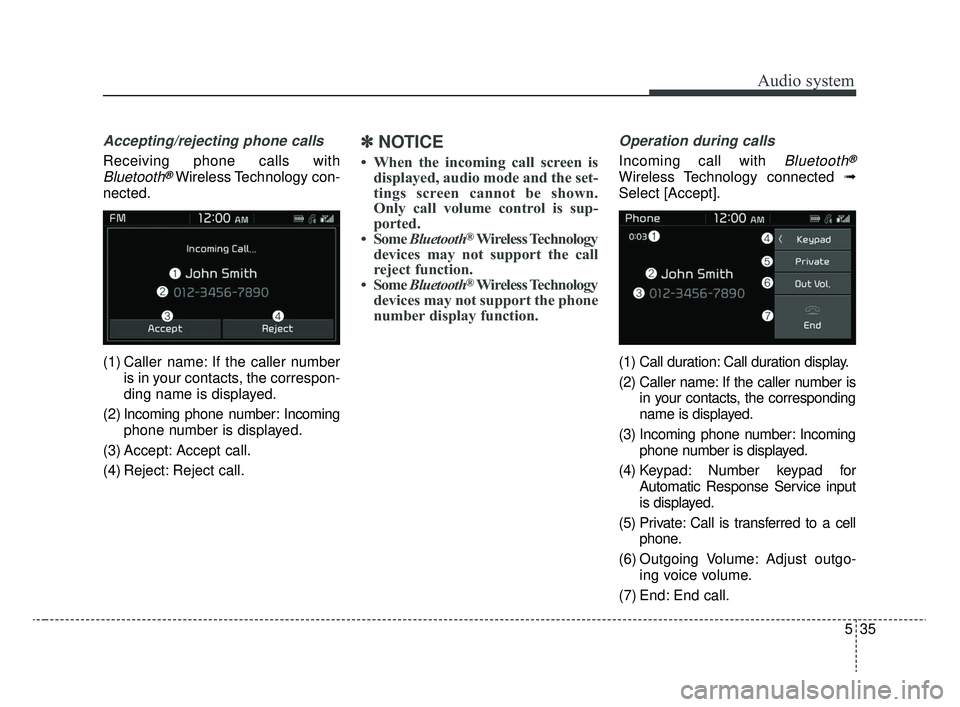
Accepting/rejecting phone calls
Receiving phone calls with
Bluetooth®Wireless Technology con-
nected.
(1) Caller name: If the caller number is in your contacts, the correspon-
ding name is displayed.
(2) Incoming phone number: Incoming phone number is displayed.
(3) Accept: Accept call.
(4) Reject: Reject call.
✽ ✽ NOTICE
• When the incoming call screen is
displayed, audio mode and the set-
tings screen cannot be shown.
Only call volume control is sup-
ported.
• Some Bluetooth
®Wireless Technology
devices may not support the call
reject function.
• Some Bluetooth
®Wireless Technology
devices may not support the phone
number display function.
Operation during calls
Incoming call with Bluetooth®
Wireless Technology connected ➟
Select [Accept].
(1) Call duration: Call duration display.
(2) Caller name: If the caller number is in your contacts, the corresponding
name is displayed.
(3) Incoming phone number: Incoming phone number is displayed.
(4) Keypad: Number keypad for Automatic Response Service input
is displayed.
(5) Private: Call is transferred to a cell phone.
(6) Outgoing Volume: Adjust outgo- ing voice volume.
(7) End: End call.
SC CAN (ENG) 5(audio).qxp 6/7/2019 9:52 AM Page 35
Page 263 of 516
![KIA RIO 2020 Owners Guide Audio system
538
Dial
Press the [PHONE]button on the
audio ➟Select [Dial].
(1) Phone number entry window: The phone number entered using the
keypad is displayed.
(2) Clear - Select to delete indivi](/img/2/40413/w960_40413-262.png "KIA RIO 2020 Owners Guide Audio system
538
Dial
Press the [PHONE]button on the
audio ➟Select [Dial].
(1) Phone number entry window: The phone number entered using the
keypad is displayed.
(2) Clear - Select to delete indivi")
Audio system
538
Dial
Press the [PHONE]button on the
audio ➟Select [Dial].
(1) Phone number entry window: The phone number entered using the
keypad is displayed.
(2) Clear - Select to delete individual digits.
- Press and hold to delete theentire phone number.
(3) Keypad: Enter phone number.
(4)
Bluetooth®Wireless Technology
phone name
- The name of the connected
Bluetooth®Wireless Technology
device is displayed.
- Contacts matching the keypad number/letter input are displayed.(5) Call
- Enter and select a phone num-ber to call.
- Select without entering a phone number to see the most recent
dialed call.
Connections (if equipped)
Press the [PHONE] button on the
audio ➟Select [Connections].
- For connections setting, refer to Setup ➟Select [Bluetooth] ➟
Select [Connections] page.
Setup
Press the [PHONE] button on the
audio ➟Select [Settings].
- For phone Setup, refer to Setup page ➟Select [Bluetooth].
WARNING- Distracted
driving
Driving while distracted can
result in a loss of vehicle control
that may lead to an accident,
severe personal injury, and death.
The driver's primary responsibili-
ty is in the safe and legal opera-
tion of a vehicle, and use of any
handheld devices, other equip-
ment, or vehicle systems which
take the driver's eyes, attention
and focus away from the safe
operation of a vehicle or which
are not permissible by law should
never be used during operation
of the vehicle.
SC CAN (ENG) 5(audio).qxp 6/7/2019 9:52 AM Page 38
Page 271 of 516
Driving your vehicle
46
Before entering vehicle
• Be sure that all windows, outsidemirror(s), and outside lights are
clean.
Check the condition of the tires.
Check under the vehicle for any sign of leaks.
Be sure there are no obstacles behind you if you intend to back up.
Necessary inspections
Fluid levels, such as engine oil,
engine coolant, brake fluid, and
washer fluid should be checked on a
regular basis, with the exact interval
depending on the fluid. Further
details are provided in Chapter 8,
“Maintenance”.
Before starting
Close and lock all doors.
Position the seat so that all con-trols are easily reached.
Buckle your seat belt.
Adjust the inside and outside rearview mirrors.
Be sure that all lights work.
Check all gauges.
Check the operation of warning lights when the ignition switch is
turned to the ON position.
Release the parking brake and make sure the brake warning light
goes off.
For safe operation, be sure you are
familiar with your vehicle and its
equipment.
BEFORE DRIVING
WARNING- Distracted driving
Focus on the road while driving.
The driver's primary responsi-
bility is in the safe and legal
operation of the vehicle. Use of
any hand held devices, other
equipment or vehicle systems
that distract the driver should
not be used during vehicle
operation.
SC CAN (ENG) 6.QXP 6/7/2019 9:49 AM Page 4
Page 272 of 516
65
Driving your vehicle
WARNING- Check sur-roundings
Always check the surrounding
areas near your vehicle for peo-
ple, especially children, before
putting a vehicle into D (Drive)
or R (Reverse).
WARNING- Fire risk
When you intend to park or stop
the vehicle with the engine on,
be careful not to depress the
accelerator pedal for a long
period of time. It may overheat
the engine or exhaust system
and cause fire.WARNING- Loose objects
Securely store items in your
vehicle. When you make a sud-
den stop or turn the steering
wheel rapidly, loose objects
may drop on the floor and could
interfere with the operation of
the foot pedals, possibly caus-
ing an accident.WARNING- Driving while intoxicated
Do not drive while intoxicated.
Drinking and driving is danger-
ous. Even a small amount of
alcohol will affect your reflexes,
perceptions and judgment.
Driving while under the influ-
ence of drugs is as dangerous
as or more dangerous than driv-
ing drunk.
WARNING- Proper footwear
Always wear appropriate shoes
when operating your vehicle.
Unsuitable shoes (high heels, ski
boots, sandals, etc.) may inter-
fere with your ability to use the
brake and accelerator pedals.
SC CAN (ENG) 6.QXP 6/7/2019 9:49 AM Page 5
Page 284 of 516
617
Driving your vehicle
Using the clutch
The clutch should be depressed all
the way to the floor before shifting,
then released slowly. The clutch
pedal should always be fully
released while driving. Do not rest
your foot on the clutch pedal while
driving. This can cause unnecessary
wear. Do not partially engage the
clutch to hold the vehicle on an
incline. This causes unnecessary
wear. Use the foot brake or parking
brake to hold the vehicle on an
incline. Do not operate the clutch
pedal rapidly and repeatedly.
Downshifting
When you must slow down in heavy
traffic or while driving up steep hills,
downshift before the engine starts to
labor. Downshifting reduces the
chance of stalling and gives better
acceleration when you need to
increase your speed again. When the
vehicle is traveling down steep hills,
downshifting helps maintain safe
speed and prolongs brake life.
Good driving practices
Never take the vehicle out of gearand coast down a hill. This is
extremely hazardous. Always leave
the vehicle in gear.
Don't "ride" the brakes. This can cause them to overheat and mal-
function. Instead, when you are
driving down a long hill, shift to a
lower gear. When you do this,
engine braking will help slow down
the vehicle.
Slow down before shifting to a lower gear. This will help avoid
over-revving the engine, which can
cause damage.
Slow down when you encounter cross winds. This gives you much
better control of your vehicle.
Be sure the vehicle is completely stopped before you attempt to shift
into R (Reverse). The transmission
can be damaged if you do not.WARNING
Exercise extreme cautionwhen driving on a slippery
surface. Be especially careful
when braking, accelerating or
shifting gears. On a slippery
surface, an abrupt change in
vehicle speed can cause the
drive wheels to lose traction
and the vehicle to lose con-
trol.
Always buckle-up! In a colli- sion, an unbelted occupant is
significantly more likely to be
seriously injured or killed
than a properly belted occu-
pant.
Never exceed posted speed limits.
Avoid high speeds when cor- nering or turning. High speed
cornering and turning
increases the risk of vehicle
rollover due to loss of vehicle
control. Rollover accidents
are extremely violent and
unpredictable.
SC CAN (ENG) 6.QXP 6/7/2019 9:49 AM Page 17
Page 286 of 516
619
Driving your vehicle
For smooth operation, depress thebrake pedal when shifting from N(Neutral) to a forward or reverse gear. Transmission ranges
The indicator in the instrument clus-
ter displays the shift lever position
when the ignition switch is in the ON
position.
P (Park)
Always come to a complete stop
before shifting into P (Park). This
position locks the transmission and
prevents the front wheels from rotat-
ing.
WARNING
- Intelligent Variable
Transmission (IVT)
Always check the surrounding areas near your vehicle for
people, especially children,
before shifting a car into D
(Drive) or R (Reverse).
Before leaving the driver’s seat, always make sure the
shift lever is in the P (Park)
position; then set the parking
brake fully and shut the engine
off. Unexpected and sudden
vehicle movement can occur if
these precautions are not fol-
lowed in the order identified.
Do not use the engine brake (shifting from a high gear to
lower gear) rapidly on slip-
pery roads.
The vehicle may slip, causing
an accident.
CAUTION
To avoid damage to your transmission, do not acceler-ate the engine in R (Reverse)or any forward gear positionwith the brakes on.
When stopped on an incline, do not hold the vehicle sta-tionary with engine power.Use the service brake or theparking brake.
Do not shift from N (Neutral) or P (Park) into D (Drive), or R(Reverse) when the engine isabove idle speed.
WARNING
Shifting into P (Park) while the vehicle is in motion will cause
the drive wheels to lock which
will cause you to lose control
of the vehicle.
Do not use the P (Park) posi- tion in place of the parking
brake. Always make sure the
shift lever is latched in the P
(Park) position and set the
parking brake fully.
Never leave a child unattend- ed in a vehicle.
SC CAN (ENG) 6.QXP 6/7/2019 9:49 AM Page 19
Page 292 of 516
625
Driving your vehicle
Good driving practices
Never move the shift lever from P(Park) or N (Neutral) to any other
position with the accelerator pedal
depressed.
Never move the shift lever into P (Park) when the vehicle is in
motion.
Be sure the vehicle is completely stopped before you attempt to shift
into R (Reverse) or D (Drive).
Never take the vehicle out of gear and coast down a hill. This may be
extremely hazardous. Always leave
the vehicle in gear when moving.
Do not "ride" the brakes. This can cause them to overheat and mal-
function. Instead, when you are
driving down a long hill, slow down
and shift to a lower gear. When you
do this, engine braking will help
slow down the vehicle.
Slow down before shifting to a lower gear. Otherwise, the lower
gear may not be engaged. Always use the parking brake. Do
not depend on placing the trans-
mission in P (Park) to keep the
vehicle from moving.
Optimum vehicle performance and economy is obtained by smoothly
depressing and releasing the
accelerator pedal.WARNING
Always buckle-up! In a colli-sion, an unbelted occupant is
significantly more likely to be
seriously injured or killed than
a properly belted occupant.
Avoid high speeds when cor- nering or turning.
Do not make quick steering wheel movements, such as
sharp lane changes or fast,
sharp turns.
The risk of a rollover is greatly increased if you lose control of
your vehicle at highway speeds.
Losing control often occurs if two or more wheels drop off the
roadway and the driver over-
steers to reenter the roadway.
In the event your vehicle leaves the roadway, do not
steer sharply. Instead, slow
down before pulling back into
the travel lanes.
Never exceed posted speed limits.
WARNING
Exercise extreme caution when
driving on a slippery surface.
Be especially careful when
braking, accelerating or shifting
gears. On a slippery surface, an
abrupt change in vehicle speed
can cause the drive wheels to
lose traction and the vehicle to
lose control.
SC CAN (ENG) 6.QXP 6/7/2019 9:49 AM Page 25
Page 299 of 516
Driving your vehicle
32
6
Anti-lock brake system (ABS)
ABS (or ESC) will not prevent acci-
dents due to improper or dangerous
driving maneuvers. Even though
ABS (or ESC) helps improve vehicle
control during emergency braking,
always maintain a safe distance
between you and objects ahead.
Vehicle speeds should always be
reduced during extreme road condi-
tions.
The vehicle should be driven at
reduced speeds in the following cir-
cumstances:
When driving on rough, gravel or
snow-covered roads
When driving on roads where the road surface is pitted or has differ-
ent surface heights.
Driving in these conditions increases
the stopping distance for your vehi-
cle. The ABS continuously senses the
speed of the wheels. If the wheels
are going to lock, the ABS system
repeatedly modulates the hydraulic
brake pressure to the wheels.
When you apply your brakes under
conditions which may lock the
wheels, you may hear a “tik-tik’’
sound from the brakes, or feel a cor-
responding sensation in the brake
pedal. This is normal and means
your ABS is active.
In order to obtain the maximum ben-
efit from your ABS in an emergency
situation, do not attempt to modulate
your brake pressure and do not try to
pump your brakes. Press your brake
pedal as hard as possible or as hard
as the situation allows the ABS to
control the force being delivered to
the brakes.
✽ ✽
NOTICE
A click sound may be heard in the
engine compartment when the vehi-
cle begins to move after the engine is
started. These conditions are normal
and indicate that the anti-lock brake
system is functioning properly.
Even with the anti-lock brake sys-
tem, your vehicle still requires suf-
ficient stopping distance. Always
maintain a safe distance from the
vehicle in front of you.
Always slow down when cornering. The anti-lock brake system cannot
prevent accidents resulting from
excessive speeds.
On loose or uneven road surfaces, operation of the anti-lock brake
system may result in a longer stop-
ping distance than for vehicles
equipped with a conventional
brake system.
SC CAN (ENG) 6.QXP 6/7/2019 9:49 AM Page 32
Page 301 of 516
Driving your vehicle
34
6
Electronic stability control (ESC) will
not prevent accidents. Excessive
speed in turns, abrupt maneuvers
and hydroplaning on wet surfaces
can still result in serious accidents.
Only a safe and attentive driver can
prevent accidents by avoiding
maneuvers that cause the vehicle to
lose traction. Even with ESC
installed, always follow all the normal
precautions for driving - including
driving at safe speeds for the condi-
tions.
The Electronic Stability Control
(ESC) system is an electronic sys-
tem designed to help the driver main-
tain vehicle control under adverse
conditions. It is not a substitute for
safe driving practices. Factors includ-
ing speed, road conditions and driv-
er steering input can all affect
whether ESC will be effective in pre-
venting a loss of control. It is still your
responsibility to drive and corner at
reasonable speeds and to leave a
sufficient margin of safety. When you apply your brakes under
conditions which may lock the
wheels, you may hear a “tik-tik’’
sound from the brakes, or feel a cor-
responding sensation in the brake
pedal. This is normal and means
your ESC is active.ESC operation
ESC ON condition
ON, ESC and ESC OFF
indicator lights illuminate
for approximately 3 sec-
onds, then ESC is turned
on.
ton for at least half a sec-
ond after turning the igni-
tion ON to turn ESC off.
(ESC OFF indicator will
illuminate). To turn the
ESC on, press the ESC
OFF button (ESC OFF
indicator light will go off).
you may hear a slight tick-
ing sound. This is the ESC
performing an automatic
system self-check and
does not indicate a prob-
lem.
-
WARNING
For maximum protection,
always wear your seat belt. No
system, no matter how
advanced, can compensate for
all driver error and/or driving
conditions. Always drive
responsibly.
SC CAN (ENG) 6.QXP 6/7/2019 9:49 AM Page 34