tow KIA RIO 2022 Owner's Manual
[x] Cancel search | Manufacturer: KIA, Model Year: 2022, Model line: RIO, Model: KIA RIO 2022Pages: 528, PDF Size: 11.8 MB
Page 218 of 528
4139
Features of your vehicle
This indicator illuminates
when the auto defogging
system senses moisture
on the inside of the wind-
shield and is activated.
If more moisture is in the vehicle, the
auto defogging system addresses
excess moisture on the inside of the
windshield in stages as follows:
Step 1 : Operating the air condition- ing
Step 2 : Outside air position
Step 3 : Blowing air flow toward the windshield
Step 4 : Increasing air flow toward the windshield
If your vehicle is equipped with the
auto defogging system, it is automat-
ically activated when the conditions
are met.
However, if you would like to deacti-
vate the auto defogging system,
keep the front defroster button
pressed longer than 3 seconds. The “ADS OFF” symbol will be
shown in the climate display to
inform you that the system is deacti-
vated.
To re-activate the auto defogging
system again, follow the procedure
mentioned above and the “ADS
OFF” symbol will disappear.
If the battery has been disconnected
or discharged, it resets to the auto
defogging status.
✽ ✽
NOTICE
• When the air conditioning is
turned on by Auto defogging sys-
tem, if you try to turn off the air
conditioning, the indicator will
blink 3 times and the air condi-
tioning will not be turned off.
• For efficiency, do not select recir- culated air position while Auto
defogging system is operating.
CAUTION
Do not remove the sensor cover
located on the upper end of thedriver side windshield glass.Damage to the system partscould occur and may not be cov-ered by your vehicle warranty.
SC PE USA 4.QXP 9/9/2021 6:08 PM Page 139
Page 229 of 528
Features of your vehicle
150
4
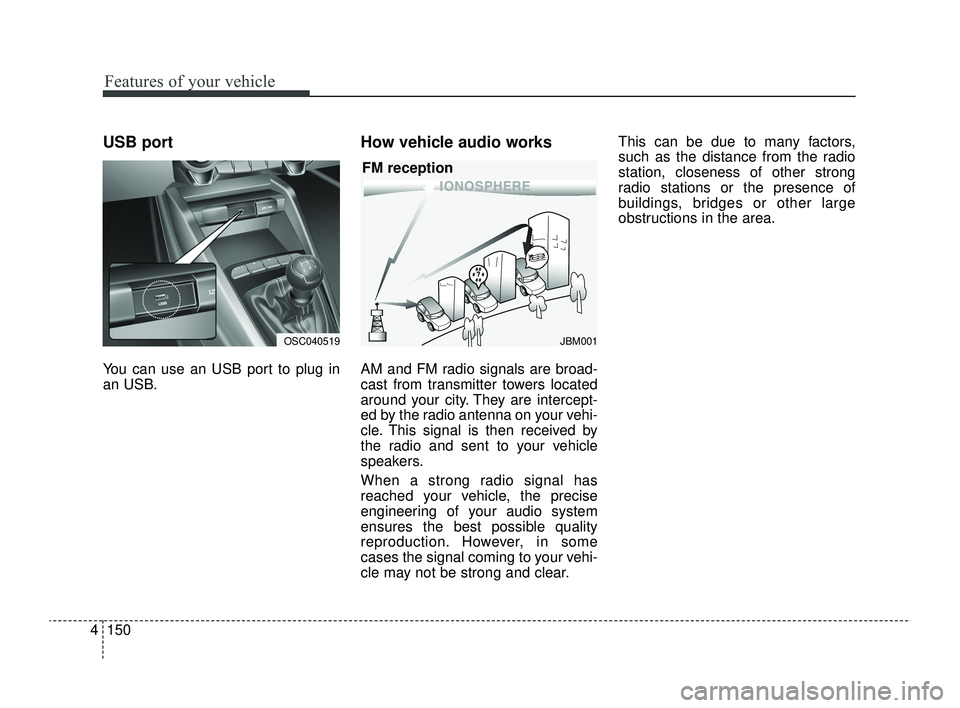
USB port
You can use an USB port to plug in
an USB.
How vehicle audio works
AM and FM radio signals are broad-
cast from transmitter towers located
around your city. They are intercept-
ed by the radio antenna on your vehi-
cle. This signal is then received by
the radio and sent to your vehicle
speakers.
When a strong radio signal has
reached your vehicle, the precise
engineering of your audio system
ensures the best possible quality
reproduction. However, in some
cases the signal coming to your vehi-
cle may not be strong and clear. This can be due to many factors,
such as the distance from the radio
station, closeness of other strong
radio stations or the presence of
buildings, bridges or other large
obstructions in the area.
JBM001
FM reception
OSC040519
SC PE USA 4.QXP 9/9/2021 6:09 PM Page 150
Page 236 of 528

• Driver Attention Warning operation . . . . . . . . . . . . 5-78
• Driver Attention Warning malfunction andlimitations. . . . . . . . . . . . . . . . . . . . . . . . . . . . . . . . . . 5-81\
Cruise Control (CC). . . . . . . . . . . . . . . . . . . . . . . . 5-84
• Cruise Control operation . . . . . . . . . . . . . . . . . . . . . . 5-84
• Increasing set speed. . . . . . . . . . . . . . . . . . . . . . . . . . . 5-85
• Decreasing set speed . . . . . . . . . . . . . . . . . . . . . . . . . . 5-85
• Accelerating temporarily . . . . . . . . . . . . . . . . . . . . . . 5-86
• Temporarily pausing Cruise Control . . . . . . . . . . . . 5-86
• Resuming Cruise Control . . . . . . . . . . . . . . . . . . . . . . 5-87
• Turning off Cruise Control. . . . . . . . . . . . . . . . . . . . . 5-87
Lane Following Assist (LFA) . . . . . . . . . . . . . . . . . 5-89
• Detecting sensor . . . . . . . . . . . . . . . . . . . . . . . . . . . . . . 5-89
• Lane Following Assist settings . . . . . . . . . . . . . . . . . 5-89
• Lane Following Assist operation . . . . . . . . . . . . . . . . 5-90
• Lane Following Assist malfunction and limitations . 5-93
Rear Cross-Traffic Collision Warning (RCCW) . 5-94
• Detecting sensor . . . . . . . . . . . . . . . . . . . . . . . . . . . . . . 5-94
• Rear Cross-Traffic Collision Warning settings . . . . 5-95
• Rear Cross-Traffic Collision Warning operation . . . 5-96
• Rear Cross-Traffic Collision Warning malfunction
and limitations . . . . . . . . . . . . . . . . . . . . . . . . . . . . . . 5-97
Declaration of conformity . . . . . . . . . . . . . . . . . . 5-102
• The radio frequency components (Rear Corner Radar)complies . . . . . . . . . . . . . . . . . . . . . . . . . . . . . . . . . . 5-10\
2
Economical operation . . . . . . . . . . . . . . . . . . . . . 5-103
Special driving conditions . . . . . . . . . . . . . . . . . . 5-105
• Hazardous driving conditions . . . . . . . . . . . . . . . . . 5-105
• Rocking the vehicle . . . . . . . . . . . . . . . . . . . . . . . . . . 5-105
• Smooth cornering . . . . . . . . . . . . . . . . . . . . . . . . . . . 5-106
• Driving at night . . . . . . . . . . . . . . . . . . . . . . . . . . . . 5-106
• Driving in the rain . . . . . . . . . . . . . . . . . . . . . . . . . . . 5-107
• Driving in flooded areas . . . . . . . . . . . . . . . . . . . . . . 5-108
• Driving off-road . . . . . . . . . . . . . . . . . . . . . . . . . . . . . 5-108
• Highway driving . . . . . . . . . . . . . . . . . . . . . . . . . . . . 5-108
Winter driving . . . . . . . . . . . . . . . . . . . . . . . . . . . 5-110
• Snowy or Icy conditions . . . . . . . . . . . . . . . . . . . . . . 5-110
• Use high quality ethylene glycol coolant . . . . . . . . . 5-112
• Check battery and cables . . . . . . . . . . . . . . . . . . . . . 5-112
• Change to "winter weight" oil if necessary . . . . . . 5-113
• Check spark plugs and ignition system . . . . . . . . . . 5-113
• To keep locks from freezing . . . . . . . . . . . . . . . . . . . 5-113
• Use approved window washer anti-freeze in system5-113
• Don't let your parking brake freeze . . . . . . . . . . . . 5-113
• Don't let ice and snow accumulate underneath . . . 5-113
• Carry emergency equipment . . . . . . . . . . . . . . . . . . 5-114
• Trailer Towing . . . . . . . . . . . . . . . . . . . . . . . . . . . . . . 5-114
5
SC PE USA 5.QXP 9/9/2021 6:17 PM Page 2
Page 285 of 528

551
Driving your vehicle
The camera sensor recognition islimited
The vehicle in front is too small to be detected. (for example a motor-
cycle etc.)
The vehicle in front is an oversize vehicle or trailer that is too big to
be detected by the camera recog-
nition function. (for example a trac-
tor trailer, etc.)
The camera's field of view is not well illuminated. (either too dark or
too much reflection or too much
backlight that obscures the field of
view)
The vehicle in front does not have their rear lights or their rear lights
does not turned ON or their rear
lights are located unusually.
The outside brightness changes suddenly, for example when enter-
ing or exiting a tunnel.
Light coming from a street light or an oncoming vehicle is reflected on
a wet road surface such as a pud-
dle in the road.
The field of view in front is obstructed by sun glare or head
light of oncoming vehicle. The windshield glass is fogged up;
a clear view of the road is obstruct-
ed.
The vehicle in front is driving errat- ically.
The vehicle is on unpaved or uneven rough surfaces, or road
with sudden gradient changes.
The vehicle is driven near areas containing metal substances as a
construction zone, railroad, etc.
The vehicle drives inside a building, such as a basement parking lot.
The camera does not recognize the entire vehicle in front.
The camera is damaged.
The brightness outside is too low such as when the headlamps are
not on at night or the vehicle is
going through a tunnel.
The shadow is on the road by a median strip, trees, etc.
The vehicle drives through a toll- gate.
The windshield glass is fogged up; a clear view of the road is obstruct-
ed. The rear part of the vehicle in front
is not normally visible. (The vehicle
turns in other direction or the vehi-
cle is overturned.)
The adverse road conditions cause excessive vehicle vibrations while
driving.
The sensor recognition changes suddenly when passing over a
speed bump.
The vehicle in front is moving verti- cally to the driving direction.
The vehicle in front is stopped ver- tically.
The vehicle in front is driving towards your vehicle or reversing.
You are on a roundabout and the vehicle in front circles.
SC PE USA 5.QXP 9/9/2021 6:18 PM Page 51
Page 290 of 528
Driving your vehicle
56
5
✽ ✽
NOTICE
In some instances, Forward
Collision-Avoidance Assist may be
canceled when subjected to electro-
magnetic interference.
This device complies with Part 15
of the FCC rules.
Operation is subject to the following
three conditions:
1. This device may not cause harm-
ful interference, and
2. This device must accept any inter- ference received, including inter-
ference that may cause undesired
operation.
3. Changes or modifications not expressly approved by the party
responsible for compliance could
void the user’s authority to operate
the device.(Continued)
Forward Collision-AvoidanceAssist is designed to detect
and monitor the vehicle ahead
or detect a pedestrian in the
roadway through front view
camera recognition. It is not
designed to detect bicycles,
motorcycles, or smaller
wheeled objects such as lug-
gage bags, shopping carts, or
strollers.
When replacing or reinstalling the windshield, front bumper
or front view camera recogni-
tion after removal, take your
vehicle to an authorized Kia
dealer and have the function
checked.WARNING
Cancel Forward Collision-Avoidance Assist in the User
Settings on the LCD display,
before towing another vehicle.
While towing, the brake appli-
cation may adversely affect
your vehicle safety.
Exercise extreme caution to the vehicle in front, when it
has heavy loading extended
rearward, or when it has high-
er ground clearance.
Never try to test the operation of Forward Collision-
Avoidance Assist. Doing so
may cause severe injury or
death.
(Continued)
SC PE USA 5.QXP 9/9/2021 6:19 PM Page 56
Page 298 of 528
Driving your vehicle
64
5
WARNING
Take the following precautions
when using Lane Keeping
Assist:
The driver should hold the
responsibility to safely drive
and control the vehicle. Do not
solely rely on Lane Keeping
Assist or drive dangerously.
The operation of Lane Keeping Assist can be can-
celled or not work properly
depending on road conditions
and surroundings. Always be
cautious while driving.
Refer to "Limitations of Lane Keeping Assist" in chapter 5,
if the lane is not detected
properly.
When you are towing a trailer or another vehicle, we recom-
mend that Lane Keeping
Assist is turned off due to
safety reasons.
(Continued)
(Continued)
If the vehicle is driven at highspeed, the steering wheel will
not be controlled. The driver
must always follow the speed
limit when using Lane Keeping
Assist.
If any other function's warn- ing message is displayed or
audible warning is generated,
Lane Keeping Assist warning
message may not be dis-
played and audible warning
may not be generated.
You may not hear the warning sound of Lane Keeping Assist
if the surrounding is noisy.
If you attach objects to the steering wheel, steering may
not be assisted properly.
Lane Keeping Assist may not operate for 15 seconds after
the vehicle is started, or the
front view camera is initial-
ized.
Lane Keeping Assist will not operate when:
(Continued)(Continued)- The turn signal or hazardwarning flasher is turned on
- The vehicle is not driven in the center of the lane when
Lane Keeping Assist is
turned on or right after
changing a lane
- ESC (Electronic Stability Control) or VSM (Vehicle
Stability Management) is
activated
- The vehicle is driven on a sharp curve
- Vehicle speed is below 35 mph (55 km/h) or above 130
mph (210 km/h)
- The vehicle makes sharp lane changes
- The vehicle is suddenly stopped
SC PE USA 5.QXP 9/9/2021 6:19 PM Page 64
Page 322 of 528
Driving your vehicle
88
5
WARNING
Take the following precautions
when using Cruise Control:
Always set the vehicle speed
under the speed limit in your
country. Keep Cruise Control
off when the function is not in
use, to avoid inadvertently
setting a speed. Check that
the CRUISE indicator is off.
Cruise Control does not sub- stitute for proper and safe
driving. It is the responsibility
of the driver to always drive
safely and should always be
aware of unexpected and sud-
den situations occurring.
Always drive cautiously to prevent unexpected and sud-
den situations from occur-
ring. Pay attention to the road
conditions at all times.
Do not use Cruise Control when it may be unsafe to keep
the vehicle at a constant speed:
(Continued)
(Continued)- When driving in heavy traf-fic, or when traffic condi-
tions make it difficult to
drive at a constant speed
- When driving on rainy, icy, or snow-covered roads
- When driving on hilly or windy roads
- When driving in windy areas
- When driving with limited view (possibly due to bad
weather, such as fog, snow,
rain and sandstorm)
Do not use Cruise Control when towing a trailer.
SC PE USA 5.QXP 9/9/2021 6:21 PM Page 88
Page 339 of 528
5105
Driving your vehicle
Hazardous driving conditions
When hazardous driving conditions
are encountered such as water,
snow, ice, mud, sand, or similar haz-
ards, follow these suggestions:
Drive cautiously and allow extradistance for braking.
Avoid sudden braking or steering.
When braking with non-ABS brakes, pump the brake pedal with
a light up-and-down motion until
the vehicle is stopped. Do not pump the brake pedal on a
vehicle equipped with ABS.
If stalled in snow, mud, or sand,
use second gear. Accelerate slow-
ly to avoid spinning the drive
wheels.
Use sand, rock salt, tire chains, or other non-slip material under the
drive wheels to provide traction
when stalled in ice, snow, or mud.
Rocking the vehicle
If it is necessary to rock the vehicle
to free it from snow, sand, or mud,
first turn the steering wheel right and
left to clear the area around your
front wheels. Then, shift back and
forth between R (Reverse) and any
forward gear in vehicles equipped
with an Intelligent Variable
Transmission. Do not race the
engine, and spin the wheels as little
as possible. If you are still stuck after
a few tries, have the vehicle pulled
out by a tow vehicle to avoid engine
overheating and possible damage to
the transmission.
The ESC system should be turned
OFF prior to rocking the vehicle.
SPECIAL DRIVING CONDITIONS
CAUTION- Vehicle
rocking
Prolonged rocking may causeengine overheating, transmis-sion damage or failure, and tiredamage.
WARNING- Downshifting
Do not downshift with an intelli-
gent variable transmission
while driving on slippery sur-
faces. The sudden change in
tire speed could cause the tires
to skid and result in an acci-
dent.
SC PE USA 5.QXP 9/9/2021 6:22 PM Page 105
Page 348 of 528
Driving your vehicle
114
5
Carry emergency equipment
Depending on the severity of the
weather you should carry appropri-
ate emergency equipment. Some of
the items you may want to carry
include tire chains, tow straps or
chains, flashlight, emergency flares,
sand, a shovel, jumper cables, a win-
dow scraper, gloves, ground cloth,
coveralls, a blanket, etc.
TRAILER TOWING
We do not recommend using this
vehicle for trailer towing.
SC PE USA 5.QXP 9/9/2021 6:22 PM Page 114
Page 350 of 528
Driving your vehicle
116
5
Seating capacity:
Total : 5 persons
(Front seat : 2 persons, Rear seat : 3 persons)
Seating capacity is the maximum
number of occupants, including a
driver, your vehicle may carry.
However, the seating capacity may
be reduced based upon the weight of
all of the occupants and the weight of
the cargo being carried or towed.
Do not overload the vehicle as there
is a limit to the total weight, or load
limit including occupants and cargo,
the vehicle can carry.
Towing capacity:
We do not recommend using this
vehicle for trailer towing.
Cargo capacity:
The cargo capacity of your vehicle
will increase or decrease depending
on the weight and the number of
occupants.
Steps for Determining Correct Load Limit -
(1) Locate the statement "The com- bined weight of occupants and
cargo should never exceed XXX
kg or XXX lbs.'' on your vehicle's
placard.
(2) Determine the combined weight of the driver and passengers that
will be riding in your vehicle.
(3) Subtract the combined weight of the driver and passengers from
XXX kg or XXX lbs. (4) The resulting figure equals the
available amount of cargo and
luggage load capacity. For exam-
ple, if the "XXX" amount equals
1400 lbs. and there will be five
150 lb passengers in your vehi-
cle, the amount of available cargo
and luggage load capacity is 650
lbs.
(1400-750 (5 x 150) = 650 lbs.)
(5) Determine the combined weight of luggage and cargo being
loaded on the vehicle. That
weight may not safely exceed the
available cargo and luggage load
capacity calculated in Step 4.
(6) If your vehicle will be towing a trailer, load from your trailer will
be transferred to your vehicle.
Consult this manual to determine
how this reduces the available
cargo and luggage load capacity
of your vehicle.
SC PE USA 5.QXP 9/9/2021 6:23 PM Page 116