display KIA RIO 2022 Owner's Guide
[x] Cancel search | Manufacturer: KIA, Model Year: 2022, Model line: RIO, Model: KIA RIO 2022Pages: 528, PDF Size: 11.8 MB
Page 282 of 528
Driving your vehicle
48
5
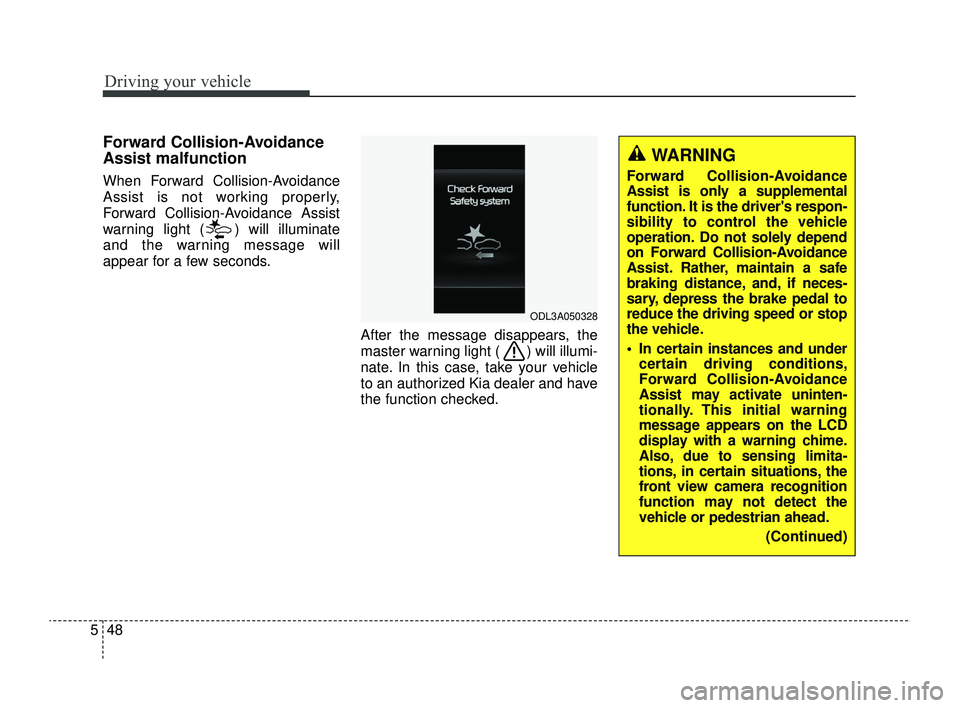
Forward Collision-Avoidance
Assist malfunction
When Forward Collision-Avoidance
Assist is not working properly,
Forward Collision-Avoidance Assist
warning light ( ) will illuminate
and the warning message will
appear for a few seconds.
After the message disappears, the
master warning light ( ) will illumi-
nate. In this case, take your vehicle
to an authorized Kia dealer and have
the function checked.
ODL3A050328
WARNING
Forward Collision-Avoidance
Assist is only a supplemental
function. It is the driver's respon-
sibility to control the vehicle
operation. Do not solely depend
on Forward Collision-Avoidance
Assist. Rather, maintain a safe
braking distance, and, if neces-
sary, depress the brake pedal to
reduce the driving speed or stop
the vehicle.
In certain instances and undercertain driving conditions,
Forward Collision-Avoidance
Assist may activate uninten-
tionally. This initial warning
message appears on the LCD
display with a warning chime.
Also, due to sensing limita-
tions, in certain situations, the
front view camera recognition
function may not detect the
vehicle or pedestrian ahead.
(Continued)
SC PE USA 5.QXP 9/9/2021 6:18 PM Page 48
Page 283 of 528
549
Driving your vehicle
(Continued)Forward Collision-Avoidance
Assist may not activate and the
warning message will not be
displayed.
Forward Collision-Avoidance Assist may unnecessarily pro-
duce the warning message
and the warning alarms. Also,
due to the sensing limitation,
Forward Collision-Avoidance
Assist may not produce the
warning message and the
warning alarm at all.
When there is a malfunction with Forward Collision-
Avoidance Assist, the
autonomous emergency brak-
ing does not operate upon
detecting a collision risk even
with other braking systems
normally operating.
Forward Collision-Avoidance Assist may not activate if the
driver applies the brake pedal
before warning to avoid risk of
collision.
(Continued)(Continued)
Forward Collision-AvoidanceAssist does not operate when
the vehicle is in reverse.
Forward Collision-Avoidance Assist is not designed to
detect other objects on the
road such as animals.
Forward Collision-Avoidance Assist does not detect vehi-
cles in the opposite lane.
Forward Collision-Avoidance Assist does not detect cross
traffic vehicles that are
approaching.
Forward Collision-Avoidance Assist cannot detect the driv-
er approaching the side view
of a parked vehicle (for exam-
ple on a dead end street). In
these cases, you must main-
tain a safe braking distance,
and if necessary, depress the
brake pedal to reduce the
driving speed in order to
maintain a safe distance.
(Continued)(Continued)
Forward Collision-AvoidanceAssist may not activate
depending on road or driving
conditions.
Forward Collision-Avoidance Assist may not activate to all
types of vehicles.
SC PE USA 5.QXP 9/9/2021 6:18 PM Page 49
Page 290 of 528
Driving your vehicle
56
5
✽ ✽
NOTICE
In some instances, Forward
Collision-Avoidance Assist may be
canceled when subjected to electro-
magnetic interference.
This device complies with Part 15
of the FCC rules.
Operation is subject to the following
three conditions:
1. This device may not cause harm-
ful interference, and
2. This device must accept any inter- ference received, including inter-
ference that may cause undesired
operation.
3. Changes or modifications not expressly approved by the party
responsible for compliance could
void the user’s authority to operate
the device.(Continued)
Forward Collision-AvoidanceAssist is designed to detect
and monitor the vehicle ahead
or detect a pedestrian in the
roadway through front view
camera recognition. It is not
designed to detect bicycles,
motorcycles, or smaller
wheeled objects such as lug-
gage bags, shopping carts, or
strollers.
When replacing or reinstalling the windshield, front bumper
or front view camera recogni-
tion after removal, take your
vehicle to an authorized Kia
dealer and have the function
checked.WARNING
Cancel Forward Collision-Avoidance Assist in the User
Settings on the LCD display,
before towing another vehicle.
While towing, the brake appli-
cation may adversely affect
your vehicle safety.
Exercise extreme caution to the vehicle in front, when it
has heavy loading extended
rearward, or when it has high-
er ground clearance.
Never try to test the operation of Forward Collision-
Avoidance Assist. Doing so
may cause severe injury or
death.
(Continued)
SC PE USA 5.QXP 9/9/2021 6:19 PM Page 56
Page 293 of 528
559
Driving your vehicle
Lane Keeping Assist settings
Setting features
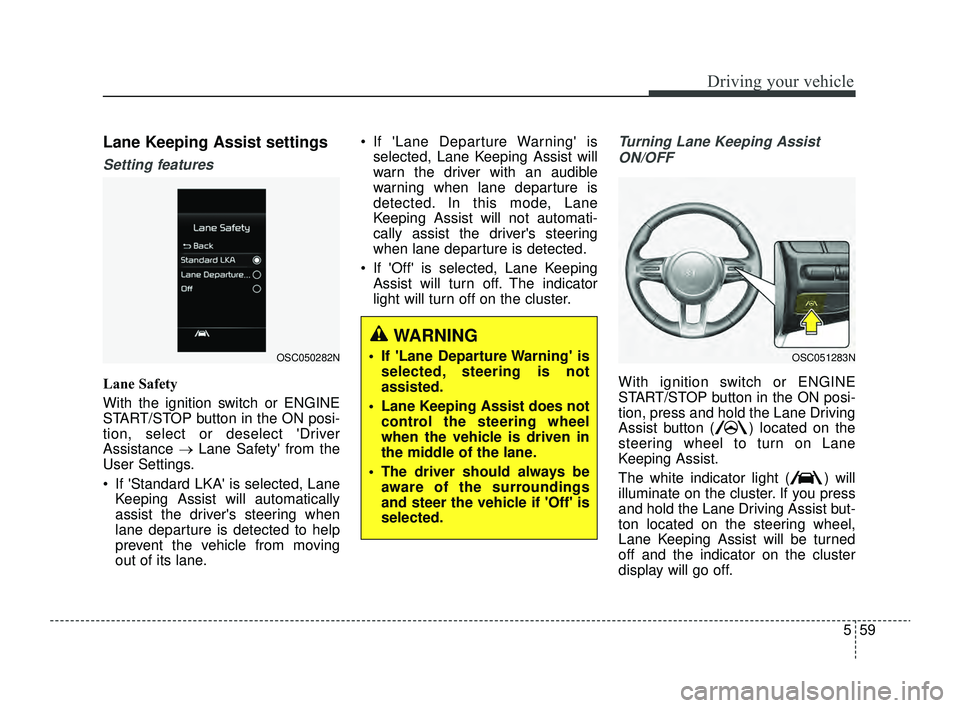
Lane Safety
With the ignition switch or ENGINE
START/STOP button in the ON posi-
tion, select or deselect 'Driver
Assistance →Lane Safety' from the
User Settings.
If 'Standard LKA' is selected, Lane Keeping Assist will automatically
assist the driver's steering when
lane departure is detected to help
prevent the vehicle from moving
out of its lane. If 'Lane Departure Warning' is
selected, Lane Keeping Assist will
warn the driver with an audible
warning when lane departure is
detected. In this mode, Lane
Keeping Assist will not automati-
cally assist the driver's steering
when lane departure is detected.
If 'Off' is selected, Lane Keeping Assist will turn off. The indicator
light will turn off on the cluster.
Turning Lane Keeping Assist
ON/OFF
With ignition switch or ENGINE
START/STOP button in the ON posi-
tion, press and hold the Lane Driving
Assist button ( ) located on the
steering wheel to turn on Lane
Keeping Assist.
The white indicator light ( ) will
illuminate on the cluster. If you press
and hold the Lane Driving Assist but-
ton located on the steering wheel,
Lane Keeping Assist will be turned
off and the indicator on the cluster
display will go off.
OSC050282NOSC051283N
WARNING
If 'Lane Departure Warning' is selected, steering is not
assisted.
Lane Keeping Assist does not control the steering wheel
when the vehicle is driven in
the middle of the lane.
The driver should always be aware of the surroundings
and steer the vehicle if 'Off' is
selected.
SC PE USA 5.QXP 9/9/2021 6:19 PM Page 59
Page 296 of 528
Driving your vehicle
62
5
✽ ✽
NOTICE
• For more details on setting the
functions, refer to "LCD Display
Mode" in chapter 4.
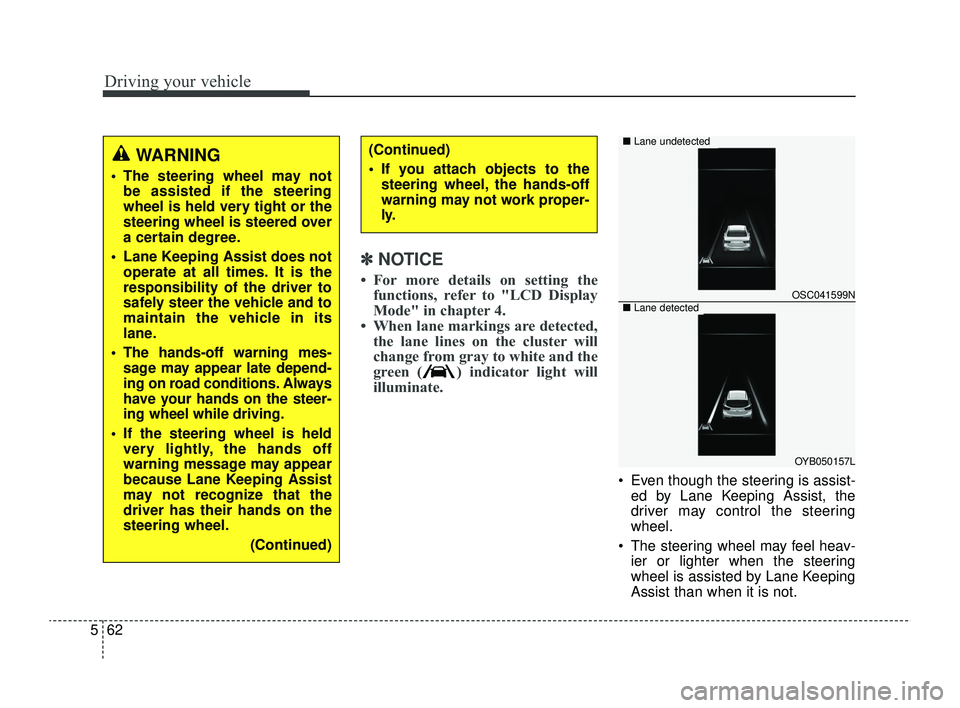
• When lane markings are detected, the lane lines on the cluster will
change from gray to white and the
green ( ) indicator light will
illuminate.
Even though the steering is assist-
ed by Lane Keeping Assist, the
driver may control the steering
wheel.
The steering wheel may feel heav- ier or lighter when the steering
wheel is assisted by Lane Keeping
Assist than when it is not.
WARNING
The steering wheel may notbe assisted if the steering
wheel is held very tight or the
steering wheel is steered over
a certain degree.
Lane Keeping Assist does not operate at all times. It is the
responsibility of the driver to
safely steer the vehicle and to
maintain the vehicle in its
lane.
The hands-off warning mes- sage may appear late depend-
ing on road conditions. Always
have your hands on the steer-
ing wheel while driving.
If the steering wheel is held very lightly, the hands off
warning message may appear
because Lane Keeping Assist
may not recognize that the
driver has their hands on the
steering wheel.
(Continued)
(Continued)
If you attach objects to thesteering wheel, the hands-off
warning may not work proper-
ly.
OSC041599N
OYB050157L
■ Lane undetected
■Lane detected
SC PE USA 5.QXP 9/9/2021 6:19 PM Page 62
Page 298 of 528
Driving your vehicle
64
5
WARNING
Take the following precautions
when using Lane Keeping
Assist:
The driver should hold the
responsibility to safely drive
and control the vehicle. Do not
solely rely on Lane Keeping
Assist or drive dangerously.
The operation of Lane Keeping Assist can be can-
celled or not work properly
depending on road conditions
and surroundings. Always be
cautious while driving.
Refer to "Limitations of Lane Keeping Assist" in chapter 5,
if the lane is not detected
properly.
When you are towing a trailer or another vehicle, we recom-
mend that Lane Keeping
Assist is turned off due to
safety reasons.
(Continued)
(Continued)
If the vehicle is driven at highspeed, the steering wheel will
not be controlled. The driver
must always follow the speed
limit when using Lane Keeping
Assist.
If any other function's warn- ing message is displayed or
audible warning is generated,
Lane Keeping Assist warning
message may not be dis-
played and audible warning
may not be generated.
You may not hear the warning sound of Lane Keeping Assist
if the surrounding is noisy.
If you attach objects to the steering wheel, steering may
not be assisted properly.
Lane Keeping Assist may not operate for 15 seconds after
the vehicle is started, or the
front view camera is initial-
ized.
Lane Keeping Assist will not operate when:
(Continued)(Continued)- The turn signal or hazardwarning flasher is turned on
- The vehicle is not driven in the center of the lane when
Lane Keeping Assist is
turned on or right after
changing a lane
- ESC (Electronic Stability Control) or VSM (Vehicle
Stability Management) is
activated
- The vehicle is driven on a sharp curve
- Vehicle speed is below 35 mph (55 km/h) or above 130
mph (210 km/h)
- The vehicle makes sharp lane changes
- The vehicle is suddenly stopped
SC PE USA 5.QXP 9/9/2021 6:19 PM Page 64
Page 303 of 528
569
Driving your vehicle
Blind-Spot Collision Warning
operation
Blind-Spot Collision Warningwarning
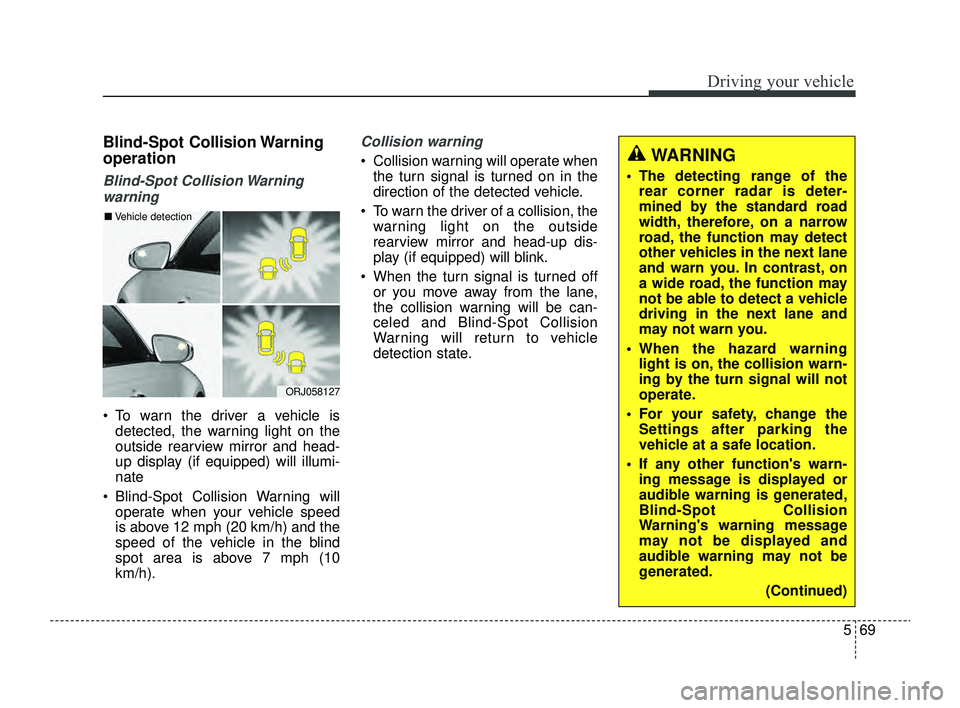
To warn the driver a vehicle is detected, the warning light on the
outside rearview mirror and head-
up display (if equipped) will illumi-
nate
Blind-Spot Collision Warning will operate when your vehicle speed
is above 12 mph (20 km/h) and the
speed of the vehicle in the blind
spot area is above 7 mph (10
km/h).
Collision warning
Collision warning will operate whenthe turn signal is turned on in the
direction of the detected vehicle.
To warn the driver of a collision, the warning light on the outside
rearview mirror and head-up dis-
play (if equipped) will blink.
When the turn signal is turned off or you move away from the lane,
the collision warning will be can-
celed and Blind-Spot Collision
Warning will return to vehicle
detection state.
ORJ058127
■ Vehicle detection
WARNING
The detecting range of the
rear corner radar is deter-
mined by the standard road
width, therefore, on a narrow
road, the function may detect
other vehicles in the next lane
and warn you. In contrast, on
a wide road, the function may
not be able to detect a vehicle
driving in the next lane and
may not warn you.
When the hazard warning light is on, the collision warn-
ing by the turn signal will not
operate.
For your safety, change the Settings after parking the
vehicle at a safe location.
If any other function's warn- ing message is displayed or
audible warning is generated,
Blind-Spot Collision
Warning's warning message
may not be displayed and
audible warning may not be
generated.
(Continued)
SC PE USA 5.QXP 9/9/2021 6:20 PM Page 69
Page 310 of 528
Driving your vehicle
76
5
Driver Attention Warning set-
tings
Setting features
Driver Attention Warning
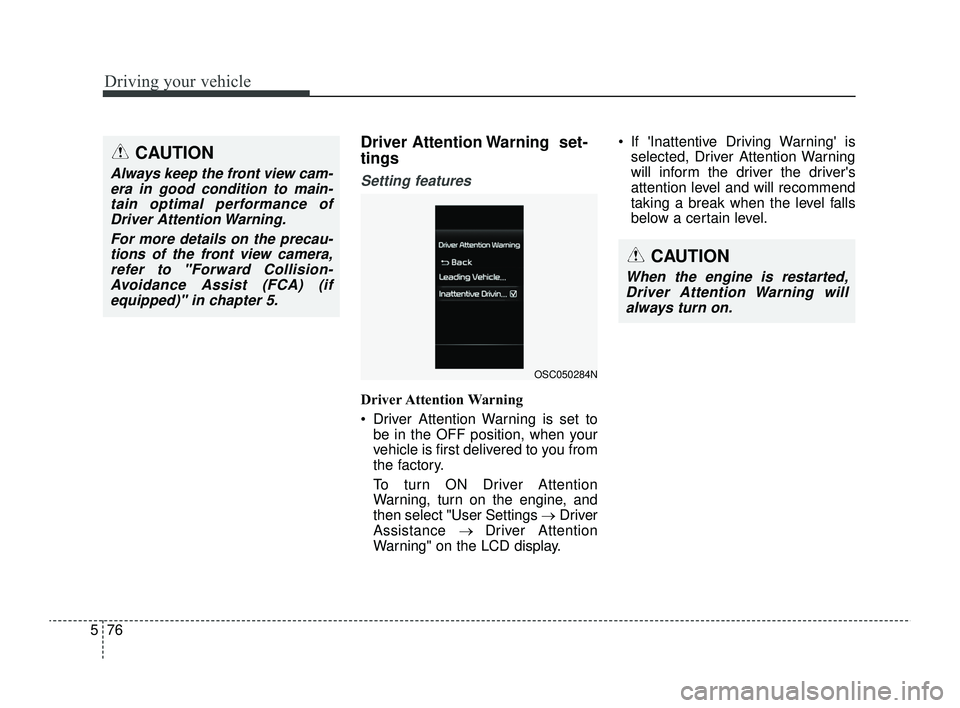
Driver Attention Warning is set to
be in the OFF position, when your
vehicle is first delivered to you from
the factory.
To turn ON Driver Attention
Warning, turn on the engine, and
then select "User Settings →Driver
Assistance → Driver Attention
Warning" on the LCD display. If 'Inattentive Driving Warning' is
selected, Driver Attention Warning
will inform the driver the driver's
attention level and will recommend
taking a break when the level falls
below a certain level.
CAUTION
Always keep the front view cam-era in good condition to main-tain optimal performance ofDriver Attention Warning.
For more details on the precau-tions of the front view camera,refer to "Forward Collision-Avoidance Assist (FCA) (ifequipped)" in chapter 5.
CAUTION
When the engine is restarted,Driver Attention Warning willalways turn on.
OSC050284N
SC PE USA 5.QXP 9/9/2021 6:20 PM Page 76
Page 311 of 528
577
Driving your vehicle
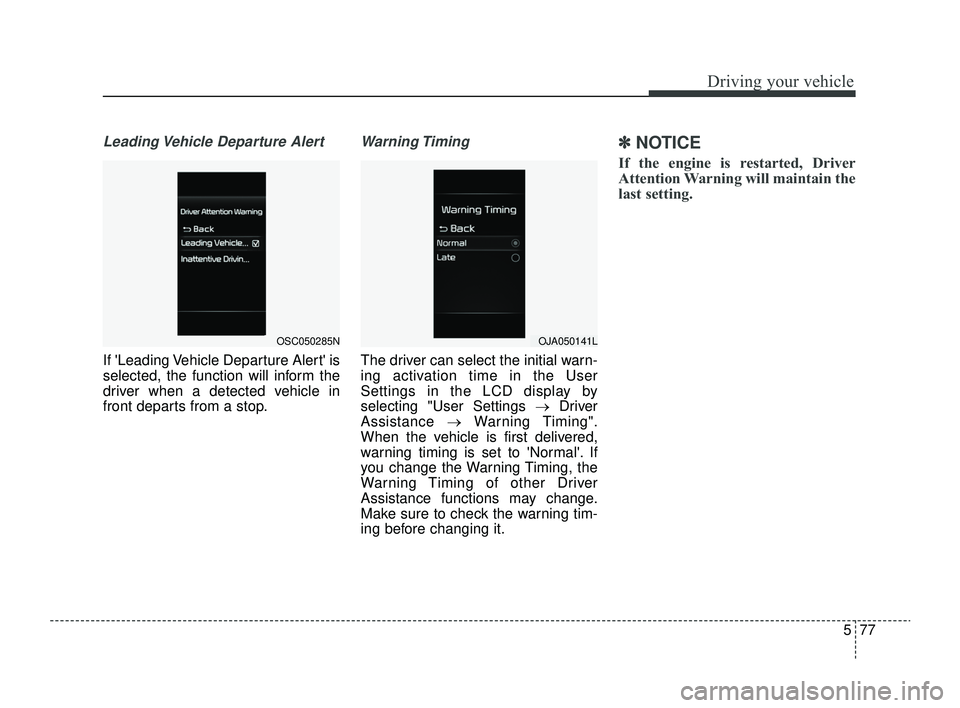
Leading Vehicle Departure Alert
If 'Leading Vehicle Departure Alert' is
selected, the function will inform the
driver when a detected vehicle in
front departs from a stop.
Warning Timing
The driver can select the initial warn-
ing activation time in the User
Settings in the LCD display by
selecting "User Settings →Driver
Assistance →Warning Timing".
When the vehicle is first delivered,
warning timing is set to 'Normal'. If
you change the Warning Timing, the
Warning Timing of other Driver
Assistance functions may change.
Make sure to check the warning tim-
ing before changing it.
✽ ✽ NOTICE
If the engine is restarted, Driver
Attention Warning will maintain the
last setting.
OSC050285NOJA050141L
SC PE USA 5.QXP 9/9/2021 6:20 PM Page 77
Page 312 of 528
Driving your vehicle
78
5
Driver Attention Warning
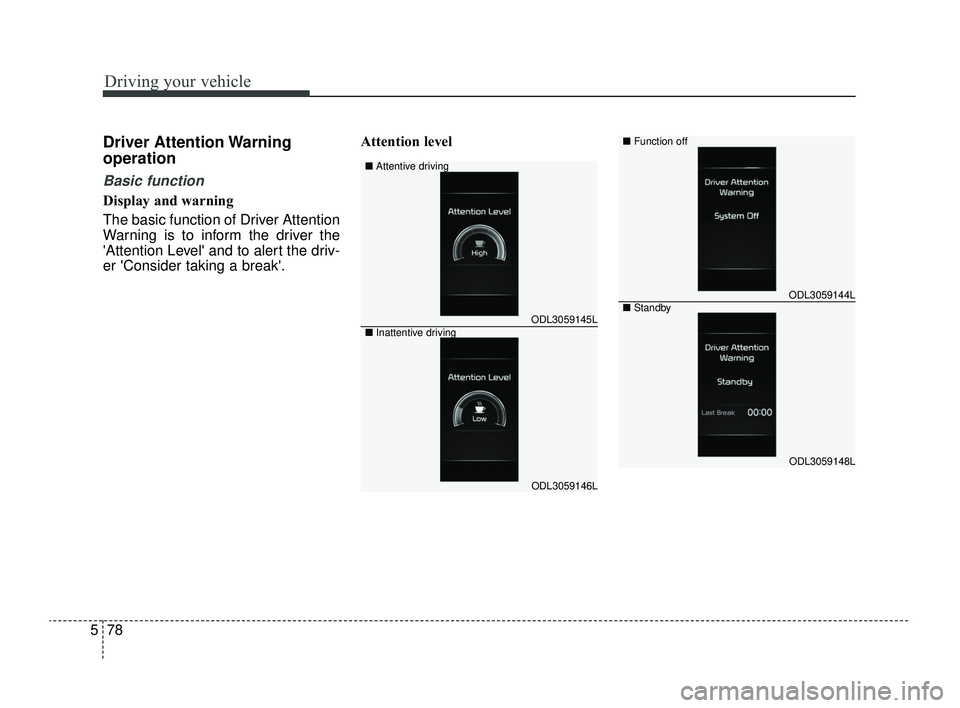
operation
Basic function
Display and warning
The basic function of Driver Attention
Warning is to inform the driver the
'Attention Level' and to alert the driv-
er 'Consider taking a break'. Attention level
ODL3059145L
ODL3059146L
■
Attentive driving
■ Inattentive driving
ODL3059144L
ODL3059148L
■Function off
■Standby
SC PE USA 5.QXP 9/9/2021 6:20 PM Page 78