alarm KIA RIO 2022 Owners Manual
[x] Cancel search | Manufacturer: KIA, Model Year: 2022, Model line: RIO, Model: KIA RIO 2022Pages: 528, PDF Size: 11.8 MB
Page 80 of 528

Features of your vehicle
Keys . . . . . . . . . . . . . . . . . . . . . . . . . . . . . . . . . . . . \
. . 4-4
• Record your key number . . . . . . . . . . . . . . . . . . . . . . . 4-4
• Key operations . . . . . . . . . . . . . . . . . . . . . . . . . . . . . . . . 4-4
• Remote keyless entry system operations . . . . . . . . . . . 4-5
• Transmitter precautions . . . . . . . . . . . . . . . . . . . . . . . . 4-7
• Battery replacement . . . . . . . . . . . . . . . . . . . . . . . . . . . 4-8
• Immobilizer system . . . . . . . . . . . . . . . . . . . . . . . . . . . . 4-9
Smart key . . . . . . . . . . . . . . . . . . . . . . . . . . . . . . . . 4-11
• Smart key functions. . . . . . . . . . . . . . . . . . . . . . . . . . . 4-11
• Smart key precautions . . . . . . . . . . . . . . . . . . . . . . . . 4-13
• Smart key immobilizer system . . . . . . . . . . . . . . . . . . 4-14
Theft-alarm system . . . . . . . . . . . . . . . . . . . . . . . . 4-15
• Armed stage . . . . . . . . . . . . . . . . . . . . . . . . . . . . . . . . . 4-15
• Theft-alarm stage . . . . . . . . . . . . . . . . . . . . . . . . . . . . 4-16
• Disarmed stage. . . . . . . . . . . . . . . . . . . . . . . . . . . . . . . 4-17
Door locks . . . . . . . . . . . . . . . . . . . . . . . . . . . . . . . . 4-18
• Operating door locks from outside the vehicle . . . . 4-18
• Operating door locks from inside the vehicle . . . . . . 4-19
• Impact sensing door unlock system . . . . . . . . . . . . . . 4-21
• Auto door lock/unlock feature . . . . . . . . . . . . . . . . . . 4-21
• Speed sensing door lock system . . . . . . . . . . . . . . . . 4-21
• Child-protector rear door lock. . . . . . . . . . . . . . . . . . 4-22
• Rear Occupant Alert (ROA) system . . . . . . . . . . . . . 4-22
Trunk (For 4 door) . . . . . . . . . . . . . . . . . . . . . . . . . 4-24
• Opening the trunk . . . . . . . . . . . . . . . . . . . . . . . . . . . . 4-24
• Closing the trunk . . . . . . . . . . . . . . . . . . . . . . . . . . . . . 4-24
• Emergency trunk safety release . . . . . . . . . . . . . . . . . 4-25
Smart Trunk Release (4 door). . . . . . . . . . . . . . . . 4-26
Liftgate (For 5 door) . . . . . . . . . . . . . . . . . . . . . . . 4-30
• Opening the liftgate . . . . . . . . . . . . . . . . . . . . . . . . . . . 4-30
• Closing the liftgate. . . . . . . . . . . . . . . . . . . . . . . . . . . . 4-30
• Emergency liftgate safety release. . . . . . . . . . . . . . . . 4-31
Windows . . . . . . . . . . . . . . . . . . . . . . . . . . . . . . . . . 4-33
• Power windows . . . . . . . . . . . . . . . . . . . . . . . . . . . . . . 4-34
Hood. . . . . . . . . . . . . . . . . . . . . . . . . . . . . . . . . . . . \
. 4-39
• Opening the hood . . . . . . . . . . . . . . . . . . . . . . . . . . . . 4-39
• Closing the hood . . . . . . . . . . . . . . . . . . . . . . . . . . . . . 4-40
• Hood open warning . . . . . . . . . . . . . . . . . . . . . . . . . . . 4-40
Fuel filler door . . . . . . . . . . . . . . . . . . . . . . . . . . . . 4-42
• Opening the fuel filler door . . . . . . . . . . . . . . . . . . . . 4-42
• Closing the fuel filler door . . . . . . . . . . . . . . . . . . . . . 4-43
Steering wheel . . . . . . . . . . . . . . . . . . . . . . . . . . . . . 4-45
• Electric Power Steering (EPS) . . . . . . . . . . . . . . . . . . 4-45
• Tilt steering . . . . . . . . . . . . . . . . . . . . . . . . . . . . . . . . . 4-46
• Horn . . . . . . . . . . . . . . . . . . . . . . . . . . . . . . . . . . . . \
. . . 4-47
Mirrors . . . . . . . . . . . . . . . . . . . . . . . . . . . . . . . . . . 4-48\
• Inside rearview mirror . . . . . . . . . . . . . . . . . . . . . . . . 4-48
• Outside rearview mirror. . . . . . . . . . . . . . . . . . . . . . . 4-49
4
SC PE USA 4.QXP 9/9/2021 6:01 PM Page 1
Page 86 of 528
47
Features of your vehicle
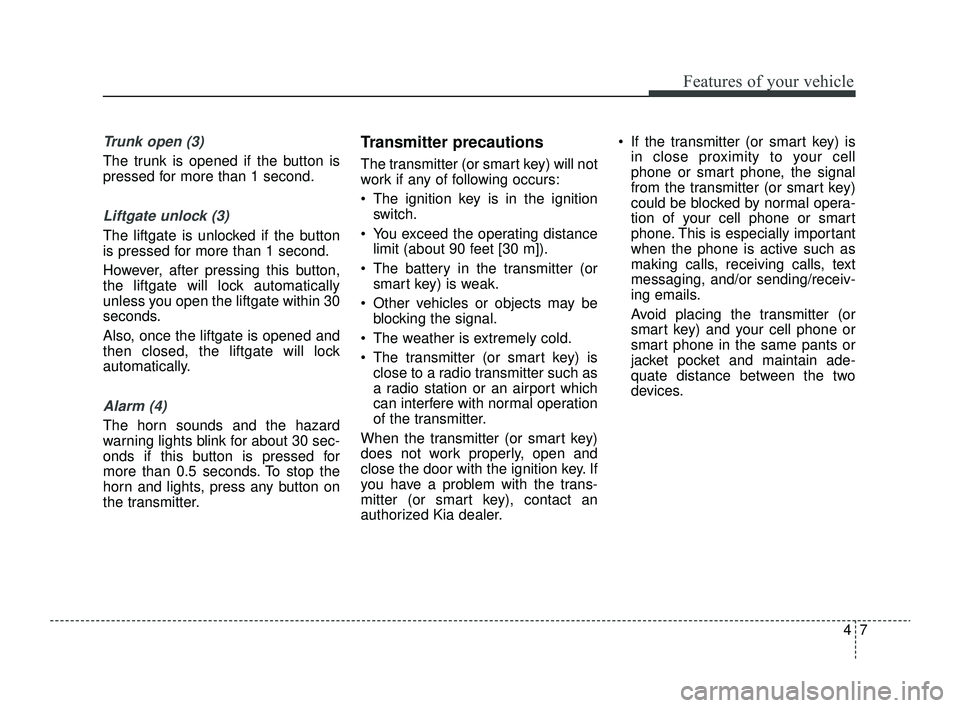
Trunk open (3)
The trunk is opened if the button is
pressed for more than 1 second.
Liftgate unlock (3)
The liftgate is unlocked if the button
is pressed for more than 1 second.
However, after pressing this button,
the liftgate will lock automatically
unless you open the liftgate within 30
seconds.
Also, once the liftgate is opened and
then closed, the liftgate will lock
automatically.
Alarm (4)
The horn sounds and the hazard
warning lights blink for about 30 sec-
onds if this button is pressed for
more than 0.5 seconds. To stop the
horn and lights, press any button on
the transmitter.
Transmitter precautions
The transmitter (or smart key) will not
work if any of following occurs:
The ignition key is in the ignitionswitch.
You exceed the operating distance limit (about 90 feet [30 m]).
The battery in the transmitter (or smart key) is weak.
Other vehicles or objects may be blocking the signal.
The weather is extremely cold.
The transmitter (or smart key) is close to a radio transmitter such as
a radio station or an airport which
can interfere with normal operation
of the transmitter.
When the transmitter (or smart key)
does not work properly, open and
close the door with the ignition key. If
you have a problem with the trans-
mitter (or smart key), contact an
authorized Kia dealer. If the transmitter (or smart key) is
in close proximity to your cell
phone or smart phone, the signal
from the transmitter (or smart key)
could be blocked by normal opera-
tion of your cell phone or smart
phone. This is especially important
when the phone is active such as
making calls, receiving calls, text
messaging, and/or sending/receiv-
ing emails.
Avoid placing the transmitter (or
smart key) and your cell phone or
smart phone in the same pants or
jacket pocket and maintain ade-
quate distance between the two
devices.
SC PE USA 4.QXP 9/9/2021 6:01 PM Page 7
Page 94 of 528
415
Features of your vehicle
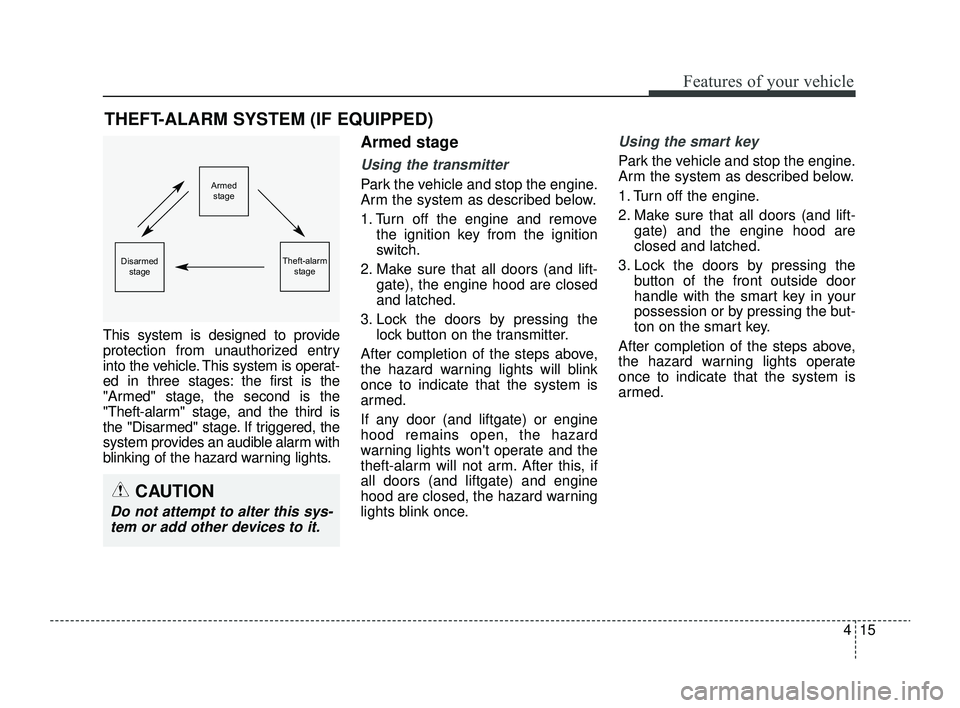
This system is designed to provide
protection from unauthorized entry
into the vehicle. This system is operat-
ed in three stages: the first is the
"Armed" stage, the second is the
"Theft-alarm" stage, and the third is
the "Disarmed" stage. If triggered, the
system provides an audible alarm with
blinking of the hazard warning lights.
Armed stage
Using the transmitter
Park the vehicle and stop the engine.
Arm the system as described below.
1. Turn off the engine and removethe ignition key from the ignition
switch.
2. Make sure that all doors (and lift- gate), the engine hood are closed
and latched.
3. Lock the doors by pressing the lock button on the transmitter.
After completion of the steps above,
the hazard warning lights will blink
once to indicate that the system is
armed.
If any door (and liftgate) or engine
hood remains open, the hazard
warning lights won't operate and the
theft-alarm will not arm. After this, if
all doors (and liftgate) and engine
hood are closed, the hazard warning
lights blink once.
Using the smart key
Park the vehicle and stop the engine.
Arm the system as described below.
1. Turn off the engine.
2. Make sure that all doors (and lift- gate) and the engine hood are
closed and latched.
3. Lock the doors by pressing the button of the front outside door
handle with the smart key in your
possession or by pressing the but-
ton on the smart key.
After completion of the steps above,
the hazard warning lights operate
once to indicate that the system is
armed.
THEFT-ALARM SYSTEM (IF EQUIPPED)
Armed stage
Theft-alarm stageDisarmedstage
CAUTION
Do not attempt to alter this sys-tem or add other devices to it.
SC PE USA 4.QXP 9/9/2021 6:01 PM Page 15
Page 95 of 528
Features of your vehicle
16
4
If any door remains open, the doors
won't lock and the chime will sound
for 3 seconds. Close the door and try
again to lock the doors.
If liftgate or engine hood remains
open, the hazard warning lights
won't operate and theft-alarm will not
arm. After this, if the liftgate and
engine hood are closed, the hazard
warning lights will blink once and the
theft-alarm will arm. Do not arm the system until all
passengers have left the vehicle. If
the system is armed while a pas-
senger(s) remains in the vehicle,
the alarm may be activated when
the remaining passenger(s) leave
the vehicle. If any door, liftgate or
engine hood is opened within 30
seconds after entering the armed
stage, the system is disarmed to
prevent unnecessary alarm.Theft-alarm stage
The alarm will be activated if any of
the following occurs while the system
is armed.
A front or rear door is opened without
using the ignition key or transmitter
(or smart key).
The trunk/liftgate is opened without using the ignition key or transmitter
(or smart key).
The engine hood is opened.
The horn will sound and the hazard
warning lights will blink continuously for
approximately 27 seconds. To turn off
the system, unlock the doors with the
ignition key or transmitter (or smart
key).
SC PE USA 4.QXP 9/9/2021 6:01 PM Page 16
Page 96 of 528
417
Features of your vehicle
Disarmed stage
The system will be disarmed when:
Transmitter
- The door unlock button is pressed.
- The engine is started. (within 3seconds)
- The ignition switch is in the "ON" position for 30 seconds or more.
Smart key
- The door unlock button is pressed.
- The button of the front outside dooris pressed while carrying the smart
key.
- The engine is started. (within 3 seconds)
After the doors are unlocked, the haz-
ard warning lights will blink twice to
indicate that the system is disarmed.
After pressing the unlock button, if any
door (or trunk/liftgate) is not opened
within 30 seconds, the system will be
rearmed.
✽ ✽ NOTICE
• Avoid trying to start the engine
while the alarm is activated. The
vehicle starting motor is disabled
during the theft-alarm stage.
- If the system is not disarmedwith the transmitter, insert the
key into the ignition switch, turn
the ignition switch to the ON
position and wait for 30 seconds.
Then, the system will be dis-
armed.
- If the system is not disarmed with the smart key, press the
ENGINE START/STOP button
with the smart key. The side with
the lock button should contact
the ENGINE START/STOP but-
ton directly.
• If you lose your keys, consult your authorized Kia dealer.
✽ ✽
NOTICE
Malfunctions caused by improper
alterations, adjustments or modifi-
cations to the theft-alarm system are
not covered by your vehicle manu-
facturer warranty.
CAUTION - Adjusting
alarm system
Do not change, alter or adjust
the theft-alarm system becauseit could cause the theft-alarmsystem to malfunction andshould only be serviced by anauthorized Kia dealer.
SC PE USA 4.QXP 9/9/2021 6:01 PM Page 17
Page 131 of 528
Features of your vehicle
52
4
Instrument Cluster Control
Adjusting Instrument Cluster
Illumination
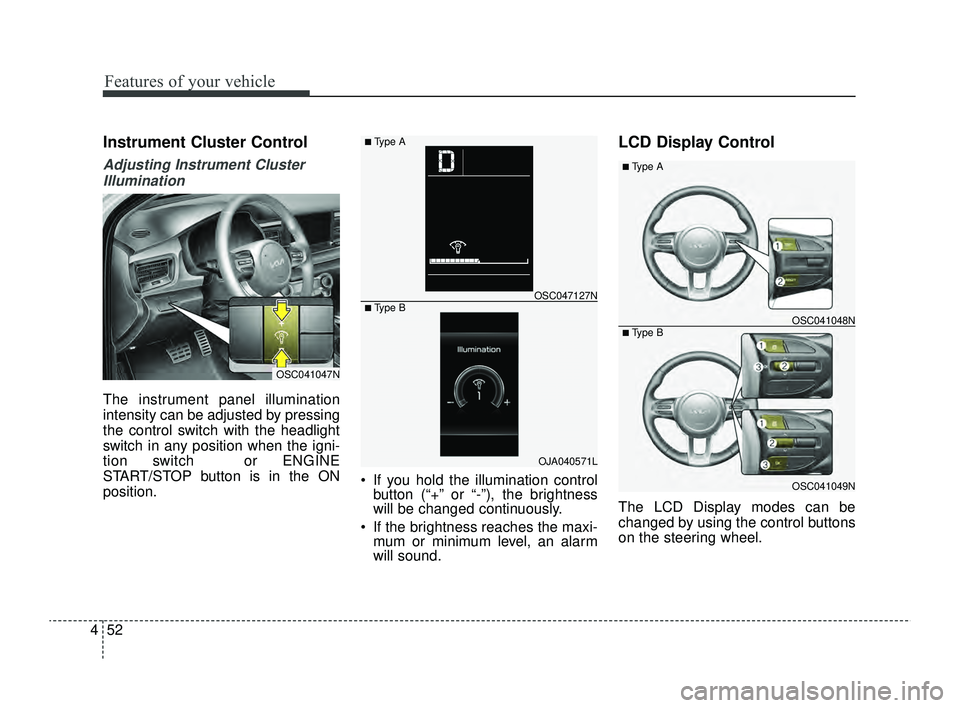
The instrument panel illumination
intensity can be adjusted by pressing
the control switch with the headlight
switch in any position when the igni-
tion switch or ENGINE
START/STOP button is in the ON
position. If you hold the illumination control
button (“+” or “-”), the brightness
will be changed continuously.
If the brightness reaches the maxi- mum or minimum level, an alarm
will sound.
LCD Display Control
The LCD Display modes can be
changed by using the control buttons
on the steering wheel.
OSC041047N
OJA040571L
OSC047127N
■ Type A
■ Type B
OSC041049N
OSC041048N
■ Type A
■ Type B
SC PE USA 4.QXP 9/9/2021 6:04 PM Page 52
Page 183 of 528
Features of your vehicle
104
4
Do not use the interior lights for
extended periods when the engine is
not running as this may cause bat-
tery discharge.Automatic turn off function
(if equipped)
The interior lights automatically turn
off approximately 20 minutes after
the ignition switch is turned off.
If your vehicle is equipped with the
theft alarm system, the interior lights
automatically turn off approximately
5 seconds after the system is in
armed stage.
Map lamp (if equipped)
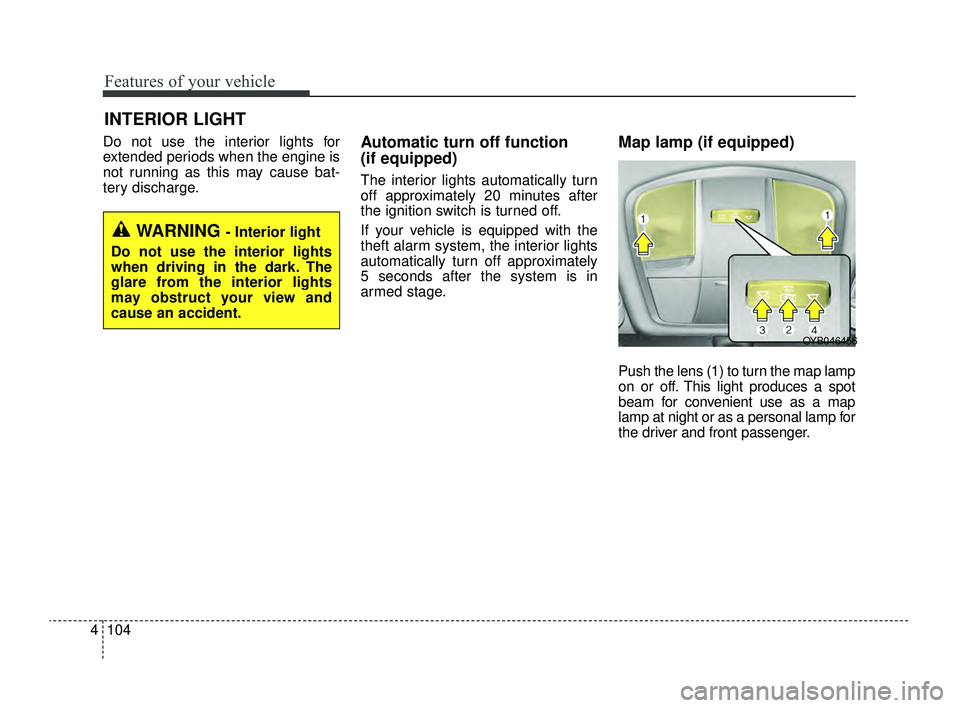
Push the lens (1) to turn the map lamp
on or off. This light produces a spot
beam for convenient use as a map
lamp at night or as a personal lamp for
the driver and front passenger.
INTERIOR LIGHT
WARNING - Interior light
Do not use the interior lights
when driving in the dark. The
glare from the interior lights
may obstruct your view and
cause an accident.
OYB046456
SC PE USA 4.QXP 9/9/2021 6:06 PM Page 104
Page 244 of 528
Driving your vehicle
10
5
Illuminated ENGINE
START/STOP button
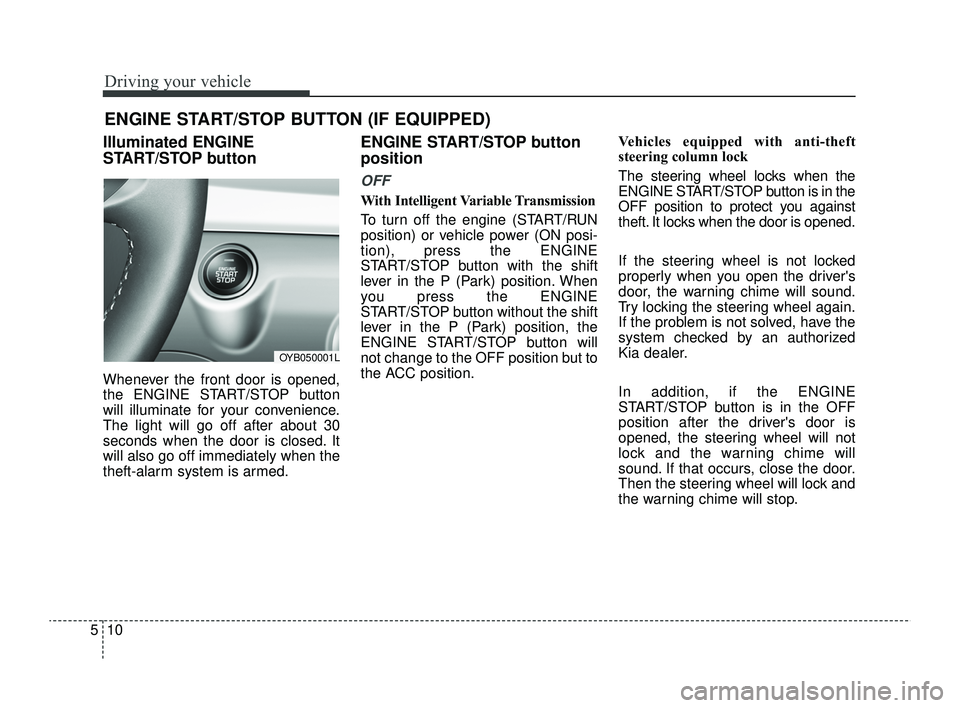
Whenever the front door is opened,
the ENGINE START/STOP button
will illuminate for your convenience.
The light will go off after about 30
seconds when the door is closed. It
will also go off immediately when the
theft-alarm system is armed.
ENGINE START/STOP button
position
OFF
With Intelligent Variable Transmission
To turn off the engine (START/RUN
position) or vehicle power (ON posi-
tion), press the ENGINE
START/STOP button with the shift
lever in the P (Park) position. When
you press the ENGINE
START/STOP button without the shift
lever in the P (Park) position, the
ENGINE START/STOP button will
not change to the OFF position but to
the ACC position. Vehicles equipped with anti-theft
steering column lock
The steering wheel locks when the
ENGINE START/STOP button is in the
OFF position to protect you against
theft. It locks when the door is opened.
If the steering wheel is not locked
properly when you open the driver's
door, the warning chime will sound.
Try locking the steering wheel again.
If the problem is not solved, have the
system checked by an authorized
Kia dealer.
In addition, if the ENGINE
START/STOP button is in the OFF
position after the driver's door is
opened, the steering wheel will not
lock and the warning chime will
sound. If that occurs, close the door.
Then the steering wheel will lock and
the warning chime will stop.
ENGINE START/STOP BUTTON (IF EQUIPPED)
OYB050001L
SC PE USA 5.QXP 9/9/2021 6:17 PM Page 10
Page 276 of 528
Driving your vehicle
42
5
Forward Collision-Avoidance
Assist settings
Setting features
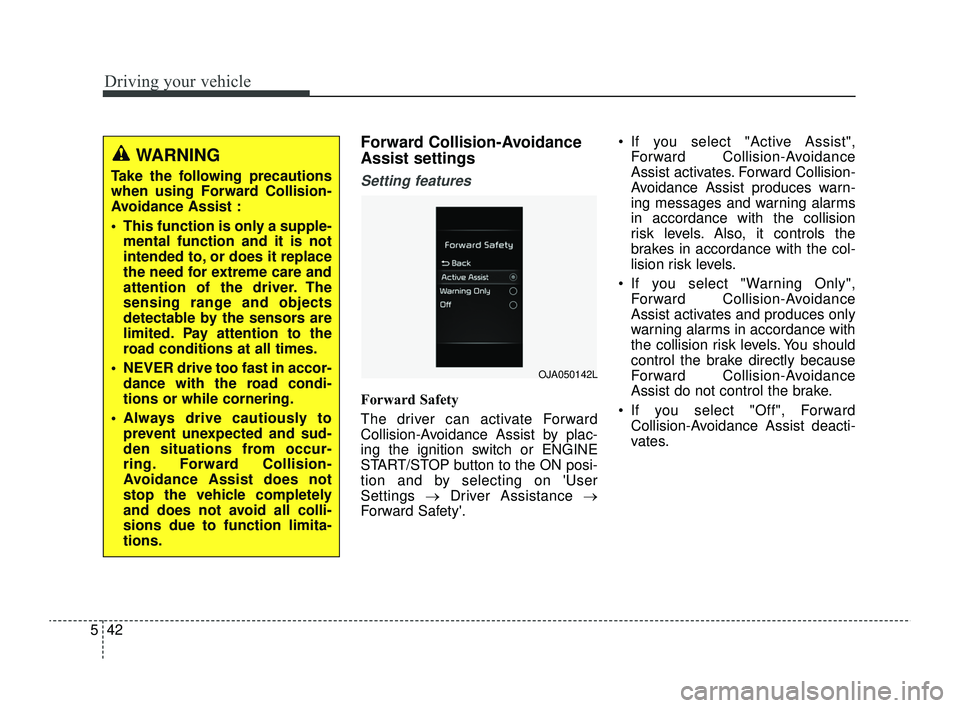
Forward Safety
The driver can activate Forward
Collision-Avoidance Assist by plac-
ing the ignition switch or ENGINE
START/STOP button to the ON posi-
tion and by selecting on 'User
Settings →Driver Assistance →
Forward Safety'. If you select "Active Assist",
Forward Collision-Avoidance
Assist activates. Forward Collision-
Avoidance Assist produces warn-
ing messages and warning alarms
in accordance with the collision
risk levels. Also, it controls the
brakes in accordance with the col-
lision risk levels.
If you select "Warning Only", Forward Collision-Avoidance
Assist activates and produces only
warning alarms in accordance with
the collision risk levels. You should
control the brake directly because
Forward Collision-Avoidance
Assist do not control the brake.
If you select "Off", Forward Collision-Avoidance Assist deacti-
vates.
WARNING
Take the following precautions
when using Forward Collision-
Avoidance Assist :
This function is only a supple-mental function and it is not
intended to, or does it replace
the need for extreme care and
attention of the driver. The
sensing range and objects
detectable by the sensors are
limited. Pay attention to the
road conditions at all times.
NEVER drive too fast in accor- dance with the road condi-
tions or while cornering.
Always drive cautiously to prevent unexpected and sud-
den situations from occur-
ring. Forward Collision-
Avoidance Assist does not
stop the vehicle completely
and does not avoid all colli-
sions due to function limita-
tions.
OJA050142L
SC PE USA 5.QXP 9/9/2021 6:18 PM Page 42
Page 278 of 528
Driving your vehicle
44
5
Prerequisite for activation
Forward Collision-Avoidance Assist
will activate when Forward Collision-
Avoidance Assist is selected on the
LCD display, and when the following
prerequisites are satisfied:
The ESC (Electronic Stability
Control) is activated.
When Forward Collision- Avoidance Assist recognizes a
vehicle or the pedestrian in front.
Forward Collision-Avoidance
Assist warning message and
function control
Forward Collision-Avoidance Assist
produces warning messages, warn-
ing alarms, and emergency braking
based on the level of risk of a frontal
collision, such as when a vehicle
ahead suddenly brakes, or when the
function detects that a collision with
a pedestrian is imminent.
The driver can select the initial warn-
ing activation time in the User
Settings in the LCD display. The
options for the initial Forward
Collision Warning include Normal or
Late initial warning time.
WARNING
Forward Collision-Avoidance
Assist may not recognize every
obstacle or provide warnings
and braking in every situation, so
do not rely on Forward Collision-
Avoidance Assist to stop the
vehicle in instances where the
driver sees an obstacle and has
the ability to apply the brakes.
Forward Collision-AvoidanceAssist automatically activates
upon placing the ignition
switch or ENGINE START/STOP
button to the ON position. The
driver can deactivate Forward
Collision-Avoidance Assist by
canceling the function setting
on the LCD display.
Forward Collision-Avoidance Assist automatically deacti-
vates upon canceling the ESC.
When the ESC is canceled,
Forward Collision-Avoidance
Assist cannot be activated on
the LCD display. Forward
Collision-Avoidance Assist
warning light will illuminate.
SC PE USA 5.QXP 9/9/2021 6:18 PM Page 44