climate control KIA RIO 2022 Owners Manual
[x] Cancel search | Manufacturer: KIA, Model Year: 2022, Model line: RIO, Model: KIA RIO 2022Pages: 528, PDF Size: 11.8 MB
Page 16 of 528
Your vehicle at a glance
62
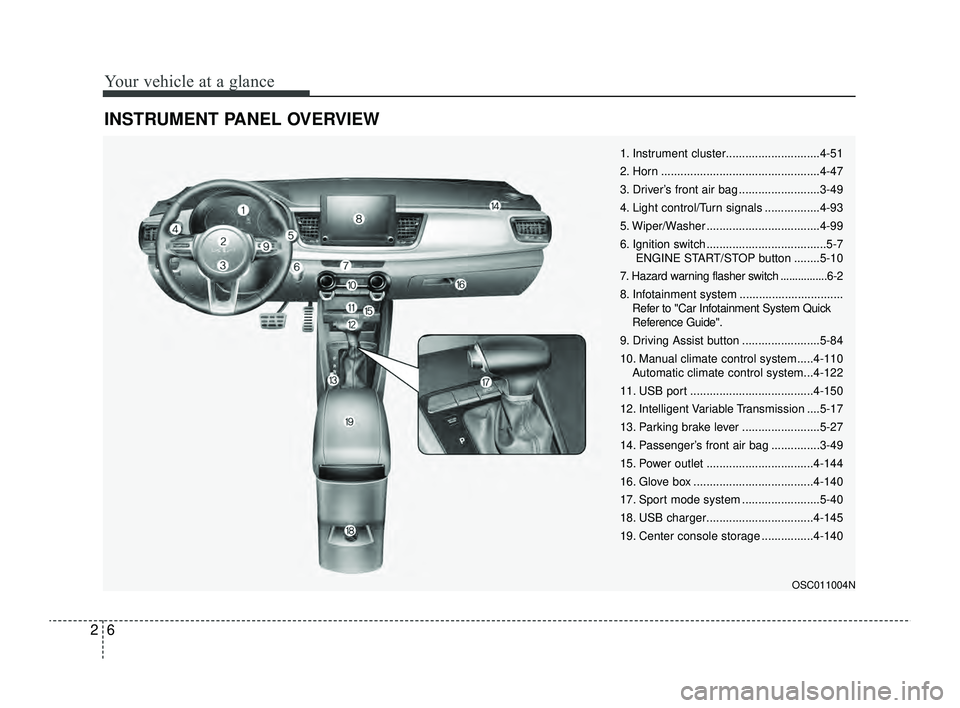
INSTRUMENT PANEL OVERVIEW
OSC011004N
1. Instrument cluster.............................4-51
2. Horn .................................................4-47
3. Driver’s front air bag .........................3-49
4. Light control/Turn signals .................4-93
5. Wiper/Washer ...................................4-99
6. Ignition switch .....................................5-7ENGINE START/STOP button ........5-10
7. Hazard warning flasher switch ................6-2
8. Infotainment system ................................ Refer to "Car Infotainment System Quick
Reference Guide".
9. Driving Assist button ........................5-84
10. Manual climate control system.....4-110 Automatic climate control system...4-122
11. USB port ......................................4-150
12. Intelligent Variable Transmission ....5-17
13. Parking brake lever ........................5-27
14. Passenger’s front air bag ...............3-49
15. Power outlet .................................4-144
16. Glove box .....................................4-140
17. Sport mode system ........................5-40
18. USB charger.................................4-145
19. Center console storage ................4-140
SC PE USA 2.qxp 8/23/2021 5:23 PM Page 6
Page 81 of 528
Instrument cluster . . . . . . . . . . . . . . . . . . . . . . . . . 4-51
• Instrument Cluster Control . . . . . . . . . . . . . . . . . . . . 4-52
• LCD Display Control . . . . . . . . . . . . . . . . . . . . . . . . . 4-52
• Gauges . . . . . . . . . . . . . . . . . . . . . . . . . . . . . . . . . . . . \
. 4-53
• Transmission Shift Indicator . . . . . . . . . . . . . . . . . . . 4-57
Trip computer . . . . . . . . . . . . . . . . . . . . . . . . . . . . . 4-58
• Trip information (Trip computer) . . . . . . . . . . . . . . . 4-58
• Service Mode (For type A cluster) . . . . . . . . . . . . . . . 4-63
LCD display (For Type B cluster) . . . . . . . . . . . . 4-64
• LCD Display Mode . . . . . . . . . . . . . . . . . . . . . . . . . . . 4-64
• Driving Assist mode. . . . . . . . . . . . . . . . . . . . . . . . . . . 4-65
• User Settings Mode (For type B cluster) . . . . . . . . . 4-66
• Warning messages (For type B cluster) . . . . . . . . . . 4-74
Warning and indicator lights . . . . . . . . . . . . . . . . 4-78
• Warning lights . . . . . . . . . . . . . . . . . . . . . . . . . . . . . . . 4-78
• Indicator Lights . . . . . . . . . . . . . . . . . . . . . . . . . . . . . . 4-86
Rear View Monitor (RVM) . . . . . . . . . . . . . . . . . . 4-90
• Rear View Monitor malfunction and limitations . . . 4-90
Lighting . . . . . . . . . . . . . . . . . . . . . . . . . . . . . . . . . . 4-92\
• Battery saver function. . . . . . . . . . . . . . . . . . . . . . . . . 4-92
• Headlight escort function . . . . . . . . . . . . . . . . . . . . . . 4-92
• Headlight welcome function . . . . . . . . . . . . . . . . . . . . 4-92
• Lighting control . . . . . . . . . . . . . . . . . . . . . . . . . . . . . . 4-93
• High beam operation. . . . . . . . . . . . . . . . . . . . . . . . . . 4-95
• High Beam Assist (HBA) . . . . . . . . . . . . . . . . . . . . . . 4-96• Turn signals and lane change signals . . . . . . . . . . . . 4-97
• Front fog light . . . . . . . . . . . . . . . . . . . . . . . . . . . . . . . 4-98
Wipers and washers . . . . . . . . . . . . . . . . . . . . . . . . 4-99
• Windshield wipers . . . . . . . . . . . . . . . . . . . . . . . . . . . 4-100
• Windshield washers (front) . . . . . . . . . . . . . . . . . . . 4-101
• Rear window wiper and washer switch (for 5 door) .
4-103
Interior light . . . . . . . . . . . . . . . . . . . . . . . . . . . . . 4-104
• Automatic turn off function . . . . . . . . . . . . . . . . . . . 4-104
• Map lamp . . . . . . . . . . . . . . . . . . . . . . . . . . . . . . . . . 4-104
• Room lamp . . . . . . . . . . . . . . . . . . . . . . . . . . . . . . . . . 4-105
• Trunk/Liftgate room lamp . . . . . . . . . . . . . . . . . . . . 4-107
• Glove box lamp . . . . . . . . . . . . . . . . . . . . . . . . . . . . . 4-107
• Vanity mirror lamp . . . . . . . . . . . . . . . . . . . . . . . . . . 4-108
Defroster . . . . . . . . . . . . . . . . . . . . . . . . . . . . . . . . 4-109
• Rear window defroster . . . . . . . . . . . . . . . . . . . . . . . 4-109
Manual climate control system . . . . . . . . . . . . . . 4-110
• Heating and air conditioning . . . . . . . . . . . . . . . . . . 4-111
• System operation . . . . . . . . . . . . . . . . . . . . . . . . . . . . 4-116
• Climate control air filter . . . . . . . . . . . . . . . . . . . . . . 4-118
• Checking the amount of air conditioner refrigerant
and compressor lubricant . . . . . . . . . . . . . . . . . . . . 4-119
• Air Conditioning refrigerant label . . . . . . . . . . . . . 4-120
• Activate upon Washer Fluid Use . . . . . . . . . . . . . . 4-121
4
SC PE USA 4.QXP 9/9/2021 6:01 PM Page 2
Page 82 of 528
Automatic climate control system . . . . . . . . . . . 4-122
• Automatic heating and air conditioning . . . . . . . . . 4-123
• Manual heating and air conditioning . . . . . . . . . . . 4-124
• System operation . . . . . . . . . . . . . . . . . . . . . . . . . . . . 4-129
• Climate control air filter . . . . . . . . . . . . . . . . . . . . . . 4-131
• Checking the amount of air conditioner refrigerantand compressor lubricant. . . . . . . . . . . . . . . . . . . . 4-132
• Air Conditioning refrigerant label . . . . . . . . . . . . . 4-133
• Activate upon washer fluid use . . . . . . . . . . . . . . . . 4-134
Windshield defrosting and defogging . . . . . . . . . 4-135
• Manual climate control system . . . . . . . . . . . . . . . . 4-135
• Automatic climate control system . . . . . . . . . . . . . . 4-136
• Defogging logic. . . . . . . . . . . . . . . . . . . . . . . . . . . . . . 4-137
Storage compartment . . . . . . . . . . . . . . . . . . . . . . 4-140
• Center console storage . . . . . . . . . . . . . . . . . . . . . . . 4-140
• Glove box . . . . . . . . . . . . . . . . . . . . . . . . . . . . . . . . . . 4-14\
0
• Sunglass holder . . . . . . . . . . . . . . . . . . . . . . . . . . . . . 4-141
• Luggage net holder . . . . . . . . . . . . . . . . . . . . . . . . . . 4-141
Interior features . . . . . . . . . . . . . . . . . . . . . . . . . . 4-143
• Cup holder . . . . . . . . . . . . . . . . . . . . . . . . . . . . . . . . . 4-143
• Sunvisor . . . . . . . . . . . . . . . . . . . . . . . . . . . . . . . . . . . 4-\
143
• Power outlet . . . . . . . . . . . . . . . . . . . . . . . . . . . . . . . . 4-144
• USB charger . . . . . . . . . . . . . . . . . . . . . . . . . . . . . . . . 4-145
• Clothes hanger . . . . . . . . . . . . . . . . . . . . . . . . . . . . . . 4-146
• Floor mat anchor(s). . . . . . . . . . . . . . . . . . . . . . . . . . 4-146 • Shopping bag holder . . . . . . . . . . . . . . . . . . . . . . . . . 4-147
• Covering shelf (for 5 door) . . . . . . . . . . . . . . . . . . . . 4-147
Infotainment system . . . . . . . . . . . . . . . . . . . . . . . 4-149
• Antenna . . . . . . . . . . . . . . . . . . . . . . . . . . . . . . . . . . . 4-\
149
• USB port . . . . . . . . . . . . . . . . . . . . . . . . . . . . . . . . . . . 4-\
150
• How vehicle audio works . . . . . . . . . . . . . . . . . . . . . 4-150
Declaration of Conformity . . . . . . . . . . . . . . . . . 4-154
• FCC . . . . . . . . . . . . . . . . . . . . . . . . . . . . . . . . . . . . \
. . 4-154
4
SC PE USA 4.QXP 9/9/2021 6:01 PM Page 3
Page 189 of 528
Features of your vehicle
110
4
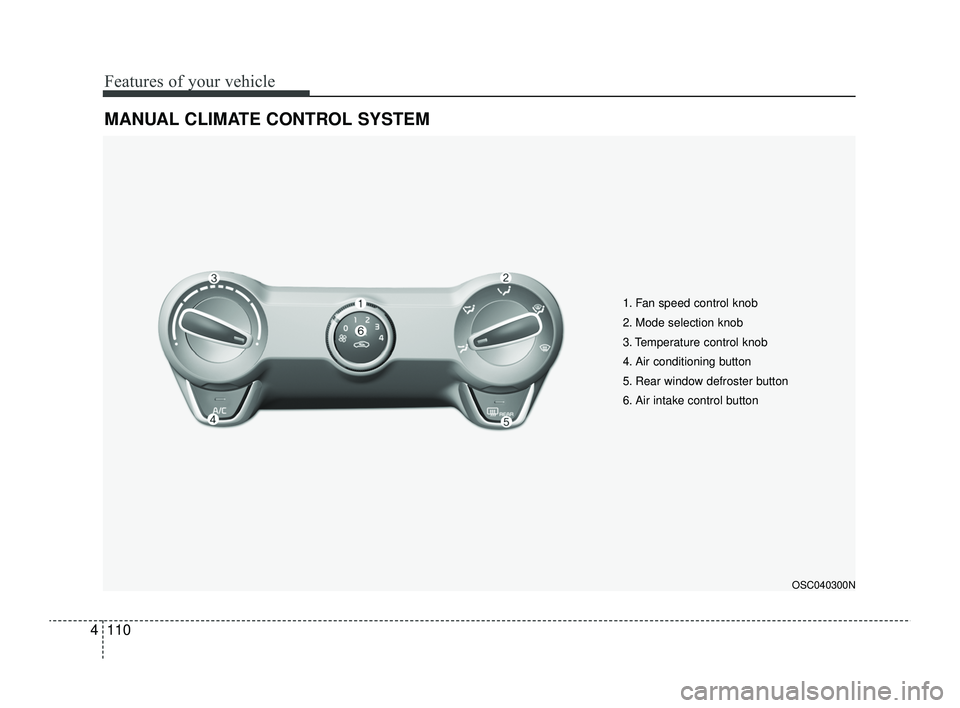
MANUAL CLIMATE CONTROL SYSTEM
OSC040300N
1. Fan speed control knob
2. Mode selection knob
3. Temperature control knob
4. Air conditioning button
5. Rear window defroster button
6. Air intake control button
SC PE USA 4.QXP 9/9/2021 6:06 PM Page 110
Page 193 of 528
Features of your vehicle
114
4
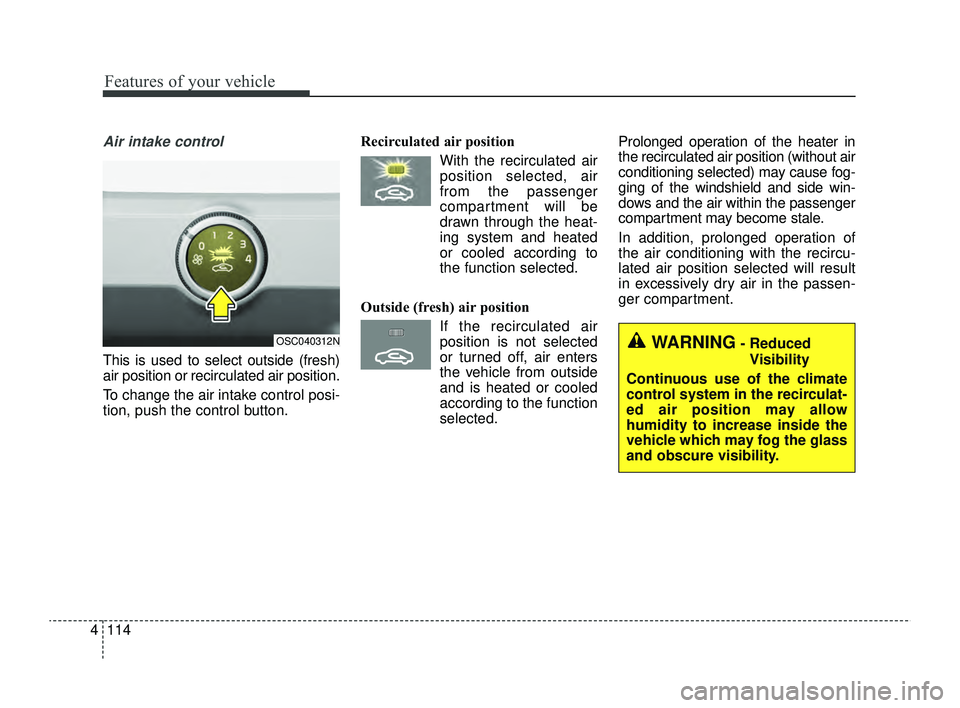
Air intake control
This is used to select outside (fresh)
air position or recirculated air position.
To change the air intake control posi-
tion, push the control button. Recirculated air position
With the recirculated airposition selected, air
from the passenger
compartment will be
drawn through the heat-
ing system and heated
or cooled according to
the function selected.
Outside (fresh) air position If the recirculated airposition is not selected
or turned off, air enters
the vehicle from outside
and is heated or cooled
according to the function
selected. Prolonged operation of the heater in
the recirculated air position (without air
conditioning selected) may cause fog-
ging of the windshield and side win-
dows and the air within the passenger
compartment may become stale.
In addition, prolonged operation of
the air conditioning with the recircu-
lated air position selected will result
in excessively dry air in the passen-
ger compartment.
OSC040312NWARNING- Reduced
Visibility
Continuous use of the climate
control system in the recirculat-
ed air position may allow
humidity to increase inside the
vehicle which may fog the glass
and obscure visibility.
SC PE USA 4.QXP 9/9/2021 6:07 PM Page 114
Page 194 of 528
4115
Features of your vehicle
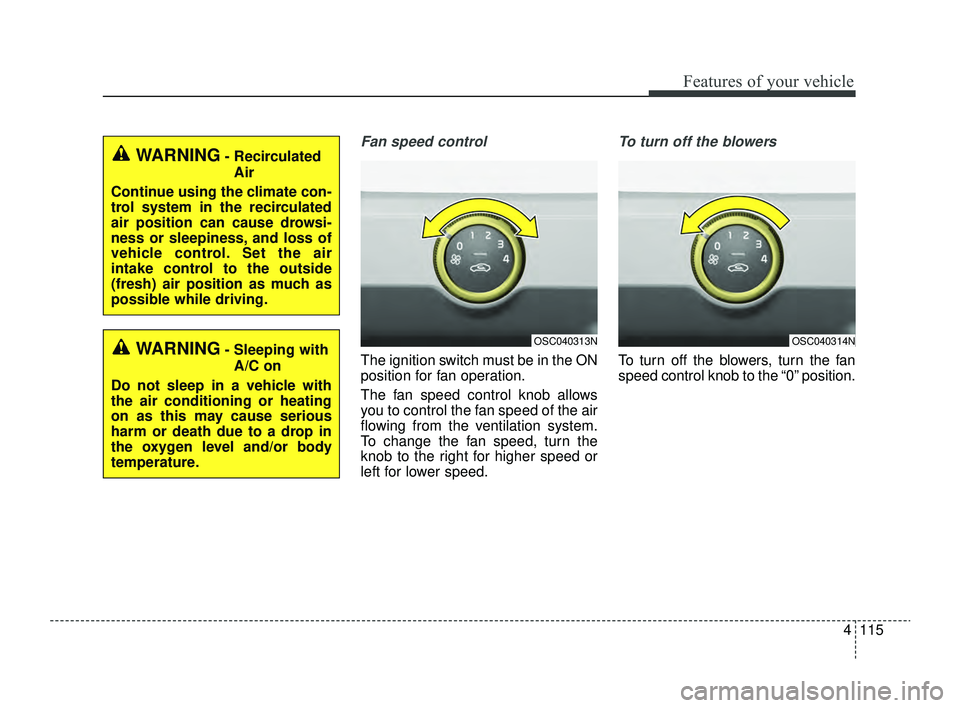
Fan speed control
The ignition switch must be in the ON
position for fan operation.
The fan speed control knob allows
you to control the fan speed of the air
flowing from the ventilation system.
To change the fan speed, turn the
knob to the right for higher speed or
left for lower speed.
To turn off the blowers
To turn off the blowers, turn the fan
speed control knob to the “0” position.
WARNING- RecirculatedAir
Continue using the climate con-
trol system in the recirculated
air position can cause drowsi-
ness or sleepiness, and loss of
vehicle control. Set the air
intake control to the outside
(fresh) air position as much as
possible while driving.
WARNING- Sleeping with A/C on
Do not sleep in a vehicle with
the air conditioning or heating
on as this may cause serious
harm or death due to a drop in
the oxygen level and/or body
temperature.OSC040313NOSC040314N
SC PE USA 4.QXP 9/9/2021 6:07 PM Page 115
Page 197 of 528
Features of your vehicle
118
4
Air conditioning system operation tips
If the vehicle has been parked in
direct sunlight during hot weather,
open the windows for a short time
to let the hot air inside the vehicle
escape.
To help reduce moisture inside of the windows on rainy or humid
days, decrease the humidity inside
the vehicle by operating the air
conditioning system.
During air conditioning system operation, you may occasionally
notice a slight change in engine
speed as the air conditioning com-
pressor cycles. This is a normal
system operation characteristic.
Use the air conditioning system every month for a few minutes to
ensure maximum system perform-
ance.
When using the air conditioning system, you may notice clear water
dripping (or even puddling) on the
ground under the passenger side
of the vehicle. This is a normal
operating characteristic of the sys-
tem. Operating the air conditioning sys-
tem in the recirculated air position
provides maximum cooling, how-
ever, continual operation in this
mode may cause the air inside the
vehicle to become stale.
During cooling operation, you may occasionally notice a misty air flow
because of rapid cooling and
humid air intake. This is a normal
operating characteristic of the sys-
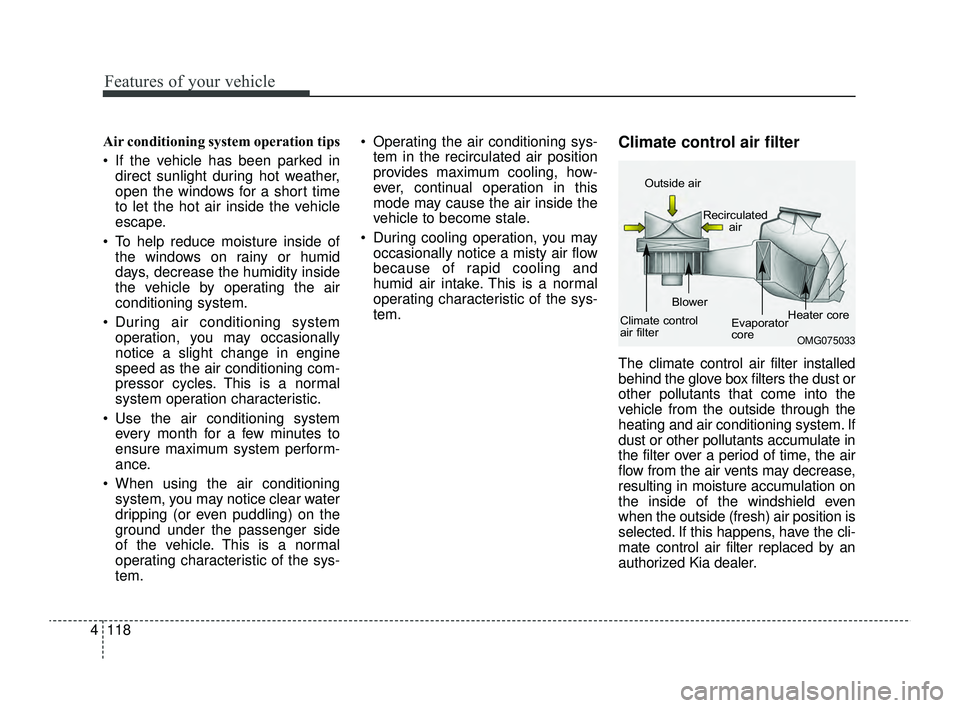
tem.Climate control air filter
The climate control air filter installed
behind the glove box filters the dust or
other pollutants that come into the
vehicle from the outside through the
heating and air conditioning system. If
dust or other pollutants accumulate in
the filter over a period of time, the air
flow from the air vents may decrease,
resulting in moisture accumulation on
the inside of the windshield even
when the outside (fresh) air position is
selected. If this happens, have the cli-
mate control air filter replaced by an
authorized Kia dealer.
OMG075033
Outside air
Recirculatedair
Climate control
air filter Blower
Evaporator
coreHeater core
SC PE USA 4.QXP 9/9/2021 6:07 PM Page 118
Page 201 of 528
Features of your vehicle
122
4
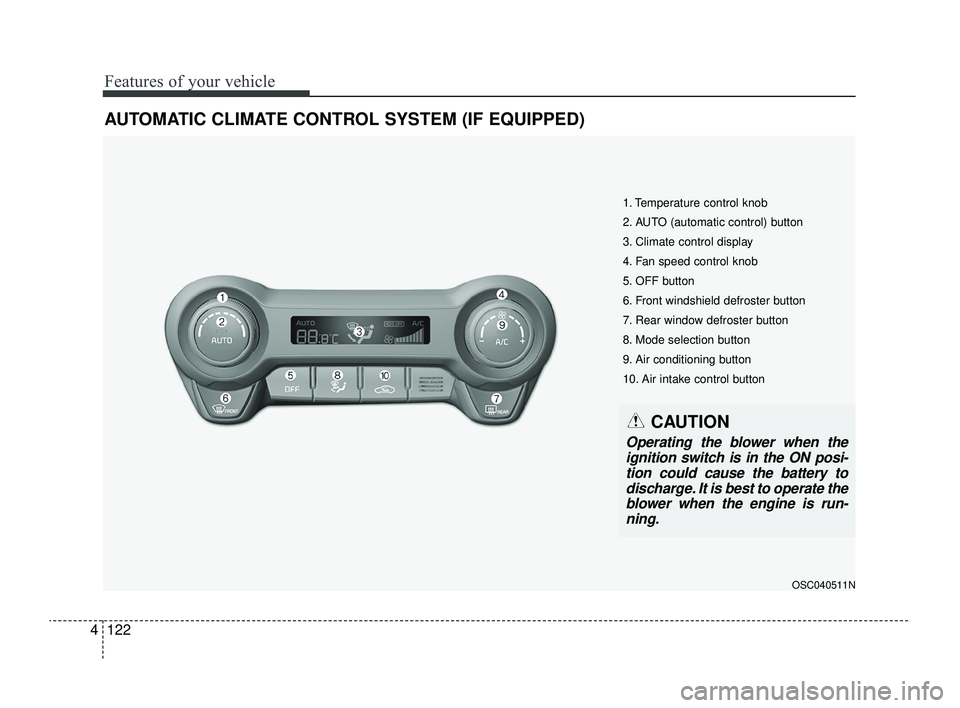
AUTOMATIC CLIMATE CONTROL SYSTEM (IF EQUIPPED)
OSC040511N
1. Temperature control knob
2. AUTO (automatic control) button
3. Climate control display
4. Fan speed control knob
5. OFF button
6. Front windshield defroster button
7. Rear window defroster button
8. Mode selection button
9. Air conditioning button
10. Air intake control button
CAUTION
Operating the blower when the
ignition switch is in the ON posi-tion could cause the battery todischarge. It is best to operate theblower when the engine is run-ning.
SC PE USA 4.QXP 9/9/2021 6:07 PM Page 122
Page 202 of 528
4123
Features of your vehicle
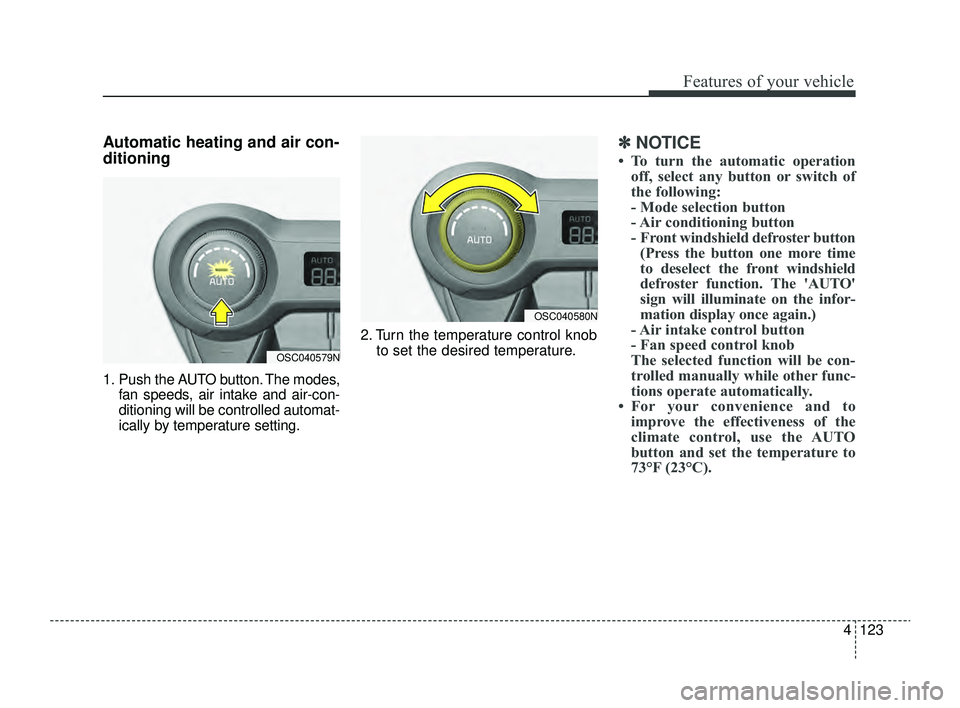
Automatic heating and air con-
ditioning
1. Push the AUTO button. The modes,fan speeds, air intake and air-con-
ditioning will be controlled automat-
ically by temperature setting. 2. Turn the temperature control knob
to set the desired temperature.
✽ ✽NOTICE
• To turn the automatic operation
off, select any button or switch of
the following:
- Mode selection button
- Air conditioning button
- Front windshield defroster button(Press the button one more time
to deselect the front windshield
defroster function. The 'AUTO'
sign will illuminate on the infor-
mation display once again.)
- Air intake control button
- Fan speed control knob
The selected function will be con- trolled manually while other func-
tions operate automatically.
• For your convenience and to improve the effectiveness of the
climate control, use the AUTO
button and set the temperature to
73°F (23°C).
OSC040579N
OSC040580N
SC PE USA 4.QXP 9/9/2021 6:07 PM Page 123
Page 203 of 528
Features of your vehicle
124
4
✽ ✽
NOTICE
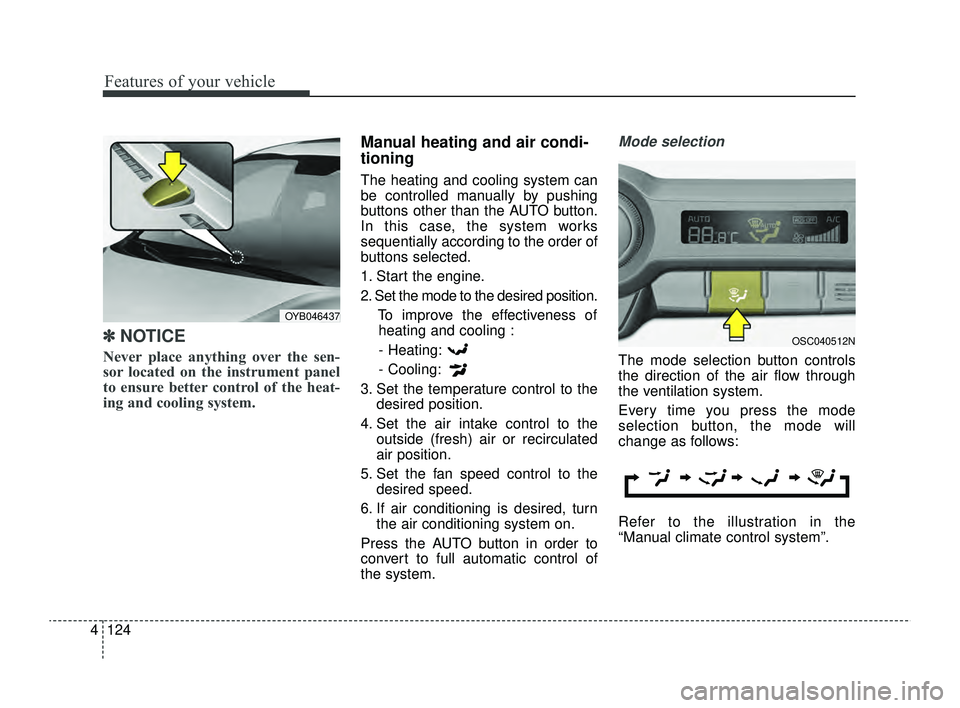
Never place anything over the sen-
sor located on the instrument panel
to ensure better control of the heat-
ing and cooling system.
Manual heating and air condi-
tioning
The heating and cooling system can
be controlled manually by pushing
buttons other than the AUTO button.
In this case, the system works
sequentially according to the order of
buttons selected.
1. Start the engine.
2. Set the mode to the desired position.
To improve the effectiveness ofheating and cooling :
- Heating:
- Cooling:
3. Set the temperature control to the desired position.
4. Set the air intake control to the outside (fresh) air or recirculated
air position.
5. Set the fan speed control to the desired speed.
6. If air conditioning is desired, turn the air conditioning system on.
Press the AUTO button in order to
convert to full automatic control of
the system.
Mode selection
The mode selection button controls
the direction of the air flow through
the ventilation system.
Every time you press the mode
selection button, the mode will
change as follows:
Refer to the illustration in the
“Manual climate control system”.
OYB046437
OSC040512N
SC PE USA 4.QXP 9/9/2021 6:07 PM Page 124