window KIA RIO HATCHBACK 2019 Owner's Manual
[x] Cancel search | Manufacturer: KIA, Model Year: 2019, Model line: RIO HATCHBACK, Model: KIA RIO HATCHBACK 2019Pages: 503, PDF Size: 10.42 MB
Page 137 of 503
![KIA RIO HATCHBACK 2019 Owners Manual 459
Features of your vehicle
[Type B]
(1) : MODE button for change theLCD MODES
(2) / : MOVE scroll switch for select the items
(3) OK : SET/RESET button for set the items or reset the items
❈](/img/2/57981/w960_57981-136.png "KIA RIO HATCHBACK 2019 Owners Manual 459
Features of your vehicle
[Type B]
(1) : MODE button for change theLCD MODES
(2) / : MOVE scroll switch for select the items
(3) OK : SET/RESET button for set the items or reset the items
❈")
459
Features of your vehicle
[Type B]
(1) : MODE button for change theLCD MODES
(2) / : MOVE scroll switch for select the items
(3) OK : SET/RESET button for set the items or reset the items
❈ For the LCD modes, refer to “LCD
window” in this chapter.Gauges
Speedometer
The speedometer indicates the for-
ward speed of the vehicle.
The speedometer is calibrated in
miles per hour and/or kilometers per
hour.
Tachometer
The tachometer indicates the
approximate number of engine revo-
lutions per minute (rpm).
Use the tachometer to select the cor-
rect shift points and to prevent lug-
ging and/or over-revving the engine.
The tachometer pointer may move
slightly when the ignition switch is in
ACC or ON position with the engine
OFF. This movement is normal and
will not affect the accuracy of the
tachometer once the engine is run-
ning.OSC047448C
OYB046106
SC CAN (ENG) 4.QXP 7/18/2018 5:48 PM Page 59
Page 140 of 503
Features of your vehicle
62
4
The outside temperature on the dis-
play may not change immediately
like a general thermometer to pre-
vent the driver from being inattentive.
To change the temperature unit (from
°C to °F or from °F to °C)
Press the TRIP button for 5 seconds
and more.
The temperature unit can be
changed by using the “User Settings”
mode of the LCD Windows.
❈ For more details, refer to “LCD
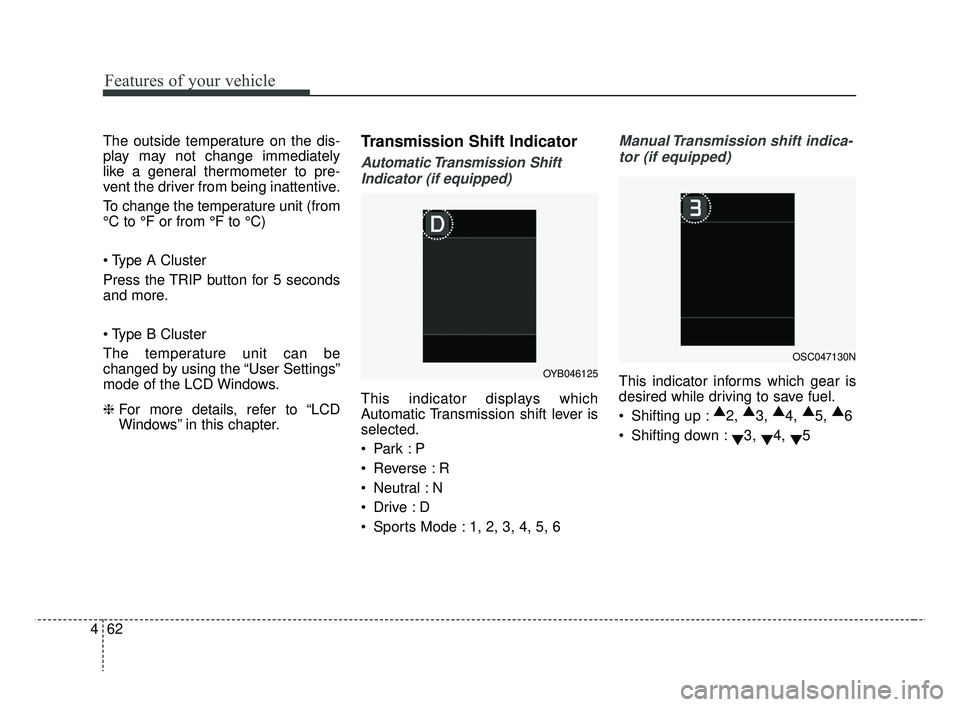
Windows” in this chapter.Transmission Shift Indicator
Automatic Transmission Shift
Indicator (if equipped)
This indicator displays which
Automatic Transmission shift lever is
selected.
Reverse : R
Neutral : N
Sports Mode : 1, 2, 3, 4, 5, 6
Manual Transmission shift indica-tor (if equipped)
This indicator informs which gear is
desired while driving to save fuel.
Shifting up : ▲
2, ▲
3, ▲
4, ▲
5, ▲
6
Shifting down : ▼3,
▼4,
▼5OYB046125
OSC047130N
SC CAN (ENG) 4.QXP 7/18/2018 5:48 PM Page 62
Page 142 of 503
Features of your vehicle
64
4
Over view
LCD windows show the following var-
ious information to drivers.
- Trip information
- LCD modes
- Warning messages
Trip information (Trip computer)
The trip computer is a microcomput-
er-controlled driver information sys-
tem that displays information related
to driving.
✽ ✽
NOTICE
Some driving information stored in
the trip computer (for example
Average Vehicle Speed) resets if the
battery is disconnected.
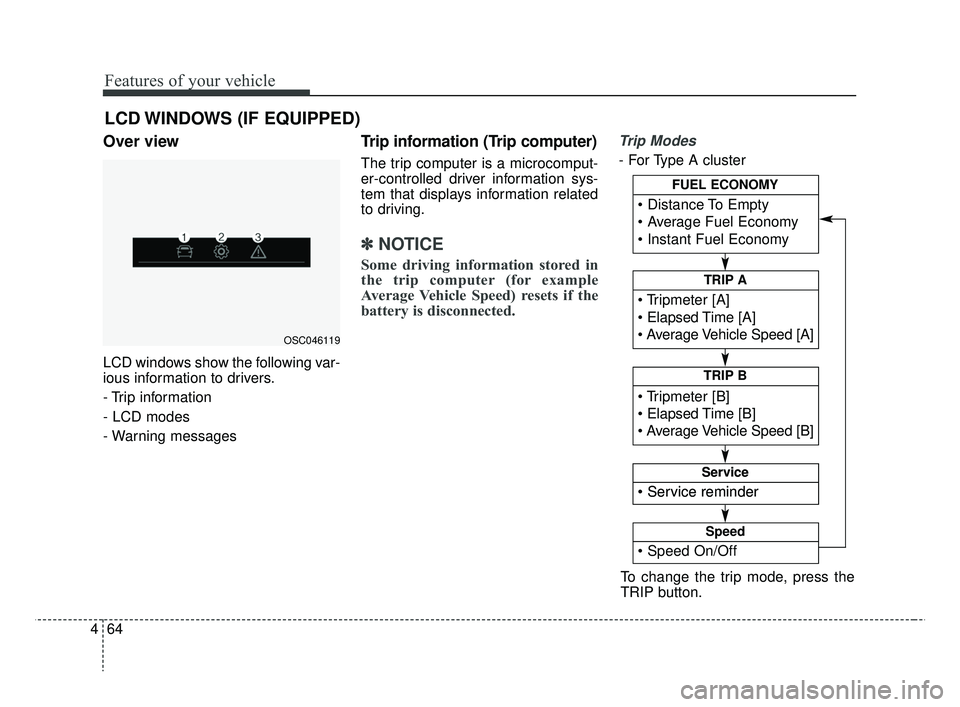
Trip Modes
- For Type A cluster
LCD WINDOWS (IF EQUIPPED)
OSC046119
To change the trip mode, press the
TRIP button.
Elapsed Time [A]
TRIP A
TRIP B
FUEL ECONOMY
Service
Service
Speed
SC CAN (ENG) 4.QXP 7/18/2018 5:48 PM Page 64
Page 144 of 503
Features of your vehicle
66
4
Average Fuel Economy (2)
The average fuel economy is cal-
culated by the total driving dis-
tance and fuel consumption since
the last average fuel economy
reset.
- Fuel economy range: 0.0 ~ 99.9L/100 km, km/L or MPG
The average fuel economy can be reset both manually and automati-
cally.
Manual reset
To clear the average fuel economy
manually, press the RESET (for Type
A cluster), OK ( for Type B cluster)
(reset) on the steering wheel for
more than 1 second when the aver-
age fuel economy is displayed. Automatic reset (for type B cluster)
To make the average fuel economy
be reset automatically whenever refu-
eling, select the “Fuel economy auto
reset” mode in User Setting menu of
the LCD window (Refer to “LCD win-
dow”).
OFF - You may set to default manu-
ally by using the trip switch reset but-
ton.
After ignition - The vehicle will auto- matically set to default once 4 hours
pass after the Ignition is in OFF.
After refueling - After refueling more than 6 liters (1.6 gallons) and driving
over 1 km/h (1 mph), the vehicle will
reset to default automatically.
✽ ✽ NOTICE
The average fuel economy is not dis-
played for more accurate calculation
if the vehicle does not drive more
than 10 seconds or 50 meters (0.03
miles) since the ignition switch or
Engine Start/Stop button is turned
to ON.
Instant Fuel Economy (3)
This mode displays the instant fuel
economy during the last few sec-
onds when the vehicle speed is
more than 10 km/h (6.2 mph).
- Fuel economy range:
30.0 L/100 km or 0.0 ~ 50.0 MPG
SC CAN (ENG) 4.QXP 7/18/2018 5:49 PM Page 66
Page 147 of 503
469
Features of your vehicle
- If the engine is running, even whenthe vehicle is not in motion, the infor-
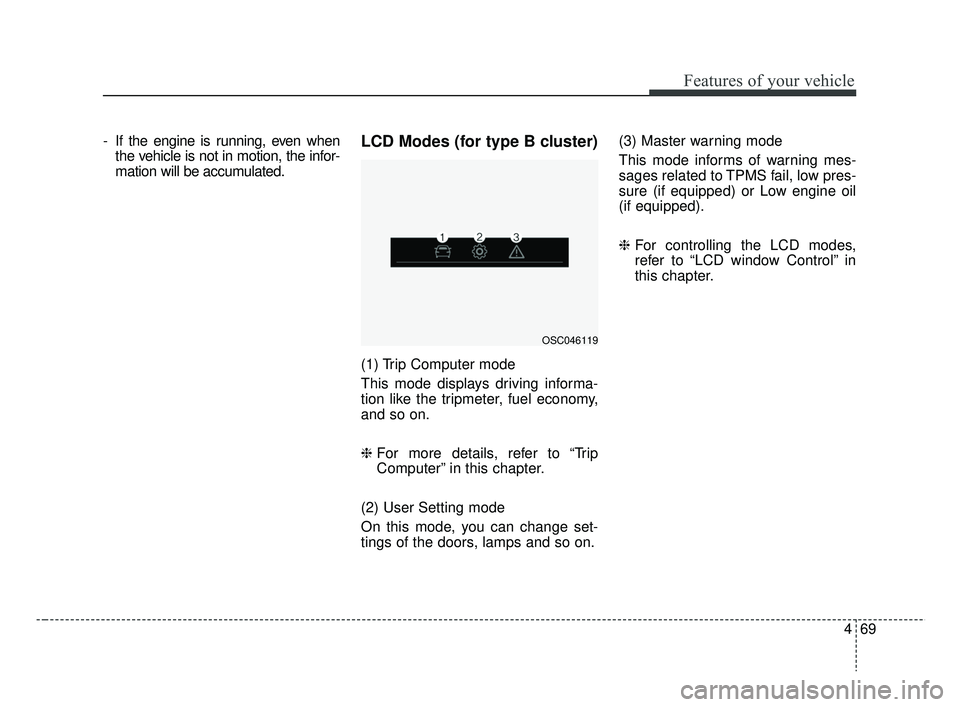
mation will be accumulated.LCD Modes (for type B cluster)
(1) Trip Computer mode
This mode displays driving informa-
tion like the tripmeter, fuel economy,
and so on.
❈ For more details, refer to “Trip
Computer” in this chapter.
(2) User Setting mode
On this mode, you can change set-
tings of the doors, lamps and so on. (3) Master warning mode
This mode informs of warning mes-
sages related to TPMS fail, low pres-
sure (if equipped) or Low engine oil
(if equipped).
❈
For controlling the LCD modes,
refer to “LCD window Control” in
this chapter.
OSC046119
SC CAN (ENG) 4.QXP 7/18/2018 5:49 PM Page 69
Page 173 of 503
495
Features of your vehicle
High beam operation
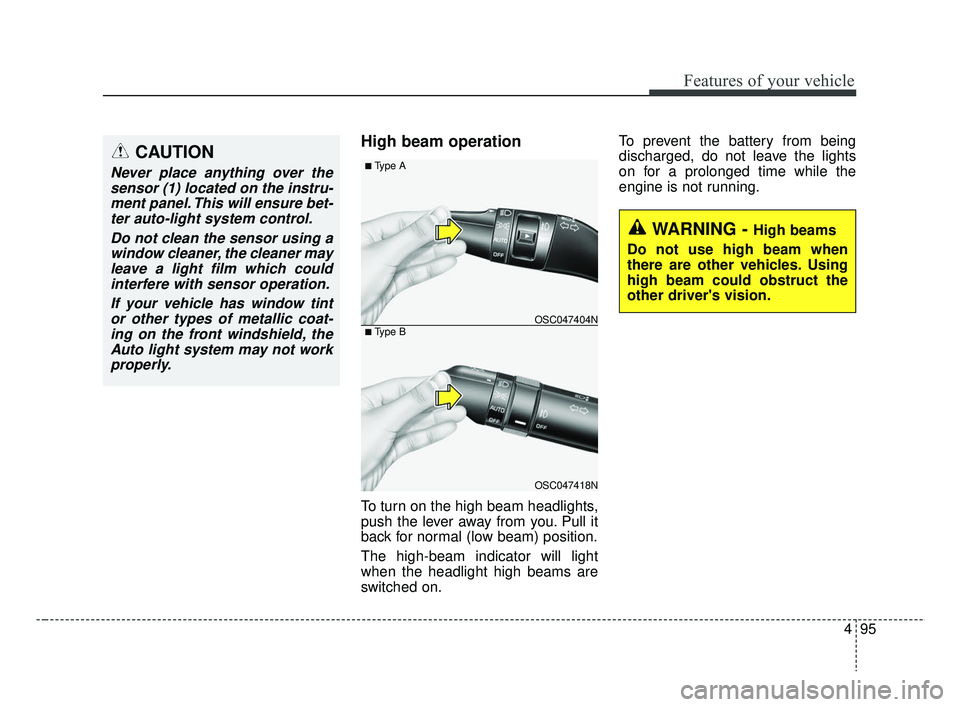
To turn on the high beam headlights,
push the lever away from you. Pull it
back for normal (low beam) position.
The high-beam indicator will light
when the headlight high beams are
switched on.To prevent the battery from being
discharged, do not leave the lights
on for a prolonged time while the
engine is not running.
WARNING - High beams
Do not use high beam when
there are other vehicles. Using
high beam could obstruct the
other driver's vision.
OSC047418N
OSC047404N
■ Type A
■ Type B
CAUTION
Never place anything over the sensor (1) located on the instru-ment panel. This will ensure bet-ter auto-light system control.
Do not clean the sensor using awindow cleaner, the cleaner mayleave a light film which couldinterfere with sensor operation.
If your vehicle has window tintor other types of metallic coat-ing on the front windshield, theAuto light system may not workproperly.
SC CAN (ENG) 4.QXP 7/18/2018 5:49 PM Page 95
Page 180 of 503
Features of your vehicle
102
4
Rear window wiper and wash-
er switch (for 5 door)
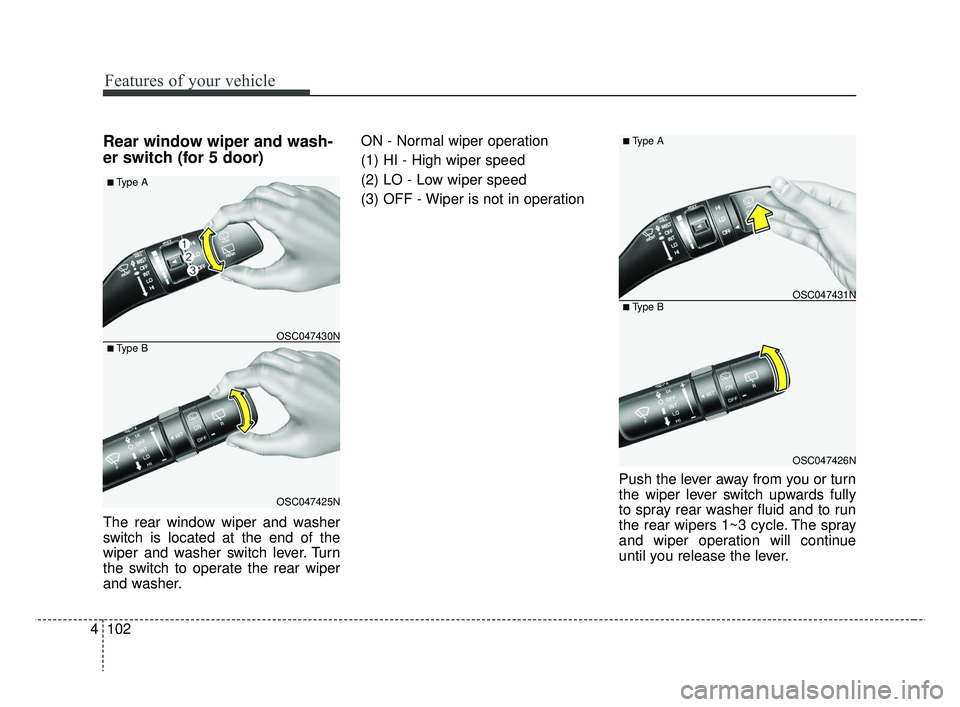
The rear window wiper and washer
switch is located at the end of the
wiper and washer switch lever. Turn
the switch to operate the rear wiper
and washer. ON - Normal wiper operation
(1) HI - High wiper speed
(2) LO - Low wiper speed
(3) OFF - Wiper is not in operation
Push the lever away from you or turn
the wiper lever switch upwards fully
to spray rear washer fluid and to run
the rear wipers 1~3 cycle. The spray
and wiper operation will continue
until you release the lever.
OSC047426N
OSC047431N
■ Type A
■ Type B
OSC047425N
OSC047430N
■ Type A
■ Type B
SC CAN (ENG) 4.QXP 7/18/2018 5:50 PM Page 102
Page 186 of 503
Features of your vehicle
108
4
If you want to defrost and defog the
front windshield, refer to “Windshield
Defrosting and Defogging” in this
section.
Rear window defroster
The defroster heats the window to
remove frost, fog and thin ice from
the interior and exterior of the rear
window, while the engine is running.
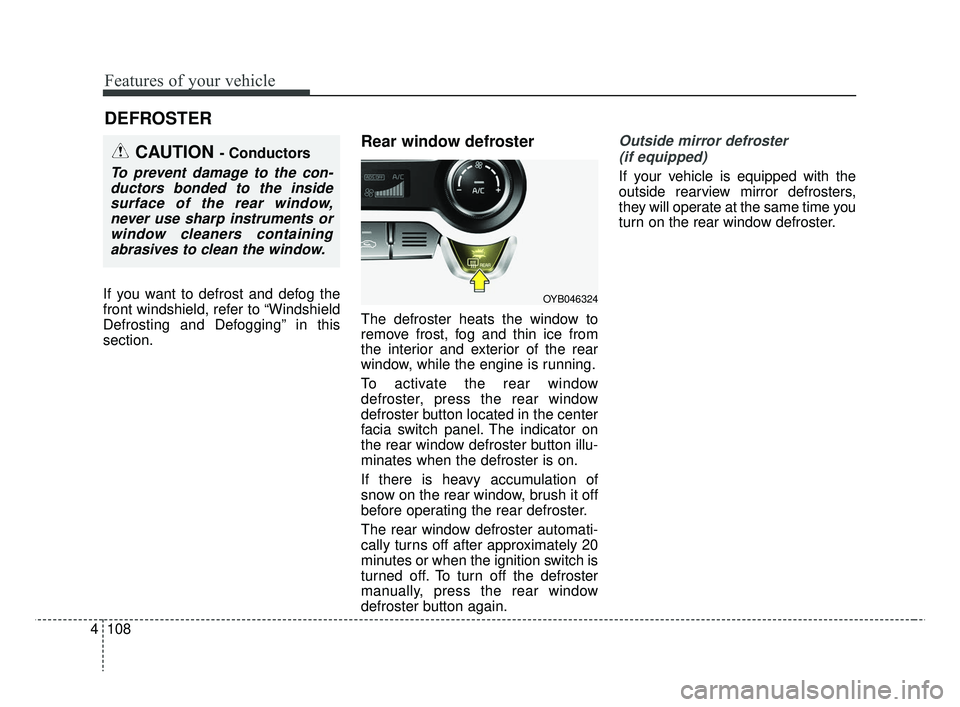
To activate the rear window
defroster, press the rear window
defroster button located in the center
facia switch panel. The indicator on
the rear window defroster button illu-
minates when the defroster is on.
If there is heavy accumulation of
snow on the rear window, brush it off
before operating the rear defroster.
The rear window defroster automati-
cally turns off after approximately 20
minutes or when the ignition switch is
turned off. To turn off the defroster
manually, press the rear window
defroster button again.
Outside mirror defroster
(if equipped)
If your vehicle is equipped with the
outside rearview mirror defrosters,
they will operate at the same time you
turn on the rear window defroster.
DEFROSTER
OYB046324
CAUTION - Conductors
To prevent damage to the con-ductors bonded to the insidesurface of the rear window,never use sharp instruments orwindow cleaners containingabrasives to clean the window.
SC CAN (ENG) 4.QXP 7/18/2018 5:51 PM Page 108
Page 187 of 503
4109
Features of your vehicle
MANUAL CLIMATE CONTROL SYSTEM
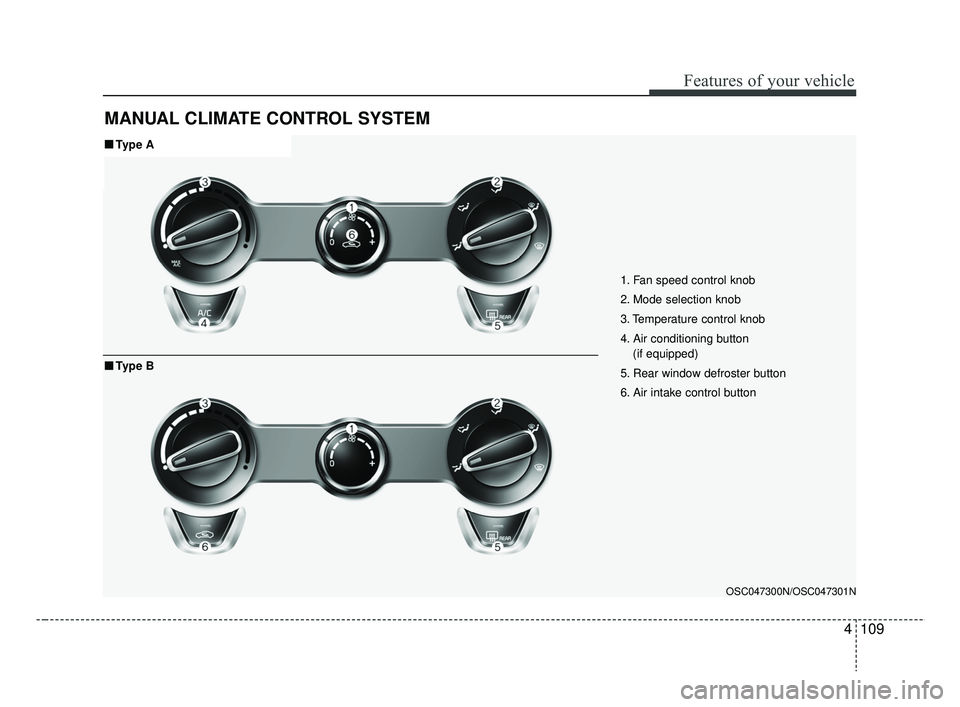
1. Fan speed control knob
2. Mode selection knob
3. Temperature control knob
4. Air conditioning button (if equipped)
5. Rear window defroster button
6. Air intake control button
OSC047300N/OSC047301N
■ ■ Type A
■ ■Type B
SC CAN (ENG) 4.QXP 7/18/2018 5:51 PM Page 109
Page 189 of 503
4111
Features of your vehicle
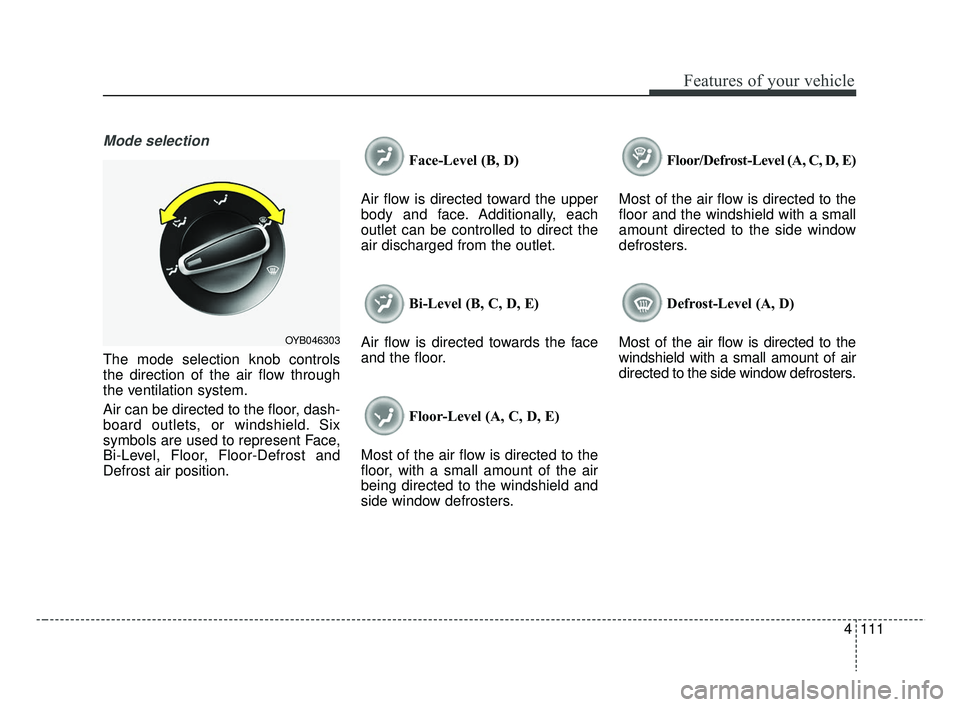
Mode selection
The mode selection knob controls
the direction of the air flow through
the ventilation system.
Air can be directed to the floor, dash-
board outlets, or windshield. Six
symbols are used to represent Face,
Bi-Level, Floor, Floor-Defrost and
Defrost air position.Face-Level (B, D)
Air flow is directed toward the upper
body and face. Additionally, each
outlet can be controlled to direct the
air discharged from the outlet.
Bi-Level (B, C, D, E)
Air flow is directed towards the face
and the floor.
Floor-Level (A, C, D, E)
Most of the air flow is directed to the
floor, with a small amount of the air
being directed to the windshield and
side window defrosters. Floor/Defrost-Level (A, C, D, E)
Most of the air flow is directed to the
floor and the windshield with a small
amount directed to the side window
defrosters.
Defrost-Level (A, D)
Most of the air flow is directed to the
windshield with a small amount of air
directed to the side window defrosters.
OYB046303
SC CAN (ENG) 4.QXP 7/18/2018 5:51 PM Page 111