ECO mode KIA SEDONA 2018 User Guide
[x] Cancel search | Manufacturer: KIA, Model Year: 2018, Model line: SEDONA, Model: KIA SEDONA 2018Pages: 586, PDF Size: 14.1 MB
Page 191 of 586
489
Features of your vehicle
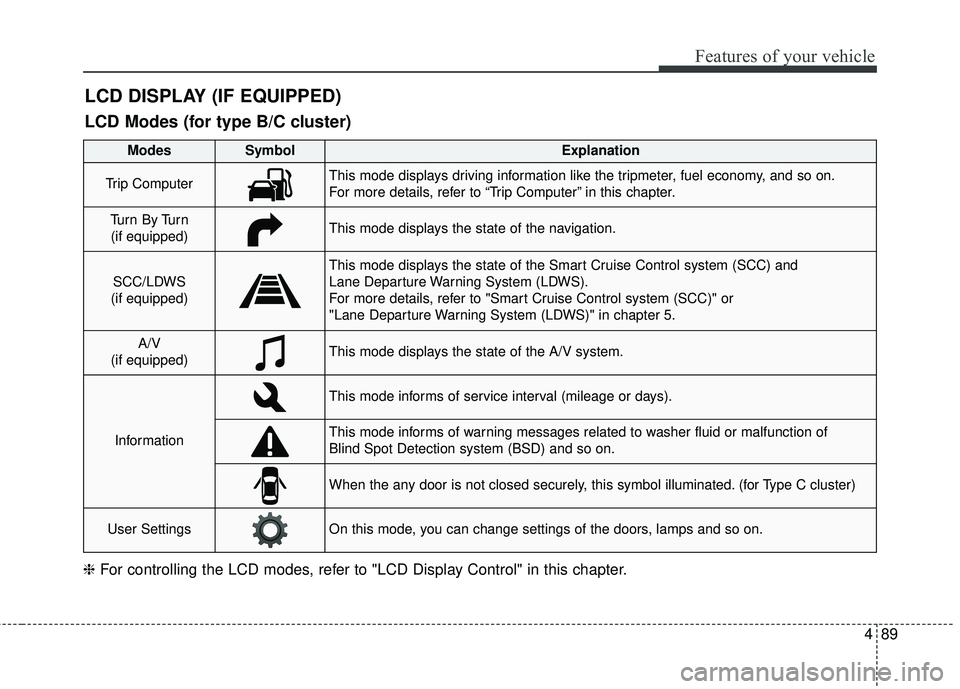
LCD DISPLAY (IF EQUIPPED)
❈For controlling the LCD modes, refer to "LCD Display Control" in this chapter.
LCD Modes (for type B/C cluster)
Modes SymbolExplanation
Trip ComputerThis mode displays driving information like the tripmeter, fuel economy, and so on.
For more details, refer to “Trip Computer” in this chapter.
Tu r n B y Tu r n
(if equipped)This mode displays the state of the navigation.
SCC/LDWS
(if equipped)
This mode displays the state of the Smart Cruise Control system (SCC) and
Lane Departure Warning System (LDWS).
For more details, refer to "Smart Cruise Control system (SCC)" or
"Lane Departure Warning System (LDWS)" in chapter 5.
A/V
(if equipped)This mode displays the state of the A/V system.
Information
This mode informs of service interval (mileage or days).
This mode informs of warning messages related to washer fluid or malfunction of
Blind Spot Detection system (BSD) and so on.
When the any door is not closed securely, this symbol illuminated. (for Type C cluster)
User SettingsOn this mode, you can change settings of the doors, lamps and so on.
Page 192 of 586
Features of your vehicle
90
4
Service Mode
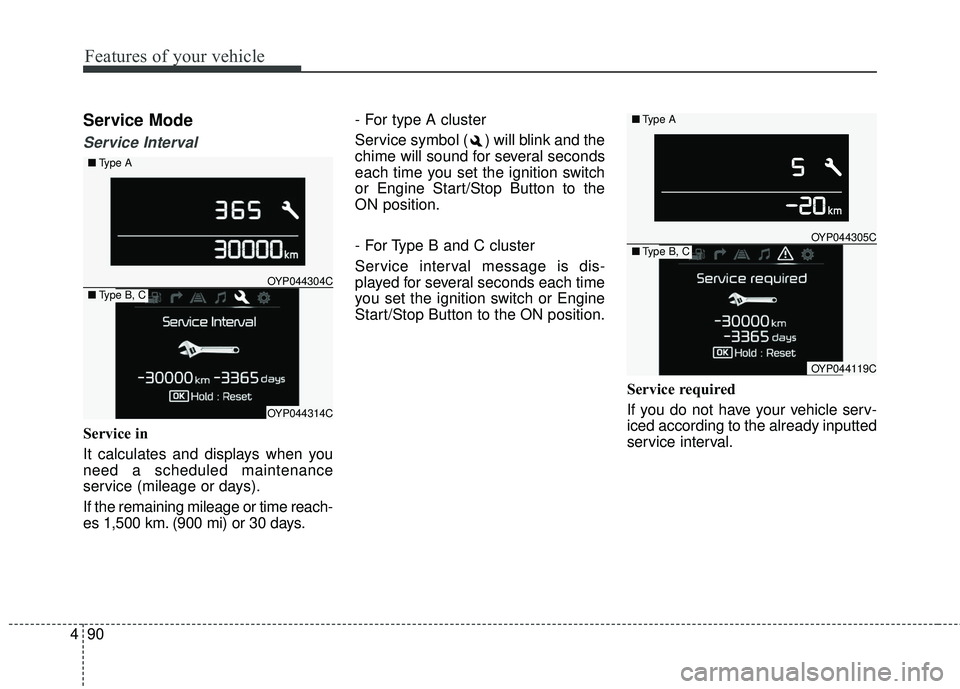
Service Interval
Service in
It calculates and displays when you
need a scheduled maintenance
service (mileage or days).
If the remaining mileage or time reach-
es 1,500 km. (900 mi) or 30 days. - For type A cluster
Service symbol ( ) will blink and the
chime will sound for several seconds
each time you set the ignition switch
or Engine Start/Stop Button to the
ON position.
- For Type B and C cluster
Service interval message is dis-
played for several seconds each time
you set the ignition switch or Engine
Start/Stop Button to the ON position.
Service required
If you do not have your vehicle serv-
iced according to the already inputted
service interval.
OYP044304C
OYP044314C
■Type A
■Type B, C
OYP044305C
OYP044119C
■Type A
■Type B, C
Page 193 of 586
491
Features of your vehicle
- For type A cluster
Service symbol ( ) will blink and the
chime will sound for several seconds
each time
you set the ignition switch or Engine
Start/Stop Button to the ON position.
- For Type B and C cluster
“Service required” message is dis-
played for several seconds each time
you set the ignition switch or Engine
Start/Stop Button to the ON position.
To reset the service interval to the
mileage and days you inputted
before:
- For Type A clusterConsult your authorized Kia dealer.
- For Type B and C cluster Press the RESET button (OK) for
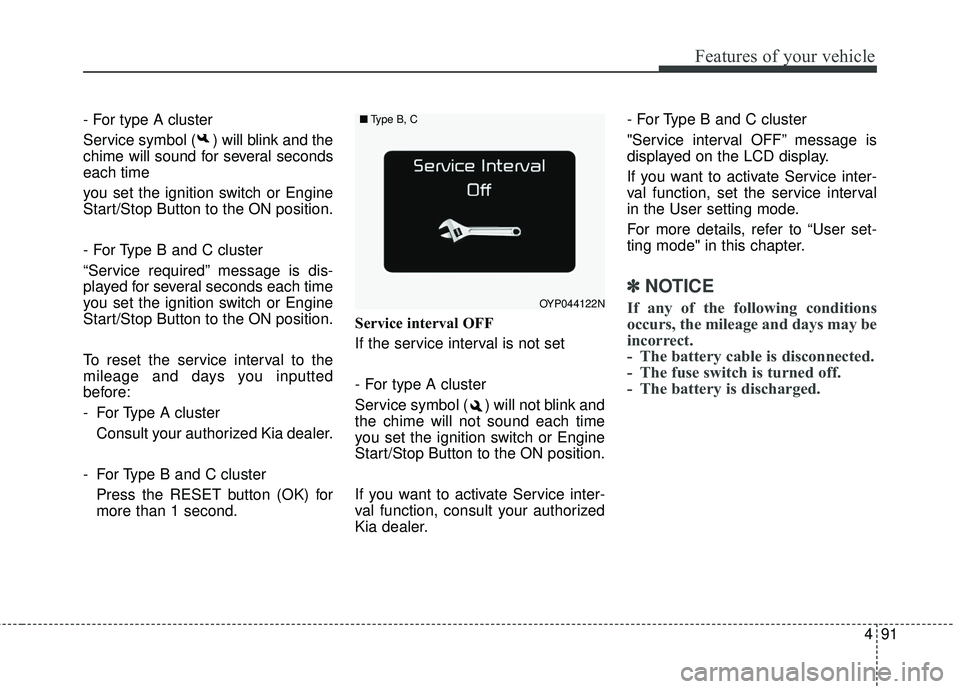
more than 1 second. Service interval OFF
If the service interval is not set
- For type A cluster
Service symbol ( ) will not blink and
the chime will not sound each time
you set the ignition switch or Engine
Start/Stop Button to the ON position.
If you want to activate Service inter-
val function, consult your authorized
Kia dealer. - For Type B and C cluster
"Service interval OFF” message is
displayed on the LCD display.
If you want to activate Service inter-
val function, set the service interval
in the User setting mode.
For more details, refer to “User set-
ting mode" in this chapter.
✽ ✽
NOTICE
If any of the following conditions
occurs, the mileage and days may be
incorrect.
- The battery cable is disconnected.
- The fuse switch is turned off.
- The battery is discharged.OYP044122N
■ Type B, C
Page 197 of 586
495
Features of your vehicle
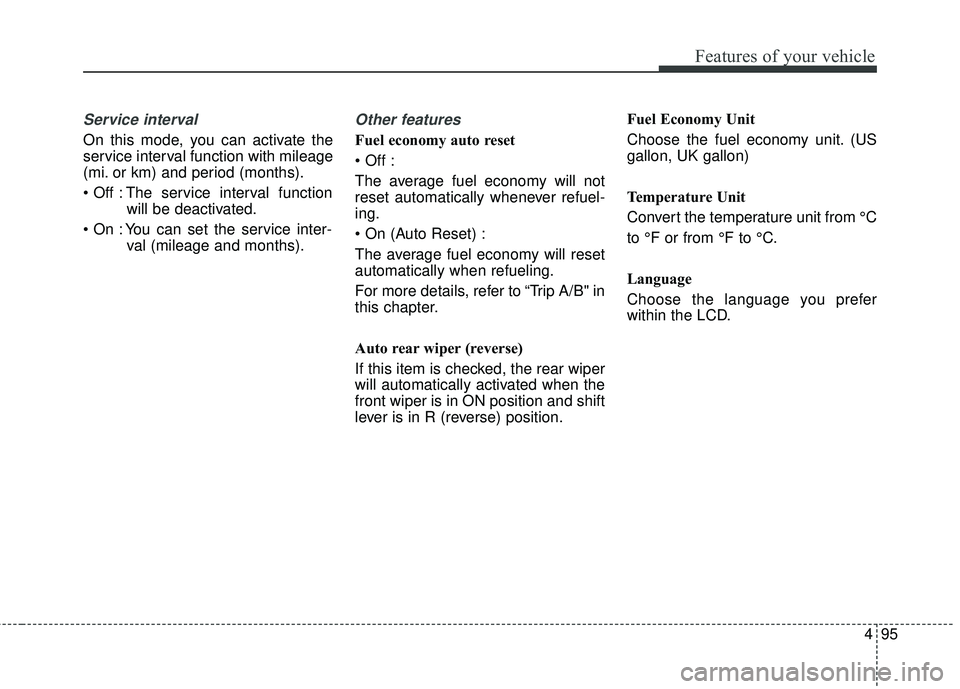
Service interval
On this mode, you can activate the
service interval function with mileage
(mi. or km) and period (months).
The service interval functionwill be deactivated.
You can set the service inter- val (mileage and months).
Other features
Fuel economy auto reset
The average fuel economy will not
reset automatically whenever refuel-
ing.
The average fuel economy will reset
automatically when refueling.
For more details, refer to “Trip A/B" in
this chapter.
Auto rear wiper (reverse)
If this item is checked, the rear wiper
will automatically activated when the
front wiper is in ON position and shift
lever is in R (reverse) position. Fuel Economy Unit
Choose the fuel economy unit. (US
gallon, UK gallon)
Temperature Unit
Convert the temperature unit from °C
to °F or from °F to °C.
Language
Choose the language you prefer
within the LCD.
Page 205 of 586
4103
Features of your vehicle
Overview
Description
The trip computer is a microcomput-
er-controlled driver information sys-
tem that displays information related
to driving.
✽ ✽NOTICE
Some driving information stored in
the trip computer (for example
Average Vehicle Speed) resets if the
battery is disconnected.
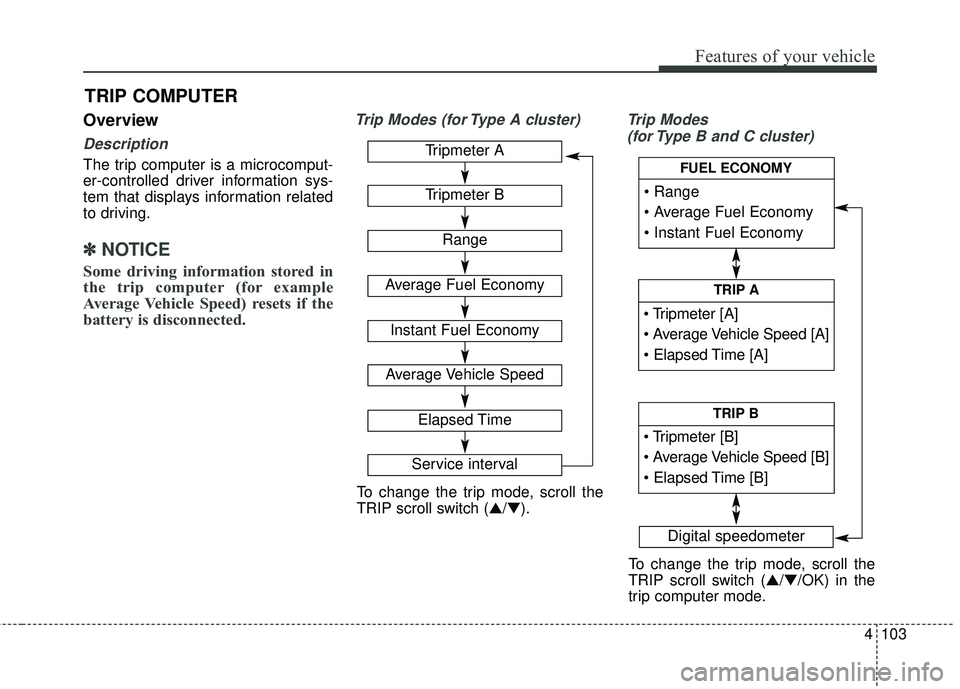
Trip Modes (for Type A cluster) Trip Modes
(for Type B and C cluster)
TRIP COMPUTER
Tripmeter A
Tripmeter B
Range
Average Fuel Economy
Instant Fuel Economy
Average Vehicle Speed
Elapsed Time
Service interval
Digital speedometer
To change the trip mode, scroll the
TRIP scroll switch (▲/▼).
To change the trip mode, scroll the
TRIP scroll switch (▲/▼/OK) in the
trip computer mode.
TRIP A
TRIP B
FUEL ECONOMY
Page 208 of 586
Features of your vehicle
106
4
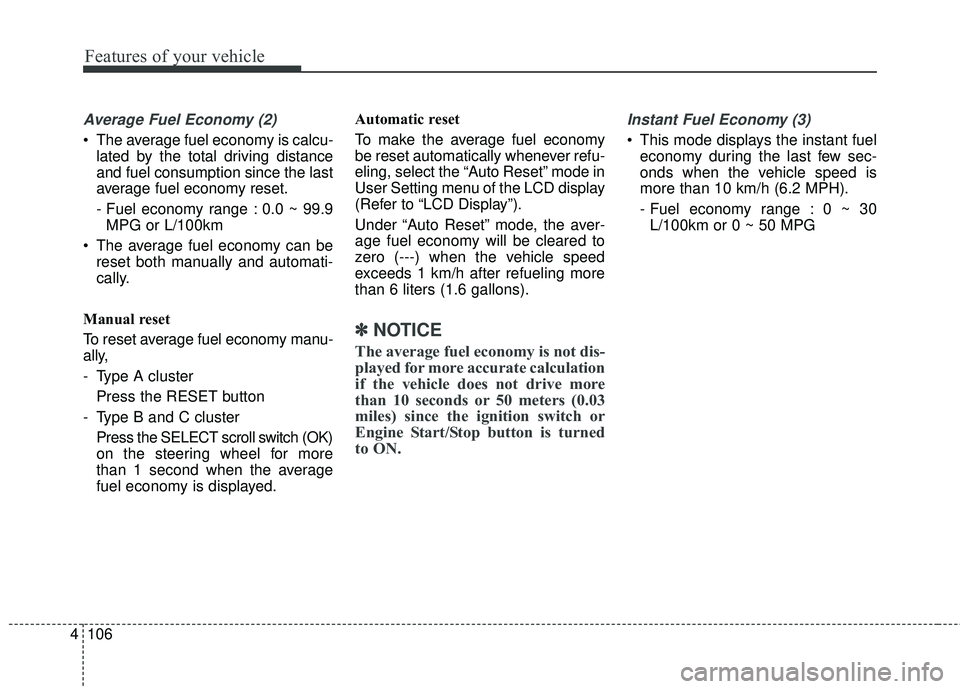
Average Fuel Economy (2)
The average fuel economy is calcu-
lated by the total driving distance
and fuel consumption since the last
average fuel economy reset.
- Fuel economy range : 0.0 ~ 99.9MPG or L/100km
The average fuel economy can be reset both manually and automati-
cally.
Manual reset
To reset average fuel economy manu-
ally,
- Type A cluster Press the RESET button
- Type B and C cluster Press the SELECT scroll switch (OK)
on the steering wheel for more
than 1 second when the average
fuel economy is displayed. Automatic reset
To make the average fuel economy
be reset automatically whenever refu-
eling, select the “Auto Reset” mode in
User Setting menu of the LCD display
(Refer to “LCD Display”).
Under “Auto Reset” mode, the aver-
age fuel economy will be cleared to
zero (---) when the vehicle speed
exceeds 1 km/h after refueling more
than 6 liters (1.6 gallons).
✽ ✽
NOTICE
The average fuel economy is not dis-
played for more accurate calculation
if the vehicle does not drive more
than 10 seconds or 50 meters (0.03
miles) since the ignition switch or
Engine Start/Stop button is turned
to ON.
Instant Fuel Economy (3)
This mode displays the instant fuel
economy during the last few sec-
onds when the vehicle speed is
more than 10 km/h (6.2 MPH).
- Fuel economy range : 0 ~ 30L/100km or 0 ~ 50 MPG
Page 209 of 586
4107
Features of your vehicle
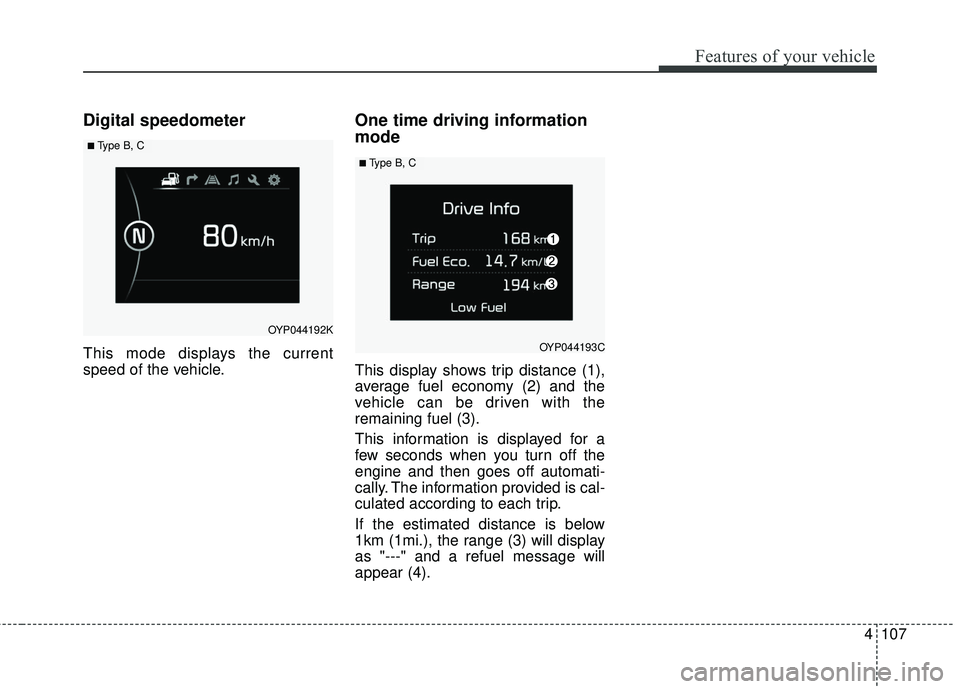
Digital speedometer
This mode displays the current
speed of the vehicle.
One time driving information
mode
This display shows trip distance (1),
average fuel economy (2) and the
vehicle can be driven with the
remaining fuel (3).
This information is displayed for a
few seconds when you turn off the
engine and then goes off automati-
cally. The information provided is cal-
culated according to each trip.
If the estimated distance is below
1km (1mi.), the range (3) will display
as "---" and a refuel message will
appear (4).
OYP044192K
■ Type B, C
OYP044193C
■ Type B, C
Page 217 of 586
4115
Features of your vehicle
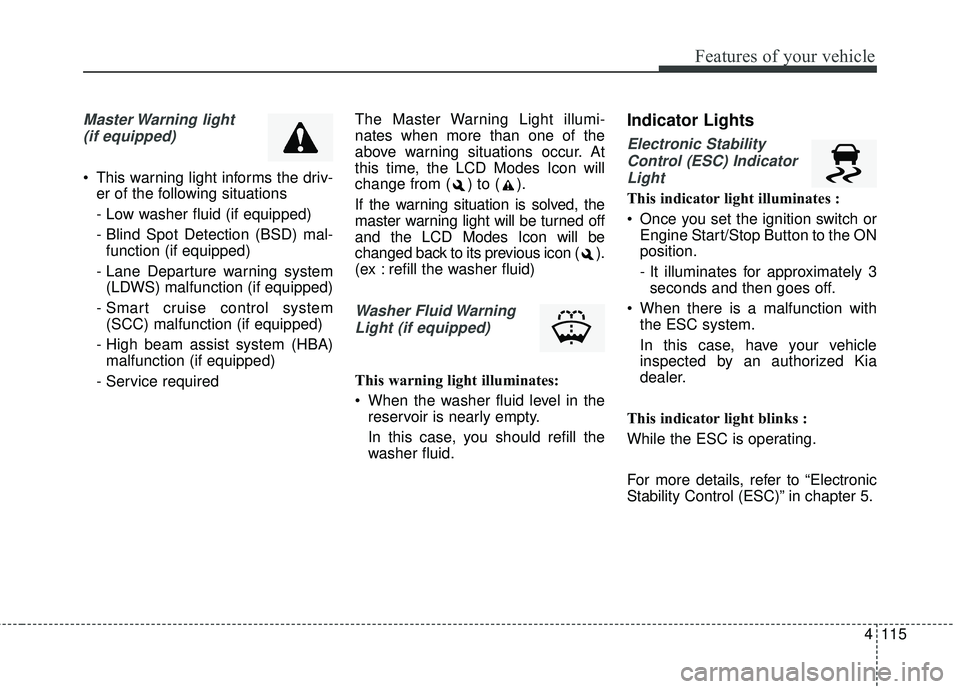
Master Warning light (if equipped)
This warning light informs the driv- er of the following situations
- Low washer fluid (if equipped)
- Blind Spot Detection (BSD) mal-function (if equipped)
- Lane Departure warning system (LDWS) malfunction (if equipped)
- Smart cruise control system (SCC) malfunction (if equipped)
- High beam assist system (HBA) malfunction (if equipped)
- Service required The Master Warning Light illumi-
nates when more than one of the
above warning situations occur. At
this time, the LCD Modes Icon will
change from ( ) to ( ).
If the warning situation is solved, the
master warning light will be turned off
and the LCD Modes Icon will be
changed back to its previous icon ( ).
(ex : refill the washer fluid)
Washer Fluid Warning
Light (if equipped)
This warning light illuminates:
When the washer fluid level in the reservoir is nearly empty.
In this case, you should refill the
washer fluid.
Indicator Lights
Electronic Stability
Control (ESC) IndicatorLight
This indicator light illuminates :
Once you set the ignition switch or Engine Start/Stop Button to the ON
position.
- It illuminates for approximately 3seconds and then goes off.
When there is a malfunction with the ESC system.
In this case, have your vehicle
inspected by an authorized Kia
dealer.
This indicator light blinks :
While the ESC is operating.
For more details, refer to “Electronic
Stability Control (ESC)” in chapter 5.
Page 218 of 586
Features of your vehicle
116
4
Electronic Stability
Control (ESC) OFFIndicator Light
This indicator light illuminates :
Once you set the ignition switch or Engine Start/Stop Button to the ON
position.
- It illuminates for approximately 3seconds and then goes off.
When you deactivate the ESC sys- tem by pressing the ESC OFF but-
ton.
For more details, refer to “Electronic
Stability Control (ESC)” in chapter 5.
ECO Mode indicator Light
Active ECO system
This indicator light illuminates:
When the Active ECO button is
pressed the ECO Mode indicator
(green) will illuminate to show that
the Active ECO is operating.
For more detailed information, refer
to "Active ECO" or "Drive mode" in
chapter 5.
COMPORT ModeIndicator Light (if equipped)
This indicator light illuminates :
When you select “COMPORT” mode as drive mode.
❈ For more details, refer to “Drive
Mode” in chapter 5.
ECOCOMPORT
Page 262 of 586
Features of your vehicle
160
4
When using the air conditioning
system, you may notice clear water
dripping (or even puddling) on the
ground under the passenger side
of the vehicle. This is a normal sys-
tem operation characteristic.
Operating the air conditioning sys- tem in the recirculated air position
provides maximum cooling, how-
ever, continual operation in this
mode may cause the air inside the
vehicle to become stale.
During cooling operation, you may occasionally notice a misty air flow
because of rapid cooling and
humid air intake. This is a normal
system operation characteristic.Climate control air filter
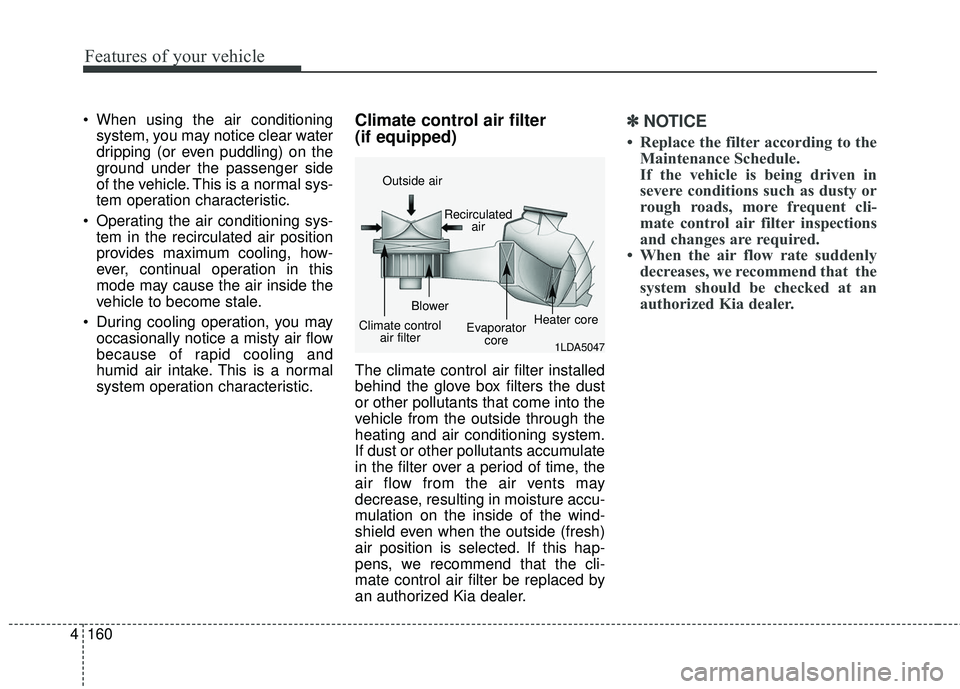
(if equipped)
The climate control air filter installed
behind the glove box filters the dust
or other pollutants that come into the
vehicle from the outside through the
heating and air conditioning system.
If dust or other pollutants accumulate
in the filter over a period of time, the
air flow from the air vents may
decrease, resulting in moisture accu-
mulation on the inside of the wind-
shield even when the outside (fresh)
air position is selected. If this hap-
pens, we recommend that the cli-
mate control air filter be replaced by
an authorized Kia dealer.
✽ ✽ NOTICE
• Replace the filter according to the
Maintenance Schedule.
If the vehicle is being driven in
severe conditions such as dusty or
rough roads, more frequent cli-
mate control air filter inspections
and changes are required.
• When the air flow rate suddenly decreases, we recommend that the
system should be checked at an
authorized Kia dealer.
1LDA5047
Outside air
Recirculatedair
Climate control air filter Blower
Evaporatorcore Heater core