lock KIA SEDONA 2019 Owners Manual
[x] Cancel search | Manufacturer: KIA, Model Year: 2019, Model line: SEDONA, Model: KIA SEDONA 2019Pages: 593, PDF Size: 15.93 MB
Page 283 of 593
4179
Features of your vehicle
Rear climate control
(if equipped)
To turn on the rear climate control
system;
From the front seat
1. Set the rear climate control selec-tion (REAR ON) button in the front
climate control panel to the ON
position.
2. Set the rear fan speed control but- ton in the front climate control
panel to the desired position.
3. Set the rear temperature control knob in the front climate control
panel to the desired position. (if
equipped)
From the rear seat
1. Set the rear climate control selec-tion (REAR ON) button in the front
climate control panel to the ON
position.
2. Set the rear climate control selec- tion(REAR LOCK) button in the
front climate control panel to the
OFF position.
3. Set the rear fan speed control but- ton on the rear climate control
panel to the desired position.
4. Set the rear temperature control button on the rear climate control
panel to the desired position.
5. Select the desired rear mode but- ton on the rear climate control
panel. (if equipped)
6. To turn off the rear air conditioning system press the off button in the
rear climate control panel.
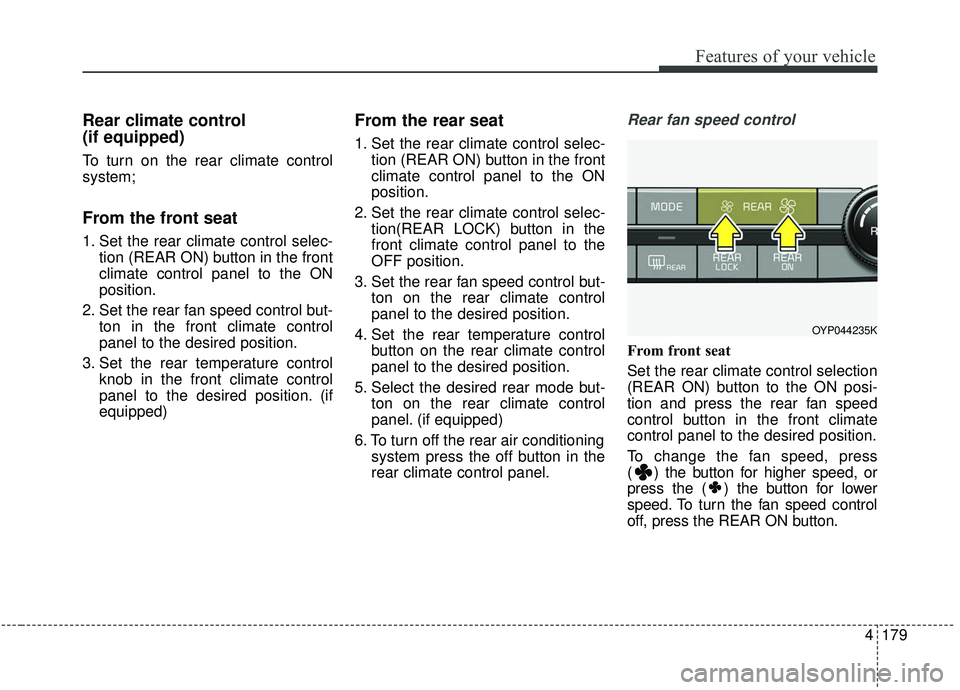
Rear fan speed control
From front seat
Set the rear climate control selection
(REAR ON) button to the ON posi-
tion and press the rear fan speed
control button in the front climate
control panel to the desired position.
To change the fan speed, press
( ) the button for higher speed, or
press the ( ) the button for lower
speed. To turn the fan speed control
off, press the REAR ON button.
OYP044235K
Page 284 of 593
Features of your vehicle
180
4
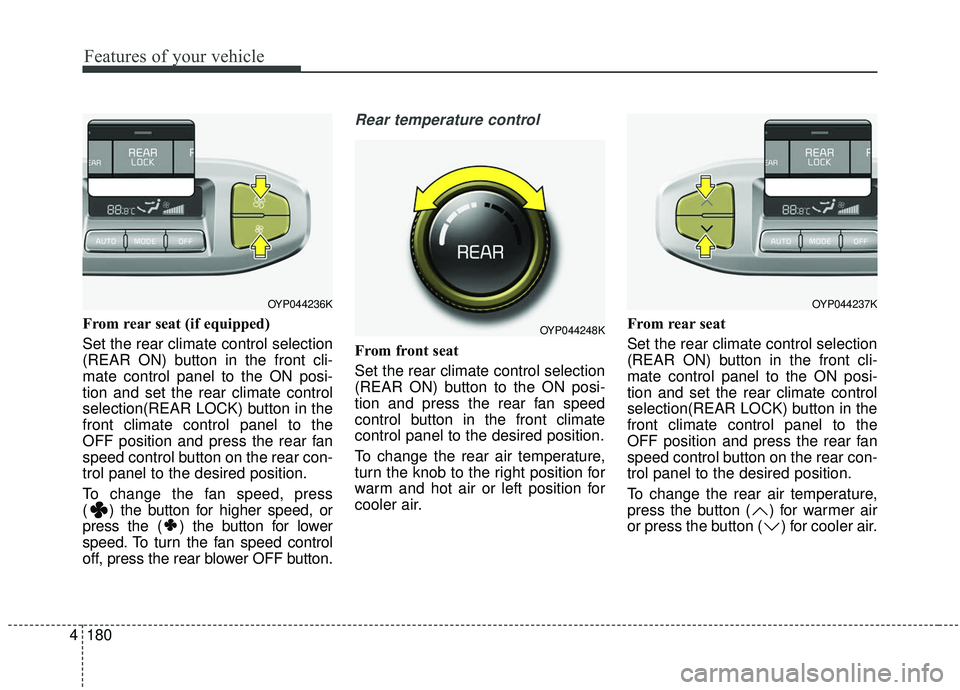
From rear seat (if equipped)
Set the rear climate control selection
(REAR ON) button in the front cli-
mate control panel to the ON posi-
tion and set the rear climate control
selection(REAR LOCK) button in the
front climate control panel to the
OFF position and press the rear fan
speed control button on the rear con-
trol panel to the desired position.
To change the fan speed, press
( ) the button for higher speed, or
press the ( ) the button for lower
speed. To turn the fan speed control
off, press the rear blower OFF button.
Rear temperature control
From front seat
Set the rear climate control selection
(REAR ON) button to the ON posi-
tion and press the rear fan speed
control button in the front climate
control panel to the desired position.
To change the rear air temperature,
turn the knob to the right position for
warm and hot air or left position for
cooler air. From rear seat
Set the rear climate control selection
(REAR ON) button in the front cli-
mate control panel to the ON posi-
tion and set the rear climate control
selection(REAR LOCK) button in the
front climate control panel to the
OFF position and press the rear fan
speed control button on the rear con-
trol panel to the desired position.
To change the rear air temperature,
press the button ( ) for warmer air
or press the button ( ) for cooler air.
OYP044236K
OYP044248K
OYP044237K
Page 285 of 593
4181
Features of your vehicle
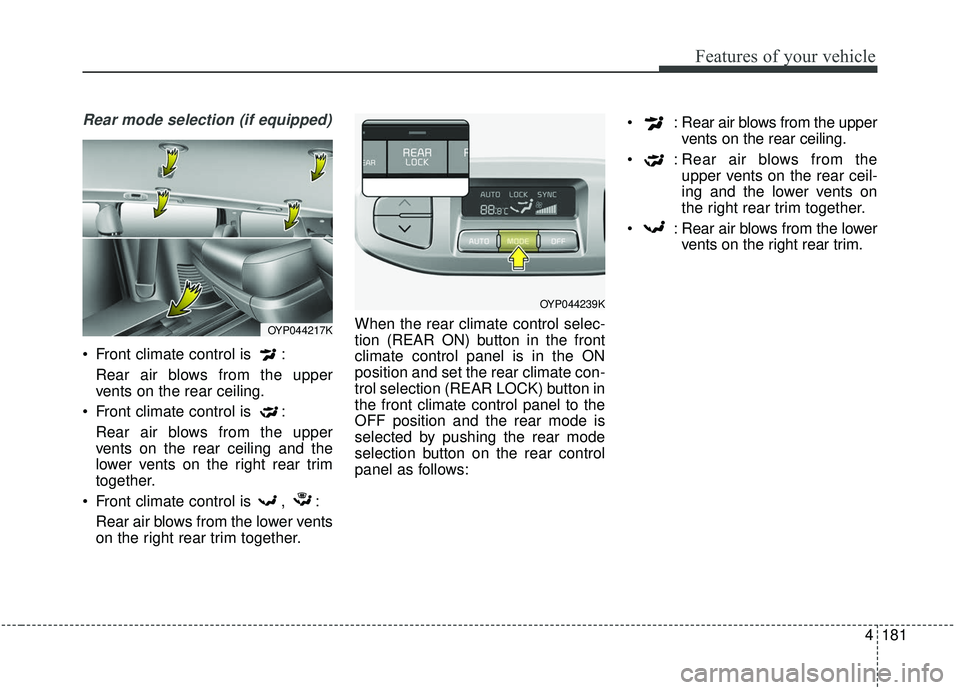
Rear mode selection (if equipped)
Front climate control is :Rear air blows from the upper
vents on the rear ceiling.
Front climate control is : Rear air blows from the upper
vents on the rear ceiling and the
lower vents on the right rear trim
together.
Front climate control is , : Rear air blows from the lower vents
on the right rear trim together. When the rear climate control selec-
tion (REAR ON) button in the front
climate control panel is in the ON
position and set the rear climate con-
trol selection (REAR LOCK) button in
the front climate control panel to the
OFF position and the rear mode is
selected by pushing the rear mode
selection button on the rear control
panel as follows: : Rear air blows from the upper
vents on the rear ceiling.
: Rear air blows from the upper vents on the rear ceil-
ing and the lower vents on
the right rear trim together.
: Rear air blows from the lower vents on the right rear trim.
OYP044217K
OYP044239K
Page 287 of 593
4183
Features of your vehicle
Operation Tips
To keep dust or unpleasant fumesfrom entering the vehicle through
the ventilation system, temporarily
set the air intake control to the
recirculated air position. Be sure to
return the control to the fresh air
position when the irritation has
passed to keep fresh air in the
vehicle. This will help keep the driv-
er alert and comfortable.
Air for the heating/cooling system is drawn in through the grilles just
ahead of the windshield. Care
should be taken that these are not
blocked by leaves, snow, ice or
other obstructions.
To prevent interior fog on the wind- shield, set the air intake control to
the fresh air position and fan speed
to the desired position, turn on the
air conditioning system, and adjust
the temperature control to desired
temperature.Air conditioning (if equipped)
Air Conditioning System in this vehi-
cle is filled with R-1234yf refrigerant.
1. Start the engine. Press the air con- ditioning button.
2. Set the mode to the position.
3. Set the air intake control to the out- side air or recirculated air position.
4. Adjust the fan speed control and temperature control to maintain
maximum comfort.
When maximum cooling is desired, set the temperature control to the
extreme left position, set the mode
control to the MAX A/C position,
then set the fan speed control to
the highest speed.CAUTION- Excessive A/C
When using the air conditioningsystem, monitor the enginecoolant closely while driving uphills or in heavy traffic when out-side temperatures are high. Airconditioning system operationmay cause engine overheatingand potential engine damage.Continue to use the blower fanbut turn the air conditioning sys-tem off if the engine coolanttemperature gauge indicatesengine overheating.
Page 297 of 593
4193
Features of your vehicle
Center console storage
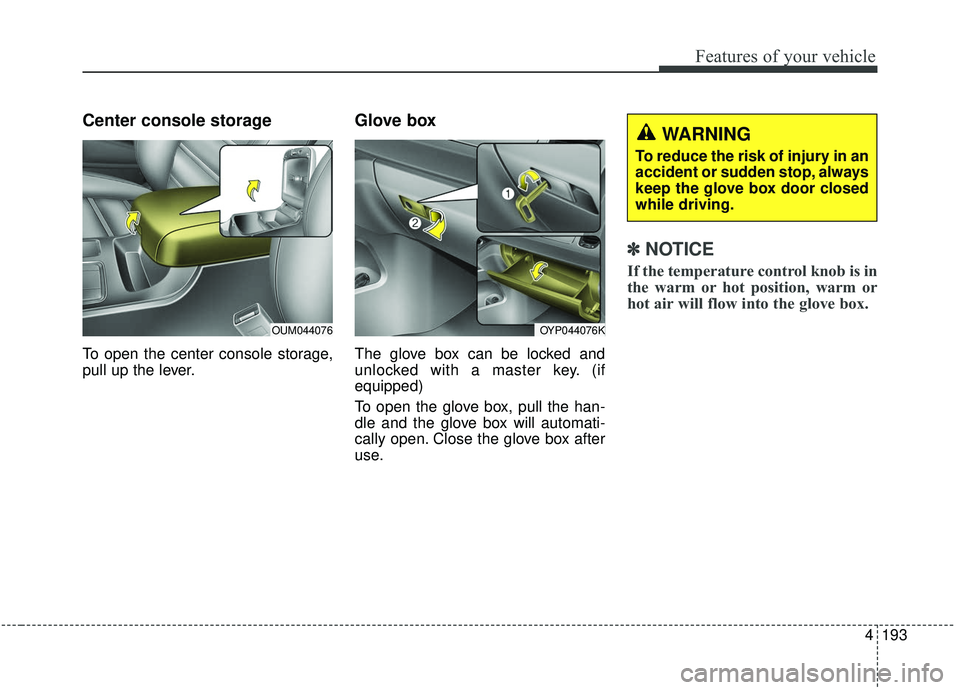
To open the center console storage,
pull up the lever.
Glove box
The glove box can be locked and
unlocked with a master key. (if
equipped)
To open the glove box, pull the han-
dle and the glove box will automati-
cally open. Close the glove box after
use.
✽ ✽
NOTICE
If the temperature control knob is in
the warm or hot position, warm or
hot air will flow into the glove box.
OYP044076K
WARNING
To reduce the risk of injury in an
accident or sudden stop, always
keep the glove box door closed
while driving.
OUM044076
Page 298 of 593
Features of your vehicle
194
4
Sunglass holder
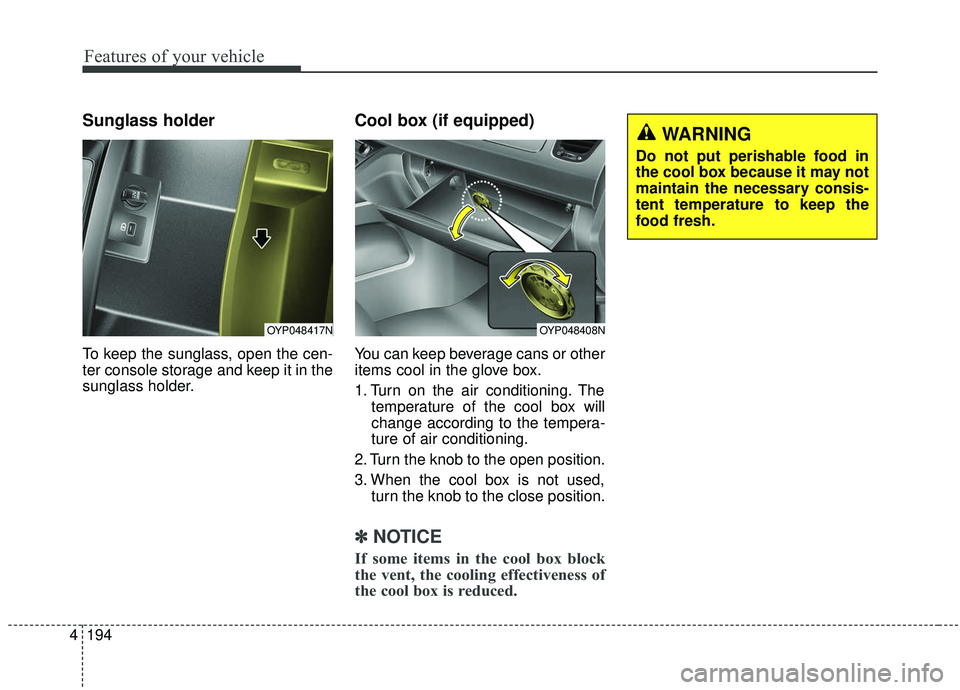
To keep the sunglass, open the cen-
ter console storage and keep it in the
sunglass holder.
Cool box (if equipped)
You can keep beverage cans or other
items cool in the glove box.
1. Turn on the air conditioning. The
temperature of the cool box will
change according to the tempera-
ture of air conditioning.
2. Turn the knob to the open position.
3. When the cool box is not used, turn the knob to the close position.
✽ ✽
NOTICE
If some items in the cool box block
the vent, the cooling effectiveness of
the cool box is reduced.
OYP048408N
WARNING
Do not put perishable food in
the cool box because it may not
maintain the necessary consis-
tent temperature to keep the
food fresh.
OYP048417N
Page 319 of 593
55
Driving your vehicle
Before entering vehicle
• Be sure that all windows, outsidemirror(s), and outside lights are
clean.
Check the condition of the tires.
Check under the vehicle for any sign of leaks.
Be sure there are no obstacles behind you if you intend to back up.
Necessary inspections
Fluid levels, such as engine oil,
engine coolant, brake fluid, and
washer fluid should be checked on a
regular basis, at the exact interval
depending on the fluid. Further
details are provided in chapter 7,
“Maintenance”.
Before starting
Close and lock all doors.
Position the seat so that all con-trols are easily reached.
Buckle your seat belt.
Adjust the inside and outside rearview mirrors.
Be sure that all lights work.
Check all gauges.
Check the operation of warning lights when the ignition switch is
turned to the ON position.
Release the parking brake and make sure the brake warning light
goes out.
For safe operation, be sure you are
familiar with your vehicle and its
equipment.
BEFORE DRIVING
WARNING - Distracted driving
Focus on the road while driving.
The driver's primary responsi-
bility is in the safe and legal
operation of the vehicle. Use of
any handled devices, other
equipment or vehicle systems
that distract the drive should
not be used during vehicle
operation.
Page 321 of 593
57
Driving your vehicle
Illuminated ignition switch
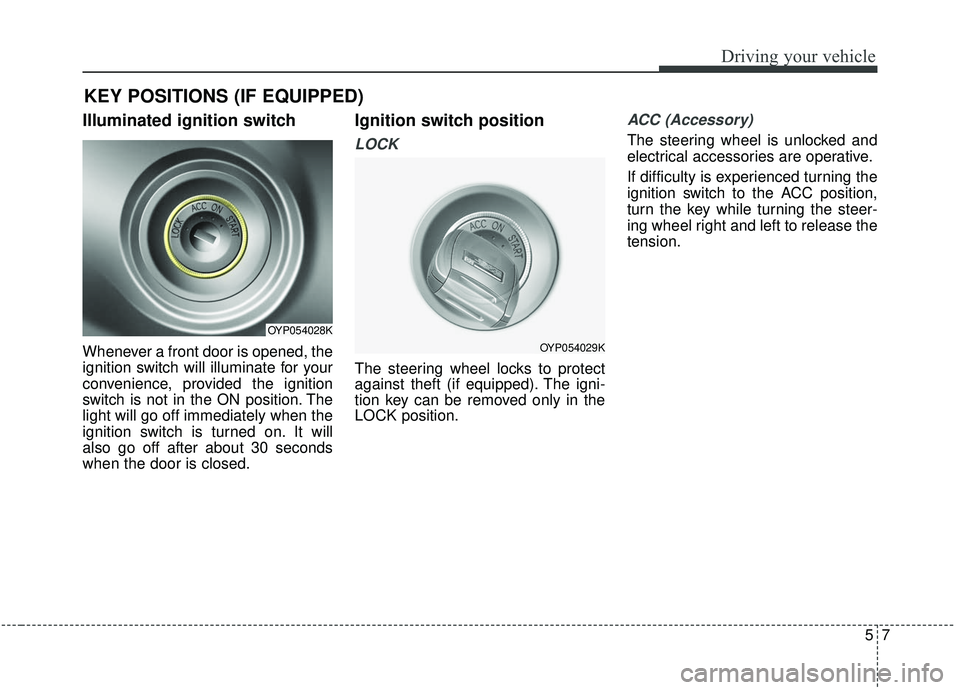
Whenever a front door is opened, the
ignition switch will illuminate for your
convenience, provided the ignition
switch is not in the ON position. The
light will go off immediately when the
ignition switch is turned on. It will
also go off after about 30 seconds
when the door is closed.
Ignition switch position
LOCK
The steering wheel locks to protect
against theft (if equipped). The igni-
tion key can be removed only in the
LOCK position.
ACC (Accessory)
The steering wheel is unlocked and
electrical accessories are operative.
If difficulty is experienced turning the
ignition switch to the ACC position,
turn the key while turning the steer-
ing wheel right and left to release the
tension.
KEY POSITIONS (IF EQUIPPED)
OYP054028K
OYP054029K
Page 322 of 593
Driving your vehicle
85
ON
The warning lights can be checked
before the engine is started. This is
the normal running position after the
engine is started.
Do not leave the ignition switch ON ifthe engine is not running to preventbattery discharge.
START
Turn the ignition switch to the START
position to start the engine. The
engine will crank until you release
the key; then it returns to the ON
position. The brake warning light can
be checked in this position. The anti-theft steering column lock (if
equipped) is not a substitute for the
parking brake. Before leaving the dri-
ver’s seat, always make sure the shift
lever is engaged in P (Park) for auto-
matic transaxle, set the parking
brake fully and shut the engine off.
Unexpected and sudden vehicle
movement may occur if these pre-
cautions are not taken.
Starting the engine
1.Make sure the parking brake is
applied.
2.Place the transaxle shift lever in P (Park). Depress the brake pedal
fully.
You can also start the engine when
the shift lever is in the N (Neutral)
position.WARNING- Ignition
switch
Never turn the ignition switch to
LOCK or ACC while the vehicle
is moving. This would result in
loss of directional control and
braking function, which could
cause an accident.
WARNING- Proper footwear
Always wear appropriate shoes
when operating your vehicle.
Unsuitable shoes (high heels,
ski boots, sandals, etc.) may
interfere with your ability to use
the brake and accelerator pedal.
Page 324 of 593
Driving your vehicle
10
5
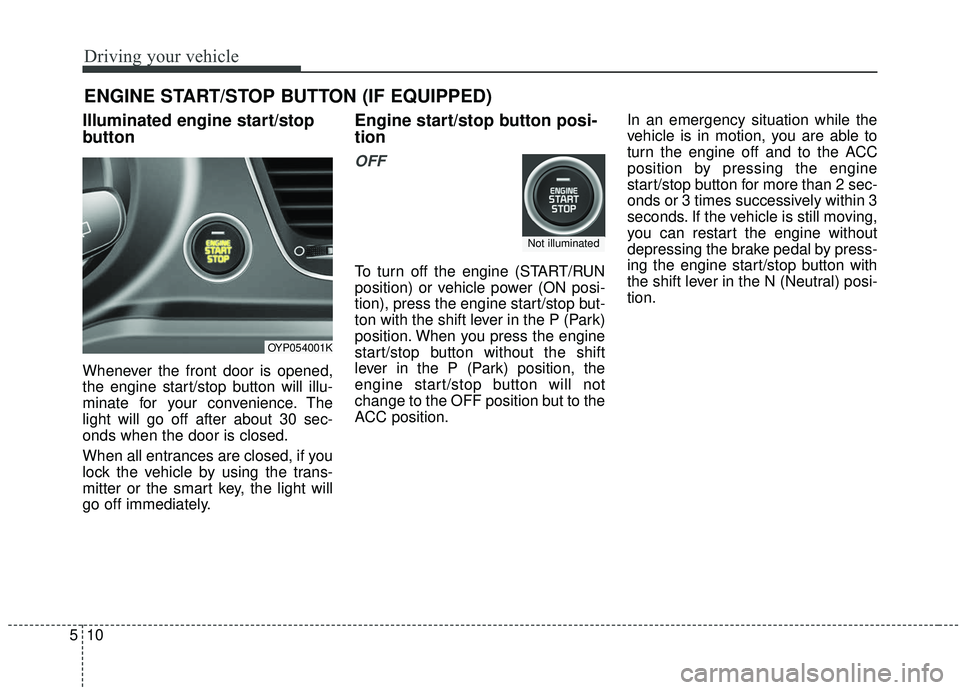
Illuminated engine start/stop
button
Whenever the front door is opened,
the engine start/stop button will illu-
minate for your convenience. The
light will go off after about 30 sec-
onds when the door is closed.
When all entrances are closed, if you
lock the vehicle by using the trans-
mitter or the smart key, the light will
go off immediately.
Engine start/stop button posi-
tion
OFF
To turn off the engine (START/RUN
position) or vehicle power (ON posi-
tion), press the engine start/stop but-
ton with the shift lever in the P (Park)
position. When you press the engine
start/stop button without the shift
lever in the P (Park) position, the
engine start/stop button will not
change to the OFF position but to the
ACC position. In an emergency situation while the
vehicle is in motion, you are able to
turn the engine off and to the ACC
position by pressing the engine
start/stop button for more than 2 sec-
onds or 3 times successively within 3
seconds. If the vehicle is still moving,
you can restart the engine without
depressing the brake pedal by press-
ing the engine start/stop button with
the shift lever in the N (Neutral) posi-
tion.
ENGINE START/STOP BUTTON (IF EQUIPPED)
OYP054001K
Not illuminated