change wheel KIA SEDONA 2019 Owners Manual
[x] Cancel search | Manufacturer: KIA, Model Year: 2019, Model line: SEDONA, Model: KIA SEDONA 2019Pages: 593, PDF Size: 15.93 MB
Page 174 of 593
Features of your vehicle
70
4
Power steering (if equipped)
Power steering uses energy from the
engine to assist you in steering the
vehicle. If the engine is off or if the
power steering system becomes
inoperative, the vehicle may still be
steered, but it will require increased
steering effort.
Should you notice any change in the
effort required to steer during normal
vehicle operation, have the power
steering checked by an authorized
Kia dealer. If the power steering drive belt
breaks or if the power steering pump
malfunctions, the steering effort will
greatly increase.
✽ ✽
NOTICE
• If the vehicle is parked for extend-
ed periods outside in cold weather
(below -10°C/14°F), the power
steering may require increased
effort when the engine is first
started. This is caused by
increased fluid viscosity due to the
cold weather and does not indicate
a malfunction.
When this happens, increase the
engine RPM by depressing the
accelerator until the RPM reaches
1,500 rpm then release or let the
engine idle for two or three min-
utes to warm up the fluid.
Electric power steering
(if equipped)
Power steering uses the motor to
assist you in steering the vehicle. If
the engine is off or if the power steer-
ing system becomes inoperative, the
vehicle may still be steered, but it will
require increased steering effort.
The motor driven power steering is
controlled by the power steering con-
trol unit which senses the steering
wheel torque and vehicle speed to
command the motor.
The steering wheel becomes heavier
as the vehicle’s speed increases and
becomes lighter as the vehicle’s
speed decreases for better control of
the steering wheel.
Should you notice any change in the
effort required to steer during normal
vehicle operation, have the power
steering checked by an authorized
Kia dealer.
STEERING WHEEL
CAUTION - Power
steering pump
Never hold the steering wheel to
the extreme right or left for morethan 5 seconds with the enginerunning. Holding the steeringwheel for more than 5 seconds ineither position may cause dam-age to the power steering pump.
Page 176 of 593
Features of your vehicle
72
4
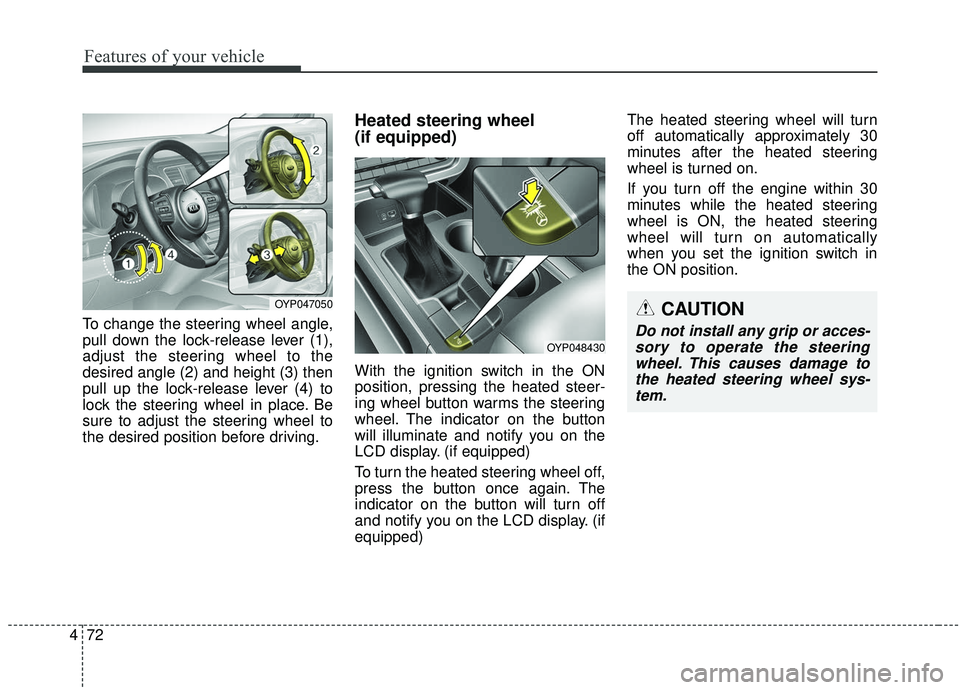
To change the steering wheel angle,
pull down the lock-release lever (1),
adjust the steering wheel to the
desired angle (2) and height (3) then
pull up the lock-release lever (4) to
lock the steering wheel in place. Be
sure to adjust the steering wheel to
the desired position before driving.
Heated steering wheel
(if equipped)
With the ignition switch in the ON
position, pressing the heated steer-
ing wheel button warms the steering
wheel. The indicator on the button
will illuminate and notify you on the
LCD display. (if equipped)
To turn the heated steering wheel off,
press the button once again. The
indicator on the button will turn off
and notify you on the LCD display. (if
equipped) The heated steering wheel will turn
off automatically approximately 30
minutes after the heated steering
wheel is turned on.
If you turn off the engine within 30
minutes while the heated steering
wheel is ON, the heated steering
wheel will turn on automatically
when you set the ignition switch in
the ON position.
OYP048430
CAUTION
Do not install any grip or acces-
sory to operate the steeringwheel. This causes damage tothe heated steering wheel sys-tem.
OYP047050
Page 194 of 593
Features of your vehicle
90
4
Instrument Cluster Control
Adjusting Instrument Cluster
Illumination
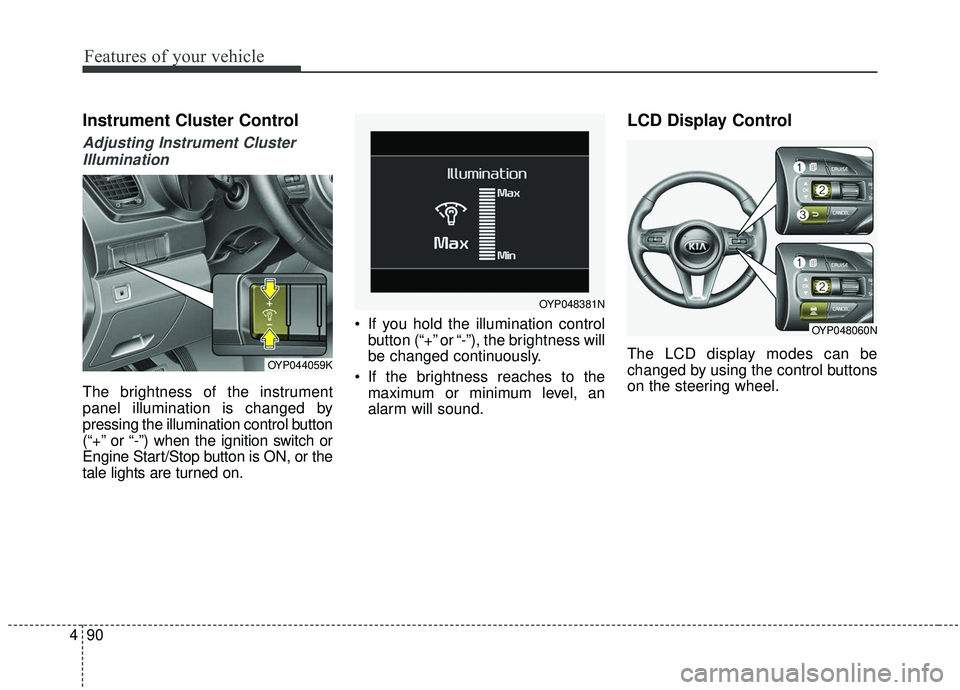
The brightness of the instrument
panel illumination is changed by
pressing the illumination control button
(“+” or “-”) when the ignition switch or
Engine Start/Stop button is ON, or the
tale lights are turned on. If you hold the illumination control
button (“+” or “-”), the brightness will
be changed continuously.
If the brightness reaches to the maximum or minimum level, an
alarm will sound.
LCD Display Control
The LCD display modes can be
changed by using the control buttons
on the steering wheel.OYP044059K
OYP048381N
OYP048060N
Page 212 of 593
Features of your vehicle
108
4
Press start button while turn
steering (for smart key system)
This warning message illuminates if the steering wheel does not
unlock normally when the Engine
Start/Stop Button is pressed.
It means that you should press the Engine Start/Stop Button while turn-
ing the steering wheel right and left.
Steering wheel unlocked
(for smart key system)
This warning message illuminates if the steering wheel does not lock
when the Engine Start/Stop Button
changes to the OFF position.
Press brake pedal to start engine
(for smart key system)
This warning message illuminates if the Engine Start/Stop Button
changes to the ACC position twice
by pressing the button repeatedly
without depressing the brake pedal.
It means that you should depress the brake pedal to start the engine.
Check steering wheel lock sys-
tem (for smart key system)
This warning message illuminates if the steering wheel does not lock
normally when the Engine
Start/Stop Button changes to the
OFF position.
Key not in vehicle
(for smart key system)
This warning message illuminates if the smart key is not in the vehicle
when you press the Engine
Start/Stop Button.
It means that you should always have the smart key with you.
Key not detected
(for smart key system)
This warning message illuminates if the smart key is not detected
when you press the Engine
Start/Stop Button.
Page 259 of 593
4155
Features of your vehicle
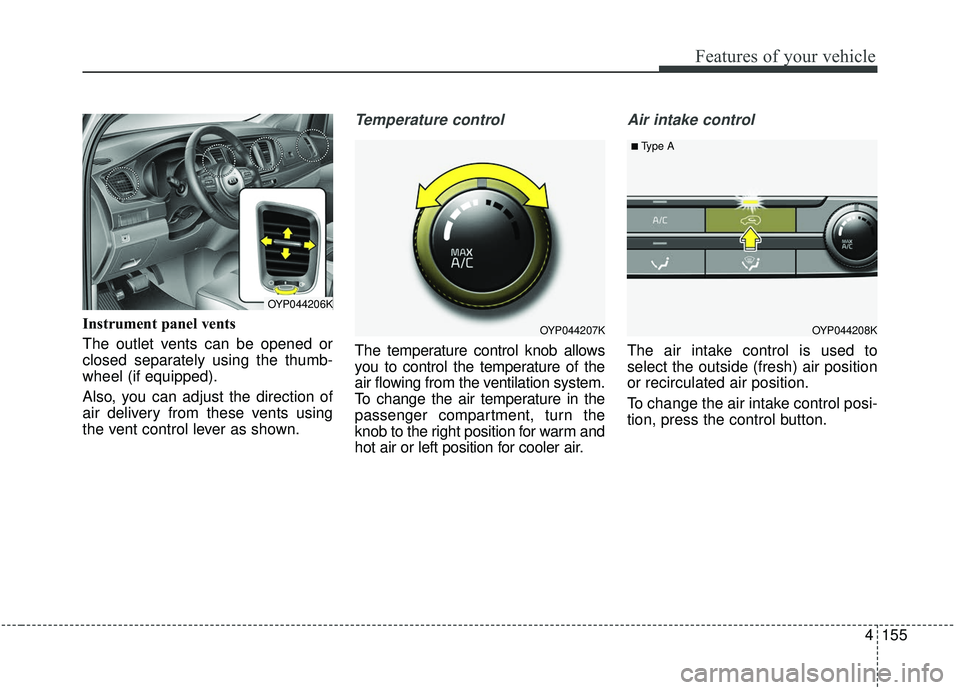
Instrument panel vents
The outlet vents can be opened or
closed separately using the thumb-
wheel (if equipped).
Also, you can adjust the direction of
air delivery from these vents using
the vent control lever as shown.
Temperature control
The temperature control knob allows
you to control the temperature of the
air flowing from the ventilation system.
To change the air temperature in the
passenger compartment, turn the
knob to the right position for warm and
hot air or left position for cooler air.
Air intake control
The air intake control is used to
select the outside (fresh) air position
or recirculated air position.
To change the air intake control posi-
tion, press the control button.
OYP044207K
OYP044206K
OYP044208K
■Type A
Page 330 of 593
Driving your vehicle
16
5
R (Reverse)
Use this position to drive the vehicle
backward.
N (Neutral)
The wheels and transmission are not
engaged. The vehicle will roll freely
even on the slightest incline unless
the parking brake or service brakes
are applied. - Parking in N (Neutral) gear
Follow below steps when parking
and you want the vehicle to move
when pushed.
1. After parking your vehicle, step on
the brake pedal and move the shift
lever to P with the ignition button in
ON or while the engine is running.
2. If the parking brake is applied unlock the parking brake.
3. While pressing the brake pedal, turn the ignition button OFF.
- For smart key equipped vehicles, the ignition switch can be moved
to OFF only when the shift lever
is in P.
4. Change the gear shift lever to N (Neutral) while pressing the brake
pedal and pushing [SHIFT LOCK
RELEASE] button or inserting,
pressing down a tool (e.g. flathead
screw-driver) into the [SHIFT LOCK
RELEASE] access hole at the
same time. Then, the vehicle will
move when external force is
applied.
CAUTION- Shifting
Always come to a complete stopbefore shifting into or out of R(Reverse); you may damage thetransaxle if you shift into R(Reverse) while the vehicle is inmotion, except when “Rockingthe vehicle” explained in thissection.
WARNING
With the exception of parking in neutral gear, always park
the vehicle in P (Park) for safe-
ty and engage the parking
brake.
Before parking in N (Neutral) gear, first make sure the park-
ing ground is level and flat. Do
not park in N gear on any
slopes or gradients.
If parked and left in N, the
vehicle may move and cause
serious damage and injury.
Page 354 of 593
Driving your vehicle
40
5
✽ ✽
NOTICE
• When operating the vehicle on a
dynamometer, ensure that the
ESC is turned off (ESC OFF light
illuminated). If the ESC is left on,
it may prevent the vehicle speed
from increasing, and result in false
diagnosis.
• Turning the ESC off does not affect ABS or brake system opera-
tion.
Vehicle stability management
(VSM) (if equipped)
This system provides further
enhancements to vehicle stability
and steering responses when a vehi-
cle is driving on a slippery road or a
vehicle detects changes in coeffi-
cient of friction between right wheels
and left wheels when braking.
VSM operation
When the VSM is in operation, ESC
indicator light ( ) blinks.
When the vehicle stability manage-
ment is operating properly, you can
feel a slight pulsation in the vehicle
and/or abnormal steering responses
(EPS). This is only the effect of brake
and EPS control and indicates noth-
ing unusual.
The VSM does not operate when:
Driving on bank road such as gra-
dient or incline
Driving in reverse
ESC OFF indicator light ( ) remains on the instrument cluster
EPS indicator light remains on the instrument cluster
WARNING- Tire/
Wheel size
When replacing tires and
wheels, make sure they are the
same size as the original tires
and wheels installed. Driving
with varying tire or wheel sizes
may diminish any supplemental
safety benefits of the VSM sys-
tem.
Page 398 of 593
Driving your vehicle
84
5
Limitation of Active ECO operation:
If the following conditions occur while
Active ECO is operating, the system
operation is limited even though
there is no change in the ECO indi-
cator.
When the coolant temperature is
low:
The system will be limited until
engine performance becomes nor-
mal.
When driving up a hill: The system will be limited to gain
power when driving uphill because
the engine torque is restricted.
When using manual mode: The system will be limited accord-
ing to the shift location.
When the accelerator pedal is deeply depressed for a few sec-
onds:
The system will be limited, judging
that the driver wants to speed up.Comfort mode
The steering wheel
becomes lighter. The
comfort mode is usually
used when driving in the
city or when parking the
vehicle.
press the steering mode
button while operating
the steering wheel, but
the steering effort will
not change immediately.
After operating the
steering wheel, the
steering effort will
change automatically to
the selected mode.
changing the steering
mode while driving.
power steering is not
operating properly, the
flex steering wheel will
not work.
Page 412 of 593
Driving your vehicle
98
5
LANE DEPARTURE WARNING (LDW) SYSTEM (IF EQUIPPED)
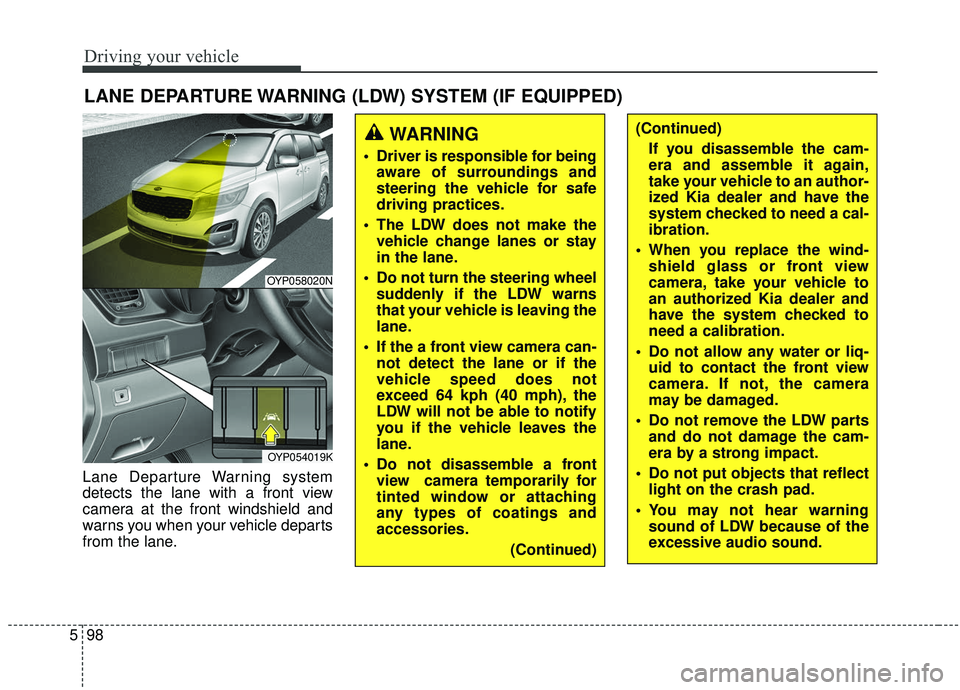
Lane Departure Warning system
detects the lane with a front view
camera at the front windshield and
warns you when your vehicle departs
from the lane.
WARNING
Driver is responsible for being
aware of surroundings and
steering the vehicle for safe
driving practices.
The LDW does not make the vehicle change lanes or stay
in the lane.
Do not turn the steering wheel suddenly if the LDW warns
that your vehicle is leaving the
lane.
If the a front view camera can- not detect the lane or if the
vehicle speed does not
exceed 64 kph (40 mph), the
LDW will not be able to notify
you if the vehicle leaves the
lane.
Do not disassemble a front view camera temporarily for
tinted window or attaching
any types of coatings and
accessories.
(Continued)
(Continued)If you disassemble the cam-
era and assemble it again,
take your vehicle to an author-
ized Kia dealer and have the
system checked to need a cal-
ibration.
When you replace the wind- shield glass or front view
camera, take your vehicle to
an authorized Kia dealer and
have the system checked to
need a calibration.
Do not allow any water or liq- uid to contact the front view
camera. If not, the camera
may be damaged.
Do not remove the LDW parts and do not damage the cam-
era by a strong impact.
Do not put objects that reflect light on the crash pad.
You may not hear warning sound of LDW because of the
excessive audio sound.
OYP058020N
OYP054019K
Page 417 of 593
5103
Driving your vehicle
Your vehicle's fuel economy depends
mainly on your style of driving, where
you drive and when you drive.
Each of these factors affects how
many miles (kilometers) you can get
from a gallon (liter) of fuel. To operate
your vehicle as economically as pos-
sible, use the following driving sug-
gestions to help save money in both
fuel and repairs:
Drive smoothly. Accelerate at amoderate rate. Don't make "jack-
rabbit" starts or full-throttle shifts
and maintain a steady cruising
speed. Don't race between stop-
lights. Try to adjust your speed to
the traffic so you don't have to
change speeds unnecessarily.
Avoid heavy traffic whenever pos-
sible. Always maintain a safe dis-
tance from other vehicles so you
can avoid unnecessary braking.
This also reduces brake wear.
Drive at a moderate speed. The faster you drive, the more fuel your
vehicle uses. Driving at a moderate
speed, especially on the highway,
is one of the most effective ways to
reduce fuel consumption. Don't "ride" the brake pedal. This
can increase fuel consumption and
also increase wear on these com-
ponents. In addition, driving with
your foot resting on the brake pedal
may cause the brakes to overheat,
which reduces their effectiveness
and may lead to more serious con-
sequences.
Take care of your tires. Keep them inflated to the recommended pres-
sure. Incorrect inflation, either too
much or too little, results in unnec-
essary tire wear. Check the tire
pressures at least once a month.
Be sure that the wheels are aligned correctly. Improper align-
ment can result from hitting curbs
or driving too fast over irregular
surfaces. Poor alignment causes
faster tire wear and may also result
in other problems as well as
greater fuel consumption. Keep your vehicle in good condi-
tion. For better fuel economy and
reduced maintenance costs, main-
tain your vehicle in accordance
with the maintenance schedule in
section 7. If you drive your vehicle
in severe conditions, more frequent
maintenance is required (see sec-
tion 7 for details).
Keep your vehicle clean. For maxi- mum service, your vehicle should
be kept clean and free of corrosive
materials. It is especially important
that mud, dirt, ice, etc. not be
allowed to accumulate on the
underside of the vehicle. This extra
weight can result in increased fuel
consumption and also contribute to
corrosion.
Travel lightly. Don't carry unneces- sary weight in your vehicle. Weight
reduces fuel economy.
Don't let the engine idle longer than necessary. If you are waiting
(and not in traffic), turn off your
engine and restart only when
you're ready to go.
ECONOMICAL OPERATION