warning light KIA SEDONA 2020 Owners Manual
[x] Cancel search | Manufacturer: KIA, Model Year: 2020, Model line: SEDONA, Model: KIA SEDONA 2020Pages: 604, PDF Size: 16.24 MB
Page 416 of 604
587
Driving your vehicle
Warning type
The system will activate when:
1. The system is on.
2. Vehicle speed is above 30 km/h(20 mph).
3. Other vehicles are detected in blind spot.
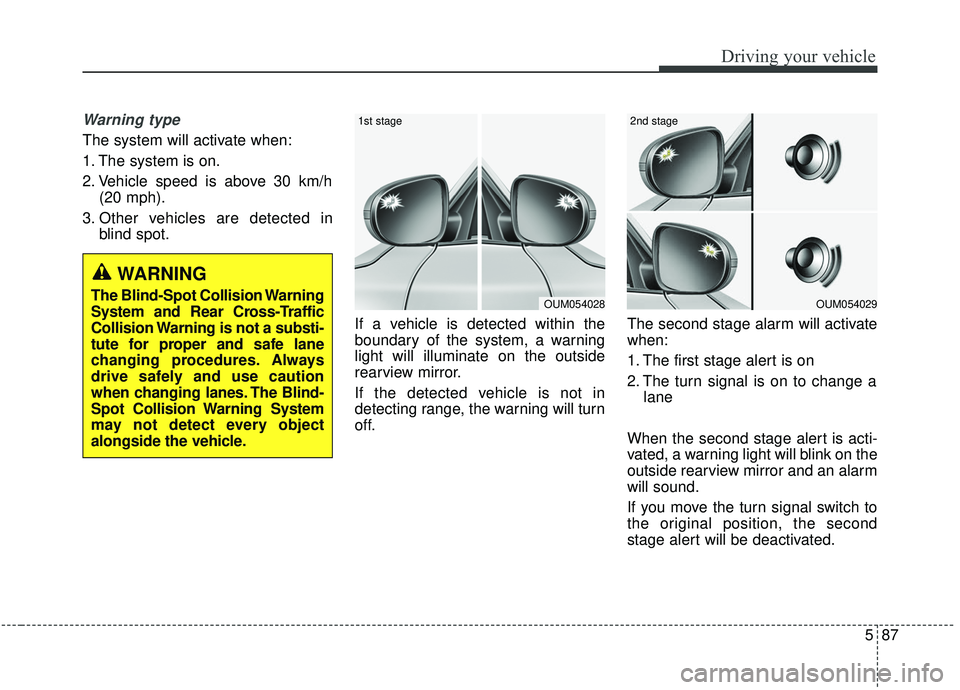
If a vehicle is detected within the
boundary of the system, a warning
light will illuminate on the outside
rearview mirror.
If the detected vehicle is not in
detecting range, the warning will turn
off. The second stage alarm will activate
when:
1. The first stage alert is on
2. The turn signal is on to change a
lane
When the second stage alert is acti-
vated, a warning light will blink on the
outside rearview mirror and an alarm
will sound.
If you move the turn signal switch to
the original position, the second
stage alert will be deactivated.
OUM054029
2nd stage
OUM054028
1st stage
WARNING
The Blind-Spot Collision Warning
System and Rear Cross-Traffic
Collision Warning is not a substi-
tute for proper and safe lane
changing procedures. Always
drive safely and use caution
when changing lanes. The Blind-
Spot Collision Warning System
may not detect every object
alongside the vehicle.
Page 417 of 604
Driving your vehicle
88
5
- The second stage alarm may be
deactivated.
To activate the alarm: Go to the User Settings Mode →
Driver Assistance and select
“Blind-Spot Collision Warning” on
the LCD display.
To deactivate the alarm: Go to the User Settings Mode →
Driver Assistance and deselect
“Blind-Spot Collision Warning” on
the LCD display.
✽ ✽
NOTICE
The alarm function helps alert the
driver. Deactivate this function only
when it is necessary
Detecting sensor
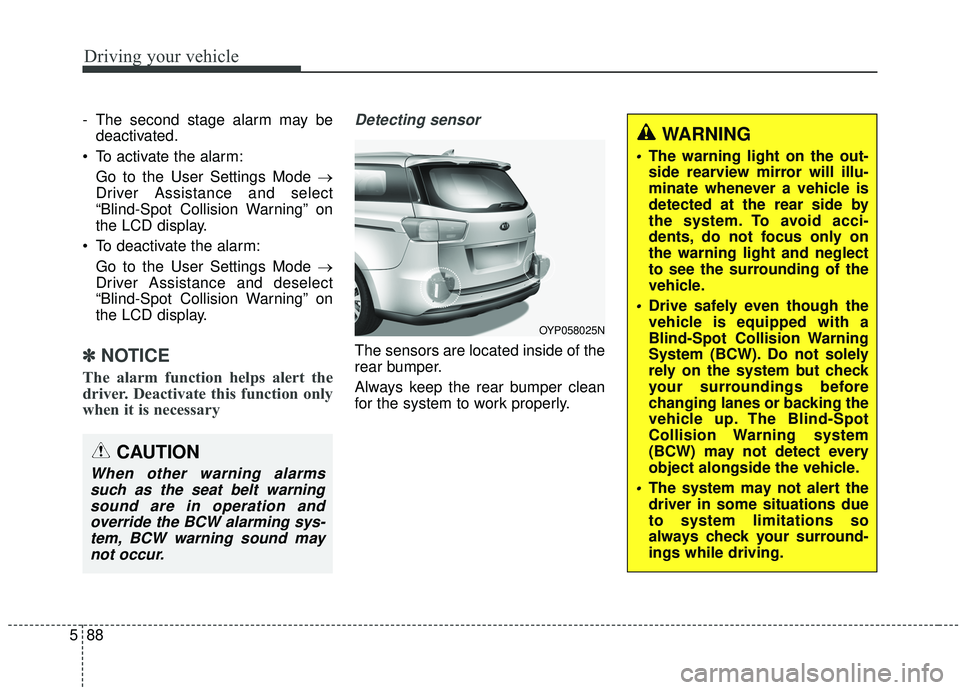
The sensors are located inside of the
rear bumper.
Always keep the rear bumper clean
for the system to work properly.
OYP058025N
CAUTION
When other warning alarms
such as the seat belt warningsound are in operation andoverride the BCW alarming sys-tem, BCW warning sound maynot occur.
WARNING
The warning light on the out-
side rearview mirror will illu-
minate whenever a vehicle is
detected at the rear side by
the system. To avoid acci-
dents, do not focus only on
the warning light and neglect
to see the surrounding of the
vehicle.
Drive safely even though the
vehicle is equipped with a
Blind-Spot Collision Warning
System (BCW). Do not solely
rely on the system but check
your surroundings before
changing lanes or backing the
vehicle up. The Blind-Spot
Collision Warning system
(BCW) may not detect every
object alongside the vehicle.
The system may not alert the
driver in some situations due
to system limitations so
always check your surround-
ings while driving.
Page 419 of 604
Driving your vehicle
90
5
If the vehicle detected by sensors
approaches your vehicle, the warn-
ing chime will sound and the warn-
ing light will blink on the outside
rearview mirror.
If the detected vehicle is out of detection range, moving away in
the opposite direction or moving
slow, or if the vehicle is right
behind your vehicle, the warning is
cancelled.
The system may not operate prop- erly due to other factors or circum-
stances. Always pay attention to
your surroundings. \b
If your vehicle's left or right side
bumper is blinded by a barrier or
vehicles, the system sensing abili-
ty may not function properly.
WARNING
The Blind-Spot Collision
Warning System and Rear
Cross-Traffic Collision
Warning is not a substitute for
proper and safe lane chang-
ing procedures. Always drive
safely and use caution when
changing lanes. The Blind-
Spot Collision Warning
System may not detect every
object alongside the vehicle.
Drive safely even though the vehicle is equipped with a
BCW (Blind-Spot Collision
Warning) system. Do not sole-
ly rely on the system but
check for yourself before
changing lanes.
The system may not alert the
driver in some conditions so
always check the surround-
ings while driving.
(Continued)
(Continued)
When the BCW system isbeing activated, the warning
light on the outside rearview
mirror will illuminate whenev-
er a vehicle is detected at the
rear side by the system. To
avoid accidents, do not focus
only on the warning light and
neglect to see the surround-
ing of the vehicle.
CAUTION
When other warning soundssuch as the seat belt warningsound are in operation andoverride the RCCW alarmingsystem, RCCW warning alarmmay not occur.
Page 420 of 604
591
Driving your vehicle
✽ ✽
NOTICE
• The system may not work proper-
ly if the bumper has been replaced
or if repair work has been done
near the sensor.
• The detection area differs accord- ing to the road's width. If the road
is narrow the system may detect
other vehicles in the next lane.
• If the road is very wide the system may not detect other vehicles.
• The system may turn off due to strong electromagnetic interfer-
ence.
Warning message
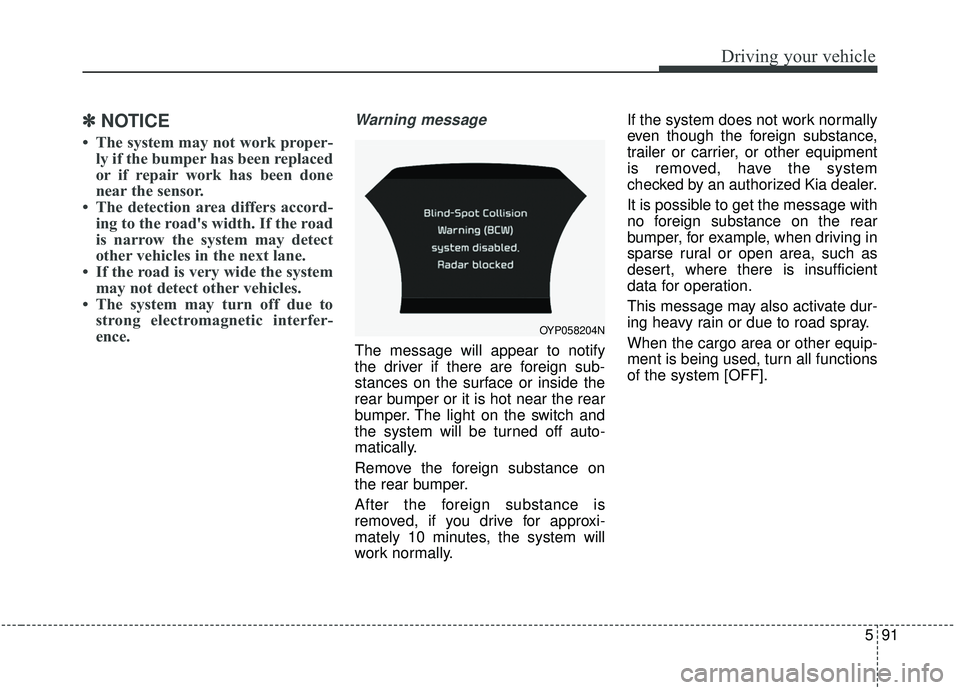
The message will appear to notify
the driver if there are foreign sub-
stances on the surface or inside the
rear bumper or it is hot near the rear
bumper. The light on the switch and
the system will be turned off auto-
matically.
Remove the foreign substance on
the rear bumper.
After the foreign substance is
removed, if you drive for approxi-
mately 10 minutes, the system will
work normally. If the system does not work normally
even though the foreign substance,
trailer or carrier, or other equipment
is removed, have the system
checked by an authorized Kia dealer.
It is possible to get the message with
no foreign substance on the rear
bumper, for example, when driving in
sparse rural or open area, such as
desert, where there is insufficient
data for operation.
This message may also activate dur-
ing heavy rain or due to road spray.
When the cargo area or other equip-
ment is being used, turn all functions
of the system [OFF].
OYP058204N
Page 421 of 604
Driving your vehicle
92
5
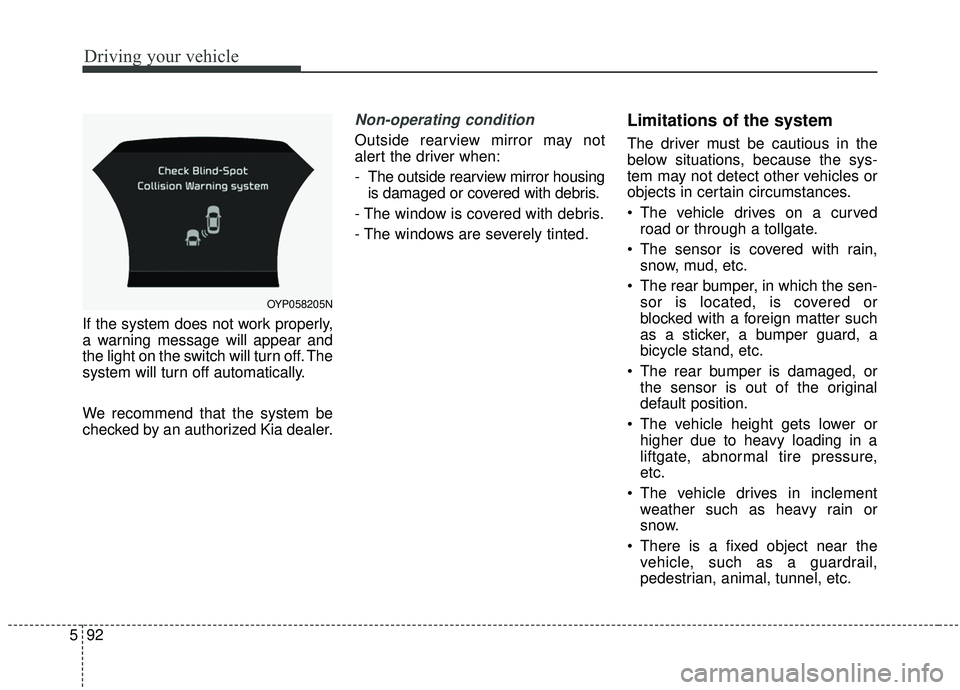
If the system does not work properly,
a warning message will appear and
the light on the switch will turn off. The
system will turn off automatically.
We recommend that the system be
checked by an authorized Kia dealer.
Non-operating condition
Outside rearview mirror may not
alert the driver when:
- The outside rearview mirror housing
is damaged or covered with debris.
- The window is covered with debris.
- The windows are severely tinted.
Limitations of the system
The driver must be cautious in the
below situations, because the sys-
tem may not detect other vehicles or
objects in certain circumstances.
The vehicle drives on a curved road or through a tollgate.
The sensor is covered with rain, snow, mud, etc.
The rear bumper, in which the sen- sor is located, is covered or
blocked with a foreign matter such
as a sticker, a bumper guard, a
bicycle stand, etc.
The rear bumper is damaged, or the sensor is out of the original
default position.
The vehicle height gets lower or higher due to heavy loading in a
liftgate, abnormal tire pressure,
etc.
The vehicle drives in inclement weather such as heavy rain or
snow.
There is a fixed object near the vehicle, such as a guardrail,
pedestrian, animal, tunnel, etc.
OYP058205N
Page 426 of 604
597
Driving your vehicle
✽ ✽NOTICE
• It may suggest a break according
to the driver’s driving pattern or
habits even if the driver doesn’t
feel fatigued.
• The driver, who feels fatigued, should take a break, even though
there is no break suggestion by the
Driver Attention Warning system.
✽ ✽ NOTICE
The Driver Attention Warning sys-
tem utilizes the camera sensor on the
front windshield for its operation.
To keep the camera sensor in the
best condition, you should observe
the followings:
• Do not place any reflective objects
(i.e. white paper, mirror) over the
dashboard. Any light reflection
may prevent the Driver Attention
Warning (DAW) system from
functioning properly.
• Pay extreme caution to keep the camera sensor dry.
• Do not disassemble the camera assembly, or apply any impact on
the camera assembly.
• Playing the vehicle audio system at high volume may prevent the
occupants from hearing the Driver
Attention Warning system warn-
ing sounds.CAUTION
The Driver Attention Warning
system may not provide alertsin the following situations:
The lane detection perform- ance is limited. (For moreinformation, refer to "LaneDeparture Warning (LDW) sys-tem" in this chapter.)
Rough or intentionally evasive driving
Large tire pressure deviation, uneven wear, poor wheelalignment, etc.
Severe winding road Uneven road surface condition The vehicle is controlled by the following driving assistsystems:
- Forward Collision-Avoidance Assist (FCA) System
- Smart Cruise Control (SCC) System
WARNING
The Driver Attention Warning
system is not a substitute for
safe driving practices, but a
convenience function only. It is
the responsibility of the driver
to always drive cautiously to
prevent unexpected and sud-
den situations from occurring.
Pay attention to the road condi-
tions at all times.
Page 427 of 604
Driving your vehicle
98
5
LANE DEPARTURE WARNING (LDW) SYSTEM (IF EQUIPPED)
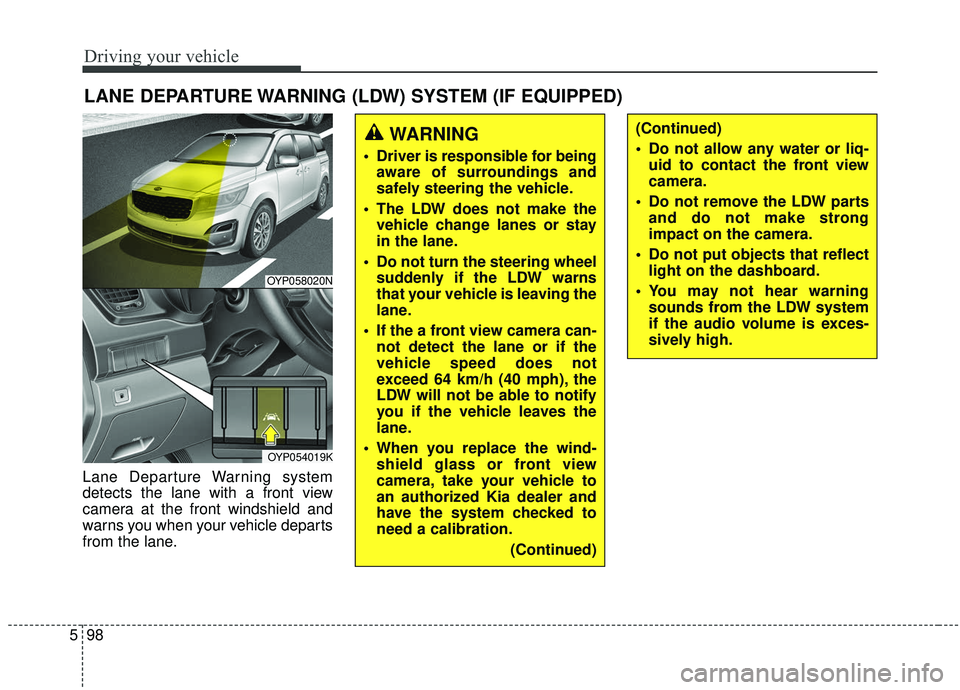
Lane Departure Warning system
detects the lane with a front view
camera at the front windshield and
warns you when your vehicle departs
from the lane.
WARNING
Driver is responsible for being
aware of surroundings and
safely steering the vehicle.
The LDW does not make the vehicle change lanes or stay
in the lane.
Do not turn the steering wheel suddenly if the LDW warns
that your vehicle is leaving the
lane.
If the a front view camera can- not detect the lane or if the
vehicle speed does not
exceed 64 km/h (40 mph), the
LDW will not be able to notify
you if the vehicle leaves the
lane.
When you replace the wind- shield glass or front view
camera, take your vehicle to
an authorized Kia dealer and
have the system checked to
need a calibration.
(Continued)
(Continued)
Do not allow any water or liq-uid to contact the front view
camera.
Do not remove the LDW parts and do not make strong
impact on the camera.
Do not put objects that reflect light on the dashboard.
You may not hear warning sounds from the LDW system
if the audio volume is exces-
sively high.
OYP058020N
OYP054019K
Page 433 of 604
Driving your vehicle
104
5
Remember, your vehicle does not
require extended warm-up. After
the engine has started, allow the
engine to run for 10 to 20 seconds
prior to placing the vehicle in gear.
In very cold weather, however, give
your engine a slightly longer warm-
up period.
Don't "lug" or "over-rev" the engine. Lugging is driving too slowly in a
very high gear resulting in engine
bucking. If this happens, shift to a
lower gear. Over-revving is racing
the engine beyond its safe limit.
This can be avoided by shifting at
the recommended speed.
Use your air conditioning sparingly. The air conditioning system is
operated by engine power so your
fuel economy is reduced when you
use it.
Open windows at high speeds can reduce fuel economy.
Fuel economy is less in crosswinds and headwinds. To help offset
some of this loss, slow down when
driving in these conditions. Keeping a vehicle in good operating
condition is important both for econ-
omy and safety. Therefore, have an
authorized Kia dealer perform
scheduled inspections and mainte-
nance.
WARNING - Engine off
during motion
Never turn the engine off to
coast down hills or anytime the
vehicle is in motion. The power
steering and power brakes will
not function properly without
the engine running. In addition,
turning off the ignition while
driving could engage the steer-
ing wheel lock resulting in loss
of vehicle steering. Keep the
engine on and downshift to an
appropriate gear for engine
braking effect.
Page 434 of 604
5105
Driving your vehicle
Hazardous driving conditions
When hazardous driving conditions
are encountered such as water,
snow, ice, mud, sand, or similar haz-
ards, follow these suggestions:
Drive cautiously and allow extradistance for braking.
Avoid sudden braking or steering.
When braking with non-ABS brakes pump the brake pedal with
a light up-and-down motion until
the vehicle is stopped.
Do not pump the brake pedal on a
vehicle equipped with ABS. If stalled in snow, mud, or sand,
use second gear. Accelerate slow-
ly to avoid spinning the drive
wheels.
Use sand, rock salt, or other non- slip material under the drive
wheels to provide traction when
stalled in ice, snow, or mud.
Reducing the risk of a rollover
This multi-purpose passenger vehi-
cle is defined as a Crossover Utility
Vehicle (CUV). CUV’s have higher
ground clearance and a narrower
track to make them capable of per-
forming in a wide variety of off-road
applications. Specific design charac-
teristics give them a higher center of
gravity than ordinary vehicles. An
advantage of the higher ground
clearance is a better view of the
road, which allows you to anticipate
problems. They are not designed for
cornering at the same speeds as
conventional passenger vehicles,
any more than low-slung sports vehi-
cles are designed to perform satis-
factorily in off-road conditions. Due to
this risk, driver and passengers are
strongly recommended to buckle
their seat belts. In a rollover crash,
an unbelted person is more likely to
die than a person wearing a seat
belt. There are steps that a driver can
make to reduce the risk of a rollover.
SPECIAL DRIVING CONDITIONS
WARNING- Downshifting
Do not downshift with an auto-
matic transmission while driv-
ing on slippery surfaces. The
sudden change in tire speed
could cause the tires to skid
and result in an accident.
Page 445 of 604
Driving your vehicle
116
5
Trailer brakes
If your trailer is equipped with a brak-
ing system, make sure it conforms to
your state’s regulations and that it is
properly installed and operating cor-
rectly.
If your trailer weight exceeds the
maximum allowed weight without
trailer brakes, then the trailer will also
require its own brakes as well. Be
sure to read and follow the instruc-
tions for the trailer brakes so you’ll be
able to install, adjust and maintain
them properly.
Don’t tap into or modify your vehi-
cle's brake system.
Driving with a trailer
Towing a trailer requires a certain
amount of experience. Before setting
out for the open road, you must get to
know your trailer. Acquaint yourself
with the feel of handling and braking
with the added weight of the trailer.
And always keep in mind that the
vehicle you are driving is now a good
deal longer and not nearly so respon-
sive as your vehicle is by itself.
Before you start, check the trailer
hitch and platform, safety chains,
electrical connector(s), lights, tires
and mirror adjustment. If the trailer
has electric brakes, start your vehicle
and trailer moving and then apply the
trailer brake controller by hand to be
sure the brakes are working. This lets
you check your electrical connection
at the same time.
During your trip, check occasionally
to be sure that the load is secure,
and that the lights and any trailer
brakes are still working.WARNING- Trailer brakes
Do not use a trailer with its own
brakes unless you are absolute-
ly certain that you have proper-
ly set up the brake system. This
is not a task for amateurs. Use
an experienced, competent
trailer shop for this work.