phone KIA SEDONA 2020 User Guide
[x] Cancel search | Manufacturer: KIA, Model Year: 2020, Model line: SEDONA, Model: KIA SEDONA 2020Pages: 604, PDF Size: 16.24 MB
Page 312 of 604
4203
Features of your vehicle
The ticket holder (5) is provided for
holding a tollgate ticket. (if equipped)
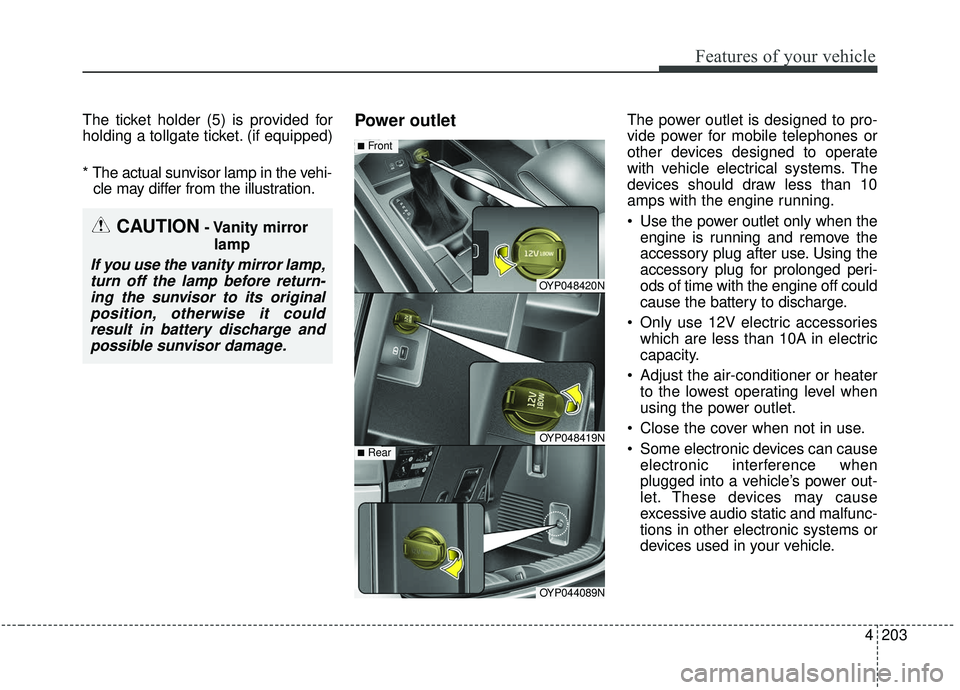
* The actual sunvisor lamp in the vehi-cle may differ from the illustration.Power outletThe power outlet is designed to pro-
vide power for mobile telephones or
other devices designed to operate
with vehicle electrical systems. The
devices should draw less than 10
amps with the engine running.
Use the power outlet only when the engine is running and remove the
accessory plug after use. Using the
accessory plug for prolonged peri-
ods of time with the engine off could
cause the battery to discharge.
Only use 12V electric accessories which are less than 10A in electric
capacity.
Adjust the air-conditioner or heater to the lowest operating level when
using the power outlet.
Close the cover when not in use.
Some electronic devices can cause electronic interference when
plugged into a vehicle’s power out-
let. These devices may cause
excessive audio static and malfunc-
tions in other electronic systems or
devices used in your vehicle.
CAUTION- Vanity mirror
lamp
If you use the vanity mirror lamp,turn off the lamp before return-ing the sunvisor to its originalposition, otherwise it couldresult in battery discharge andpossible sunvisor damage.
OYP048420N
OYP048419N
■Front
OYP044089N
■Rear
Page 315 of 604
Features of your vehicle
206
4
USB charger (if equipped)
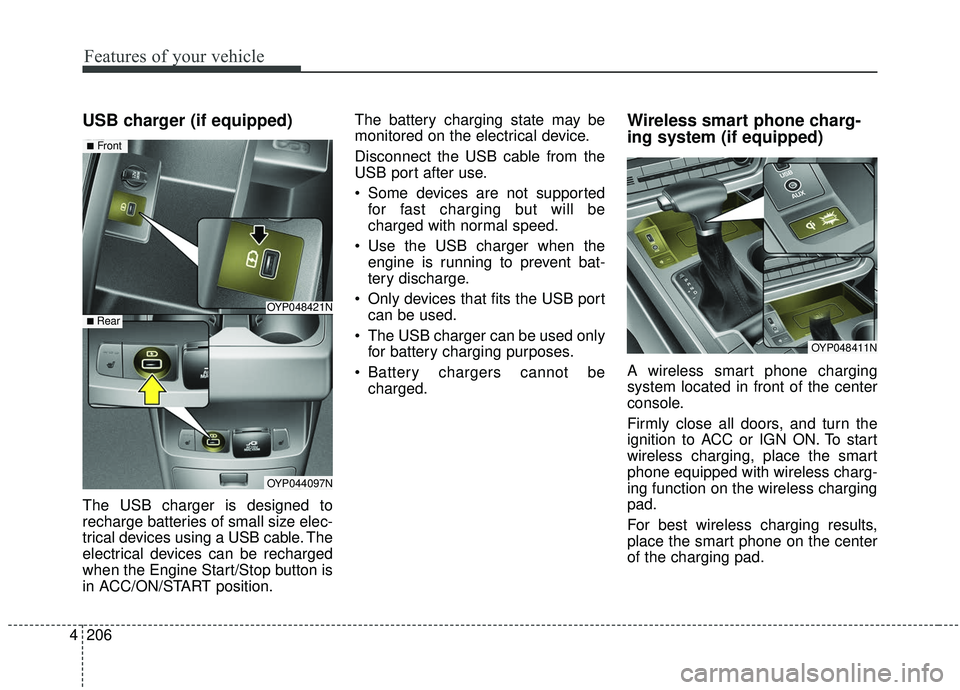
The USB charger is designed to
recharge batteries of small size elec-
trical devices using a USB cable. The
electrical devices can be recharged
when the Engine Start/Stop button is
in ACC/ON/START position. The battery charging state may be
monitored on the electrical device.
Disconnect the USB cable from the
USB port after use.
Some devices are not supported
for fast charging but will be
charged with normal speed.
Use the USB charger when the engine is running to prevent bat-
tery discharge.
Only devices that fits the USB port can be used.
The USB charger can be used only for battery charging purposes.
Battery chargers cannot be charged.
Wireless smart phone charg-
ing system (if equipped)
A wireless smart phone charging
system located in front of the center
console.
Firmly close all doors, and turn the
ignition to ACC or IGN ON. To start
wireless charging, place the smart
phone equipped with wireless charg-
ing function on the wireless charging
pad.
For best wireless charging results,
place the smart phone on the center
of the charging pad.
OYP048421N
OYP044097N
■Front
■ Rear
OYP048411N
Page 316 of 604
4207
Features of your vehicle
The wireless charging system is
designed for one smart phone
equipped with QI per single usage
only. Please refer to the smart phone
accessory cover or the smart phone
manufacturer homepage to check
whether your smart phone supports
QI function.Wireless smart phone charging
1. Remove any object on the smartphone charging pad including the
smart key. If there is any foreign
object on the pad other than a
smart phone, the wireless charging
function may not operate properly.
2. Place the smart phone on the cen- ter of the wireless charging pad.
3. The indicator light will change to orange once the wireless charging
begins. After the charging is com-
plete, the orange light will change
to green.
4. You can choose to turn the wireless charging function to either ON or
OFF by selecting the USM on the
instrument cluster. (Please refer to
“Instrument Cluster” for details). If the wireless charging is not func-
tioning properly, the orange light will
blink and flash for ten seconds then
turn off. In such cases, remove the
smart phone from the pad and
replace it on the pad again, or double
check the charging status.
If you leave the smart phone on the
charging pad when the vehicle igni-
tion is in OFF, the vehicle will alert
you through warning messages and
sound (applicable for vehicles with
voice guidance function).
Page 317 of 604
Features of your vehicle
208
4
✽ ✽
NOTICE
• When the interior temperature of
the wireless charging system rises
above a set temperature, the wire-
less charging will cease to func-
tion. After the interior tempera-
ture drops below the threshold,
the wireless charging function will
resume.
• The wireless charging may not function properly when there is a
heavy accessory cover on the
smart phone.
The wireless charging will stop
when the smart phone is not in
complete contact with the wireless
charging pad.
• The smart key detection feature in operation could temporarily stop
charging.
(When turning on ignition, open-
ing doors, or closing doors)
• The wireless charging will stop when the vehicle is turned OFF. (Continued)WARNING - Distracted
driving
Driving while distracted can
result in a loss of vehicle con-
trol that may lead to an acci-
dent, severe bodily injury, and
death. The driver’s primary
responsibility is in the safe and
legal operation of a vehicle, and
use of any handheld devices,
other equipment, or vehicle sys-
tems which take the driver’s
eyes, attention and focus away
from the safe operation of a
vehicle or which are not permis-
sible by law should never be
used during operation of the
vehicle.CAUTION - Metal in
Wireless Charging System
If any metallic object such as a coin is located between thewireless charging system andthe smart phone, the chargingmay be disrupted. Also, themetallic object may heat up andpotentially damage the chargingsystem. If there is any metallicobject between the smart phoneand the charging pad, immedi-ately remove the smart phone.Remove the metallic object afterit has cooled down.
Page 318 of 604
4209
Features of your vehicle
(Continued)
• Items equipped with magneticcomponents such as credit cards,
telephone cards, bankbooks, or a
transportation ticket may become
damaged during wireless charg-
ing.
• Place the smart phone on the cen- ter of the charge pad for best
results. The smart phone may not
charge when placed near the rim
of the charging pad. When the
smart phone does get charged, it
may heat up excessively.
• For smart phones without built-in wireless charging system, an
appropriate accessory has to be
equipped.
• Cellphones without the certifica- tion for wireless charging ( )
could fail to charge.
• The self-protection feature equipped in some mobile phones
could slow down or stop charging. (Continued)(Continued)
• Items equipped with magnetic
components such as credit cards,
telephone cards, bankbooks, or a
transportation ticket may become
damaged during wireless charg-
ing.
• When any smart phone without a wireless charging function or a
metallic object is placed on the
charging pad, a small noise may
sound. This small sound is due to
the vehicle discerning compatibili-
ty of the object placed on the
charging pad. It does not affect
your vehicle or the smart phone in
any way. This device complies with Industry
Canada licence-exempt RSS stan-
dard(s).
Operation is subject to the following
two conditions:
(1) This device may not cause inter-
ference, and
(2) This device must accept any
interference, including interfer-
ence that may cause undesired
operation of the device.
Page 326 of 604
4217
Features of your vehicle
✽ ✽NOTICE
• Always use the USB charging
cable that has been certified by the
phone manufacturer. Use of after-
market cables is not recommend-
ed.
• When using a portable audio device connected to the power out-
let, noise may occur during play-
back. If this happens, use the
power source of the portable audio
device.
*iPod®is a Registered trademark of Apple
Inc.
How Vehicle Radio Works
FM reception
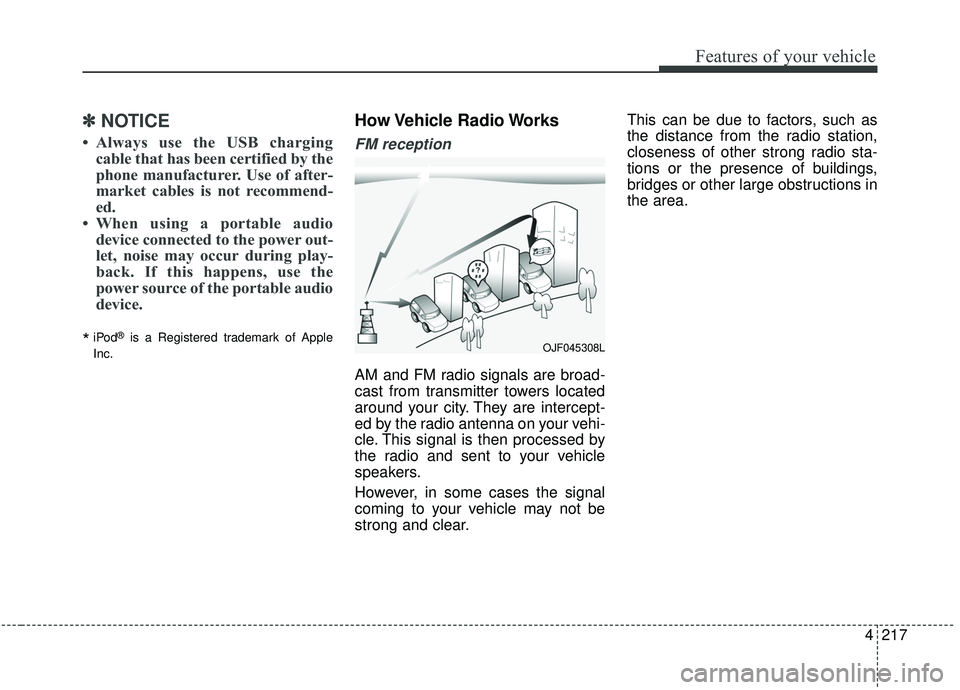
AM and FM radio signals are broad-
cast from transmitter towers located
around your city. They are intercept-
ed by the radio antenna on your vehi-
cle. This signal is then processed by
the radio and sent to your vehicle
speakers.
However, in some cases the signal
coming to your vehicle may not be
strong and clear. This can be due to factors, such as
the distance from the radio station,
closeness of other strong radio sta-
tions or the presence of buildings,
bridges or other large obstructions in
the area.
OJF045308L
Page 328 of 604
4219
Features of your vehicle
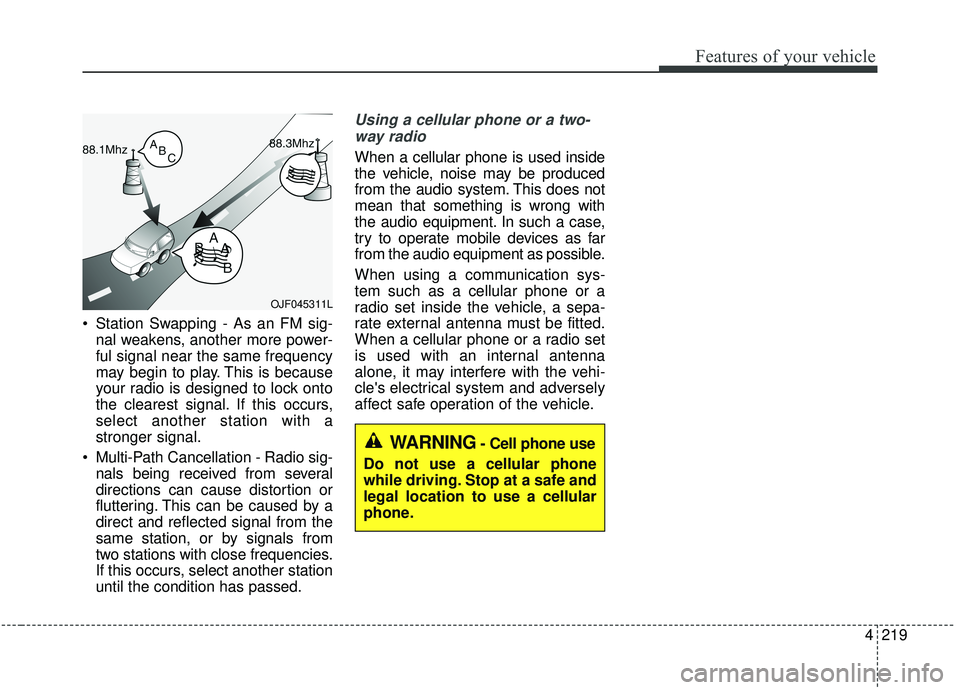
Station Swapping - As an FM sig-nal weakens, another more power-
ful signal near the same frequency
may begin to play. This is because
your radio is designed to lock onto
the clearest signal. If this occurs,
select another station with a
stronger signal.
Multi-Path Cancellation - Radio sig- nals being received from several
directions can cause distortion or
fluttering. This can be caused by a
direct and reflected signal from the
same station, or by signals from
two stations with close frequencies.
If this occurs, select another station
until the condition has passed.
Using a cellular phone or a two-
way radio
When a cellular phone is used inside
the vehicle, noise may be produced
from the audio system. This does not
mean that something is wrong with
the audio equipment. In such a case,
try to operate mobile devices as far
from the audio equipment as possible.
When using a communication sys-
tem such as a cellular phone or a
radio set inside the vehicle, a sepa-
rate external antenna must be fitted.
When a cellular phone or a radio set
is used with an internal antenna
alone, it may interfere with the vehi-
cle's electrical system and adversely
affect safe operation of the vehicle.
OJF045311L
WARNING- Cell phone use
Do not use a cellular phone
while driving. Stop at a safe and
legal location to use a cellular
phone.
Page 599 of 604
Index
6I
Seat warmer ..............................................................4-201
Side curtain ..............................................................4-212
Sunvisor ....................................................................4-20\
2
USB charger ..............................................................4-206
Wireless smart phone charging system ....................4-206
Interior lights ..............................................................4-152 Automatic turn off function ......................................4-152
Glove box lamp ........................................................4-154
Luggage lamp............................................................\
4-154
Map lamp ..................................................................4-153
Room lamp ................................................................4-152
Vanity mirror lamp ....................................................4-154
Interior overview..............................................................2-4
Key positions ..................................................................5-7 Ignition switch position ................................................5-7
Illuminated ignition switch ..........................................5-7
Starting the engine ........................................................5-9
Lane Departure Warning (LDW) system ......................5-98 LDW operation ..........................................................5-99
Limitations of the system..........................................5-101\
Warning indicator......................................................5-100 LCD display ..................................................................4-98
LCD modes ................................................................4-98
Liftgate (for manual liftgate) ........................................4-32 Closing the liftgate ......................................................4-33
Emergency liftgate safety release ..............................4-34
Opening the liftgate ....................................................4-32
Light bulbs ....................................................................7-65\
Back-up lamp bulb replacement (Rear combination lamp Type A) ............................7-80
Back-up lamp bulb replacement (Rear combination lamp Type B) ............................7-83
Bulb replacement precaution ......................................7-65
Front fog lamp bulb replacement................................7-75
Front turn signal lamp bulb replacement (Headlamp Type A) ..................................................7-72
Front turn signal lamp bulb replacement (Headlamp Type B) ..................................................7-74
Glove box lamp replacement ......................................7-86
Headlamp (High beam) bulb replacement (Headlamp Type A) ..................................................7-70
Headlamp (LED type) replacement (Headlamp Type B) ..................................................7-73
Headlamp (Low beam) bulb replacement (Headlamp Type A) ..................................................7-69
High mounted stop lamp (LED type) bulb replacement ..............................................................7-84
License plate lamp bulb replacement ........................7-84
Light bulb position (Front) ........................................7-67
K
L