phone KIA SEDONA 2020 Owners Manual
[x] Cancel search | Manufacturer: KIA, Model Year: 2020, Model line: SEDONA, Model: KIA SEDONA 2020Pages: 604, PDF Size: 16.24 MB
Page 99 of 604
383
Safety features of your vehicle
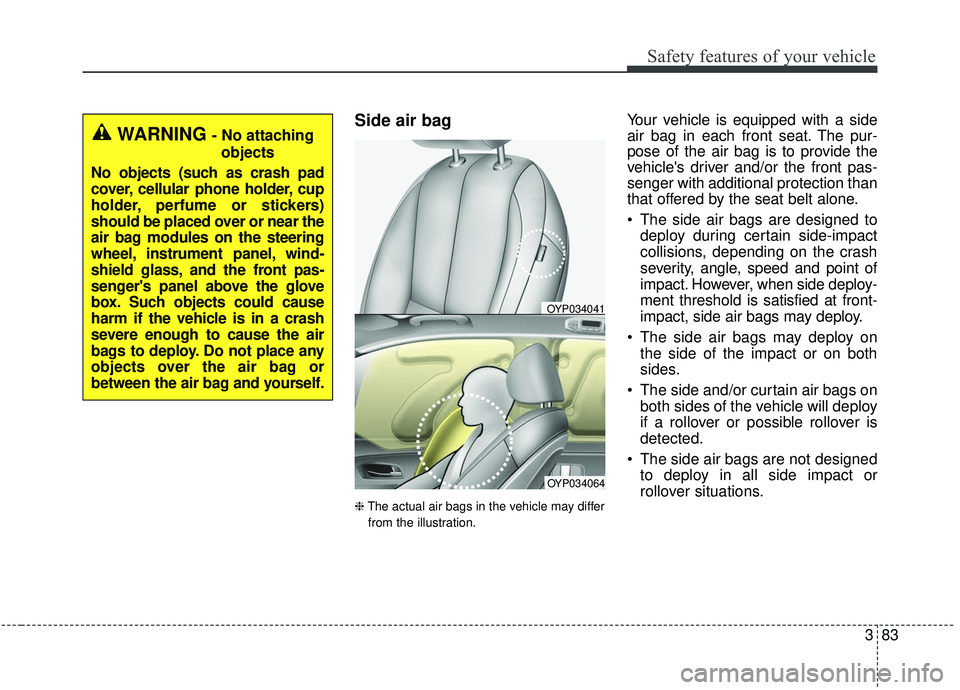
Side air bag
❈The actual air bags in the vehicle may differ
from the illustration.
Your vehicle is equipped with a side
air bag in each front seat. The pur-
pose of the air bag is to provide the
vehicle's driver and/or the front pas-
senger with additional protection than
that offered by the seat belt alone.
The side air bags are designed to deploy during certain side-impact
collisions, depending on the crash
severity, angle, speed and point of
impact. However, when side deploy-
ment threshold is satisfied at front-
impact, side air bags may deploy.
The side air bags may deploy on the side of the impact or on both
sides.
The side and/or curtain air bags on both sides of the vehicle will deploy
if a rollover or possible rollover is
detected.
The side air bags are not designed to deploy in all side impact or
rollover situations.
OYP034064
OYP034041
WARNING- No attaching
objects
No objects (such as crash pad
cover, cellular phone holder, cup
holder, perfume or stickers)
should be placed over or near the
air bag modules on the steering
wheel, instrument panel, wind-
shield glass, and the front pas-
senger's panel above the glove
box. Such objects could cause
harm if the vehicle is in a crash
severe enough to cause the air
bags to deploy. Do not place any
objects over the air bag or
between the air bag and yourself.
Page 113 of 604
Windshield defrosting and defogging . . . . . . . . . 4-191
• Manual climate control system . . . . . . . . . . . . . . . . 4-191
• Automatic climate control system . . . . . . . . . . . . . . 4-192
• Defogging logic. . . . . . . . . . . . . . . . . . . . . . . . . . . . . . 4-193
Clean air . . . . . . . . . . . . . . . . . . . . . . . . . . . . . . . . 4-196
Storage compartments . . . . . . . . . . . . . . . . . . . . . 4-197
• Center console storage . . . . . . . . . . . . . . . . . . . . . . . 4-198
• Glove box . . . . . . . . . . . . . . . . . . . . . . . . . . . . . . . . . . 4-19\
8
• Sunglass holder . . . . . . . . . . . . . . . . . . . . . . . . . . . . . 4-199
• Cool box . . . . . . . . . . . . . . . . . . . . . . . . . . . . . . . . . . . 4-\
199
Interior features . . . . . . . . . . . . . . . . . . . . . . . . . . 4-200
• Cup holder . . . . . . . . . . . . . . . . . . . . . . . . . . . . . . . . . 4-200
• Bottle holder. . . . . . . . . . . . . . . . . . . . . . . . . . . . . . . . 4-200
• Seat warmer . . . . . . . . . . . . . . . . . . . . . . . . . . . . . . . . 4-201
• Air ventilation seat . . . . . . . . . . . . . . . . . . . . . . . . . . 4-202
• Sunvisor . . . . . . . . . . . . . . . . . . . . . . . . . . . . . . . . . . . 4-\
202
• Power outlet . . . . . . . . . . . . . . . . . . . . . . . . . . . . . . . . 4-203
• AC inverter . . . . . . . . . . . . . . . . . . . . . . . . . . . . . . . . 4-204
• USB charger . . . . . . . . . . . . . . . . . . . . . . . . . . . . . . . . 4-206
• Wireless smart phone charging system . . . . . . . . . . 4-206
• Coat hook . . . . . . . . . . . . . . . . . . . . . . . . . . . . . . . . . . 4-21\
0
• Floor mat anchor(s). . . . . . . . . . . . . . . . . . . . . . . . . . 4-210
• Side curtain . . . . . . . . . . . . . . . . . . . . . . . . . . . . . . . . 4-212
• Luggage net holder . . . . . . . . . . . . . . . . . . . . . . . . . . 4-212
Exterior features . . . . . . . . . . . . . . . . . . . . . . . . . . 4-214
• Roof rack . . . . . . . . . . . . . . . . . . . . . . . . . . . . . . . . . . 4-21\
4
Audio system . . . . . . . . . . . . . . . . . . . . . . . . . . . . . 4-216
• Antenna . . . . . . . . . . . . . . . . . . . . . . . . . . . . . . . . . . . 4-\
216
• AUX, USB port . . . . . . . . . . . . . . . . . . . . . . . . . . . . . 4-216
• How vehicle radio works . . . . . . . . . . . . . . . . . . . . . 4-217
Declaration of Conformity . . . . . . . . . . . . . . . . . 4-220
• IC. . . . . . . . . . . . . . . . . . . . . . . . . . . . . . . . . . . \
. . . . . . 4-220
4
Page 118 of 604
49
Features of your vehicle
Transmitter precautions
The transmitter will not work if anyof following occur:
- The ignition key is in the ignitionswitch.
- You exceed the operating dis- tance limit (about 10 m [30 feet]).
- The battery in the transmitter is weak.
- Other vehicles or objects may be blocking the signal.
- The weather is extremely cold.
- The transmitter is close to a radio transmitter such as a radio sub-
station or an airport which can
interfere with normal operation of
the transmitter. When the transmitter does not work
correctly, open and close the door
with the ignition key. If you have a
problem with the transmitter, con-
tact an authorized Kia dealer.
If the transmitter is in close proxim- ity to your mobile phone, the signal
could be blocked by your mobile
phones normal operational signals.
This is especially important when
the phone is active such as making
and receiving calls, text messag-
ing, and/or sending/receiving
emails. Avoid placing the transmit-
ter and your mobile phone in the
same pants or jacket pocket and
always try to maintain an adequate
distance between the two devices.
✽ ✽ NOTICE
If the keyless entry system is inoper-
ative due to exposure to water or liq-
uids, it will not be covered by your
manufacturer’s vehicle warranty.
CAUTION
Keep the transmitter away from
water or any liquid as it canbecome damaged and not func-tion properly.
Page 128 of 604
419
Features of your vehicle
Smart key precautions
The smart key will not work if anyof the following occur:
- The smart key is close to a radio transmitter such as a radio sta-
tion or an airport which can inter-
fere with normal operation of the
smart key.
- The smart key is near a mobile two way radio system or a cellu-
lar phone.
- Another vehicle’s smart key is being operated close to your
vehicle.
When the smart key does not work correctly, open and close the door
with the mechanical key and contact
an authorized Kia dealer. If the smart key is in close proximity
to your cell phone or smart phone,
the signal from the smart key could
be blocked by normal operation of
your cell phone or smart phone.
This is especially important when
the phone is active such as making
a call, receiving calls, text messag-
ing, and/or sending/receiving
emails. Avoid placing the smart key
and your cell phone or smart phone
in the same pants or jacket pocket
and maintain adequate distance
between the two devices.
Do not leave the smart key near metallic objects such as golf bags,
metal cases and so on.
Door Lock/Unlock failure or poor starting can occur when the smart
key is placed near metallic objects.
Always carry your smart key when you leave the car. An unattended
smart key close to the vehicle can
cause the vehicle battery to be dis-
charged. Internal circuit damage may occur
when the key comes into contact
with moisture (beverage, water etc.)
or heat. Damage to the smart key
due to exposure to liquids or heat is
not covered by the manufacturer's
vehicle warranty.
CAUTION - Transmitter
Keep the transmitter away fromwater or any liquid as it canbecome damaged and not func-tion properly.
Page 161 of 604
Features of your vehicle
52
4
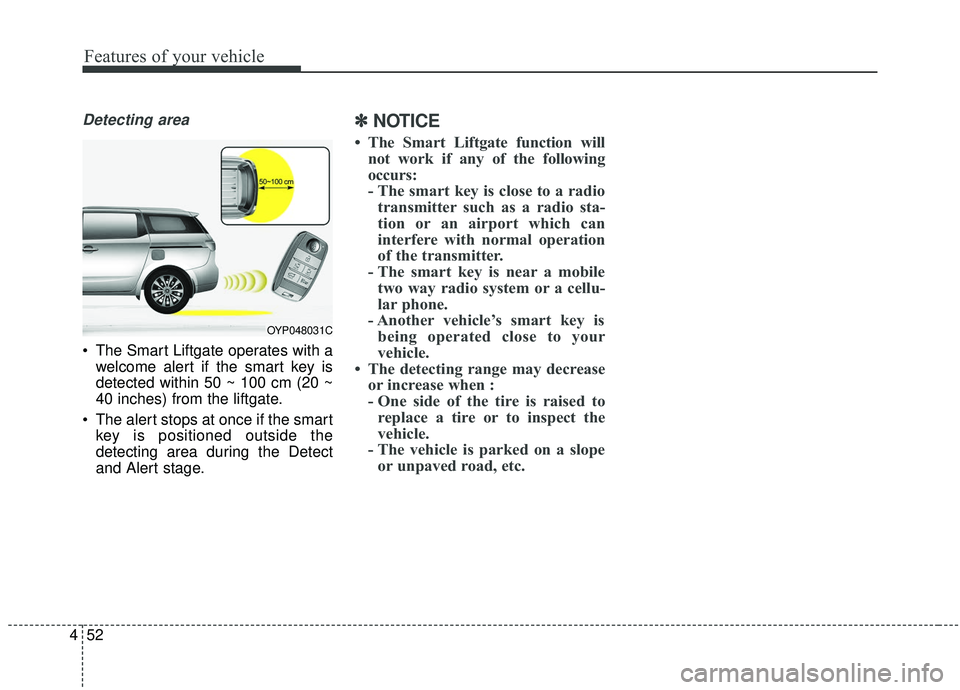
Detecting area
The Smart Liftgate operates with a
welcome alert if the smart key is
detected within 50 ~ 100 cm (20 ~
40 inches) from the liftgate.
The alert stops at once if the smart key is positioned outside the
detecting area during the Detect
and Alert stage.
✽ ✽ NOTICE
• The Smart Liftgate function will
not work if any of the following
occurs:
- The smart key is close to a radiotransmitter such as a radio sta-
tion or an airport which can
interfere with normal operation
of the transmitter.
- The smart key is near a mobile two way radio system or a cellu-
lar phone.
- Another vehicle’s smart key is being operated close to your
vehicle.
• The detecting range may decrease or increase when :
- One side of the tire is raised toreplace a tire or to inspect the
vehicle.
- The vehicle is parked on a slope or unpaved road, etc.
OYP048031C
Page 172 of 604
463
Features of your vehicle
WARNING- Cell phonefires
Do not use cellular phones
while refueling. Electric current
and/or electronic interference
from cellular phones can poten-
tially ignite fuel vapors causing
a fire.
WARNING- Smoking
DO NOT use matches or a lighter
and DO NOT SMOKE or leave a lit
cigarette in your vehicle while at
a gas station especially during
refueling. Automotive fuel is
highly flammable and can, when
ignited, result in fire.
WARNING- Refueling & Vehicle fires
When refueling, always shut the
engine off. Sparks produced by
electrical components related
to the engine can ignite fuel
vapors causing a fire. Once
refueling is complete, check to
make sure the filler cap and
filler door are securely closed,
before starting the engine.WARNING- Portable fuel container
When using an approved
portable fuel container, be sure
to place the container on the
ground prior to refueling. Static
electricity discharge from the
container can ignite fuel vapors
causing a fire. Once refueling
has begun, contact with the
vehicle should be maintained
until the filling is complete. Use
only approved portable plastic
fuel containers designed to
carry and store gasoline.
Page 186 of 604
477
Features of your vehicle
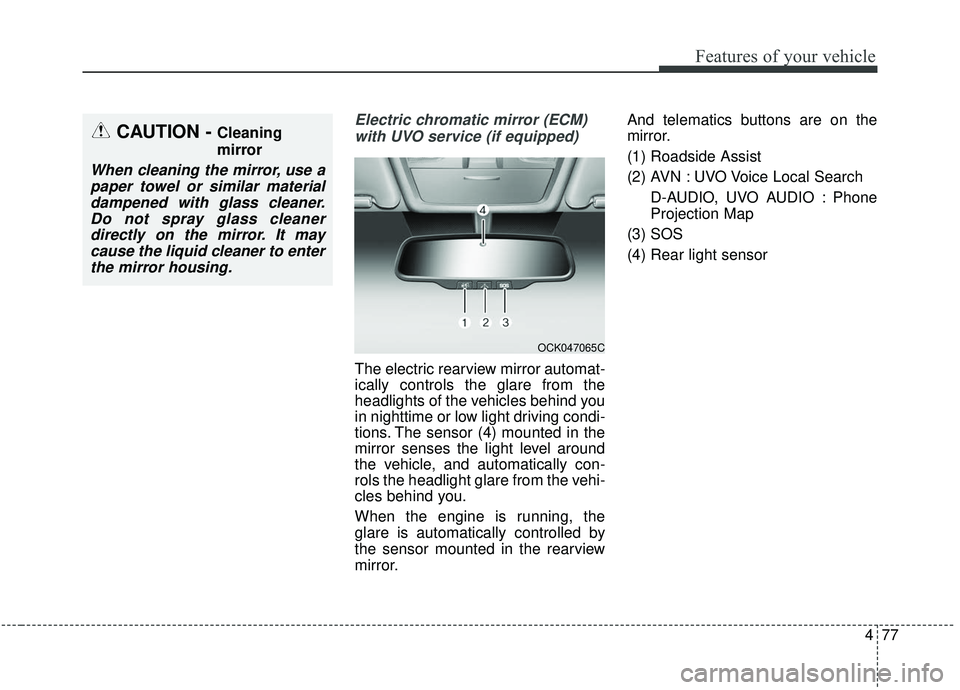
Electric chromatic mirror (ECM)with UVO service (if equipped)
The electric rearview mirror automat-
ically controls the glare from the
headlights of the vehicles behind you
in nighttime or low light driving condi-
tions. The sensor (4) mounted in the
mirror senses the light level around
the vehicle, and automatically con-
rols the headlight glare from the vehi-
cles behind you.
When the engine is running, the
glare is automatically controlled by
the sensor mounted in the rearview
mirror. And telematics buttons are on the
mirror.
(1) Roadside Assist
(2) AVN : UVO Voice Local Search
D-AUDIO, UVO AUDIO : Phone
Projection Map
(3) SOS
(4) Rear light sensor
CAUTION - Cleaning
mirror
When cleaning the mirror, use a paper towel or similar materialdampened with glass cleaner.Do not spray glass cleanerdirectly on the mirror. It maycause the liquid cleaner to enterthe mirror housing.
OCK047065C
Page 187 of 604
Features of your vehicle
78
4
Electric chromic mirror (ECM)
with HomeLink®system and com-
pass (if equipped)
Your vehicle may be equipped with a
Gentex Automatic-Dimming Mirror
with a Z-Nav
®Electronic Compass
Display and an Integrated HomeLink®
Wireless Control System.
During nighttime driving, this feature
will automatically detect and reduce
rearview mirror glare while the com-
pass indicates the direction the vehi-
cle is pointed. The HomeLink
®
Universal Transceiver allows you to
activate your garage door(s), electric
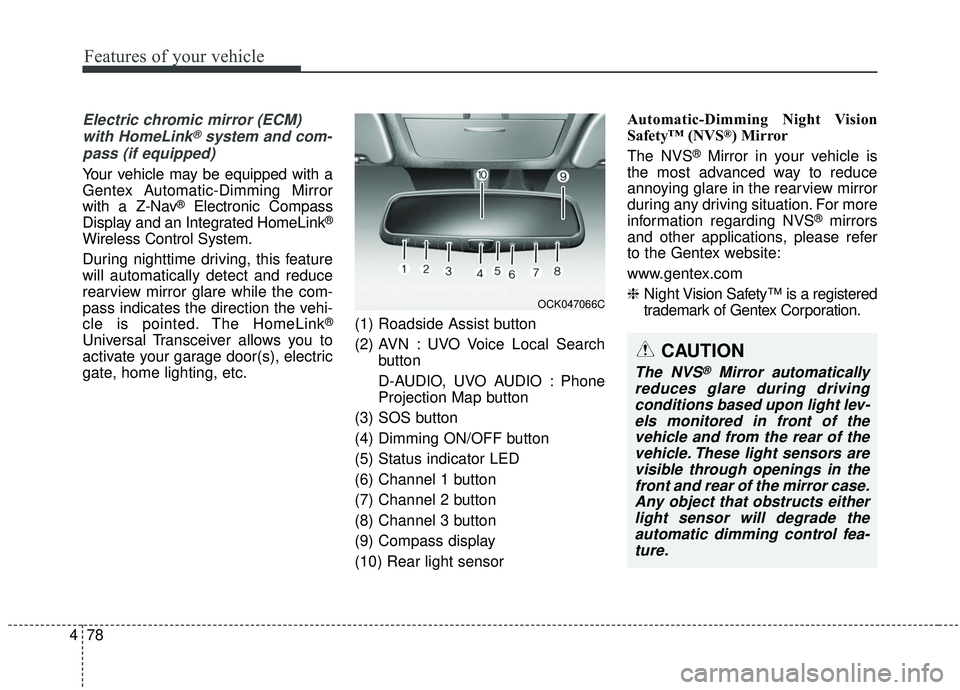
gate, home lighting, etc. (1) Roadside Assist button
(2) AVN : UVO Voice Local Search
button
D-AUDIO, UVO AUDIO : Phone
Projection Map button
(3) SOS button
(4) Dimming ON/OFF button
(5) Status indicator LED
(6) Channel 1 button
(7) Channel 2 button
(8) Channel 3 button
(9) Compass display
(10) Rear light sensor Automatic-Dimming Night Vision
Safety™ (NVS
®) Mirror
The NVS
®Mirror in your vehicle is
the most advanced way to reduce
annoying glare in the rearview mirror
during any driving situation. For more
information regarding NVS
®mirrors
and other applications, please refer
to the Gentex website:
www.gentex.com
❈ Night Vision Safety™ is a registered
trademark of Gentex Corporation.
OCK047066C
CAUTION
The NVS®Mirror automatically
reduces glare during driving conditions based upon light lev-els monitored in front of thevehicle and from the rear of thevehicle. These light sensors arevisible through openings in thefront and rear of the mirror case.Any object that obstructs eitherlight sensor will degrade theautomatic dimming control fea-ture.
Page 238 of 604
4129
Features of your vehicle
Types of warning sound
When an object is 120 cm to 61 cm(47 in. to 24 in.) from the rear
bumper: Buzzer beeps intermit-
tently.
When an object is 60 cm to 31 cm (24 in. to 12 in.) from the rear
bumper: Buzzer beeps more fre-
quently.
When an object is within 30 cm (12 in.) of the rear bumper : Buzzer
sounds continuously.
Non-operational conditions of
the parking distance warning-
reverse
The parking distance warning-
reverse may not operate properly
when:
1. Moisture is frozen to the sensor. (It will operate normally when the
moisture has been cleared.)
2. The sensor is covered with foreign matter, such as snow or water, or
the sensor cover is blocked. (It will
operate normally when the materi-
al is removed or the sensor is no
longer blocked.)
3. Driving on uneven road surfaces (unpaved roads, gravel, bumps,
gradient).
4. Objects generating excessive noise (vehicle horns, loud motor-
cycle engines, or truck air brakes)
are within range of the sensor.
5. The weather conditions produce heavy rain or water spray. 6. Wireless transmitters or mobile
phones are within range of the
sensor.
7. The sensor is covered with snow.
8. Trailer towing
Page 244 of 604
4135
Features of your vehicle
There is a possibility of parkingdistance warning malfunctionwhen:
1. Driving on uneven road surfaces such as unpaved roads, gravel,
bumps, or gradient.
2. Objects generating excessive noise such as vehicle horns, loud motor-
cycle engines, or truck air brakes
can interfere with the sensor.
3. The weather conditions produce heavy rain or water spray.
4. Wireless transmitters or mobile phones are present near the sen-
sor.
5. Sensor is covered with snow.
Detecting range may decrease when:
1. Outside air temperature is extremely hot or cold.
2. Undetectable objects smaller than 1 m (39 in.) and narrower than 14
cm (5.5 in.) in diameter.
The following objects may not be
recognized by the sensor:
1. Sharp or slim objects such as ropes, chains or small poles.
2. Objects, which tend to absorb sen- sor frequency such as clothes,
spongy material or snow.
✽ ✽NOTICE
1. The warning may not sound
depending on the speed and
shapes of the objects detected.
2. The parking distance warning may malfunction if the vehicle
bumper height or sensor installa-
tion has been modified. Any non-
factory installed equipment or
accessories may also interfere
with the sensor performance.
3. Sensor may not recognize objects less than 30 cm (12 in.) from the
sensor, or it may sense an incor-
rect distance. Use with caution.
4. When the sensor is frozen or stained with snow or water, the
sensor may be inoperative until
the stains are removed using a
soft cloth.
5. Do not push, scratch or strike the sensor with any hard objects that
could damage the surface of the
sensor. Sensor damage could occur.