key KIA SEDONA 2020 Workshop Manual
[x] Cancel search | Manufacturer: KIA, Model Year: 2020, Model line: SEDONA, Model: KIA SEDONA 2020Pages: 604, PDF Size: 16.24 MB
Page 338 of 604
59
Driving your vehicle
Starting the engine
1. Make sure the parking brake isapplied.
2. Place the transmission shift lever in P (Park). Depress the brake
pedal fully.
You can also start the engine when the shift lever is in the N
(Neutral) position.
3. Turn the ignition switch to START and hold it there until the engine
starts (a maximum of 10 sec-
onds), then release the key.
It should be started withoutdepressing the accelerator.
4. Do not wait for the engine to warm up while the vehicle remains sta-
tionary.
Start driving at moderate engine
speeds. (Steep accelerating and
decelerating should be avoided.) If the engine stalls while you are in
motion, do not attempt to move the
shift lever to the P (Park) position. If
traffic and road conditions permit,
you may put the shift lever in the N
(Neutral) position while the vehicle is
still moving and turn the ignition
switch to the START position in an
attempt to restart the engine.
CAUTION- Starter
Do not engage the starter for
more than 10 seconds. If theengine stalls or fails to start,wait 5 to 10 seconds before re-engaging the starter. Improperuse of the starter may damage it.
WARNING- Steering
wheel
Never reach for any controls
through the steering wheel
while the vehicle is in motion.
The presence of your hand or
arm in this area could cause a
loss of vehicle control.WARNING- Leaving the Vehicle
To avoid unexpected or sudden
vehicle movement, never leave
your vehicle if the transmission
is not locked in the P (Park)
position and the parking brake
is fully engaged. Before leaving
the driver's seat, always make
sure the shift lever is engaged in
P (Park), set the parking brake
fully and shut the engine off.
Page 339 of 604
Driving your vehicle
10
5
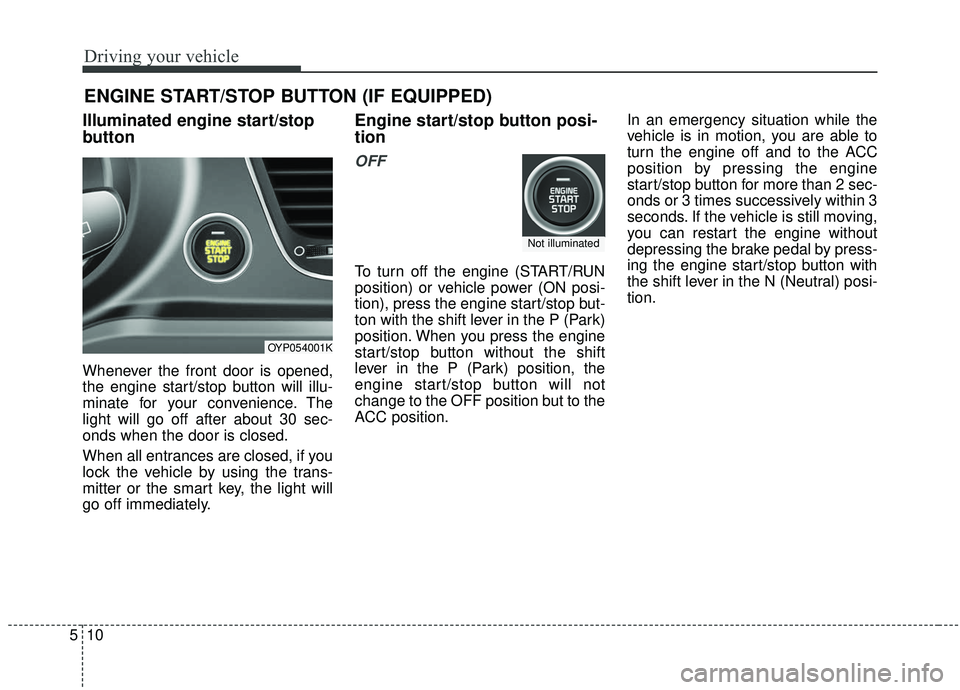
Illuminated engine start/stop
button
Whenever the front door is opened,
the engine start/stop button will illu-
minate for your convenience. The
light will go off after about 30 sec-
onds when the door is closed.
When all entrances are closed, if you
lock the vehicle by using the trans-
mitter or the smart key, the light will
go off immediately.
Engine start/stop button posi-
tion
OFF
To turn off the engine (START/RUN
position) or vehicle power (ON posi-
tion), press the engine start/stop but-
ton with the shift lever in the P (Park)
position. When you press the engine
start/stop button without the shift
lever in the P (Park) position, the
engine start/stop button will not
change to the OFF position but to the
ACC position. In an emergency situation while the
vehicle is in motion, you are able to
turn the engine off and to the ACC
position by pressing the engine
start/stop button for more than 2 sec-
onds or 3 times successively within 3
seconds. If the vehicle is still moving,
you can restart the engine without
depressing the brake pedal by press-
ing the engine start/stop button with
the shift lever in the N (Neutral) posi-
tion.
ENGINE START/STOP BUTTON (IF EQUIPPED)
OYP054001K
Not illuminated
Page 341 of 604
Driving your vehicle
12
5
✽ ✽
NOTICE
If you leave the engine start/stop
button in the ACC or ON position
for a long time, the battery will dis-
charge.
Starting the engine with a
smart key
1. Carry the smart key or leave it
inside the vehicle.
2. Make sure the parking brake is firmly applied.
3. Place the transmission shift lever in P (Park). Depress the brake
pedal fully.
You can also start the enginewhen the shift lever is in the N(Neutral) position.
4. Press the engine start/stop button while depressing the brake pedal.
It should be started withoutdepressing the accelerator.
5. Do not wait for the engine to warm up while the vehicle remains sta-
tionary.
Start driving at moderate engine
speeds. (Steep accelerating and
decelerating should be avoided.) Even if the smart key is in the vehi-
cle, if it is far away from you, the
engine may not start.
When the engine start/stop button is in the ACC position or above, if
any door is opened, the system
checks for the smart key. If the
smart key is not in the vehicle, a
message "key is not in the vehicle"
will appear on the LCD display. And
if all doors are closed, the chime
will sound for 5 seconds. The indi-
cator or warning will turn off while
the vehicle is moving. Always have
the smart key with you.
WARNING- Starting
vehicle
Never press the engine
start/stop button while the vehi-
cle is in motion except in an
emergency. This would result in
loss of directional control and
braking function, which could
cause an accident.
Page 342 of 604
513
Driving your vehicle
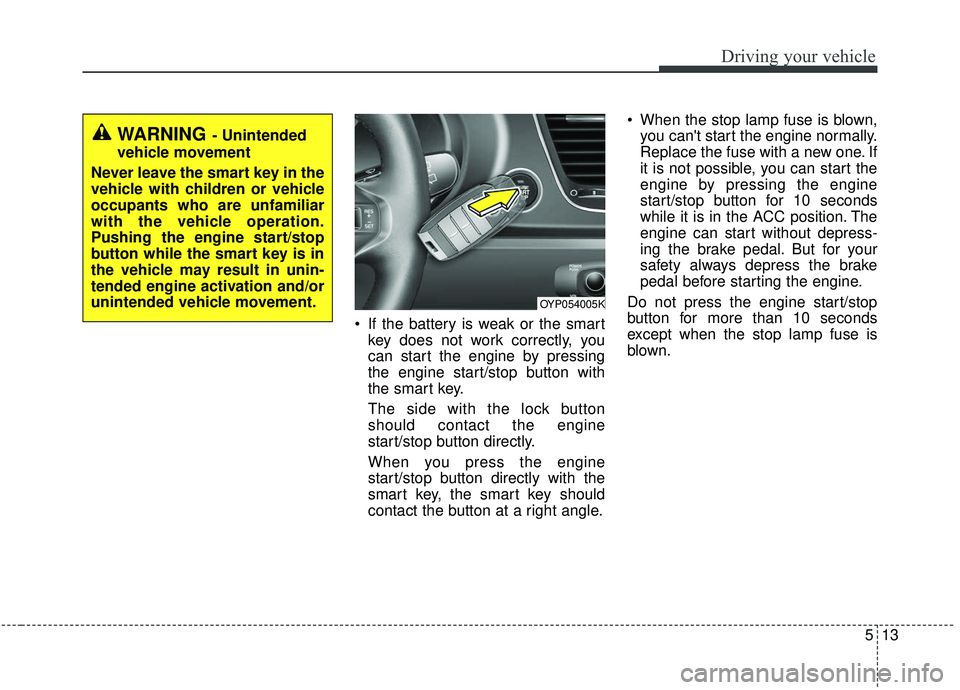
If the battery is weak or the smartkey does not work correctly, you
can start the engine by pressing
the engine start/stop button with
the smart key.
The side with the lock button
should contact the engine
start/stop button directly.
When you press the engine
start/stop button directly with the
smart key, the smart key should
contact the button at a right angle. When the stop lamp fuse is blown,
you can't start the engine normally.
Replace the fuse with a new one. If
it is not possible, you can start the
engine by pressing the engine
start/stop button for 10 seconds
while it is in the ACC position. The
engine can start without depress-
ing the brake pedal. But for your
safety always depress the brake
pedal before starting the engine.
Do not press the engine start/stop
button for more than 10 seconds
except when the stop lamp fuse is
blown.
WARNING - Unintended
vehicle movement
Never leave the smart key in the
vehicle with children or vehicle
occupants who are unfamiliar
with the vehicle operation.
Pushing the engine start/stop
button while the smart key is in
the vehicle may result in unin-
tended engine activation and/or
unintended vehicle movement.
OYP054005K
Page 345 of 604
Driving your vehicle
16
5
R (Reverse)
Use this position to drive the vehicle
backward. N (Neutral)
When in Neutral, the wheels and
transmission are not engaged. The
vehicle will roll freely even on the
slightest incline unless the parking
brake or service brakes are applied.- Parking in N (Neutral) gear
Follow below steps when parking
and you want the vehicle to move
when pushed.
1. After parking your vehicle, step on
the brake pedal and move the shift
lever to P with the ignition button in
ON or while the engine is running.
2. If the parking brake is applied unlock the parking brake.
3. While pressing the brake pedal, turn the ignition button OFF.
- For smart key equipped vehicles, the ignition switch can be moved
to OFF only when the shift lever
is in P.
4. Change the gear shift lever to N (Neutral) while pressing the brake
pedal and pushing [SHIFT LOCK
RELEASE] button or inserting,
pressing down a tool (e.g. flathead
screw-driver) into the [SHIFT LOCK
RELEASE] access hole at the
same time. Then, the vehicle will
move when external force is
applied.
CAUTION- Shifting
Always come to a complete stopbefore shifting into or out of R(Reverse); you may damage thetransmission if you shift into R(Reverse) while the vehicle is inmotion, except when “Rockingthe vehicle” explained in thischapter.
WARNING
ALWAYS check the surrounding
areas near your vehicle for peo-
ple, especially children, before
shifting a vehicle into D (Drive)
or R (Reverse).
Page 348 of 604
519
Driving your vehicle
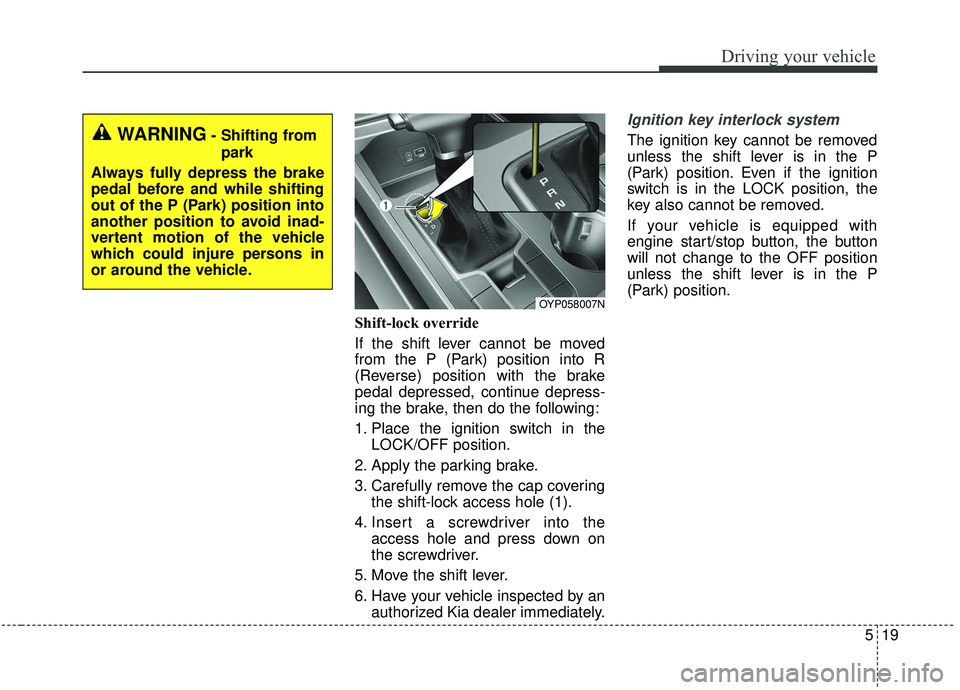
Shift-lock override
If the shift lever cannot be moved
from the P (Park) position into R
(Reverse) position with the brake
pedal depressed, continue depress-
ing the brake, then do the following:
1. Place the ignition switch in theLOCK/OFF position.
2. Apply the parking brake.
3. Carefully remove the cap covering the shift-lock access hole (1).
4. Insert a screwdriver into the access hole and press down on
the screwdriver.
5. Move the shift lever.
6. Have your vehicle inspected by an authorized Kia dealer immediately.
Ignition key interlock system
The ignition key cannot be removed
unless the shift lever is in the P
(Park) position. Even if the ignition
switch is in the LOCK position, the
key also cannot be removed.
If your vehicle is equipped with
engine start/stop button, the button
will not change to the OFF position
unless the shift lever is in the P
(Park) position.
OYP058007N
WARNING- Shifting from
park
Always fully depress the brake
pedal before and while shifting
out of the P (Park) position into
another position to avoid inad-
vertent motion of the vehicle
which could injure persons in
or around the vehicle.
Page 357 of 604
Driving your vehicle
28
5
A click or electric brake motor
whine sound may be heard while
operating or releasing the EPB, but
these conditions are normal and
indicate that the EPB is functioning
properly.
When leaving your keys with a parking lot attendant or valet, make
sure to inform him/her how to oper-
ate the EPB.
The EPB may malfunction if you drive with the EPB applied.
When you automatically release EPB by depressing the accelerator
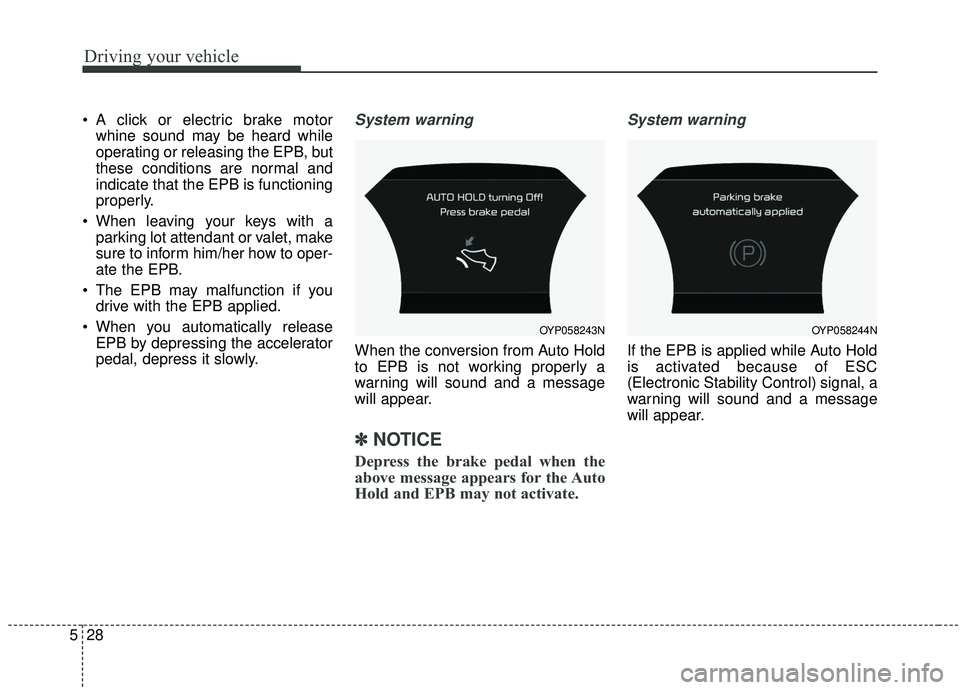
pedal, depress it slowly.System warning
When the conversion from Auto Hold
to EPB is not working properly a
warning will sound and a message
will appear.
✽ ✽ NOTICE
Depress the brake pedal when the
above message appears for the Auto
Hold and EPB may not activate.
System warning
If the EPB is applied while Auto Hold
is activated because of ESC
(Electronic Stability Control) signal, a
warning will sound and a message
will appear.
OYP058244NOYP058243N
Page 441 of 604
Driving your vehicle
112
5
Use high quality ethylene gly-
col coolant
Your vehicle is delivered with high
quality ethylene glycol coolant in the
cooling system. It is the only type of
coolant that should be used because
it helps prevent corrosion in the cool-
ing system, lubricates the water
pump and prevents freezing. Be sure
to replace or replenish your coolant
in accordance with the maintenance
schedule in section 7. Before winter,
have your coolant tested to assure
that its freezing point is sufficient for
the temperatures anticipated during
the winter.
Check battery and cables
Winter puts additional burdens on the
battery system. Visually inspect the
battery and cables as described in
chapter 7. The level of charge in your
battery can be checked by an author-
ized Kia dealer or a service station.
Change to "winter weight" oil
if necessary
In some climates it is recommended
that a lower viscosity "winter weight"
oil be used during cold weather. See
chapter 8 for recommendations. If you
aren't sure what weight oil you should
use, consult an authorized Kia dealer.
Check spark plugs and igni-
tion system
Inspect your spark plugs as
described in chapter 7 and replace
them if necessary. Also check all
ignition wiring and components to be
sure they are not cracked, worn or
damaged in any way.
To keep locks from freezing
To keep the locks from freezing,
squirt an approved de-icer fluid or
glycerine into the key opening. If a
lock is covered with ice, squirt it with
an approved de-icing fluid to remove
the ice. If the lock is frozen internally,
you may be able to thaw it out by
using a heated key. Handle the heat-
ed key with care to avoid injury.
Page 539 of 604
Maintenance
56
7
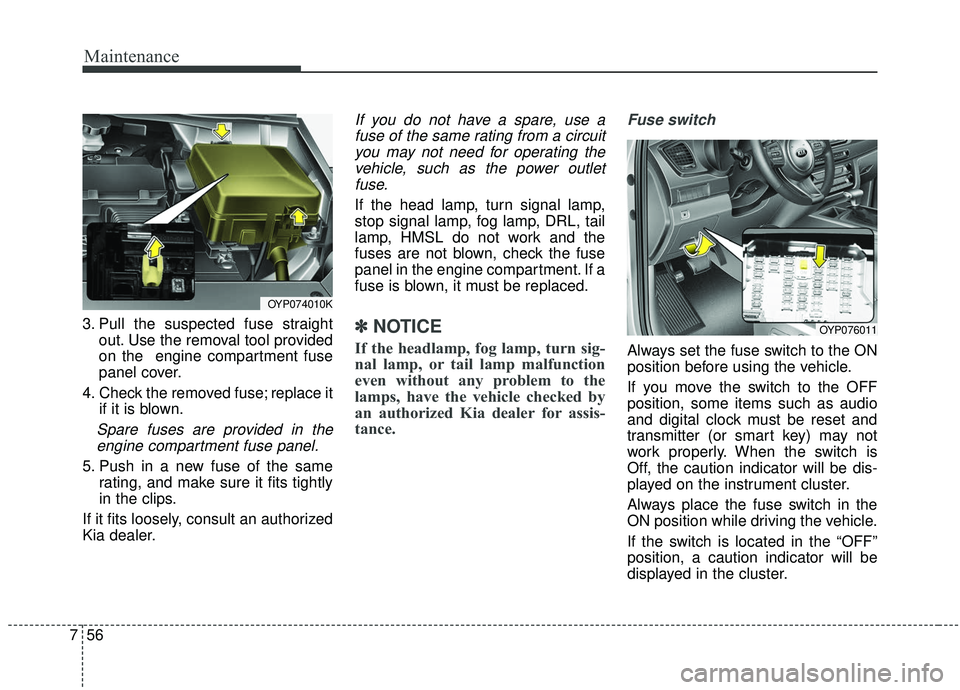
3. Pull the suspected fuse straight
out. Use the removal tool provided
on the engine compartment fuse
panel cover.
4. Check the removed fuse; replace it if it is blown.
Spare fuses are provided in theengine compartment fuse panel.
5. Push in a new fuse of the same rating, and make sure it fits tightly
in the clips.
If it fits loosely, consult an authorized
Kia dealer.
If you do not have a spare, use a fuse of the same rating from a circuityou may not need for operating thevehicle, such as the power outletfuse.
If the head lamp, turn signal lamp,
stop signal lamp, fog lamp, DRL, tail
lamp, HMSL do not work and the
fuses are not blown, check the fuse
panel in the engine compartment. If a
fuse is blown, it must be replaced.
✽ ✽ NOTICE
If the headlamp, fog lamp, turn sig-
nal lamp, or tail lamp malfunction
even without any problem to the
lamps, have the vehicle checked by
an authorized Kia dealer for assis-
tance.
Fuse switch
Always set the fuse switch to the ON
position before using the vehicle.
If you move the switch to the OFF
position, some items such as audio
and digital clock must be reset and
transmitter (or smart key) may not
work properly. When the switch is
Off, the caution indicator will be dis-
played on the instrument cluster.
Always place the fuse switch in the
ON position while driving the vehicle.
If the switch is located in the “OFF”
position, a caution indicator will be
displayed in the cluster.
OYP074010K
OYP076011
Page 543 of 604
Maintenance
60
7
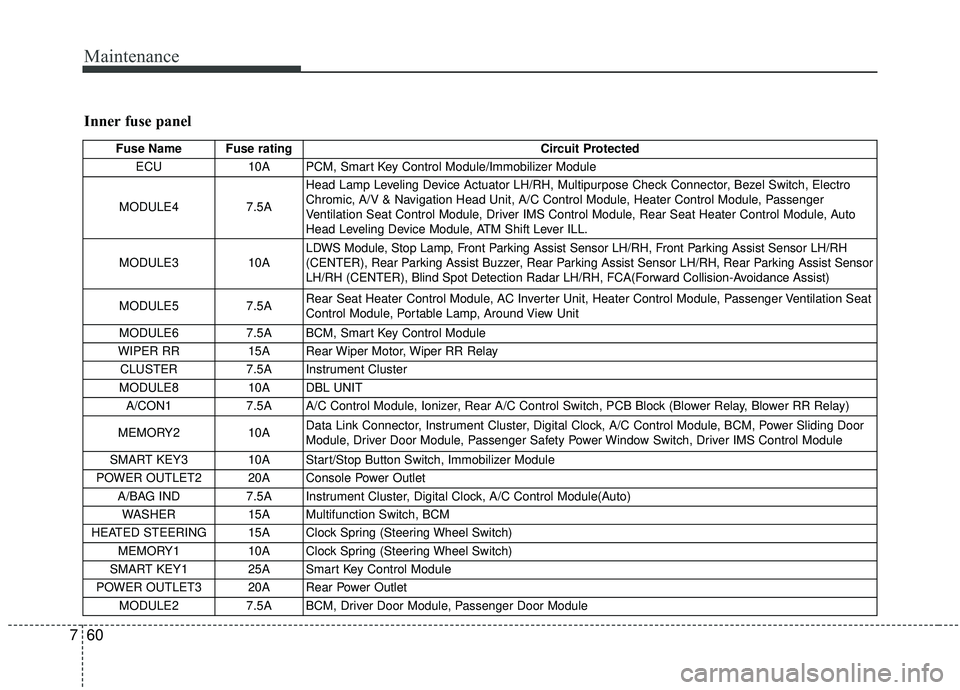
Inner fuse panel
Fuse Name Fuse rating Circuit Protected
ECU 10A PCM, Smart Key Control Module/Immobilizer Module
MODULE4 7.5AHead Lamp Leveling Device Actuator LH/RH, Multipurpose Check Connector, Bezel Switch, Electro
Chromic, A/V & Navigation Head Unit, A/C Control Module, Heater Control Module, Passenger
Ventilation Seat Control Module, Driver IMS Control Module, Rear Seat Heater Control Module, Auto
Head Leveling Device Module, ATM Shift Lever ILL.
MODULE3 10A LDWS Module, Stop Lamp, Front Parking Assist Sensor LH/RH, Front Parking Assist Sensor LH/RH
(CENTER), Rear Parking Assist Buzzer, Rear Parking Assist Sensor LH/RH, Rear Parking Assist Sensor
LH/RH (CENTER), Blind Spot Detection Radar LH/RH, FCA(Forward Collision-Avoidance Assist)
MODULE5 7.5A Rear Seat Heater Control Module, AC Inverter Unit, Heater Control Module, Passenger Ventilation Seat
Control Module, Portable Lamp, Around View Unit
MODULE6 7.5A BCM, Smart Key Control Module
WIPER RR 15A Rear Wiper Motor, Wiper RR Relay
CLUSTER 7.5A Instrument Cluster
MODULE8 10A DBL UNIT
A/CON1 7.5A A/C Control Module, Ionizer, Rear A/C Control Switch, PCB Block (Blower Relay, Blower RR Relay)
MEMORY2 10A Data Link Connector, Instrument Cluster, Digital Clock, A/C Control Module, BCM, Power Sliding Door
Module, Driver Door Module, Passenger Safety Power Window Switch, Driver IMS Control Module
SMART KEY3 10A Start/Stop Button Switch, Immobilizer Module
POWER OUTLET2 20A Console Power Outlet A/BAG IND 7.5A Instrument Cluster, Digital Clock, A/C Control Module(Auto)
WASHER 15A Multifunction Switch, BCM
HEATED STEERING 15A Clock Spring (Steering Wheel Switch) MEMORY1 10A Clock Spring (Steering Wheel Switch)
SMART KEY1 25A Smart Key Control Module
POWER OUTLET3 20A Rear Power Outlet MODULE2 7.5A BCM, Driver Door Module, Passenger Door Module