lock KIA SEDONA 2020 Manual Online
[x] Cancel search | Manufacturer: KIA, Model Year: 2020, Model line: SEDONA, Model: KIA SEDONA 2020Pages: 604, PDF Size: 16.24 MB
Page 238 of 604
4129
Features of your vehicle
Types of warning sound
When an object is 120 cm to 61 cm(47 in. to 24 in.) from the rear
bumper: Buzzer beeps intermit-
tently.
When an object is 60 cm to 31 cm (24 in. to 12 in.) from the rear
bumper: Buzzer beeps more fre-
quently.
When an object is within 30 cm (12 in.) of the rear bumper : Buzzer
sounds continuously.
Non-operational conditions of
the parking distance warning-
reverse
The parking distance warning-
reverse may not operate properly
when:
1. Moisture is frozen to the sensor. (It will operate normally when the
moisture has been cleared.)
2. The sensor is covered with foreign matter, such as snow or water, or
the sensor cover is blocked. (It will
operate normally when the materi-
al is removed or the sensor is no
longer blocked.)
3. Driving on uneven road surfaces (unpaved roads, gravel, bumps,
gradient).
4. Objects generating excessive noise (vehicle horns, loud motor-
cycle engines, or truck air brakes)
are within range of the sensor.
5. The weather conditions produce heavy rain or water spray. 6. Wireless transmitters or mobile
phones are within range of the
sensor.
7. The sensor is covered with snow.
8. Trailer towing
Page 243 of 604
Features of your vehicle
134
4
Non-operational conditions of
parking distance warning
Parking distance warning may
not operate normally when:
1. Moisture is frozen to the sensor. (It will operate normally when mois-
ture melts.)
2. Sensor is covered with foreign matter, such as snow or water, or
the sensor cover is blocked. (It will
operate normally when the materi-
al is removed or the sensor is no
longer blocked.)
3. Sensor is stained with foreign mat- ter such as snow or water. (Sensing
range will return to normal when
removed.)
4. The parking assist button is off.
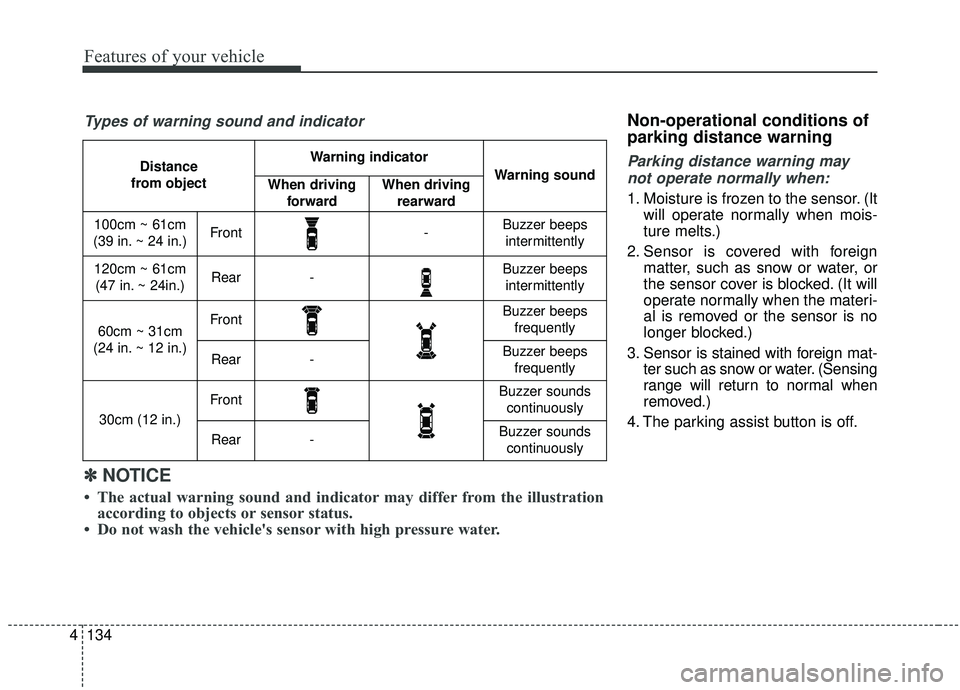
Distance
from object Warning indicator
Warning soundWhen driving forwardWhen driving rearward
100cm ~ 61cm
(39 in. ~ 24 in.)Front-Buzzer beeps intermittently
120cm ~ 61cm(47 in. ~ 24in.)Rear-Buzzer beeps intermittently
60cm ~ 31cm
(24 in. ~ 12 in.)FrontBuzzer beeps frequently
Rear-Buzzer beeps frequently
30cm (12 in.)
FrontBuzzer sounds continuously
Rear-Buzzer sounds continuously
✽ ✽ NOTICE
• The actual warning sound and indicator may differ from the illustration
according to objects or sensor status.
• Do not wash the vehicle's sensor with high pressure water.
Types of warning sound and indicator
Page 248 of 604
4139
Features of your vehicle
Battery saver function
The purpose of this feature is toprevent the battery from being dis-
charged if the lights are left in the
ON position. The system automati-
cally shuts off the parking lights 30
seconds after the ignition key is
removed and the driver’s door is
opened and closed.
With this feature, the parking lights will turn off automatically if the driver
parks on the side of the road at night
and opens the driver’s side door.
If necessary, to keep the parking
lights on when the ignition key is
removed, perform the following:
1) Open the driver-side door.
2) Turn the parking lights OFF and ON again using the light switch
on the steering column.
Headlight escort function
If you turn the ignition switch to the
ACC or OFF position with the head-
lights ON, the headlights remain on
for about 5 minutes. However, if the
driver's door is opened and closed,
the headlights are turned off after 15
seconds.
The headlights can be turned off by
pressing the lock button on the trans-
mitter (or smart key) twice or turning
the light switch to the OFF position.
If the driver gets out of the vehicle
through other doors (except driver’s
door), the battery saver function
does not operate and the headlight
escort function does not turn off
automatically. Therefore, it can cause
the battery to be discharged. In this
case, make sure to turn off the lamp
before getting out of the vehicle.
Daytime running light
(if equipped)
The Daytime Running Lights (DRL)
can make it easier for others to see
the front of your vehicle during the
day. DRL can be helpful in many dif-
ferent driving conditions, and it is
especially helpful after dawn and
before sunset.
The DRL system turns OFF when:
1. The headlight switch is on
2. The engine is off
3. Engaging the Parking Brake
LIGHTING
Page 262 of 604
4153
Features of your vehicle
Map lamp
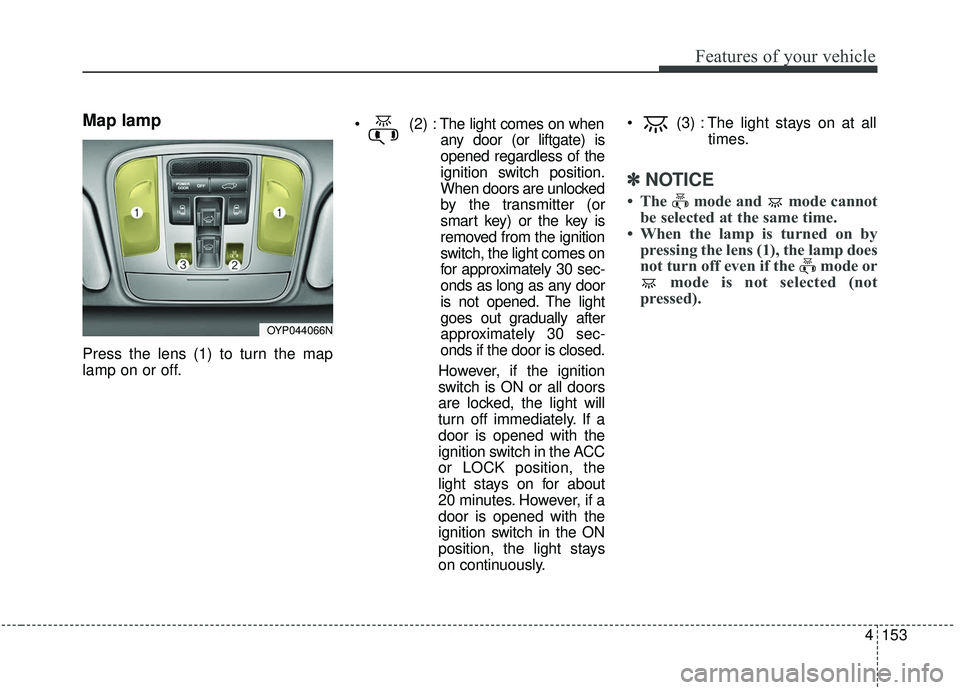
Press the lens (1) to turn the map
lamp on or off.
The light comes on when
any door (or liftgate) is
opened regardless of the
ignition switch position.
When doors are unlocked
by the transmitter (or
smart key) or the key is
removed from the ignition
switch, the light comes on
for approximately 30 sec-
onds as long as any door
is not opened. The light
goes out gradually after
approximately 30 sec-
onds if the door is closed.
However, if the ignition
switch is ON or all doors
are locked, the light will
turn off immediately. If a
door is opened with the
ignition switch in the ACC
or LOCK position, the
light stays on for about
20 minutes. However, if a
door is opened with the
ignition switch in the ON
position, the light stays
on continuously. (3) : The light stays on at all
times.
✽ ✽NOTICE
• The mode and mode cannot
be selected at the same time.
• When the lamp is turned on by pressing the lens (1), the lamp does
not turn off even if the mode or mode is not selected (not
pressed).
OYP044066N
Page 265 of 604
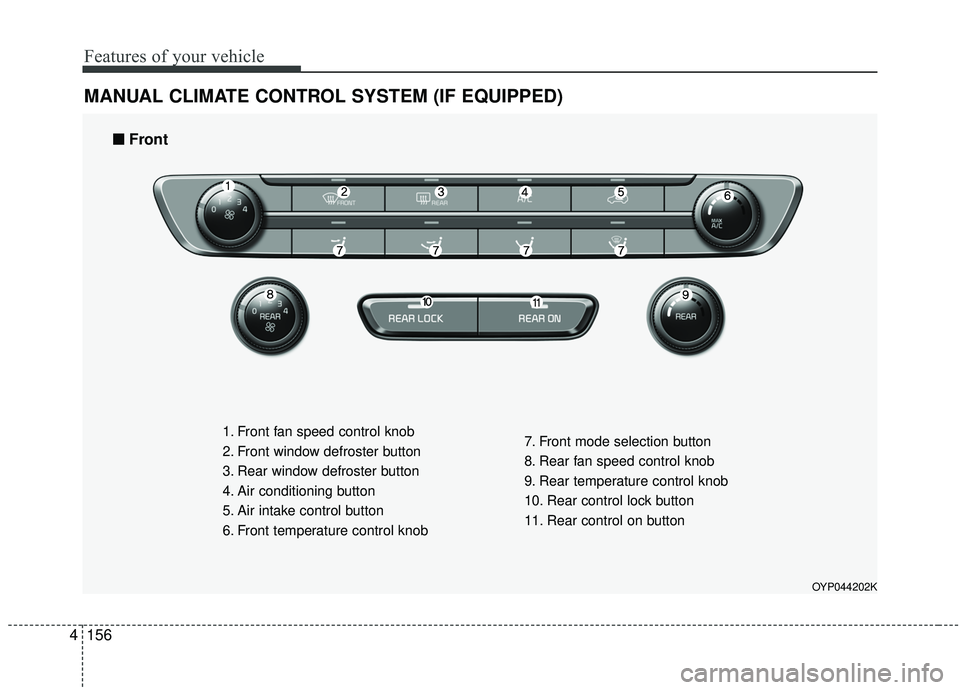
Features of your vehicle
156
4
MANUAL CLIMATE CONTROL SYSTEM (IF EQUIPPED)
OYP044202K
1. Front fan speed control knob
2. Front window defroster button
3. Rear window defroster button
4. Air conditioning button
5. Air intake control button
6. Front temperature control knob 7. Front mode selection button
8. Rear fan speed control knob
9. Rear temperature control knob
10. Rear control lock button
11. Rear control on button
■ ■
Front
Page 273 of 604
Features of your vehicle
164
4
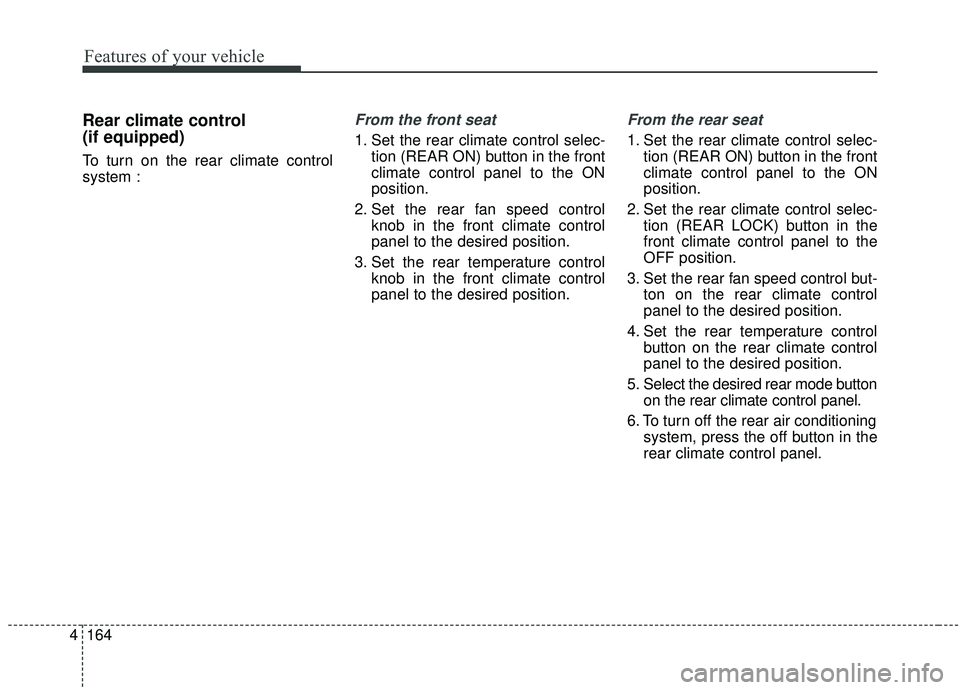
Rear climate control
(if equipped)
To turn on the rear climate control
system :
From the front seat
1. Set the rear climate control selec-
tion (REAR ON) button in the front
climate control panel to the ON
position.
2. Set the rear fan speed control knob in the front climate control
panel to the desired position.
3. Set the rear temperature control knob in the front climate control
panel to the desired position.
From the rear seat
1. Set the rear climate control selec-tion (REAR ON) button in the front
climate control panel to the ON
position.
2. Set the rear climate control selec- tion (REAR LOCK) button in the
front climate control panel to the
OFF position.
3. Set the rear fan speed control but- ton on the rear climate control
panel to the desired position.
4. Set the rear temperature control button on the rear climate control
panel to the desired position.
5. Select the desired rear mode button on the rear climate control panel.
6. To turn off the rear air conditioning system, press the off button in the
rear climate control panel.
Page 274 of 604
4165
Features of your vehicle
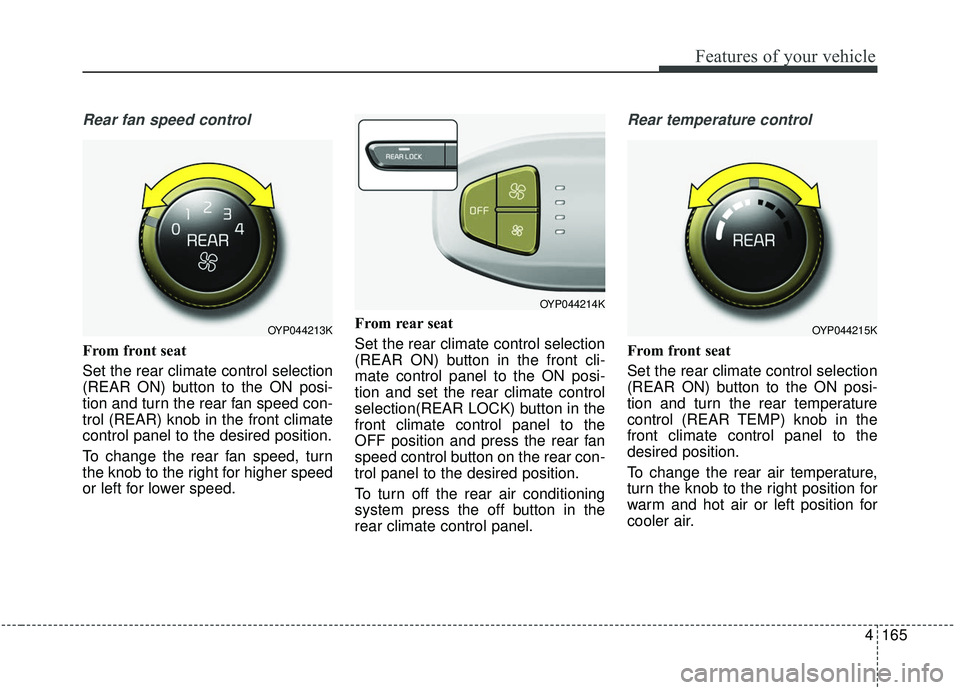
Rear fan speed control
From front seat
Set the rear climate control selection
(REAR ON) button to the ON posi-
tion and turn the rear fan speed con-
trol (REAR) knob in the front climate
control panel to the desired position.
To change the rear fan speed, turn
the knob to the right for higher speed
or left for lower speed.From rear seat
Set the rear climate control selection
(REAR ON) button in the front cli-
mate control panel to the ON posi-
tion and set the rear climate control
selection(REAR LOCK) button in the
front climate control panel to the
OFF position and press the rear fan
speed control button on the rear con-
trol panel to the desired position.
To turn off the rear air conditioning
system press the off button in the
rear climate control panel.
Rear temperature control
From front seat
Set the rear climate control selection
(REAR ON) button to the ON posi-
tion and turn the rear temperature
control (REAR TEMP) knob in the
front climate control panel to the
desired position.
To change the rear air temperature,
turn the knob to the right position for
warm and hot air or left position for
cooler air.
OYP044213K
OYP044214K
OYP044215K
Page 275 of 604
Features of your vehicle
166
4
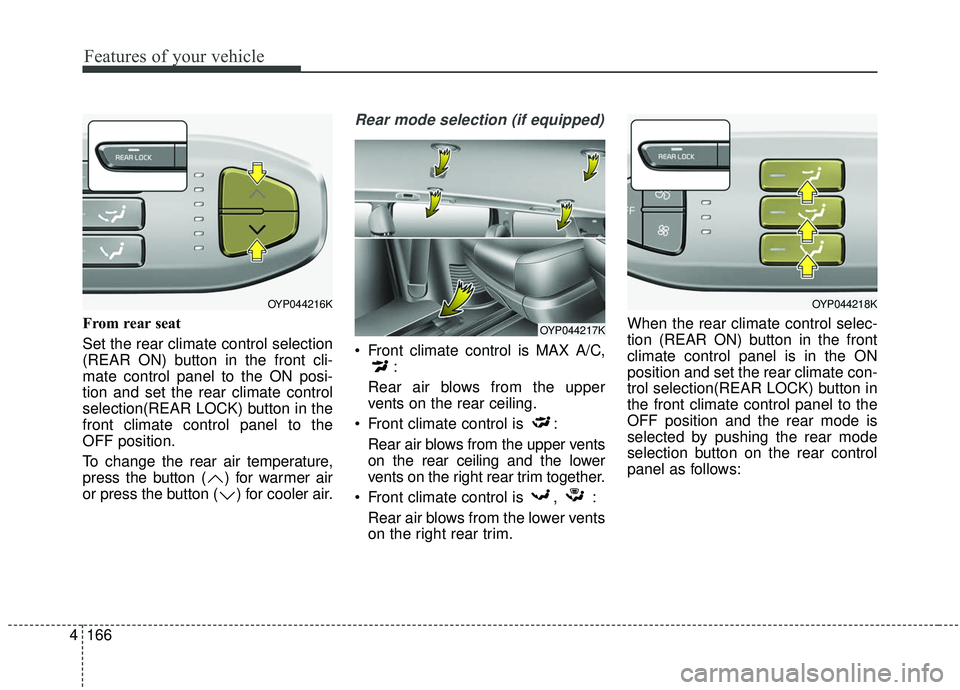
From rear seat
Set the rear climate control selection
(REAR ON) button in the front cli-
mate control panel to the ON posi-
tion and set the rear climate control
selection(REAR LOCK) button in the
front climate control panel to the
OFF position.
To change the rear air temperature,
press the button ( ) for warmer air
or press the button ( ) for cooler air.
Rear mode selection (if equipped)
Front climate control is MAX A/C,
:
Rear air blows from the upper
vents on the rear ceiling.
Front climate control is : Rear air blows from the upper vents
on the rear ceiling and the lower
vents on the right rear trim together.
Front climate control is , : Rear air blows from the lower vents
on the right rear trim. When the rear climate control selec-
tion (REAR ON) button in the front
climate control panel is in the ON
position and set the rear climate con-
trol selection(REAR LOCK) button in
the front climate control panel to the
OFF position and the rear mode is
selected by pushing the rear mode
selection button on the rear control
panel as follows:
OYP044216K
OYP044217K
OYP044218K
Page 277 of 604
Features of your vehicle
168
4
Heating
1. Set the mode to the position.
2. Set the air intake control to the
outside (fresh) air position.
3. Set the temperature control to the desired position.
4. Set the fan speed control to the desired speed.
5. If dehumidified heating is desired, turn the air conditioning system (if
equipped) on.
If the windshield fogs up, set the mode to the or position. Operation Tips
To keep dust or unpleasant fumes
from entering the vehicle through
the ventilation system, temporarily
set the air intake control to the
recirculated air position. Be sure to
return the control to the fresh air
position when the irritation has
passed to keep fresh air in the
vehicle. This will help keep the driv-
er alert and comfortable.
Air for the heating/cooling system is drawn in through the grilles just
ahead of the windshield. Care
should be taken that these are not
blocked by leaves, snow, ice or
other obstructions.
To prevent interior fog on the wind- shield, set the air intake control to
the fresh air position and fan speed
to the desired position, turn on the
air conditioning system, and adjust
the temperature control to desired
temperature.
Air conditioning
Kia Air Conditioning Systems are
filled with refrigerant*.
1. Start the engine. Push the air con- ditioning button.
2. Set the mode to the position.
3. Set the air intake control to the outside air or recirculated air posi-
tion.
4. Adjust the fan speed control and temperature control to maintain
maximum comfort.
Page 281 of 604
Features of your vehicle
172
4
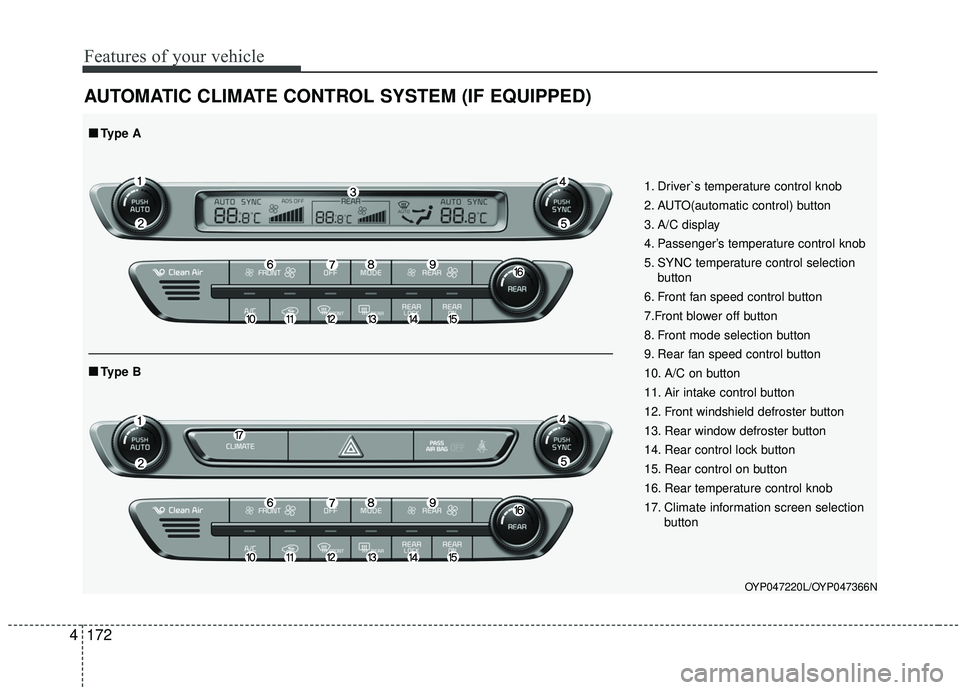
AUTOMATIC CLIMATE CONTROL SYSTEM (IF EQUIPPED)
OYP047220L/OYP047366N
1. Driver`s temperature control knob
2. AUTO(automatic control) button
3. A/C display
4. Passenger’s temperature control knob
5. SYNC temperature control selection
button
6. Front fan speed control button
7.Front blower off button
8. Front mode selection button
9. Rear fan speed control button
10. A/C on button
11. Air intake control button
12. Front windshield defroster button
13. Rear window defroster button
14. Rear control lock button
15. Rear control on button
16. Rear temperature control knob
17. Climate information screen selection button
■ ■Type B
■ ■Type A