display KIA SEDONA 2020 Owners Manual
[x] Cancel search | Manufacturer: KIA, Model Year: 2020, Model line: SEDONA, Model: KIA SEDONA 2020Pages: 604, PDF Size: 16.24 MB
Page 111 of 604

Sunroof . . . . . . . . . . . . . . . . . . . . . . . . . . . . . . . . . . 4-65\
• Sliding the sunroof . . . . . . . . . . . . . . . . . . . . . . . . . . . 4-66
• Tilting the sunroof (for front sunroof) . . . . . . . . . . . 4-68
• Sunshade. . . . . . . . . . . . . . . . . . . . . . . . . . . . . . . . \
. . . . 4-69
• Resetting the sunroof . . . . . . . . . . . . . . . . . . . . . . . . . 4-69
• Rear sunroof lock . . . . . . . . . . . . . . . . . . . . . . . . . . . . 4-70
• Sunroof open warning. . . . . . . . . . . . . . . . . . . . . . . . . 4-71
Steering wheel . . . . . . . . . . . . . . . . . . . . . . . . . . . . . 4-72
• Power steering . . . . . . . . . . . . . . . . . . . . . . . . . . . . . . . 4-72
• Electric power steering . . . . . . . . . . . . . . . . . . . . . . . . 4-72
• Tilt and telescopic steering . . . . . . . . . . . . . . . . . . . . . 4-73
• Heated steering wheel . . . . . . . . . . . . . . . . . . . . . . . . . 4-74
• Horn . . . . . . . . . . . . . . . . . . . . . . . . . . . . . . . . . . . . \
. . . 4-75
Mirrors . . . . . . . . . . . . . . . . . . . . . . . . . . . . . . . . . . 4-76\
• Inside rearview mirror . . . . . . . . . . . . . . . . . . . . . . . . 4-76
• Outside rearview mirror. . . . . . . . . . . . . . . . . . . . . . . 4-86
Instrument cluster . . . . . . . . . . . . . . . . . . . . . . . . . 4-91
• Instrument cluster control . . . . . . . . . . . . . . . . . . . . . 4-92
• LCD display control . . . . . . . . . . . . . . . . . . . . . . . . . . 4-92
• Gauges . . . . . . . . . . . . . . . . . . . . . . . . . . . . . . . . . . . . \
. 4-93
• Transmission shift indicator . . . . . . . . . . . . . . . . . . . . 4-96
LCD display . . . . . . . . . . . . . . . . . . . . . . . . . . . . . . 4-98
• LCD modes. . . . . . . . . . . . . . . . . . . . . . . . . . . . . . . . . . 4-98\
Trip modes (Trip computer) . . . . . . . . . . . . . . . . . 4-99
• Trip modes . . . . . . . . . . . . . . . . . . . . . . . . . . . . . . . . . . 4-99\
• Fuel economy . . . . . . . . . . . . . . . . . . . . . . . . . . . . . . . . 4-99
• Accumulated driving information mode . . . . . . . . . 4-101
• One time driving information mode . . . . . . . . . . . . 4-101
• Digital speedometer . . . . . . . . . . . . . . . . . . . . . . . . . . 4-102
• Smart shift . . . . . . . . . . . . . . . . . . . . . . . . . . . . . . . . . 4-102
• Turn by turn mode . . . . . . . . . . . . . . . . . . . . . . . . . . 4-102
• Assist mode. . . . . . . . . . . . . . . . . . . . . . . . . . . . . . . . . 4-103
• Distance to empty . . . . . . . . . . . . . . . . . . . . . . . . . . . 4-105
• User settings mode. . . . . . . . . . . . . . . . . . . . . . . . . . . 4-106
• Warning messages . . . . . . . . . . . . . . . . . . . . . . . . . . . 4-111
Warning and indicator lights . . . . . . . . . . . . . . . 4-116
• Warning lights . . . . . . . . . . . . . . . . . . . . . . . . . . . . . . 4-116
• Indicator lights. . . . . . . . . . . . . . . . . . . . . . . . . . . . . . 4-123
Parking distance warning-reverse . . . . . . . . . . . 4-128
• Operation of the parking distance warning-reverse . 4-128
• Non-operational conditions of the parking distance warning-reverse . . . . . . . . . . . . . . . . . . . . . . . . . . . . 4-129
• Parking distance warning-reverse precautions . . . 4-130
• Self-diagnosis . . . . . . . . . . . . . . . . . . . . . . . . . . . . . . . 4-131
4
Page 158 of 604
449
Features of your vehicle
1. Setting
To activate the Smart Liftgate, go to
User Settings Mode and select
Smart Liftgate on the LCD display.❈ ❈
For more information, refer to
the “LCD Display” section in
this chapter.
2. Detect and Alert
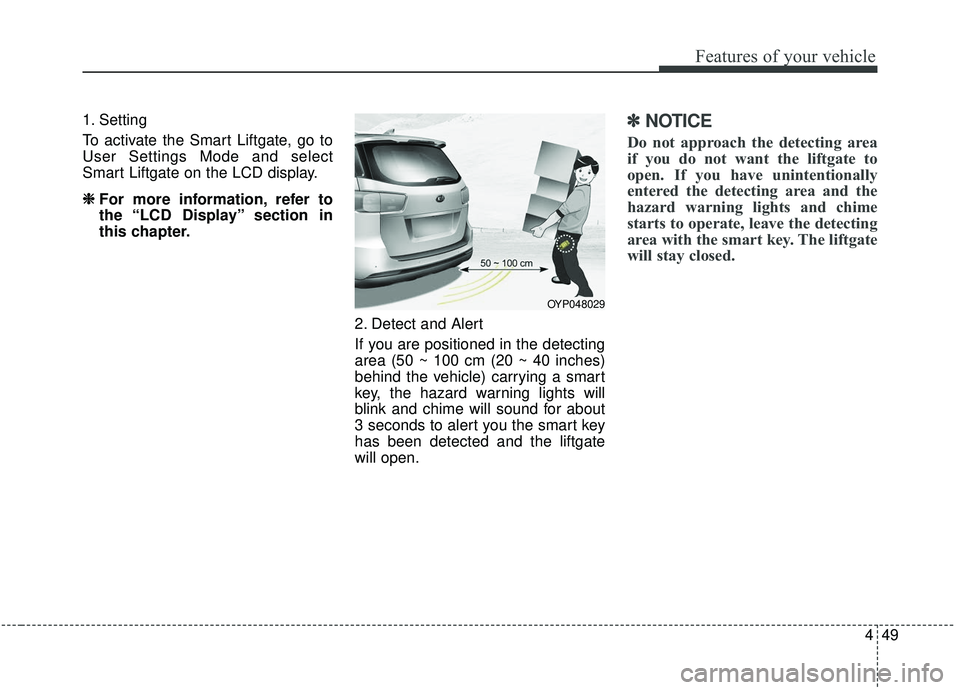
If you are positioned in the detecting
area (50 ~ 100 cm (20 ~ 40 inches)
behind the vehicle) carrying a smart
key, the hazard warning lights will
blink and chime will sound for about
3 seconds to alert you the smart key
has been detected and the liftgate
will open.✽ ✽NOTICE
Do not approach the detecting area
if you do not want the liftgate to
open. If you have unintentionally
entered the detecting area and the
hazard warning lights and chime
starts to operate, leave the detecting
area with the smart key. The liftgate
will stay closed.
OYP048029
Page 168 of 604
459
Features of your vehicle
Hood open warning
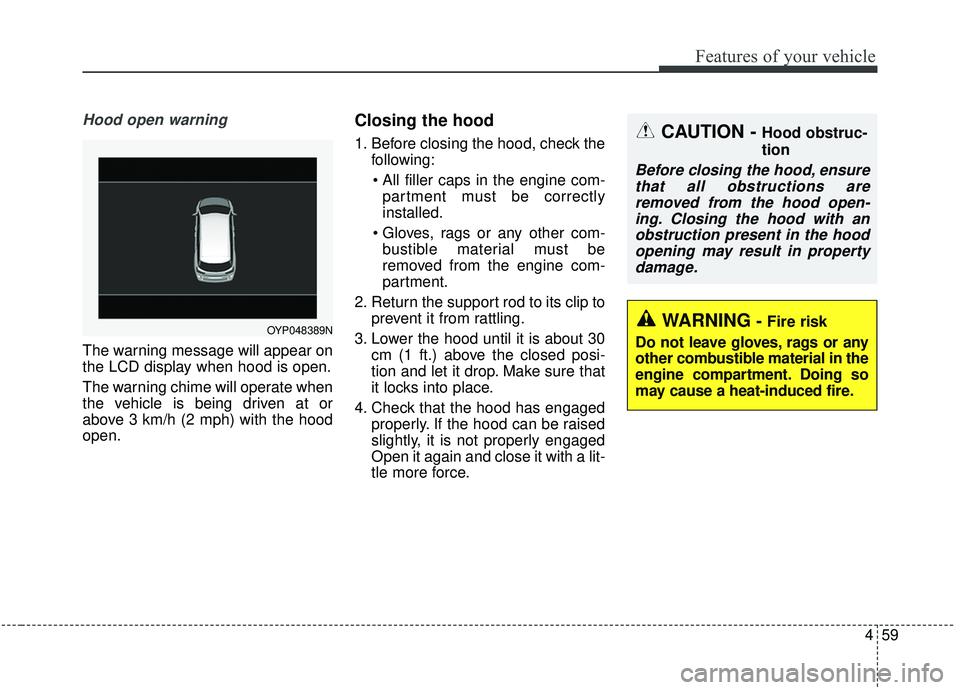
The warning message will appear on
the LCD display when hood is open.
The warning chime will operate when
the vehicle is being driven at or
above 3 km/h (2 mph) with the hood
open.
Closing the hood
1. Before closing the hood, check thefollowing:
partment must be correctly
installed.
bustible material must be
removed from the engine com-
partment.
2. Return the support rod to its clip to prevent it from rattling.
3. Lower the hood until it is about 30 cm (1 ft.) above the closed posi-
tion and let it drop. Make sure that
it locks into place.
4. Check that the hood has engaged properly. If the hood can be raised
slightly, it is not properly engaged
Open it again and close it with a lit-
tle more force.
OYP048389N
CAUTION - Hood obstruc-
tion
Before closing the hood, ensurethat all obstructions areremoved from the hood open-ing. Closing the hood with anobstruction present in the hoodopening may result in propertydamage.
WARNING- Fire risk
Do not leave gloves, rags or any
other combustible material in the
engine compartment. Doing so
may cause a heat-induced fire.
Page 180 of 604
471
Features of your vehicle
Sunroof open warning
(if equipped)
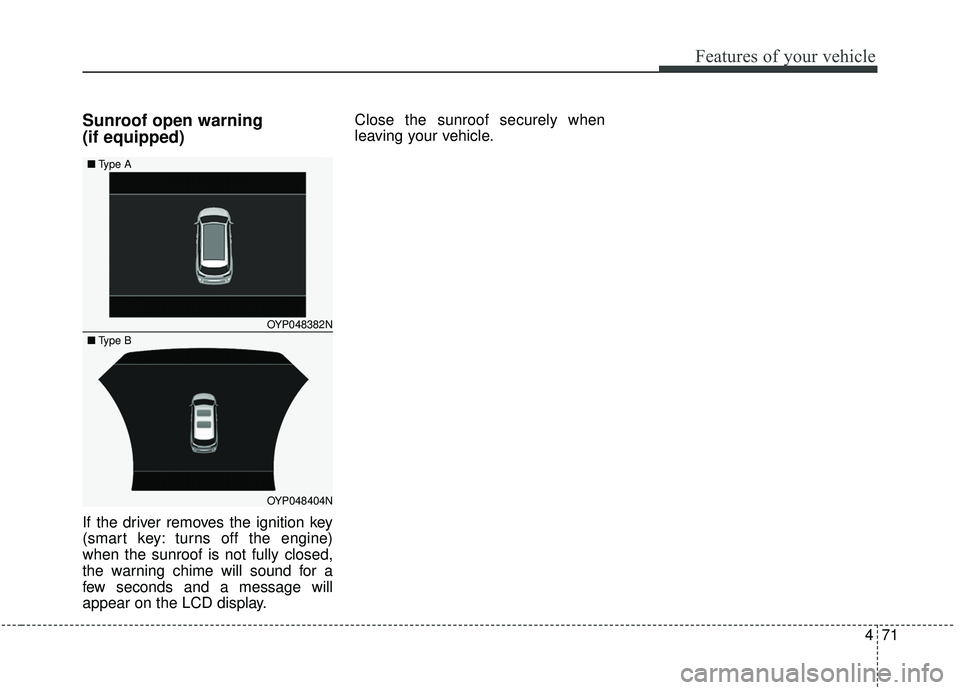
If the driver removes the ignition key
(smart key: turns off the engine)
when the sunroof is not fully closed,
the warning chime will sound for a
few seconds and a message will
appear on the LCD display.Close the sunroof securely when
leaving your vehicle.
OYP048382N
OYP048404N
■
Type A
■Type B
Page 183 of 604
Features of your vehicle
74
4
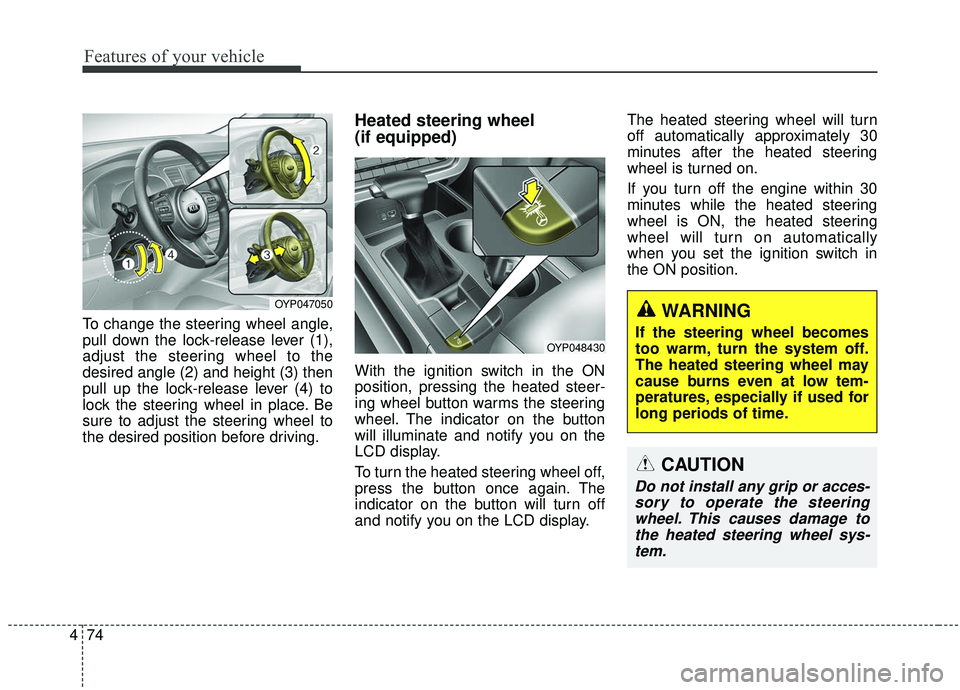
To change the steering wheel angle,
pull down the lock-release lever (1),
adjust the steering wheel to the
desired angle (2) and height (3) then
pull up the lock-release lever (4) to
lock the steering wheel in place. Be
sure to adjust the steering wheel to
the desired position before driving.
Heated steering wheel
(if equipped)
With the ignition switch in the ON
position, pressing the heated steer-
ing wheel button warms the steering
wheel. The indicator on the button
will illuminate and notify you on the
LCD display.
To turn the heated steering wheel off,
press the button once again. The
indicator on the button will turn off
and notify you on the LCD display. The heated steering wheel will turn
off automatically approximately 30
minutes after the heated steering
wheel is turned on.
If you turn off the engine within 30
minutes while the heated steering
wheel is ON, the heated steering
wheel will turn on automatically
when you set the ignition switch in
the ON position.
OYP048430
CAUTION
Do not install any grip or acces-
sory to operate the steeringwheel. This causes damage tothe heated steering wheel sys-tem.
OYP047050WARNING
If the steering wheel becomes
too warm, turn the system off.
The heated steering wheel may
cause burns even at low tem-
peratures, especially if used for
long periods of time.
Page 187 of 604
Features of your vehicle
78
4
Electric chromic mirror (ECM)
with HomeLink®system and com-
pass (if equipped)
Your vehicle may be equipped with a
Gentex Automatic-Dimming Mirror
with a Z-Nav
®Electronic Compass
Display and an Integrated HomeLink®
Wireless Control System.
During nighttime driving, this feature
will automatically detect and reduce
rearview mirror glare while the com-
pass indicates the direction the vehi-
cle is pointed. The HomeLink
®
Universal Transceiver allows you to
activate your garage door(s), electric
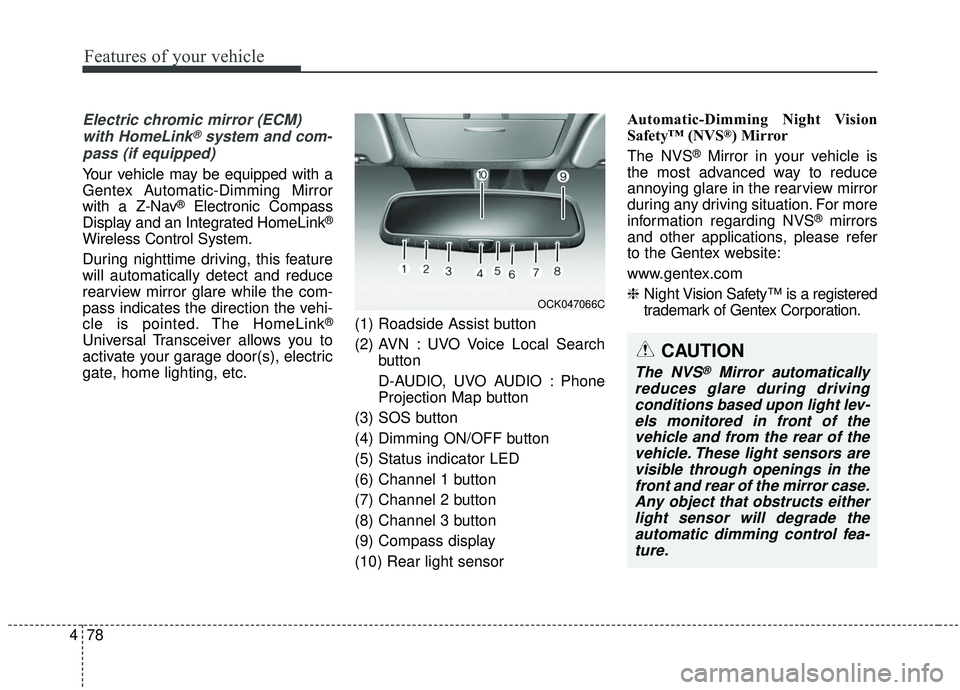
gate, home lighting, etc. (1) Roadside Assist button
(2) AVN : UVO Voice Local Search
button
D-AUDIO, UVO AUDIO : Phone
Projection Map button
(3) SOS button
(4) Dimming ON/OFF button
(5) Status indicator LED
(6) Channel 1 button
(7) Channel 2 button
(8) Channel 3 button
(9) Compass display
(10) Rear light sensor Automatic-Dimming Night Vision
Safety™ (NVS
®) Mirror
The NVS
®Mirror in your vehicle is
the most advanced way to reduce
annoying glare in the rearview mirror
during any driving situation. For more
information regarding NVS
®mirrors
and other applications, please refer
to the Gentex website:
www.gentex.com
❈ Night Vision Safety™ is a registered
trademark of Gentex Corporation.
OCK047066C
CAUTION
The NVS®Mirror automatically
reduces glare during driving conditions based upon light lev-els monitored in front of thevehicle and from the rear of thevehicle. These light sensors arevisible through openings in thefront and rear of the mirror case.Any object that obstructs eitherlight sensor will degrade theautomatic dimming control fea-ture.
Page 188 of 604
479
Features of your vehicle
Automatic-dimming function
Your mirror will automatically dim
upon detecting glare from the vehi-
cles traveling behind you. The auto-
dimming function can be controlled
by the Dimming ON/OFF Button:
1. Pressing the button turns theauto-dimming function OFF which
is indicated by the green Status
Indicator LED turning off.
2. Pressing the button again turns the auto-dimming function ON
which is indicated by the green
Status Indicator LED turning on.
✽ ✽NOTICE
The mirror defaults to the ON posi-
tion each time the vehicle is started.
Z-Nav™ Compass Display
The NVS
®Mirror in your vehicle is
also equipped with a Z-NAV™
Compass that shows the vehicle
Compass heading in the Display
Window using the 8 basic cardinal
headings (N, NE, E, SE, etc.).
❈ Z-Nav™ is a registered trademark
of Gentex Corporation. Compass function
The Compass can be turned ON and
OFF and will remember the last state
when the ignition is cycled. To turn
the display feature ON/OFF:
1. Press and release the button to
turn the display feature OFF.
2. Press and release the button
again to turn the display back ON.
Additional options can be set with
press and hold sequences of the
button and are detailed below.
There is a difference between mag-
netic north and true north. The com-
pass in the mirror can compensate
for this difference when it knows the
Magnetic Zone in which it is operat-
ing. This is set either by the dealer or
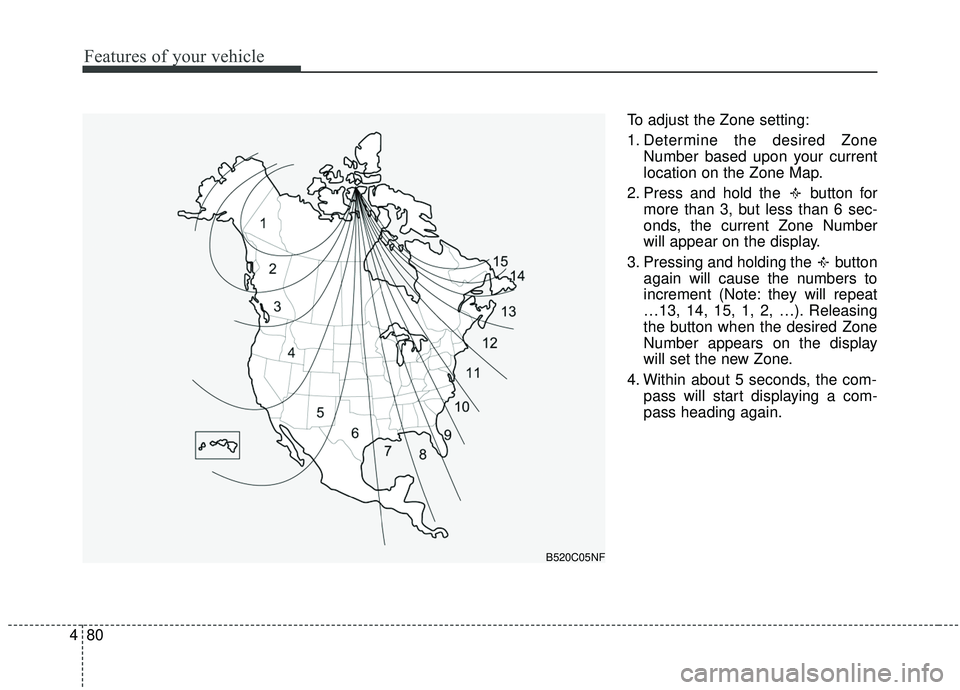
by the user. The operating Zone
Numbers for North America are
shown in the figure on the following
section.
Page 189 of 604
Features of your vehicle
80
4
To adjust the Zone setting:
1. Determine the desired Zone
Number based upon your current
location on the Zone Map.
2. Press and hold the button for more than 3, but less than 6 sec-
onds, the current Zone Number
will appear on the display.
3. Pressing and holding the button again will cause the numbers to
increment (Note: they will repeat
…13, 14, 15, 1, 2, …). Releasing
the button when the desired Zone
Number appears on the display
will set the new Zone.
4. Within about 5 seconds, the com- pass will start displaying a com-
pass heading again.
B520C05NF
Page 190 of 604
481
Features of your vehicle
There are some conditions that can
cause changes to the vehicle mag-
nets, such as installing a ski rack or
a CB antenna. Body repair work on
the vehicle can also cause changes
to the vehicle's magnetic field. In
these situations, the compass will
need to be re-calibrated to quickly
correct for these changes. To re-cali-
brate the compass:
1. Press and hold the button formore than 6 seconds. When the
compass memory is cleared, a "C"
will appear in the display.
2. To calibrate the compass, drive the vehicle in 2 complete circles at
less than 8 km/h (5 mph). Integrated HomeLink®Wireless
Control System
The HomeLink
®Wireless Control
System provides a convenient way to
replace up to three hand-held radio-
frequency (RF) transmitters with a
single built-in device. This innovative
feature will learn the radio frequency
codes of most current transmitters to
operate devices such as gate opera-
tors, garage door openers, entry
door locks, security systems, even
home lighting. Both standard and
rolling code-equipped transmitters
can be programmed by following the
outlined procedures. Additional
HomeLink
®information can be found
at: www.homelink.com or by calling
1-800-355-3515.
❈ HomeLink
®is a registered trade-
mark of Johnson Controls, Inc. Retain the original transmitter of the
RF device you are programming for
use in other vehicles as well as for
future HomeLink
®programming. It is
also suggested that upon the sale of
the vehicle, the programmed
HomeLink
®buttons be erased for
security purposes.
Page 200 of 604
491
Features of your vehicle
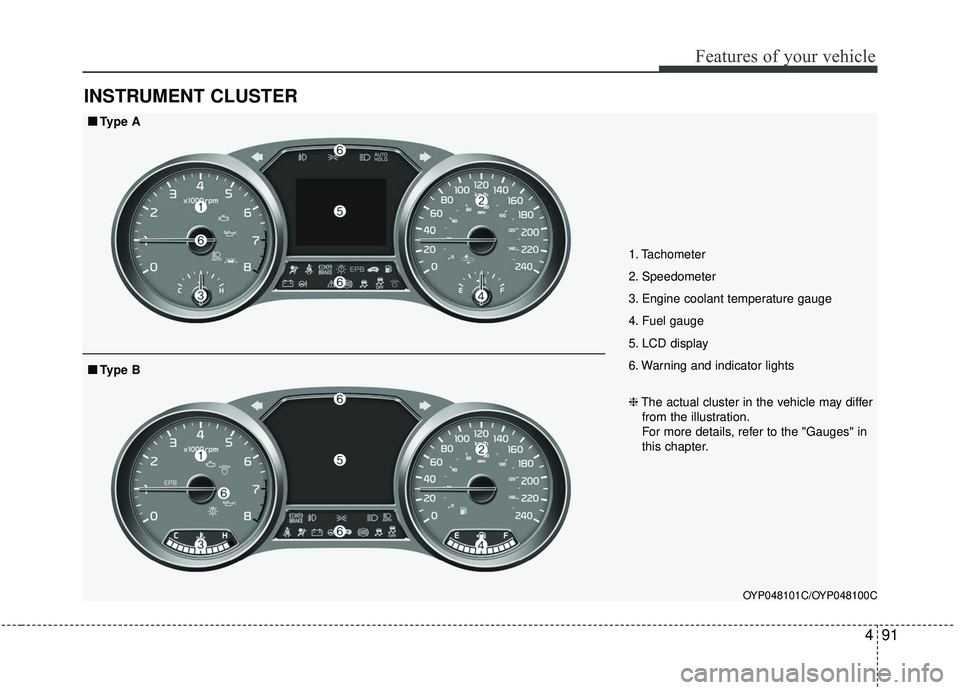
INSTRUMENT CLUSTER
1. Tachometer
2. Speedometer
3. Engine coolant temperature gauge
4. Fuel gauge
5. LCD display
6. Warning and indicator lights
OYP048101C/OYP048100C
■ ■Type A
❈The actual cluster in the vehicle may differ
from the illustration.
For more details, refer to the "Gauges" in
this chapter.
■ ■ Type B