ECO KIA SELTOS 2022 Navigation System Quick Reference Guide
[x] Cancel search | Manufacturer: KIA, Model Year: 2022, Model line: SELTOS, Model: KIA SELTOS 2022Pages: 316, PDF Size: 10.48 MB
Page 270 of 316

9-82
Language
You can set the system display language.
0000
A
Once the language has been changed, it takes a while to apply the new language to the
system. The notification pop-up window appears as soon as the new language is applied
to the system. When you wait a while or press anywhere outside the pop-up window, the
window automatically disappears.
0000
A
When you change the system language, it does not affect the display of other unique
data such as MP3 music file name.
0000
A
Depending on the system language, the Bluetooth phone message view and voice
recognition may not be supported.
Keyboard
You can change the keyboard type for each language to use when entering the text.
English-Latin Keyboard Type
You can select the keyboard type to use when entering the English text.
Default Keyboard
You can select the default keyboard type.
Page 271 of 316
9-83
Units (if equipped)
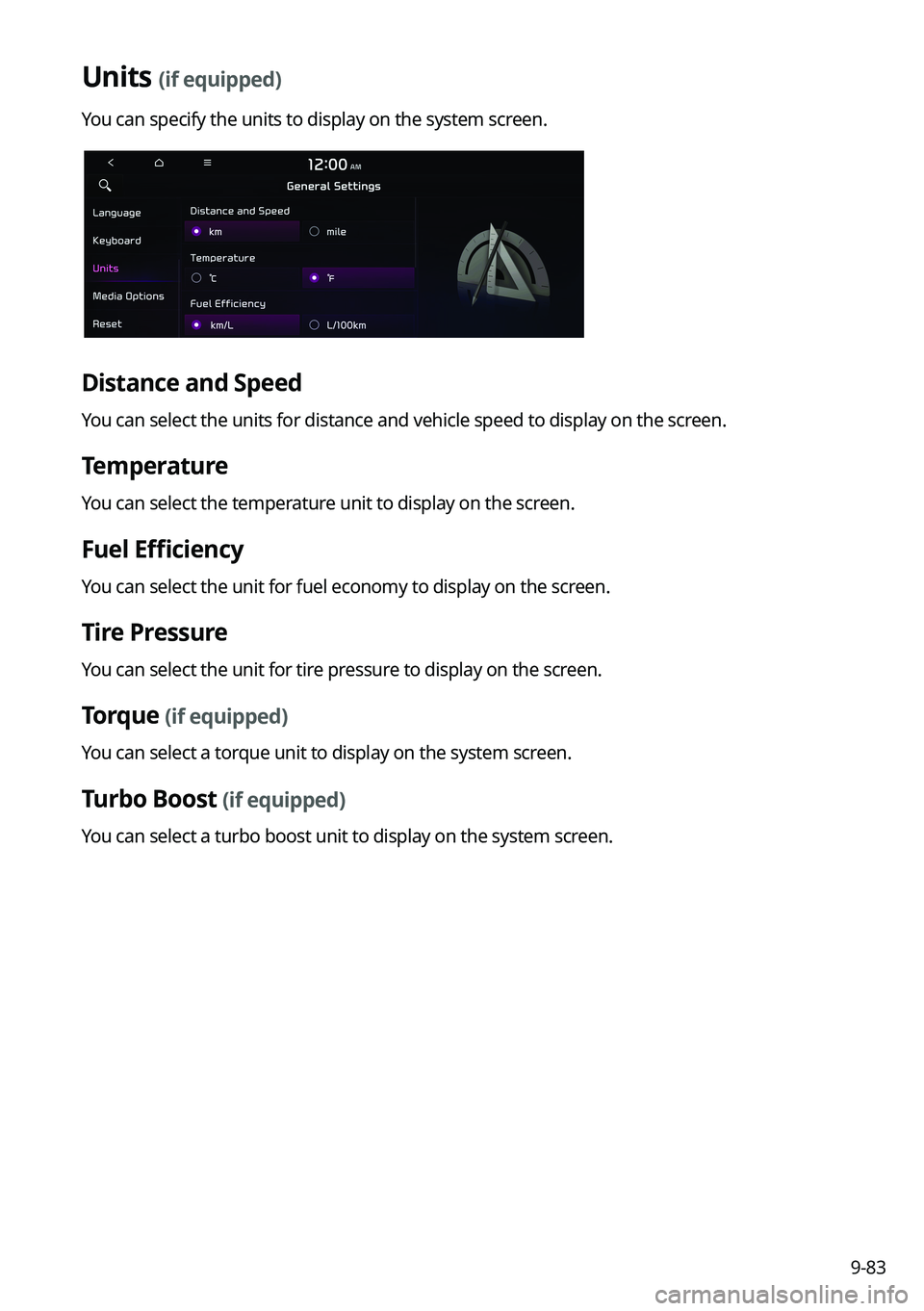
You can specify the units to display on the system screen.
Distance and Speed
You can select the units for distance and vehicle speed to display on the screen.
Temperature
You can select the temperature unit to display on the screen.
Fuel Efficiency
You can select the unit for fuel economy to display on the screen.
Tire Pressure
You can select the unit for tire pressure to display on the screen.
Torque (if equipped)
You can select a torque unit to display on the system screen.
Turbo Boost (if equipped)
You can select a turbo boost unit to display on the system screen.
Page 292 of 316
10-4
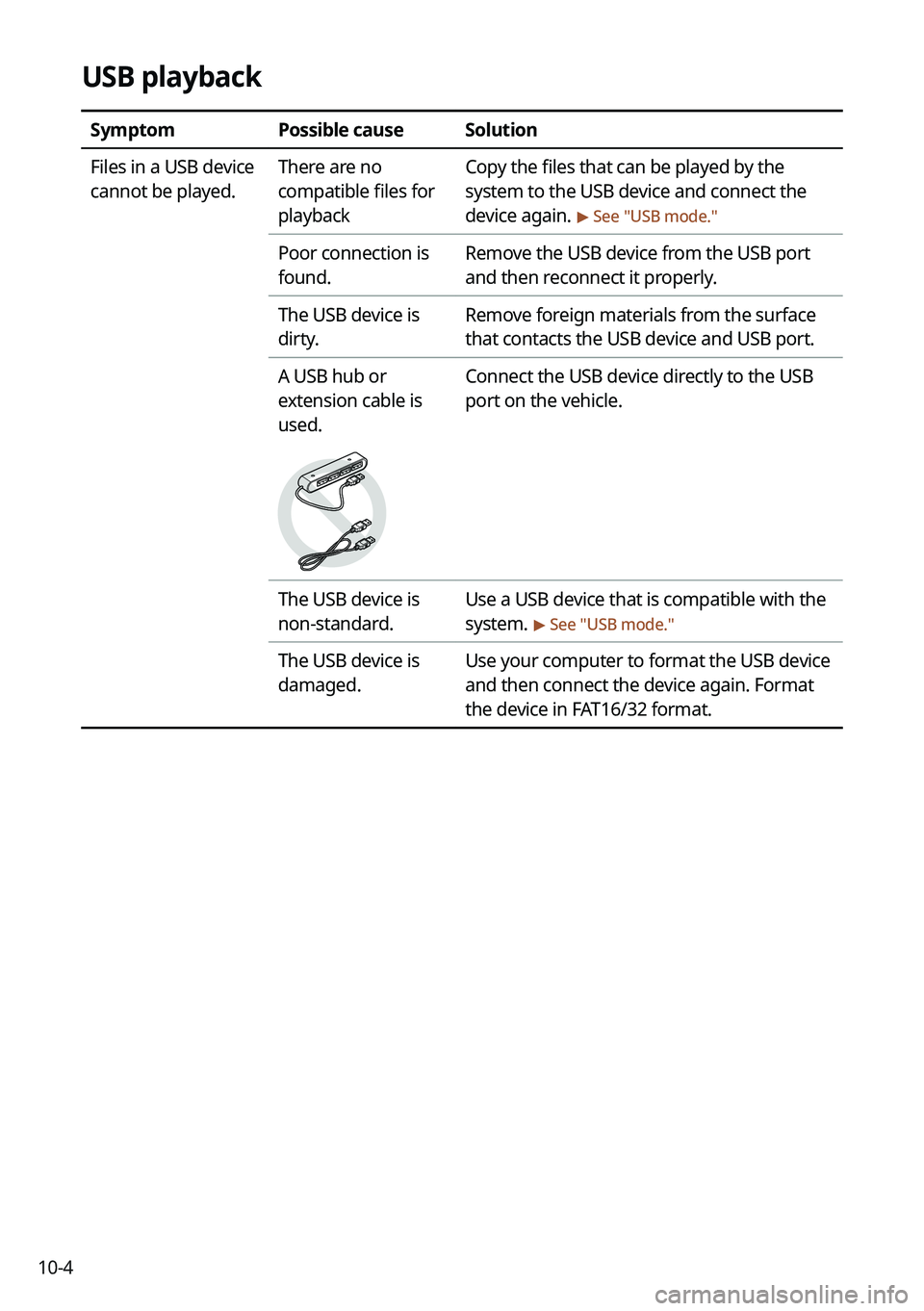
USB playback
SymptomPossible causeSolution
Files in a USB device
cannot be played. There are no
compatible files for
playbackCopy the files that can be played by the
system to the USB device and connect the
device again.
> See "
USB mode."
Poor connection is
found. Remove the USB device from the USB port
and then reconnect it properly.
The USB device is
dirty. Remove foreign materials from the surface
that contacts the USB device and USB port.
A USB hub or
extension cable is
used.
Connect the USB device directly to the USB
port on the vehicle.
The USB device is
non-standard. Use a USB device that is compatible with the
system.
> See "
USB mode."
The USB device is
damaged. Use your computer to format the USB device
and then connect the device again. Format
the device in FAT16/32 format.
Page 294 of 316

10-6
Phone projection
SymptomPossible causeSolution
The phone
projection function
is not performed
when a smartphone
is connected using a
USB cable. Phone projection is
not supported.
Visit the website to check whether your
smartphone supports the phone projection.
\225
Android Auto: https://support.google.
com/androidauto
\225Apple CarPlay: http://www.apple.com/
ios/carplay
The function is
inactive.
\225 On the All Menus screen, navigate to
Setup >
Device Connections and
activate the connection function from the
Phone Projection Settings menu.
\225 Make sure that the phone projection is
not disabled in the App settings or block-
out settings on your smartphone.
Smartphone is
encountered with
poor operation or
malfunction.
\225 Check that the smartphone battery level
is not too low. Recognition may not work
properly when the battery level is too
low.
\225The phone projection may not work
properly when the signal strength is
weak.
\225When the smartphone is locked, first
unlock it.
\225Initialize the smartphone and connect
the device again.
A black screen
appears when the
phone projection is
activated or in use. The smartphone
malfunctions.
\225
Remove the USB cable from the
smartphone and connect the device
again.
\225Initialize the smartphone and connect
the device again.
Page 297 of 316

10-9
System status indicator icons
You can see the system status by checking the status indicator icons at the top right of the
system screen.
Different status indicator icons appear when each function is performed. The meanings of
the icons are as follows:
Mute/memo recording
Navigation sound muted
Radio/Media sound muted
All sound outputs muted
Recording a voice memo
Bluetooth/call
Connecting a phone via Bluetooth
Connecting an audio device via Bluetooth
Connecting a phone and an audio device via Bluetooth
Making a call via a Bluetooth phone
Bluetooth phone's microphone off
Downloading the contact and list of recent calls from the connected Bluetooth
phone
Page 302 of 316
10-140000
A
The following files are not played.
000DModified files (format-changed files)
000DVariant files (e.g. MP3 files encoded by WMA audio codec)
000DDRM (Digital Rights Management)-protected files
000DFiles with no index
0000
A
Sound quality is not guaranteed in case of music files that use the bit-rate exceeding 192
kbps.
0000
A
With the files that do not use the fixed bit rate, some functions may not work properly or
the playback time may not appear accurately.
0000
A
When a trouble occurs while playing or you want to play an incompatible format file, use
the latest encoder software to change the format before using the file.
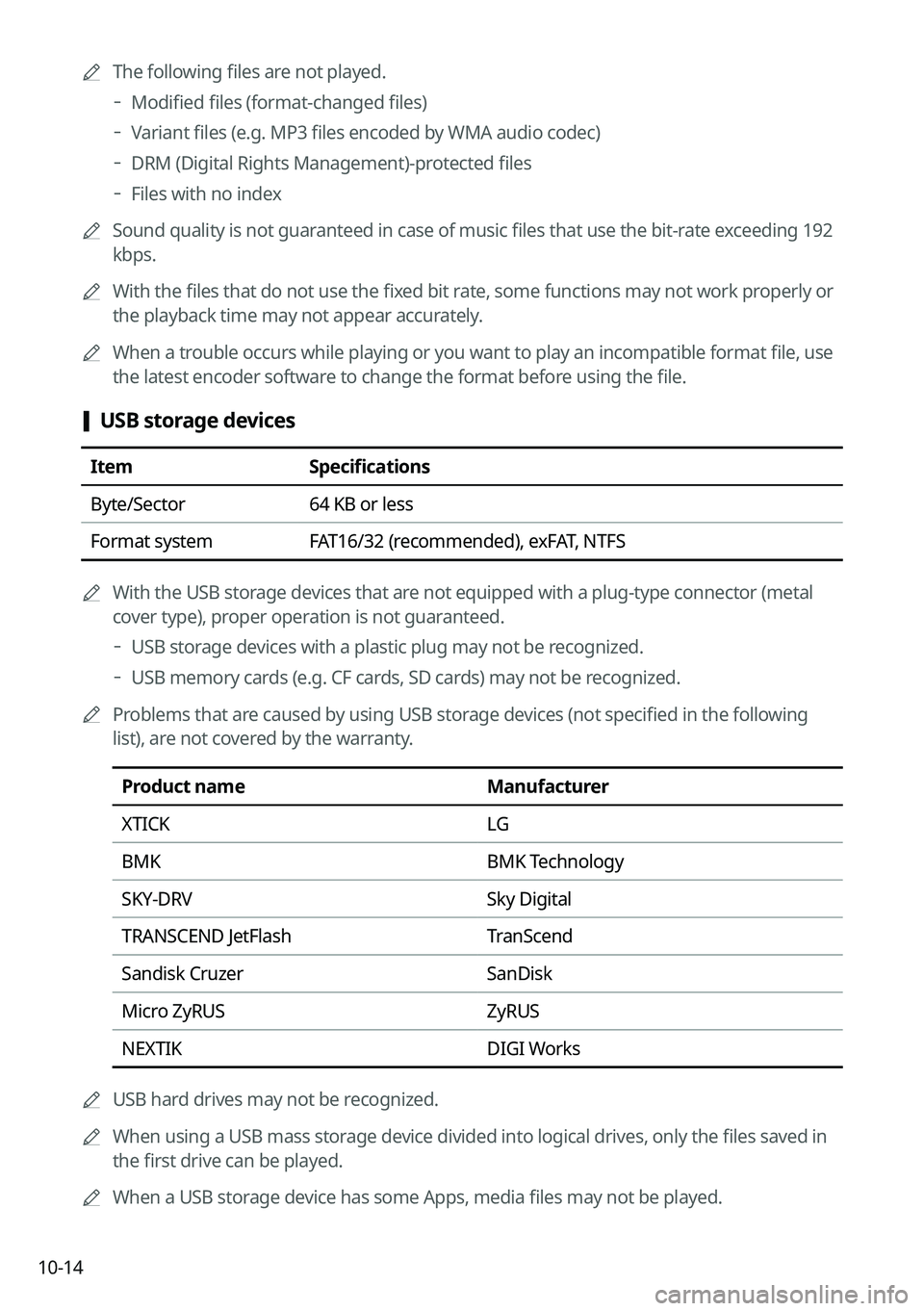
[USB storage devices
Item
Specifications
Byte/Sector 64 KB or less
Format system FAT16/32 (recommended), exFAT, NTFS
0000
A
With the USB storage devices that are not equipped with a plug-type connector (metal
cover type), proper operation is not guaranteed.
000DUSB storage devices with a plastic plug may not be recognized.
000DUSB memory cards (e.g. CF cards, SD cards) may not be recognized.
0000
A
Problems that are caused by using USB storage devices (not specified in the following
list), are not covered by the warranty.
Product name Manufacturer
XTICK LG
BMK BMK Technology
SKY-DRV Sky Digital
TRANSCEND JetFlash TranScend
Sandisk Cruzer SanDisk
Micro ZyRUS ZyRUS
NEXTIK DIGI Works
0000
A
USB hard drives may not be recognized.
0000
A
When using a USB mass storage device divided into logical drives, only the files saved in
the first drive can be played.
0000
A
When a USB storage device has some Apps, media files may not be played.
Page 306 of 316

10-18
Navigation features
Navigation features included in the system are intended to provide detailed instructions to
get you to a desired destination. Ensure that all persons using this system carefully read and
follow all instructions on safety information.
Distraction hazard
Some navigation features may require manual (non-verbal) setup. Attempting to perform
such setup or inputting data while driving can seriously distract your attention and could
cause an accident. Stop the vehicle in a safe and legal manner before attempting these
operations.
Let your judgment prevail
Any navigation features are provided only as an aid. Make your driving decisions based on
your observations of local conditions and existing traffic regulations. Any such feature is not
a substitute for your personal judgment. Any route suggestions made by this system should
never replace any local traffic regulations or your personal judgment or knowledge of safe
driving practices.
Route safety
Do not follow the route suggestions if doing so would result in an unsafe or illegal maneuver,
if you would be placed in an unsafe situation, or if you would be directed into an area that
you consider unsafe. The driver is ultimately responsible for the safe operation of the vehicle
and must evaluate whether it is safe to follow the suggested directions.
Potential map inaccuracy
Maps used by this system may be inaccurate because of changes in roads, traffic controls
or driving conditions. Always use good judgment and common sense when following the
suggested routes.
Emergency services
Do not rely on any navigation features included in the system to direct you to emergency
services. Ask local authorities or an emergency services operator for these locations. Not all
emergency services such as police, fire stations, hospitals and clinics are contained in the
map database for navigation features.
Use of speech recognition functions
Speech recognition software is inherently a statistical process which is subject to errors. It is
your responsibility to monitor any speech recognition functions included in the system and
address any errors.
Page 307 of 316

10-19
C
Climate control system 2-14
Component names and functionsSteering wheel remote control
Call button 1-4, 1-5
Component Names and Functions
Control panel
Custom button 1-3
MAP button 1-2
MEDIA button 1-2
NAV button 1-2
POWER button/VOLUME knob 1-2
RADIO button 1-2
Search knob 1-3
SEEK/TRACK button 1-3
SETUP button 1-3
System Reset button 1-3
Steering wheel remote control
MODE button 1-4
Move lever/button 1-4
Voice Recognition button 1-4
Volume lever/Mute button 1-4
Contacts list 6-10
Control panel 1-2
D
Deleting a location 5-27
Destination search 5-3
Driving assist display 2-9
Index
A
Advanced system settings 9-38
Android devicesAndroid Auto 2-5
Apple devices Apple CarPlay 2-7
B
Battery warning 1-7
BluetoothBluetooth phone
Answering a call 6-15
Call 6-6
Contacts list 6-10
Dial pad 6-13
Favorites settings 6-8
Options during a call 6-16
Recent calls list 6-6
Switching to another call 6-17
Text message 6-18
Specifications 10-15
Bluetooth connection Adding a device 6-2
Deleting a device 6-5
Device connection 6-4
Disconnecting a device 6-5
Page 309 of 316

10-21
P
Parking assist guide lines 2-9
Phone 6-6
Phone projectionAndroid Auto 2-5
Apple CarPlay 2-7
Previous Destinations 5-13
Product specifications Bluetooth 10-15
Common specifications 10-15
LTE RF 10-16
Media player 10-13
Radio 10-15
Proximity Warning 2-10
R
Radio Changing the channel 3-6, 3-7
Changing the radio mode 3-5
Deleting a channel 3-9
Registering a channel 3-8
Scanning channels 3-7
Rear view display 2-9
Recent calls list 6-6
S
Save searched place 5-23
Saving frequently visited places 5-25
Saving the current position 5-24 Settings
Advanced settings 9-38
Bluetooth settings 9-36
Date and time 9-76, 9-81
Device connection 9-33, 9-35
Keyboard 9-78, 9-82
Screen saver settings 9-92, 9-93
System display settings 9-86, 9-90
System language 9-77, 9-82
User profile settings 9-72, 9-73
UVO settings 9-68, 9-70
Vehicle settings 9-3, 9-15
Voice recognition settings 9-54, 9-55
SiriusXM™ 3-12 Changing to SiriusXM mode 3-12, 3-13
Featured Favorites channels 3-18
Searching for channels 3-15
Seeing the program schedule 3-17
Selecting channels 3-16
Smart Updater Plus 9-96
Software update 9-96
Sound Mood Lamp 2-20
Sounds of Nature 2-21
Split screen 1-15
Steering wheel remote control 1-4
Surround view monitor Door opening/mirror folding alert 2-12
Rear view video 2-13
Screen settings 2-13
Screen view 2-12
System Info 9-75
System status indicator icons
10-9
System update 9-96
Page 310 of 316
10-22UVO menu
Diagnosing the vehicle 8-9
Driving Information 2-25
Roadside Assistance 8-5
Settings 8-11,
9-68, 9-70
Virtual Assistant 8-10
Voice Local Search 8-11
Weather info 8-8
V
Vehicle settings 9-3, 9-15
Voice memo 7-22
Voice recognition Help 7-4
Microphone 7-2
Navigation commands 7-7
Other commands 7-10
POI name 7-11
Radio commands 7-8
Using the voice recognition 7-2
Volume setting 7-4
Voice recognition settings 9-54, 9-55
T
Troubleshooting 10-2
Bluetooth connection 10-5
Navigation operation 10-8
Phone projection 10-6
Sound and display 10-2
System operation 10-7
USB playback 10-4
TUNE Knob Function 9-38
Turning the system on or off 1-6
U
Update 9-96
USB file specifications 10-13
USB music 4-2
USB port 4-2
USB storage device specifications 10-14
Using the Driver talk mode in the rear seat
2-17
Using the Quiet mode in the rear seat 2-19
Using the rear-seat climate control system
2-15
Using the sound mood lamp 2-20
Using the touch screen 1-8
UVO Service 8-2
Find 8-12