Speed KIA SELTOS 2022 Navigation System Quick Reference Guide
[x] Cancel search | Manufacturer: KIA, Model Year: 2022, Model line: SELTOS, Model: KIA SELTOS 2022Pages: 316, PDF Size: 10.48 MB
Page 4 of 316
2
Safety Warnings
Be sure to keep the following instructions. Otherwise, it may cause serious injury or accident.
\335Driving
Obey all traffic laws while driving.
\225
Relying solely on the navigation system may cause violation of traffic rules and regulations, resulting in an
accident.
In order to check the vehicle speed, see the speedometer first, not the speed on the
navigation system.
\225The speed on the navigation system may differ from actual vehicle speed.
While driving, refrain from watching the screen.
\225An accident may occur by negligence in keeping your eyes forward.
\225To manipulate the screen or buttons requiring multiple steps, be sure to stop your vehicle.
To use your mobile phone, first stop your vehicle.
\225When you use your mobile phone while driving, it may disperse your atten\
tion, resulting in an accident.
\225When making a call while driving, use the Bluetooth Hands-free function and if possible, minimise the call
time.
Make sure that the volume of the phone is sufficiently low so that the external sound is
audible.
\225When you drive with no external sound present may cause a traffic accident.
\225When you drive for a long time with a loud audio volume, it may affect your hearing.
For emergency services (e.g. hospital, fire station), do not rely solely on the navigation
system.
\225Some emergency services may not be included in the navigation map. Check relevant information in advance
to stay prepared for an emergency.
\335System handling
Do NOT arbitrarily disassemble or modify the system.
\225It may cause an accident, fire, or electric shock.
Exercise caution to make sure that no liquid or foreign materials enter the system.
\225It may cause smoke generation, fire ignition, or system failure.
When the screen is not displayed, the volume is muted, or other system failures occur,
immediately stop using the system.
\225Otherwise, it may cause fire, electric shock, or fatal system failure.
0000
A
If you experience any problems with the system, contact your place of purchase or dealer.
Page 17 of 316
5
Be sure to keep the following instructions. Otherwise, it may cause serious injury or accident.
\335Driving
Obey all traffic laws while driving.
\225 Relying solely on the navigation system may cause violation of traffic rules and regulations, resulting in an
accident.
In order to check the vehicle speed, see the speedometer first, not the speed on the
navigation system.
\225The speed on the navigation system may differ from actual vehicle speed.
While driving, refrain from watching the screen.
\225An accident may occur by negligence in keeping your eyes forward.
\225To manipulate the screen or buttons requiring multiple steps, be sure to stop your vehicle.
To use your mobile phone, first stop your vehicle.
\225When you use your mobile phone while driving, it may disperse your attention, resulting in an accident.
\225If necessary, use handsfree (Bluetooth) calling when driving and minimize the call time.
Make sure that the volume of the phone is sufficiently low so that the external sound is
audible.
\225When you drive with no external sound present may cause a traffic accident.
\225When you drive for a long time with a loud audio volume, it may affect your hearing.
For emergency services (e.g. hospital, fire station), do not rely solely on the navigation
system.
\225Some emergency services may not be included in the navigation map. Check relevant information in advance
to stay prepared for an emergency.
\335System handling
Do NOT arbitrarily disassemble or modify the system.
\225 It may cause an accident, fire, or electric shock.
Exercise caution to make sure that no liquid or foreign materials enter the system.
\225It may cause smoke generation, fire ignition, or system failure.
When the screen is not displayed, the volume is muted, or other system failures occur,
immediately stop using the system.
\225Otherwise, it may cause fire, electric shock, or fatal system failure.
0000
A
If you experience any problems with the system, contact your place of purchase or dealer.
Safety Warnings
Page 50 of 316

2-12
Surround View Monitor (if equipped)
You can check the surroundings by using multiple cameras on the vehicle.0000
A
Use the +/- button on the right of the screen to zoom in or out.
Viewing the surround view while driving
1 In order to see the surround view, press the [] or [] button.
The system displays both the front view and surround view.
0000
A
The surround view monitor function operates only when any of the following
conditions are met.
000DThe driving speed is below 6 mph or 9 mph with the shift position in "D" (Drive) (if
equipped).
000DThe vehicle is stationary and the shift position is in "D" (Drive) or \
"N" (Neutral).
0000
A
You can use Remote Smart Parking Assist by long pressing the [
] button. For more
information, refer to the owner’s manual that is separately provided (if equipped).
2 Press the icon to get a view in the desired direction.
Icon Description
Displays the zoom-in front top view and top view.
Displays the front wide view and top view (default).
Displays the front blind spot view and top view.
Displays the surround view settings.
0000
A
When any door or trunk (tailgate) is open or outside rear view mirrors are folded, an
alert icon appears on the screen.
0000
A
To turn off the surround view screen, press the [
] or [] button.
Page 52 of 316

2-14
Using the climate control system (if equipped)
You can check and adjust the climate system settings on the screen.0000
A
For more information about how to use the heater and air conditioner, refer to Owner's
Manual of the vehicle.
1 Perform any of the following methods:
\225Press the [
CLIMATE] button on the climate control system.
\225On the All Menus screen, press Climate.
2 Select and then change the settings.
\037
\036
\035
\034
\033
\032\031
\030
\027
\026\025
a a Returns to the previous step.
b b Shows the set temperature for the driver's seat.
c c Shows the set temperature for the passenger seat.
d d Shows the current airflow direction.
e e Shows the current fan speed.
f f Shows whether the automatic temperature control function is on or off.
g g Shows whether the A/C is on or off.
h h Shows whether the SYNC function, which syncs the driver's seat temperature with the
passenger seat temperature, is on or off.
i i Configure specific climate control function settings.
0000
A
Available settings may differ depending on the vehicle model and specifications.
Page 53 of 316
2-15
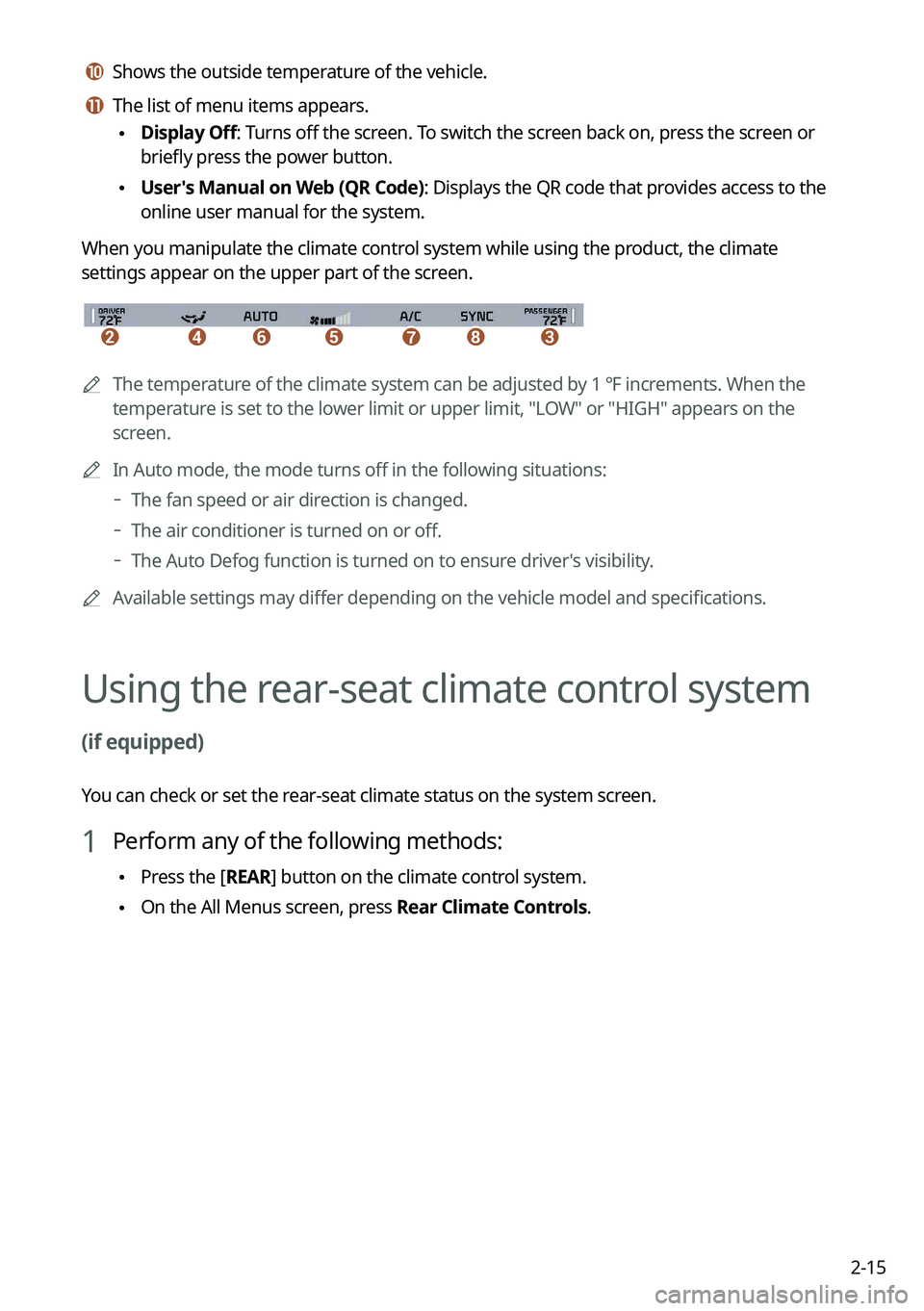
j j Shows the outside temperature of the vehicle.
k k The list of menu items appears.
\225Display Off: Turns off the screen. To switch the screen back on, press the screen or
briefly press the power button.
\225User's Manual on Web (QR Code): Displays the QR code that provides access to the
online user manual for the system.
When you manipulate the climate control system while using the product, the climate
settings appear on the upper part of the screen.
\037\036\035\034\033\032\031
0000A The temperature of the climate system can be adjusted by 1 ℉ increments. When the
temperature is set to the lower limit or upper limit, "LOW" or "HIGH" appears on the
screen.
0000
A
In Auto mode, the mode turns off in the following situations:
000DThe fan speed or air direction is changed.
000DThe air conditioner is turned on or off.
000DThe Auto Defog function is turned on to ensure driver's visibility.
0000
A
Available settings may differ depending on the vehicle model and specifications.
Using the rear-seat climate control system
(if equipped)
You can check or set the rear-seat climate status on the system screen.
1 Perform any of the following methods:
\225Press the [
REAR] button on the climate control system.
\225On the All Menus screen, press Rear Climate Controls.
Page 54 of 316
2-16
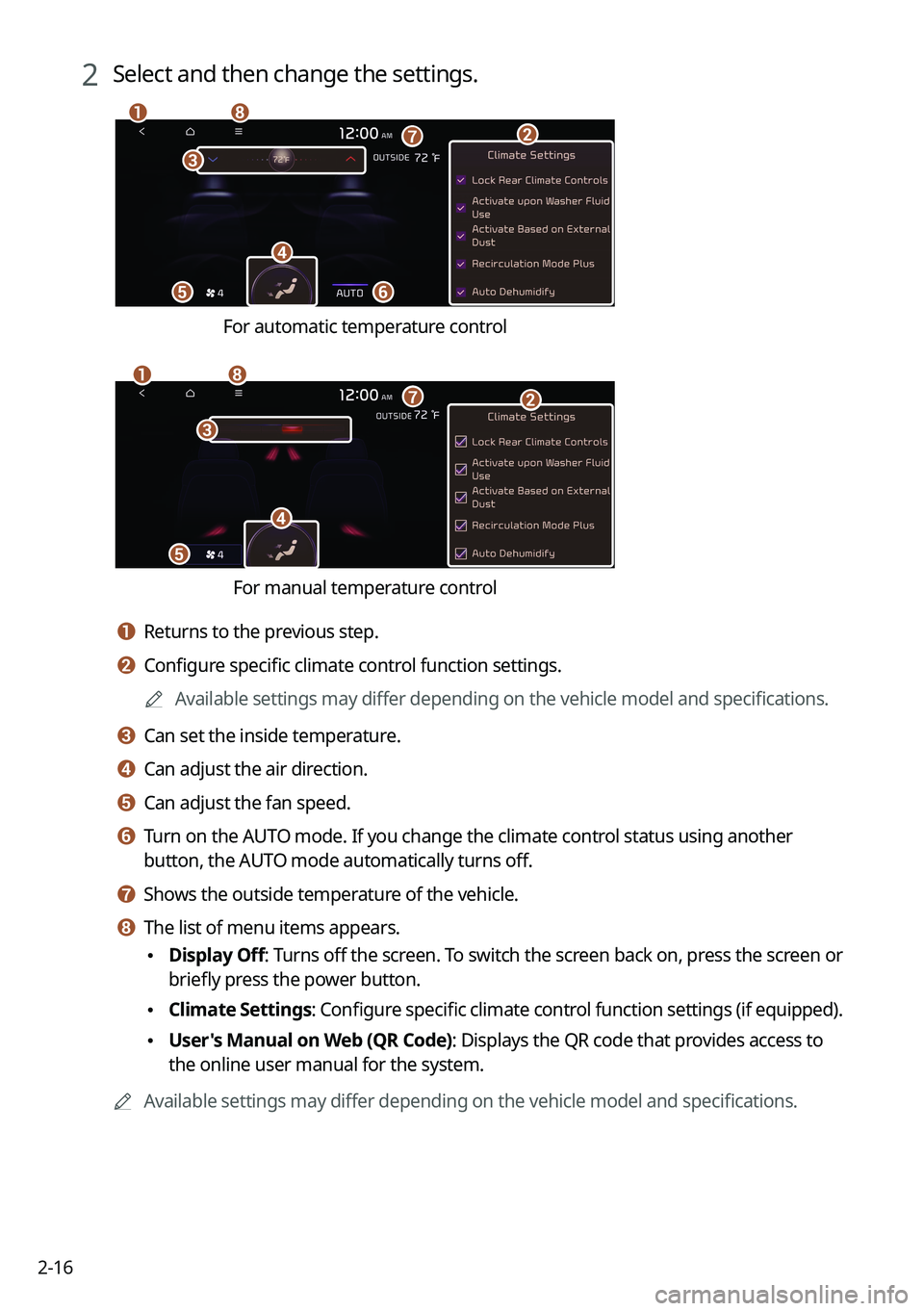
2 Select and then change the settings.
\037
\036
\035
\034
\033
\032\031
\030
For automatic temperature control
\037
\036\035\034
\033
\032
\031
For manual temperature control
a a Returns to the previous step.
b b Configure specific climate control function settings.0000
A
Available settings may differ depending on the vehicle model and specifications.
c c Can set the inside temperature.
d d Can adjust the air direction.
e e Can adjust the fan speed.
f f Turn on the AUTO mode. If you change the climate control status using another
button, the AUTO mode automatically turns off.
g g Shows the outside temperature of the vehicle.
h h The list of menu items appears.
\225Display Off
: Turns off the screen. To switch the screen back on, press the screen or
briefly press the power button.
\225 Climate Settings
: Configure specific climate control function settings (if equipped).
\225User's Manual on Web (QR Code): Displays the QR code that provides access to
the online user manual for the system.
0000
A
Available settings may differ depending on the vehicle model and specifications.
Page 61 of 316
2-23
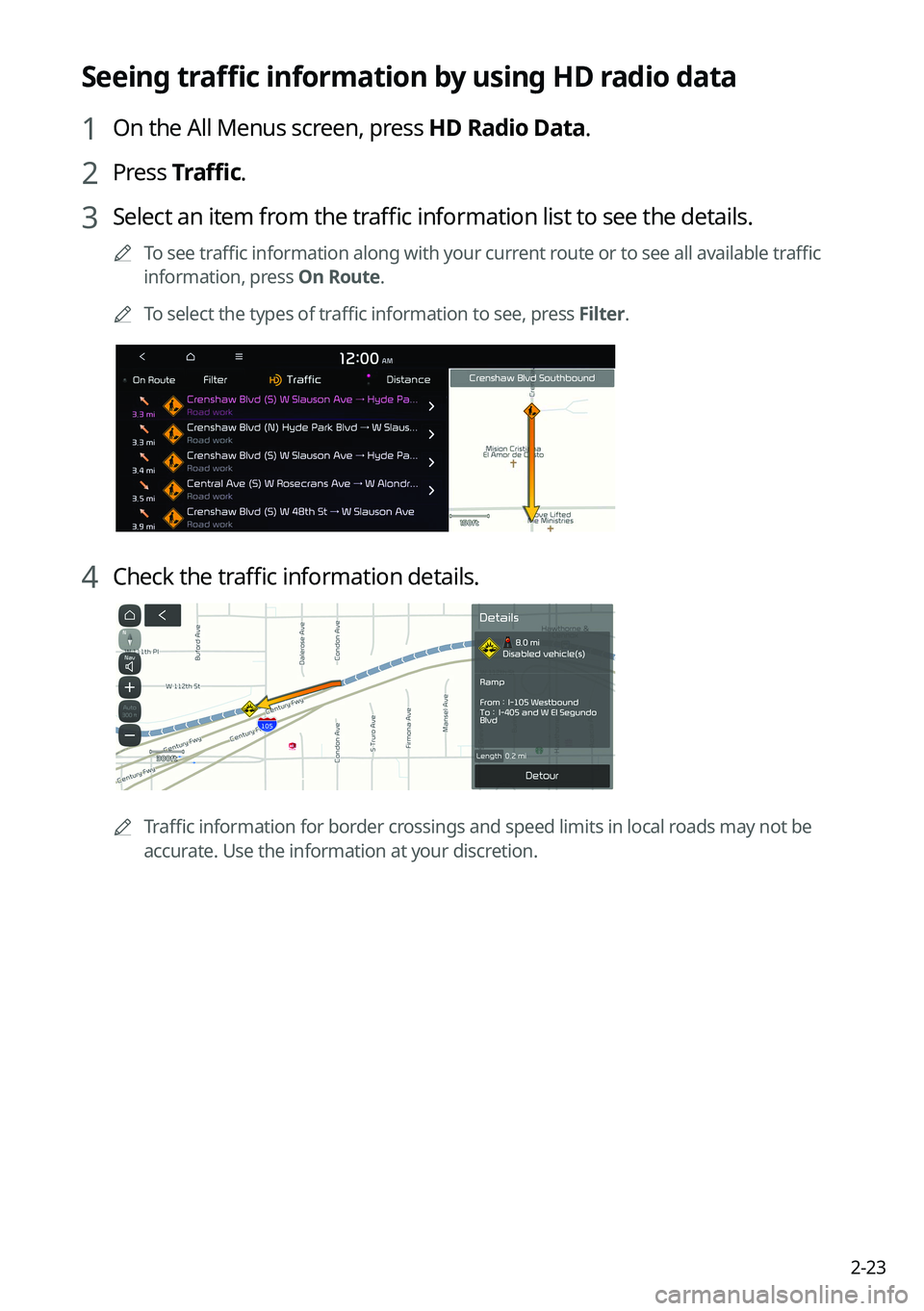
Seeing traffic information by using HD radio data
1 On the All Menus screen, press HD Radio Data.
2 Press Traffic.
3 Select an item from the traffic information list to see the details.
0000
A
To see traffic information along with your current route or to see all available traffic
information, press On Route.
0000
A
To select the types of traffic information to see, press Filter.
4 Check the traffic information details.
0000
A
Traffic information for border crossings and speed limits in local roads may not be
accurate. Use the information at your discretion.
Page 63 of 316
2-25
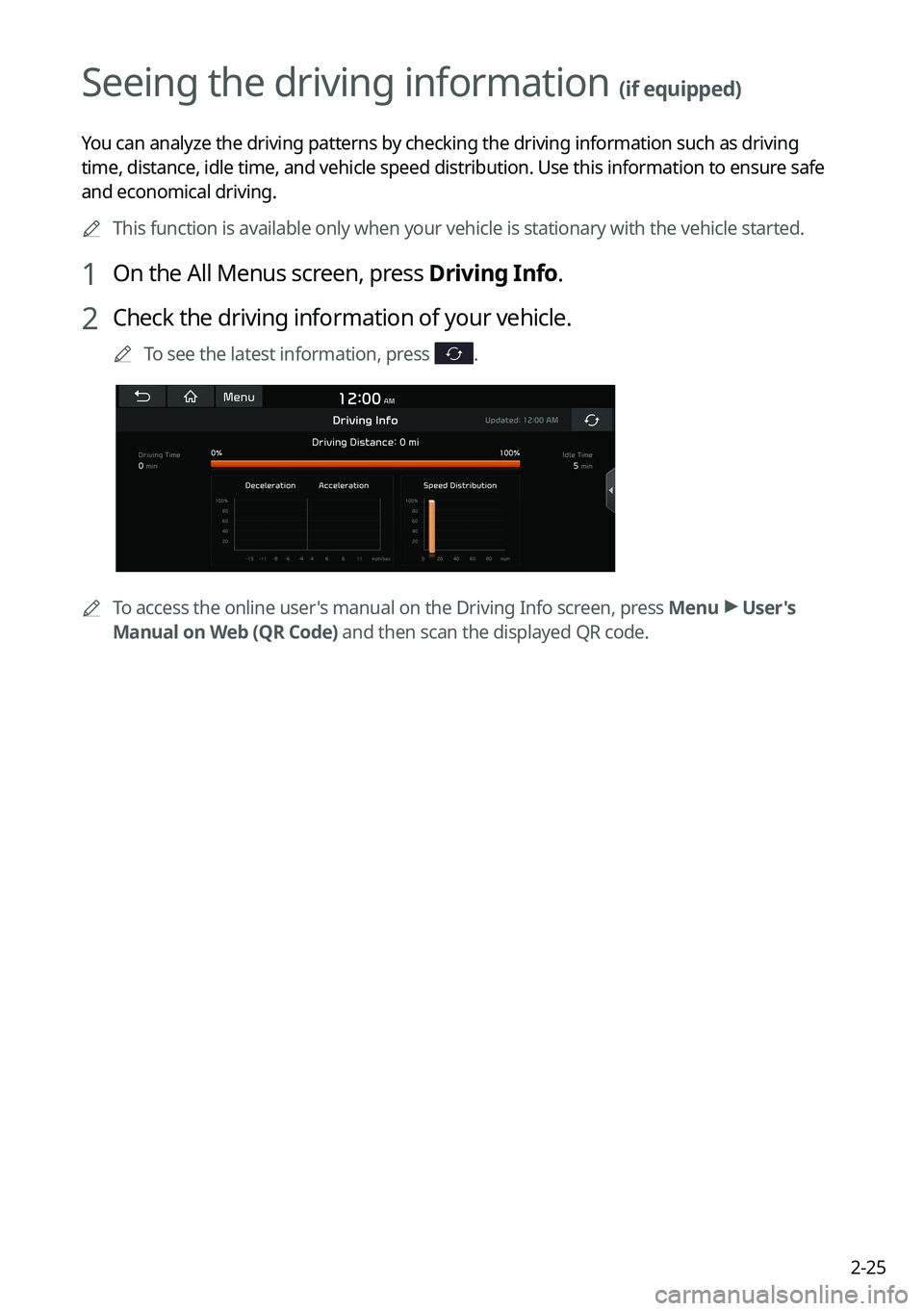
Seeing the driving information (if equipped)
You can analyze the driving patterns by checking the driving information such as driving
time, distance, idle time, and vehicle speed distribution. Use this info\
rmation to ensure safe
and economical driving.0000
A
This function is available only when your vehicle is stationary with the\
vehicle started.
1 On the All Menus screen, press Driving Info.
2 Check the driving information of your vehicle.
0000
A
To see the latest information, press .
0000
A
To access the online user's manual on the Driving Info screen, press Menu >
User's
Manual on Web (QR Code) and then scan the displayed QR code.
Page 65 of 316
2-27
Using the Valet mode (if equipped)
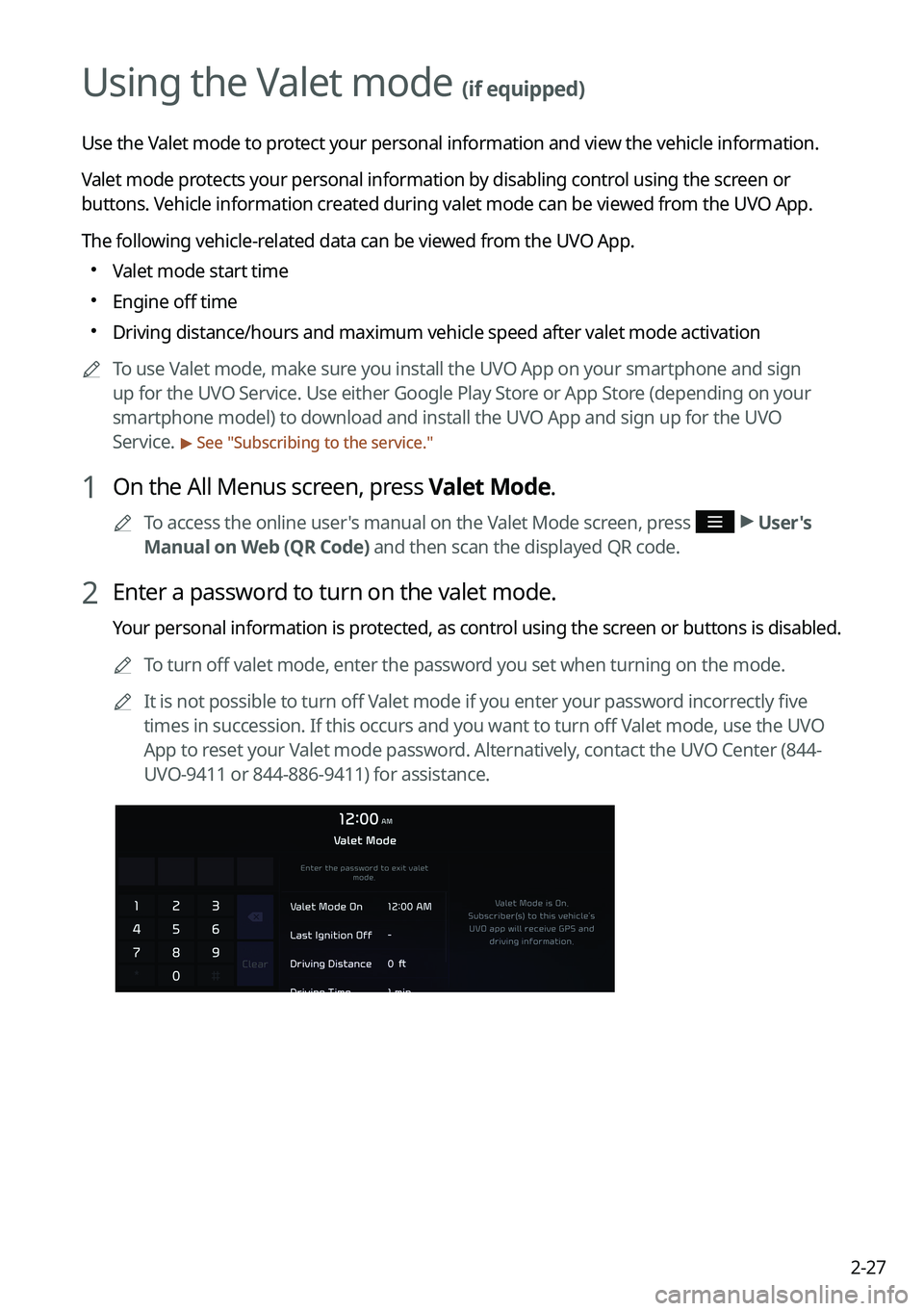
Use the Valet mode to protect your personal information and view the vehicle information.
Valet mode protects your personal information by disabling control using the screen or
buttons. Vehicle information created during valet mode can be viewed from the UVO App.
The following vehicle-related data can be viewed from the UVO App.
000EValet mode start time
000EEngine off time
000EDriving distance/hours and maximum vehicle speed after valet mode activa\
tion
0000
A
To use Valet mode, make sure you install the UVO App on your smartphone and sign
up for the UVO Service. Use either Google Play Store or App Store (depending on your
smartphone model) to download and install the UVO App and sign up for the UVO
Service.
> See "Subscribing to the service."
1 On the All Menus screen, press Valet Mode.
0000
A
To access the online user's manual on the Valet Mode screen, press >
User's
Manual on Web (QR Code) and then scan the displayed QR code.
2 Enter a password to turn on the valet mode.
Your personal information is protected, as control using the screen or buttons is disabled.
0000
A
To turn off valet mode, enter the password you set when turning on the mode.
0000
A
It is not possible to turn off Valet mode if you enter your password incorrectly five
times in succession. If this occurs and you want to turn off Valet mode, use the UVO
App to reset your Valet mode password. Alternatively, contact the UVO Center (844-
UVO-9411 or 844-886-9411) for assistance.
Page 99 of 316

5-5
0000
A
Vehicle location may not be displayed correctly if:
000DThe vehicle is driving on a Y-shaped or winding road with narrow angles.
000DThe vehicle is driving closely to another road.
000DThe vehicle is driving on a road where there are many tall buildings in the vicinity.
000DThe vehicle is driving on a new road or a road under construction.
000DThe vehicle is transported by a ferry or heavy-duty transport vehicle.
000DThe vehicle is driving in a rugged mountain area or on a steep curve road.
000DThe vehicle is entering a public road after making a turn through the turntable in an
underground parking lot or multi-story parking lot.
000DThe vehicle stops and starts repeatedly or moves slowly in front of an intersection.
000DThe system reboots after the vehicle battery has been recharged or replaced.
000DThe vehicle is driving on a slippery road due to heavy snow, etc.
000DThe tires have been replaced recently or spare tires (or studless tires) are used.
000DImproper-sized tires are used or the pressure of each tire is different.
000DThe replaced tire is worn out or the studless tires have been used for over two seasons.
000DA roof carrier is installed on the vehicle.
000DOn a highway continued driving causes the system to perform map matching or apply
the updated GPS data.
0000
A
Navigation service may not be provided correctly under the following conditions:
000DWhen the vehicle drives on a straight road continuously, the system may guide you to
drive straight. It is not a malfunction.
000DGuidance may not be followed immediately after the vehicle makes a turn at an
intersection or drives through an intersection.
000DThe system may guide you to make a U-turn in a prohibited area.
000DThe system may guide you to a traffic-blocked road (e.g. no-entry road or road under
construction).
000DThe system may guide you to a road away from the destination when there is no road
to the destination or there are only narrow roads on the way.
000DGuidance may not be proper when the vehicle is off the route.
000DGuidance may not match the actual distance on an overpass or underpass due to the
difference of the start point.
000DWhen you are driving at high speeds, route recalculations may take longer.
0000
A
Because the navigation system is used for information purposes only, Kia does not
assume responsibility of the accuracy of the information.
0000
A
When the traffic information is not received, the status icon appears at the top of the map
screen.
000DHD Radio: The system is using the HD radio data. If no traffic information is available,
the status icon (
) will be displayed instead.