turn signal KIA SELTOS 2023 Features and Functions Guide
[x] Cancel search | Manufacturer: KIA, Model Year: 2023, Model line: SELTOS, Model: KIA SELTOS 2023Pages: 62, PDF Size: 7.51 MB
Page 50 of 62
Remote but ton configuration may var y depending on vehicle options For more information on the Mechanical Key, please refer to section 4 in the Owner ’s Manual
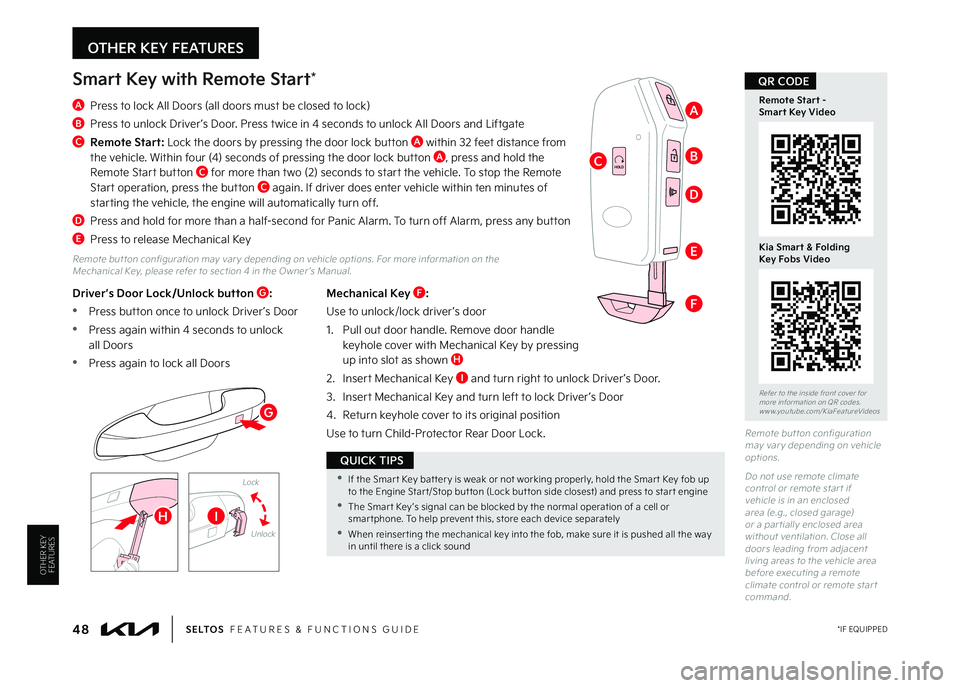
Mechanical Key F:
Use to unlock/lock driver ’s door
1 Pull out door handle Remove door handle keyhole cover with Mechanical Key by pressing up into slot as shown H
2 Insert Mechanical Key I and turn right to unlock Driver ’s Door
3 Insert Mechanical Key and turn left to lock Driver ’s Door
4 Return keyhole cover to its original position
Use to turn Child-Protector Rear Door Lock
Driver’s Door Lock/Unlock button G:
•Press button once to unlock Driver ’s Door
•Press again within 4 seconds to unlock all Doors
•Press again to lock all Doors
Smart Key with Remote Start*
A Press to lock All Doors (all doors must be closed to lock)
B Press to unlock Driver ’s Door Press twice in 4 seconds to unlock All Doors and Liftgate
C
Remote Start: Lock the doors by pressing the door lock button A within 32 feet distance from the vehicle Within four (4) seconds of pressing the door lock button A, press and hold the Remote Start button C for more than two (2) seconds to start the vehicle To stop the Remote Start operation, press the button C again If driver does enter vehicle within ten minutes of starting the vehicle, the engine will automatically turn off
D Press and hold for more than a half-second for Panic Alarm To turn off Alarm, press any button
E Press to release Mechanical Key
Lock
Unlock
Remote but ton configuration may var y depending on vehicle options
Do not use remote climate control or remote star t if vehicle is in an enclosed area (e g , closed garage) or a par tially enclosed area without ventilation Close all doors leading from adjacent living areas to the vehicle area before executing a remote climate control or remote star t command
HOLD
48 *IF EQUIPPEDS E LT O S FEATURES & FUNCTIONS GUIDE
Refer to the inside front cover for more information on QR codes www youtube com/KiaFeatureVideos
Remote Start - Smart Key Video
Kia Smart & FoldingKey Fobs Video
QR CODE
•If the Smar t Key bat ter y is weak or not working properly, hold the Smar t Key fob up to the Engine Star t/Stop but ton (Lock but ton side closest) and press to star t engine
•The Smar t Key ’s signal can be blocked by the normal operation of a cell or smar tphone To help prevent this, store each device separately
•When reinser ting the mechanical key into the fob, make sure it is pushed all the way in until there is a click sound
QUICK TIPS
A
BC
D
E
F
G
HI
OTHER KEY FEATURES
OTHER KEY FEATURES
MY23 Seltos FFG Inside March 2022.indd 48MY23 Seltos FFG Inside March 2022.indd 484/15/22 3:40 AM4/15/22 3:40 AM