engine KIA Sorento 2008 1.G Owner's Guide
[x] Cancel search | Manufacturer: KIA, Model Year: 2008, Model line: Sorento, Model: KIA Sorento 2008 1.GPages: 326, PDF Size: 8.63 MB
Page 147 of 326
417
Driving your vehicle
• If you need to drive in water, stop your
vehicle, set your transfer knob to 4LO
or LOW and drive at less than 8 km/h
(5 mph).• Do not drive in water if the level is high-
er than the bottom of the wheel hubs.
• Check your brake condition once you
are out of mud or water. Press the
brake pedal several times as you move
slowly until you feel normal braking
forces return.
• Shorten your scheduled maintenance
interval if you drive off-road in condi-
tions such as sand, mud or water (see
“Scheduled Maintenance’’ in the
Index). Always wash your car thor-
oughly.
• The full time four wheel drive vehicle
cannot be towed by an ordinarily tow
truck. Make sure that the vehicle is
towed with its four wheels raised off the
ground.
• Since the driving torque is always
applied to the 4 wheels the perform-
ance of the 4WD vehicle is greatly
affected by the condition of the tires.
Be sure to equip them with all four tires
with same size and type.
WARNING
If you are driving in heavy wind, the
vehicle’s higher center of gravity
decreases your steering control.
Drive more slowly than you would
in calm conditions.
WARNING- Driving
through water
If you are driving too fast in water,
the water spray can get into the
engine compartment and wet the
ignition system, causing your vehi-
cle to suddenly stop. If this hap-
pens and your vehicle is in a tilted
position, your vehicle may roll over.
WARNING
Your vehicle is equipped with tires
designed to provide for safe ride
and handling capability.
Do not use a size and type of tire
and wheel that is different from the
one that is originally installed on
your vehicle. It can affect the safety
and performance of your vehicle,
which could lead to handling failure
or rollover and serious injury.
When replacing the tires, be sure to
equip all four tires with the tire and
wheel of the same size, type, tread,
brand and load-carrying capacity. If
you nevertheless decide to equip
your vehicle with any tire/wheel
combination not recommended by
Kia for off road driving, you should
not use these tires for highway driv-
ing.
Page 148 of 326
Driving your vehicle
18 4
• For speedometer test or inspection/
maintenance (I/M) program of full-time
4WD vehicle, use a four wheel chassis
dynamometer.• A 4WD vehicle should not be tested on
a 2WD drive roll tester. If a 2WD roll
tester must be used, perform the fol-
lowing:
1. Check the tire pressures recommend-
ed for your vehicle.
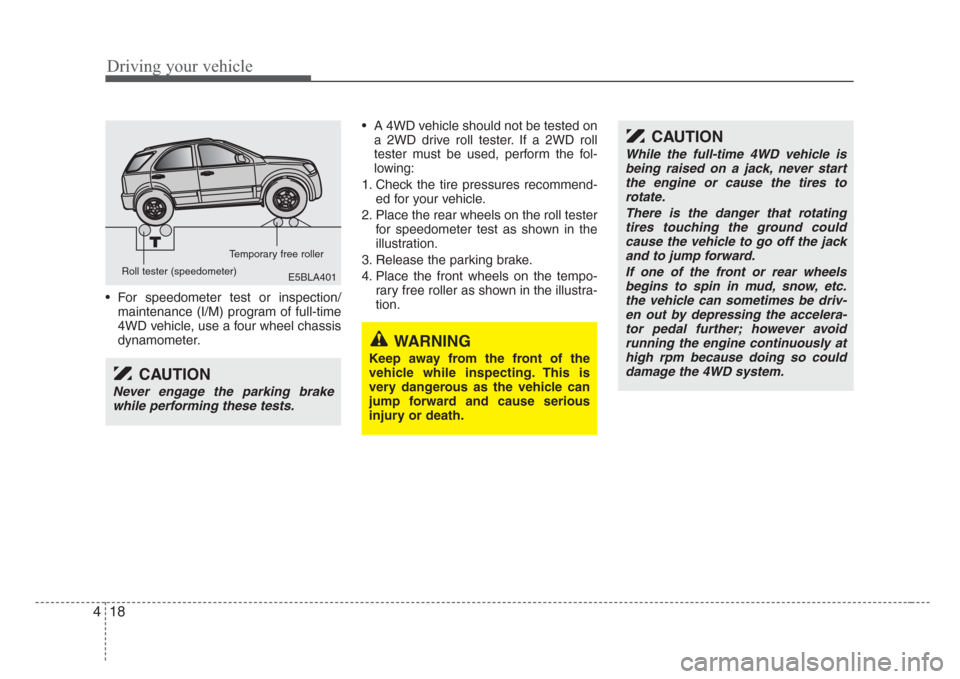
2. Place the rear wheels on the roll tester
for speedometer test as shown in the
illustration.
3. Release the parking brake.
4. Place the front wheels on the tempo-
rary free roller as shown in the illustra-
tion.
E5BLA401 Roll tester (speedometer)Temporary free roller
CAUTION
Never engage the parking brake
while performing these tests.
CAUTION
While the full-time 4WD vehicle is
being raised on a jack, never start
the engine or cause the tires to
rotate.
There is the danger that rotating
tires touching the ground could
cause the vehicle to go off the jack
and to jump forward.
If one of the front or rear wheels
begins to spin in mud,snow, etc.
the vehicle can sometimes be driv-
en out by depressing the accelera-
tor pedal further; however avoid
running the engine continuously at
high rpm because doing so could
damage the 4WD system.
WARNING
Keep away from the front of the
vehicle while inspecting. This is
very dangerous as the vehicle can
jump forward and cause serious
injury or death.
Page 149 of 326
419
Driving your vehicle
A limited slip differential if equipped, is for
the rear wheel differential only. The fea-
tures of this limited slip differential are
described below;
Just as with conventional differential, the
wheel on one side is allowed to turn at a
different speed from the wheel on the
other side when the vehicle is cornering.
The difference between the limited slip
differential and a conventional differential
is that if the wheel on one side of the
vehicle loses traction, a greater amount
of torque is applied to the rear wheel on
the other side to improve traction.
WARNING
To avoid injury, never run the
engine with one wheel off the
ground,such as when changing a
tire.
WARNING
• Avoid high cornering speed.
• Do not make quick steering wheel
movements,such as sharp lane
changes or fast,sharp turns.
• The risk of rollover is greatly
increased if you lose control of
your vehicle at high speeds.
• In a collision crash, an unbelted
person is significantly more likely
to die compared to a person
wearing a seat belt.
•Loss of control often occurs if
two or more wheels drop off the
roadway and the driver over
steers to re-enter the roadway.
• In the event your vehicle leaves
the roadway, do not steer sharply.
Instead,slow down before pulling
back into the travel lanes.
LIMITED SLIP DIFFERENTIAL (IF EQUIPPED)
Page 150 of 326
Driving your vehicle
20 4
Power brakes
Your vehicle has power-assisted brakes
that adjust automatically through normal
usage.
In the event that the power-assisted
brakes lose power because of a stalled
engine or some other reason, you can
still stop your vehicle by applying greater
force to the brake pedal than you nor-
mally would. The stopping distance, how-
ever, will be somewhat longer.
When the engine is not running, the
reserve brake power is partially depleted
each time the brake pedal is applied. Do
not pump the brake pedal when the
power assist has been interrupted.
Pump the brake pedal only when neces-
sary to maintain steering control on slip-
pery surfaces.
In the event of brake failure
If service brakes fail to operate while the
vehicle is in motion, you can make an
emergency stop with the parking brake.
The stopping distance, however, will be
much greater than normal.
BRAKE SYSTEM
WARNING -Brakes
• Do not drive with your foot rest-
ing on the brake pedal. This will
create abnormal high brake tem-
peratures, excessive brake lining
and pad wear, and increased
stopping distances.
• When descending a long or steep
hill,shift to a lower gear and
avoid continuous application of
the brakes. Continuous brake
application will cause the brakes
to overheat and could result in a
temporary loss of braking per-
formance.
• Wet brakes may result in the vehi-
cle not slowing down at the usual
rate and pulling to one side when
the brakes are applied. After
going through water, apply the
brakes lightly to regain smooth
braking performance.
WARNING- Parking brake
Operating the parking brake while
the vehicle is moving at normal
speeds can cause a sudden loss of
control of the vehicle. If you must
use the parking brake to stop the
vehicle, use great caution in apply-
ing the brake.
Page 152 of 326
Driving your vehicle
22 4
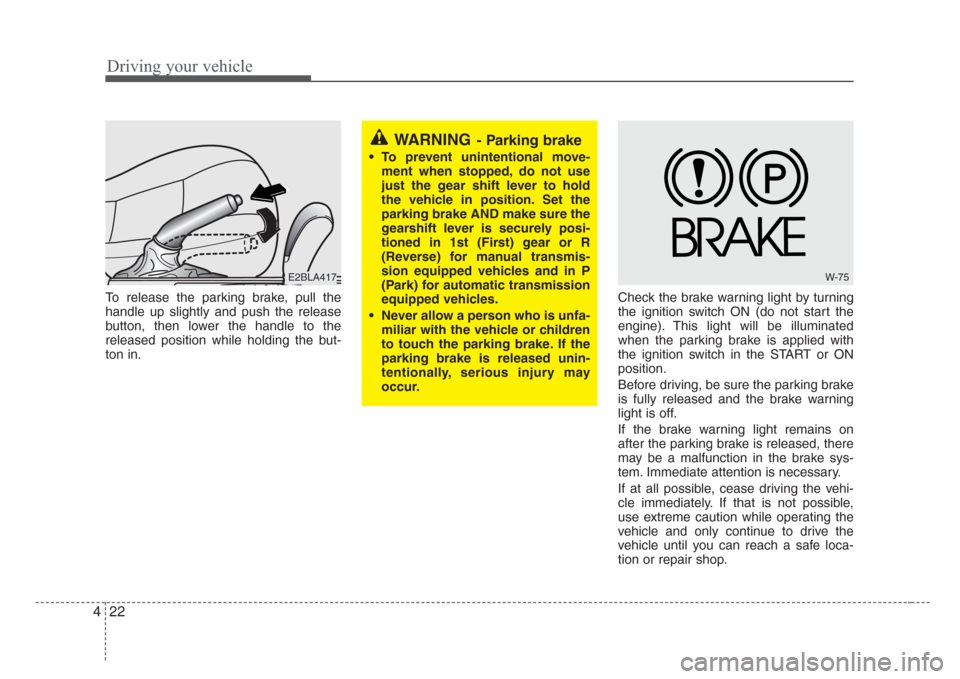
To release the parking brake, pull the
handle up slightly and push the release
button, then lower the handle to the
released position while holding the but-
ton in.Check the brake warning light by turning
the ignition switch ON (do not start the
engine). This light will be illuminated
when the parking brake is applied with
the ignition switch in the START or ON
position.
Before driving, be sure the parking brake
is fully released and the brake warning
light is off.
If the brake warning light remains on
after the parking brake is released, there
may be a malfunction in the brake sys-
tem. Immediate attention is necessary.
If at all possible, cease driving the vehi-
cle immediately. If that is not possible,
use extreme caution while operating the
vehicle and only continue to drive the
vehicle until you can reach a safe loca-
tion or repair shop.
WARNING- Parking brake
• To prevent unintentional move-
ment when stopped, do not use
just the gear shift lever to hold
the vehicle in position. Set the
parking brake AND make sure the
gearshift lever is securely posi-
tioned in 1st (First) gear or R
(Reverse) for manual transmis-
sion equipped vehicles and in P
(Park) for automatic transmission
equipped vehicles.
• Never allow a person who is unfa-
miliar with the vehicle or children
to touch the parking brake. If the
parking brake is released unin-
tentionally,serious injury may
occur.
E2BLA417W-75
Page 154 of 326
Driving your vehicle
24 4
• Even with the anti-lock brake system,
your vehicle still requires sufficient
stopping distance. Always maintain a
safe distance from the vehicle in front
of you.
• Always slow down when cornering.
The anti-lock brake system cannot pre-
vent accidents resulting from exces-
sive speeds.
• On loose or uneven road surfaces,
operation of the anti-lock brake system
may result in a longer stopping dis-
tance than for vehicles equipped with a
conventional brake system.
✽
NOTICE
When you jump start your vehicle
because of a drained battery, the engine
may not run as smoothly and the ABS
warning light may turn on at the same
time. This happens because of the low
battery voltage. It does not mean your
ABS is malfunctioning.
Do not pump your brakes!
Have the battery recharged before
driving the vehicle.
ABS
W-78
CAUTION
• If the ABS warning light is on and
stays on, you may have a problem
with the ABS system. In this case,
however, your regular brakes will
work normally.
• The ABS warning light will stay
on for approximately 3 seconds
after the ignition switch is ON.
During that time, the ABS will go
through self-diagnosis and the
light will go off if everything is
normal. If the light stays on, you
may have a problem with your
ABS system. Contact an author-
ized Kia dealer as soon as possi-
ble.
CAUTION
• When you drive on a road having
poor traction,such as an icy road,
and operate your brakes continu-
ously, the ABS will be active con-
tinuously and the ABS warning
light may illuminate. Pull your car
over to a safe place and stop the
engine.
•Restart the engine. If the ABS
warning light is off, then your
ABS system is normal.
Otherwise, you may have a prob-
lem with the ABS. Contact an
authorized Kia dealer as soon as
possible.
Page 155 of 326

425
Driving your vehicle
Power steering
Power Steering uses energy from the
engine to assist you in steering the vehi-
cle. If the engine is off or if the power
steering system becomes inoperative,
the vehicle may still be steered, but it will
require increased steering effort.
Should you notice any change in the
effort required to steer during normal
vehicle operation, have the power steer-
ing checked by an Authorized Kia Dealer.
✽
NOTICE
If the power steering drive belt breaks
or if the power steering pump malfunc-
tions, the steering effort will greatly
increase.
✽
NOTICE
If the vehicle is parked for extended
periods outside in cold weather (below -
10°C/14°F), the power steering may
require increased effort when the engine
is first started. This is caused by
increased fluid viscosity due to the cold
weather and does not indicate a mal-
function.
When this happens, increase the engine
RPM by depressing accelerator until the
RPM reaches 1,500 rpm then release or
let the engine idle for two or three min-
utes to warm up the fluid.
STEERING WHEEL
CAUTION
Never hold the steering wheel
against a stop (extreme right or left
turn) for more than 5 seconds with
the engine running. Holding the
steering wheel for more than 5 sec-
onds in either position may cause
damage to the power steering
pump.
Page 160 of 326
Driving your vehicle
30 4
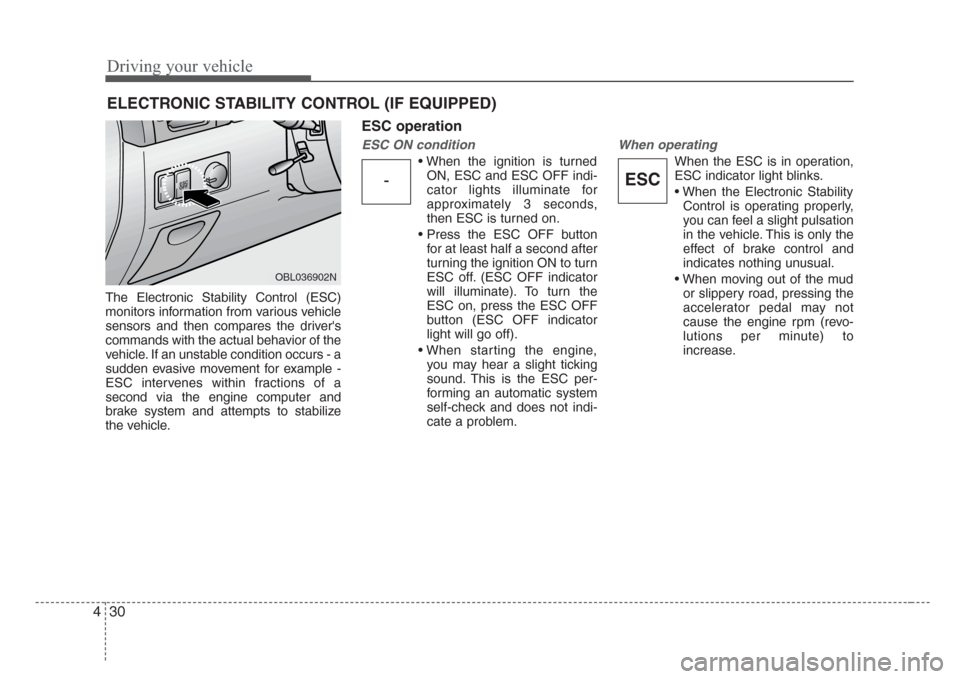
The Electronic Stability Control (ESC)
monitors information from various vehicle
sensors and then compares the driver's
commands with the actual behavior of the
vehicle. If an unstable condition occurs - a
sudden evasive movement for example -
ESC intervenes within fractions of a
second via the engine computer and
brake system and attempts to stabilize
the vehicle.
ESC operation
ESC ON condition
• When the ignition is turned
ON, ESC and ESC OFF indi-
cator lights illuminate for
approximately 3 seconds,
then ESC is turned on.
• Press the ESC OFF button
for at least half a second after
turning the ignition ON to turn
ESC off. (ESC OFF indicator
will illuminate). To turn the
ESC on, press the ESC OFF
button (ESC OFF indicator
light will go off).
• When starting the engine,
you may hear a slight ticking
sound. This is the ESC per-
forming an automatic system
self-check and does not indi-
cate a problem.
When operating
When the ESC is in operation,
ESC indicator light blinks.
• When the Electronic Stability
Control is operating properly,
you can feel a slight pulsation
in the vehicle. This is only the
effect of brake control and
indicates nothing unusual.
• When moving out of the mud
or slippery road, pressing the
accelerator pedal may not
cause the engine rpm (revo-
lutions per minute) to
increase.
ELECTRONIC STABILITY CONTROL (IF EQUIPPED)
-ESCESC
OBL036902N
Page 161 of 326
431
Driving your vehicle
ESC operation off
ESC OFF state
• To cancel ESC operation,
press the ESC OFF button
(ESC OFF indicator light illu-
minates).
• If the ignition switch is turned
to LOCK position when ESC
is off, ESC remains off. Upon
restarting the engine, the
ESC will automatically turn
on again.
• During ESC operation, if the
transfer shift knob is turned
from 2WD mode (2HI) to
4WD mode (4HI or 4LO), the
ESC will automatically turn
off, and if it is turned from
4WD mode (4HI or 4LO) to
2WD mode (2HI), the ESC
will automatically turn on
again. (if part time 4WD is
equipped)
Indicator light
When ignition switch is turned to ON, the
indicator light illuminates, then goes off if
ESC system is operating normally.
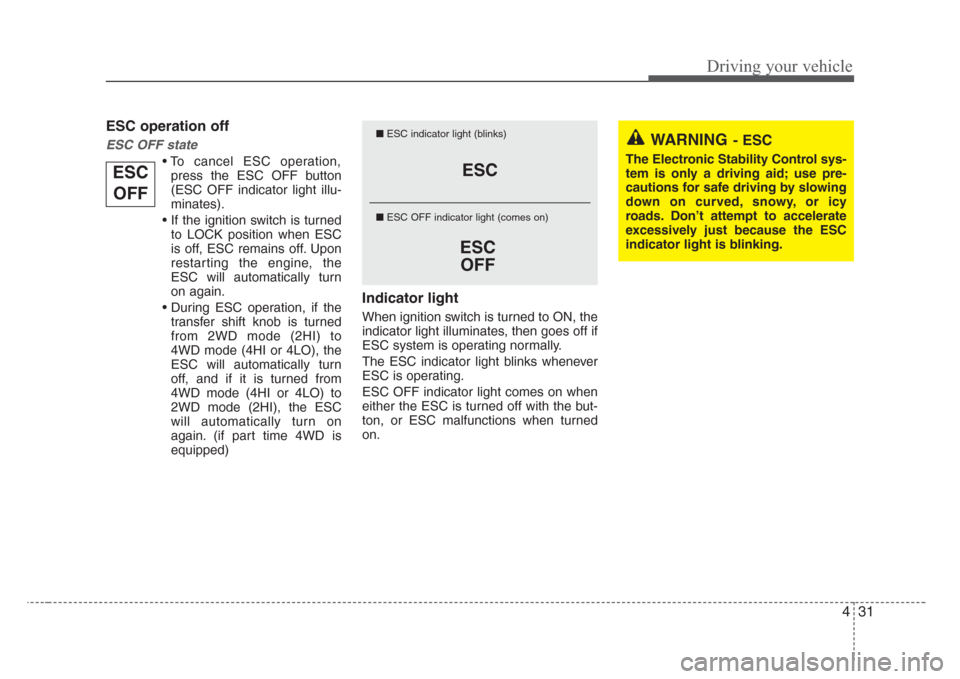
The ESC indicator light blinks whenever
ESC is operating.
ESC OFF indicator light comes on when
either the ESC is turned off with the but-
ton, or ESC malfunctions when turned
on.
ESC
ESC
OFF
■ESC indicator light (blinks)
■ ESC OFF indicator light (comes on)WARNING- ESC
The Electronic Stability Control sys-
tem is only a driving aid; use pre-
cautions for safe driving by slowing
down on curved,snowy, or icy
roads. Don’t attempt to accelerate
excessively just because the ESC
indicator light is blinking.
ESC
OFF
Page 164 of 326
Driving your vehicle
34 4
Non-operational conditions of
rear parking assist system
Rear parking assist system may not
operate normally when:
1. Moisture is frozen to the sensor. (It will
operate normally when moisture
melts.)
2. Sensor is covered with foreign matter,
such as snow or water, or the sensor
cover is blocked. (It will operate nor-
mally when the material is removed or
the sensor is no longer blocked.)
3. Driving on uneven road surfaces
(unpaved roads, gravel, bumps, gradi-
ent).
4. Objects generating excessive noise
(vehicle horns, loud motorcycle
engines, or truck air brakes) are within
range of the sensor.
5. Heavy rain or water spray exists.
6. Wireless transmitters or mobile phones
are within range of the sensor.
7. Sensor is covered with snow.
8. Trailer towing
Detecting range may decrease when:
1. Sensor is coverd with foreign matter
such as snow or water. (Sensing range
will return to normal when removed.)
2. Outside air temperature is extremely
hot or cold.
Following objects may not be recog-
nized by the sensor:
1. Sharp or slim objects such as ropes,
chains or small poles.
2. Objects which tend to absorb sensor
frequency such as clothes, spongy
material or snow.
3. Undetectable objects smaller than 1 m
(40 in.) and narrower than 14 cm (6 in.)
in diameter.
CAUTION
1. The rear parking assist system
may not sound sequentially
depending on the speed and
shapes of the objects detected.
2. The rear parking assist system
may malfunction if the vehicle
bumper height or sensor installa-
tion has been modified or dam-
aged. Any non-factory installed
equipment or accessories may
also interfere with the sensor per-
formance.
3. Sensor may not recognize
objects less than 40 cm (15 in.)
from the sensor, or it may sense
an incorrect distance. Use cau-
tion.
4. When the sensor is covered with
snow, dirt or water,sensor may
be inoperative until the debris is
removed us
ing a soft cloth
5. Do not push,scratch or strike the
sensor. Sensor damage could
occur.