engine KIA Sorento 2008 1.G User Guide
[x] Cancel search | Manufacturer: KIA, Model Year: 2008, Model line: Sorento, Model: KIA Sorento 2008 1.GPages: 326, PDF Size: 8.63 MB
Page 80 of 326
371
Knowing your vehicle
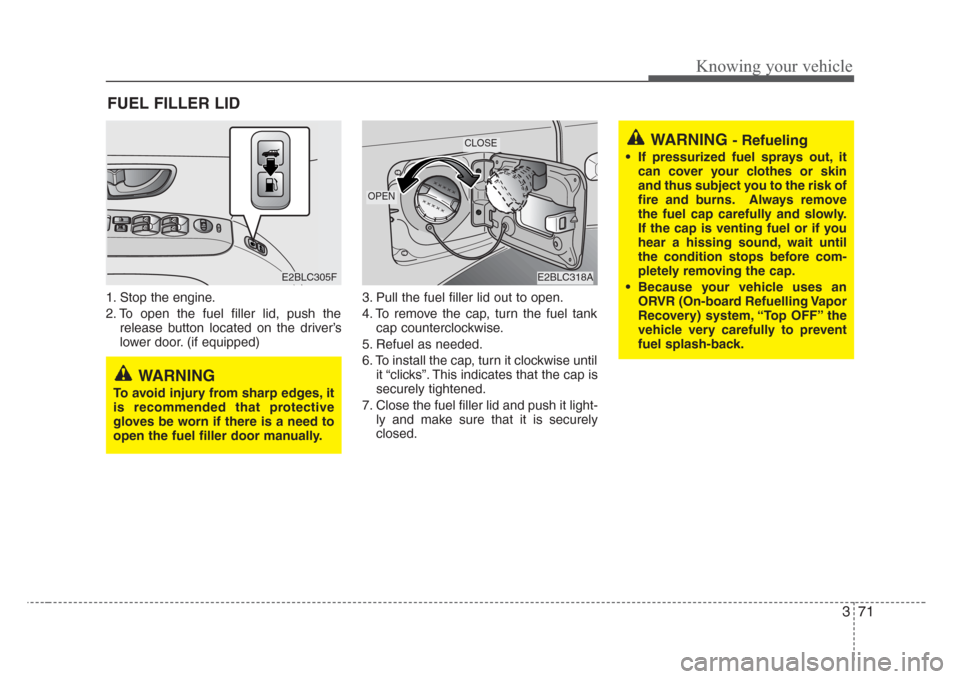
1. Stop the engine.
2. To open the fuel filler lid, push the
release button located on the driver’s
lower door. (if equipped)3. Pull the fuel filler lid out to open.
4. To remove the cap, turn the fuel tank
cap counterclockwise.
5. Refuel as needed.
6. To install the cap, turn it clockwise until
it “clicks”. This indicates that the cap is
securely tightened.
7. Close the fuel filler lid and push it light-
ly and make sure that it is securely
closed.
FUEL FILLER LID
WARNING - Refueling
• If pressurized fuel sprays out, it
can cover your clothes or skin
and thus subject you to the risk of
fire and burns.Always remove
the fuel cap carefully and slowly.
If the cap is venting fuel or if you
hear a hissing sound, wait until
the condition stops before com-
pletely removing the cap.
• Because your vehicle uses an
ORVR (On-board Refuelling Vapor
Recovery) system, “Top OFF” the
vehicle very carefully to prevent
fuel splash-back.
E2BLC305FE2BLC318A
OPEN
CLOSE
WARNING
To avoid injury from sharp edges,it
is recommended that protective
gloves be worn if there is a need to
open the fuel filler door manually.
Page 81 of 326
Knowing your vehicle
72 3
WARNING - Refueling dan-
gers
Automotive fuels are flammable
materials. When refueling, please
note the following guidelines care-
fully. Failure to follow these guide-
lines may result in severe personal
injury,severe burns or death by fire
or explosion.
• Before refueling note the location
of the Emergency Gasoline Shut-
Off, if available, at the gas station
facility.
Always heed any warnings or
cautions posted at the fueling
station.
• Before touching the fuel nozzle,
you should eliminate potentially
dangerous static electricity dis-
charge by touching another metal
part of the vehicle, a safe distance
away from the fuel filler neck, noz-
zle, or other gas source.
(Continued)
(Continued)
• Do not get back into a vehicle
once you have begun refueling
since you can generate static
electricity by touching, rubbing or
sliding against any item or fabric
(polyester,satin, nylon, etc.)
capable of producing static elec-
tricity. Static electricity discharge
can ignite fuel vapors resulting in
rapid burning. If you must re-
enter the vehicle, you should
once again eliminate potentially
dangerous static electricity dis-
charge by touching a metal part
of the vehicle, away from the fuel
filler neck, nozzle or other gaso-
line source.
• When using a portable fuel con-
tainer be sure to place the con-
tainer on the ground prior to refu-
eling. Static electricity discharge
from the container can ignite fuel
vapors causing a fire. Once refu-
eling has begun, contact with the
vehicle should be maintained
until the filling is complete.
(Continued)(Continued)
Use only portable plastic fuel
containers designed to carry and
store gasoline.
• Do not use cellular phones while
refueling. Electric current and/or
electronic interference from cellu-
lar phones can potentially ignite
fuel vapors causing a fire.
• When refueling, always shut the
engine off. Sparks produced by
electrical components related to
the engine can ignite fuel vapors
causing a fire. Once refueling is
complete, check to make sure the
filler cap and filler door are
securely closed, before starting
the engine.
(Continued)
Page 82 of 326
373
Knowing your vehicle
✽
NOTICE
If the fuel filler lid will not open in cold
weather because the area around it is
frozen, push or lightly tap the lid.
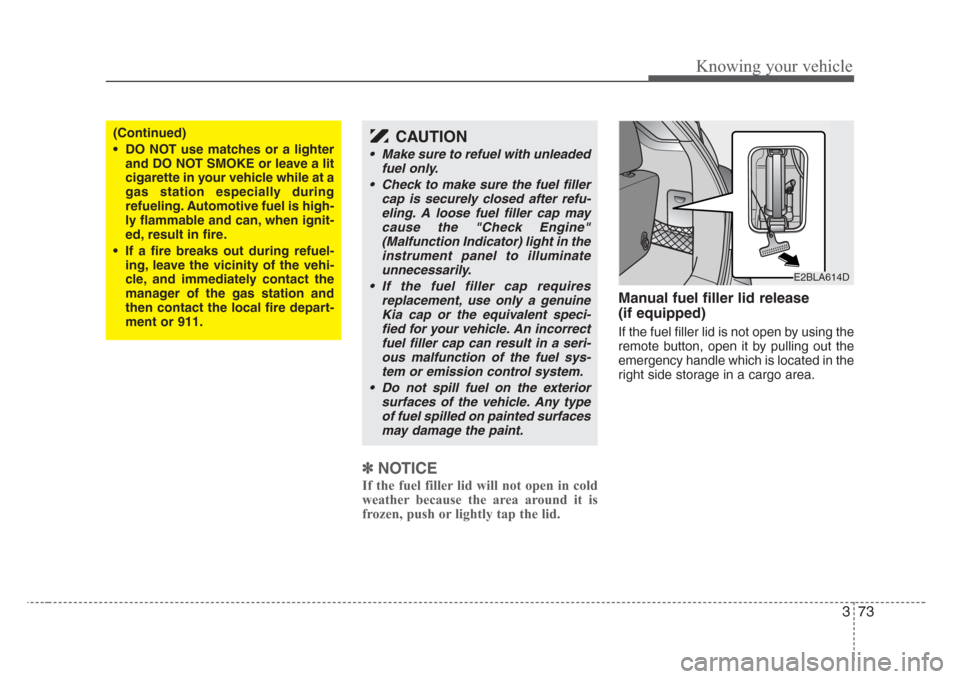
Manual fuel filler lid release
(if equipped)
If the fuel filler lid is not open by using the
remote button, open it by pulling out the
emergency handle which is located in the
right side storage in a cargo area.
(Continued)
• DO NOT use matches or a lighter
and DO NOT SMOKE or leave a lit
cigarette in your vehicle while at a
gas station especially during
refueling. Automotive fuel is high-
ly flammable and can, when ignit-
ed, result in fire.
• If a fire breaks out during refuel-
ing, leave the vicinity of the vehi-
cle, and immediately contact the
manager of the gas station and
then contact the local fire depart-
ment or 911.CAUTION
• Make sure to refuel with unleaded
fuel only.
• Check to make sure the fuel filler
cap is securely closed after refu-
eling. A loose fuel filler cap may
cause the "Check Engine"
(Malfunction Indicator) light in the
instrument panel to illuminate
unnecessarily.
• If the fuel filler cap requires
replacement, use only a genuine
Kia cap or the equivalent speci-
fied for your vehicle. An incorrect
fuel filler cap can result in a seri-
ous malfunction of the fuel sys-
tem or emission control system.
• Do not spill fuel on the exterior
surfaces of the vehicle. Any type
of fuel spilled on painted surfaces
may damage the paint.
E2BLA614D
Page 83 of 326
Knowing your vehicle
74 3
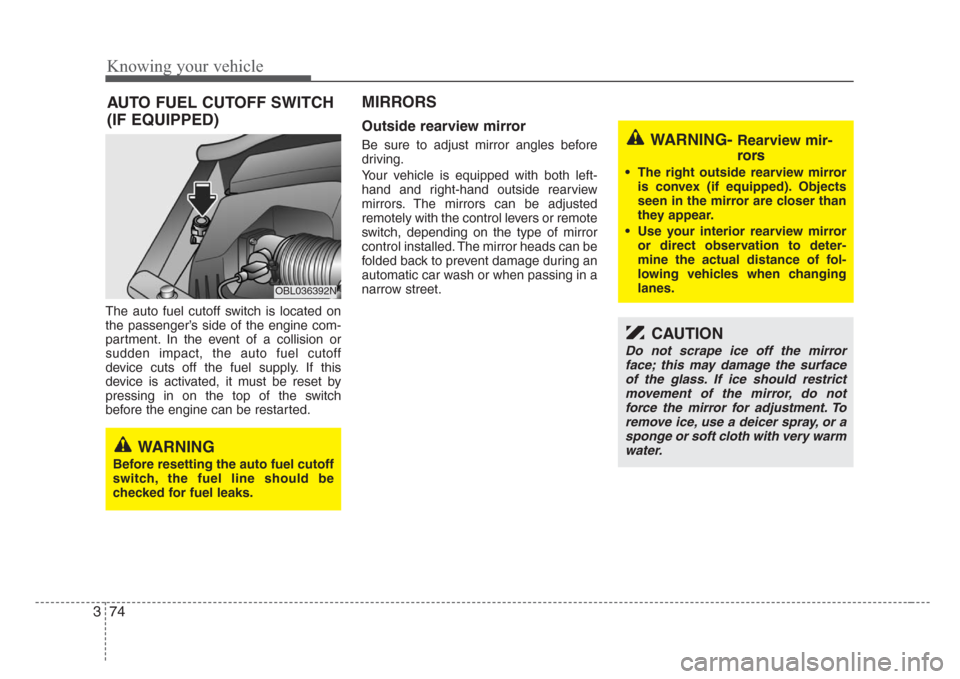
The auto fuel cutoff switch is located on
the passenger’s side of the engine com-
partment. In the event of a collision or
sudden impact, the auto fuel cutoff
device cuts off the fuel supply. If this
device is activated, it must be reset by
pressing in on the top of the switch
before the engine can be restarted.
MIRRORS
Outside rearview mirror
Be sure to adjust mirror angles before
driving.
Your vehicle is equipped with both left-
hand and right-hand outside rearview
mirrors. The mirrors can be adjusted
remotely with the control levers or remote
switch, depending on the type of mirror
control installed. The mirror heads can be
folded back to prevent damage during an
automatic car wash or when passing in a
narrow street.
OBL036392N
WARNING
Before resetting the auto fuel cutoff
switch, the fuel line should be
checked for fuel leaks.
WARNING- Rearview mir-
rors
• The right outside rearview mirror
is convex (if equipped). Objects
seen in the mirror are closer than
they appear.
•Use your interior rearview mirror
or direct observation to deter-
mine the actual distance of fol-
lowing vehicles when changing
lanes.
CAUTION
Do not scrape ice off the mirror
face; this may damage the surface
of the glass. If ice should restrict
movement of the mirror, do not
force the mirror for adjustment. To
remove ice, use a deicer spray, or a
sponge or soft cloth with very warm
water.
AUTO FUEL CUTOFF SWITCH
(IF EQUIPPED)
Page 85 of 326
Knowing your vehicle
76 3
Outside rearview mirror heater
(if equipped)
The outside rearview mirror heater is
actuated in connection with the rear win-
dow defroster. To heat the outside
rearview mirror glass, push the button for
the rear window defroster.
The rearview mirror heater (and rear win-
dow defroster) will not operate unless the
engine is running.
The outside rearview mirror glass will be
heated for defrosting or defogging and
will give you improved rear vision in
inclement weather conditions. Push the
button again to turn the heater off. The
outside rearview mirror heater automati-
cally turns off after 20 minutes.
Inside rearview mirror
Adjust the rearview mirror to center on
the view through the rear window. Make
this adjustment before you start driving.
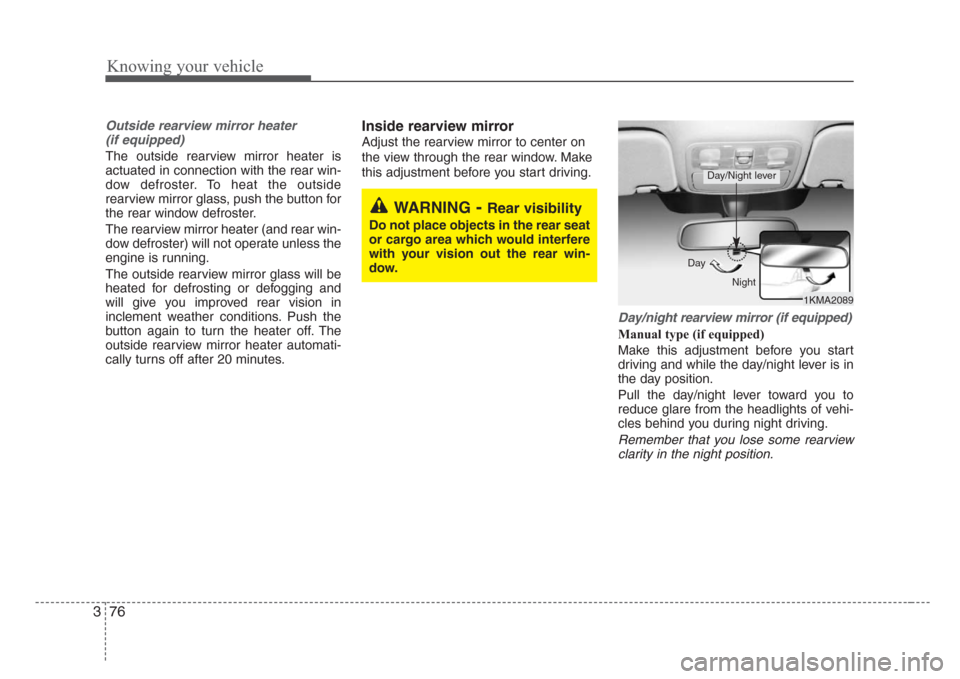
Day/night rearview mirror (if equipped)
Manual type (if equipped)
Make this adjustment before you start
driving and while the day/night lever is in
the day position.
Pull the day/night lever toward you to
reduce glare from the headlights of vehi-
cles behind you during night driving.
Remember that you lose some rearview
clarity in the night position.
1KMA2089 Day
Night
Day/Night lever
WARNING-Rear visibility
Do not place objects in the rear seat
or cargo area which would interfere
with your vision out the rear win-
dow.
Page 86 of 326
377
Knowing your vehicle
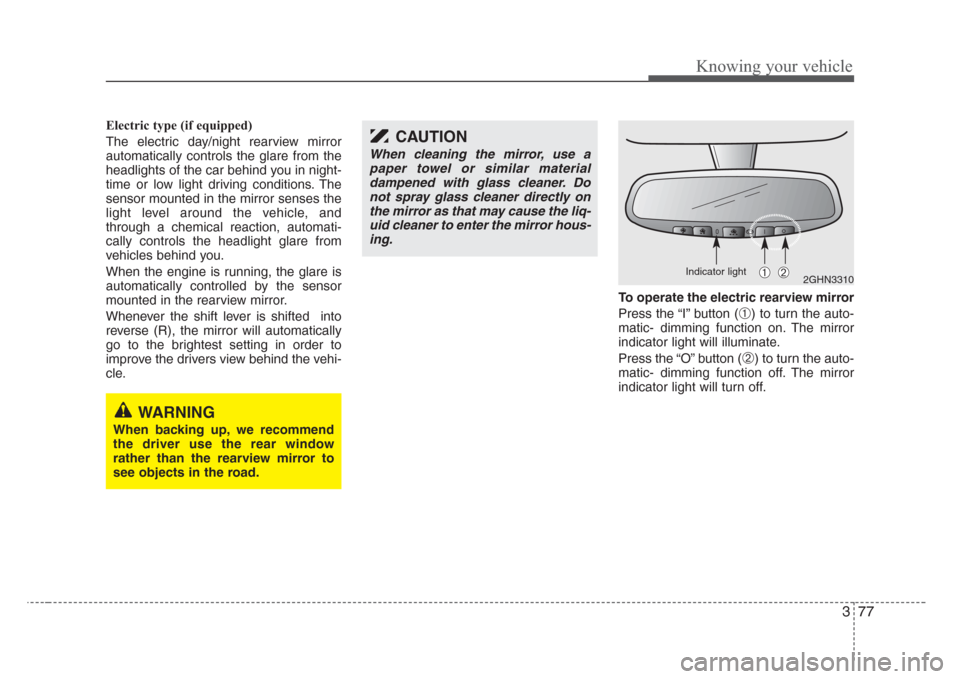
Electric type (if equipped)
The electric day/night rearview mirror
automatically controls the glare from the
headlights of the car behind you in night-
time or low light driving conditions. The
sensor mounted in the mirror senses the
light level around the vehicle, and
through a chemical reaction, automati-
cally controls the headlight glare from
vehicles behind you.
When the engine is running, the glare is
automatically controlled by the sensor
mounted in the rearview mirror.
Whenever the shift lever is shifted into
reverse (R), the mirror will automatically
go to the brightest setting in order to
improve the drivers view behind the vehi-
cle.To operate the electric rearview mirror
Press the “I” button (
➀) to turn the auto-
matic- dimming function on. The mirror
indicator light will illuminate.
Press the “O” button (
➁) to turn the auto-
matic- dimming function off. The mirror
indicator light will turn off.
2GHN3310➀➁
CAUTION
When cleaning the mirror, use a
paper towel or similar material
dampened with glass cleaner. Do
not spray glass cleaner directly on
the mirror as that may cause the liq-
uid cleaner to enter the mirror hous-
ing.
WARNING
When backing up, we recommend
the driver use the rear window
rather than the rearview mirror to
see objects in the road.
Indicator light
Page 95 of 326
Knowing your vehicle
86 3
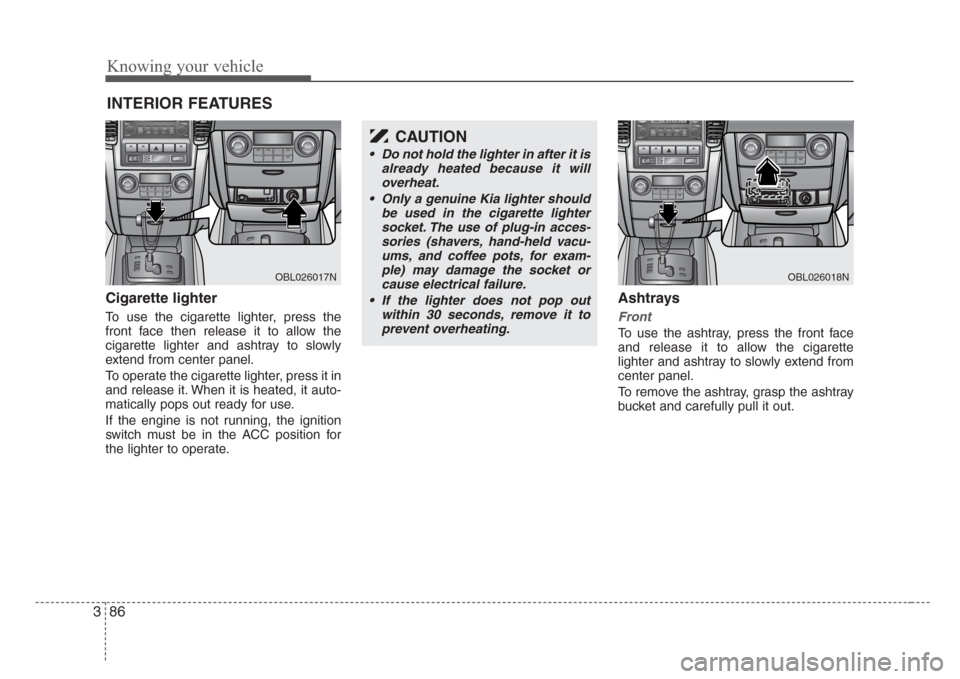
Cigarette lighter
To use the cigarette lighter, press the
front face then release it to allow the
cigarette lighter and ashtray to slowly
extend from center panel.
To operate the cigarette lighter, press it in
and release it. When it is heated, it auto-
matically pops out ready for use.
If the engine is not running, the ignition
switch must be in the ACC position for
the lighter to operate.
Ashtrays
Front
To use the ashtray, press the front face
and release it to allow the cigarette
lighter and ashtray to slowly extend from
center panel.
To remove the ashtray, grasp the ashtray
bucket and carefully pull it out.
INTERIOR FEATURES
OBL026017N
CAUTION
• Do not hold the lighter in after it is
already heated because it will
overheat.
• Only a genuine Kia lighter should
be used in the cigarette lighter
socket. The use of plug-in acces-
sories (shavers, hand-held vacu-
ums, and coffee pots, for exam-
ple) may damage the socket or
cause electrical failure.
• If the lighter does not pop out
within 30 seconds, remove it to
prevent overheating.
OBL026018N
Page 98 of 326
389
Knowing your vehicle
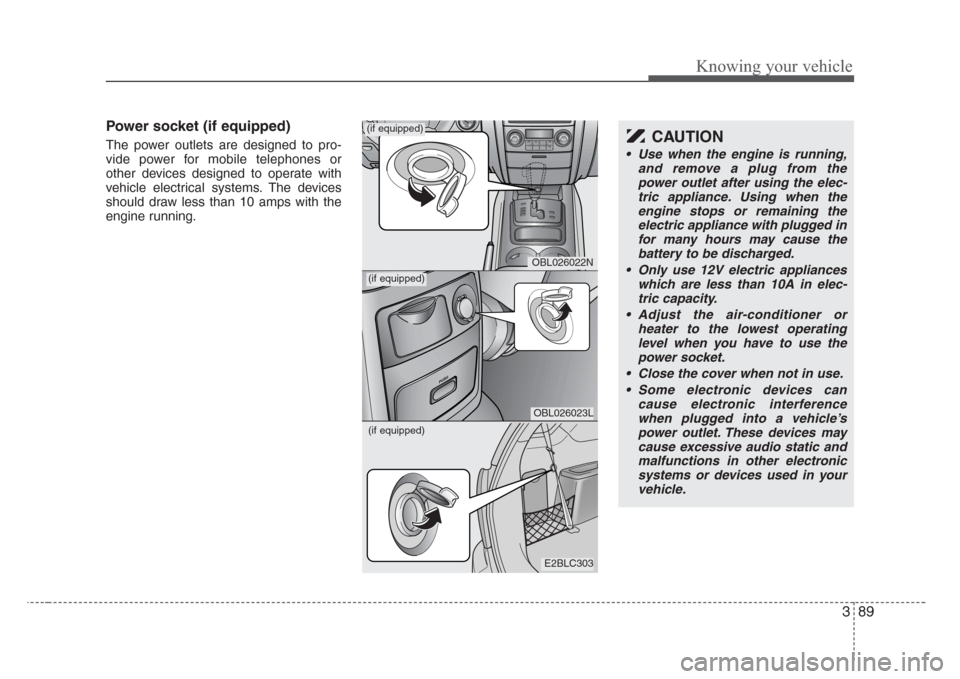
Power socket (if equipped)
The power outlets are designed to pro-
vide power for mobile telephones or
other devices designed to operate with
vehicle electrical systems. The devices
should draw less than 10 amps with the
engine running.
E2BLC303
OBL026023L
OBL026022N
(if equipped)
(if equipped)
CAUTION
•Use when the engine is running,
and remove a plug from the
power outlet after using the elec-
tric appliance. Using when the
engine stops or remaining the
electric appliance with plugged in
for many hours may cause the
battery to be discharged.
• Only use 12V electric appliances
which are less than 10A in elec-
tric capacity.
• Adjust the air-conditioner or
heater to the lowest operating
level when you have to use the
power socket.
•Close the cover when not in use.
• Some electronic devices can
cause electronic interference
when plugged into a vehicle’s
power outlet. These devices may
cause excessive audio static and
malfunctions in other electronic
systems or devices used in your
vehicle.
(if equipped)
Page 112 of 326
3 103
Knowing your vehicle
✽
NOTICE
Your audio system's factory-installed
amplifier is pre-configured for optimum
performance. You will not be able to
make any adjustments. If there is a
problem with the audio system's ampli-
fier, please consult a professional audio
engineer or the dealer where you pur-
chased your vehicle.
1. Operational Controls:
These controls are used to operate the
entire audio system. (e.g. Power ON-OFF
control knob)
2. Sound Controls:
Use these controls independently or in
combination to control how the audio
system sounds. (e.g. Volume control,
Bass and Treble controls).
The sound settings you make are appli-
cable to all audio reproduction sources
(radio or CD devices).
3. Radio controls:
Use these controls to operate, navigate
the menu options and change settings
when you are using the AM/FM digital
tuner.
4. CD controls:
Use these controls to operate the CD
player/changer, navigate the discs menu
options and change playback settings
when you are using the CD player.
✽
NOTICE
A button or control may have different
functions depending on whether you are
using the Radio or CD player. For exam-
ple, the RPT (Repeat) button can only
be used in the CD mode.
Page 129 of 326
Knowing your vehicle
120 3
Solution:
Use your audio system's Scan function to
automatically search for and select
another radio station with good signal
strength.
Problem:
Interference caused by cellular
phones and 2-way radios
Operating cellular phones and 2-way
radios inside or within close proximity of
your car may interfere with your radio
reception. You may hear static, clicks,
sounds or other types of white noise from
your speakers.
Solution:
Cease operation of cellular phone or 2-
way radios. Alternatively, move away
from your car. The interference to your
radio reception should be reduced.Caring for your Audio System
Your audio system contains sophisticat-
ed electronics and precision-engineered
parts and components that are not user-
serviceable. To ensure trouble-free oper-
ation, please observe the following pre-
cautions:
1. General Use and Operation
Your audio system contains precision
electronic components that are tempera-
ture-, moisture-, and static-sensitive. You
should take care not to subject your
audio system to extremes in tempera-
tures or moisture. For example, if you
have parked your car in the sun, the inte-
rior of the car could be very hot. Ventilate
the car to reduce the interior temperature
before trying to operate the audio sys-
tem.
Never try to insert anything other than
properly formatted CDs into the CD play-
er. Foreign objects can cause the deli-
cate mechanism to jam and render your
CD player unusable. You must also follow
the instructions displayed on your audio
system's LCD screen.
For example, if your audio system is dis-
playing "Wait", you should never try to
force-load a CD into the CD player.
WARNING
• Your car's electrical systems con-
tain sensitive electronics compo-
nents. Interference from cellular
phones, 2-way radios and other
transmitting devices could
adversely affect the safe opera-
tion of your vehicle. This could
compromise the safety of both
the driver and other passengers
in the vehicle.
• When using cellular phones,2-
way radios and other transmitting
devices in your vehicle, always
use a separate external antenna.
For restrictions on the use of
communications and transmitting
devices, please consult the rele-
vant product documentation.
• Local laws may prohibit the use
of cellular phones while driving. If
you need to make or answer a call
while driving, please s
top the
vehicle in a safe place before pro-
ceeding.