warning KIA Sorento 2014 3.G Owners Manual
[x] Cancel search | Manufacturer: KIA, Model Year: 2014, Model line: Sorento, Model: KIA Sorento 2014 3.GPages: 508, PDF Size: 7.59 MB
Page 135 of 508
Features of your vehicle44
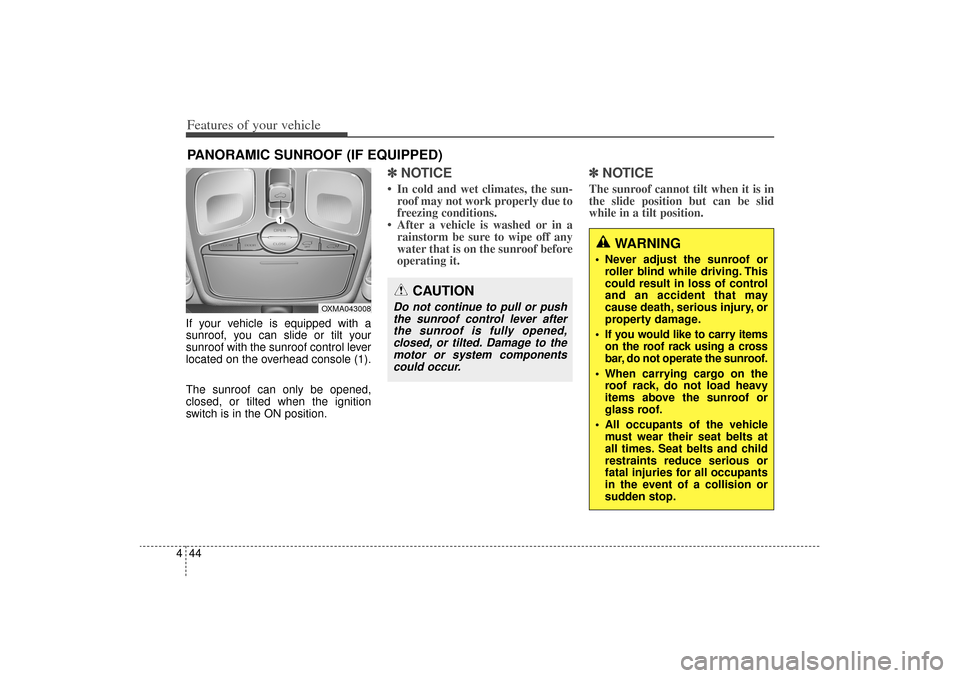
4If your vehicle is equipped with a
sunroof, you can slide or tilt your
sunroof with the sunroof control lever
located on the overhead console (1).
The sunroof can only be opened,
closed, or tilted when the ignition
switch is in the ON position.
✽ ✽
NOTICE• In cold and wet climates, the sun-
roof may not work properly due to
freezing conditions.
• After a vehicle is washed or in a rainstorm be sure to wipe off any
water that is on the sunroof before
operating it.
✽ ✽ NOTICEThe sunroof cannot tilt when it is in
the slide position but can be slid
while in a tilt position.
PANORAMIC SUNROOF (IF EQUIPPED)
CAUTION
Do not continue to pull or push
the sunroof control lever afterthe sunroof is fully opened,closed, or tilted. Damage to themotor or system componentscould occur.
WARNING
Never adjust the sunroof or roller blind while driving. This
could result in loss of control
and an accident that may
cause death, serious injury, or
property damage.
If you would like to carry items on the roof rack using a cross
bar, do not operate the sunroof.
When carrying cargo on the roof rack, do not load heavy
items above the sunroof or
glass roof.
All occupants of the vehicle must wear their seat belts at
all times. Seat belts and child
restraints reduce serious or
fatal injuries for all occupants
in the event of a collision or
sudden stop.
OXMA043008
XM(FL) CAN(ENG) 4a(~158).QXP 1/23/2013 3:48 PM Page 44
Page 136 of 508
445
Features of your vehicle
Sunroof open warning
(if equipped)If the driver removes the ignition key
(smart key: turns off the engine) and
opens the driver-side door when the
sunroof is not fully closed, the warn-
ing chime will sound for a few sec-
onds and a message "Sunroof Open"
will appear on the LCD display.
Close the sunroof securely when
leaving your vehicle.
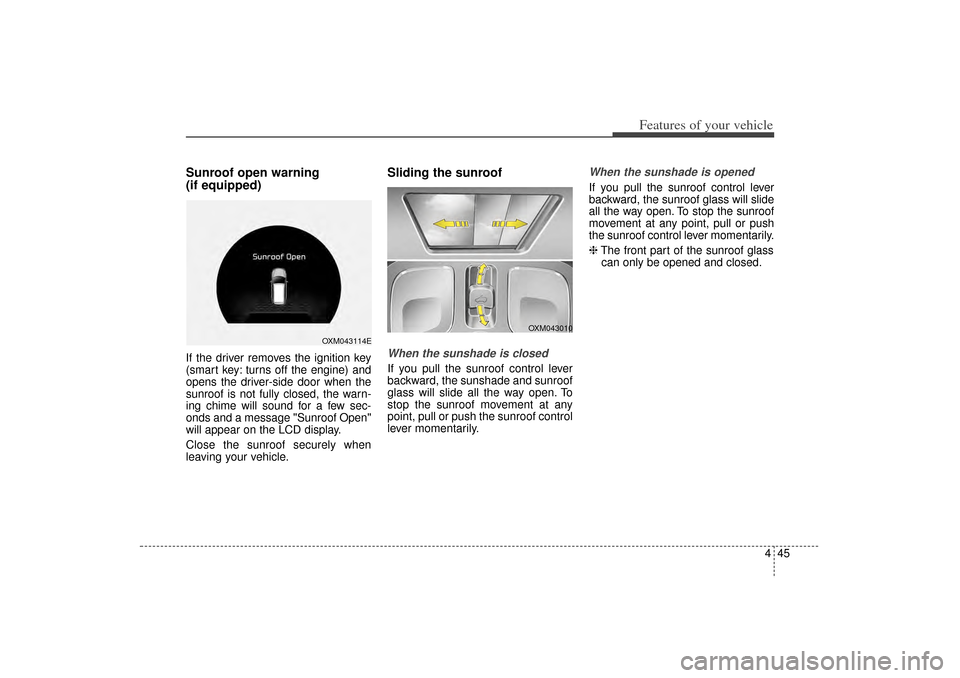
Sliding the sunroof When the sunshade is closedIf you pull the sunroof control lever
backward, the sunshade and sunroof
glass will slide all the way open. To
stop the sunroof movement at any
point, pull or push the sunroof control
lever momentarily.
When the sunshade is openedIf you pull the sunroof control lever
backward, the sunroof glass will slide
all the way open. To stop the sunroof
movement at any point, pull or push
the sunroof control lever momentarily.
❈The front part of the sunroof glass
can only be opened and closed.
OXM043114E
OXM043010
XM(FL) CAN(ENG) 4a(~158).QXP 1/23/2013 3:48 PM Page 45
Page 137 of 508
Features of your vehicle46
4Automatic reversalIf an object or part of the body is
detected while the sunroof is closing
automatically, it will reverse the direc-
tion, and then stop.
The auto reverse function does not
work if a tiny obstacle is between the
sliding glass and the sunroof sash.
You should always check that all pas-
sengers and objects are away from
the sunroof before closing it.
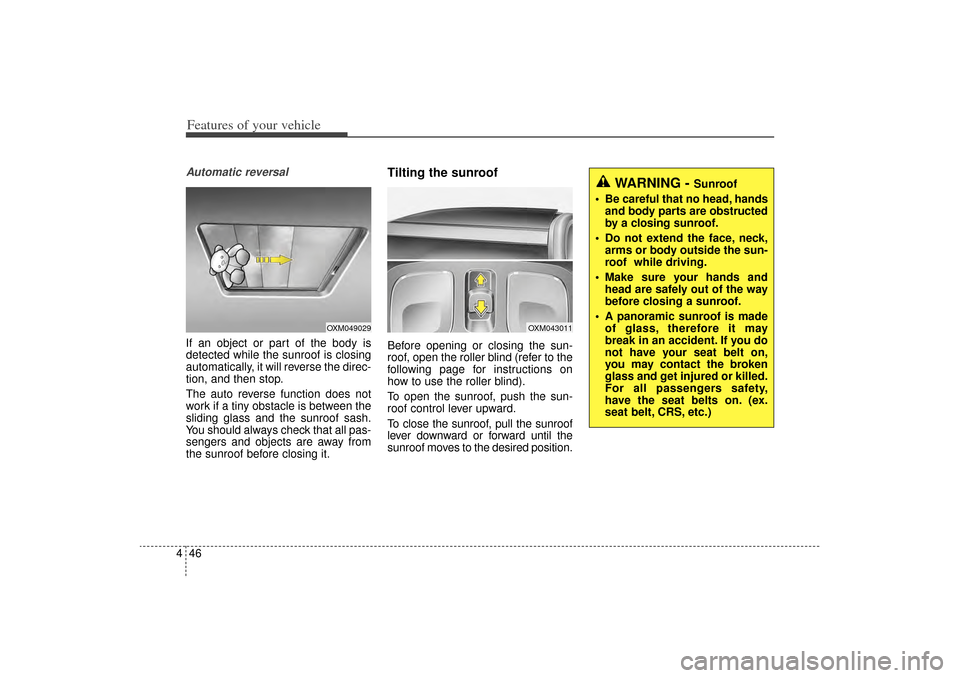
Tilting the sunroofBefore opening or closing the sun-
roof, open the roller blind (refer to the
following page for instructions on
how to use the roller blind).
To open the sunroof, push the sun-
roof control lever upward.
To close the sunroof, pull the sunroof
lever downward or forward until the
sunroof moves to the desired position.
WARNING -
Sunroof
Be careful that no head, hands and body parts are obstructed
by a closing sunroof.
Do not extend the face, neck, arms or body outside the sun-
roof while driving.
Make sure your hands and head are safely out of the way
before closing a sunroof.
A panoramic sunroof is made of glass, therefore it may
break in an accident. If you do
not have your seat belt on,
you may contact the broken
glass and get injured or killed.
For all passengers safety,
have the seat belts on. (ex.
seat belt, CRS, etc.)
OXM043011
OXM049029
XM(FL) CAN(ENG) 4a(~158).QXP 1/23/2013 3:48 PM Page 46
Page 140 of 508
449
Features of your vehicle
Electric power steering (EPS)The power steering uses a motor to
assist you in steering the vehicle. If
the engine is off or if the power steer-
ing system becomes inoperative, the
vehicle may still be steered, but it will
require increased steering effort.
The motor driven power steering is
controlled by a power steering con-
trol unit which senses the steering
wheel torque and vehicle speed to
command the motor.
The steering becomes heavier as
the vehicle’s speed increases and
becomes lighter as the vehicle’s
speed decreases for optimum steer-
ing control.
Should you notice any change in the
effort required to steer during normal
vehicle operation, have the power
steering checked by an authorized
Kia dealer.
✽ ✽NOTICEThe following symptoms may occur
during normal vehicle operation:
• The EPS warning light does not
illuminate.
• The steering gets heavy immedi- ately after turning the ignition
switch on. This happens as the sys-
tem performs the EPS system
diagnostics. When the diagnostics
are completed, the steering wheel
will return to its normal condition.
• A click noise may be heard from the EPS relay after the ignition
switch is turned to the ON or
LOCK (OFF) position.
• A motor noise may be heard when the vehicle is at a stop or at a low
driving speed.
• If the Electric Power Steering System does not operate normally,
the warning light will illuminate on
the instrument cluster. The steer-
ing wheel may become difficult to
control or operate abnormally.
Take your vehicle to an authorized
Kia dealer and have the vehicle
checked as soon as possible. (Continued)
STEERING WHEEL
CAUTION
If the Electric Power Steering
System does not operate nor-mally, the warning light willilluminate on the instrumentcluster. The steering wheelmay require increased steer-ing effort. Take your vehicle toan authorized Kia dealer andhave the vehicle checked assoon as possible.
When you operate the steering wheel in low temperature,noise may occur. If temperaturerises, the noise will likely disap-pear. This is a normal condition.
When the vehicle is stationary, when the steering wheel isturned all the way to the left orright continuously, the steer-ing wheel becomes harder toturn. The power assist is limit-ed to protect the motor fromoverheating.
As time passes, the steeringwheel return to its normalcondition.
XM(FL) CAN(ENG) 4a(~158).QXP 1/23/2013 3:48 PM Page 49
Page 141 of 508
Features of your vehicle50
4(Continued)
• When you operate the steering
wheel in low temperature, abnor-
mal noise may occur. If tempera-
ture rises, the noise will likely dis-
appear. This is a normal condition.
• When the charging system warn- ing light comes on due to the low
voltage (When the alternator or
battery) does not operate normal-
ly or it malfunctions), the steering
wheel may require increased
steering effort.
Tilt and telescopic steering Tilt and telescopic steering allows
you to adjust the steering wheel
before you drive. You can also raise it
to give your legs more room when
you exit and enter the vehicle.
The steering wheel should be posi-
tioned so that it is comfortable for
you to drive, while permitting you to
see the instrument panel warning
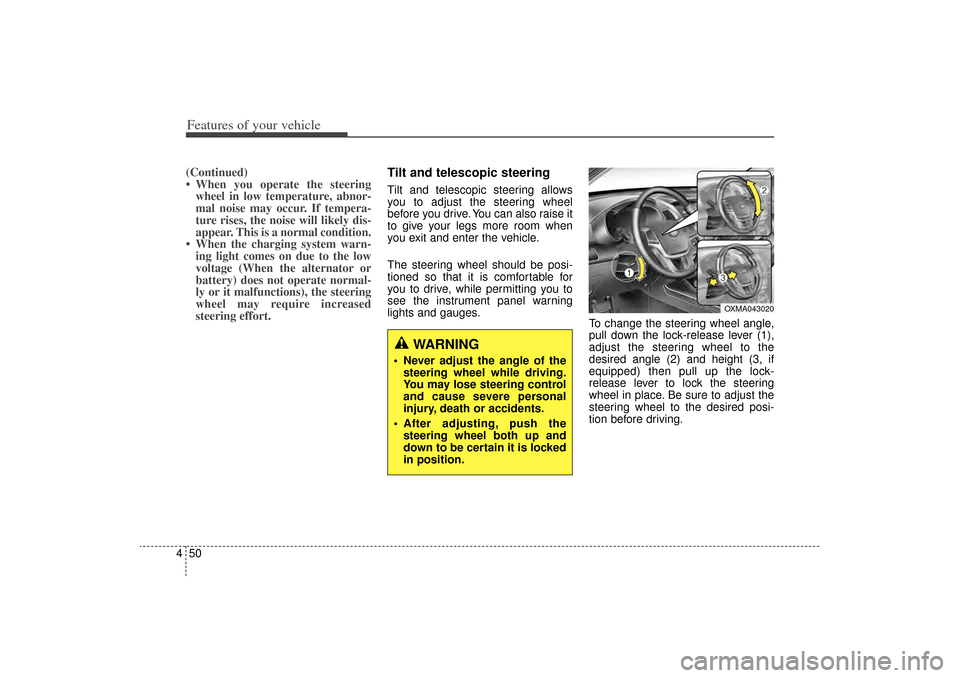
lights and gauges. To change the steering wheel angle,
pull down the lock-release lever (1),
adjust the steering wheel to the
desired angle (2) and height (3, if
equipped) then pull up the lock-
release lever to lock the steering
wheel in place. Be sure to adjust the
steering wheel to the desired posi-
tion before driving.
WARNING
Never adjust the angle of the
steering wheel while driving.
You may lose steering control
and cause severe personal
injury, death or accidents.
After adjusting, push the steering wheel both up and
down to be certain it is locked
in position.
OXMA043020
XM(FL) CAN(ENG) 4a(~158).QXP 1/23/2013 3:48 PM Page 50
Page 146 of 508
455
Features of your vehicle
MIRRORSInside rearview mirrorAdjust the rearview mirror so that the
center view through the rear window
is seen. Make this adjustment before
you start driving.
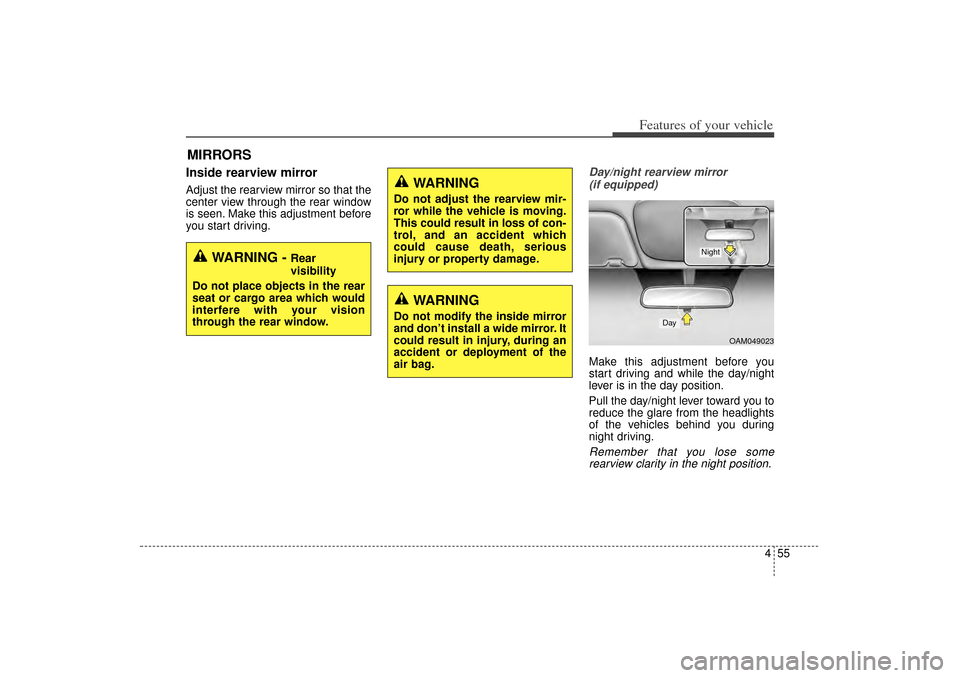
Day/night rearview mirror (if equipped)Make this adjustment before you
start driving and while the day/night
lever is in the day position.
Pull the day/night lever toward you to
reduce the glare from the headlights
of the vehicles behind you during
night driving.Remember that you lose somerearview clarity in the night position.
WARNING -
Rear
visibility
Do not place objects in the rear
seat or cargo area which would
interfere with your vision
through the rear window.
WARNING
Do not adjust the rearview mir-
ror while the vehicle is moving.
This could result in loss of con-
trol, and an accident which
could cause death, serious
injury or property damage.
WARNING
Do not modify the inside mirror
and don’t install a wide mirror. It
could result in injury, during an
accident or deployment of the
air bag.
OAM049023
Day
Night
XM(FL) CAN(ENG) 4a(~158).QXP 1/23/2013 3:48 PM Page 55
Page 151 of 508
Features of your vehicle60
4
Retain the original transmitter for
future programming procedures (i.e.,
new vehicle purchase). It is also sug-
gested that upon the sale of the vehi-
cle, the programmed HomeLink but-
tons be erased for security purposes
(follow step 1 in the “Programming”
portion of this text).
Programming
Your vehicle may require the ignition
switch to be turned to the ACC posi-
tion for programming and/or opera-
tion of HomeLink. It is also recom-
mended that a new battery be
replaced in the hand-held transmitter
of the device being programmed to
HomeLink for quicker training and
accurate transmission of the radio-
frequency.
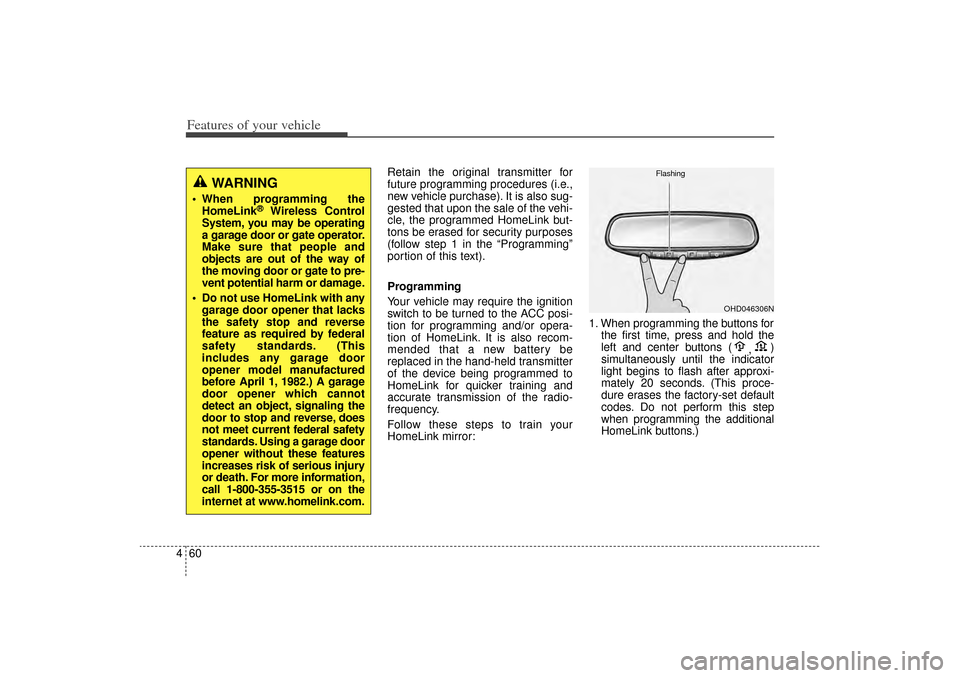
Follow these steps to train your
HomeLink mirror: 1. When programming the buttons for
the first time, press and hold the
left and center buttons ( ,)
simultaneously until the indicator
light begins to flash after approxi-
mately 20 seconds. (This proce-
dure erases the factory-set default
codes. Do not perform this step
when programming the additional
HomeLink buttons.)
WARNING
When programming the HomeLink
®
Wireless Control
System, you may be operating
a garage door or gate operator.
Make sure that people and
objects are out of the way of
the moving door or gate to pre-
vent potential harm or damage.
Do not use HomeLink with any garage door opener that lacks
the safety stop and reverse
feature as required by federal
safety standards. (This
includes any garage door
opener model manufactured
before April 1, 1982.) A garage
door opener which cannot
detect an object, signaling the
door to stop and reverse, does
not meet current federal safety
standards. Using a garage door
opener without these features
increases risk of serious injury
or death. For more information,
call 1-800-355-3515 or on the
internet at www.homelink.com.
OHD046306N
Flashing
XM(FL) CAN(ENG) 4a(~158).QXP 1/23/2013 3:49 PM Page 60
Page 155 of 508
Features of your vehicle64
4Accessories
If you would like additional informa-
tion on the HomeLink Wireless
Control System, HomeLink compati-
ble products, or to purchase other
accessories such as the HomeLink
®
Lighting Package, please contact
HomeLink at 1-800-355-3515 or on
the internet at www.homelink.com. FCC ID: NZLZTVHL3
IC: 4112A-ZTVHL3
This device complies with Industry
Canada Standard RSS-210.
Operation is subject to the following
two conditions:
1. This device may not cause harm-
ful interference, and
2. This device must accept any inter- ference received, including inter-
ference that may cause undesired
operation.
Outside rearview mirror Be sure to adjust the mirror angles
before driving.
Your vehicle is equipped with both
left-hand and right-hand outside
rearview mirrors. The mirrors can be
adjusted remotely with the remote
switch. The mirror heads can be fold-
ed back to prevent damage during an
automatic vehicle wash or when
passing through a narrow street.
WARNING -
Rearview
mirrors
The right outside rearview mirror is convex. Objects seen
in the mirror are closer than
they appear.
Use your interior rearview mirror or direct observation to
determine the actual distance
of following vehicles when
changing lanes.
WARNING
The transceiver has been tested
and complies with FCC and
Industry Canada rules. Changes
or modifications not expressly
approved by the party responsi-
ble for compliance could void
the user's authority to operate
the device.
XM(FL) CAN(ENG) 4a(~158).QXP 1/23/2013 3:49 PM Page 64
Page 156 of 508
465
Features of your vehicle
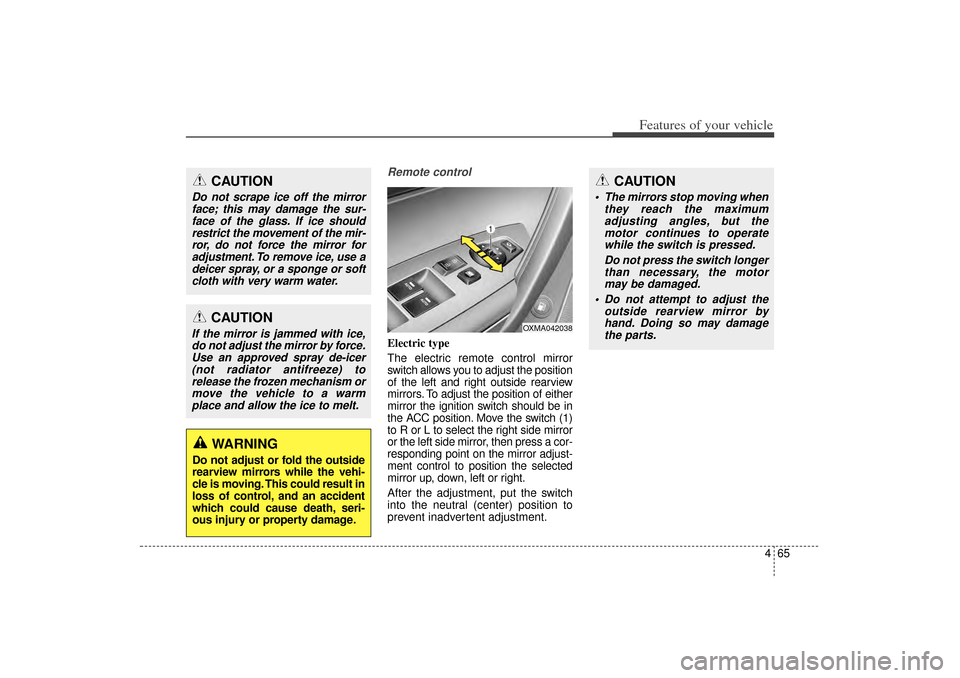
Remote controlElectric type
The electric remote control mirror
switch allows you to adjust the position
of the left and right outside rearview
mirrors. To adjust the position of either
mirror the ignition switch should be in
the ACC position. Move the switch (1)
to R or L to select the right side mirror
or the left side mirror, then press a cor-
responding point on the mirror adjust-
ment control to position the selected
mirror up, down, left or right.
After the adjustment, put the switch
into the neutral (center) position to
prevent inadvertent adjustment.
CAUTION
Do not scrape ice off the mirrorface; this may damage the sur-face of the glass. If ice shouldrestrict the movement of the mir-ror, do not force the mirror foradjustment. To remove ice, use adeicer spray, or a sponge or softcloth with very warm water.
CAUTION
If the mirror is jammed with ice,do not adjust the mirror by force.Use an approved spray de-icer(not radiator antifreeze) torelease the frozen mechanism ormove the vehicle to a warmplace and allow the ice to melt.
WARNING
Do not adjust or fold the outside
rearview mirrors while the vehi-
cle is moving. This could result in
loss of control, and an accident
which could cause death, seri-
ous injury or property damage.
OXMA042038
CAUTION
The mirrors stop moving when they reach the maximumadjusting angles, but themotor continues to operatewhile the switch is pressed.
Do not press the switch longerthan necessary, the motormay be damaged.
Do not attempt to adjust the outside rearview mirror byhand. Doing so may damagethe parts.
XM(FL) CAN(ENG) 4a(~158).QXP 1/23/2013 3:49 PM Page 65
Page 159 of 508
Features of your vehicle68
4INSTRUMENT CLUSTER
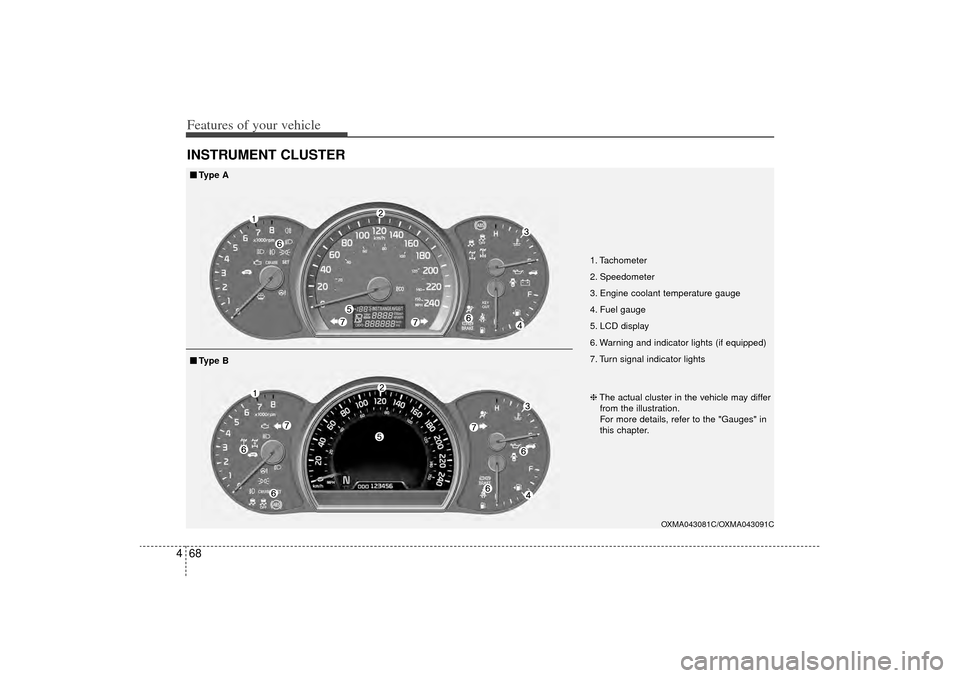
1. Tachometer
2. Speedometer
3. Engine coolant temperature gauge
4. Fuel gauge
5. LCD display
6. Warning and indicator lights (if equipped)
7. Turn signal indicator lights
OXMA043081C/OXMA043091C
■
■
Type A
❈The actual cluster in the vehicle may differ
from the illustration.
For more details, refer to the "Gauges" in
this chapter.■
■ Type B
XM(FL) CAN(ENG) 4a(~158).QXP 1/23/2013 3:49 PM Page 68