videos KIA SORENTO 2014 Features and Functions Guide
[x] Cancel search | Manufacturer: KIA, Model Year: 2014, Model line: SORENTO, Model: KIA SORENTO 2014Pages: 42, PDF Size: 8.74 MB
Page 31 of 42
29ALWAYS CHECK THE OWNER’S MANUAL FOR COMPLETE OPERATING INFORMATION AND SAFET Y WARNINGS *IF EQUIPPED
OTHER KEY FEATURES
Smart Key*
The Smart Key’s signal can be blocked by the normal operation of a cellular phone or smartphone To help prevent this, store each device separately
QUICK TIPS
REMINDER: Remote button configuration may vary depending on vehicle options
REMINDER: Remote button configuration may vary depending on vehicle options
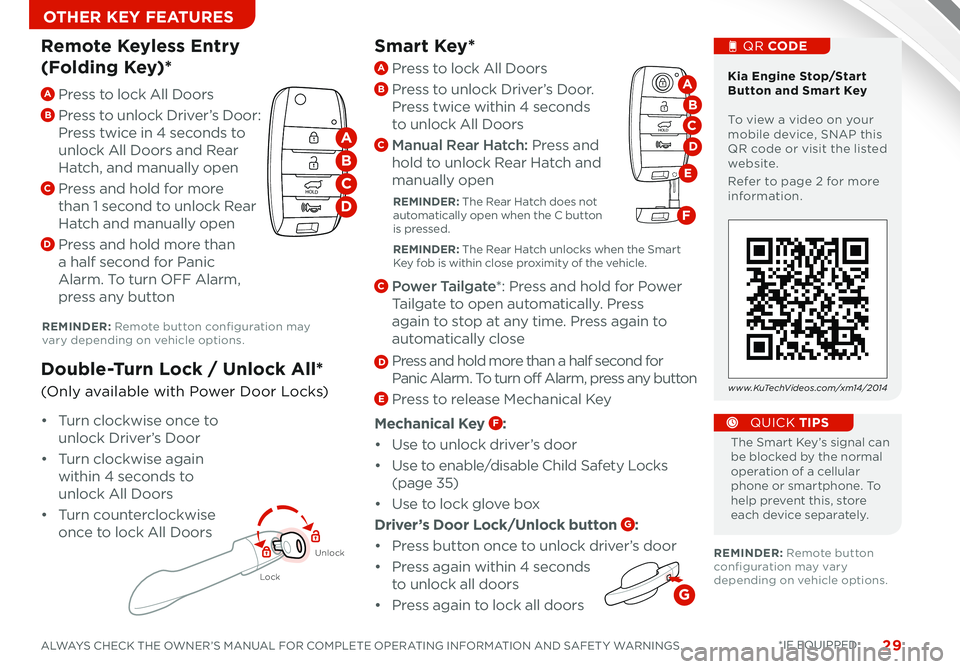
A Press to lock All Doors
B
Press to unlock Driver’s Door:
Press twice in 4 seconds to
unlock All Doors and Rear
Hatch, and manually open
C Press and hold for more
than 1 second to unlock Rear
Hatch and manually open
D Press and hold more than
a half second for Panic
Alarm To turn OFF Alarm,
press any button
Remote Keyless Entry
(Folding Key)*
Lock
Unlock
• Turn clockwise once to
unlock Driver’s Door
• Turn clockwise again
within 4 seconds to
unlock All Doors
• Turn counterclockwise
once to lock All Doors
Double-Turn Lock / Unlock All*
(Only available with Power Door Locks)
Kia Engine Stop/Start Button and Smart Key To view a video on your mobile device, SNAP this QR code or visit the listed website
Refer to page 2 for more information
QR CODE
www.KuTechVideos.com/xm14/2014
HOLD
HOLD
A
B
C
D
A Press to lock All Doors
B Press to unlock Driver’s Door
Press twice within 4 seconds
to unlock All Doors
C Manual Rear Hatch: Press and
hold to unlock Rear Hatch and
manually open
REMINDER: The Rear Hatch does not automatically open when the C button is pressed
REMINDER: The Rear Hatch unlocks when the Smart Key fob is within close proximity of the vehicle
C Power Tailgate*: Press and hold for Power
Tailgate to open automatically Press
again to stop at any time Press again to
automatically close
D Press and hold more than a half second for
Panic Alarm To turn off Alarm, press any button
E Press to release Mechanical Key
Mechanical Key F:
• Use to unlock driver’s door
• Use to enable/disable Child Safety Locks
(page 35)
• Use to lock glove box
Driver’s Door Lock/Unlock button G:
• Press button once to unlock driver’s door
• Press again within 4 seconds
to unlock all doors
•
Press again to lock all doors
HOLD
HOLD
D
A
B
E
C
F
G
Page 33 of 42
31ALWAYS CHECK THE OWNER’S MANUAL FOR COMPLETE OPERATING INFORMATION AND SAFET Y WARNINGS *IF EQUIPPED
OTHER KEY FEATURES
CLICK!
Fuel Cap/Malfunction
Indicator (Check
Engine Light)
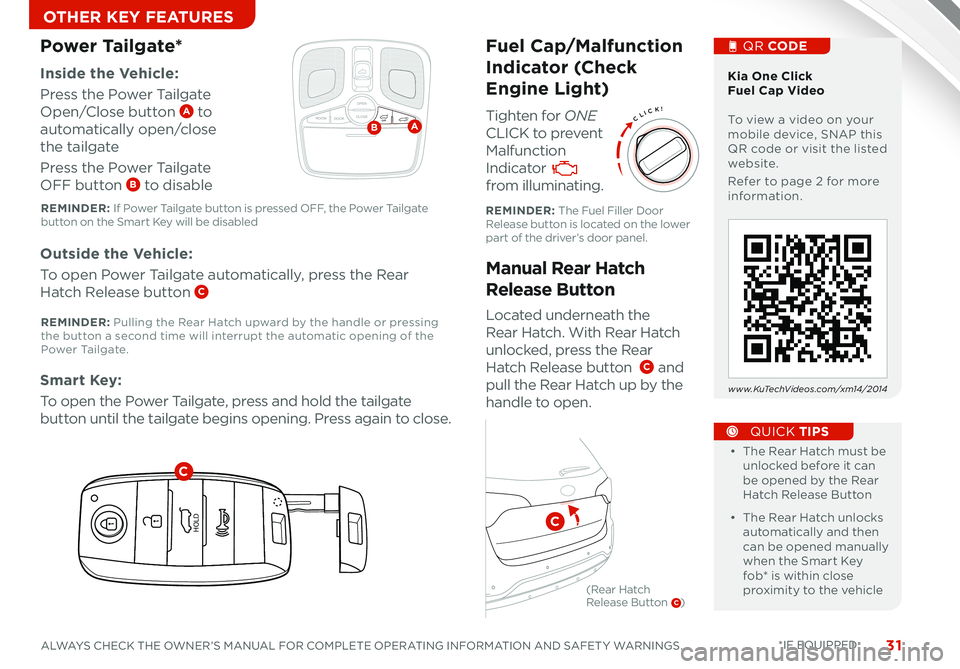
Tighten for ONE
CLICK to prevent
Malfunction
Indicator
from illuminating
Located underneath the
Rear Hatch With Rear Hatch
unlocked, press the Rear
Hatch Release button C and
pull the Rear Hatch up by the
handle to open
Inside the Vehicle:
Press the Power Tailgate
Open/Close button A to
automatically open/close
the tailgate
Press the Power Tailgate
OFF button B to disable
Manual Rear Hatch
Release Button
Power Tailgate*
Outside the Vehicle:
To open Power Tailgate automatically, press the Rear
Hatch Release button C
Smart Key:
To open the Power Tailgate, press and hold the tailgate
button until the tailgate begins opening Press again to close •
• The Rear Hatch must be unlocked before it can be opened by the Rear Hatch Release Button
• The Rear Hatch unlocks automatically and then can be opened manually when the Smart Key fob* is within close proximity to the vehicle
QUICK TIPS
Kia One Click Fuel Cap Video To view a video on your mobile device, SNAP this QR code or visit the listed website
Refer to page 2 for more information
QR CODE
www.KuTechVideos.com/xm14/2014
How to Sync Transmitter with HomeLink®*
REMINDER: The Fuel Filler Door Release button is located on the lower part of the driver’s door panel
REMINDER: If Power Tailgate button is pressed OFF, the Power Tailgate button on the Smart Key will be disabled
REMINDER: Pulling the Rear Hatch upward by the handle or pressing the button a second time will interrupt the automatic opening of the Power Ta i l g a t e
OPEN
CLOSEROOM DOOROFFAB
HOLD
HOLD
C
C
(Rear Hatch Release Button C)
Page 36 of 42
SORENTO FEATURES & FUNCTIONS GUIDE34*IF EQUIPPED
OTHER KEY FEATURES
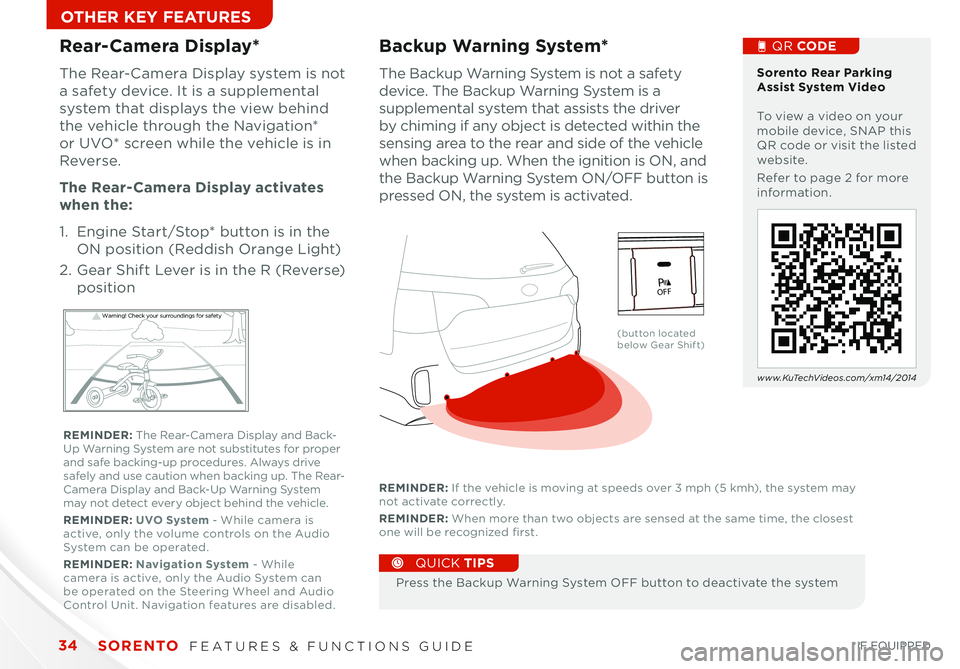
The Backup Warning System is not a safety
device The Backup Warning System is a
supplemental system that assists the driver
by chiming if any object is detected within the
sensing area to the rear and side of the vehicle
when backing up When the ignition is ON, and
the Backup Warning System ON/OFF button is
pressed ON, the system is activated
Backup Warning System*
Press the Backup Warning System OFF button to deactivate the system
QUICK TIPS
REMINDER: If the vehicle is moving at speeds over 3 mph (5 kmh), the system may not activate correctly
REMINDER: When more than two objects are sensed at the same time, the closest one will be recognized first
Rear-Camera Display*
The Rear-Camera Display system is not
a safety device It is a supplemental
system that displays the view behind
the vehicle through the Navigation*
or UVO* screen while the vehicle is in
Reverse
The Rear- Camera Display activates
when the:
1 Engine Start/Stop* button is in the
ON position (Reddish Orange Light)
2
Gear Shift Lever is in the R (Reverse)
position
W arning! Check yo ur sur roun dings for safe\fy
Sorento Rear Parking Assist System Video To view a video on your mobile device, SNAP this QR code or visit the listed website
Refer to page 2 for more information
www.KuTechVideos.com/xm14/2014
(button located below Gear Shift)
QR CODE
REMINDER: The Rear-Camera Display and Back-Up Warning System are not substitutes for proper and safe backing-up procedures Always drive safely and use caution when backing up The Rear-Camera Display and Back-Up Warning System may not detect every object behind the vehicle
REMINDER: UVO System - While camera is active, only the volume controls on the Audio System can be operated
REMINDER: Navigation System - While camera is active, only the Audio System can be operated on the Steering Wheel and Audio Control Unit Navigation features are disabled
active
EC OAC
115VPO FF
Page 37 of 42

35ALWAYS CHECK THE OWNER’S MANUAL FOR COMPLETE OPERATING INFORMATION AND SAFET Y WARNINGS *IF EQUIPPED
SAFETY
Child Safety Locks
Located on the rear edge of the rear
passenger doors, push the Child Safety
Lock to the lock position to disable the
inner door handles from opening the
rear doors
Please refer to your Owner’s Manual and the separate brochure titled “ Understanding Your Safety Belt & Supplemental Restraint System” for more detailed information regarding your vehicle’s air bags.PASSENGER
AIR BAG
Kia Occupant Detection System Video To view a video on your mobile device, SNAP this QR code or visit the listed website
Refer to page 2 for more information
QR CODE
www.KuTechVideos.com/xm14/2014
ODS detects the presence of the front passenger
Depending on the situation and type of accident, the system may:
• Deploy air bag (Adult)
• Not deploy the airbag (Unoccupied)
If the system determines that the air bag should not be deployed, the “PASSENGER AIR BAG
OFF” light will illuminate
Occupant Detection System (ODS)/
PASSENGER AIR BAG OFF Indicator
REMINDER: Child Safety Lock is located on rear passenger’s door jamb