check KIA SORENTO 2014 Navigation System Quick Reference Guide
[x] Cancel search | Manufacturer: KIA, Model Year: 2014, Model line: SORENTO, Model: KIA SORENTO 2014Pages: 236, PDF Size: 7.61 MB
Page 132 of 236
4-18
Using Bluetooth® Wireless Technology
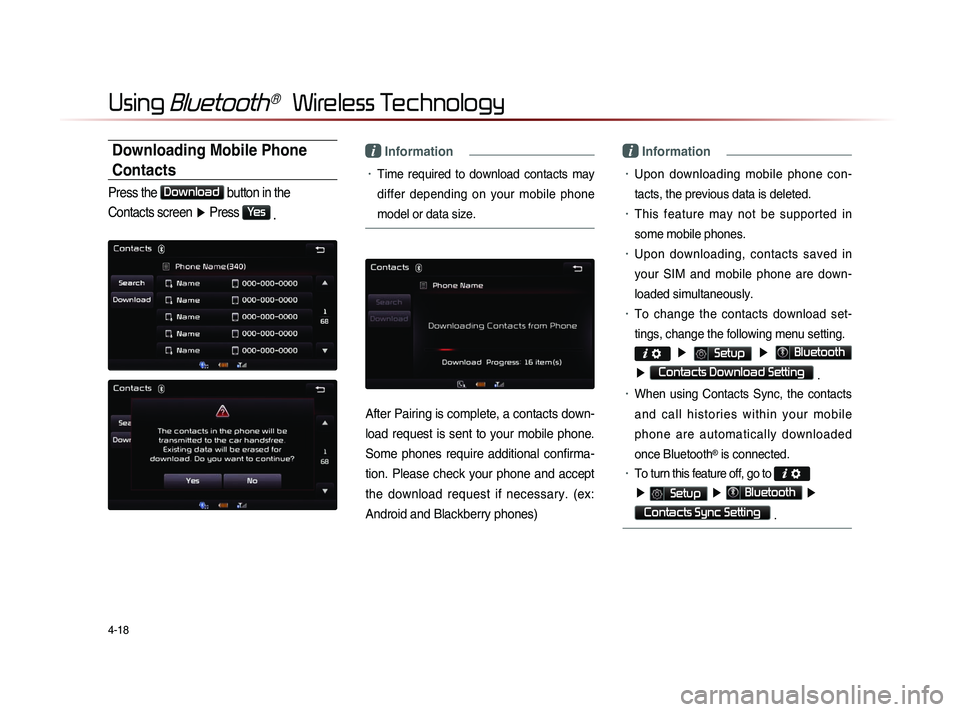
Downloading Mobile Phone
Contacts
Press the Download
button in the
Contacts screen ▶ Press
Yes
.
i Information
• Time required to download contacts may
differ depending on your mobile phone
model or data size.
After Pairing is complete, a contacts down-
load request is sent to your mobile phone.
Some phones require additional confirma-
tion. Please check your phone and accept
the download request if necessary. (ex:
Android and Blackberry phones)
i Information
• Upon downloading mobile phone con-
tacts, the previous data is deleted.
• This feature may not be supported in
some mobile phones.
• Upon downloading, contacts saved in
your SIM and mobile phone are down-
loaded simultaneously.
• To change the contacts download set-
tings, change the following menu setting.
▶ Setup ▶ Bluetooth
▶ Contacts Download Setting .
• When using Contacts Sync, the contacts
a n d c a l l h i s t o r i e s w i t h i n y o u r m o b i l e
phone are automatically downloaded
once Bluetooth
® is connected.
• To turn this feature off, go to
▶ Setup ▶ Bluetooth ▶
Contacts Sync Setting .
Page 133 of 236
Using
Bluetooth
® Wireless Technology
Bluetooth® Handsfree l
4-19
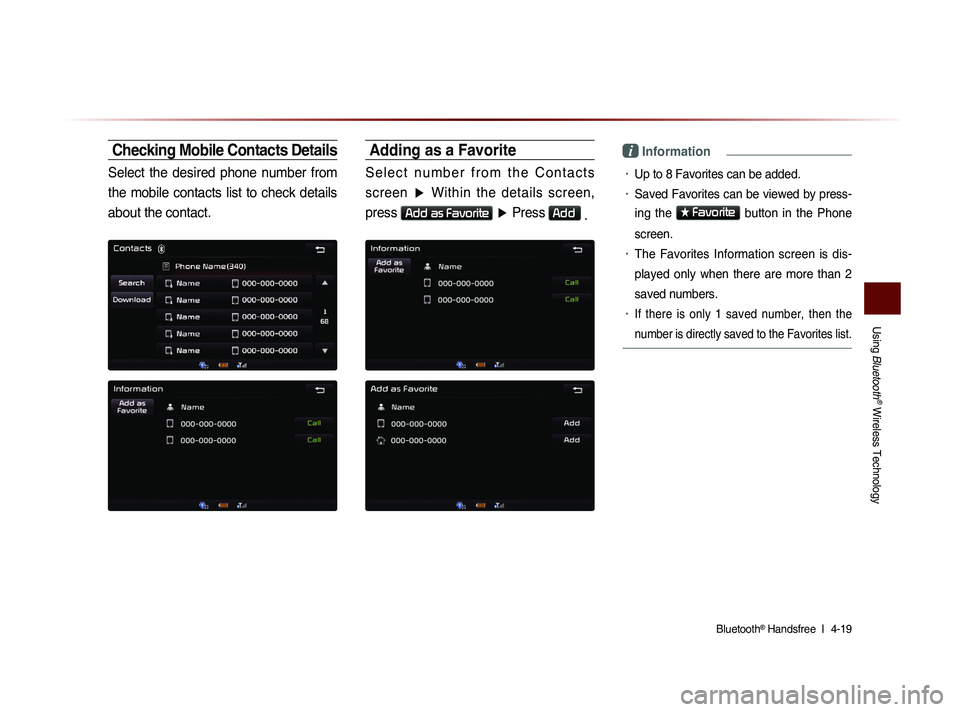
Checking Mobile Contacts Details
Select the desired phone number from
the mobile contacts list to check details
about the contact.
Adding as a Favorite
S e l e c t n u m b e r f r o m t h e C o n t a c t s screen ▶ Within the details screen,
press
Add as Favorite
▶ Press Add
.
i Information
• Up to 8 Favorites can be added.
• Saved Favorites can be viewed by press-
ing the
★ Favorite
button in the Phone
screen.
• The Favorites Information screen is dis-
played only when there are more than 2
saved numbers.
• If there is only 1 saved number, then the
number is directly saved to the Favorites list.
Page 137 of 236
Using
Bluetooth
® Wireless Technology
Bluetooth® Handsfree l
4-23
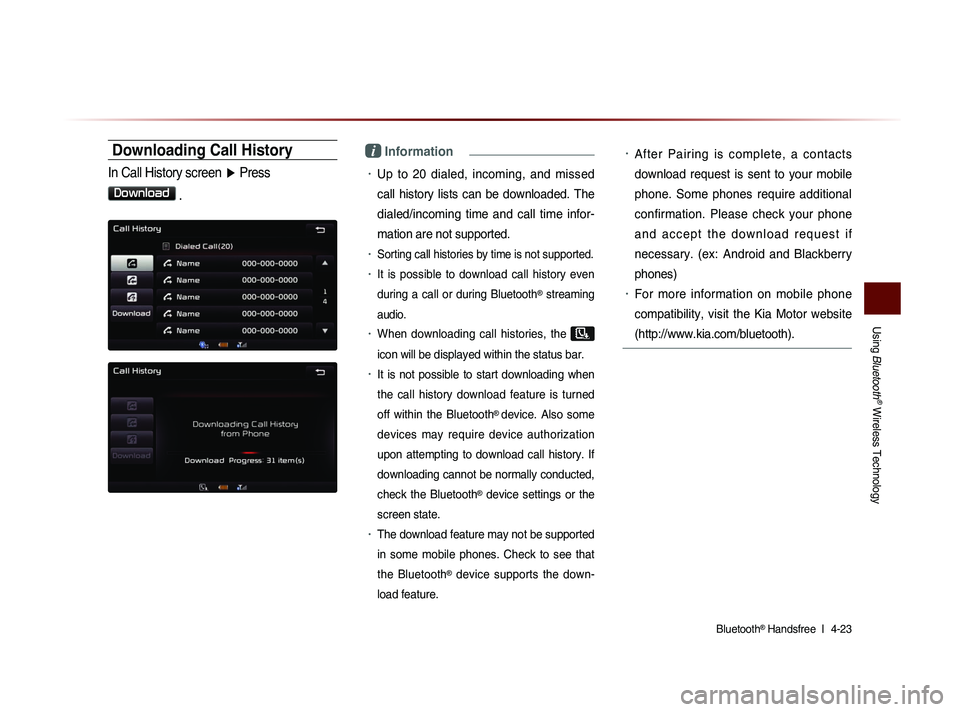
Downloading Call History
In Call History screen ▶ Press
Download
.
i Information
• Up to 20 dialed, incoming, and missed
call history lists can be downloaded. The
dialed/incoming time and call time infor-
mation are not supported.
• Sorting call histories by time is not supported.
• It is possible to download call history even
during a call or during Bluetooth
® streaming
audio.
• When downloading call histories, the
icon will be displayed within the status bar.
• It is not possible to start downloading when
the call history download feature is turned
off within the Bluetooth
® device. Also some
devices may require device authorization
upon attempting to download call history. If
downloading cannot be normally conducted,
check the Bluetooth
® device settings or the
screen state.
• The download feature may not be supported
in some mobile phones. Check to see that
the Bluetooth
® device supports the down-
load feature.
• After Pairing is complete, a contacts
download request is sent to your mobile
phone. Some phones require additional
confirmation. Please check your phone
a n d a c c e p t t h e d o w n l o a d r e q u e s t i f
necessary. (ex: Android and Blackberry
phones)
• For more information on mobile phone
compatibility, visit the Kia Motor website
(http://www.kia.com/bluetooth).
Page 158 of 236

5-16
Voice Command Lists
POI Category List
Restaurants
African Restaurants
American Restaurants
Asian Restaurants
Chinese Restaurants
Coffee Shop
Continental Restaurants
Fast Food
French Restaurants
Italian Restaurants
Japanese Restaurants
Korean Restaurants
Latin American Restaurants
Mexican Restaurants
Seafood Restaurants
Vegetarian Restaurants
Other Restaurants
Automotive
Auto Parts
Auto Service
Automobile Dealership
Car Wash
Gas Station
Hyundai Dealership
Motorcycle Dealership
Parking Rest Area
Road Assistance
Travel
Airport
Bus Station
Campground
City Center
Ferry Terminal
Hotel
Local Transit
Rental Car Agency
Tourist Attraction
Tourist Information
Train Station
Travel Agent
Shopping
Bookstore
Clothing Shop
Convenience Store
Department Store
Electronics Store
Gift Shop
Grocery Store
Home Specialty Store
Music Store
Pharmacy Shoe Store
Shopping Center
Sporting Goods Store
Recreation
Amusement Park
Cinema
Golf Course
Museum
Recreation Area
Ski Resort
Sports Activities
Sports Complex
Video & Game Rental
Winery
Other Recreation
Financial Services
ATM
Bank
Business Facility
Check Cashing Service
Money Transfer
Community
City Hall
Civic Center
Convention Center
Court House Fire Department
Government Offices
Library
Police Station
Post Office
School
Utilities
Waste & Sanitary
Services
Attorney
Cleaning & Laundry
Communication Services
Dentist
Funeral Home
Hair & Beauty
Hospital
Medical Service
Mover Services
Photography
Physician
Social Service
Tailor & Alteration
Tax Service
Page 162 of 236
6-2
UVO eServices(Optional)
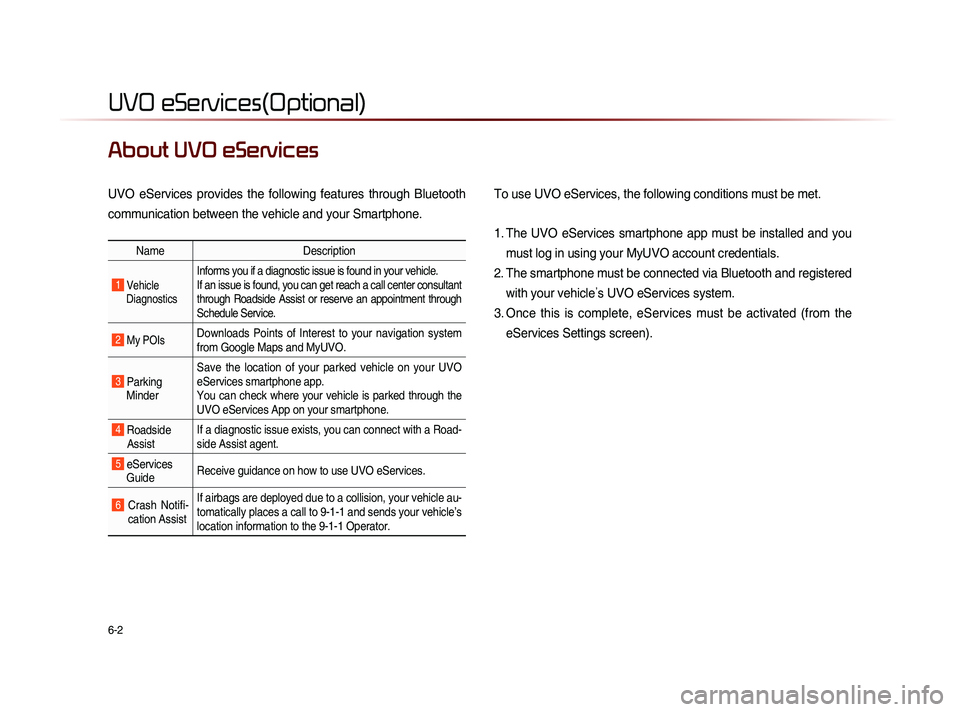
About UVO eServices
UVO eServices provides the following features through Bluetooth
communication between the vehicle and your Smartphone. To use UVO eServices, the following conditions must be met.
1. The UVO eServices smartphone app must be installed and you
must log in using your MyUVO account credentials.
2. The smartphone must be connected via Bluetooth and registered with your vehicle ’s UVO eServices system.
3. Once this is complete, eServices must be activated (from the eServices Settings screen).
Name Description
1 Vehicle
Diagnostics
Informs you if a diagnostic issue is found in your vehicle.
If an issue is found, you can get reach a call center consultant
through Roadside Assist or reserve an appointment through
Schedule Service.
2 My POIsDownloads Points of Interest to your navigation system
from Google Maps and MyUVO.
3 Parking Minder Save the location of your parked vehicle on your UVO
eServices smartphone app.
You can check where your vehicle is parked through the
UVO eServices App on your smartphone.
4 Roadside
Assist If a diagnostic issue exists, you can connect with a Road-
side Assist agent.
5 eServices
Guide Receive guidance on how to use UVO eServices.
6 Crash Notifi-
cation Assist If airbags are deployed due to a collision, your vehicle au-
tomatically places a call to 9-1-1 and sends your vehicle’s
location information to the 9-1-1 Operator.
Page 166 of 236
6-6
UVO eServices(Optional)
Vehicle Diagnostics
Conducting Vehicle Diagnostics
Vehicle Diagnostics is available only when
the ignition is turned on and the vehicle is
parked.
It also requires that UVO eServices is
activated, and the Registered Phone is
connected via Bluetooth before starting
Vehicle Diagnostics.
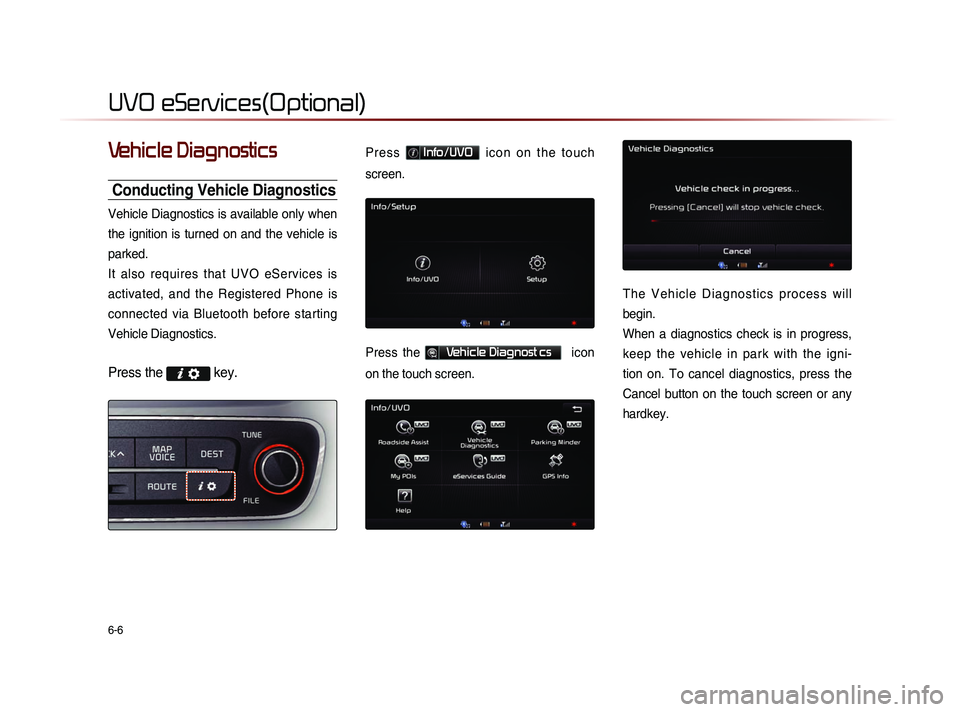
Press the key.
P r e s s Info/UVO i c o n o n t h e t o u c h
screen.
Press the Vehicle Diagnost cs icon
on the touch screen.
T h e V e h i c l e D i a g n o s t i c s p r o c e s s w i l l
begin.
When a diagnostics check is in progress,
keep the vehicle in park with the igni-
tion on. To cancel diagnostics, press the
Cancel button on the touch screen or any
hardkey.
Page 169 of 236
UVO eServices
Information l
6-9
Scheduled Diagnostics
If you have set up Scheduled Diagnostics
on your UVO eServices smartphone app,
a vehicle diagnostics check will automati-
cally start on the day you specified.
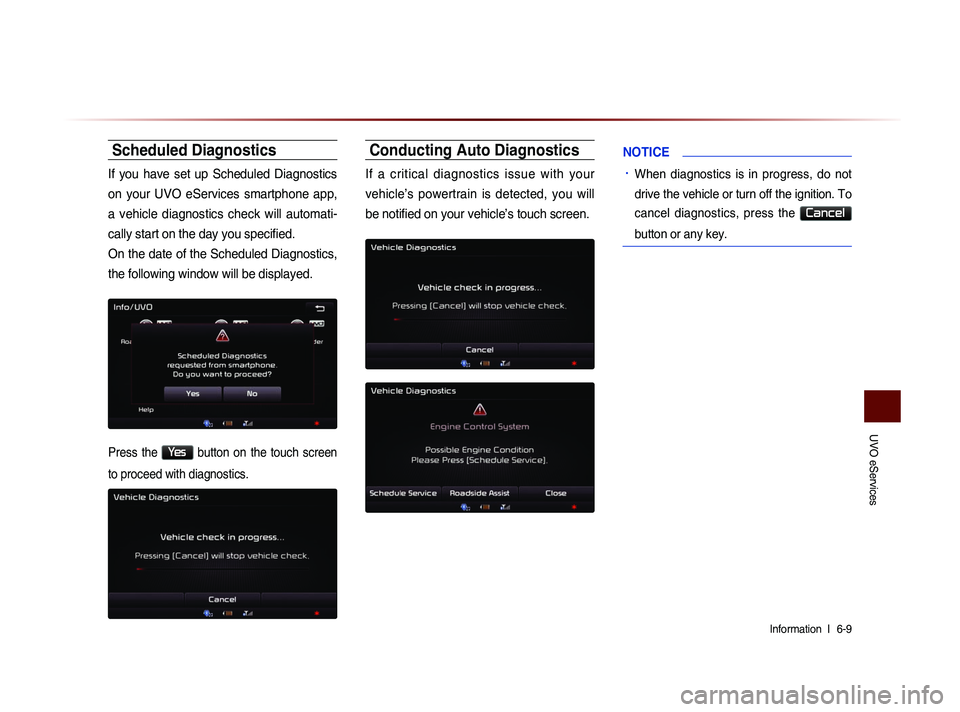
On the date of the Scheduled Diagnostics,
the following window will be displayed.
Press the Yes button on the touch screen
to proceed with diagnostics.
Conducting Auto Diagnostics
If a critical diagnostics issue with your
vehicle’s powertrain is detected, you will
be notified on your vehicle’s touch screen.
NOTICE
• When diagnostics is in progress, do not
drive the vehicle or turn off the ignition. To
cancel diagnostics, press the
Cancel
button or any key.
Page 185 of 236
Rear Camera
Other Features l
7-7
About Rear Detection
Camera
• This system has been equipped with a
rear camera for user safety by allowing a
wider rear range of vision.
• The rear camera will operate automati-
cally when the ignition KEY is turned ON
and the transmission lever is set to R.
The rear camera will automatically stop
operating when set to a different lever.
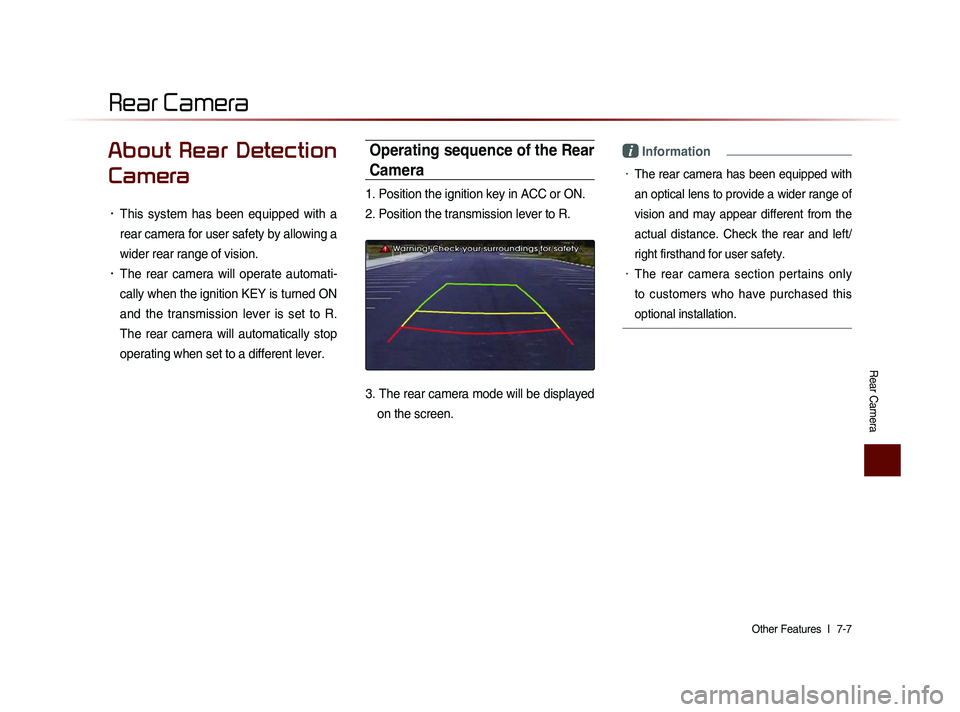
Operating sequence of the Rear
Camera
1. Position the ignition key in ACC or ON.
2. Position the transmission lever to R.
3. The rear camera mode will be displayed
on the screen.
i Information
• The rear camera has been equipped with
an optical lens to provide a wider range of
vision and may appear different from the
actual distance. Check the rear and left/
right firsthand for user safety.
• The rear camera section pertains only
to customers who have purchased this
optional installation.
Rear Camera
Page 188 of 236
8-2
Using Setup
Basic Mode Screen
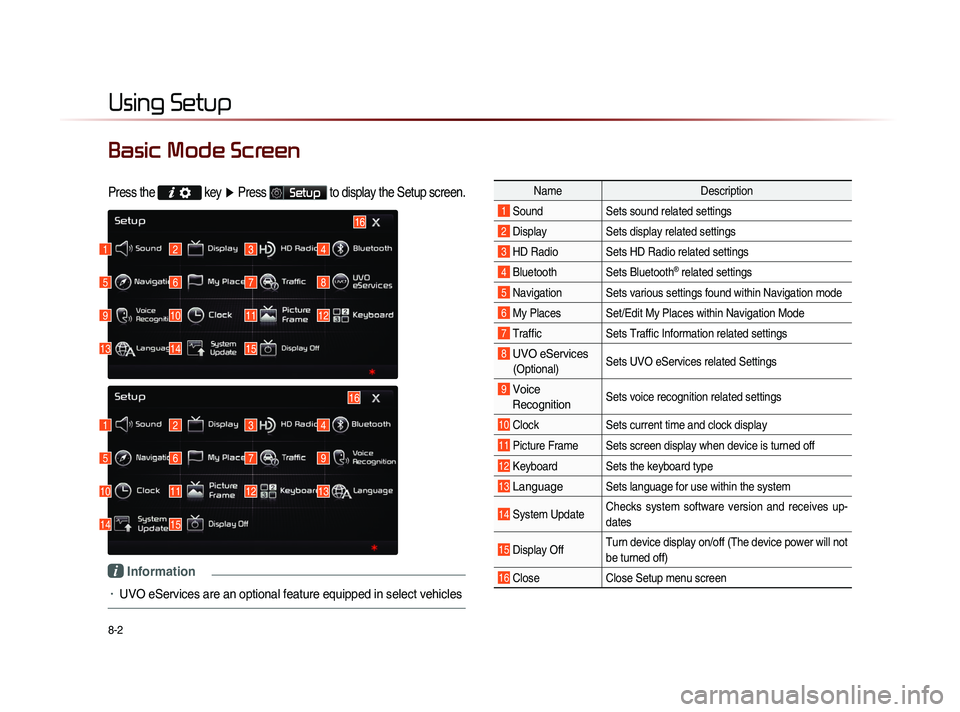
Press the key
▶ Press Setup to display the Setup screen.
Name Description
1 Sound Sets sound related settings
2 Display Sets display related settings
3 HD Radio Sets HD Radio related settings
4 Bluetooth Sets Bluetooth® related settings
5 Navigation Sets various settings found within Navigation mode
6 My Places Set/Edit My Places within Navigation Mode
7 Traffic Sets Traffic Information related settings
8 UVO eServices
(Optional)Sets UVO eServices related Settings
9 Voice
Recognition Sets voice recognition related settings
10 Clock Sets current time and clock display
11 Picture Frame Sets screen display when device is turned off
12 Keyboard Sets the keyboard type
13 Language Sets language for use within the system
14 System Update Checks system software version and receives up-
dates
15 Display Off Turn device display on/off (The device power will not
be turned off)
16 Close
Close Setup menu screen
1
1
5
5
9
10
13
14
2
2
6
6
10
11
14
15
3
3
7
7
11
12
4
4
8
9
12
13
16
15
16
i Information
• UVO eServices are an optional feature equipped in select vehicles
Page 189 of 236
Using Setup
Setup l
8-3
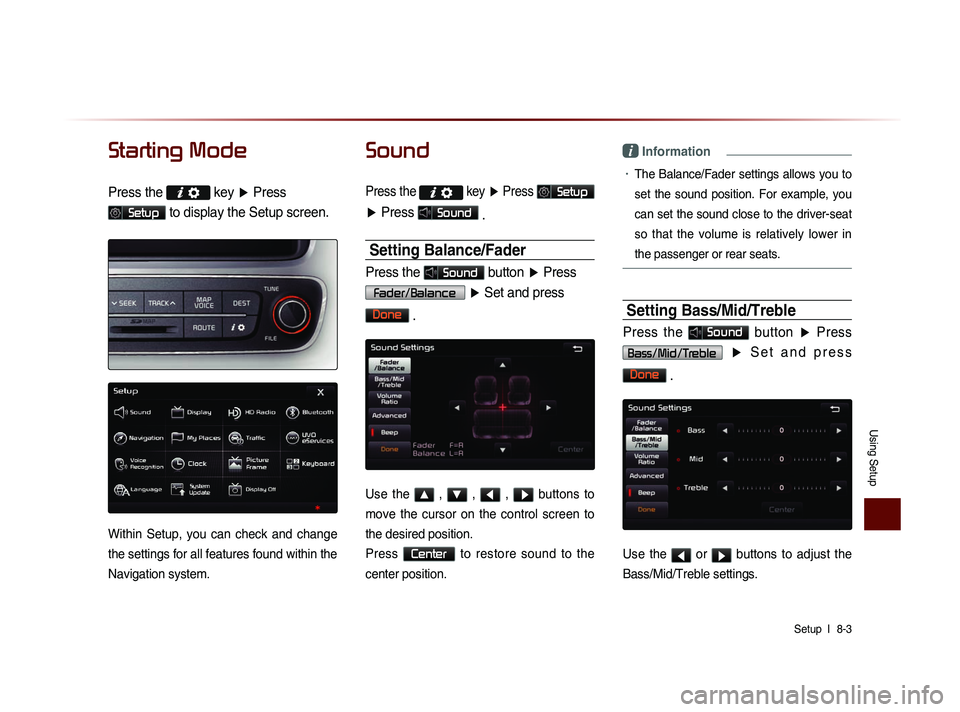
Starting Mode
Press the key
▶ Press
Setup to display the Setup screen.
Within Setup, you can check and change
the settings for all features found within the
Navigation system.
Sound
Press the
key ▶ Press Setup
▶ Press Sound
.
Setting Balance/Fader
Press the Sound button ▶ Press
Fader/Balance
▶ Set and press
Done
.
Use the ▲ , ▼ , ◀ , ▶ buttons to
move the cursor on the control screen to
the desired position.
Press
Center to restore sound to the
center position.
i Information
• The Balance/Fader settings allows you to
set the sound position. For example, you
can set the sound close to the driver-seat
so that the volume is relatively lower in
the passenger or rear seats.
Setting Bass/Mid/Treble
Press the Sound button ▶ Press
Bass/Mid/Treble ▶ S e t a n d p r e s s
Done
.
Use the ◀ or ▶ buttons to adjust the
Bass/Mid/Treble settings.