EBS KIA SORENTO 2019 Features and Functions Guide
[x] Cancel search | Manufacturer: KIA, Model Year: 2019, Model line: SORENTO, Model: KIA SORENTO 2019Pages: 54, PDF Size: 3.52 MB
Page 40 of 54
SORENTO FEATURES & FUNCTIONS GUIDE38*IF EQUIPPED †LEGAL DISCL AIMERS ON BACK INSIDE COVER
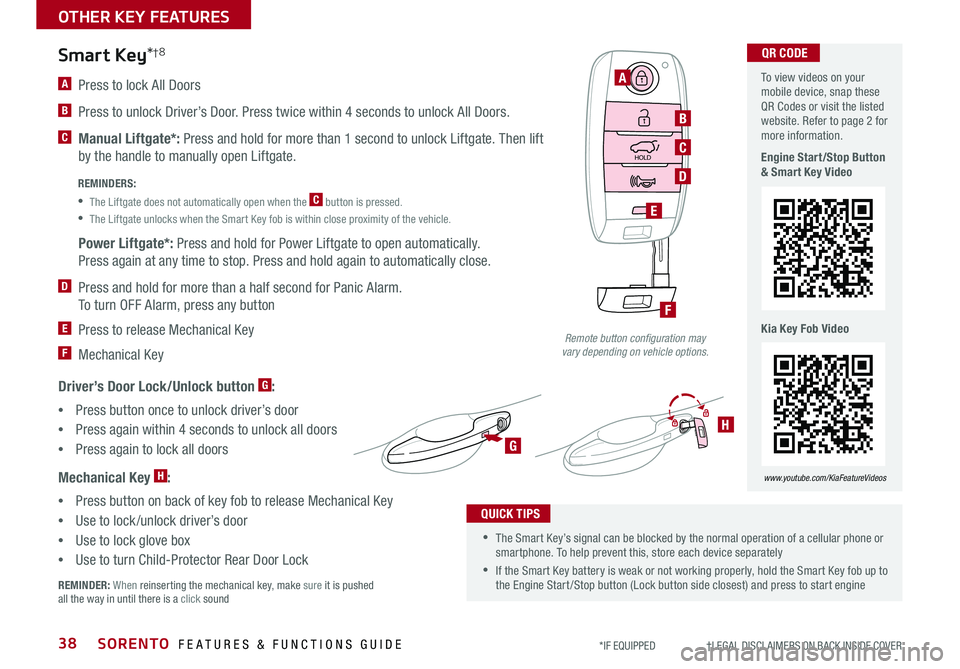
A Press to lock All Doors
B Press to unlock Driver’s Door . Press twice within 4 seconds to unlock All Doors .
C Manual Liftgate*: Press and hold for more than 1 second to unlock Liftgate . Then lift
by the handle to manually open Liftgate .
Power Liftgate*: Press and hold for Power Liftgate to open automatically .
Press again at any time to stop . Press and hold again to automatically close .
D Press and hold for more than a half second for Panic Alarm .
To turn OFF Alarm, press any button
E Press to release Mechanical Key
F Mechanical Key
Driver’s Door Lock/Unlock button G:
•Press button once to unlock driver’s door
•Press again within 4 seconds to unlock all doors
•
Press again to lock all doors
Mechanical Key H:
•Press button on back of key fob to release Mechanical Key
•Use to lock /unlock driver’s door
•Use to lock glove box
•Use to turn Child-Protector Rear Door Lock
REMINDER: When reinserting the mechanical key, make sure it is pushed all the way in until there is a click sound
Smart Key*†8
HOLD
A
B
C
E
D
F
G
H
REMINDERS:
•
The Liftgate does not automatically open when the C button is pressed .
•
The Liftgate unlocks when the Smart Key fob is within close proximity of the vehicle .
•The Smart Key’s signal can be blocked by the normal operation of a cellular phone or smartphone . To help prevent this, store each device separately
•If the Smart Key battery is weak or not working properly, hold the Smart Key fob up to the Engine Start /Stop button (Lock button side closest) and press to start engine
QUICK TIPS
Remote button configuration may vary depending on vehicle options.
To view videos on your mobile device, snap these QR Codes or visit the listed website . Refer to page 2 for more information .
Engine Start/Stop Button & Smart Key Video
Kia Key Fob Video
www.youtube.com/KiaFeatureVideos
QR CODE
OTHER KEY FEATURES
Page 41 of 54
39ALWAYS CHECK THE OWNER’S MANUAL FOR COMPLETE OPER ATING INFORMATION AND SAFET Y WARNINGS *IF EQUIPPED †LEGAL DISCL AIMERS ON BACK INSIDE COVER
HOLD
Power Liftgate*†1 6
Opening from Inside the Vehicle:
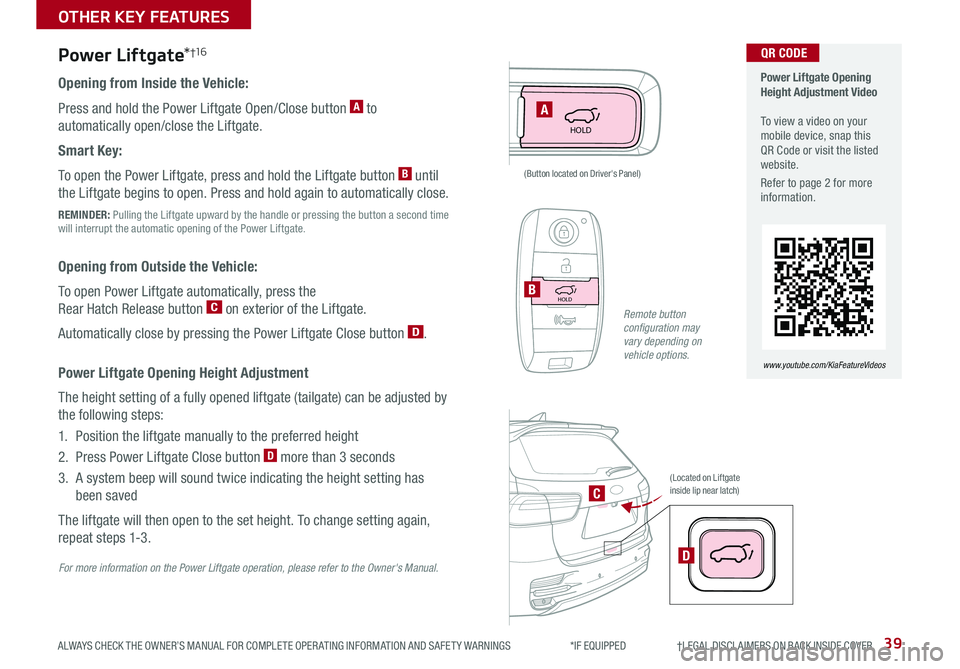
Press and hold the Power Liftgate Open/Close button A to
automatically open/close the Liftgate .
Smart Key:
To open the Power Liftgate, press and hold the Liftgate button B until
the Liftgate begins to open . Press and hold again to automatically close .
REMINDER: Pulling the Liftgate upward by the handle or pressing the button a second time will interrupt the automatic opening of the Power Liftgate .
Opening from Outside the Vehicle:
To open Power Liftgate automatically, press the
Rear Hatch Release button C on exterior of the Liftgate .
Automatically close by pressing the Power Liftgate Close button D .
Power Liftgate Opening Height Adjustment
The height setting of a fully opened liftgate (tailgate) can be adjusted by
the following steps:
1 . Position the liftgate manually to the preferred height
2 . Press Power Liftgate Close button D more than 3 seconds
3 . A system beep will sound twice indicating the height setting has
been saved
The liftgate will then open to the set height . To change setting again,
repeat steps 1-3 .
A
HOLDB
D
C
(Located on Liftgate inside lip near latch)
(Button located on Driver's Panel)
For more information on the Power Liftgate operation, please refer to the Owner's Manual.
Power Liftgate Opening Height Adjustment Video To view a video on your mobile device, snap this QR Code or visit the listed website .
Refer to page 2 for more information .
www.youtube.com/KiaFeatureVideos
QR CODE
Remote button configuration may vary depending on vehicle options.
OTHER KEY FEATURES
Page 42 of 54
SORENTO FEATURES & FUNCTIONS GUIDE40*IF EQUIPPED †LEGAL DISCL AIMERS ON BACK INSIDE COVER
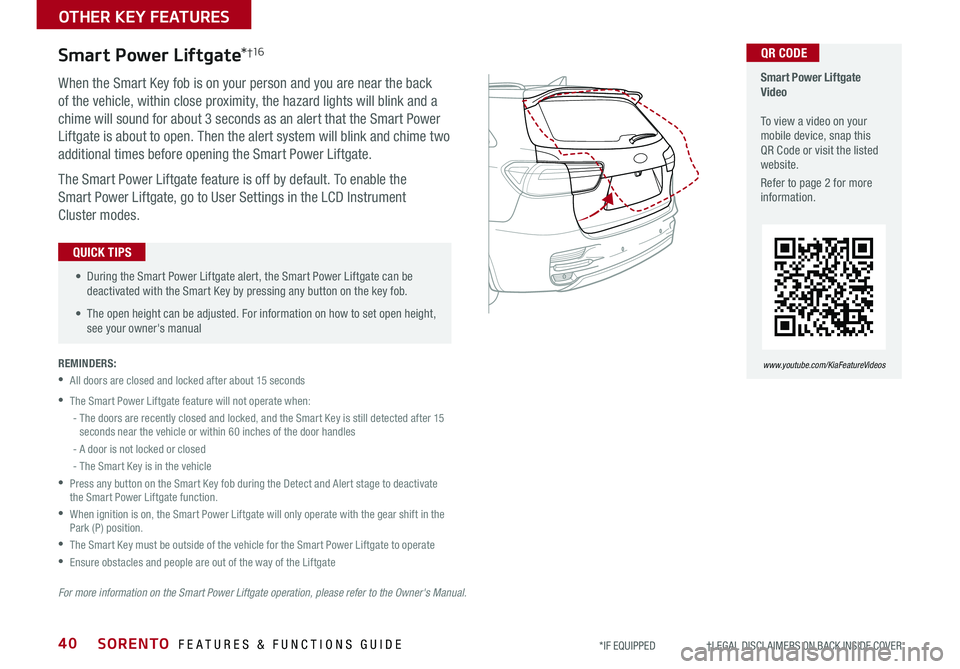
When the Smart Key fob is on your person and you are near the back
of the vehicle, within close proximity, the hazard lights will blink and a
chime will sound for about 3 seconds as an alert that the Smart Power
Liftgate is about to open . Then the alert system will blink and chime two
additional times before opening the Smart Power Liftgate .
The Smart Power Liftgate feature is off by default . To enable the
Smart Power Liftgate, go to User Settings in the LCD Instrument
Cluster modes .
REMINDERS:
•All doors are closed and locked after about 15 seconds
•The Smart Power Liftgate feature will not operate when:
- The doors are recently closed and locked, and the Smart Key is still detected after 15 seconds near the vehicle or within 60 inches of the door handles
- A door is not locked or closed
- The Smart Key is in the vehicle
•
Press any button on the Smart Key fob during the Detect and Alert stage to deactivate the Smart Power Liftgate function .
•
When ignition is on, the Smart Power Liftgate will only operate with the gear shift in the Park (P) position .
•The Smart Key must be outside of the vehicle for the Smart Power Liftgate to operate
•Ensure obstacles and people are out of the way of the Liftgate
Smart Power Liftgate*†1 6
For more information on the Smart Power Liftgate operation, please refer to the Owner's Manual.
• During the Smart Power Liftgate alert, the Smart Power Liftgate can be deactivated with the Smart Key by pressing any button on the key fob .
• The open height can be adjusted . For information on how to set open height, see your owner's manual
QUICK TIPS
Smart Power Liftgate Video To view a video on your mobile device, snap this QR Code or visit the listed website .
Refer to page 2 for more information .
www.youtube.com/KiaFeatureVideos
QR CODE
OTHER KEY FEATURES
Page 44 of 54
SORENTO FEATURES & FUNCTIONS GUIDE42*IF EQUIPPED †LEGAL DISCL AIMERS ON BACK INSIDE COVER
Erasing programmed buttons:
How to Sync Transmitter with HomeLink®*
If programming for the first time, begin with Step 1
(repeating this step will delete all information) .
To program non-rolling and rolling code garage
door openers and other devices:
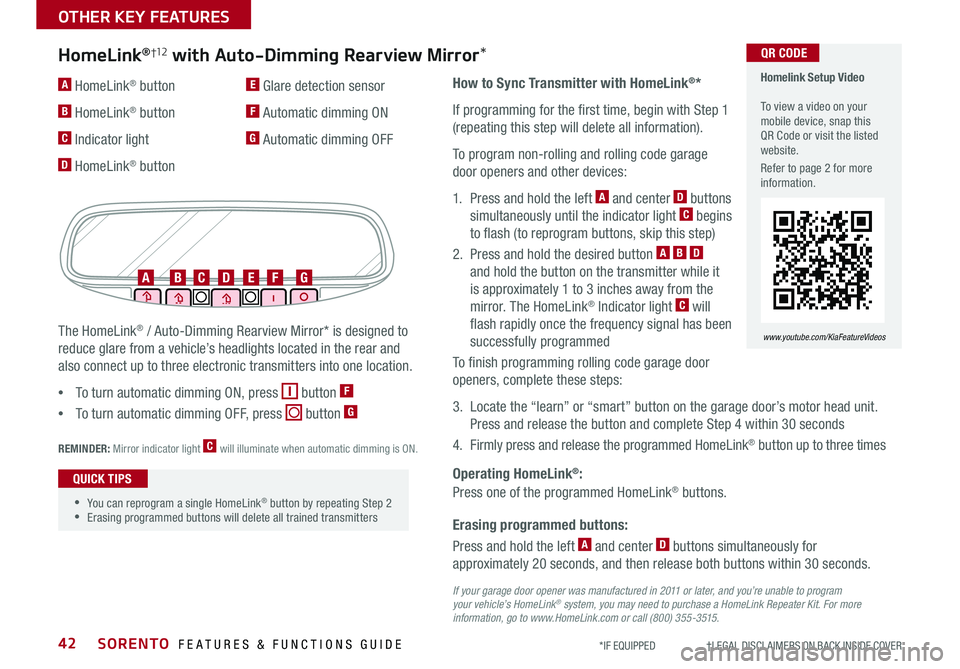
1 . Press and hold the left A and center D buttons
simultaneously until the indicator light C begins
to flash (to reprogram buttons, skip this step)
2 . Press and hold the desired button A B D
and hold the button on the transmitter while it
is approximately 1 to 3 inches away from the
mirror . The HomeLink® Indicator light C will
flash rapidly once the frequency signal has been
successfully programmed
To finish programming rolling code garage door
openers, complete these steps:
3 . Locate the “learn” or “smart” button on the garage door’s motor head unit .
Press and release the button and complete Step 4 within 30 seconds
4 . Firmly press and release the programmed HomeLink® button up to three times
Press and hold the left A and center D buttons simultaneously for
approximately 20 seconds, and then release both buttons within 30 seconds .
Operating HomeLink®:
Press one of the programmed HomeLink® buttons .
REMINDER: Mirror indicator light C will illuminate when automatic dimming is ON .
If your garage door opener was manufactured in 2011 or later, and you’re unable to program your vehicle’s HomeLink® system, you may need to purchase a HomeLink Repeater Kit. For more information, go to www.HomeLink.com or call (800) 355-3515.
The HomeLink® / Auto-Dimming Rearview Mirror* is designed to
reduce glare from a vehicle’s headlights located in the rear and
also connect up to three electronic transmitters into one location .
•
To turn automatic dimming ON, press button F
•
To turn automatic dimming OFF, press button G
HomeLink®†12 with Auto-Dimming Rearview Mirror*
A HomeLink® button
B HomeLink® button
C Indicator light
D HomeLink® button
E Glare detection sensor
F Automatic dimming ON
G Automatic dimming OFF
ABCDEFG
•
•You can reprogram a single HomeLink® button by repeating Step 2 •Erasing programmed buttons will delete all trained transmitters
QUICK TIPS
Homelink Setup Video To view a video on your mobile device, snap this QR Code or visit the listed website .
Refer to page 2 for more information .
www.youtube.com/KiaFeatureVideos
QR CODE
OTHER KEY FEATURES
Page 45 of 54
43ALWAYS CHECK THE OWNER’S MANUAL FOR COMPLETE OPER ATING INFORMATION AND SAFET Y WARNINGS . *IF EQUIPPED
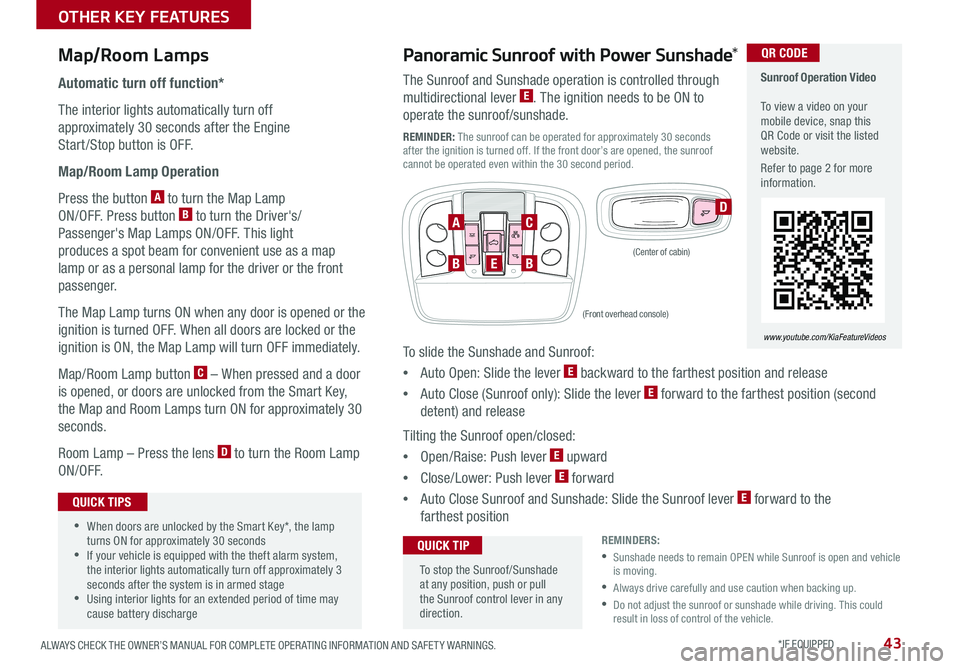
Map/Room Lamps
Automatic turn off function*
The interior lights automatically turn off
approximately 30 seconds after the Engine
Start /Stop button is OFF .
Map/Room Lamp Operation
Press the button A to turn the Map Lamp
ON/OFF . Press button B to turn the Driver's/
Passenger's Map Lamps ON/OFF . This light
produces a spot beam for convenient use as a map
lamp or as a personal lamp for the driver or the front
passenger .
The Map Lamp turns ON when any door is opened or the
ignition is turned OFF . When all doors are locked or the
ignition is ON, the Map Lamp will turn OFF immediately .
Map/Room Lamp button C – When pressed and a door
is opened, or doors are unlocked from the Smart Key,
the Map and Room Lamps turn ON for approximately 30
seconds .
Room Lamp – Press the lens D to turn the Room Lamp
ON/OFF .
D
•When doors are unlocked by the Smart Key*, the lamp turns ON for approximately 30 seconds •If your vehicle is equipped with the theft alarm system, the interior lights automatically turn off approximately 3 seconds after the system is in armed stage •Using interior lights for an extended period of time may cause battery discharge
QUICK TIPS
Panoramic Sunroof with Power Sunshade*
The Sunroof and Sunshade operation is controlled through
multidirectional lever E . The ignition needs to be ON to
operate the sunroof/sunshade .
REMINDER: The sunroof can be operated for approximately 30 seconds after the ignition is turned off . If the front door’s are opened, the sunroof cannot be operated even within the 30 second period .
To slide the Sunshade and Sunroof:
•Auto Open: Slide the lever E backward to the farthest position and release
•Auto Close (Sunroof only): Slide the lever E forward to the farthest position (second
detent) and release
Tilting the Sunroof open/closed:
•Open/Raise: Push lever E upward
•Close/Lower: Push lever E forward
•Auto Close Sunroof and Sunshade: Slide the Sunroof lever E forward to the
farthest position
To stop the Sunroof/Sunshade at any position, push or pull the Sunroof control lever in any direction .
QUICK TIP
BBE
AC
(Front overhead console)
(Center of cabin)
Sunroof Operation Video To view a video on your mobile device, snap this QR Code or visit the listed website .
Refer to page 2 for more information .
www.youtube.com/KiaFeatureVideos
QR CODE
REMINDERS:
•
Sunshade needs to remain OPEN while Sunroof is open and vehicle is moving .
•Always drive carefully and use caution when backing up .
• Do not adjust the sunroof or sunshade while driving . This could result in loss of control of the vehicle .
OTHER KEY FEATURES
Page 47 of 54

45ALWAYS CHECK THE OWNER’S MANUAL FOR COMPLETE OPER ATING INFORMATION AND SAFET Y WARNINGS . *IF EQUIPPED
CLICK!
Fuel Cap / Malfunction
Indicator (Check Engine
Light)
Tighten for ONE CLICK to prevent
Malfunction Indicator from
illuminating .
REMINDERS:
• The Fuel Filler Door Release button is located on the driver’s button panel, left of the Steering Wheel .
• It is normal operation when tightening to hear one click and then when Fuel Cap is released, it clicks back .
Child-Protector Rear Door Locks
Located on the rear edge of the rear passenger doors, turn the Child-
Protector Rear Door Lock to the lock position to disable the inner door
handles from opening the rear doors .
REMINDER: Child-Protector Rear Door Locks are located on rear passenger’s door jamb .
Opening the Hood:
1 . Pull the Hood Release Lever A to unlatch the Hood
2 . In the front of the vehicle, lift the Hood slightly, push the secondary
Latch B to the left inside of the Hood’s center and lift the Hood
3 . It will open by itself after it has been raised about half way .
REMINDER: Open the Hood only after turning the engine off, on a flat surface, with the gear shift in P (Park) position and setting the parking brake .
Hood Release Lever and Latch
(Lever located near floor below Driver's Panel) (Latch located inside hood)
(Lock located on rear passenger inside door jam)
A
B
Closing the Hood:
Lower the Hood about halfway and then press down to securely
lock in place .
One-Click Fuel Cap Video To view a video on your mobile device, snap this QR Code or visit the listed website .
Refer to page 2 for more information .
www.youtube.com/KiaFeatureVideos
QR CODE
OTHER KEY FEATURES