ECO KIA SORENTO 2022 Navigation System Quick Reference Guide
[x] Cancel search | Manufacturer: KIA, Model Year: 2022, Model line: SORENTO, Model: KIA SORENTO 2022Pages: 324, PDF Size: 10.45 MB
Page 147 of 324

6-15
Accepting an incoming call over Bluetooth
The system screen alerts you when you receive a call while connected using Bluetooth.
Perform any of the following methods:
\225Press
Accept on the screen.
\225On the steering wheel, press the Call button.
\335Warning
\225Park the vehicle at a safe place before connecting your mobile phone. It may take the
driver attention off the road and cause a traffic accident which can result in damages,
injuries, and/or death.
\225Do not talk on your mobile device while driving. Distraction by the use of a mobile phone
may cause you not to recognize traffic flow around and not to cope with unexpected
situations. As a result, a traffic accident may occur. If necessary, use the Bluetooth hands-
free function and make the call as short as possible.
0000
A
If your mobile phone is connected to the system and you make a call whil\
e stepping out
of the vehicle, the call may be heard through the vehicle's speakers. To disconnect the
call, disable the Bluetooth connection on the system or turn off the Bluetooth function on
the mobile phone.
Rejecting a call
Perform any of the following methods:
\225Press
Reject on the screen.
\225On the steering wheel, press the End Call button.
0000
A
To reject by sending a call-reject message, press Message. From the list, select the call-
reject message and press Send.
0000
A
The call-reject or auto-reply message may not be supported in some phone models.
Page 148 of 324

6-16
Using functions during a call
During a call, the following screen appears.
Press to use the available options.
\037
\036
\035
\034\033
\032\031
a a Returns to the previous step.
b b Used to turn on or off the microphone mute function.
c c Can adjust the microphone volume.
d d Displays or hides the dial pad screen.
e e Used to switch the call to the mobile phone. This option may not be avai\
lable in some
phone models.
f f Used to end a call.
g g The list of menu items appears.
\225Display Off: Turns off the screen. To switch the screen back on, press the screen or
briefly press the power button.
\225Privacy Mode: Activate privacy mode to protect personal data. The data downloaded
from the mobile phone stays hidden while this mode is on.
\225Split Screen: Can turn on or off the split screen mode.
0000
A
If you set the microphone volume too high, the other party may have a difficulty
understanding you due to noise or echoing, depending on their mobile pho\
ne and
surroundings. Setting the volume to 30 or lower is recommended.
0000
A
When the caller is in the contact list, the caller's name and phone number of the caller are
displayed. Otherwise, only the phone number appears.
0000
A
During a call with a Bluetooth connection, you cannot switch to another \
screen such as
Radio/Media mode.
0000
A
Depending on the phone model, the call volume of the other party may differ.
0000
A
Depending on the phone model, the smartphone number may not appear.
Page 150 of 324
6-18
c c Can see the message details.
d d Reads out the message through the speakers in the vehicle.
e e Used to close the notification window.
0000
A
The message notification window does not appear when the privacy mode is enabled or
the message notification is turned off.
0000
A
The screen display may differ depending on the mobile phone model.
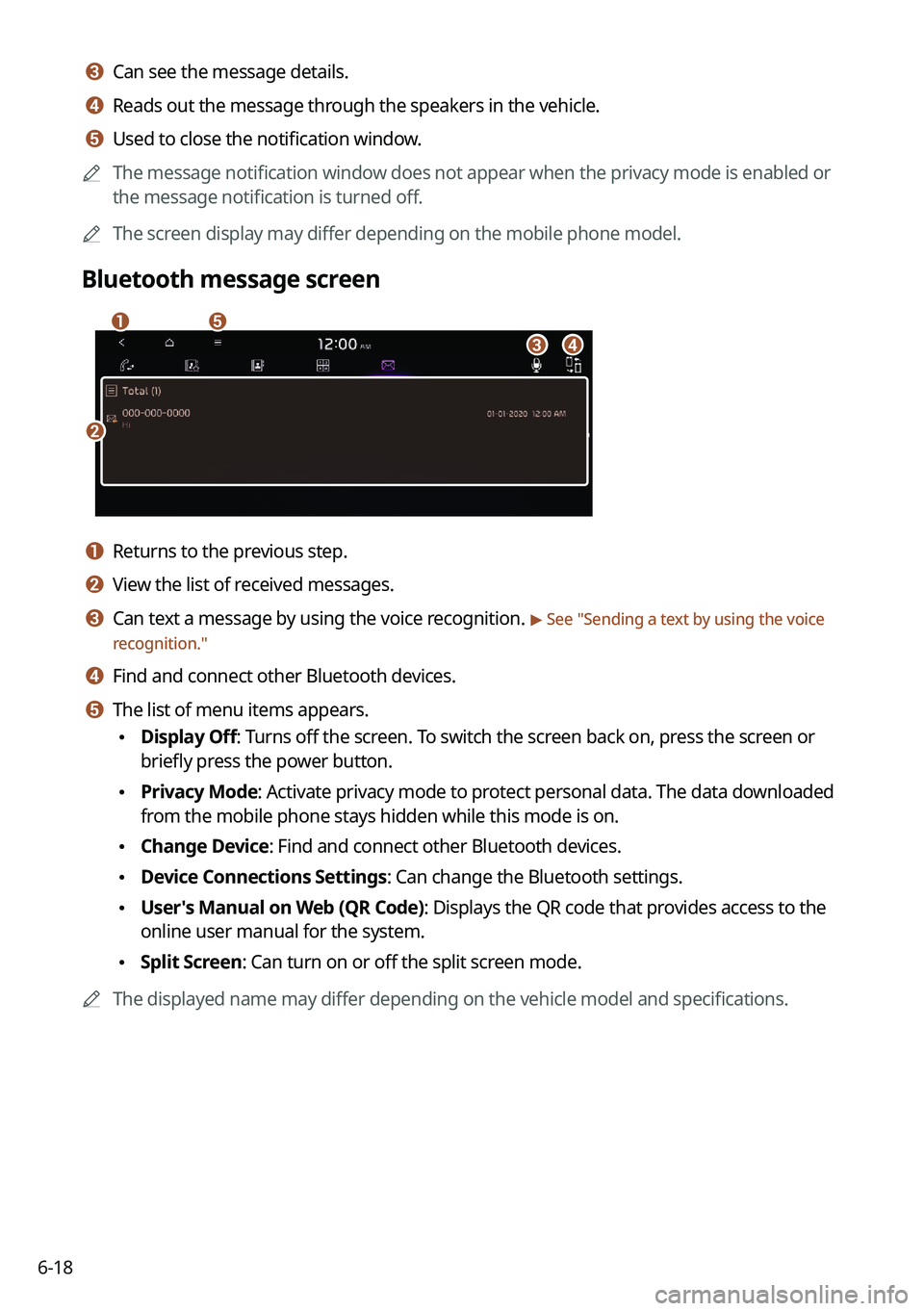
Bluetooth message screen
\037
\036
\035
\034
\033
a a Returns to the previous step.
b b View the list of received messages.
c c Can text a message by using the voice recognition. > See "Sending a text by using the voice
recognition."
d d Find and connect other Bluetooth devices.
e e The list of menu items appears.
\225 Display Off: Turns off the screen. To switch the screen back on, press the screen or
briefly press the power button.
\225Privacy Mode: Activate privacy mode to protect personal data. The data downloaded
from the mobile phone stays hidden while this mode is on.
\225Change Device: Find and connect other Bluetooth devices.
\225Device Connections Settings: Can change the Bluetooth settings.
\225User's Manual on Web (QR Code): Displays the QR code that provides access to the
online user manual for the system.
\225Split Screen: Can turn on or off the split screen mode.
0000
A
The displayed name may differ depending on the vehicle model and specifications.
Page 151 of 324
6-19
Checking new messages from the list
1 Perform any of the following methods:
\225On the All Menus screen, press Phone.
\225On the steering wheel, press the Call button.
2 On the Bluetooth Call screen, press .
3 Select a message from the list.
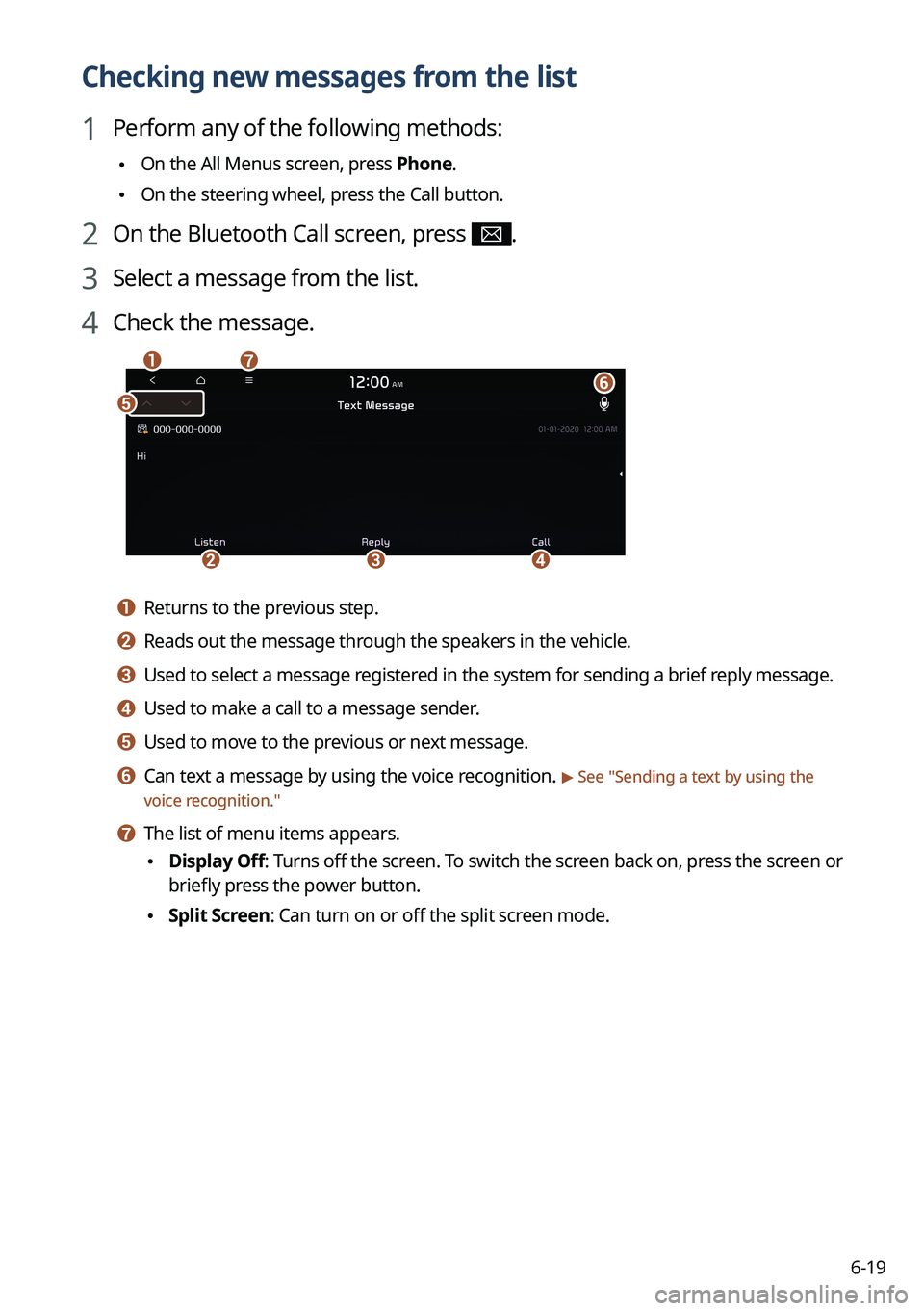
4 Check the message.
\037
\036
\035
\034
\033\032
\031
a a Returns to the previous step.
b b Reads out the message through the speakers in the vehicle.
c c Used to select a message registered in the system for sending a brief reply message.
d d Used to make a call to a message sender.
e e Used to move to the previous or next message.
f f Can text a message by using the voice recognition. > See "
Sending a text by using the
voice recognition."
g g The list of menu items appears.
\225 Display Off
: Turns off the screen. To switch the screen back on, press the screen or
briefly press the power button.
\225 Split Screen: Can turn on or off the split screen mode.
Page 152 of 324

6-200000
A
The auto-reply messaging may not be available depending on the smartphone model.
0000
A
To edit or delete a message, park the vehicle at a safe place and access \
the messaging
function on your smartphone. You cannot edit or delete a message from the system.
0000
A
When an iPhone is connected to the system, there are some restrictions when receiving
messages as follows:
000DOnly the sender name appears when the sender information is saved.
000DWhen the sender information is not saved, only the phone number appears.\
000DYou cannot use the auto-reply message function.
000DWhen the incoming message notification or lock-screen view option is off, messages
cannot be received.
0000
A
The message reader function may not be supported depending on the system language.
Sending a text by using the voice recognition
When you connect your mobile device to the system via Bluetooth, contacts from the device
are downloaded to the system so you can text a message to a contact by using the voice
recognition.
0000
A
To call using voice recognition, there must be contacts stored on the system.
0000
A
It is available only when the UVO service is active.
1 Perform any of the following methods:
\225On the All Menus screen, press Phone.
\225On the steering wheel, press the Call button.
2 On the Bluetooth message screen, press .
3 When a guiding beep is heard, say the message.
The system sends the text to the selected contact.
Page 153 of 324
Voice functions
Voice recognition
Using the Siri Eyes Free Voice Memo
07
Page 154 of 324

7-2
Voice recognition
With the voice recognition function, you can access various functions of the infotainmen\
t
system without manipulating the screen or buttons. This function prevents driver distraction
and dangerous situations.
Use voice commands to access various functions easily.0000
A
The system can recognize the specified voice commands.
> See "Available voice commands"
or " Viewing the voice recognition help."
0000
A
Note the following for accurate delivery of command when saying it.
000DPronounce a command accurately and naturally like a conversation.
000DKeep the correct posture and say commands toward the direction of the microphone.
0000
A
Voice recognition is automatically ended when:
000DYou make or receive a call.
000DThe front or rear cameras operate (if equipped).
000DThe
[RADIO] or [MEDIA] button is pressed to perform another function.
000DRerouting or other unexpected action is made due to deviation from the route during
guidance.
0000
A
Voice recognition may not work properly when:
000DThe sunroof or windows are open so the wind is strong.
000DThe fan speed of the air conditioner or heater is high (level 3 or below is
recommended).
000DThe vehicle is passing through a tunnel.
000DThe vehicle is driving on an unpaved road and its noise and vibration are loud.
000DNoise is loud due to a heavy rain or storm.
Using the voice recognition function
1 On the steering wheel, press the Voice Recognition button.
Voice recognition starts along with voice guidance.
0000
A
To skip the voice guidance, press the Voice Recognition button on the steering wheel.
Page 155 of 324
7-3
2 When a beep sound is heard, say a command to perform (e.g.
navigation, music, call).
> See "Available voice commands" or " Viewing the voice
recognition help."
The recognized command appears in text at the top of the screen and the corresponding
function is performed.
0000
A
When an additional command is required to perform, the commands that can be
followed in the next step appear on the screen. Say a command or press a command.
0000
A
When there are several similar commands, say a command number to perform.
3 To end the voice recognition, perform one of the following methods:
\225In standby mode for voice recognition, say "Exit"
\225On the voice recognition screen, press Exit.
\225On the steering wheel, press and hold the Voice Recognition button.
0000
A
When the Voice Recognition button is pressed in standby mode for voice recognition,
the standby time is extended.
0000
A
When the voice recognition is not available, press the Voice Recognition button on
the steering wheel and use the voice recognition on your smartphone via phone
projection.
> See "Using the phone projection function."
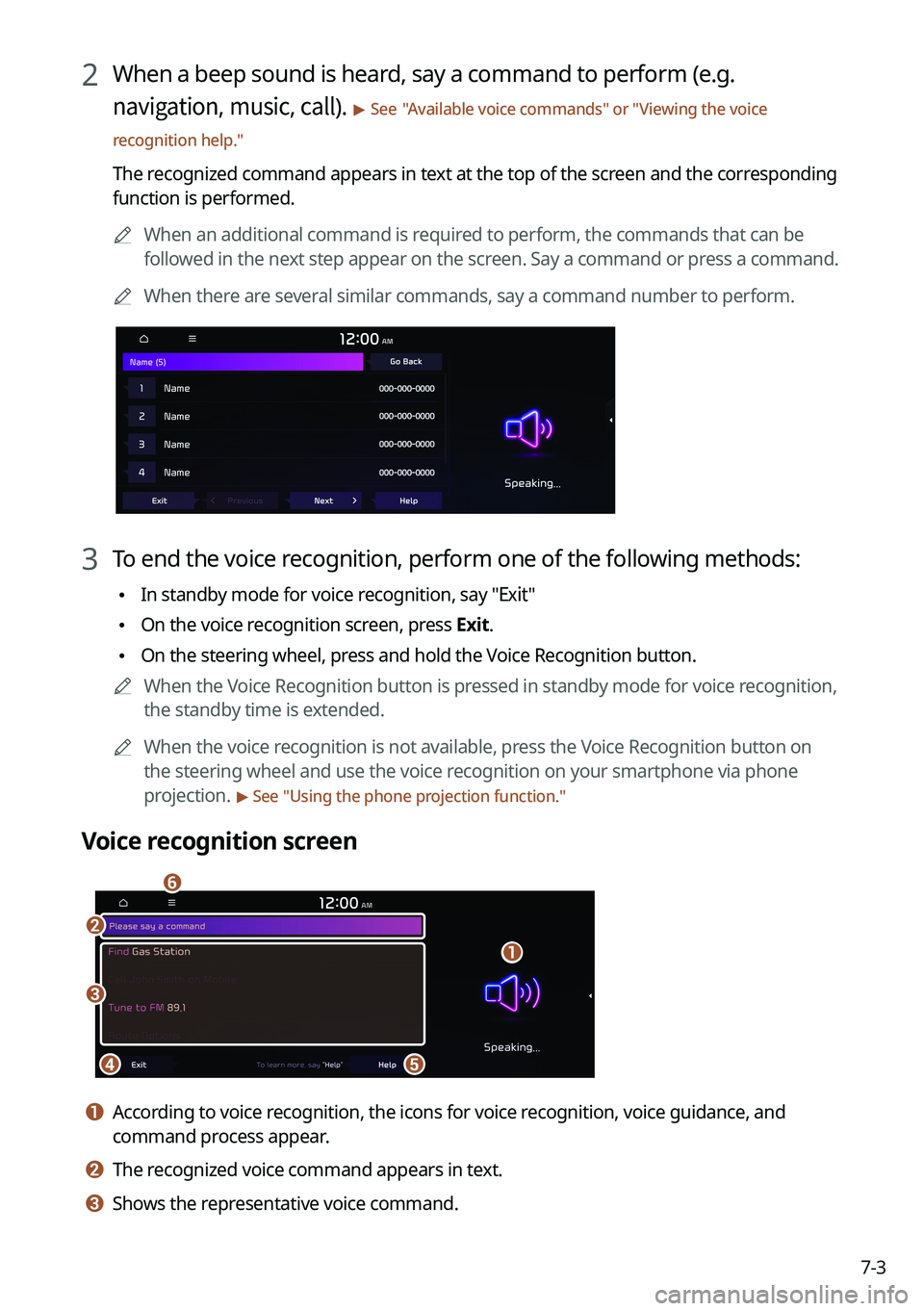
Voice recognition screen
\037
\036
\035\034
\033
\032
a a According to voice recognition, the icons for voice recognition, voice guidance, and
command process appear.
b b The recognized voice command appears in text.
c c Shows the representative voice command.
Page 156 of 324
7-4
d d Ends the voice recognition.
e e Displays the voice recognition help.
f f The list of menu items appears.
\225Split Screen: Can turn on or off the split screen mode.
Adjusting the voice guidance volume
Adjust the voice guidance volume when the system volume is so low or high and it interferes
with your driving.
When the voice recognition is active, use the Volume knob on the control
panel.
Viewing the voice recognition help
You can see more details on how to perform various functions by voice commands.
\334\334Caution
Park the vehicle at a safe place and see the help.
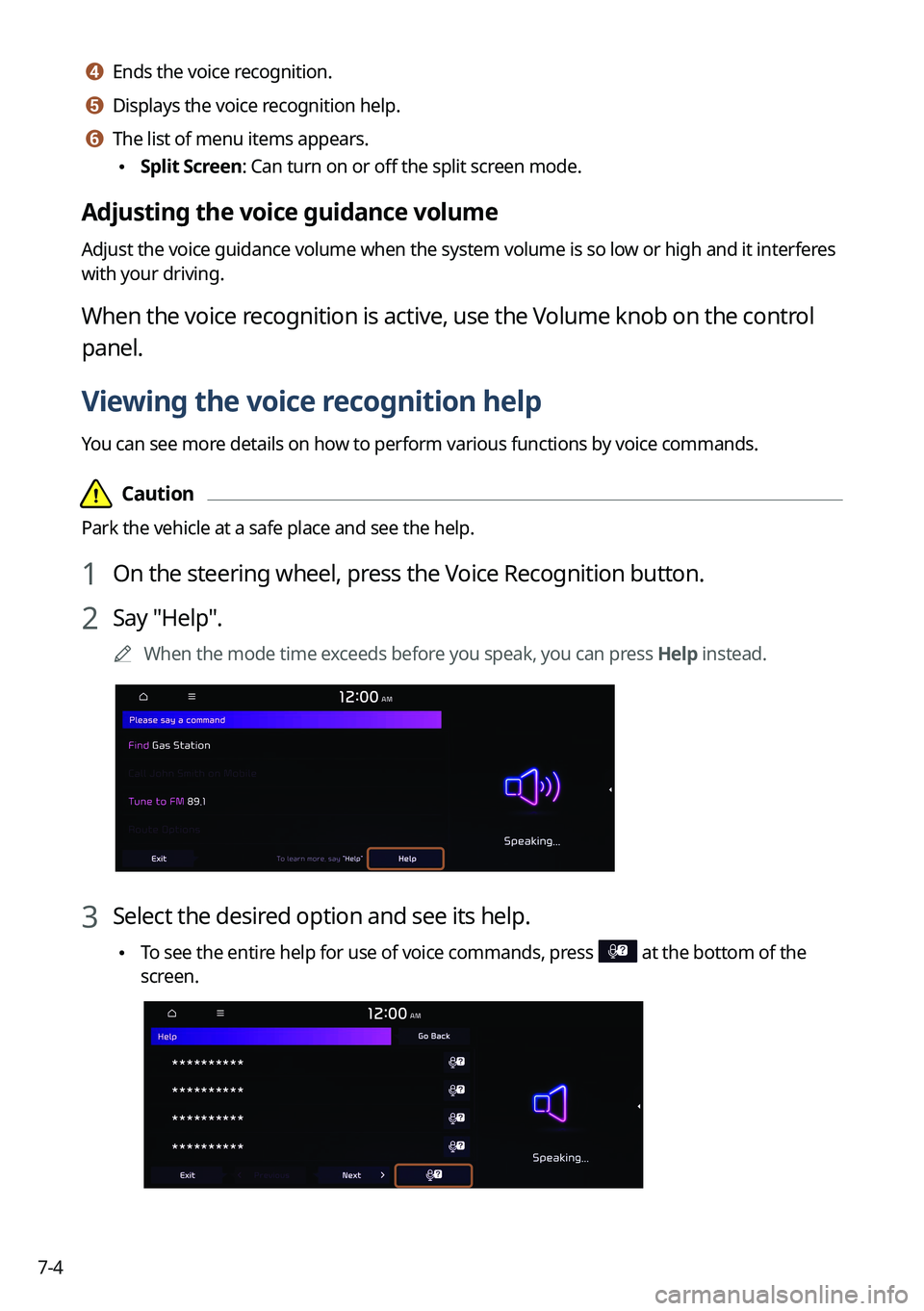
1 On the steering wheel, press the Voice Recognition button.
2 Say "Help".
0000
A
When the mode time exceeds before you speak, you can press Help instead.
3 Select the desired option and see its help.
\225To see the entire help for use of voice commands, press at the bottom of the
screen.
Page 157 of 324
7-5
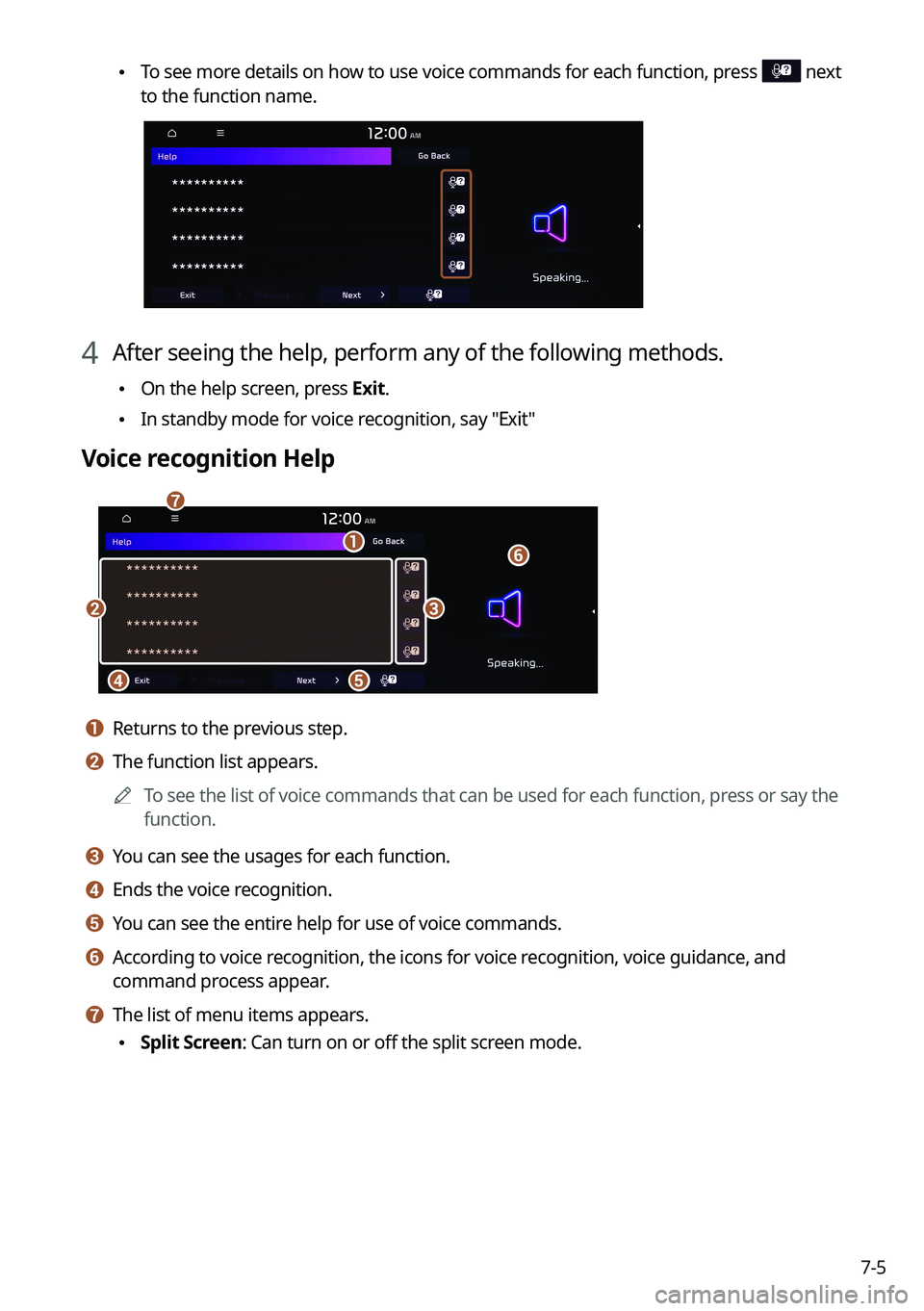
\225To see more details on how to use voice commands for each function, press next
to the function name.
4 After seeing the help, perform any of the following methods.
\225On the help screen, press Exit.
\225In standby mode for voice recognition, say "Exit"
Voice recognition Help
\037
\036
\035
\034\033
\032
\031
a a Returns to the previous step.
b b The function list appears.
0000
A
To see the list of voice commands that can be used for each function, press or say the
function.
c c You can see the usages for each function.
d d Ends the voice recognition.
e e You can see the entire help for use of voice commands.
f f According to voice recognition, the icons for voice recognition, voice guidance, and
command process appear.
g g The list of menu items appears.
\225Split Screen: Can turn on or off the split screen mode.