child lock KIA Soul 2012 1.G User Guide
[x] Cancel search | Manufacturer: KIA, Model Year: 2012, Model line: Soul, Model: KIA Soul 2012 1.GPages: 393, PDF Size: 8.76 MB
Page 204 of 393
4125
Features of your vehicle
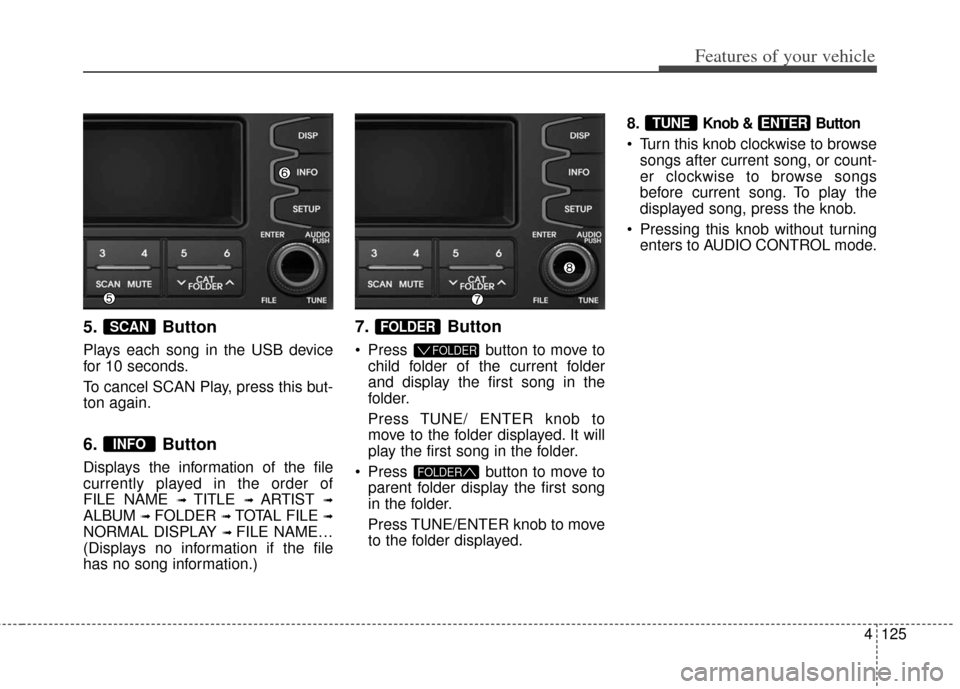
5. Button
Plays each song in the USB device
for 10 seconds.
To cancel SCAN Play, press this but-
ton again.
6. Button
Displays the information of the file
currently played in the order of
FILE NAME
➟ TITLE ➟ ARTIST ➟
ALBUM ➟ FOLDER ➟ TOTAL FILE ➟
NORMAL DISPLAY ➟ FILE NAME…
(Displays no information if the file
has no song information.)
7. Button
Press button to move to child folder of the current folder
and display the first song in the
folder.
Press TUNE/ ENTER knob to
move to the folder displayed. It will
play the first song in the folder.
Press button to move to parent folder display the first song
in the folder.
Press TUNE/ENTER knob to move
to the folder displayed. 8.
Knob & Button
Turn this knob clockwise to browse
songs after current song, or count-
er clockwise to browse songs
before current song. To play the
displayed song, press the knob.
Pressing this knob without turning enters to AUDIO CONTROL mode.
ENTERTUNE
FOLDER
FOLDER
FOLDER
INFO
SCAN
Page 225 of 393
53
Driving your vehicle
Before entering vehicle
• Be sure that all windows, outsidemirror(s), and outside lights are
clean.
Check the condition of the tires.
Check under the vehicle for any sign of leaks.
Be sure there are no obstacles behind you if you intend to back up.
Necessary inspections
Fluid levels, such as engine oil,
engine coolant, brake fluid, and
washer fluid should be checked on a
regular basis, with the exact interval
depending on the fluid. Further
details are provided in section 7,
“Maintenance”.
Before starting
Close and lock all doors.
Position the seat so that all con-trols are easily reached.
Buckle your seat belt.
Adjust the inside and outside rearview mirrors.
Be sure that all lights work.
Check all gauges.
Check the operation of warning lights when the ignition switch is
turned to the ON position.
Release the parking brake and make sure the brake warning light
goes out.
For safe operation, be sure you are
familiar with your vehicle and its
equipment.
BEFORE DRIVING
WARNING - Distracted driving
Focus on the road while driving.
The driver's primary responsi-
bility is in the safe and legal
operation of the vehicle. Use of
any handled devices, other
equipment or vehicle systems
that distract the drive should
not be used during vehicle
operation.
WARNING - Check sur-rounding
Always check the surrounding
areas near your vehicle for peo-
ple, especially children, before
putting a car into D (Drive) or R
(Reverse).
Page 293 of 393
What to do in an emergency
14
6
Do not allow anyone to remain in
the vehicle while it is on the jack.
Make sure any children present are in a secure place away from
the road and from the vehicle to be
raised with the jack.
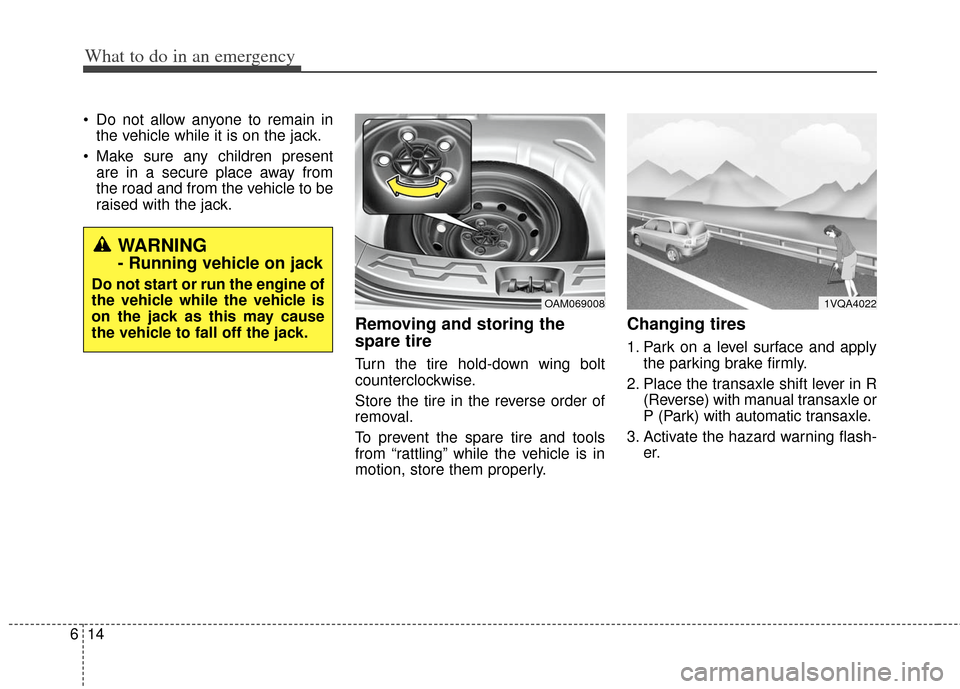
Removing and storing the
spare tire
Turn the tire hold-down wing bolt
counterclockwise.
Store the tire in the reverse order of
removal.
To prevent the spare tire and tools
from “rattling” while the vehicle is in
motion, store them properly.
Changing tires
1. Park on a level surface and apply the parking brake firmly.
2. Place the transaxle shift lever in R (Reverse) with manual transaxle or
P (Park) with automatic transaxle.
3. Activate the hazard warning flash- er.
OAM0690081VQA4022
WARNING
- Running vehicle on jack
Do not start or run the engine of
the vehicle while the vehicle is
on the jack as this may cause
the vehicle to fall off the jack.