light KIA Soul 2016 2.G Owner's Manual
[x] Cancel search | Manufacturer: KIA, Model Year: 2016, Model line: Soul, Model: KIA Soul 2016 2.GPages: 556, PDF Size: 21.35 MB
Page 373 of 556
543
Driving your vehicle
Your vehicle may be equipped with
the ISG system, which reduces fuel
consumption by automatically shut-
ting down the engine, when the vehi-
cle is at a standstill. (For example :
red light, stop sign and traffic jam)
The engine starts automatically as
soon as the starting conditions are
met.
The ISG system is ON whenever the
engine is running.
✽ ✽NOTICE
When the engine automatically
starts by the ISG system, some
warning lights (ABS, ESC, ESC
OFF, EPS or Parking brake warn-
ing light) may turn on for a few sec-
onds.
This happens because of low battery
voltage. It does not mean the system
is malfunctioning.
Auto stop
To stop the engine in idle stop
mode
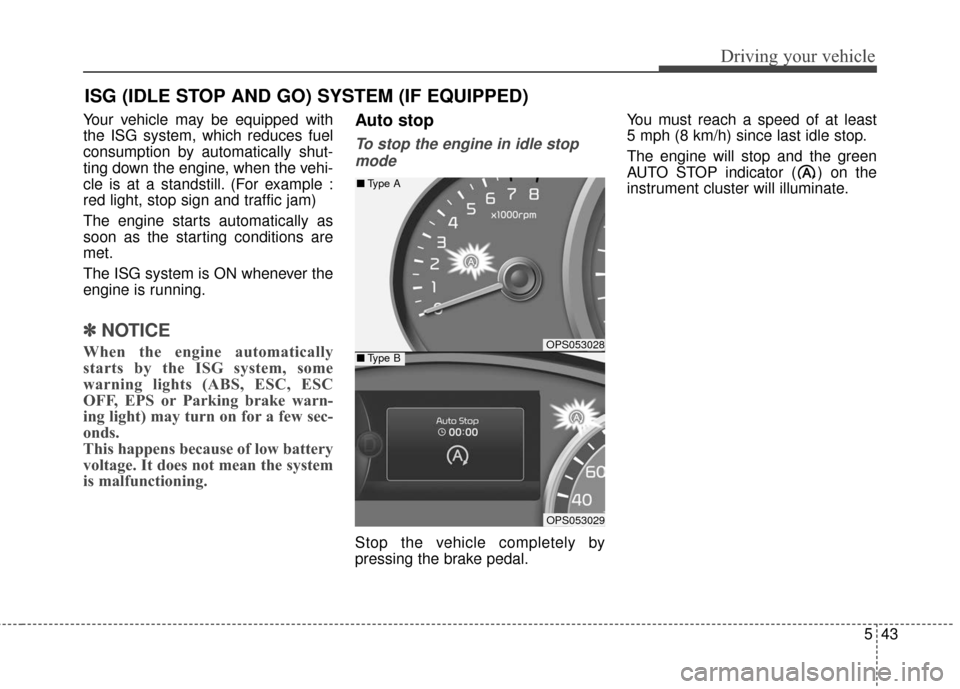
Stop the vehicle completely by
pressing the brake pedal. You must reach a speed of at least
5 mph (8 km/h) since last idle stop.
The engine will stop and the green
AUTO STOP indicator ( ) on the
instrument cluster will illuminate.
ISG (IDLE STOP AND GO) SYSTEM (IF EQUIPPED)
OPS053028
OPS053029
■
Type A
■Type B
Page 374 of 556
Driving your vehicle
44
5
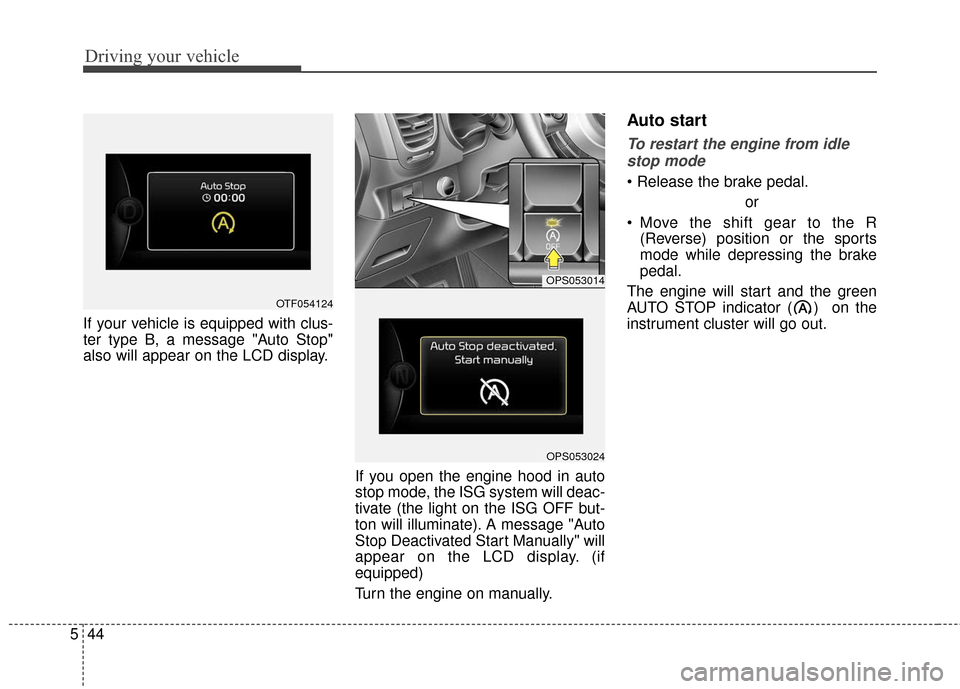
If your vehicle is equipped with clus-
ter type B, a message "Auto Stop"
also will appear on the LCD display.
If you open the engine hood in auto
stop mode, the ISG system will deac-
tivate (the light on the ISG OFF but-
ton will illuminate). A message "Auto
Stop Deactivated Start Manually" will
appear on the LCD display. (if
equipped)
Turn the engine on manually.
Auto start
To restart the engine from idlestop mode
or
Move the shift gear to the R (Reverse) position or the sports
mode while depressing the brake
pedal.
The engine will start and the green
AUTO STOP indicator ( ) on the
instrument cluster will go out.
OPS053014
OPS053024
OTF054124
Page 376 of 556
Driving your vehicle
46
5
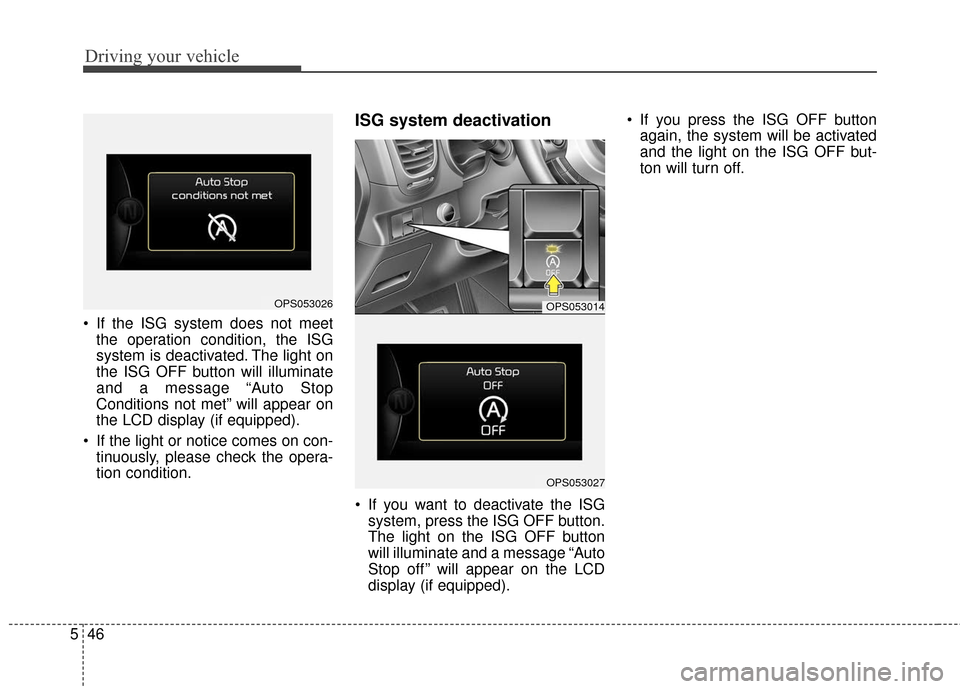
If the ISG system does not meet
the operation condition, the ISG
system is deactivated. The light on
the ISG OFF button will illuminate
and a message “Auto Stop
Conditions not met” will appear on
the LCD display (if equipped).
If the light or notice comes on con- tinuously, please check the opera-
tion condition.
ISG system deactivation
If you want to deactivate the ISGsystem, press the ISG OFF button.
The light on the ISG OFF button
will illuminate and a message “Auto
Stop off ” will appear on the LCD
display (if equipped). If you press the ISG OFF button
again, the system will be activated
and the light on the ISG OFF but-
ton will turn off.
OPS053026OPS053014
OPS053027
Page 377 of 556
547
Driving your vehicle
ISG system malfunction
The system may not operatewhen:
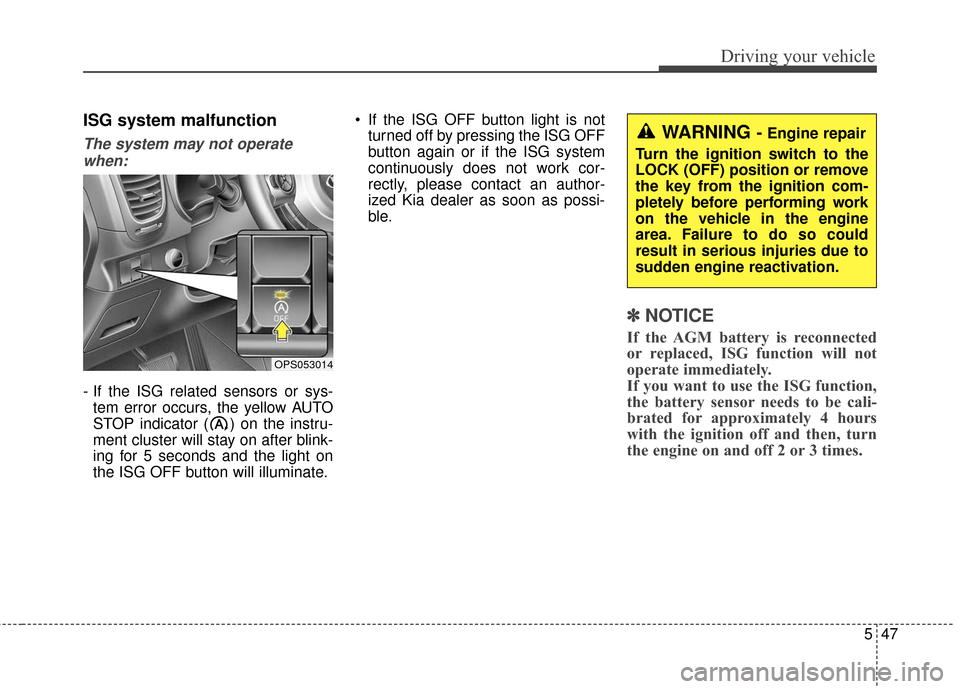
- If the ISG related sensors or sys- tem error occurs, the yellow AUTO
STOP indicator ( ) on the instru-
ment cluster will stay on after blink-
ing for 5 seconds and the light on
the ISG OFF button will illuminate. If the ISG OFF button light is not
turned off by pressing the ISG OFF
button again or if the ISG system
continuously does not work cor-
rectly, please contact an author-
ized Kia dealer as soon as possi-
ble.
✽ ✽ NOTICE
If the AGM battery is reconnected
or replaced, ISG function will not
operate immediately.
If you want to use the ISG function,
the battery sensor needs to be cali-
brated for approximately 4 hours
with the ignition off and then, turn
the engine on and off 2 or 3 times.
WARNING - Engine repair
Turn the ignition switch to the
LOCK (OFF) position or remove
the key from the ignition com-
pletely before performing work
on the vehicle in the engine
area. Failure to do so could
result in serious injuries due to
sudden engine reactivation.
OPS053014
Page 378 of 556
Driving your vehicle
48
5
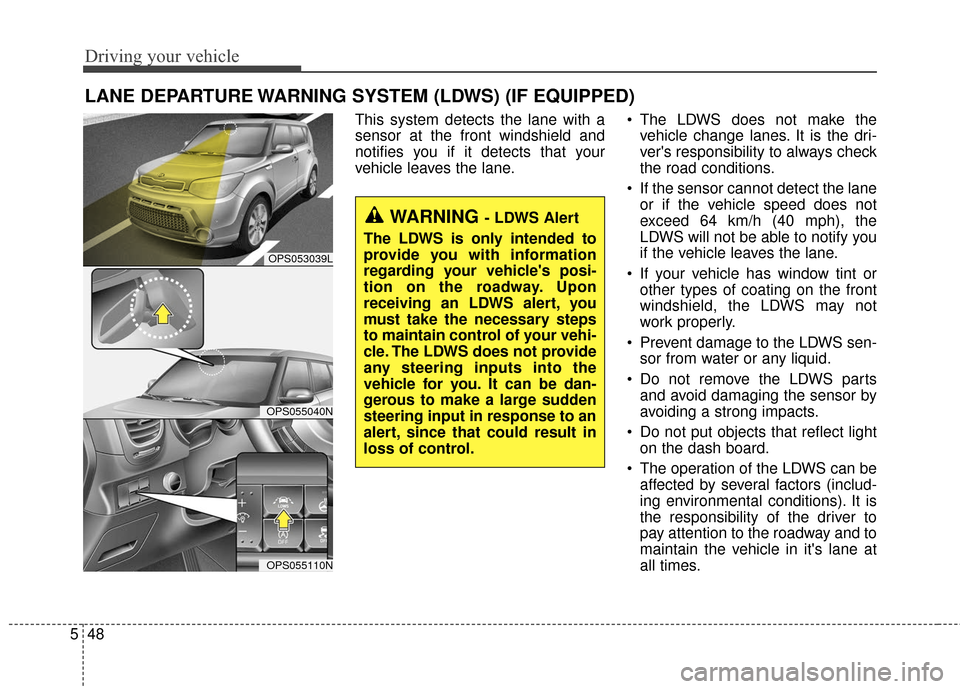
This system detects the lane with a
sensor at the front windshield and
notifies you if it detects that your
vehicle leaves the lane. The LDWS does not make the
vehicle change lanes. It is the dri-
ver's responsibility to always check
the road conditions.
If the sensor cannot detect the lane or if the vehicle speed does not
exceed 64 km/h (40 mph), the
LDWS will not be able to notify you
if the vehicle leaves the lane.
If your vehicle has window tint or other types of coating on the front
windshield, the LDWS may not
work properly.
Prevent damage to the LDWS sen- sor from water or any liquid.
Do not remove the LDWS parts and avoid damaging the sensor by
avoiding a strong impacts.
Do not put objects that reflect light on the dash board.
The operation of the LDWS can be affected by several factors (includ-
ing environmental conditions). It is
the responsibility of the driver to
pay attention to the roadway and to
maintain the vehicle in it's lane at
all times.
LANE DEPARTURE WARNING SYSTEM (LDWS) (IF EQUIPPED)
OPS053039L
OPS055040N
OPS055110N
WARNING - LDWS Alert
The LDWS is only intended to
provide you with information
regarding your vehicle's posi-
tion on the roadway. Upon
receiving an LDWS alert, you
must take the necessary steps
to maintain control of your vehi-
cle. The LDWS does not provide
any steering inputs into the
vehicle for you. It can be dan-
gerous to make a large sudden
steering input in response to an
alert, since that could result in
loss of control.
Page 380 of 556
Driving your vehicle
50
5
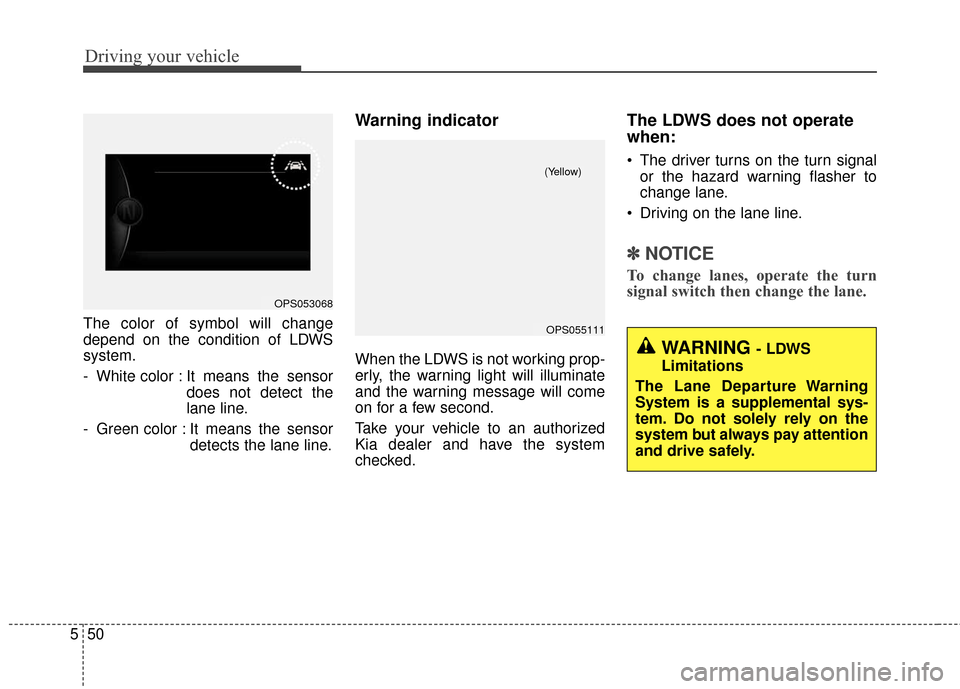
The color of symbol will change
depend on the condition of LDWS
system.
- White color : It means the sensor
does not detect the
lane line.
- Green color : It means the sensor detects the lane line.
Warning indicator
When the LDWS is not working prop-
erly, the warning light will illuminate
and the warning message will come
on for a few second.
Take your vehicle to an authorized
Kia dealer and have the system
checked.
The LDWS does not operate
when:
The driver turns on the turn signalor the hazard warning flasher to
change lane.
Driving on the lane line.
✽ ✽ NOTICE
To change lanes, operate the turn
signal switch then change the lane.
OPS053068
OPS055111
(Yellow)
WARNING - LDWS
Limitations
The Lane Departure Warning
System is a supplemental sys-
tem. Do not solely rely on the
system but always pay attention
and drive safely.
Page 381 of 556
551
Driving your vehicle
The LDWS may not warn you
even if the vehicle leaves the
lane, or may warn you even if
the vehicle does not leave the
lane when;
The lane is not visible due to snow,rain, stain, a puddle or other envi-
ronmental conditions.
The brightness of the outside changes suddenly such as tunnel
enter/exit.
The headlights are off at night or in a tunnel.
The color of the lane marking from the road is difficult to distinguish.
Driving on a steep grade or a curve.
Light such as street light, sunlight or oncoming vehicle light reflects
from water on the road.
The lens or windshield is stained with foreign matter.
The sensor cannot detect the lane because of fog, heavy rain or
heavy snow. The surrounding of the inside rear
view mirror temperature is high
due to a direct ray of light.
The lane is very wide or narrow.
The lane line is damaged or indis- tinct.
The windshield is fogged by humid air in the vehicle.
The shadow is on the lane line by a median strip.
The sensor cannot distinguish the lane from the road due to the
dust/dirt.
There is a mark similar to a lane line.
There is a boundary structure.
The distance from vehicle ahead is very short or the vehicle ahead
drives hiding the lane line.
The vehicle vibrates heavily due to road conditions.
The lane number increases or decreases or the lane lines are
crossing.
Putting something on the dash- board.
Driving with the sun in front of you. Driving in areas under construc-
tion.
The lane line is more than two in either side (Left/Right)
This device complies with
Industry Canada licence-exempt
RSS standard(s).
Operation is subject to the following
two conditions:
(1) This device may not cause inter- ference, and
(2) This device must accept any interference, including interfer-
ence that may cause undesired
operation of the device.
Page 383 of 556
553
Driving your vehicle
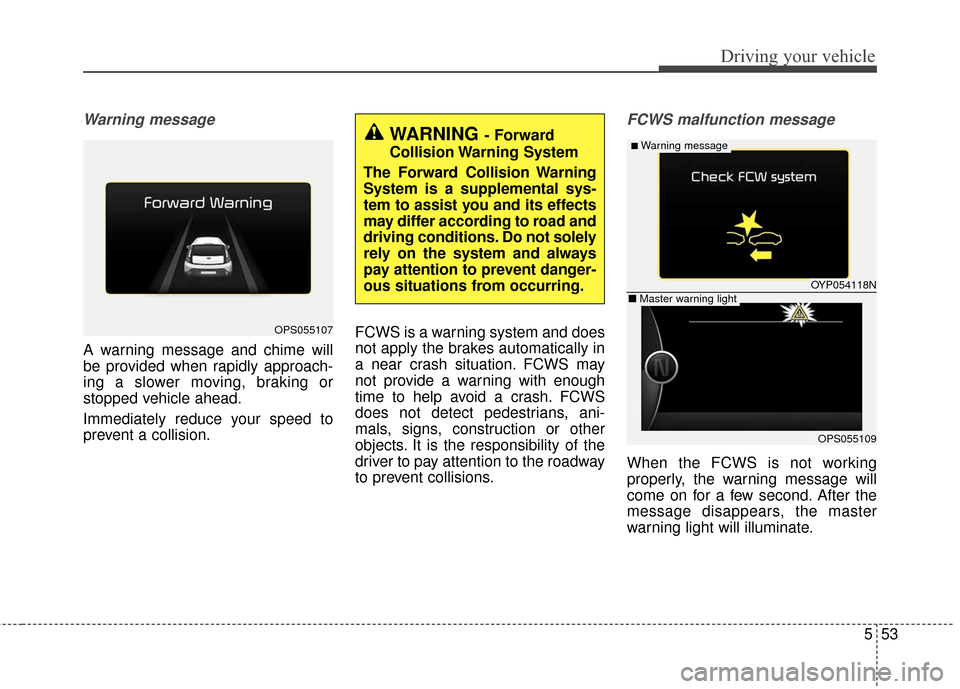
Warning message
A warning message and chime will
be provided when rapidly approach-
ing a slower moving, braking or
stopped vehicle ahead.
Immediately reduce your speed to
prevent a collision.FCWS is a warning system and does
not apply the brakes automatically in
a near crash situation. FCWS may
not provide a warning with enough
time to help avoid a crash. FCWS
does not detect pedestrians, ani-
mals, signs, construction or other
objects. It is the responsibility of the
driver to pay attention to the roadway
to prevent collisions.
FCWS malfunction message
When the FCWS is not working
properly, the warning message will
come on for a few second. After the
message disappears, the master
warning light will illuminate.
WARNING- Forward
Collision Warning System
The Forward Collision Warning
System is a supplemental sys-
tem to assist you and its effects
may differ according to road and
driving conditions. Do not solely
rely on the system and always
pay attention to prevent danger-
ous situations from occurring.
OYP054118N
OPS055109
■Warning message
■ Master warning light
OPS055107
Page 386 of 556
Driving your vehicle
56
5
Your vehicle's fuel economy depends
mainly on your style of driving, where
you drive and when you drive.
Each of these factors affects how
many miles (kilometers) you can get
from a gallon (liter) of fuel. To operate
your vehicle as economically as pos-
sible, use the following driving sug-
gestions to help save money in both
fuel and repairs:
Drive smoothly. Accelerate at a
moderate rate. Don't make "jack-
rabbit" starts or full-throttle shifts
and maintain a steady cruising
speed. Don't race between stop-
lights. Try to adjust your speed to
the traffic so you don't have to
change speeds unnecessarily.
Avoid heavy traffic whenever pos-
sible. Always maintain a safe dis-
tance from other vehicles so you
can avoid unnecessary braking.
This also reduces brake wear.
Drive at a moderate speed. The faster you drive, the more fuel your
vehicle uses. Driving at a moderate
speed, especially on the highway,
is one of the most effective ways to
reduce fuel consumption. Don't "ride" the brake or clutch
pedal. This can increase fuel con-
sumption and also increase wear
on these components. In addition,
driving with your foot resting on the
brake pedal may cause the brakes
to overheat, which reduces their
effectiveness and may lead to
more serious consequences.
Take care of your tires. Keep them inflated to the recommended pres-
sure. Incorrect inflation, either too
much or too little, results in unnec-
essary tire wear. Check the tire
pressures at least once a month.
Be sure that the wheels are aligned correctly. Improper align-
ment can result from hitting curbs
or driving too fast over irregular
surfaces. Poor alignment causes
faster tire wear and may also result
in other problems as well as
greater fuel consumption. Keep your vehicle in good condi-
tion. For better fuel economy and
reduced maintenance costs, main-
tain your vehicle in accordance
with the maintenance schedule in
section 7. If you drive your vehicle
in severe conditions, more frequent
maintenance is required (see sec-
tion 7 for details).
Keep your vehicle clean. For maxi- mum service, your vehicle should
be kept clean and free of corrosive
materials. It is especially important
that mud, dirt, ice, etc. not be
allowed to accumulate on the
underside of the vehicle. This extra
weight can result in increased fuel
consumption and also contribute to
corrosion.
Travel lightly. Don't carry unneces- sary weight in your vehicle. Weight
reduces fuel economy.
Don't let the engine idle longer than necessary. If you are waiting
(and not in traffic), turn off your
engine and restart only when
you're ready to go.
ECONOMICAL OPERATION
Page 387 of 556
557
Driving your vehicle
Remember, your vehicle does notrequire extended warm-up. After
the engine has started, allow the
engine to run for 10 to 20 seconds
prior to placing the vehicle in gear.
In very cold weather, however, give
your engine a slightly longer warm-
up period.
Don't "lug" or "over-rev" the engine. Lugging is driving too slowly in a
very high gear resulting in engine
bucking. If this happens, shift to a
lower gear. Over-revving is racing
the engine beyond its safe limit.
This can be avoided by shifting at
the recommended speed. Use your air conditioning sparingly.
The air conditioning system is
operated by engine power so your
fuel economy is reduced when you
use it.
Open windows at high speeds can reduce fuel economy.
Fuel economy is less in crosswinds and headwinds. To help offset
some of this loss, slow down when
driving in these conditions.
Keeping a vehicle in good operating
condition is important both for econ-
omy and safety. Therefore, have an
authorized Kia dealer perform
scheduled inspections and mainte-
nance.
WARNING - Engine off
during motion
Never turn the engine off to
coast down hills or anytime the
vehicle is in motion. The power
steering and power brakes will
not function properly without
the engine running. In addition,
turning off the ignition while
driving could engage the steer-
ing wheel lock resulting in loss
of vehicle steering. Keep the
engine on and downshift to an
appropriate gear for engine
braking effect.