alarm KIA SOUL 2019 Owners Manual
[x] Cancel search | Manufacturer: KIA, Model Year: 2019, Model line: SOUL, Model: KIA SOUL 2019Pages: 564, PDF Size: 14.2 MB
Page 138 of 564
Features of your vehicle
52
4
Instrument Cluster Control
Adjusting Instrument Cluster
Illumination
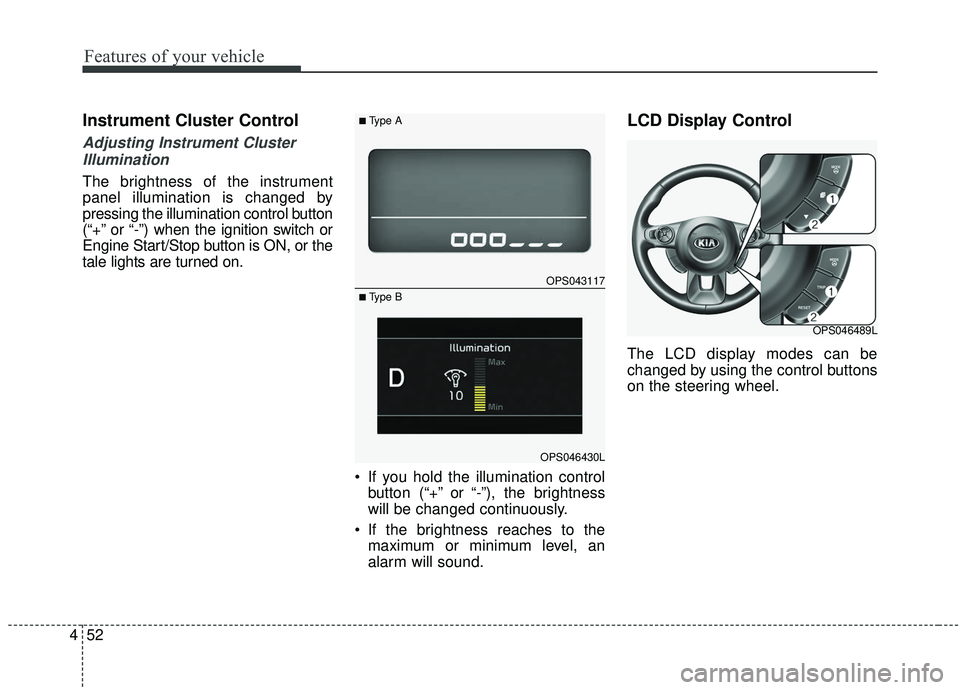
The brightness of the instrument
panel illumination is changed by
pressing the illumination control button
(“+” or “-”) when the ignition switch or
Engine Start/Stop button is ON, or the
tale lights are turned on.
If you hold the illumination controlbutton (“+” or “-”), the brightness
will be changed continuously.
If the brightness reaches to the maximum or minimum level, an
alarm will sound.
LCD Display Control
The LCD display modes can be
changed by using the control buttons
on the steering wheel.
OPS043117
OPS046430L
■Type A
■ Type B
OPS046489L
Page 340 of 564
Driving your vehicle
50
6
The AEB system is designed to
potentially reduce accident risk. It
recognizes the distance from the
vehicle ahead or a pedestrian
through the sensors (i.e. radar and
camera), and, if necessary, warns
the driver of a collision risk with ta
warning message or warning alarms.System setting and activation
System setting
The driver can activate the AEB by
placing the engine start/stop button
to the ON position and by selecting
'User Settings', 'Driving Assist', and
'Autonomous Emergency Braking
System'. The AEB deactivates, when
the driver cancels the system setting.
AUTONOMOUS EMERGENCY BRAKING (AEB) (IF EQUIPPED)
WARNING
-
Autonomous Emergency
Braking (AEB) Limitations
The AEB system is a supple-
mental system and is not a sub-
stitute for safe driving prac-
tices. It is still the responsibility
of the driver to ensure it is safe
to use the AEB based on the
speed of traffic and the distance
to the nearest vehicle ahead of
the driver.
WARNING
Take the following precautions
when using the Autonomous
Emergency Braking (AEB):
This system is only a supple- mental system and it is not
intended to, nor does it
replace the need for extreme
care and attention of the driv-
er. The sensing range and
objects detectable by the sen-
sors are limited. Pay attention
to the road conditions at all
times.
NEVER drive too fast in accor- dance with the road condi-
tions or while cornering.
Always drive cautiously to prevent unexpected and sud-
den situations from occur-
ring. AEB does not stop the
vehicle completely and does
not avoid collisions.
Page 342 of 564
Driving your vehicle
52
6
Prerequisite for activation
The AEB will activate when the AEB
is selected on the LCD display, and
when the following prerequisites are
satisfied:
- The ESC (Electronic Stability
Control) is activated.
- The driving speed is over 6 mph (10 km/h). (The AEB only works
within a certain range of vehicle
speeds)
- When the AEB recognizes a vehi- cle or the pedestrian in front. (The
AEB may not recognize every
obstacle or provide warnings and
braking in every situation, so do
not rely on the AEB to stop the
vehicle in instances where the driv-
er sees an obstacle and has the
ability to apply the brakes) The AEB automatically activates
when you turn the vehicle on.
The driver can deactivate the AEB
by canceling the in the system set-
ting on the LCD display.
The AEB automatically deactivates when canceling ESC. When the
ESC is canceled, the AEB cannot
be activated on the LCD display.
AEB warning message and
system control
The AEB produces warning mes-
sages, warning alarms, and emer-
gency braking based on the level of
risk of a frontal collision, such as
when a vehicle ahead suddenly
brakes or when it detects a collision
with a pedestrian is imminent.
WARNING
Set or cancel AEB with the con-
trolling switches on the steering
wheel only when the vehicle is
stopped. Do not attempt to set
or cancel the AEB while your
vehicle is moving.
Page 343 of 564
653
Driving your vehicle
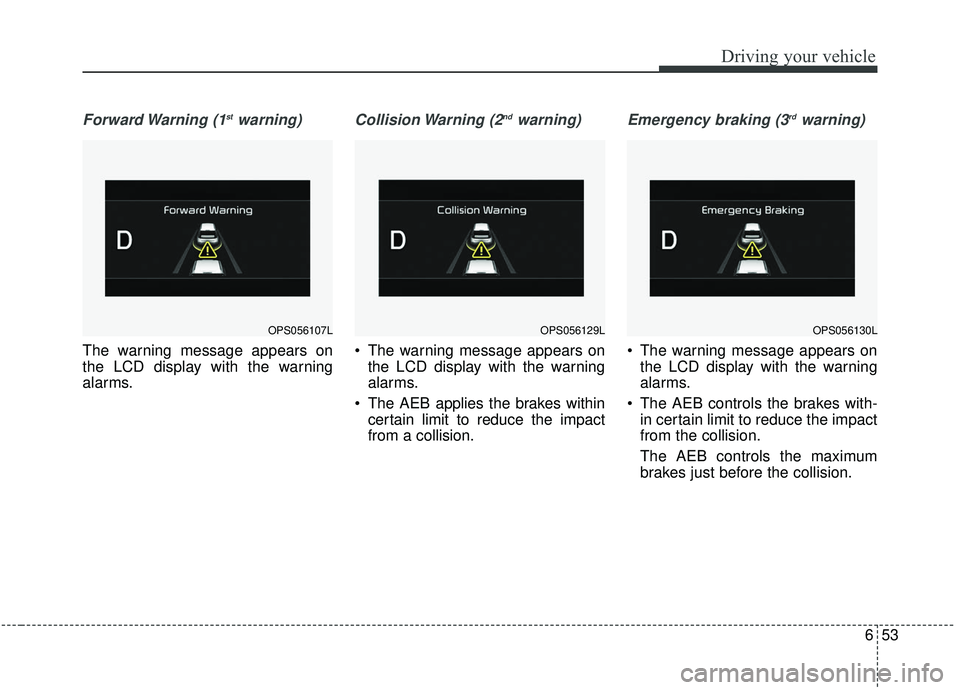
Forward Warning (1stwarning)
The warning message appears on
the LCD display with the warning
alarms.
Collision Warning (2ndwarning)
The warning message appears onthe LCD display with the warning
alarms.
The AEB applies the brakes within certain limit to reduce the impact
from a collision.
Emergency braking (3rdwarning)
The warning message appears onthe LCD display with the warning
alarms.
The AEB controls the brakes with- in certain limit to reduce the impact
from the collision.
The AEB controls the maximum
brakes just before the collision.
OPS056129LOPS056130LOPS056107L
Page 344 of 564
Driving your vehicle
54
6
Brake operation
In an urgent situation, the braking
system enters into the ready status
for prompt reaction against the dri-
ver’s depressing the brake pedal.
The AEB provides additional brak- ing power for optimum braking per-
formance, when the driver
depresses the brake pedal.
The braking control is automatical- ly deactivated, when the driver
sharply depresses the accelerator
pedal, or when the driver abruptly
operates the steering wheel.
The braking control is automatical- ly canceled, when risk factors dis-
appear.
The driver should always exercise
caution when operating the vehicle,
even though there is no warning
message or warning alarm.
✽ ✽ NOTICE
The AEB operates in accordance
with the risk levels, such as the dis-
tance from the vehicle/passer-by in
front, the speed of the vehicle/pass-
er-by in front, and the driver's vehi-
cle operation.
✽ ✽NOTICE
The AEB system logic operates with-
in certain parameters, such as the
distance from the vehicle or pedes-
trian ahead, the speed of the vehicle
ahead, and the driver's vehicle
speed. Certain conditions such as
inclement weather and road condi-
tions may affect the operation of the
AEB system.WARNING
The AEB cannot avoid all colli-
sions. The AEB might not com-
pletely stop the vehicle before
collision, due to ambient weath-
er and road conditions. The
driver has the responsibility to
drive safely and control the
vehicle.
WARNING
The AEB braking control is a
supplemental system and can-
not completely stop the vehicle
nor avoid all collisions. It is the
responsibility of the driver to
safely drive and control the
vehicle.
WARNING
Never deliberately drive danger-
ously to activate the system as
such conduct increases the risk
of an accident.
Page 350 of 564
Driving your vehicle
60
6
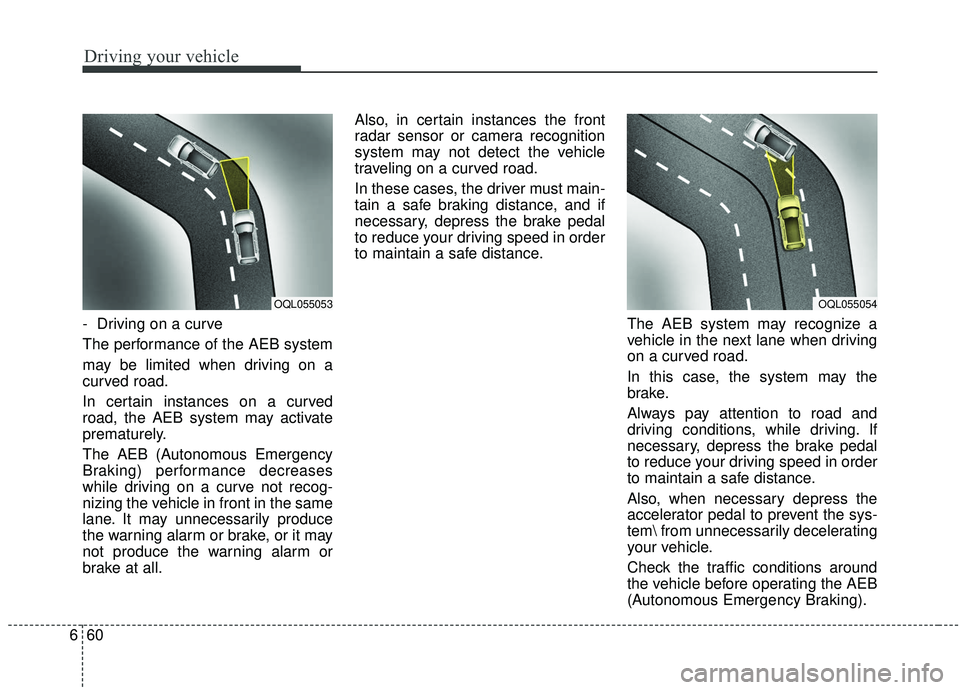
- Driving on a curve
The performance of the AEB system
may be limited when driving on a
curved road.
In certain instances on a curved
road, the AEB system may activate
prematurely.
The AEB (Autonomous Emergency
Braking) performance decreases
while driving on a curve not recog-
nizing the vehicle in front in the same
lane. It may unnecessarily produce
the warning alarm or brake, or it may
not produce the warning alarm or
brake at all. Also, in certain instances the front
radar sensor or camera recognition
system may not detect the vehicle
traveling on a curved road.
In these cases, the driver must main-
tain a safe braking distance, and if
necessary, depress the brake pedal
to reduce your driving speed in order
to maintain a safe distance.
The AEB system may recognize a
vehicle in the next lane when driving
on a curved road.
In this case, the system may the
brake.
Always pay attention to road and
driving conditions, while driving. If
necessary, depress the brake pedal
to reduce your driving speed in order
to maintain a safe distance.
Also, when necessary depress the
accelerator pedal to prevent the sys-
tem from unnecessarily decelerating
your vehicle.
Check the traffic conditions around
the vehicle before operating the AEB
(Autonomous Emergency Braking).
OQL055054OQL055053
Page 351 of 564
661
Driving your vehicle
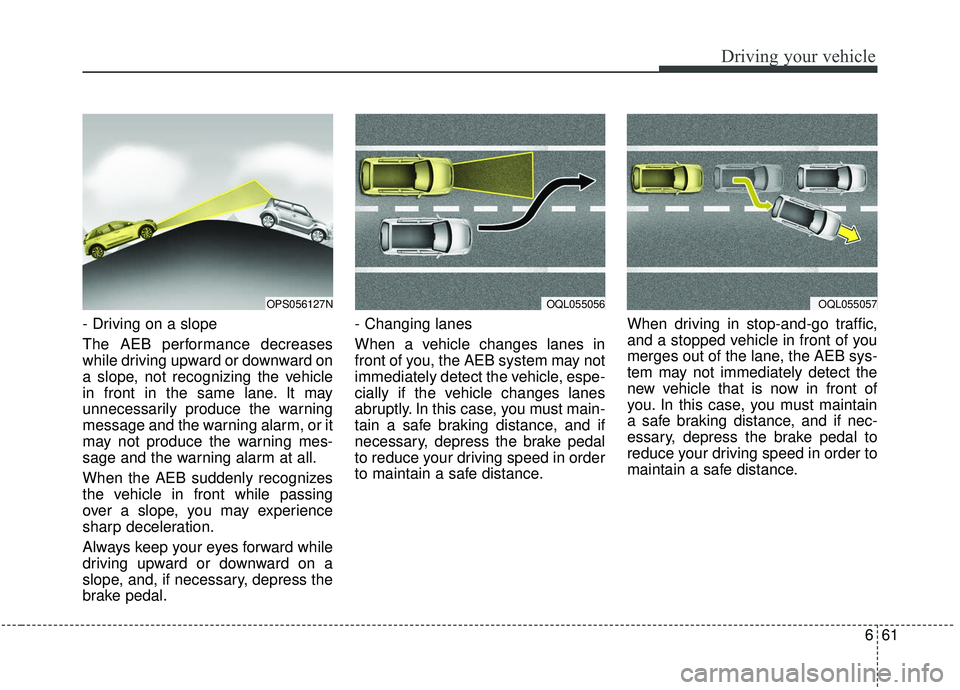
- Driving on a slope
The AEB performance decreases
while driving upward or downward on
a slope, not recognizing the vehicle
in front in the same lane. It may
unnecessarily produce the warning
message and the warning alarm, or it
may not produce the warning mes-
sage and the warning alarm at all.
When the AEB suddenly recognizes
the vehicle in front while passing
over a slope, you may experience
sharp deceleration.
Always keep your eyes forward while
driving upward or downward on a
slope, and, if necessary, depress the
brake pedal.- Changing lanes
When a vehicle changes lanes in
front of you, the AEB system may not
immediately detect the vehicle, espe-
cially if the vehicle changes lanes
abruptly. In this case, you must main-
tain a safe braking distance, and if
necessary, depress the brake pedal
to reduce your driving speed in order
to maintain a safe distance.
When driving in stop-and-go traffic,
and a stopped vehicle in front of you
merges out of the lane, the AEB sys-
tem may not immediately detect the
new vehicle that is now in front of
you. In this case, you must maintain
a safe braking distance, and if nec-
essary, depress the brake pedal to
reduce your driving speed in order to
maintain a safe distance.
OQL055057OPS056127NOQL055056
Page 385 of 564
695
Driving your vehicle
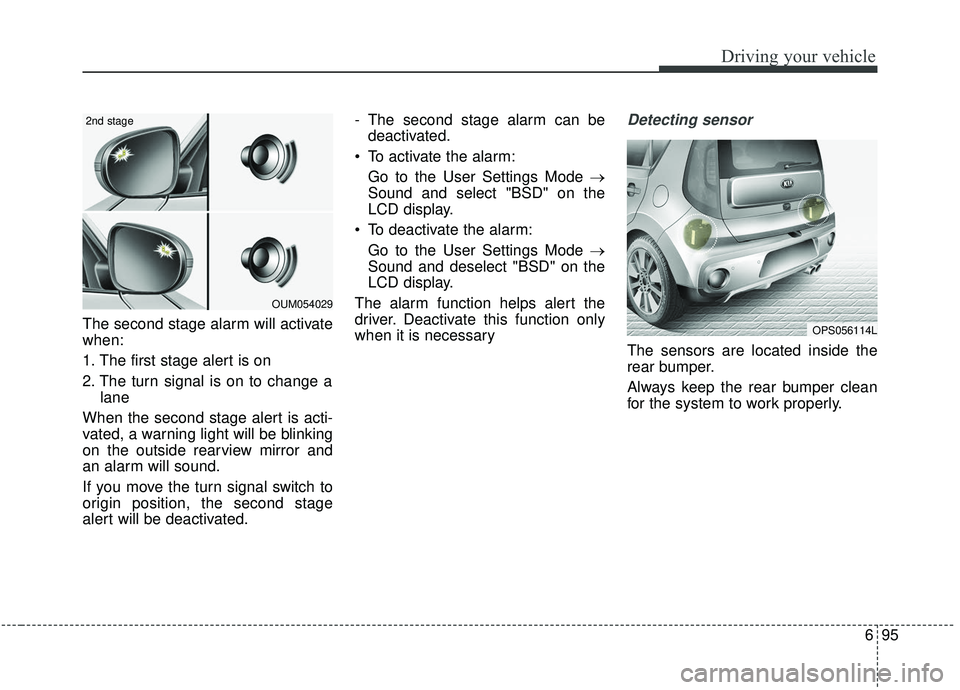
The second stage alarm will activate
when:
1. The first stage alert is on
2. The turn signal is on to change alane
When the second stage alert is acti-
vated, a warning light will be blinking
on the outside rearview mirror and
an alarm will sound.
If you move the turn signal switch to
origin position, the second stage
alert will be deactivated. - The second stage alarm can be
deactivated.
To activate the alarm: Go to the User Settings Mode →
Sound and select "BSD" on the
LCD display.
To deactivate the alarm: Go to the User Settings Mode →
Sound and deselect "BSD" on the
LCD display.
The alarm function helps alert the
driver. Deactivate this function only
when it is necessary
Detecting sensor
The sensors are located inside the
rear bumper.
Always keep the rear bumper clean
for the system to work properly.
OPS056114L
OUM054029
2nd stage