horn KIA SOUL 2019 Owners Manual
[x] Cancel search | Manufacturer: KIA, Model Year: 2019, Model line: SOUL, Model: KIA SOUL 2019Pages: 564, PDF Size: 14.2 MB
Page 16 of 564
25
Your vehicle at a glance
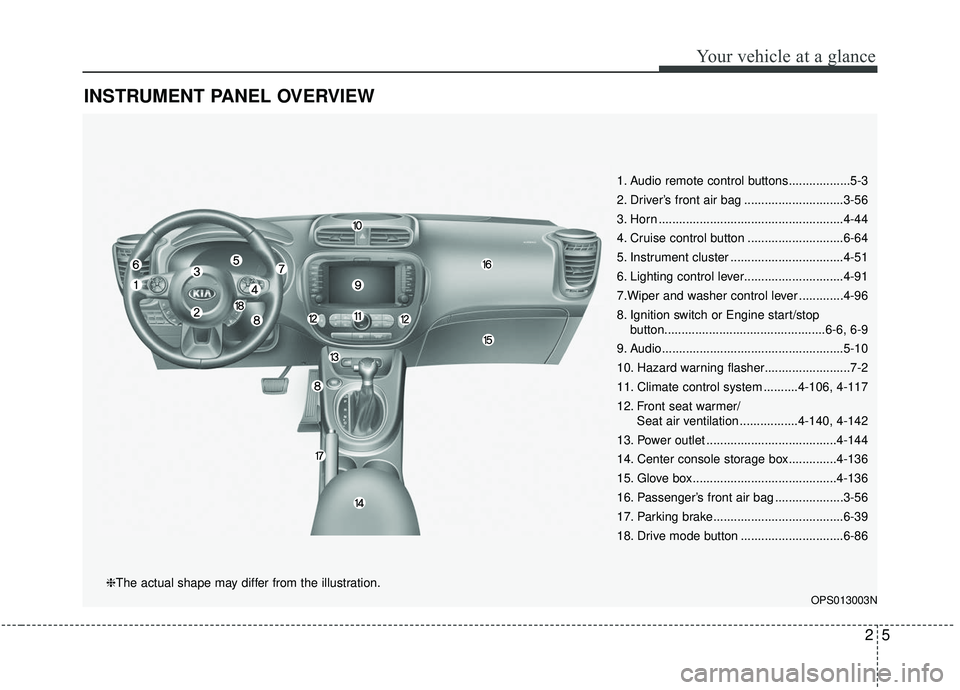
INSTRUMENT PANEL OVERVIEW
1. Audio remote control buttons..................5-3
2. Driver’s front air bag .............................3-56
3. Horn ......................................................4-44
4. Cruise control button ............................6-64
5. Instrument cluster .................................4-51
6. Lighting control lever.............................4-91
7.Wiper and washer control lever .............4-96
8. Ignition switch or Engine start/stopbutton...............................................6-6, 6-9
9. Audio.....................................................5-10
10. Hazard warning flasher.........................7-2
11. Climate control system ..........4-106, 4-117
12. Front seat warmer/ Seat air ventilation .................4-140, 4-142
13. Power outlet ......................................4-144
14. Center console storage box..............4-136
15. Glove box ..........................................4-136
16. Passenger’s front air bag ....................3-56
17. Parking brake......................................6-39
18. Drive mode button ..............................6-86
OPS013003N
❈The actual shape may differ from the illustration.
Page 91 of 564
45
Features of your vehicle
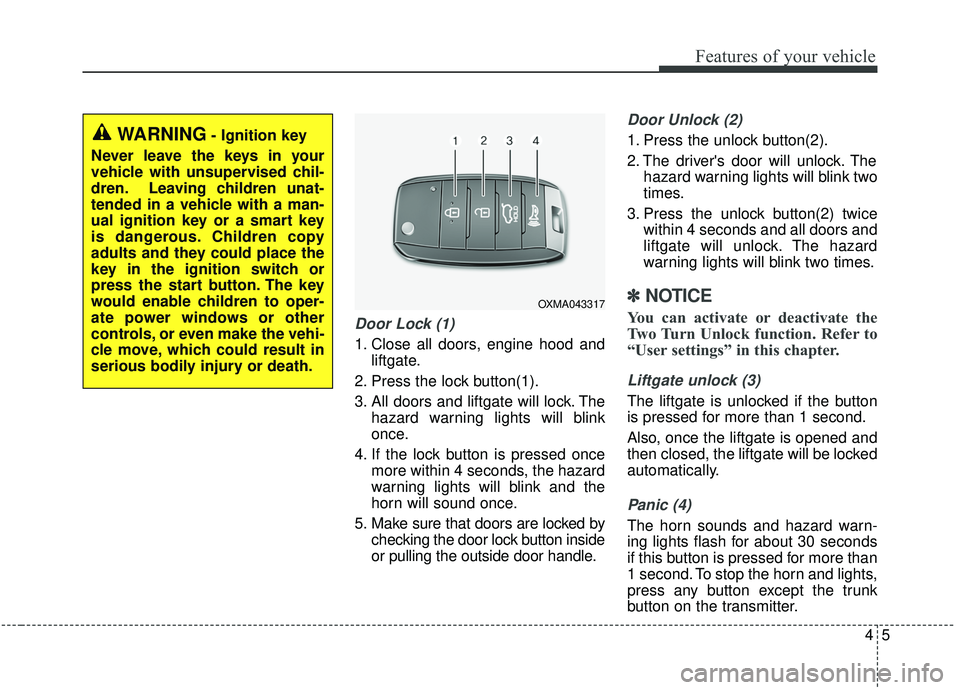
Door Lock (1)
1. Close all doors, engine hood andliftgate.
2. Press the lock button(1).
3. All doors and liftgate will lock. The hazard warning lights will blink
once.
4. If the lock button is pressed once more within 4 seconds, the hazard
warning lights will blink and the
horn will sound once.
5. Make sure that doors are locked by checking the door lock button inside
or pulling the outside door handle.
Door Unlock (2)
1. Press the unlock button(2).
2. The driver's door will unlock. Thehazard warning lights will blink two
times.
3. Press the unlock button(2) twice within 4 seconds and all doors and
liftgate will unlock. The hazard
warning lights will blink two times.
✽ ✽NOTICE
You can activate or deactivate the
Two Turn Unlock function. Refer to
“User settings” in this chapter.
Liftgate unlock (3)
The liftgate is unlocked if the button
is pressed for more than 1 second.
Also, once the liftgate is opened and
then closed, the liftgate will be locked
automatically.
Panic (4)
The horn sounds and hazard warn-
ing lights flash for about 30 seconds
if this button is pressed for more than
1 second. To stop the horn and lights,
press any button except the trunk
button on the transmitter.
OXMA043317
WARNING- Ignition key
Never leave the keys in your
vehicle with unsupervised chil-
dren. Leaving children unat-
tended in a vehicle with a man-
ual ignition key or a smart key
is dangerous. Children copy
adults and they could place the
key in the ignition switch or
press the start button. The key
would enable children to oper-
ate power windows or other
controls, or even make the vehi-
cle move, which could result in
serious bodily injury or death.
Page 99 of 564
413
Features of your vehicle
Using the button on the smart key
1. Press the liftgate unlock button(3)for more than 1 second.
2. When all doors are locked, the hazard warning lights will blink two
times.
Panic
1. Press the panic button(4) for morethan 1 second.
2. The horn sounds and hazard warning light flash for about 30
seconds.
Start-up
You can start the engine without
inserting the key.
❈ For detailed information refer to
the “Engine start/stop button” in
chapter 6.
Loss of the smart key
A maximum of 2 smart keys can be
registered to a single vehicle.
If you happen to lose your smart key,
you will not be able to start the
engine. You should immediately take
the vehicle and remaining key to your
authorized Kia dealer(tow the vehi-
cle, if necessary) to protect it from
potential theft.
Smart key precautions
The smart key will not work if any
of the following occur:
- The smart key is close to a radiotransmitter such as a radio sta-
tion or an airport which can inter-
fere with normal operation of the
smart key.
- The smart key is near a mobile two way radio system or a cellular
phone.
- Another vehicle’s smart key is being operated close to your
vehicle.
When the smart key does not work correctly, open and close the door
with the mechanical key and contact
an authorized Kia dealer.
Page 130 of 564
Features of your vehicle
44
4
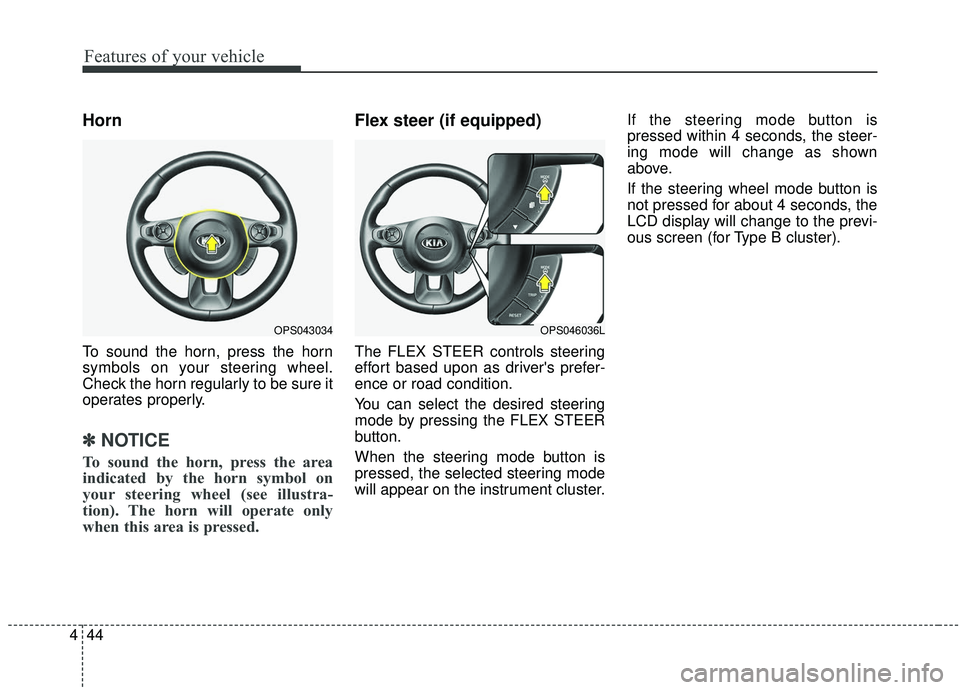
Horn
To sound the horn, press the horn
symbols on your steering wheel.
Check the horn regularly to be sure it
operates properly.
✽ ✽
NOTICE
To sound the horn, press the area
indicated by the horn symbol on
your steering wheel (see illustra-
tion). The horn will operate only
when this area is pressed.
Flex steer (if equipped)
The FLEX STEER controls steering
effort based upon as driver's prefer-
ence or road condition.
You can select the desired steering
mode by pressing the FLEX STEER
button.
When the steering mode button is
pressed, the selected steering mode
will appear on the instrument cluster. If the steering mode button is
pressed within 4 seconds, the steer-
ing mode will change as shown
above.
If the steering wheel mode button is
not pressed for about 4 seconds, the
LCD display will change to the previ-
ous screen (for Type B cluster).
OPS043034OPS046036L
Page 149 of 564
463
Features of your vehicle
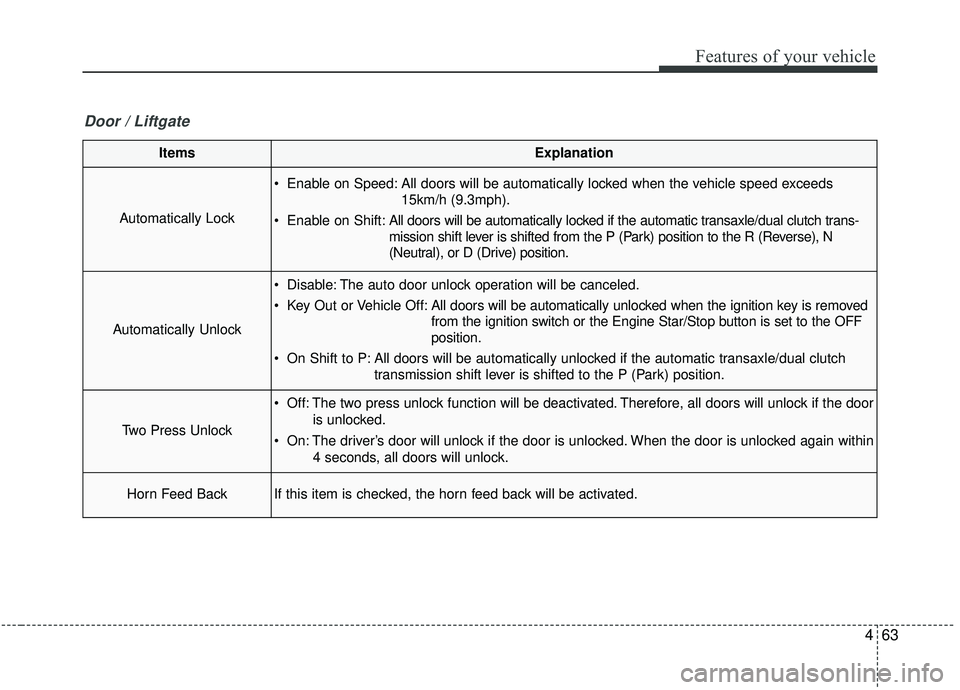
ItemsExplanation
Automatically Lock
Enable on Speed: All doors will be automatically locked when the vehicle speed exceeds15km/h (9.3mph).
Enable on Shift: All doors will be automatically locked if the automatic transaxle/dual clutch trans-
mission shift lever is shifted from the P (Park) position to the R (Reverse), N
(Neutral), or D (Drive) position.
Automatically Unlock
Disable: The auto door unlock operation will be canceled.
Key Out or Vehicle Off: All doors will be automatically unlocked when the ignition key is removed
from the ignition switch or the Engine Star/Stop button is set to the OFF
position.
On Shift to P: All doors will be automatically unlocked if the automatic transaxle/dual clutch transmission shift lever is shifted to the P (Park) position.
Two Press Unlock
Off: The two press unlock function will be deactivated. Therefore, all doors will unlock if the door
is unlocked.
On: The driver’s door will unlock if the door is unlocked. When the door is unlocked again within 4 seconds, all doors will unlock.
Horn Feed BackIf this item is checked, the horn feed back will be activated.
Door / Liftgate
Page 511 of 564
873
Maintenance
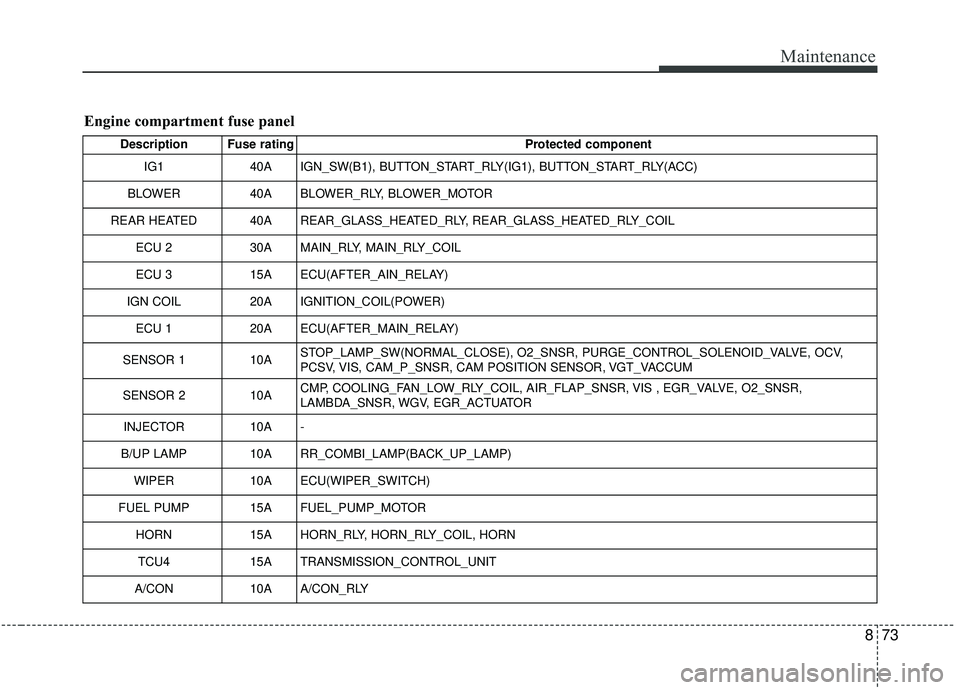
Engine compartment fuse panel
Description Fuse ratingProtected component
IG1 40A IGN_SW(B1), BUTTON_START_RLY(IG1), BUTTON_START_RLY(ACC)
BLOWER 40A BLOWER_RLY, BLOWER_MOTOR
REAR HEATED 40A REAR_GLASS_HEATED_RLY, REAR_GLASS_HEATED_RLY_COIL ECU 2 30A MAIN_RLY, MAIN_RLY_COIL
ECU 3 15A ECU(AFTER_AIN_RELAY)
IGN COIL 20A IGNITION_COIL(POWER)
ECU 1 20A ECU(AFTER_MAIN_RELAY)
SENSOR 1 10ASTOP_LAMP_SW(NORMAL_CLOSE), O2_SNSR, PURGE_CONTROL_SOLENOID_VALVE, OCV,
PCSV, VIS, CAM_P_SNSR, CAM POSITION SENSOR, VGT_VACCUM
SENSOR 2 10ACMP, COOLING_FAN_LOW_RLY_COIL, AIR_FLAP_SNSR, VIS , EGR_VALVE, O2_SNSR,
LAMBDA_SNSR, WGV, EGR_ACTUATOR
INJECTOR 10A -
B/UP LAMP 10A RR_COMBI_LAMP(BACK_UP_LAMP)
WIPER 10A ECU(WIPER_SWITCH)
FUEL PUMP15AFUEL_PUMP_MOTOR
HORN15AHORN_RLY, HORN_RLY_COIL, HORN
TCU415ATRANSMISSION_CONTROL_UNIT
A/CON10AA/CON_RLY
Page 563 of 564
I9
Index
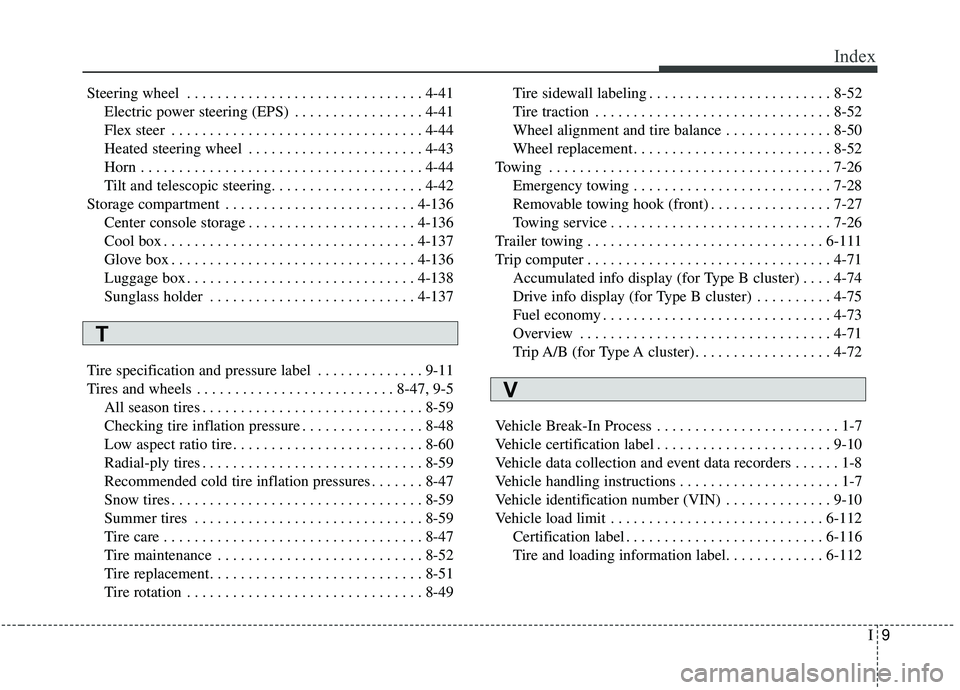
Steering wheel . . . . . . . . . . . . . . . . . . . . . . . . . . . . . . . 4-41Electric power steering (EPS) . . . . . . . . . . . . . . . . . 4-41
Flex steer . . . . . . . . . . . . . . . . . . . . . . . . . . . . . . . . . 4-44
Heated steering wheel . . . . . . . . . . . . . . . . . . . . . . . 4-43
Horn . . . . . . . . . . . . . . . . . . . . . . . . . . . . . . . . . . . . \
. 4-44
Tilt and telescopic steering. . . . . . . . . . . . . . . . . . . . 4-42
Storage compartment . . . . . . . . . . . . . . . . . . . . . . . . . 4-136 Center console storage . . . . . . . . . . . . . . . . . . . . . . 4-136
Cool box . . . . . . . . . . . . . . . . . . . . . . . . . . . . . . . . . 4-137
Glove box . . . . . . . . . . . . . . . . . . . . . . . . . . . . . . . . 4-136
Luggage box . . . . . . . . . . . . . . . . . . . . . . . . . . . . . . 4-138
Sunglass holder . . . . . . . . . . . . . . . . . . . . . . . . . . . 4-137
Tire specification and pressure label . . . . . . . . . . . . . . 9-11
Tires and wheels . . . . . . . . . . . . . . . . . . . . . . . . . . 8-47, 9-5 All season tires . . . . . . . . . . . . . . . . . . . . . . . . . . . . . 8-59
Checking tire inflation pressure . . . . . . . . . . . . . . . . 8-48
Low aspect ratio tire. . . . . . . . . . . . . . . . . . . . . . . . . 8-60
Radial-ply tires . . . . . . . . . . . . . . . . . . . . . . . . . . . . . 8-59
Recommended cold tire inflation pressures . . . . . . . 8-47
Snow tires . . . . . . . . . . . . . . . . . . . . . . . . . . . . . . . . . 8-59
Summer tires . . . . . . . . . . . . . . . . . . . . . . . . . . . . . . 8-59
Tire care . . . . . . . . . . . . . . . . . . . . . . . . . . . . . . . . . . 8-47\
Tire maintenance . . . . . . . . . . . . . . . . . . . . . . . . . . . 8-52
Tire replacement . . . . . . . . . . . . . . . . . . . . . . . . . . . . 8-51
Tire rotation . . . . . . . . . . . . . . . . . . . . . . . . . . . . . . . 8-49 Tire sidewall labeling . . . . . . . . . . . . . . . . . . . . . . . . 8-52
Tire traction . . . . . . . . . . . . . . . . . . . . . . . . . . . . . . . 8-52
Wheel alignment and tire balance . . . . . . . . . . . . . . 8-50
Wheel replacement . . . . . . . . . . . . . . . . . . . . . . . . . . 8-52
Towing . . . . . . . . . . . . . . . . . . . . . . . . . . . . . . . . . . . . \
. 7-26 Emergency towing . . . . . . . . . . . . . . . . . . . . . . . . . . 7-28
Removable towing hook (front) . . . . . . . . . . . . . . . . 7-27
Towing service . . . . . . . . . . . . . . . . . . . . . . . . . . . . . 7-26
Trailer towing . . . . . . . . . . . . . . . . . . . . . . . . . . . . . . . 6-111
Trip computer . . . . . . . . . . . . . . . . . . . . . . . . . . . . . . . . 4-71 Accumulated info display (for Type B cluster) . . . . 4-74
Drive info display (for Type B cluster) . . . . . . . . . . 4-75
Fuel economy . . . . . . . . . . . . . . . . . . . . . . . . . . . . . . 4-73
Overview . . . . . . . . . . . . . . . . . . . . . . . . . . . . . . . . . 4-71
Trip A/B (for Type A cluster) . . . . . . . . . . . . . . . . . . 4-72
Vehicle Break-In Process . . . . . . . . . . . . . . . . . . . . . . . . 1-7
Vehicle certification label . . . . . . . . . . . . . . . . . . . . . . . 9-10
Vehicle data collection and event data recorders . . . . . . 1-8
Vehicle handling instructions . . . . . . . . . . . . . . . . . . . . . 1-7
Vehicle identification number (VIN) . . . . . . . . . . . . . . 9-10
Vehicle load limit . . . . . . . . . . . . . . . . . . . . . . . . . . . . 6-112 Certification label . . . . . . . . . . . . . . . . . . . . . . . . . . 6-116
Tire and loading information label. . . . . . . . . . . . . 6-112
T
V