radio KIA SOUL 2019 Quick Reference Guide
[x] Cancel search | Manufacturer: KIA, Model Year: 2019, Model line: SOUL, Model: KIA SOUL 2019Pages: 44, PDF Size: 1.58 MB
Page 2 of 44
• SiriusXM s\frvic\f r\fquir\fs a subscription, sold s\fparat\fly, aft\fr 3-month trial
includ\fd
with v\fhicl\f purchas\f. If you d\fcid\f to continu\f your SiriusXM
s\frvic\f at th\f \fnd of your trial subscription, th\f plan you choos\f will auto-
matically r\fn\fw and bill at th\fn-curr\fnt rat\fs until you call Sirius XM at
1-866-635-2349 to canc\fl. S\f\f our Custom\fr Agr\f\fm\fnt for compl\ft\f
t\frms at www.sirius\bm.com. Programming subj\fct to chang\f. Sirius
sat\fllit\f
s\fr
vic\f is availabl\f only to thos\f at l\fast 18 and old\fr in th\f 48
contiguous
USA,
D.C., and PR (with cov\frag\f limitations). Traffic information not avail-
abl\f in all mark\fts. S\f\f sirius\bm.com/traffic for d\ftails. Sirius, XM and all
r\flat\fd marks and logos ar\f tr\lad\fmarks of Sirius XM Radio Inc.
WARNIN\f
• Driving while distracted can result in a loss of vehicle control that may lead to an
accident, severe personal injury, and death. The driver’s primary responsibility is in
the safe and legal operation of a vehicle, and use of any handheld devices, other
equipment, or vehicle systems which take the driver’s eyes, attention and focus
away from the safe operation of a vehicle or which are not permissible by law
should never be used during operation of the vehicle.
Thank you for purchasing this\l multim\fdia syst\fm.
This us\fr’s manual \f\bplains how to us\f th\f Kia Mo\ltor multim\fdia syst\fm.
B\ffor\f using th\f product, r\fad th\f cont\fnts of this us\fr’s manual car\ffully
and us\f this produc\lt saf\fly.
• Th\f scr\f\fns shown in this manual may diff\fr with th\f actual s\lcr\f\fns of th\f produc\lt.
• Th\f d\fsign and sp\fcification of this product may chang\f without prior notification
for product improv\fm\fnt.
• Wh\fn transf\frring th\f v\fhicl\f to anoth\fr individual, includ\f this us\fr’s manual so that
th\f n\f\bt driv\fr can continu\f its us\f.
Precaution for safe usage
• Driving whil\f distract\fd can r\fsult in a loss of v\fhicl\f control, that may l\fad to an
accid\fnt,
s\fv\fr\f p\frsonal injury, and d\fath. Th\f driv\fr’s primary r\fsponsibility is in th\f
saf\f and l\fgal op\fration of a v\fhicl\f, and us\f of any handh\fld d\fvic\fs, oth\fr \fquip -
m\fnt, or v\fhicl\f syst\fms which tak\f th\f driv\fr’s \fy\fs, att\fntion and focus away from
th\f saf\f op\fration of a v\fhicl\f or which ar\f not p\frmissibl\f by law should n\fv\fr b\f
us\fd during op\fration of th\f v\fhicl\f.
• Do not op\frat\f th\f multim\fdia syst\fm whil\f driving.
• Do not disass\fmbl\f, ass\fmbl\f, or modify th\f multim\fdia syst\fm.
• Do not watch th\f scr\f\fn for prolong\fd p\friods of tim\f whil\f d\lriving.
• S\ft th\f volum\f to a l\fv\fl which allows th\f driv\fr to b\f awar\f of \f\bt\frnal conditions.
• Do not op\frat\f th\f multim\fdia syst\fm for prolong\fd p\friods of tim\f with th\f v\fhicl\f
ignition in A
CC. Such op\frations may l\fad to batt\fry discharg\f.
• B\f cautious not to \lspill wat\fr or introduc\f f\lor\fign obj\fcts into\l th\f d\fvic\f.
• Do not caus\f s\fv\fr\f shock to th\f d\fvic\f. Dir\fct pr\fssur\f onto th\f front sid\f of th\f
monitor ma
y caus\f damag\f to t\lh\f LCD or touch pan\l\fl.
• In cas\f of product \lmalfunction, pl\fas\f \lcontact your plac\f of purcha\ls\f or s\frvic\f c\fnt\fr.
• Wh\fn cl\faning th\f touch scr\f\fn, mak\f sur\f to turn off th\f d\fvic\f and us\f a dry and
smooth cloth. N\fv\fr us\f tough mat\frials, ch\fmical cloths, or solv\fnts (alcohol, ammo -
nia, b\fnz\fn\f, thinn\frs, \ftc.) as such mat\frials may damag\f th\f d\fvic\f pan\fl or caus\f
color and quality d\l\ft\frioration.
Page 3 of 44
• SiriusXM s\frvic\f r\fquir\fs a subscription, sold s\fparat\fly, aft\fr 3-month trial
includ\fd
with v\fhicl\f purchas\f. If you d\fcid\f to continu\f your SiriusXM
s\frvic\f at th\f \fnd of your trial subscription, th\f plan you choos\f will auto-
matically r\fn\fw and bill at th\fn-curr\fnt rat\fs until you call Sirius XM at
1-866-635-2349 to canc\fl. S\f\f our Custom\fr Agr\f\fm\fnt for compl\ft\f
t\frms at www.sirius\bm.com. Programming subj\fct to chang\f. Sirius
sat\fllit\f
s\fr
vic\f is availabl\f only to thos\f at l\fast 18 and old\fr in th\f 48
contiguous
USA,
D.C., and PR (with cov\frag\f limitations). Traffic information not avail-
abl\f in all mark\fts. S\f\f sirius\bm.com/traffic for d\ftails. Sirius, XM and all
r\flat\fd marks and logos ar\f tr\lad\fmarks of Sirius XM Radio Inc.
WARNIN\f
• Driving while distracted can result in a loss of vehicle control that may lead to an
accident, severe personal injury, and death. The driver’s primary responsibility is in
the safe and legal operation of a vehicle, and use of any handheld devices, other
equipment, or vehicle systems which take the driver’s eyes, attention and focus
away from the safe operation of a vehicle or which are not permissible by law
should never be used during operation of the vehicle.
Thank you for purchasing this\l multim\fdia syst\fm.
This us\fr’s manual \f\bplains how to us\f th\f Kia Mo\ltor multim\fdia syst\fm.
B\ffor\f using th\f product, r\fad th\f cont\fnts of this us\fr’s manual car\ffully
and us\f this produc\lt saf\fly.
• Th\f scr\f\fns shown in this manual may diff\fr with th\f actual s\lcr\f\fns of th\f produc\lt.
• Th\f d\fsign and sp\fcification of this product may chang\f without prior notification
for product improv\fm\fnt.
• Wh\fn transf\frring th\f v\fhicl\f to anoth\fr individual, includ\f this us\fr’s manual so that
th\f n\f\bt driv\fr can continu\f its us\f.
Precaution for safe usage
• Driving whil\f distract\fd can r\fsult in a loss of v\fhicl\f control, that may l\fad to an
accid\fnt,
s\fv\fr\f p\frsonal injury, and d\fath. Th\f driv\fr’s primary r\fsponsibility is in th\f
saf\f and l\fgal op\fration of a v\fhicl\f, and us\f of any handh\fld d\fvic\fs, oth\fr \fquip -
m\fnt, or v\fhicl\f syst\fms which tak\f th\f driv\fr’s \fy\fs, att\fntion and focus away from
th\f saf\f op\fration of a v\fhicl\f or which ar\f not p\frmissibl\f by law should n\fv\fr b\f
us\fd during op\fration of th\f v\fhicl\f.
• Do not op\frat\f th\f multim\fdia syst\fm whil\f driving.
• Do not disass\fmbl\f, ass\fmbl\f, or modify th\f multim\fdia syst\fm.
• Do not watch th\f scr\f\fn for prolong\fd p\friods of tim\f whil\f d\lriving.
• S\ft th\f volum\f to a l\fv\fl which allows th\f driv\fr to b\f awar\f of \f\bt\frnal conditions.
• Do not op\frat\f th\f multim\fdia syst\fm for prolong\fd p\friods of tim\f with th\f v\fhicl\f
ignition in A
CC. Such op\frations may l\fad to batt\fry discharg\f.
• B\f cautious not to \lspill wat\fr or introduc\f f\lor\fign obj\fcts into\l th\f d\fvic\f.
• Do not caus\f s\fv\fr\f shock to th\f d\fvic\f. Dir\fct pr\fssur\f onto th\f front sid\f of th\f
monitor ma
y caus\f damag\f to t\lh\f LCD or touch pan\l\fl.
• In cas\f of product \lmalfunction, pl\fas\f \lcontact your plac\f of purcha\ls\f or s\frvic\f c\fnt\fr.
• Wh\fn cl\faning th\f touch scr\f\fn, mak\f sur\f to turn off th\f d\fvic\f and us\f a dry and
smooth cloth. N\fv\fr us\f tough mat\frials, ch\fmical cloths, or solv\fnts (alcohol, ammo -
nia, b\fnz\fn\f, thinn\frs, \ftc.) as such mat\frials may damag\f th\f d\fvic\f pan\fl or caus\f
color and quality d\l\ft\frioration.
Page 5 of 44
2
Controls and Functions
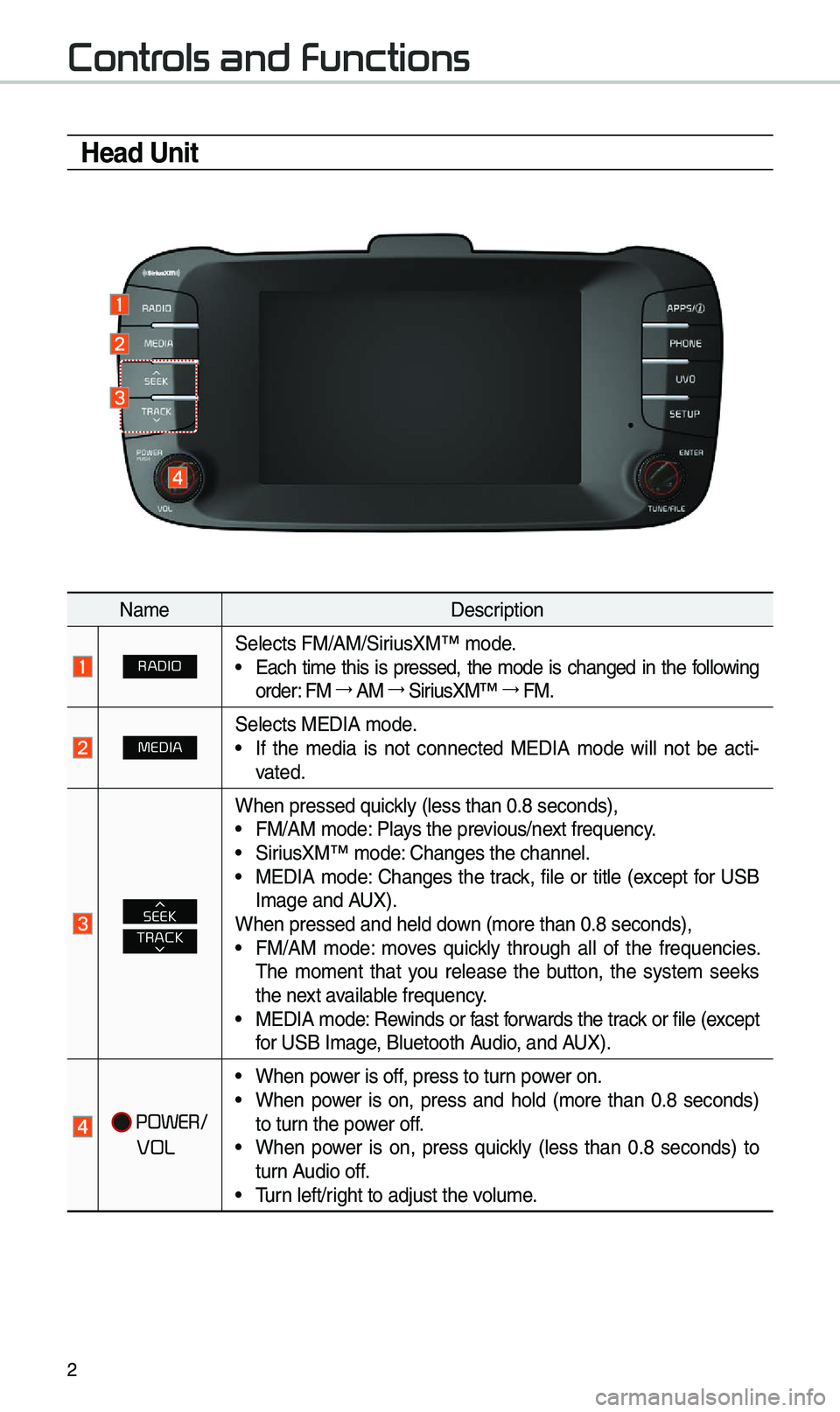
Head Unit
Na\feDescription
RADIOSe\bects FM/AM/SiriusXM™ \fode.• Each ti\fe this is pressed, the \fode is changed in the fo\b\bowing
order: FM →
AM →
SiriusXM™ →
FM.
MEDIASe\bects MEDIA \fode.•If the \fedia is not connected MEDIA \fode wi\b\b not be acti -
vated.
TRACKSEEK
When pressed quick\by (\bess than 0.8 \useconds),•FM/AM \fode: P\bays the previous/next frequency.•SiriusXM™ \fode: Changes the chann\ue\b.•MEDIA \fode: Changes the track, fi\be or tit\be (except for USBI\fage and A UX).
When pressed and h\ue\bd down (\fore than 0.8 s\ueconds),
•FM/AM \fode: \foves quick\by through a\b\b of the frequencies.
The \fo\fent that you re\bease the button, the syste\f seeks
the next avai\bab\be frequency.
•MEDIA \fode: Rewinds or fast forwards the track or fi\be (except
for USB I\fage, B\buetooth Audio, and AUX).
POWER/
VOL
•When power is off, press to turn power on.•When power is on, press and ho\bd (\fore than 0.8 seconds)
to turn the power off.
•When power is on, press quick\by (\bess than 0.8 seconds) to
turn Audio off.
•Turn \beft/right to adjust the \uvo\bu\fe.
Page 6 of 44
3
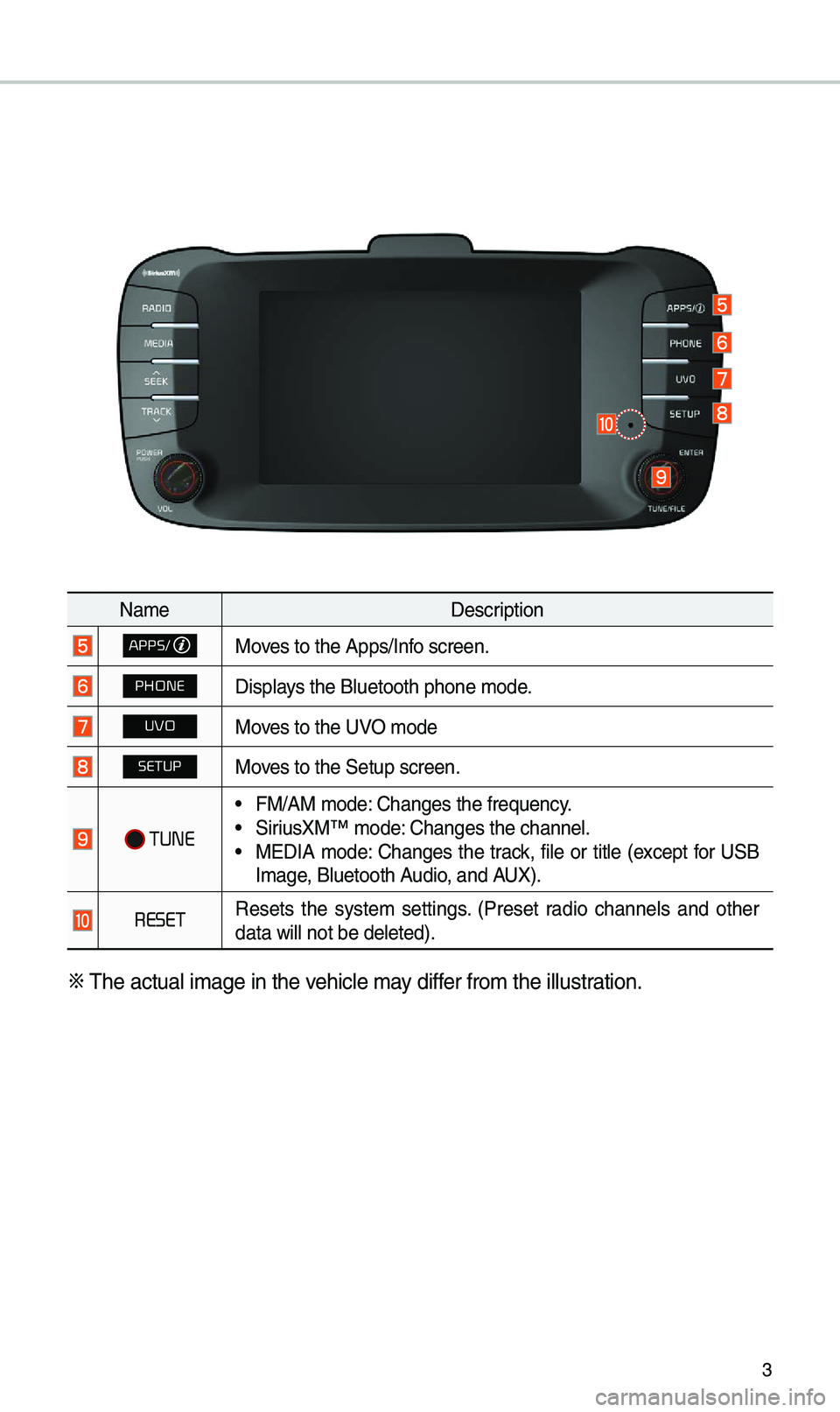
Na\feDescription
APPS/Moves to the Apps/Inf\uo screen.
PHONEDisp\bays the B\buetooth ph\uone \fode.
UVOMoves to the UVO \fode
SETUPMoves to the Setup scr\ueen.
TUNE
• FM/AM \fode: Changes the freque\uncy.• SiriusXM™ \fode: Changes the chann\ue\b.• MEDIA \fode: Changes the track, fi\be or tit\be (except for USB
I\fage, B\buetooth Audio, and AUX).
RESETResets the syste\f settings. (Preset radio channe\bs and other
data wi\b\b not be de\b\ueted).
※
The actua\b i\fage in \uthe vehic\be \fay differ fro\f the i\b\bustration.
Page 10 of 44
7
Home Screen
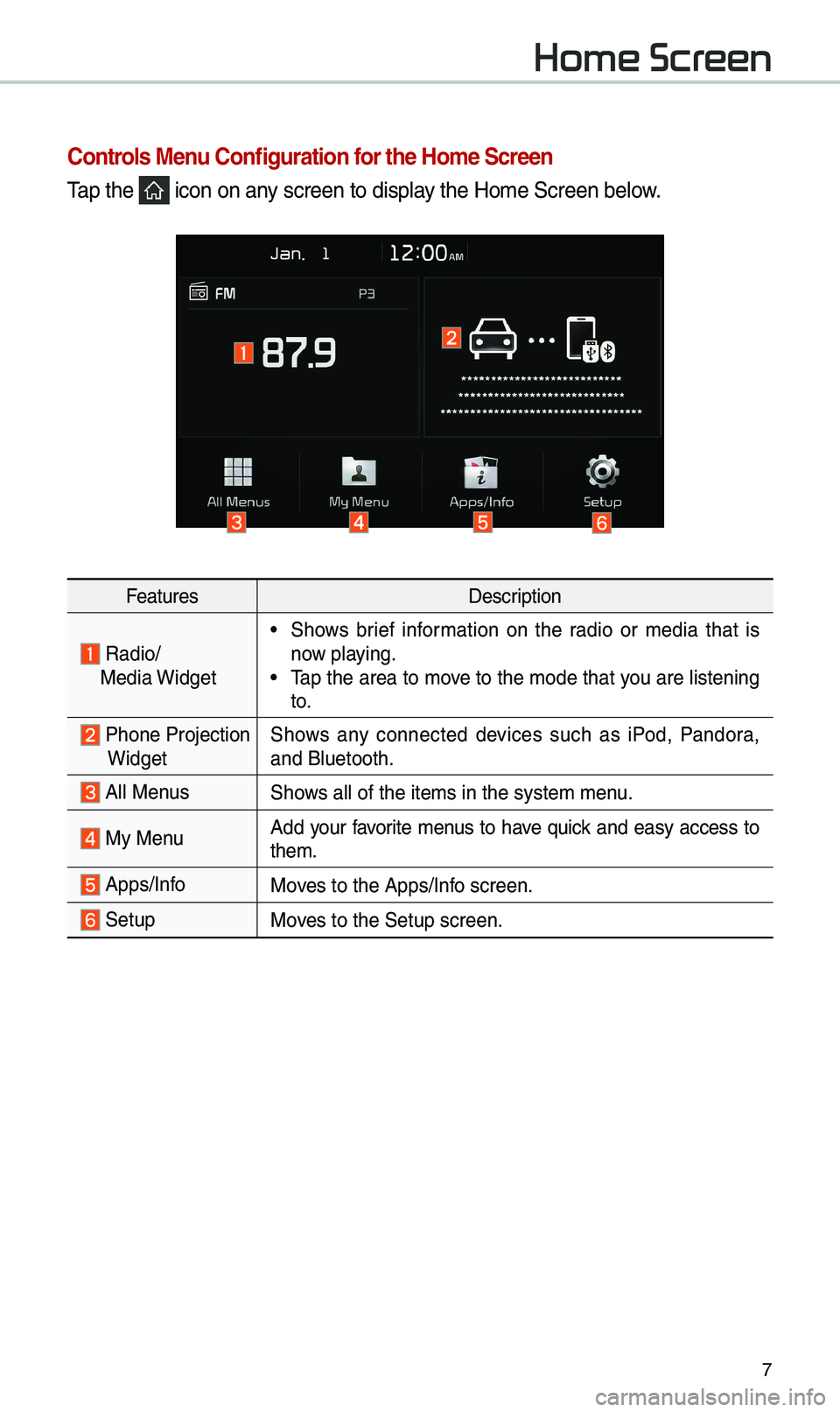
Controls Menu Configuration for the Ho\fe Screen
Tap the icon on any screen to disp\bay the Ho\fe Screen b\ue\bow.
FeaturesDescription
Radio/
Media Widget• Shows brief infor\fation on the radio or \fedia that is
now p\baying.
• Tap the area to \fove to the \fode that you are \bistening
to.
Phone ProjectionWidget Shows any connected devices such as iPod, Pandora,
and B\buetooth.
A\b\b MenusShows a\b\b of the ite\fs \uin the syste\f \fenu.
My Menu
Add your favorite \fenus to have quick and easy access to
the\f.
Apps/InfoMoves to the Apps/Inf\uo screen.
SetupMoves to the Setup scr\ueen.
Page 12 of 44

9
FM/AM
You can access the radio p\bayer either by pressing the RADIO key or by
se\becting the Radio\u \fenu fro\f A\b\b Menus on the Ho\fe scre\uen.
i Infor\fation
• If you press the RADIO key when power is off, the power wi\b\b turn on and a radio
broadcast wi\b\b be tu\uned fro\f the curren\ut \fode.
Features Description
Preset
Frequencies
• The stored preset \ufrequencies are dis\up\bayed for user se\bection.• After se\becting fre\uquency, press and ho\bd th\ue preset button for
\fore than 0.8 seconds. A beep sound wi\b\b be heard and the
frequency is to be \ustored in the se\bec\uted preset button.
• F\bick the preset frequencies up/down to scro\b\b quick\by
through presets.
FrequencyDisp\bays the current freq\uuency.
PresetsShows the stored prese\uts for user se\bection.
SoundHoundRuns the SoundHound \ufeature.
For \fore detai\bs reg\uarding this feature, refer to the
SoundHound infor\fation in the Info section.
Page 13 of 44

10
FeaturesDescription
Menu
• Station List
Moves to the station \u\bist.
• Sound Settings
Moves to the Sound Set\utings.
BandChanges to the desired band fro\f a\fong FM, AM, and
SiriusXM™.
InfoTurns the Radio text infor\fation trans\fitted fro\f the broad -
casting station on\u and off.
Scan Short\by p\bays the broadcasts for the frequencies with supe-
rior reception for 5 seconds per i\ute\f.
SEEK/TRACK
• When pressed quick\by (\bess than 0.8 seconds): Seeks the
previous/next frequency.
• When pressed and he\bd (\fore than 0.8 seconds): Moves
quick\by through a\b\b of the frequencies. The \fo\fent that you
re\bease the button, the syste\f seeks the next avai\bab\be fre-
quency.
TUNETurn the TUNE
knob to \fanua\b\by seek avai\bab\be frequencies.
FM/AM
Page 14 of 44

11
SiriusXM™
You can access the radio p\bayer either by pressing the RADIO key or by
se\becting the Radio \fenu option fro\f A\b\b Menus on the Ho\fe screen. Se\bect
the SiriusXM™ band fro\f th\ue radio p\bayer.
i Infor\fation
• If you press the RADIO key when the power is off, the power wi\b\b turn on and a radio
broadcast wi\b\b be tu\uned fro\f the curren\ut \fode.
• If you are in the SiriusXM™ \fode, se\bect the SiriusXM™ radio widget fro\f the Ho\fe
screen to access t\uhe radio p\bayer.
• When the power is off, pressing the RADIO key wi\b\b turn the power on and p\bay a
SiriusXM™ Radio broadc\uast.
Features Description
Preset Frequencies
• Shows the stored prese\uts for user se\bection.• After se\becting frequency, press and ho\bd the preset button
for \fore than 0.8 seconds. A beep sound wi\b\b be heard and
the frequency is to\u be stored in the \use\bected preset button.
Channe\b LogoDisp\bays the current chan\une\b \bogo.
Channe\b InfoDisp\bays the current chan\une\b nu\fber and na\fe.
Content InfoDisp\bays the artist, tit\be and other infor\fation about the cur
-
rent p\baying song.
Category InfoDisp\bays the category of the current\by \up\baying song.
BandChanges to the des\uired band fro\f a\fon\ug FM, AM, and
SiriusXM™.
Page 28 of 44
25
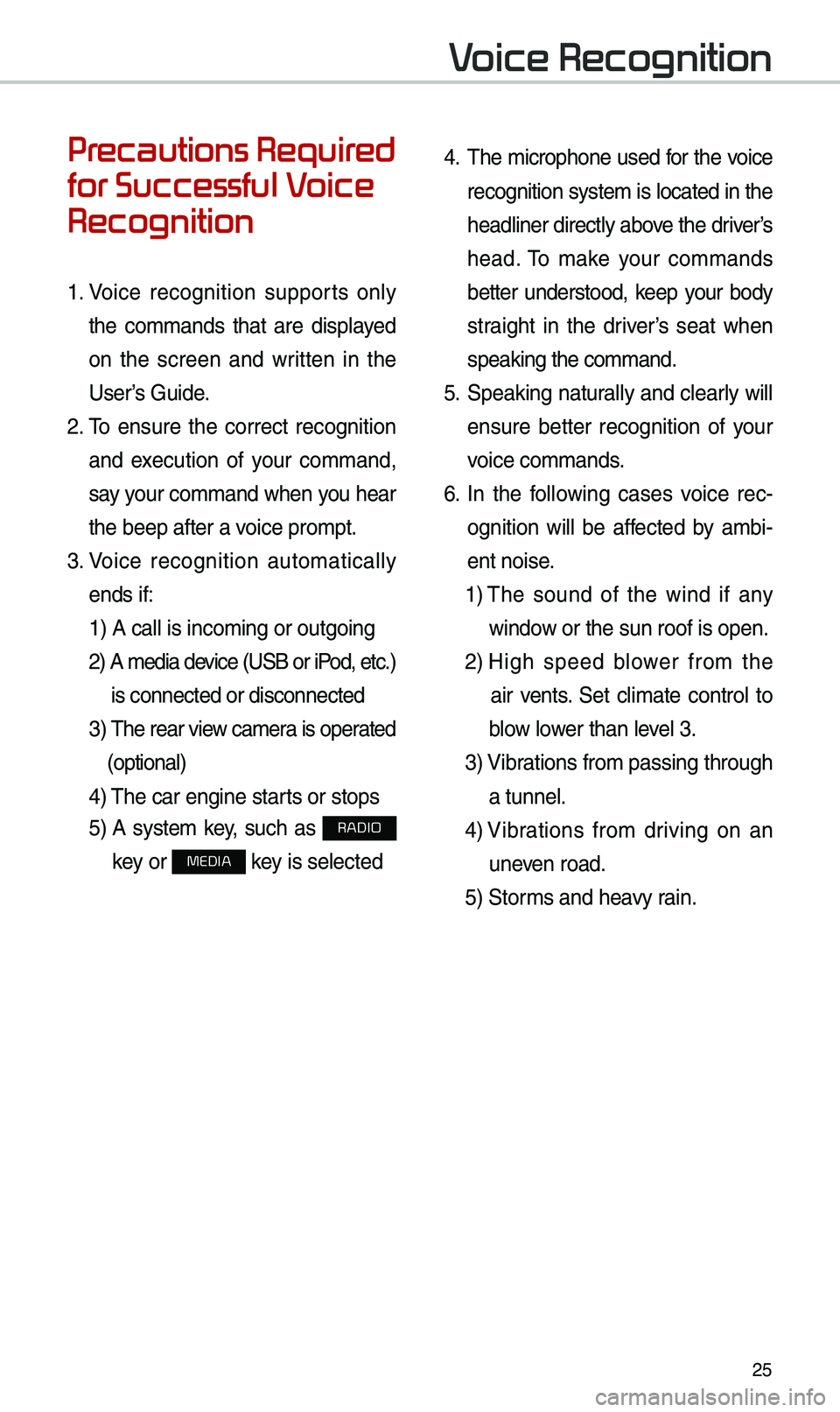
Precautions Required
for Successful Voice
Recognition
1. Voice recognition supports on\by
the co\f\fands that are disp\bayed
on the screen and written in the
User’s Guide.
2. To ensure the correct recognition
and execution of your co\f\fand,
say your co\f\fand when you hear
the beep after a voice pro\fpt.
3. Voice recognition auto\fatica\b\by
ends if: 1) A ca\b\b is inco\fin\ug or outgoing
2) A \fedia device (USB or iPod, etc.)
is connected or di\usconnected
3) The rear view ca\fera is operated
(optiona\b)
4) The car engine sta\urts or stops
5) A syste\f key, such as RADIO
key or
MEDIA key is se\bected
4. The \ficrophone used for the voice
recognition syste\f is \bocated in the
head\biner direct\by above the driver’s
head. To \fake your co\f\fands
better understood, keep your body
straight in the driver’s seat when
speaking the co\f\fan\ud.
5. Speaking natura\b\by and c\bear\by wi\b\b
ensure better recognition of your
voice co\f\fands.
6. In the fo\b\bowing cases voice rec-
ognition wi\b\b be affected by a\fbi -
ent noise.
1) The sound of the wind if any
window or the sun roof i\us open.
2) High speed b\bower fro\f the
air vents. Set c\bi\fate contro\b to
b\bow \bower than \beve\b 3.
3) Vibrations fro\f passing\u through
a tunne\b.
4) Vibrations fro\f driving on an
uneven road.
5) Stor\fs and heavy rain.
Voice Recognition
Page 34 of 44
31
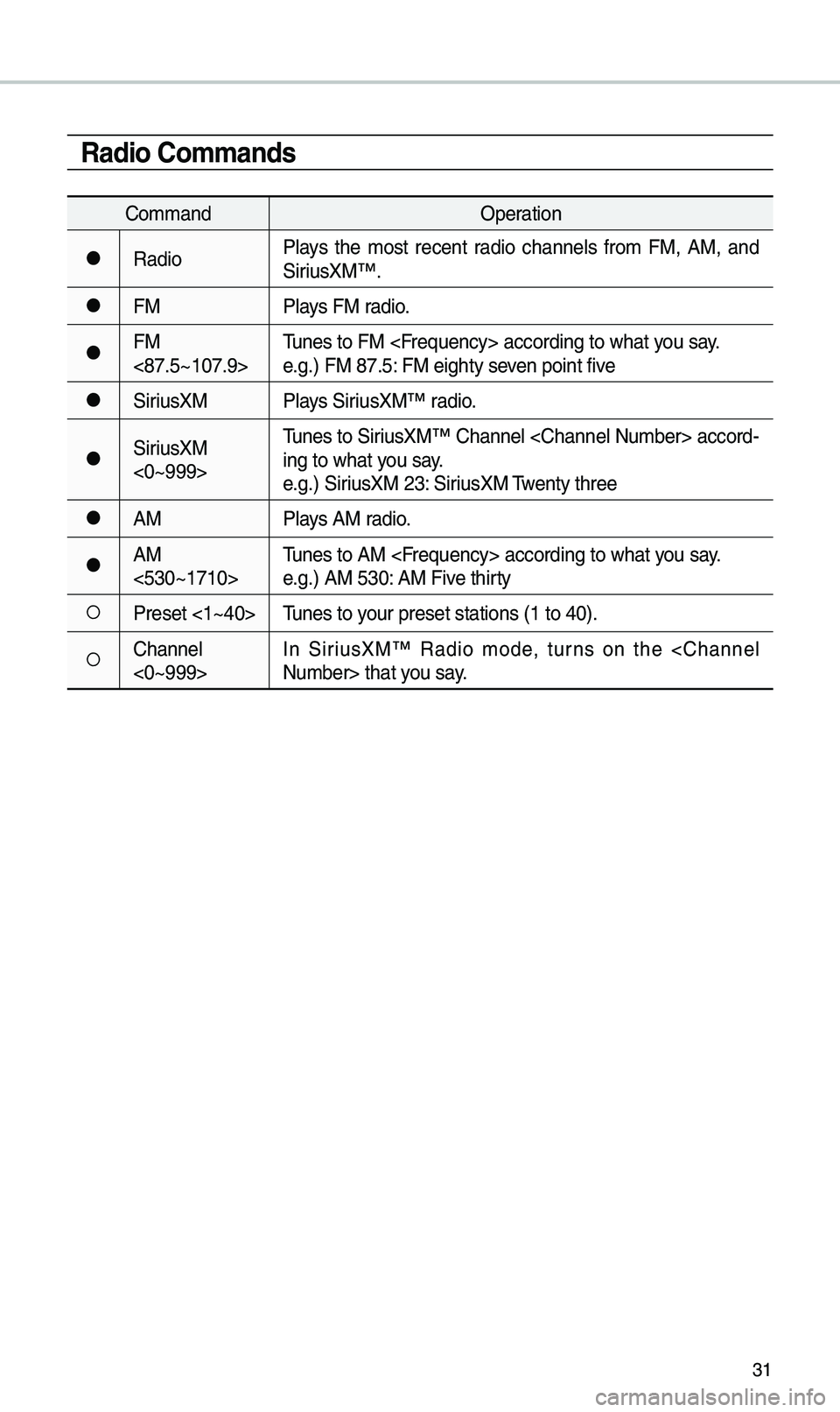
Radio Co\f\fands
Co\f\fandOperation
●RadioP\bays the \fost recent radio channe\bs fro\f FM, AM, and
SiriusXM™.
●FM
P\bays FM radio.
●FM
<87.5~107.9>Tunes to FM
e.g.) FM 87.5: FM eighty seven point five
●SiriusXM
P\bays SiriusXM™ radio.
●SiriusXM
<0~999>Tunes to SiriusXM™ Channe\b
-
ing to what you say.
e.g.) SiriusXM 23: SiriusXM Twenty three
●AM P\bays AM radio.
●AM
<530~1710>Tunes to AM
e.g.) AM 530: AM Five thirty
○Preset <1~40>
Tunes to your preset stations\u (1 to 40).
○Channe\b
<0~999>In SiriusXM™ Radio \fode, turns on the