music KIA SOUL 2021 Navigation System Quick Reference Guide
[x] Cancel search | Manufacturer: KIA, Model Year: 2021, Model line: SOUL, Model: KIA SOUL 2021Pages: 211, PDF Size: 6.67 MB
Page 6 of 211
4
Component names and functions
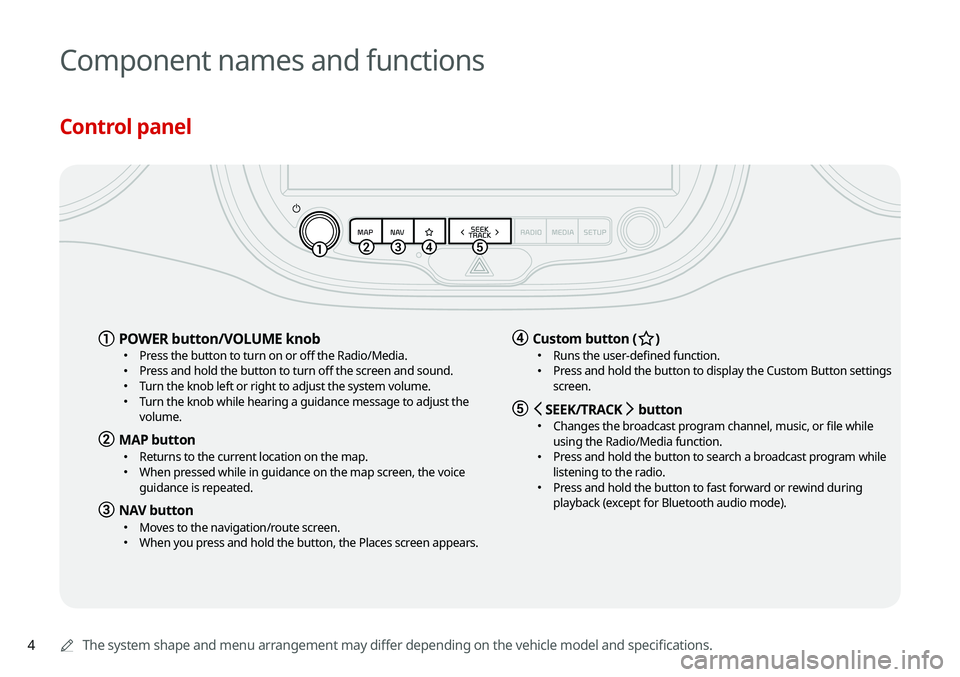
Control panel
0000AThe system shape and menu arrangement may differ depending on the vehicle model and specifications.
a POWER button/VOLUME knob \225
Press the button to turn on or off the Radio/Media. \225Press and hold the button to turn off the screen and sound. \225Turn the knob left or right to adjust the system volume. \225Turn the knob while hearing a guidance message to adjust the
volume.
b MAP button \225Returns to the current location on the map. \225When pressed while in guidance on the map screen, the voice
guidance is repeated.
c NAV button \225Moves to the navigation/route screen. \225When you press and hold the button, the Places screen appears.
d Custom button (B ) \225
Runs the user-defined function. \225Press and hold the button to display the Custom Button settings
screen.
e < SEEK/TRACK > button \225
Changes the broadcast program channel, music, or file while
using the Radio/Media function.
\225Press and hold the button to search a broadcast program while
listening to the radio.
\225Press and hold the button to fast forward or rewind during
playback (except for Bluetooth audio mode).
Page 7 of 211
5
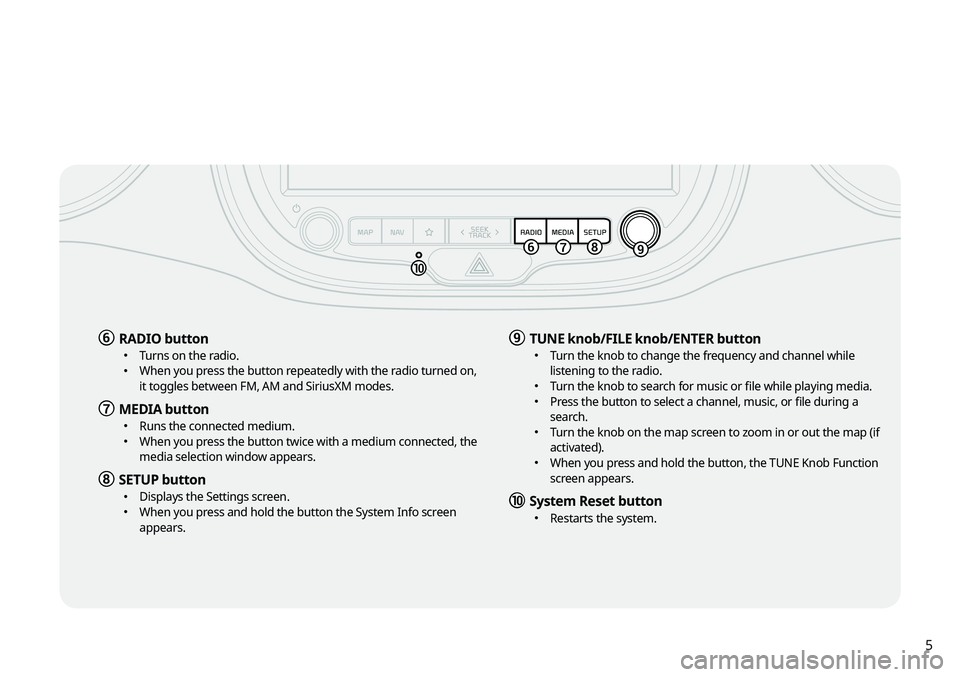
f RADIO button \225Turns on the radio. \225When you press the button repeatedly with the radio turned on,
it toggles between FM, AM and SiriusXM modes.
g MEDIA button \225Runs the connected medium. \225When you press the button twice with a medium connected, the
media selection window appears.
h SETUP button \225Displays the Settings screen. \225When you press and hold the button the System Info screen
appears.
i TUNE knob/FILE knob/ENTER button \225Turn the knob to change the frequency and channel while
listening to the radio.
\225Turn the knob to search for music or file while playing media. \225Press the button to select a channel, music, or file during a
search.
\225Turn the knob on the map screen to zoom in or out the map (if
activated).
\225When you press and hold the button, the TUNE Knob Function
screen appears.
j System Reset button \225Restarts the system.
Page 8 of 211
6
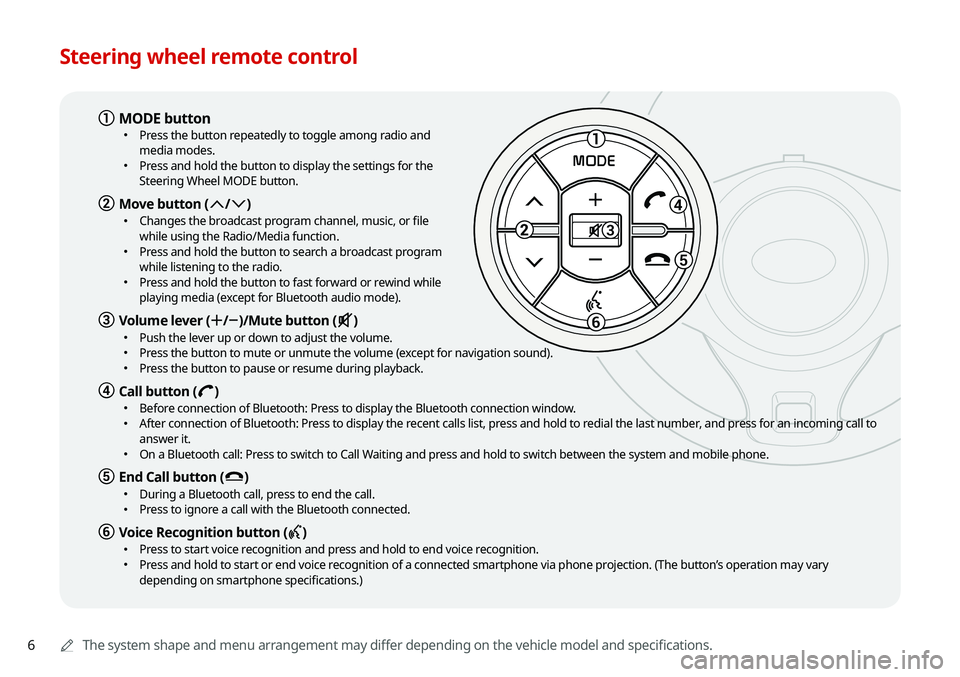
Steering wheel remote control
0000AThe system shape and menu arrangement may differ depending on the vehicle model and specifications.
1
3
5
6
MODE
a MODE button \225
Press the button repeatedly to toggle among radio and
media modes.
\225Press and hold the button to display the settings for the
Steering Wheel MODE button.
b Move button (: /; ) \225
Changes the broadcast program channel, music, or file
while using the Radio/Media function.
\225Press and hold the button to search a broadcast program
while listening to the radio.
\225Press and hold the button to fast forward or rewind while
playing media (except for Bluetooth audio mode).
c Volume lever (+ /- )/Mute button (M ) \225
Push the lever up or down to adjust the volume. \225Press the button to mute or unmute the volume (except for navigation sound). \225Press the button to pause or resume during playback.
d Call button (D ) \225
Before connection of Bluetooth: Press to display the Bluetooth connection window. \225After connection of Bluetooth: Press to display the recent calls list, press and hold to redial the last number, and press for an incoming call to
answer it.
\225On a Bluetooth call: Press to switch to Call Waiting and press and hold to switch between the system and mobile phone.
e End Call button (E ) \225
During a Bluetooth call, press to end the call. \225Press to ignore a call with the Bluetooth connected.
f Voice Recognition button (C ) \225
Press to start voice recognition and press and hold to end voice recognition. \225Press and hold to start or end voice recognition of a connected smartphone via phone projection. (The button’s operation may vary
depending on smartphone specifications.)
Page 17 of 211
7
03 Radio
Listening to the radio 3-2
Radio screen 3-2
Changing the radio mode 3-4
Changing the radio channel 3-4
Saving the current radio channel 3-5
Editing the radio channel list 3-6
Listening to HD Radio™ 3-7
HD Radio™ Technology 3-7
Listening to SiriusXM™ radio 3-8
Changing to SiriusXM mode 3-8
Searching for SiriusXM radio channels 3-10
Selecting channels by using channel numbers 3-10
Seeing the program schedule 3-11
Listening to Featured Favorites channels 3-11
04 Media
Using media 4-2
Listening to music from a USB device 4-2
Listening to music via Bluetooth 4-7
05 Navigation
Navigation functions 5-2
Navigation Menu overview 5-2
Finding a route easily 5-3
Map screen 5-6
Configuring the settings for map display 5-8
Adjusting the navigation volume 5-9
Stopping the route guidance 5-9
Seeing traffic Information 5-9
Various ways to find routes 5-10
Searching by keyword 5-11
Searching by previous destinations 5-12
Searching the nearby points of interest 5-13
Searching for restaurants 5-16
Searching for emergency services 5-16
Editing the route 5-17
Changing the route search criteria 5-19
Avoiding specific zones 5-20
Page 22 of 211
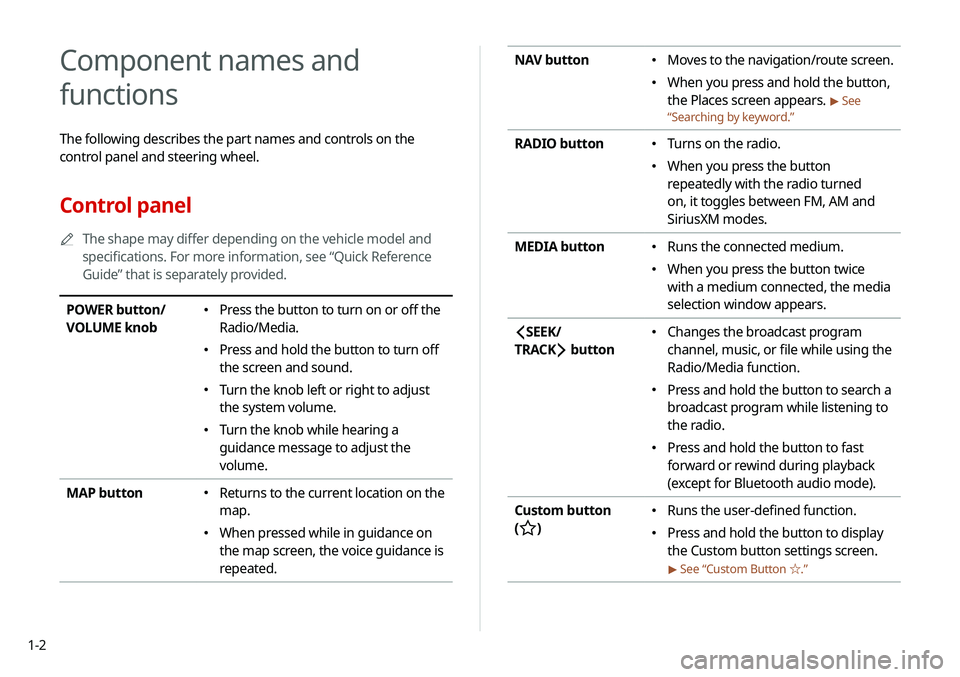
1-2
NAV button \225Moves to the navigation/route screen.
\225When you press and hold the button,
the Places screen appears.
> See
“ Searching by keyword.”
RADIO button \225
Turns on the radio.
\225When you press the button
repeatedly with the radio turned
on, it toggles between FM, AM and
SiriusXM modes.
MEDIA button
\225 Runs the connected medium.
\225When you press the button twice
with a medium connected, the media
selection window appears.
SEEK/
TRACK
button
\225 Changes the broadcast program
channel, music, or file while using the
Radio/Media function.
\225Press and hold the button to search a
broadcast program while listening to
the radio.
\225Press and hold the button to fast
forward or rewind during playback
(except for Bluetooth audio mode).
Custom button
(
)
\225 Runs the user-defined function.
\225Press and hold the button to display
the Custom button settings screen.
> See “Custom Button ☆ .”
Component names and
functions
The following describes the part names and controls on the
control panel and steering wheel.
Control panel
0000
A
The shape may differ depending on the vehicle model and
specifications. For more information, see “Quick Reference
Guide” that is separately provided.
POWER button/
VOLUME knob \225Press the button to turn on or off the
Radio/Media.
\225Press and hold the button to turn off
the screen and sound.
\225Turn the knob left or right to adjust
the system volume.
\225Turn the knob while hearing a
guidance message to adjust the
volume.
MAP button
\225 Returns to the current location on the
map.
\225When pressed while in guidance on
the map screen, the voice guidance is
repeated.
Page 23 of 211
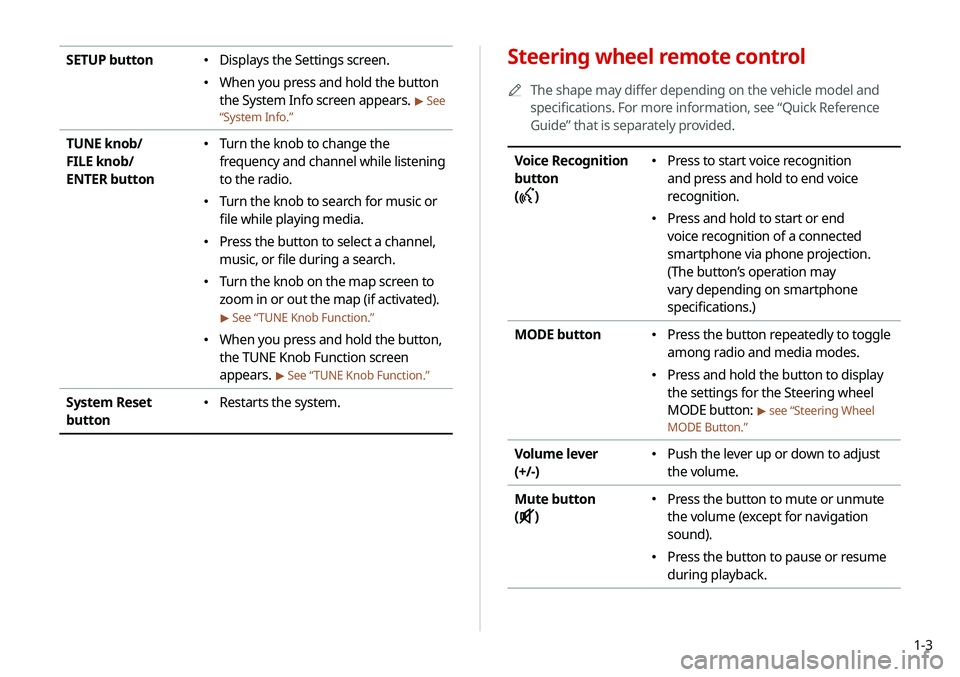
1-3
Steering wheel remote control
0000
A
The shape may differ depending on the vehicle model and
specifications. For more information, see “Quick Reference
Guide” that is separately provided.
Voice Recognition
button
(
)
\225 Press to start voice recognition
and press and hold to end voice
recognition.
\225Press and hold to start or end
voice recognition of a connected
smartphone via phone projection.
(The button’s operation may
vary depending on smartphone
specifications.)
MODE button
\225 Press the button repeatedly to toggle
among radio and media modes.
\225Press and hold the button to display
the settings for the Steering wheel
MODE button:
> see “Steering Wheel
MODE Button.”
Volume lever
(+/-) \225 Push the lever up or down to adjust
the volume.
Mute button
(
)
\225 Press the button to mute or unmute
the volume (except for navigation
sound).
\225Press the button to pause or resume
during playback.
SETUP button \225Displays the Settings screen.
\225When you press and hold the button
the System Info screen appears.
> See
“ System Info.”
TUNE knob/
FILE knob/
ENTER button \225
Turn the knob to change the
frequency and channel while listening
to the radio.
\225Turn the knob to search for music or
file while playing media.
\225Press the button to select a channel,
music, or file during a search.
\225Turn the knob on the map screen to
zoom in or out the map (if activated).
> See “ TUNE Knob Function.”
\225
When you press and hold the button,
the TUNE Knob Function screen
appears.
> See “ TUNE Knob Function.”
System Reset
button \225
Restarts the system.
Page 24 of 211
1-4
Turning the system on or off
The following explains how to turn on or off the system. Before
using the system, be sure to read the user's manual for safe and
convenient manipulation.
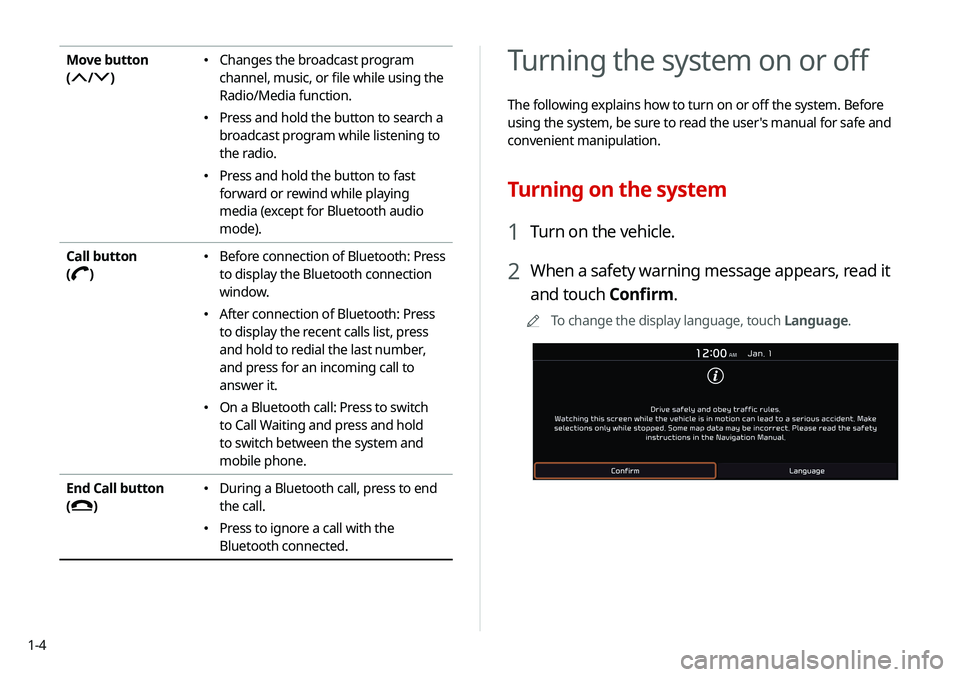
Turning on the system
1 Turn on the vehicle.
2 When a safety warning message appears, read it
and touch Confirm.
0000
A
To change the display language, touch Language.
Move button
(
/)
\225Changes the broadcast program
channel, music, or file while using the
Radio/Media function.
\225Press and hold the button to search a
broadcast program while listening to
the radio.
\225Press and hold the button to fast
forward or rewind while playing
media (except for Bluetooth audio
mode).
Call button
(
)
\225 Before connection of Bluetooth: Press
to display the Bluetooth connection
window.
\225After connection of Bluetooth: Press
to display the recent calls list, press
and hold to redial the last number,
and press for an incoming call to
answer it.
\225On a Bluetooth call: Press to switch
to Call Waiting and press and hold
to switch between the system and
mobile phone.
End Call button
(
)
\225 During a Bluetooth call, press to end
the call.
\225Press to ignore a call with the
Bluetooth connected.
Page 37 of 211
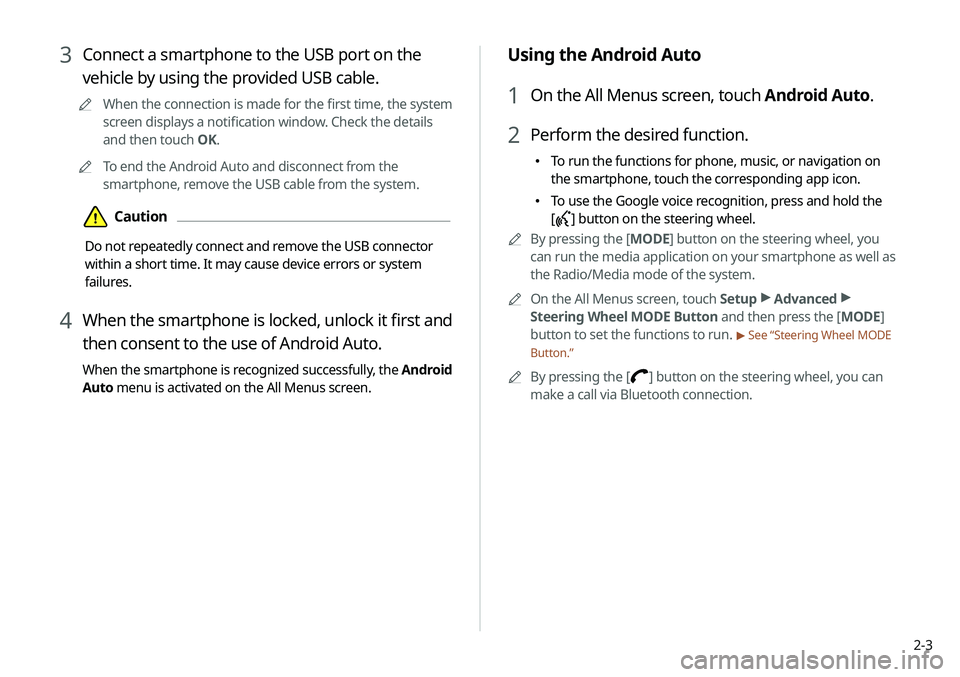
2-3
Using the Android Auto
1 On the All Menus screen, touch Android Auto.
2 Perform the desired function.
\225To run the functions for phone, music, or navigation on
the smartphone, touch the corresponding app icon.
\225To use the Google voice recognition, press and hold the
[
] button on the steering wheel.
0000
A
By pressing the [ MODE] button on the steering wheel, you
can run the media application on your smartphone as well as
the Radio/Media mode of the system.
0000
A
On the All Menus screen, touch Setup >
Advanced >
Steering Wheel MODE Button and then press the [ MODE]
button to set the functions to run.
> See “Steering Wheel MODE
Button.”
0000
A
By pressing the [] button on the steering wheel, you can
make a call via Bluetooth connection.
3 Connect a smartphone to the USB port on the
vehicle by using the provided USB cable.
0000
A
When the connection is made for the first time, the system
screen displays a notification window. Check the details
and then touch OK.
0000
A
To end the Android Auto and disconnect from the
smartphone, remove the USB cable from the system.
\334Caution
Do not repeatedly connect and remove the USB connector
within a short time. It may cause device errors or system
failures.
4 When the smartphone is locked, unlock it first and
then consent to the use of Android Auto.
When the smartphone is recognized successfully, the Android
Auto menu is activated on the All Menus screen.
Page 45 of 211
2-11
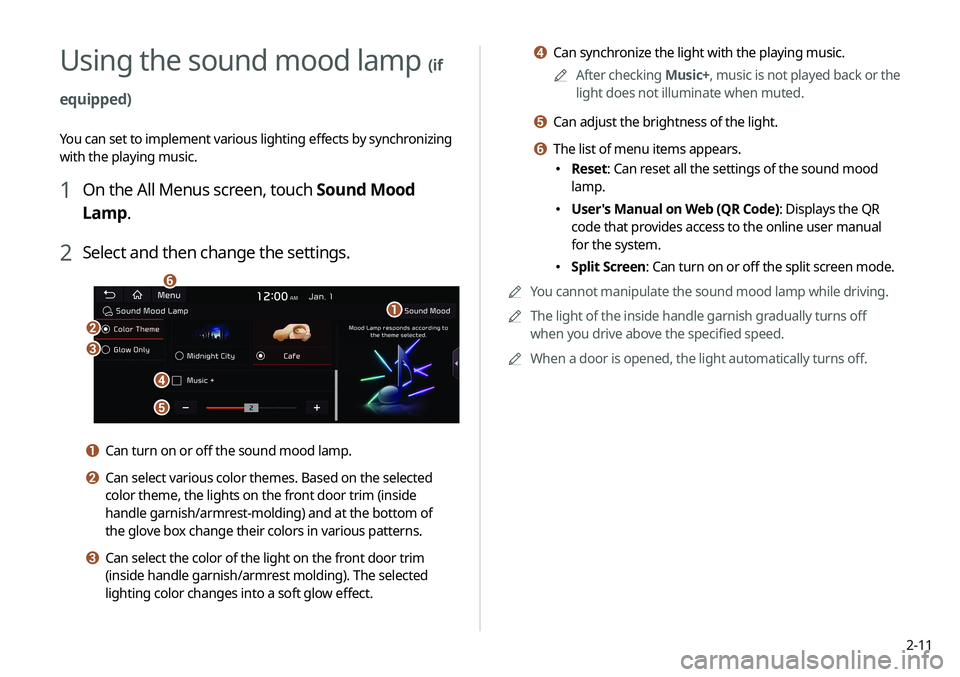
d Can synchronize the light with the playing music.0000
A
After checking Music+, music is not played back or the
light does not illuminate when muted.
e Can adjust the brightness of the light.
f The list of menu items appears.
\225 Reset: Can reset all the settings of the sound mood
lamp.
\225User's Manual on Web (QR Code): Displays the QR
code that provides access to the online user manual
for the system.
\225Split Screen: Can turn on or off the split screen mode.
0000
A
You cannot manipulate the sound mood lamp while driving.
0000
A
The light of the inside handle garnish gradually turns off
when you drive above the specified speed.
0000
A
When a door is opened, the light automatically turns off.
Using the sound mood lamp (if
equipped)
You can set to implement various lighting effects by synchronizing
with the playing music.
1 On the All Menus screen, touch Sound Mood
Lamp.
2 Select and then change the settings.
\037
\036
\035
\034
\033
\032
a Can turn on or off the sound mood lamp.
b Can select various color themes. Based on the selected
color theme, the lights on the front door trim (inside
handle garnish/armrest-molding) and at the bottom of
the glove box change their colors in various patterns.
c Can select the color of the light on the front door trim
(inside handle garnish/armrest molding). The selected
lighting color changes into a soft glow effect.
Page 60 of 211
4-2
Using media
You can use the USB mode to play music files on a connected
mobile device, such as USB device and MP3 player. You can also
play Bluetooth music by connecting a Bluetooth device, which
supports a Bluetooth function.
Listening to music from a USB device
1 Connect a media device to play to the USB port on
the vehicle.
0000APlayback may start automatically depending on the media
type.
0000
A
For more information about supportable devices and file
types:
> see “USB mode.”
0000
A
The shapes and arrangement of the buttons and USB
ports may differ depending on the vehicle model and
specifications.
2 Perform any of the following methods:
\225On the Home screen, touch the Radio/Media info widget.
\225On the control panel, press the [ MEDIA] button.
0000
A
When multiple media are connected, press the [ MEDIA]
button once more and then press the desired media
source from the media selection window.
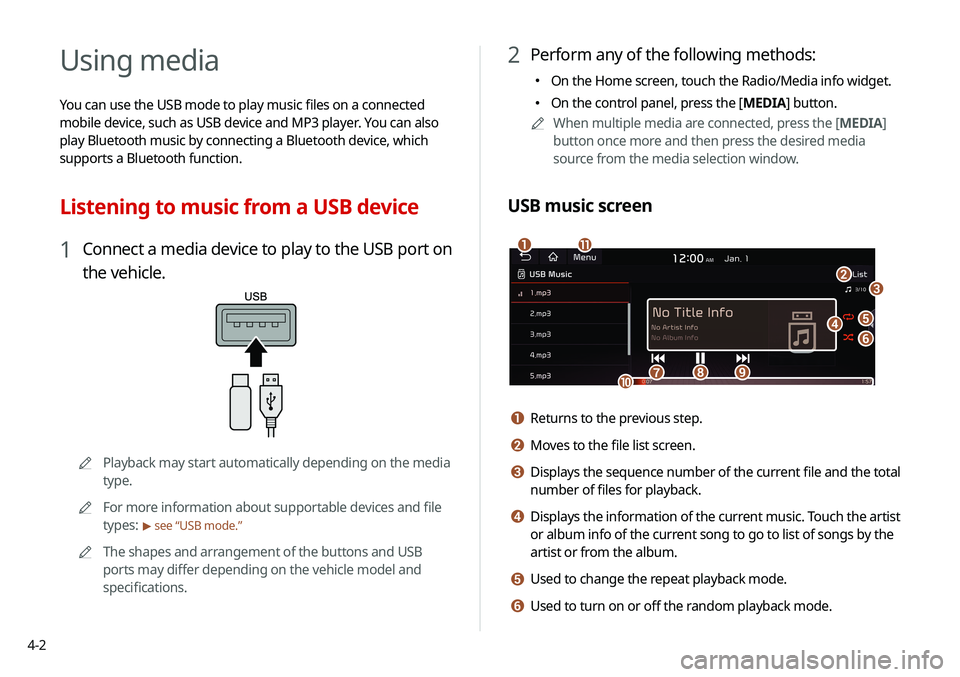
USB music screen
\037
\036
\035\034
\033
\032\031
\030
\027\026
\025
a Returns to the previous step.
b Moves to the file list screen.
c Displays the sequence number of the current file and the total
number of files for playback.
d Displays the information of the current music. Touch the artist
or album info of the current song to go to list of songs by the
artist or from the album.
e Used to change the repeat playback mode.
f Used to turn on or off the random playback mode.