music KIA SOUL 2021 Navigation System Quick Reference Guide
[x] Cancel search | Manufacturer: KIA, Model Year: 2021, Model line: SOUL, Model: KIA SOUL 2021Pages: 211, PDF Size: 6.67 MB
Page 61 of 211
4-3
\335Warning
Driving while distracted can result in a loss of vehicle control that
may lead to an accident, severe bodily injury, or death. The driver's
primary responsibility is the safe and legal operation of the
vehicle, and the use of any vehicle systems, including the touch
screen and steering wheel controls, which take the driver's eyes,
attention, and focus away from the safe operation of the vehicle,
or which are not permissible by law, should never be used during
the operation of the vehicle.
Pause/Resume
You can pause or resume playback of a USB music file.
On the USB music playback screen, touch or .
Rewind
By using the rewind function, you can listen to music in the USB
device from the desired point during playback.
Perform any of the following methods:
\225On the USB music playback screen, touch and hold .
\225On the control panel, press and hold the [ SEEK] button.
0000
A
On the steering wheel, use the [
/] button to run the
function.
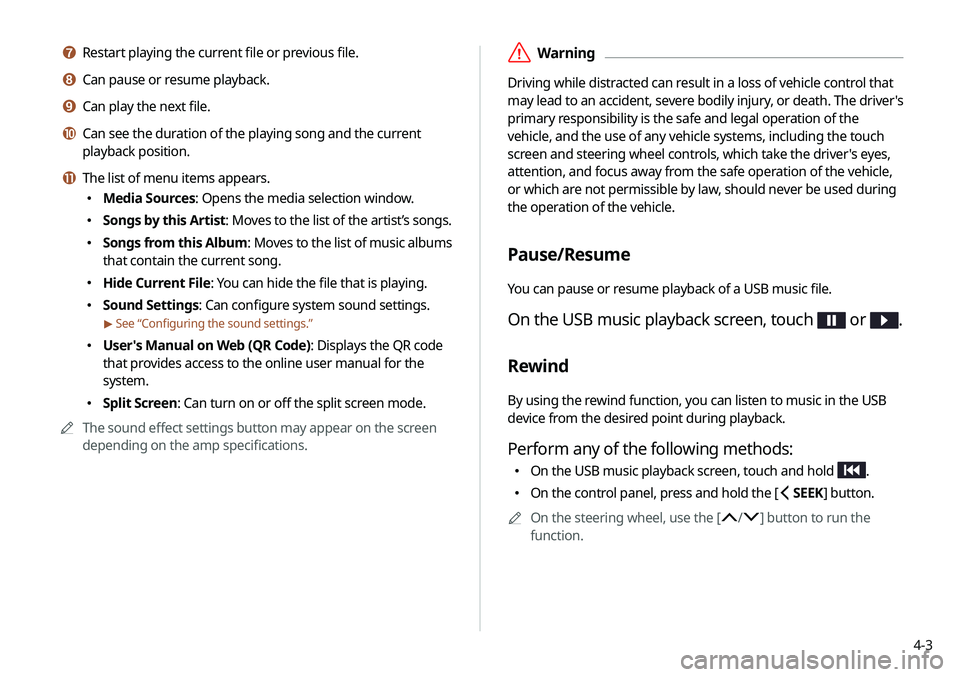
g Restart playing the current file or previous file.
h Can pause or resume playback.
i Can play the next file.
j Can see the duration of the playing song and the current
playback position.
k The list of menu items appears.
\225 Media Sources: Opens the media selection window.
\225Songs by this Artist: Moves to the list of the artist’s songs.
\225Songs from this Album : Moves to the list of music albums
that contain the current song.
\225 Hide Current File: You can hide the file that is playing.
\225Sound Settings: Can configure system sound settings.
> See “Configuring the sound settings.”
\225User's Manual on Web (QR Code): Displays the QR code
that provides access to the online user manual for the
system.
\225Split Screen: Can turn on or off the split screen mode.
0000
A
The sound effect settings button may appear on the screen
depending on the amp specifications.
Page 62 of 211
4-4
Playing the previous file
You can play the previous file during playback in the USB device.
Perform any of the following methods:
\225On the USB music playback screen, touch within 3
seconds during playback.
\225 On the control panel, press the [ SEEK] button within 3
seconds during playback.
0000
A
After playback, you can play the previous music by touching
twice or pressing the [ SEEK] button on the control
panel twice.
0000
A
On the steering wheel, use the [
/] lever to run the
function.
0000
A
On the control panel, turn the [TUNE/FILE] knob to search for
a music file and press the knob within 5 seconds to play it.
0000
A
When there is no input for 5 seconds, the search stops and
the system displays the information of the current file.
Fast forward
By using the fast forward function, you can listen to music in the
USB device from the desired point during playback.
Perform any of the following methods:
\225On the USB music playback screen, touch and hold .
\225On the control panel, press and hold the [ TRACK ] button.
0000
A
On the steering wheel, use the [
/] lever to run the
function.
Resuming playback of the current music
You can play the current music in the USB device from the
beginning.
Perform any of the following methods:
\225 On the USB music playback screen, touch after 3
seconds during playback.
\225 On the control panel, press the [ SEEK] button after 3
seconds during playback.
0000
A
On the steering wheel, use the [
/] lever to run the
function.
Page 63 of 211
4-5
Turning on/off the random playback
You can turn on or off the random playback mode for USB music.
On the USB music playback screen, touch
repeatedly.
Each time the icon is touched, the random playback mode is
turned on and off. When the random playback is active, the files
are played randomly with no sequence.
Playing the next file
You can play the next file in the USB device during playback.
Perform any of the following methods:
\225On the USB music playback screen, touch .
\225On the control panel, press the [ TRACK ] button.
0000
A
On the steering wheel, use the [
/] lever to run the
function.
0000
A
On the control panel, turn the [TUNE/FILE] knob to search for
a music file and press the knob within 5 seconds to play it
0000
A
When there is no input for 5 seconds, the search stops and
the system displays the information of the current file.
Changing the repeated playback mode for USB
music
You can change the repeated playback mode for USB music:
Repeat One, Repeat Folder, and Repeat All.
On the USB music playback screen, touch
repeatedly.
Each time the icon is touched, the playback repetition modes are
toggled and the activated mode icon appears on the screen.
Page 64 of 211
4-6
\334Caution
\225 Be sure to start the vehicle before connecting a USB device.
When you start the vehicle after connecting a USB device, the
USB device may get damaged.
\225 Be careful of static electricity when connecting or removing a
USB device. It may cause a system failure.
\225 Be careful and avoid your body or any object coming into
contact with the USB port on the vehicle. It may cause an
accident or system failures.
\225 Do not repeatedly connect and remove the USB connector
within a short time. It may cause device errors or system
failures.
\225 Do not use a USB device for purposes other than playback.
When you connect a USB for charging or heating, the system
performance may decrease or it may cause system failures.
USB music list screen
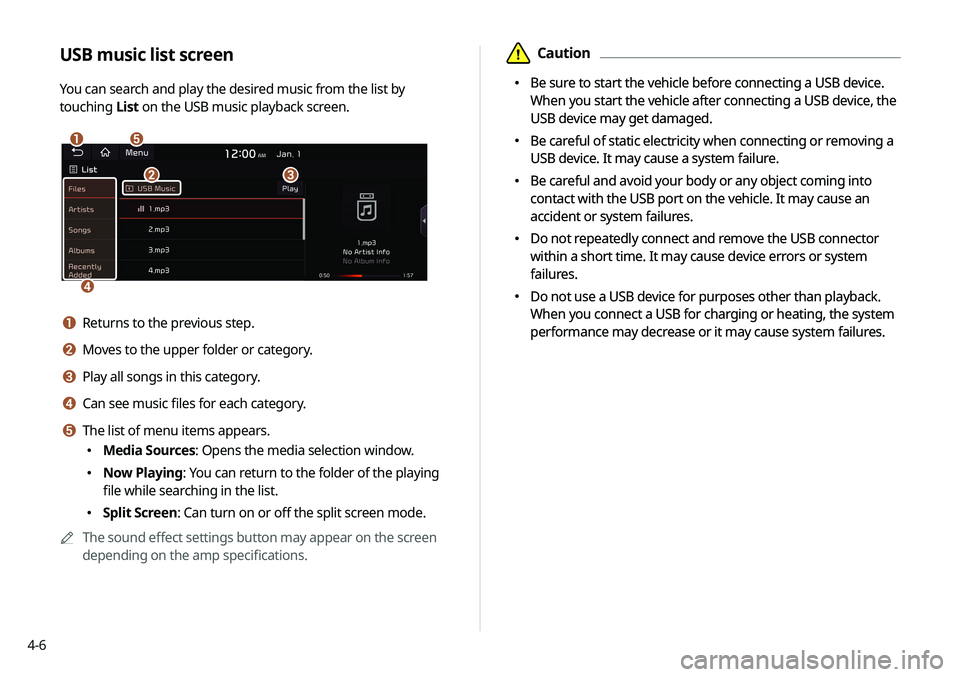
You can search and play the desired music from the list by
touching List on the USB music playback screen.
\037\036
\035
\034\033
a Returns to the previous step.
b Moves to the upper folder or category.
c Play all songs in this category.
d Can see music files for each category.
e The list of menu items appears.
\225
Media Sources: Opens the media selection window.
\225Now Playing: You can return to the folder of the playing
file while searching in the list.
\225Split Screen: Can turn on or off the split screen mode.
0000
A
The sound effect settings button may appear on the screen
depending on the amp specifications.
\334Caution
\225 Be sure to start the vehicle before connecting a USB device.
When you start the vehicle after connecting a USB device, the
USB device may get damaged.
\225 Be careful of static electricity when connecting or removing a
USB device. It may cause a system failure.
\225 Be careful and avoid your body or any object coming into
contact with the USB port on the vehicle. It may cause an
accident or system failures.
\225 Do not repeatedly connect and remove the USB connector
within a short time. It may cause device errors or system
failures.
\225 Do not use a USB device for purposes other than playback.
When you connect a USB for charging or heating, the system
performance may decrease or it may cause system failures.
Page 65 of 211
4-7
Listening to music via Bluetooth
To use a Bluetooth device for audio playback, connect a device
that supports Bluetooth communication such as mobile phone
and MP3 player.
For more information about Bluetooth connection:
> see
“ Connecting a Bluetooth device.”
0000
A
The controls or display screens may differ depending on the
connected Bluetooth device, phone model, and music player
application.
0000
A
The streaming may not be supported in some music player
applications.
0000
A
Some functions may not be available depending on the
connected Bluetooth device or phone model.
0000
A
When a media device or mobile phone is connected by both
the Bluetooth and USB cable at the same time, the device
or system may not work properly. To use the Bluetooth
connection, remove all cables from the device.
0000
A
When connecting a USB storage, do not use a separate
extension cable and directly connect to the USB port. When
you connect a USB storage via a USB hub or extension cable,
the device may not be recognized.
0000
A
Push the USB connector fully into the USB port. When the
connector is not fully inserted, a communication problem
may occur.
0000
A
Noise may occur when removing a USB device from the
system.
0000
A
You can play only the files that have been encoded in the
standard format.
0000
A
The following USB devices may not be recognized or may not
work properly.
-Encrypted MP3 players
-USB devices that are not recognized as removable disks
0000
A
USB devices may not be recognized depending on the device
status.
0000
A
Some USB devices may not be supported due to compatibility
issues.
0000
A
USB device recognition may take longer than usual depending
on the device type, capacity, and file formats on the device.
0000
A
Some devices may not be charged through USB connection. It
depends on the USB specifications.
0000
A
You can hide files only in the USB device formatted in exFAT/
NTFS/FAT16/32. The hidden files can be found in the “Hidden_”
folder.
Page 66 of 211
4-8
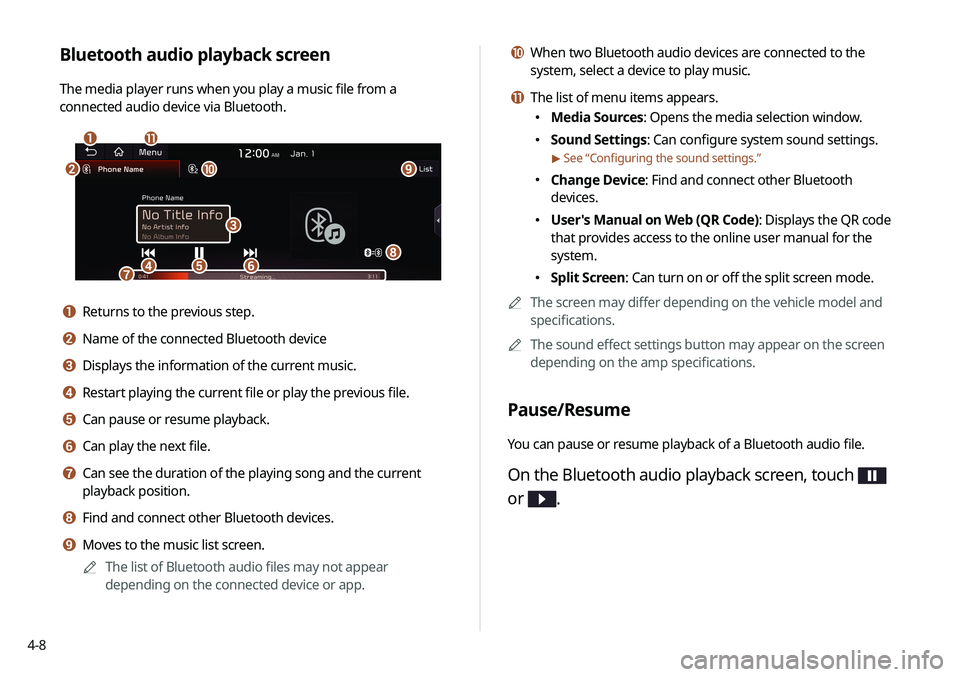
j When two Bluetooth audio devices are connected to the
system, select a device to play music.
k The list of menu items appears.
\225Media Sources: Opens the media selection window.
\225Sound Settings: Can configure system sound settings.
> See “Configuring the sound settings.”
\225Change Device: Find and connect other Bluetooth
devices.
\225User's Manual on Web (QR Code): Displays the QR code
that provides access to the online user manual for the
system.
\225Split Screen: Can turn on or off the split screen mode.
0000
A
The screen may differ depending on the vehicle model and
specifications.
0000
A
The sound effect settings button may appear on the screen
depending on the amp specifications.
Pause/Resume
You can pause or resume playback of a Bluetooth audio file.
On the Bluetooth audio playback screen, touch
or
.
Bluetooth audio playback screen
The media player runs when you play a music file from a
connected audio device via Bluetooth.
\037\036
\035
\034\033\032\031
\030
\027
\026\025
a Returns to the previous step.
b Name of the connected Bluetooth device
c Displays the information of the current music.
d Restart playing the current file or play the previous file.
e Can pause or resume playback.
f Can play the next file.
g Can see the duration of the playing song and the current
playback position.
h Find and connect other Bluetooth devices.
i Moves to the music list screen.
0000
A
The list of Bluetooth audio files may not appear
depending on the connected device or app.
Page 67 of 211
4-9
Resuming playback of the previous Bluetooth
audio file
You can play the previous Bluetooth audio file during playback.
Perform any of the following methods:
\225On the Bluetooth audio playback screen, touch twice.
\225On the control panel, press the [ SEEK] button twice.
0000
A
The actions required may differ depending on the connected
device.
0000
A
On the steering wheel, use the [
/] lever to run the
function.
0000
A
On the control panel, turn the [TUNE/ FILE] knob to search for
a music file and press the knob within 5 seconds to play it.
0000
A
When there is no operation for 5 seconds, the search stops
and the system displays the information of the playing
content.
Resuming playback of the current Bluetooth
audio file
You can play the current Bluetooth audio file from the beginning.
Perform any of the following methods:
\225On the Bluetooth audio playback screen, touch .
\225On the control panel, press the [ SEEK] button.
0000
A
The actions required may differ depending on the connected
device.
0000
A
On the steering wheel, use the [
/] lever to run the
function.
Page 68 of 211
4-10
Turning on/off the random playback
You can turn on or off the random playback mode for Bluetooth
audio.
On the Bluetooth audio playback screen, touch
repeatedly.
Each time the icon is touched, the random playback mode is
turned on and off. When the random playback is active, the files
are played randomly with no sequence.0000
A
This function may not be available depending on the device
or app.
Resuming playback of the next Bluetooth audio
file
You can play the next Bluetooth audio file during playback.
Perform any of the following methods:
\225On the Bluetooth audio playback screen, touch .
\225On the control panel, press the [ TRACK ] button.
0000
A
On the steering wheel, use the [
/] lever to run the
function.
0000
A
On the control panel, turn the [TUNE/FILE] knob to search for
a music file and press the knob within 5 seconds to play it.
0000
A
When there is no operation for 5 seconds, the search stops
and the system displays the information of the playing
content.
Changing the repeated playback mode for
Bluetooth audio
You can change the repeated playback mode for Bluetooth audio:
Repeat One and Repeat All.
On the Bluetooth audio playback screen, touch
repeatedly.
Each time the icon is touched, the playback repetition modes are
toggled and the activated mode icon appears on the screen.
0000
A
This function may not be available depending on the device
or app.
Page 105 of 211
6-3
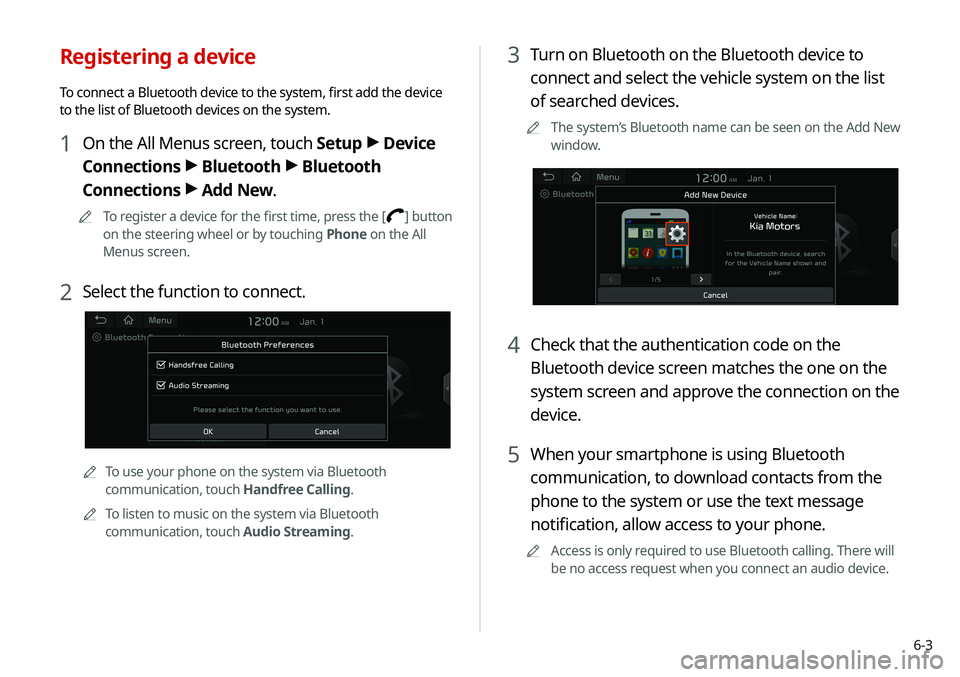
3 Turn on Bluetooth on the Bluetooth device to
connect and select the vehicle system on the list
of searched devices.
0000
A
The system’s Bluetooth name can be seen on the Add New
window.
4 Check that the authentication code on the
Bluetooth device screen matches the one on the
system screen and approve the connection on the
device.
5 When your smartphone is using Bluetooth
communication, to download contacts from the
phone to the system or use the text message
notification, allow access to your phone.
0000
A
Access is only required to use Bluetooth calling. There will
be no access request when you connect an audio device.
Registering a device
To connect a Bluetooth device to the system, first add the device
to the list of Bluetooth devices on the system.
1 On the All Menus screen, touch Setup >
Device
Connections >
Bluetooth >
Bluetooth
Connections >
Add New.
0000
A
To register a device for the first time, press the [] button
on the steering wheel or by touching Phone on the All
Menus screen.
2 Select the function to connect.
0000
A
To use your phone on the system via Bluetooth
communication, touch Handfree Calling.
0000
A
To listen to music on the system via Bluetooth
communication, touch Audio Streaming.
Page 124 of 211
7-2
Voice recognition
With the voice recognition function, you can access various
functions of the infotainment system without manipulating the
screen or buttons. This function prevents driver distraction and
dangerous situations.
Use voice commands to access various functions easily.0000
A
The system can recognize the specified voice commands.
> See “ Available voice commands” or the voice recognition help.
0000
A
Note the following for accurate delivery of command when
saying it.
-Pronounce a command accurately and naturally like a
conversation.
-Keep the correct posture and say commands toward the
direction of the microphone.
0000
A
Voice recognition is automatically ended when:
-You make or receive a call.
-A media source is connected or disconnected.
-The front or rear cameras operate (if equipped).
-The [RADIO] or [MEDIA] button is pressed to perform
another function.
- Rerouting or other unexpected action is made due to
deviation from the route during guidance. 0000
A
Voice recognition may not work properly when:
-The sunroof or windows are open so the wind is strong.
-The fan speed of the air conditioner or heater is high (level
3 or below is recommended).
-The vehicle is passing through a tunnel.
-The vehicle is driving on an unpaved road and its noise and
vibration are loud.
-Noise is loud due to a heavy rain or storm.
Using the voice recognition
1 On the steering wheel, press the [] button.
Voice recognition starts along with voice guidance.
0000
A
To skip the voice guidance, press the [
] button on the
steering wheel.
2 When a beep sound is heard, say a command to
perform (e.g. navigation, music, call).
> See “ Available
voice commands” or the voice recognition help.
The recognized command appears in text at the top of the
screen and the corresponding function is performed. 0000
A
When an additional command is required to perform, the
commands that can be followed in the next step appear
on the screen. Say a command or touch a command.
0000
A
When there are several similar commands, say a
command number to perform.