display KIA SOUL EV 2018 Owner's Guide
[x] Cancel search | Manufacturer: KIA, Model Year: 2018, Model line: SOUL EV, Model: KIA SOUL EV 2018Pages: 496, PDF Size: 15.13 MB
Page 192 of 496
461
Features of your vehicle
Overview
Description
The trip computer is a microcomput-
er-controlled driver information sys-
tem that displays information related
to driving.
✽ ✽NOTICE
Some driving information stored in
the trip computer (for example
Average Vehicle Speed) resets if the
battery is disconnected.
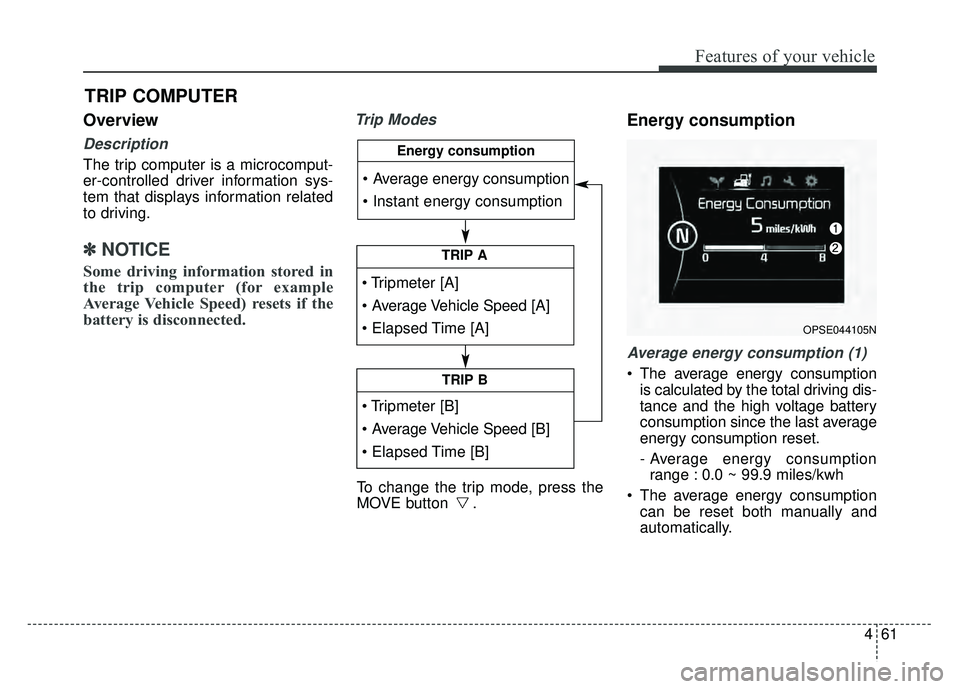
Trip ModesEnergy consumption
Average energy consumption (1)
The average energy consumption
is calculated by the total driving dis-
tance and the high voltage battery
consumption since the last average
energy consumption reset.
- Average energy consumptionrange : 0.0 ~ 99.9 miles/kwh
The average energy consumption can be reset both manually and
automatically.
TRIP COMPUTER
To change the trip mode, press the
MOVE button .
TRIP A
TRIP B
Energy consumption
OPSE044105N
Page 193 of 496
Features of your vehicle
62
4
Manual reset
To clear the average energy con-
sumption manually, press the but-
ton (MOVE) on the steering wheel for
more than 1 second when the aver-
age energy consumption is displayed.
Automatic reset
To make the average energy con-
sumption be reset automatically
whenever recharging, select the
“Auto Reset” mode in User Settings
menu of the LCD display (Refer to
“LCD Display”).
Under “Auto Reset” mode, the aver-
age energy consumption will be
cleared to zero (---) when the driving
distance exceeds 0.19 mile (300m)
after recharging more than 10%.Instant energy consumption (2)
This mode displays the instant ener- gy consumption during the last few
seconds when the vehicle speed is
more than 10 km/h (6.2 MPH).
- Instant energy consumptionrange : 0.0 ~ 8miles/kwh
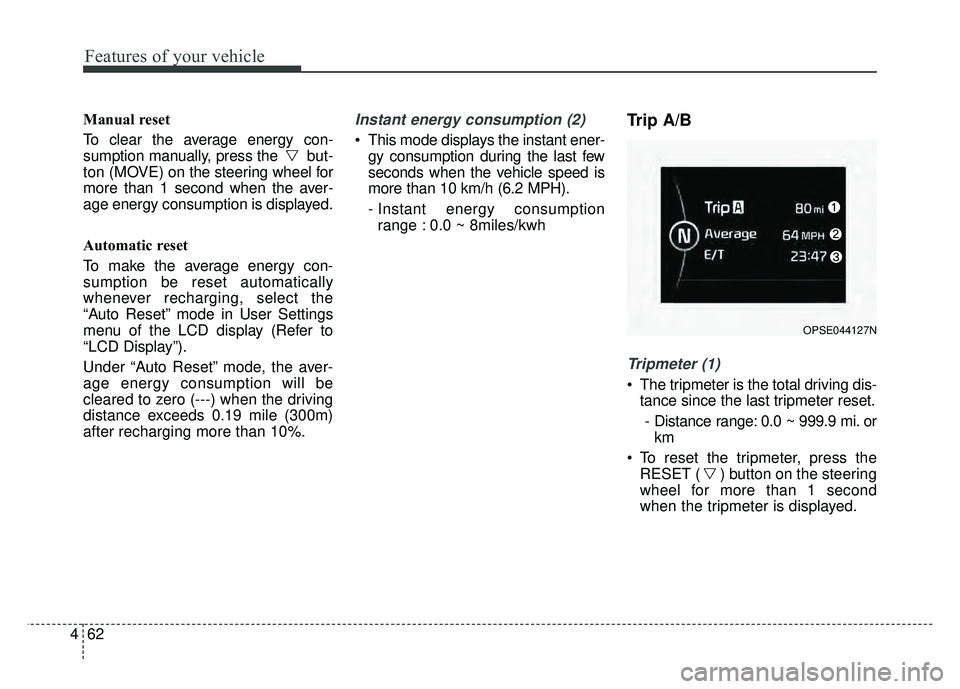
Trip A/B
Tripmeter (1)
The tripmeter is the total driving dis- tance since the last tripmeter reset.
- Distance range: 0.0 ~ 999.9 mi. or km
To reset the tripmeter, press the RESET ( ) button on the steering
wheel for more than 1 second
when the tripmeter is displayed.
OPSE044127N
Page 194 of 496
463
Features of your vehicle
Average Vehicle Speed (2)
The average vehicle speed is cal-culated by the total driving dis-
tance and driving time since the
last average vehicle speed reset.
- Speed range: 160 MPH or 200km/h
To reset the average vehicle speed, press the RESET ( ) button on
the steering wheel for more than 1
second when the average vehicle
speed is displayed.
✽ ✽ NOTICE
• The average vehicle speed is not dis-
played if the driving distance is less
than 0.03 miles (50 meters) or the
driving time is less than 10 seconds
since the POWER button is turned
to ON.
• Even if the vehicle is not in motion, the average vehicle speed
keeps going while the vehicle is in
the ready ( ) mode.
Elapsed Time (3)
The elapsed time is the total driv-
ing time since the last elapsed time
reset.
- Time range (hh:mm): 00:00 ~ 99:59
To reset the elapsed time, press the RESET ( ) button on the
steering wheel for more than 1
second when the elapsed time is
displayed.
✽ ✽ NOTICE
Even if the vehicle is not in motion,
the elapsed time keeps going while
the vehicle is in the ready ( )
mode.
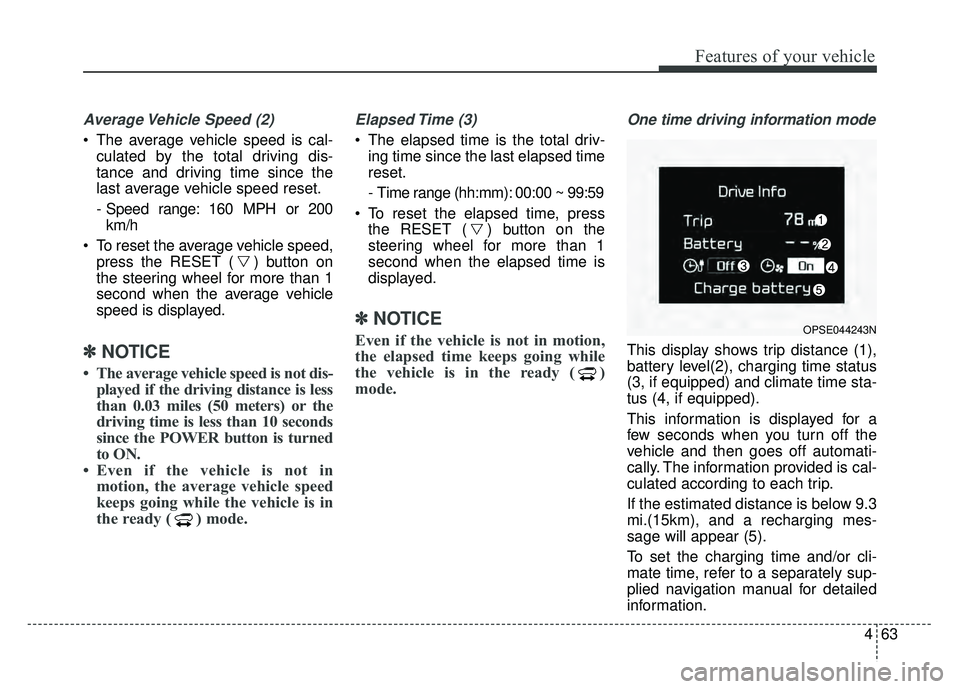
One time driving information mode
This display shows trip distance (1),
battery level(2), charging time status
(3, if equipped) and climate time sta-
tus (4, if equipped).
This information is displayed for a
few seconds when you turn off the
vehicle and then goes off automati-
cally. The information provided is cal-
culated according to each trip.
If the estimated distance is below 9.3
mi.(15km), and a recharging mes-
sage will appear (5).
To set the charging time and/or cli-
mate time, refer to a separately sup-
plied navigation manual for detailed
information.
OPSE044243N
Page 195 of 496
Features of your vehicle
64
4
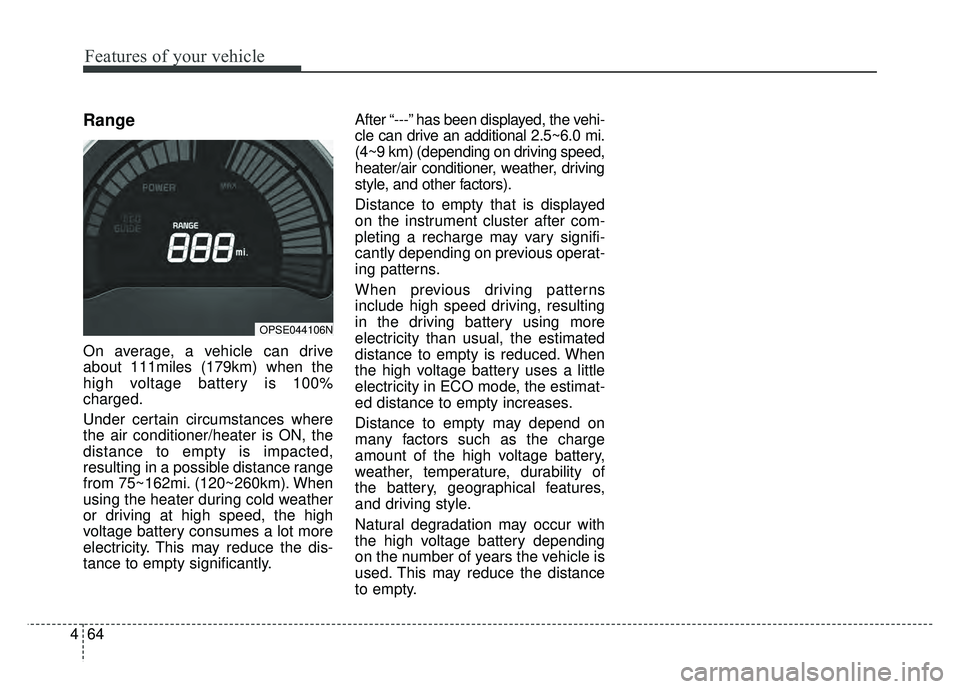
Range
On average, a vehicle can drive
about 111miles (179km) when the
high voltage battery is 100%
charged.
Under certain circumstances where
the air conditioner/heater is ON, the
distance to empty is impacted,
resulting in a possible distance range
from 75~162mi. (120~260km). When
using the heater during cold weather
or driving at high speed, the high
voltage battery consumes a lot more
electricity. This may reduce the dis-
tance to empty significantly. After “---” has been displayed, the vehi-
cle can drive an additional 2.5~6.0 mi.
(4~9 km) (depending on driving speed,
heater/air conditioner, weather, driving
style, and other factors).
Distance to empty that is displayed
on the instrument cluster after com-
pleting a recharge may vary signifi-
cantly depending on previous operat-
ing patterns.
When previous driving patterns
include high speed driving, resulting
in the driving battery using more
electricity than usual, the estimated
distance to empty is reduced. When
the high voltage battery uses a little
electricity in ECO mode, the estimat-
ed distance to empty increases.
Distance to empty may depend on
many factors such as the charge
amount of the high voltage battery,
weather, temperature, durability of
the battery, geographical features,
and driving style.
Natural degradation may occur with
the high voltage battery depending
on the number of years the vehicle is
used. This may reduce the distance
to empty.
OPSE044106N
Page 211 of 496
Features of your vehicle
80
4
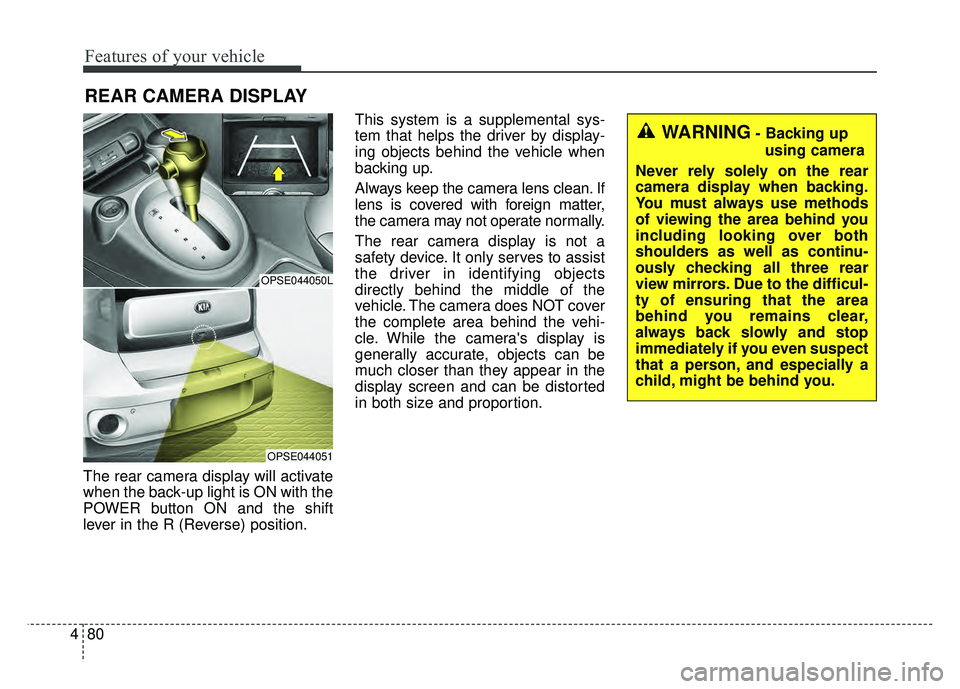
The rear camera display will activate
when the back-up light is ON with the
POWER button ON and the shift
lever in the R (Reverse) position. This system is a supplemental sys-
tem that helps the driver by display-
ing objects behind the vehicle when
backing up.
Always keep the camera lens clean. If
lens is covered with foreign matter,
the camera may not operate normally.
The rear camera display is not a
safety device. It only serves to assist
the driver in identifying objects
directly behind the middle of the
vehicle. The camera does NOT cover
the complete area behind the vehi-
cle. While the camera's display is
generally accurate, objects can be
much closer than they appear in the
display screen and can be distorted
in both size and proportion.
REAR CAMERA DISPLAY
OPSE044050L
OPSE044051
WARNING- Backing up
using camera
Never rely solely on the rear
camera display when backing.
You must always use methods
of viewing the area behind you
including looking over both
shoulders as well as continu-
ously checking all three rear
view mirrors. Due to the difficul-
ty of ensuring that the area
behind you remains clear,
always back slowly and stop
immediately if you even suspect
that a person, and especially a
child, might be behind you.
Page 225 of 496
Features of your vehicle
94
4
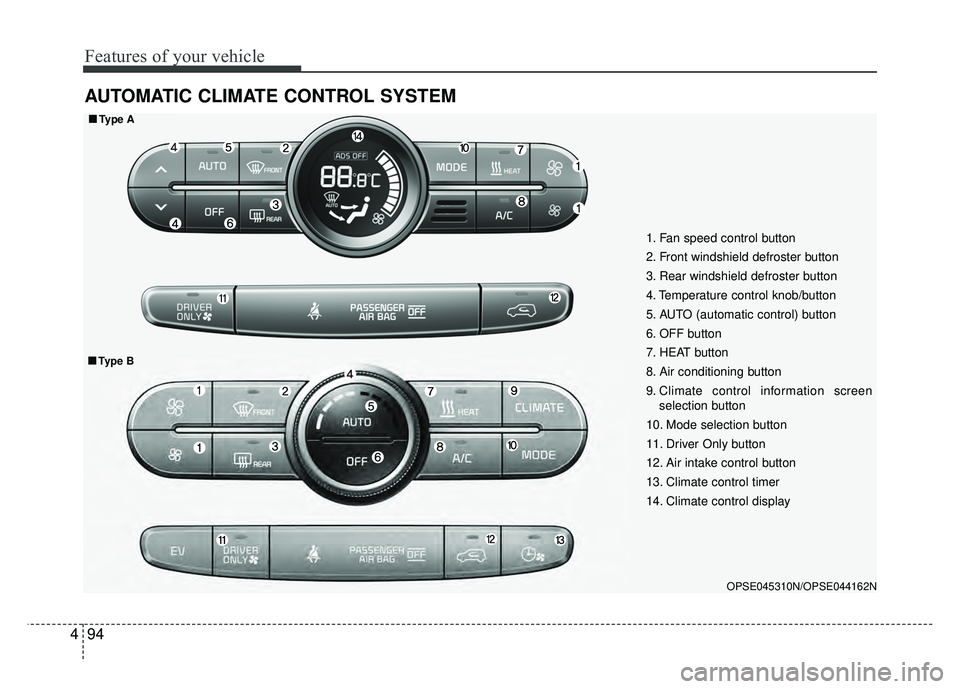
AUTOMATIC CLIMATE CONTROL SYSTEM
OPSE045310N/OPSE044162N
1. Fan speed control button
2. Front windshield defroster button
3. Rear windshield defroster button
4. Temperature control knob/button
5. AUTO (automatic control) button
6. OFF button
7. HEAT button
8. Air conditioning button
9. Climate control information screen
selection button
10. Mode selection button
11. Driver Only button
12. Air intake control button
13. Climate control timer
14. Climate control display
■ ■ Type A
■
■Type B
Page 226 of 496
495
Features of your vehicle
Automatic heating and air
conditioning
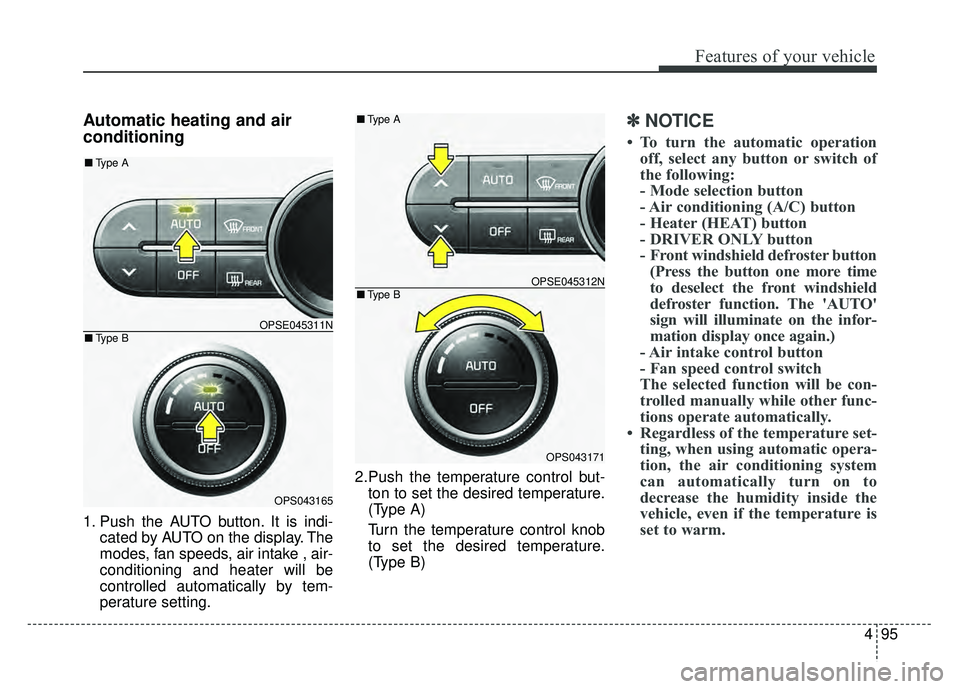
1. Push the AUTO button. It is indi-cated by AUTO on the display. The
modes, fan speeds, air intake , air-
conditioning and heater will be
controlled automatically by tem-
perature setting. 2.Push the temperature control but-
ton to set the desired temperature.
(Type A)
Turn the temperature control knob
to set the desired temperature.
(Type B)
✽ ✽ NOTICE
• To turn the automatic operation
off, select any button or switch of
the following:
- Mode selection button
- Air conditioning (A/C) button
- Heater (HEAT) button
- DRIVER ONLY button
- Front windshield defroster button(Press the button one more time
to deselect the front windshield
defroster function. The 'AUTO'
sign will illuminate on the infor-
mation display once again.)
- Air intake control button
- Fan speed control switch
The selected function will be con-
trolled manually while other func-
tions operate automatically.
• Regardless of the temperature set- ting, when using automatic opera-
tion, the air conditioning system
can automatically turn on to
decrease the humidity inside the
vehicle, even if the temperature is
set to warm.
OPSE045311N
OPS043165
■ Type B
■Type A
OPSE045312N
OPS043171
■Type B
■Type A
Page 231 of 496
Features of your vehicle
100
4
The temperature will decrease to the
minimum (62°F(17°C)) by pushing
the button ( ).
When pushing the button, the tem-
perature will increase or decrease by
0.5°C/1°F. When set to the lowest
temperature setting, the air condi-
tioning will operate continuously.
B
The temperature will increase to the
maximum (90°F(32°C)) by turning
the knob to the right extremely.
The temperature will decrease to the
minimum (62°F(17°C)) by turning the
knob to the left extremely.
When turning the knob, the tempera-
ture will increase or decrease by
0.5°C/1°F. When set to the lowest
temperature setting, the air condi-
tioning will operate continuously. Temperature scale conversion
If the battery has been discharged or
disconnected, the temperature mode
display will reset to Centigrade.
This is normal condition. You can
switch the temperature scale as fol-
lows;
While pressing the AUTO button,
press the OFF button for 3 seconds
or more. The temperature scale will
change from Centigrade to
Fahrenheit, or from Fahrenheit to
Centigrade.
The temperature unit (from °C to °F
or from °F to °C) can be changed by
using the “User Settings” mode of the
LCD display.
❈
You change the temperature unit,
the temperature unit on the instru-
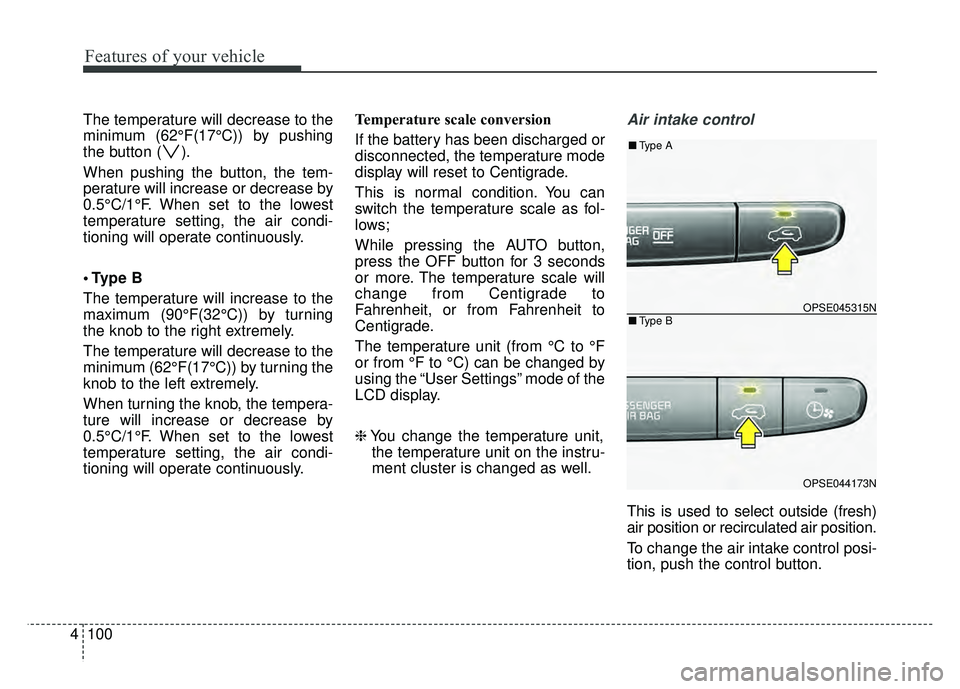
ment cluster is changed as well.Air intake control
This is used to select outside (fresh)
air position or recirculated air position.
To change the air intake control posi-
tion, push the control button.
OPSE045315N
OPSE044173N
■ Type B
■Type A
Page 236 of 496
4105
Features of your vehicle
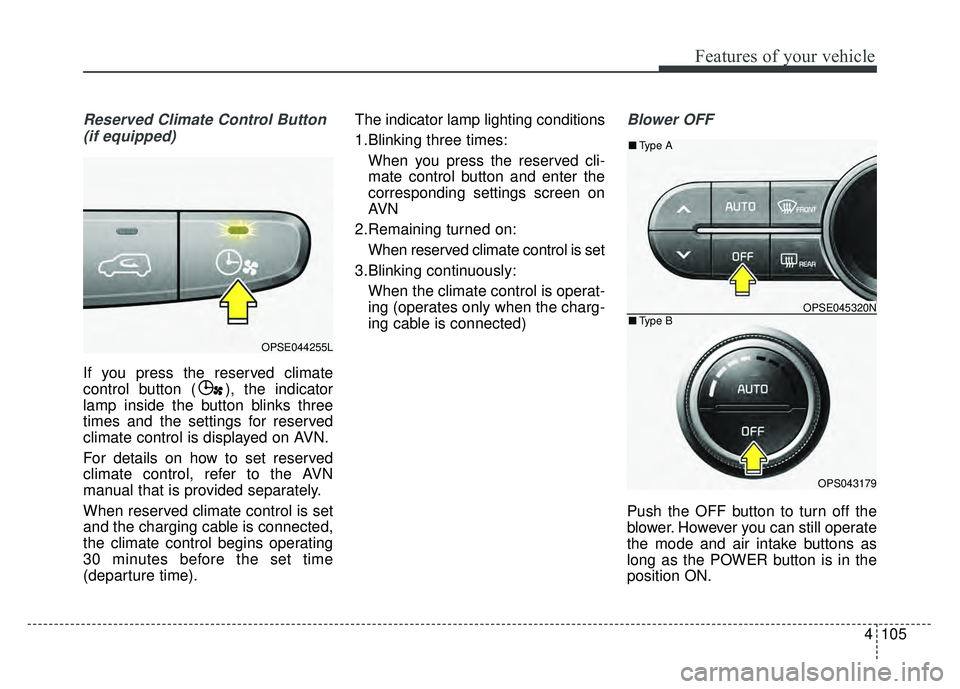
Reserved Climate Control Button(if equipped)
If you press the reserved climate
control button ( ), the indicator
lamp inside the button blinks three
times and the settings for reserved
climate control is displayed on AVN.
For details on how to set reserved
climate control, refer to the AVN
manual that is provided separately.
When reserved climate control is set
and the charging cable is connected,
the climate control begins operating
30 minutes before the set time
(departure time). The indicator lamp lighting conditions
1.Blinking three times:
When you press the reserved cli-
mate control button and enter the
corresponding settings screen on
AVN
2.Remaining turned on: When reserved climate control is set
3.Blinking continuously: When the climate control is operat-
ing (operates only when the charg-
ing cable is connected)
Blower OFF
Push the OFF button to turn off the
blower. However you can still operate
the mode and air intake buttons as
long as the POWER button is in the
position ON.
OPSE044255L
OPSE045320N
OPS043179
■ Type B
■Type A
Page 273 of 496
142
4
Features of your vehicle
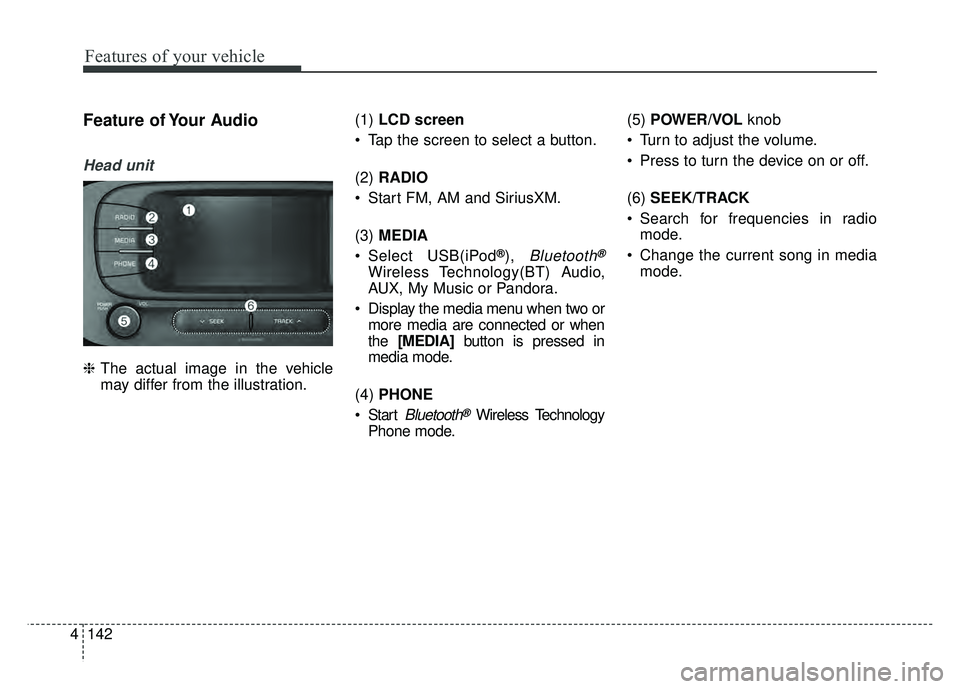
Feature of Your Audio
Head unit
❈ The actual image in the vehicle
may differ from the illustration. (1)
LCD screen
Tap the screen to select a button.
(2) RADIO
Start FM, AM and SiriusXM.
(3) MEDIA
Select USB(iPod
®),Bluetooth®
Wireless Technology(BT) Audio,
AUX, My Music or Pandora.
Display the media menu when two or more media are connected or when
the [MEDIA] button is pressed in
media mode.
(4) PHONE
Start
Bluetooth®Wireless Technology
Phone mode. (5)
POWER/VOL knob
Turn to adjust the volume.
Press to turn the device on or off.
(6) SEEK/TRACK
Search for frequencies in radio mode.
Change the current song in media mode.