instrument panel KIA SPECTRA5 2009 User Guide
[x] Cancel search | Manufacturer: KIA, Model Year: 2009, Model line: SPECTRA5, Model: KIA SPECTRA5 2009Pages: 291, PDF Size: 2.63 MB
Page 85 of 291

375
1
2
3
4
5
6
7
8
9
Knowing your vehicle
(Continued)
If a fire breaks out during refu-eling, leave the vicinity of the
vehicle, and immediately con-
tact the manager of the gas
station or contact the police
and local fire department.
Follow any safety instructions
they provide.
(Continued)
If the fuel filler cap requires replacement, use only a gen-uine Kia cap or the equivalentspecified for your vehicle. Anincorrect fuel filler cap canresult in a serious malfunctionof the fuel system or emissioncontrol system. Correctreplacement caps are avail-able at authorized Kia dealers.
Do not spill fuel on the exteri- or surfaces of the vehicle. Anytype of fuel spilled on paintedsurfaces may damage thepaint.
A loose fuel filler cap may cause the “Check Engine”(Malfunction Indicator) light inthe instrument panel to illumi-nate unnecessarily.
If the fuel filler lid will not open in cold weather because thearea around it is frozen, pushor lightly tap the lid.
CAUTION
Make sure to refuel with gaso- line (unleaded fuel) only forthe gasoline engine vehicles.
Check to make sure the fuel filler cap is securely closedafter refueling.
(Continued)
Page 145 of 291
419
1
2
3
4
5
6
7
8
9
Driving your vehicle
Tilt steering (if equipped)A tilt steering wheel allows you to
adjust the steering wheel before you
drive. You can also raise it to the
highest level to give your legs more
room when you exit and enter the
vehicle.
The steering wheel should be posi-
tioned so that it is comfortable for
you to drive, while permitting you to
see the instrument panel warning
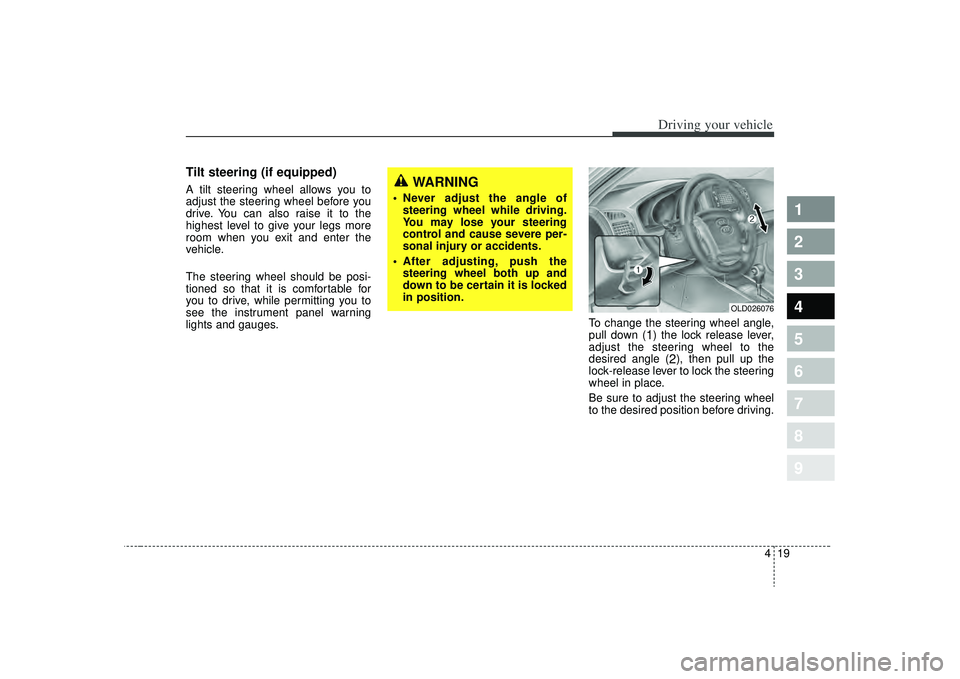
lights and gauges.To change the steering wheel angle,
pull down (
1) the lock release lever,
adjust the steering wheel to the
desired angle (
2), then pull up the
lock-release lever to lock the steering
wheel in place.
Be sure to adjust the steering wheel
to the desired position before driving.
WARNING
Never adjust the angle of steering wheel while driving.
You may lose your steering
control and cause severe per-
sonal injury or accidents.
After adjusting, push the steering wheel both up and
down to be certain it is locked
in position.
OLD026076
Page 156 of 291
Driving your vehicle30
4
1
2
3
4
5
6
7
8
9
Engine temperature gauge This gauge shows the temperature
of the engine coolant when the igni-
tion switch is ON.
Do not continue driving with an over-
heated engine. If your vehicle over-
heats, refer to “Overheating” in the
Index.
Fuel gaugeThe fuel gauge indicates the approx-
imate amount of fuel remaining in the
fuel tank.
Fuel tank capacity - 55 litres (14.52
US gal. ).
The fuel gauge is supplemented by a
low fuel warning light, which will illu-
minate when the fuel level has
dropped to about 8.5 liters (2.25 US
gal.).
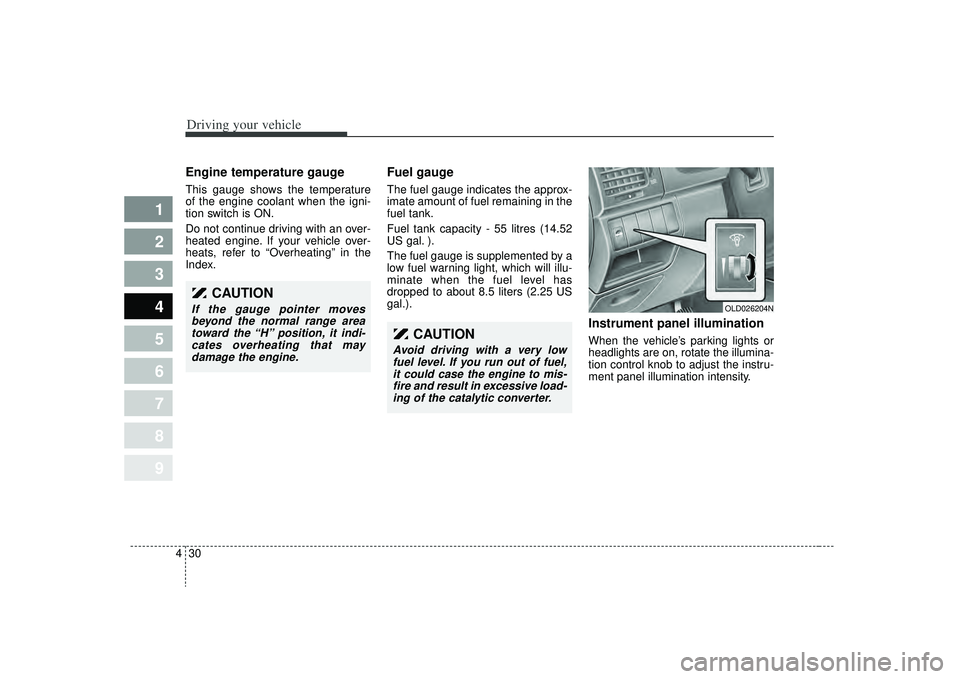
Instrument panel illuminationWhen the vehicle’s parking lights or
headlights are on, rotate the illumina-
tion control knob to adjust the instru-
ment panel illumination intensity.
OLD026204N
CAUTION
If the gauge pointer moves
beyond the normal range areatoward the “H” position, it indi-cates overheating that maydamage the engine.
CAUTION
Avoid driving with a very lowfuel level. If you run out of fuel,it could case the engine to mis-fire and result in excessive load-ing of the catalytic converter.
Page 161 of 291

435
1
2
3
4
5
6
7
8
9
Driving your vehicle
Malfunction indicator
(if equipped)This indicator light is part of the
Engine Control System which moni-
tors various emission control system
components. If this light illuminates
while driving, it indicates that a
potential problem has been detected
somewhere in the emission control
system.
Generally, your vehicle will continue
to be drivable and will not need tow-
ing, but have the system checked by
an Authorized Kia Dealer as soon as
possible.✽ ✽
NOTICEA loose fuel filler cap may cause the
On Board Diagnostic System
Malfunction Indicator Light ( )
in the instrument panel to illuminate
unnecessarily. Always make sure
that the fuel filler cap is tight.
Air bag warning
(if equipped) This warning light will blink or illumi-
nate for approximately 6 seconds
each time you turn the ignition switch
to the ON position.
If this indicator does not go out, or if
it illuminates while the vehicle is
being driven, see an Authorized Kia
Dealer for immediate service.
CHECK
CHECK
CHECKCHECK
CAUTION
Prolonged driving with the
Emission Control SystemMalfunction Indicator Light ( ) illuminated may causedamage to the emission con-trol systems which couldeffect drivability and/or fueleconomy.
If the
Emission
Control System
Malfunction Indicator Light ( ) begins to flash ON andOFF, potential catalytic con-verter damage is possiblewhich could result in loss ofengine power. Have the EngineControl System inspected assoon as possible by anAuthorized Kia Dealer.
CHECK
CHECKCHECK
CHECK
Page 165 of 291
439
1
2
3
4
5
6
7
8
9
Driving your vehicle
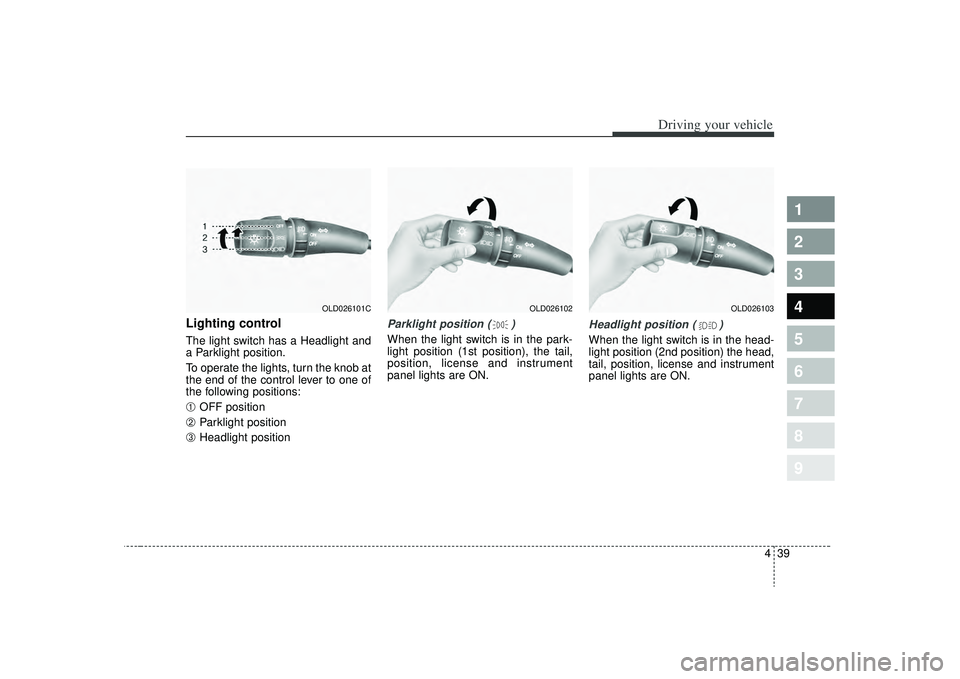
Lighting control The light switch has a Headlight and
a Parklight position.
To operate the lights, turn the knob at
the end of the control lever to one of
the following positions:➀
OFF position
➁
Parklight position
➂
Headlight position
Parklight position ( )When the light switch is in the park-
light position (1st position), the tail,
position, license and instrument
panel lights are ON.
Headlight position ( )When the light switch is in the head-
light position (2nd position) the head,
tail, position, license and instrument
panel lights are ON.
OLD026102
OLD026101C
OLD026103
Page 166 of 291
Driving your vehicle40
4
1
2
3
4
5
6
7
8
9
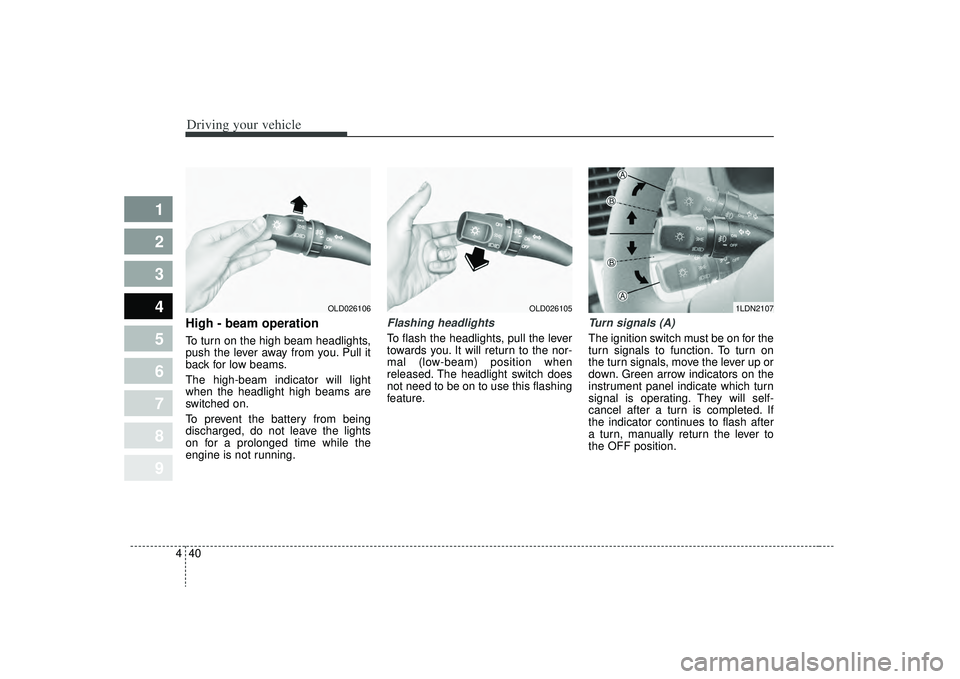
High - beam operation To turn on the high beam headlights,
push the lever away from you. Pull it
back for low beams.
The high-beam indicator will light
when the headlight high beams are
switched on.
To prevent the battery from being
discharged, do not leave the lights
on for a prolonged time while the
engine is not running.
Flashing headlights To flash the headlights, pull the lever
towards you. It will return to the nor-
mal (low-beam) position when
released. The headlight switch does
not need to be on to use this flashing
feature.
Turn signals (A)The ignition switch must be on for the
turn signals to function. To turn on
the turn signals, move the lever up or
down. Green arrow indicators on the
instrument panel indicate which turn
signal is operating. They will self-
cancel after a turn is completed. If
the indicator continues to flash after
a turn, manually return the lever to
the OFF position.
OLD026106
OLD026105
1LDN2107
Page 171 of 291
445
1
2
3
4
5
6
7
8
9
Driving your vehicle
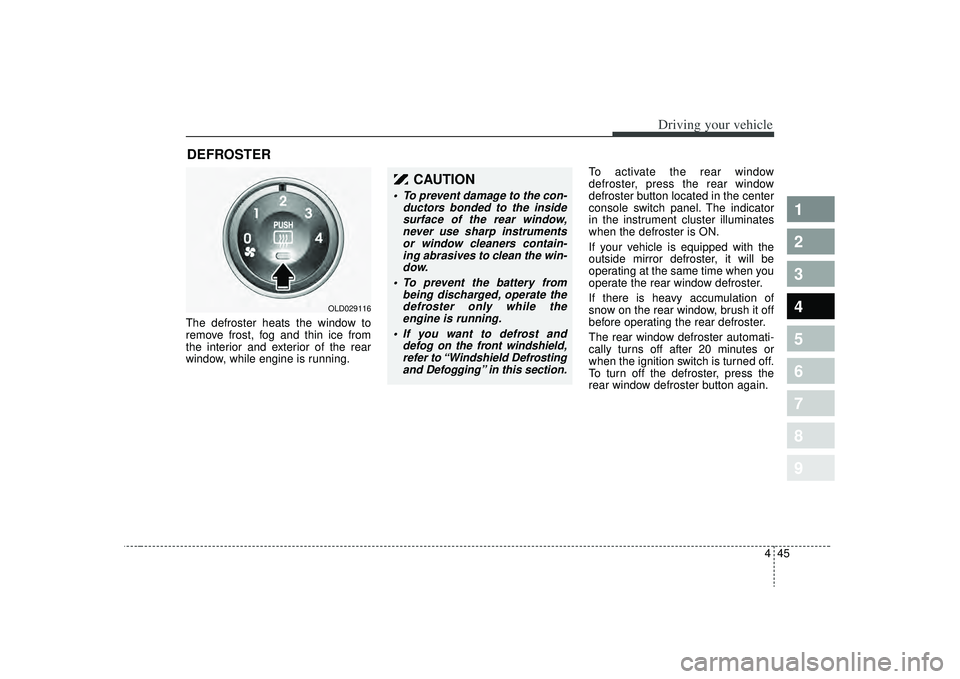
The defroster heats the window to
remove frost, fog and thin ice from
the interior and exterior of the rear
window, while engine is running.To activate the rear window
defroster, press the rear window
defroster button located in the center
console switch panel. The indicator
in the instrument cluster illuminates
when the defroster is ON.
If your vehicle is equipped with the
outside mirror defroster, it will be
operating at the same time when you
operate the rear window defroster.
If there is heavy accumulation of
snow on the rear window, brush it off
before operating the rear defroster.
The rear window defroster automati-
cally turns off after 20 minutes or
when the ignition switch is turned off.
To turn off the defroster, press the
rear window defroster button again.DEFROSTER
OLD029116
CAUTION
To prevent damage to the con-
ductors bonded to the insidesurface of the rear window,never use sharp instrumentsor window cleaners contain-ing abrasives to clean the win-dow.
To prevent the battery from being discharged, operate thedefroster only while theengine is running.
If you want to defrost and defog on the front windshield,refer to “Windshield Defrostingand Defogging” in this section.
Page 176 of 291
Driving your vehicle50
4
1
2
3
4
5
6
7
8
9
Face position
Air flow is directed toward
the upper body and face.
Additionally, each outlet
can be controlled to direct
the air discharged from
the outlet.
(outlet port: B, D)
Face - floor position
Air flow is directed towardsthe face and the floor. The
air to the floor is warmer
than the air to the face
(except when the temper-
ature control is set to the
extreme cold position).
(outlet port: B, D, C, E)
Floor position
Most of the air flow is
directed to the floor, with a
small amount of the air
being directed to the wind-
shield and side window
defroster.
(outlet port: C, E, A, D)
Floor - defrost position
Most of the air flow is
directed to the floor and
the windshield with a small
amount directed to the
side window defrosters.
(outlet port: A, C, E, D)
Defrost position
Most of the air flow is
directed to the windshield
with a small amount of air
directed to the side win-
dow defrosters.
(outlet port: A, D)
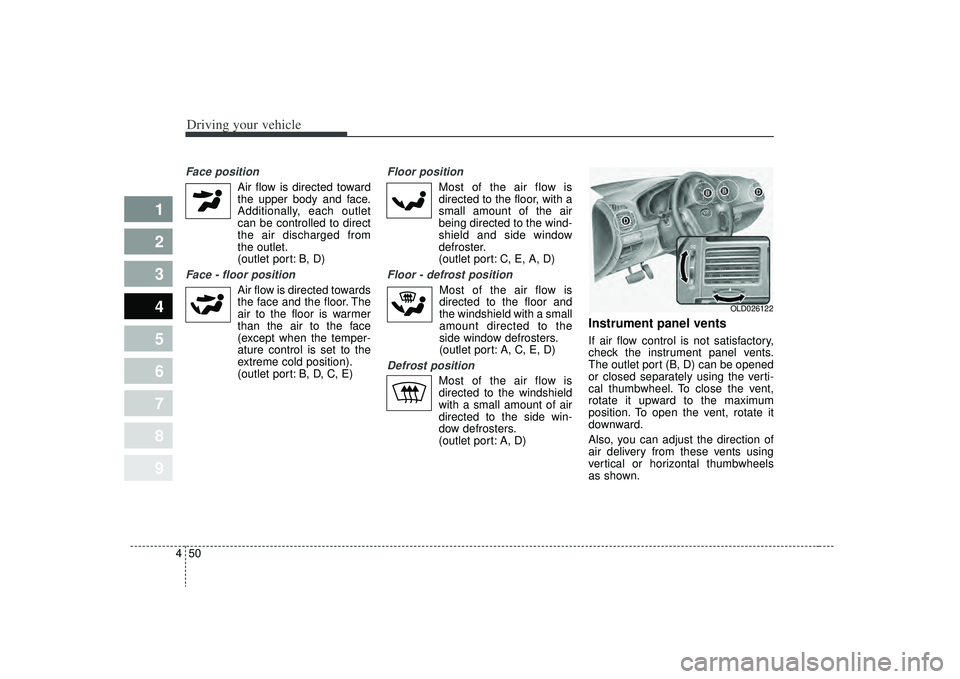
Instrument panel ventsIf air flow control is not satisfactory,
check the instrument panel vents.
The outlet port (B, D) can be opened
or closed separately using the verti-
cal thumbwheel. To close the vent,
rotate it upward to the maximum
position. To open the vent, rotate it
downward.
Also, you can adjust the direction of
air delivery from these vents using
vertical or horizontal thumbwheels
as shown.
OLD026122
Page 204 of 291
521
Driving tips
1
2
3
4
5
6
7
8
9
Following distance Stay at least twice as far behind the
vehicle ahead as you would when
driving your vehicle without a trailer.
This can help you avoid situations
that require heavy braking and sud-
den turns.Passing You’ll need more passing distance
up ahead when you’re towing a trail-
er. And, because you’re a good deal
longer, you’ll need to go much farther
beyond the passed vehicle before
you can return to your lane.
Backing up The trailer will go in the opposite
direction of the rear of your vehicle
when backing up. This is very difficult
for an inexperienced trailer driver to
get used to. To help you avoid mis-
takes, hold the bottom of the steering
wheel with one hand. Then, to move
the trailer to the left, just hold the
steering wheel firmly and move your
hand to the left. To move the trailer to
the right, move your hand to the
right. Always back up slowly and, if
possible, have someone guide you.Making turns When you’re turning with a trailer,
make wider turns than normal. Do
this so your trailer won’t strike soft
shoulders, curbs, road signs, trees,
or other objects. Avoid jerky or sud-
den maneuvers. Signal well in
advance.
Turn signals when towing a trailer When you tow a trailer, your vehicle
has to have a different turn signal
flasher and extra wiring. The green
arrows on your instrument panel will
flash whenever you signal a turn or
lane change. Properly connected,
the trailer lights will also flash to alert
other drivers you’re about to turn,
change lanes, or stop.
When towing a trailer, the green
arrows on your instrument panel will
flash for turns even if the bulbs on
the trailer are burned out. Thus, you
may think drivers behind you are
seeing your signals when, in fact,
they are not. It’s important to check
reqularly to be sure the trailer bulbs
are still working. You must also check
the lights every time you disconnect
and then reconnect the wires.
Page 289 of 291

Index29
1
2
3
4
5
6
7
8
9
Air bag - supplemental restraint system....................3-50
Air cleaner....................................................................7-21\
Antenna ........................................................................\
3-91
Audio system ................................................................3-92
Automatic transaxle.............................................4-6, 7-18
Battery ........................................................................\
..7-25
Before driving ................................................................5-5
Brake system ................................................................4-11
Brakes and clutch ........................................................7-15
Climate control air filter.............................................7-22
Cruise control ..............................................................4-21
Defroster .......................................................................4\
-45
Door locks ......................................................................3-\
8
Electrical circuit protection........................................6-12
Emergency starting .......................................................6-9
Emission control system ...............................................5-3
Engine compartment ...........................................2-4, 7-10 Engine cooling system .................................................7-12
Engine oil and oil filter ...............................................7-11
Exterior care ................................................................7-40
Fuel filler lid ................................................................3-73
Fuel requirements .........................................................5-2
Gauges ........................................................................\
..4-29
Hazard warning flasher ..............................................4-46
Hood....................................................................\
..........3-71
How to use this manual ................................................1-2
If you have a flat tire...................................................6-24
Ignition switch ...............................................................4-2
Immobilizer system .......................................................3-6
In case of an emergency while driving ........................6-2
Instrument cluster .......................................................4-28
Instrument panel overview...........................................2-3
Interior care .................................................................7-44
Interior features...........................................................3-83
Interior lights ...............................................................3-80
Interior overview ...........................................................2-2ABCDE
GFHI