lock KIA Sportage 2005 JE_ / 2.G Repair Manual
[x] Cancel search | Manufacturer: KIA, Model Year: 2005, Model line: Sportage, Model: KIA Sportage 2005 JE_ / 2.GPages: 354, PDF Size: 2.78 MB
Page 176 of 354
453
Driving your vehicle
1
2
3
4
5
6
7
8
9
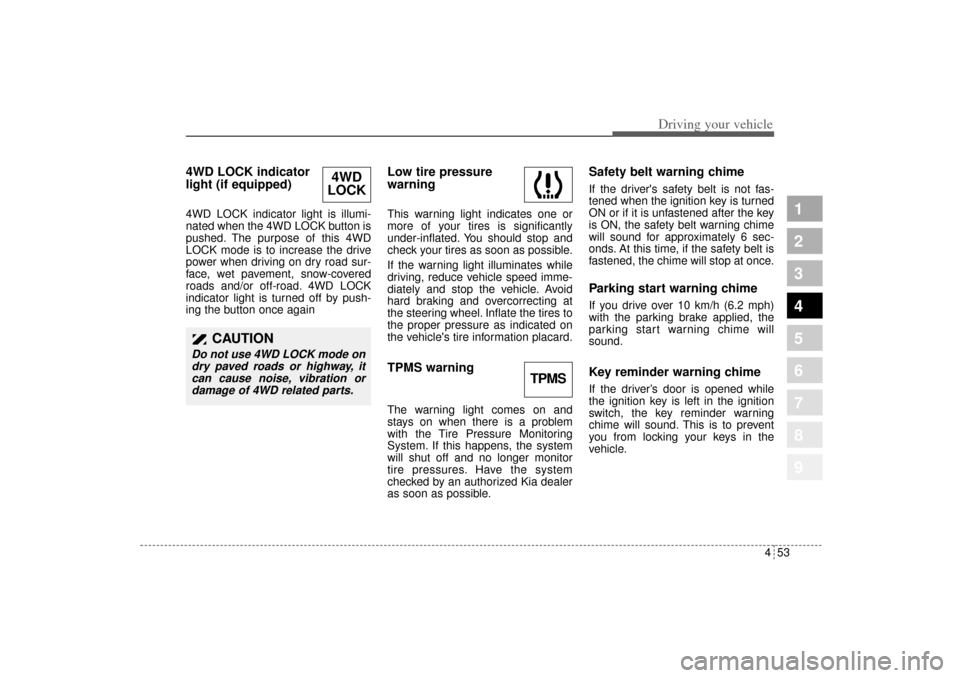
4WD LOCK indicator
light (if equipped) 4WD LOCK indicator light is illumi-
nated when the 4WD LOCK button is
pushed. The purpose of this 4WD
LOCK mode is to increase the drive
power when driving on dry road sur-
face, wet pavement, snow-covered
roads and/or off-road. 4WD LOCK
indicator light is turned off by push-
ing the button once again
Low tire pressure
warningThis warning light indicates one or
more of your tires is significantly
under-inflated. You should stop and
check your tires as soon as possible.
If the warning light illuminates while
driving, reduce vehicle speed imme-
diately and stop the vehicle. Avoid
hard braking and overcorrecting at
the steering wheel. Inflate the tires to
the proper pressure as indicated on
the vehicle's tire information placard.TPMS warning The warning light comes on and
stays on when there is a problem
with the Tire Pressure Monitoring
System. If this happens, the system
will shut off and no longer monitor
tire pressures. Have the system
checked by an authorized Kia dealer
as soon as possible.
Safety belt warning chime If the driver's safety belt is not fas-
tened when the ignition key is turned
ON or if it is unfastened after the key
is ON, the safety belt warning chime
will sound for approximately 6 sec-
onds. At this time, if the safety belt is
fastened, the chime will stop at once.Parking start warning chimeIf you drive over 10 km/h (6.2 mph)
with the parking brake applied, the
parking start warning chime will
sound.Key reminder warning chimeIf the driver’s door is opened while
the ignition key is left in the ignition
switch, the key reminder warning
chime will sound. This is to prevent
you from locking your keys in the
vehicle.
4WD
LOCK
CAUTION
Do not use 4WD LOCK mode on
dry paved roads or highway, it
can cause noise, vibration or
damage of 4WD related parts.
TPMS
KM CAN (ENG) 4.qxd 9/13/2004 4:48 PM Page 53
Page 180 of 354
457
Driving your vehicle
1
2
3
4
5
6
7
8
9
If the vehicle's compass headings
become inaccurate continuously, the
compass should be manually cali-
brated as follows:
1) Move the vehicle away from any
large steel structures or power
generating cables or equipment.
2) Turn on the compass by pressing
the COMP button.
3) Check the zone number by press-
ing the COMP button for more
than 4 seconds until the current
zone number appears in the dis-
play. To re-calibrate, hold the
COMP button for 3 seconds until
C is displayed.
If the zone number is different for
your country, set the correct zone
number referring to "Setting the
compass zone" and perform the
"Calibration procedure" again.4) Make sure the vehicle windshield
wipers are turned off.
5) Drive your vehicle in at least 2
complete (either clockwise or
counter-clockwise) circles at less
than 8 km/h (5 mph) until the com-
pass heading appears. Driving in
a circle in right-handed direction
and opposite direction is possible
and if possible, stop the wiper
operation.
6) If the vehicle's compass headings
become inaccurate again, repeat
steps 1 through 6 above.
✽ ✽
NOTICEIf new vehicle is first driven or if the
battery has been disconnected, do
the calibration procedure as above.
Setting the compass zoneThis compass must be set to com-
pensate for the variation between
true north and magnetic north. To set
variation:
1. Find your current location and
variance zone number on the zone
map.
2. Press the COMP button for more
than 4 seconds. The current zone
number will appear in the display.
3. Release and press the COMP but-
ton until the new zone number
appears in the display. After you
stop pressing the button in, the
display will show a compass direc-
tion within a few seconds.
KM CAN (ENG) 4.qxd 9/13/2004 4:48 PM Page 57
Page 222 of 354
55
Driving tips
BEFORE DRIVING Before entering vehicle: Be sure that all windows, outside
mirror(s), and outside lights are
clean.
Check the condition of the tires.
Check under the vehicle for any
sign of leaks.
Be sure there are no obstacles
behind you if you intend to back up.Necessary inspections Fluid levels, such as engine oil,
engine coolant, brake fluid, and
washer fluid should be checked on a
regular basis, with the exact interval
depending on the fluid. Further
details are provided in Section 7,
Maintenance.
Before starting Close and lock all doors.
Position the seat so that all con-
trols are easily reached.
Adjust the inside and outside
rearview mirrors.
Be sure that all lights work.
Check all gauges.
Check the operation of warning
lights when the ignition switch is
turned to the ON position.
Release the parking brake and
make sure the brake warning light
goes out.
For safe operation, be sure you are
familiar with your vehicle and its
equipment.
1
2
3
4
5
6
7
8
9
WARNING
- Driving under
the influence of alcohol or
drugs
Drinking and driving is danger-
ous. Drunk driving is the num-
ber one contributor to the high-
way death toll each year. Even a
small amount of alcohol will
affect your reflexes, perceptions
and judgement.
You are much more likely to
have a serious accident if you
drink and drive.
If you are drinking or taking
drugs, don’t drive. Do not ride
with a driver who has been
drinking or taking drugs.
Choose a designated driver or
call a cab.
Driving while under the influ-
ence of drugs is as dangerous
or more dangerous than driving
drunk.
KM CAN (ENG) 5.qxd 9/13/2004 4:48 PM Page 5
Page 226 of 354

59
Driving tips
Driving too fast through large pud-
dles can affect your brakes. If you
must go through puddles, try to
drive through them slowly.
If you believe you may have gotten
your brakes wet, apply them lightly
while driving until normal braking
operation returns.
Winter driving We recommend that you carry
emergency equipment, including
tire chains, a window scraper,
windshield de-icer, a bag of sand
or salt, flares, a small shovel and
jumper cables.
Make sure you have sufficient eth-
ylene-glycol coolant in the radiator.
Check the battery condition and
cables. Cold temperatures reduce
the capacity of any battery, so it
must be in excellent condition to
provide enough winter starting
power.
Make sure the engine oil viscosity
is suitable for cold weather.
Check the ignition system for loose
connections and damage. Use antifreeze-formulated wind-
shield washer fluid. (Do not use
engine coolant antifreeze.)
Do not use the parking brake if it
might freeze. When parking, shift
to 1 (First) or R (Reverse) with a
manual transaxle or P (Park) with
an automatic transaxle and block
the rear wheels.
1
2
3
4
5
6
7
8
9
KM CAN (ENG) 5.qxd 9/13/2004 4:48 PM Page 9
Page 229 of 354
Driving tips12 5
1
2
3
4
5
6
7
8
9
USING FOUR-WHEEL DRIVEDriving on snow- or Ice-cov-
ered roads (“4WD LOCK” for
full-time 4WD operation) Use snow tires. See “Tires” in this
section for more information.
Keep an adequate distance
between yourself and other vehi-
cles.
Avoid sudden braking, acceleration
or steering. These actions can
cause your vehicle to lose traction.
Driving in sand or mud (“4WD
LOCK” for full-time 4WD opera-
tion) Avoid sudden braking, acceleration
or steering. These actions can
cause your vehicle to get stuck in
the sand or mud.
Drive at low speeds whenever pos-
sible.
You may need to get out of your
vehicle at times to check road con-
ditions.
If you get stuck in the sand or mud,
try placing stones, wood or other
similar materials under the tires to
get traction, or move forward and
backward repeatedly to get
unstuck.
✽ ✽
NOTICEProlonged rocking may cause engine
damage, overheating, transaxle dif-
ferential or transfer case damage or
failure and tire damage.
WARNING
- Traction
Make sure that no one stands in
front of or behind the tires when
materials are placed under the
tires to get more traction. The
tires may cause loose materials
to fly out from under the vehicle,
potentially causing serious bod-
ily injury or death.
KM CAN (ENG) 5.qxd 9/13/2004 4:48 PM Page 12
Page 230 of 354
513
Driving tips
1
2
3
4
5
6
7
8
9
Driving on a hill (“4WD LOCK”
for full-time 4WD operation) Use low gear when going uphill or
downhill and avoid sudden braking.
Do not shift gears or use your
clutch when going downhill. Do not
coast downhill in Neutral.
Crossing a ditch (“4WD LOCK”
for full-time 4WD operation) Avoid driving through ditches if
possible, especially if there is
water in the ditch. Your vehicle may
stall if the electrical system gets
wet. If you must cross a ditch,
select 4WD LOCK mode.
Avoid driving where the water level
is higher than the bottom of the
wheel hub. If the water level rises
above this mark, your vehicle will
need to be serviced.
Tap lightly on the brake pedal dur-
ing and after driving through water.
This will help keep the brakes dry
and in proper working order.
Do not shift gears while crossing a
ditch.
Tight corner brake effectThis is called tight corner brake
effect. Tight corner brake effect is a
unique characteristic of four-wheel
drive vehicles caused by the differ-
ence in tire rotation at the four
wheels and the zero-degree align-
ment of the front wheels and sus-
pension.
Sharp turns at low speeds should be
carried out with caution.
CAUTION
When turning sharply on a
paved road at low speed while
in four-wheel drive, steering
control will be difficult.
KM CAN (ENG) 5.qxd 9/13/2004 4:48 PM Page 13
Page 236 of 354
519
Driving tips
1
2
3
4
5
6
7
8
9
Approaching a hillWhen you approach a hill, you need
to decide if it’s one of those hills
that’s just too steep to climb,
descend, or cross. Steepness can be
difficult to judge. On a very small hill,
for example, there may be a smooth,
constant incline with only a small
change in elevation where you can
easily see all the way to the top. On
a large hill, the incline may get steep-
er as you near the top, but you may
not see this because the crest of the
hill is hidden by bushes, grass, or
shrubs.Here are some other things to con-
sider as you approach a hill:
Is there a constant incline, or does
the hill get sharply steeper in
places?
Is there good traction on the hill-
side, or will the surface cause tire
slipping?
Is there a straight path up or down
the hill so you won’t have to make
turning maneuvers?
Are there obstructions on the hill
that can block your path (boulders,
trees, logs or ruts)?
What’s beyond the hill? Is there a
cliff, an embankment, a drop-off, or
a fence? Get out of the vehicle and
walk the hill if you are unsure. It’s
the smart way to find out. Is the hill simply too rough? Steep
hills often have ruts, gullies,
troughs, and exposed rocks
because they are more susceptible
to the effects of erosion.
How have weather conditions
affected the terrain? Is there likely
to be mud, snow or ice on the hill?
What time of day is it? Are temper-
atures dropping so that wet sur-
faces will start to freeze?
KM CAN (ENG) 5.qxd 9/13/2004 4:48 PM Page 19
Page 238 of 354
521
Driving tips
1
2
3
4
5
6
7
8
9
Stalling while driving uphill
What should I do if my vehicle stalls,
or is about to stall, and I can’t make
it up the hill?If your vehicle stalls, or is about to
stall while driving uphill, there are
some things you should do, and
there are some things you must not
do. First, here’s what you should do:
Push the brake pedal to stop the
vehicle and keep it from rolling
backwards. Also, apply the parking
brake.
If your engine is still running, shift
the transaxle into reverse, release
the parking brake, and slowly back
down the hill in reverse. If your engine has stopped run-
ning, you’ll need to restart it. With
the brake pedal depressed and the
parking brake still applied, shift a
manual transaxle to N (Neutral), or
an automatic transaxle to P (Park)
and restart the engine. Then, shift
to reverse, release the parking
brake, and slowly back down the
hill in reverse.
As you are backing down the hill,
put your left hand on the steering
wheel at the 12 o’clock position.
This way, you’ll be able to tell if
your wheels are straight or turned
to the left or right as you back
down.Here are some things you must not
do if you stall, or are about to stall,
when going up a hill.
Never attempt to prevent a stall by
depressing the clutch or shifting to
N (Neutral) to “rev-up” the engine
and regain forward momentum.
This won’t work. Your vehicle will
roll backwards very quickly and
you could go out of control or roll
over.
Instead, apply the brake to stop the
vehicle. Then apply the parking
brake. Shift into reverse, release the
parking brake, and slowly back
down.
KM CAN (ENG) 5.qxd 9/13/2004 4:48 PM Page 21
Page 241 of 354
Driving tips24 5
1
2
3
4
5
6
7
8
9
Avoid turns that take you across the
incline of the hill. A hill that’s not too
steep to drive down may be too
steep to drive across. You could roll
over if you don’t drive straight down.
Never go downhill with the clutch
pedal depressed. This is called “free-
wheeling.” Your brakes will have to do
all the work and could overheat and
fade.If your wheels lock up during down-
hill braking, you may feel the vehicle
starting to slide sideways. To regain
your direction, just ease off the
brakes and steer to keep the front of
the vehicle pointing straight downhill.
CAUTION
Before beginning to go down-
hill, it is critical that you ensure
that no cargo can shift forward
while you are heading downhill.
Such shifting could either
endanger you and your occu-
pants, or interfere with your
ability to control the vehicle.
WARNING
- Braking
Heavy braking when going
down a hill can cause your
brakes to overheat and fade.
This could cause loss of control
and a serious accident. Apply
the brakes lightly when
descending a hill and use a low
gear to keep vehicle speed
under control.
CAUTION
Avoid braking so hard that you
lock the wheels when going
downhill. If your front wheels
are locked, you can’t steer your
vehicle.
KM CAN (ENG) 5.qxd 9/13/2004 4:48 PM Page 24
Page 264 of 354
547
Driving tips
1
2
3
4
5
6
7
8
9
6. Return to the vehicle and firmly
press and release the pro-
grammed HomeLink button up to
three times. The rolling code
equipped device should now rec-
ognize the HomeLink signal and
activate when the HomeLink but-
ton is pressed. The remaining two
buttons may now be programmed
if this has not previously been
done. Refer to the “Programming”
portion of this text.
Operating HomeLink To operate, simply press the pro-
grammed HomeLink button.
Activation will now occur for the
trained product (garage door, securi-
ty system, entry door lock, estate
gate, or home or office lighting). For
convenience, the hand-held trans-
mitter of the device may also be used
at any time. The HomeLink Wireless
Controls System (once programmed)
or the original hand-held transmitter
may be used to activate the device
(e.g. garage door, entry door lock,
etc.). In the event that there are still
programming difficulties, contact
HomeLink at 1-800-355-3515 or on
the internet at www.homelink.com.
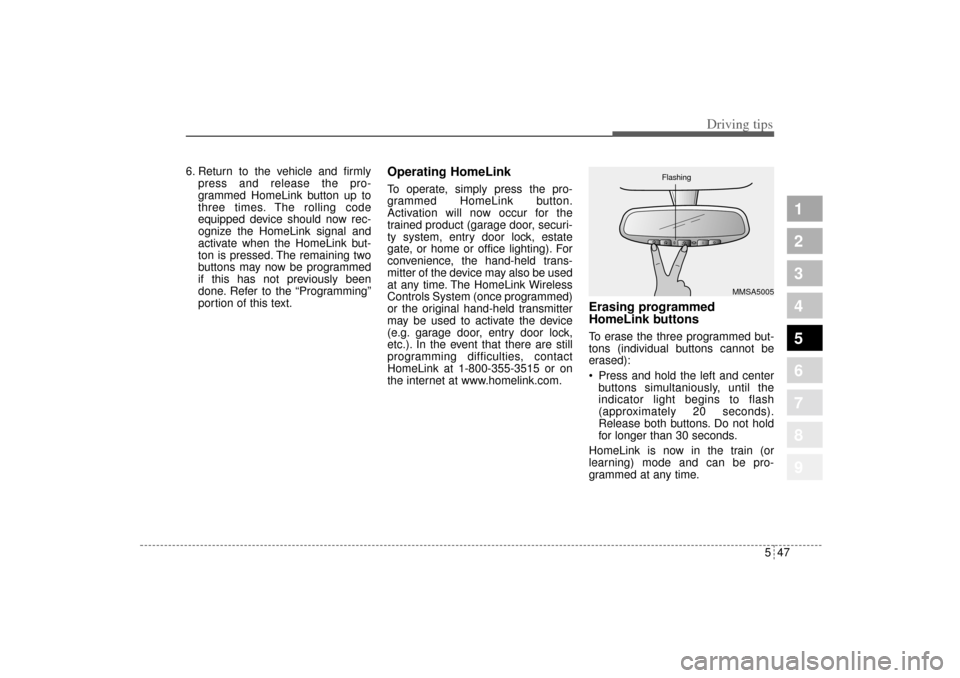
Erasing programmed
HomeLink buttonsTo erase the three programmed but-
tons (individual buttons cannot be
erased):
Press and hold the left and center
buttons simultaniously, until the
indicator light begins to flash
(approximately 20 seconds).
Release both buttons. Do not hold
for longer than 30 seconds.
HomeLink is now in the train (or
learning) mode and can be pro-
grammed at any time.
MMSA5005 Flashing
KM CAN (ENG) 5.qxd 9/13/2004 4:48 PM Page 47