check engine KIA Sportage 2016 QL / 4.G Owner's Guide
[x] Cancel search | Manufacturer: KIA, Model Year: 2016, Model line: Sportage, Model: KIA Sportage 2016 QL / 4.GPages: 501, PDF Size: 18.95 MB
Page 330 of 501
55
Driving your vehicle
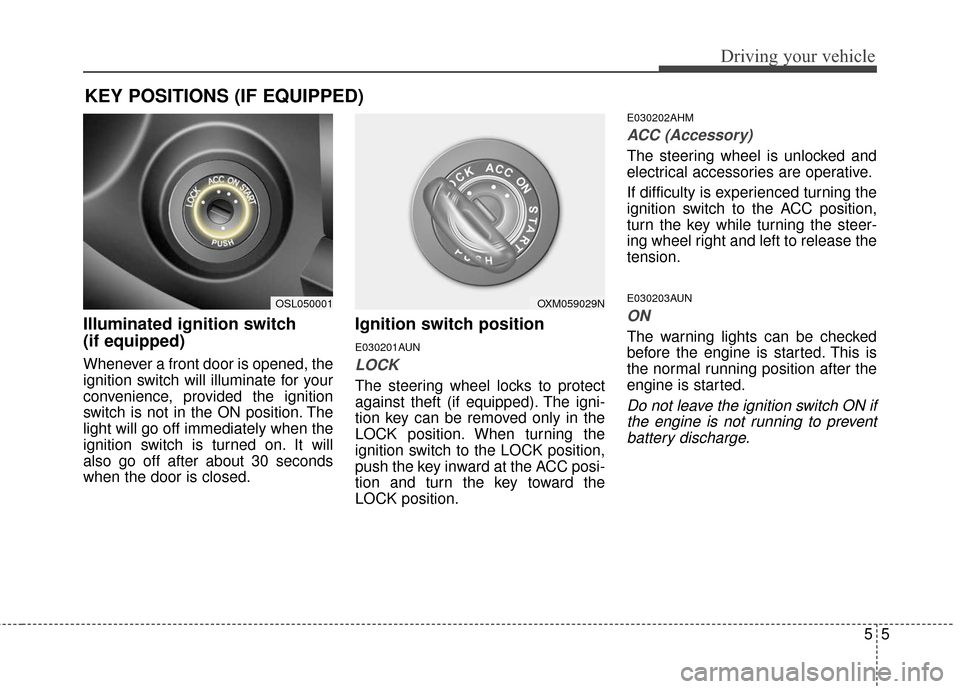
Illuminated ignition switch
(if equipped)
Whenever a front door is opened, the
ignition switch will illuminate for your
convenience, provided the ignition
switch is not in the ON position. The
light will go off immediately when the
ignition switch is turned on. It will
also go off after about 30 seconds
when the door is closed.
Ignition switch position
E030201AUN
LOCK
The steering wheel locks to protect
against theft (if equipped). The igni-
tion key can be removed only in the
LOCK position. When turning the
ignition switch to the LOCK position,
push the key inward at the ACC posi-
tion and turn the key toward the
LOCK position.
E030202AHM
ACC (Accessory)
The steering wheel is unlocked and
electrical accessories are operative.
If difficulty is experienced turning the
ignition switch to the ACC position,
turn the key while turning the steer-
ing wheel right and left to release the
tension.
E030203AUN
ON
The warning lights can be checked
before the engine is started. This is
the normal running position after the
engine is started.
Do not leave the ignition switch ON ifthe engine is not running to preventbattery discharge.
KEY POSITIONS (IF EQUIPPED)
OXM059029NOSL050001
Page 331 of 501
Driving your vehicle
65
E030204APB
START
Turn the ignition switch to the START
position to start the engine. The
engine will crank until you release
the key; then it returns to the ON
position. The brake warning light can
be checked in this position.
E030205AHM
The anti-theft steering column lock is
not a substitute for the parking brake.
Before leaving the driver’s seat,
always make sure the shift lever is
engaged in 1st gear for the manual
transaxle or P (Park) for automatic
transaxle, set the parking brake fully
and shut the engine off. Unexpected
and sudden vehicle movement may
occur if these precautions are not
taken.E040100AUN
Starting the engine
WARNING - Ignitionswitch
Never turn the ignition switch to
LOCK or ACC while the vehicle
is moving. This would result in
loss of directional control and
braking function, which could
cause an accident.
WARNING- Proper footwear
Always wear appropriate shoes
when operating your vehicle.
Unsuitable shoes (high heels,
ski boots, sandals, etc.) may
interfere with your ability to use
the brake and accelerator pedal,
and the clutch (if equipped).
Page 334 of 501
59
Driving your vehicle
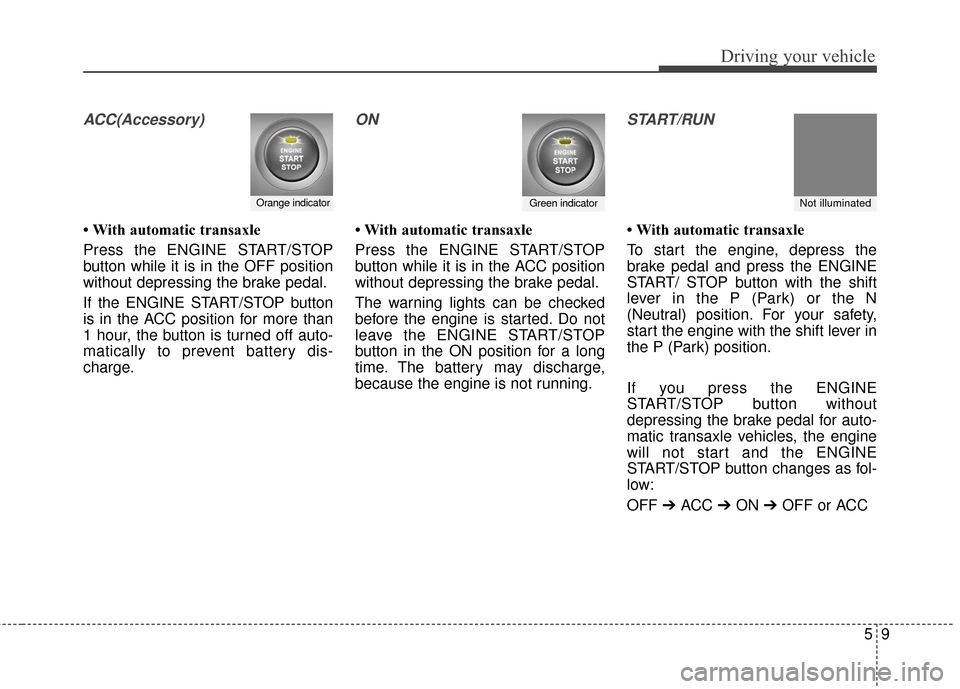
ACC(Accessory)
• With automatic transaxle
Press the ENGINE START/STOP
button while it is in the OFF position
without depressing the brake pedal.
If the ENGINE START/STOP button
is in the ACC position for more than
1 hour, the button is turned off auto-
matically to prevent battery dis-
charge.
ON
• With automatic transaxle
Press the ENGINE START/STOP
button while it is in the ACC position
without depressing the brake pedal.
The warning lights can be checked
before the engine is started. Do not
leave the ENGINE START/STOP
button in the ON position for a long
time. The battery may discharge,
because the engine is not running.
START/RUN
• With automatic transaxle
To start the engine, depress the
brake pedal and press the ENGINE
START/ STOP button with the shift
lever in the P (Park) or the N
(Neutral) position. For your safety,
start the engine with the shift lever in
the P (Park) position.
If you press the ENGINE
START/STOP button without
depressing the brake pedal for auto-
matic transaxle vehicles, the engine
will not start and the ENGINE
START/STOP button changes as fol-
low:
OFF➔ ACC ➔ ON ➔ OFF or ACC
Orange indicatorGreen indicatorNot illuminated
Page 335 of 501
Driving your vehicle
10
5
✽
✽
NOTICE
If you leave the ENGINE START/
STOP button in the ACC or ON
position for a long time, the battery
will discharge.
E040300AHM-EU
Starting the engine with a
smart key (if equipped)
1.Carry the smart key or leave it
inside the vehicle.
2.Make sure the parking brake is firmly applied
3. Automatic Transaxle - Place the
transaxle shift lever in P (Park).
Depress the brake pedal fully.
4.Press the ENGINE START/STOP button while depressing the brake
pedal.
It should be started withoutdepressing the accelerator.
5.Do not wait for the engine to warm up while the vehicle remains sta-
tionary.
Start driving at moderate engine
speeds. (Steep accelerating and
decelerating should be avoided.) Even if the smart key is in the vehi-
cle, if it is far away from you, the
engine may not start.
When the ENGINE START/STOP button is in the ACC position or
above, if any door is opened, the
system checks for the smart key. If
the smart key is not in the vehicle,
the "KEY OUT" indicator will blink.
And if all doors are closed, the
chime will sound for 5 seconds.
The indicator or warning will turn
off while the vehicle is moving.
Always have the smart key with
you.
WARNING- Startingvehicle
Never press the ENGINE
START/STOP button while the
vehicle is in motion except in an
emergency. If the engine stops
while the vehicle is in motion,
this would result in loss of
directional control and braking
function, which could cause an
accident.
Page 346 of 501
521
Driving your vehicle
Engine power can be delivered to all
front and rear wheels for maximum
traction. 4WD is useful when extra
traction is required on road, such as,
when driving on slippery, muddy, wet,
or snow-covered roads. These vehi-
cles are not designed for challenging
off-road use. Occasional off-road use
such as established unpaved roads
and trails are OK. It is always impor-
tant when traveling off-highway that
the driver carefully reduces the speed
to a level that does not exceed the
safe operating speed for those condi-
tions. In general, off-road conditions
provide less traction and braking effec-
tiveness than normal road conditions.
The driver must be especially alert to
avoid driving on slopes which tilt the
vehicle to either side.
These factors must be carefully con-
sidered when driving off-road. Keeping
the vehicle in contact with the driving
surface and under control in these
conditions is always the driver's
responsibility for the safety of him/her-
self and his or her passengers.If the 4WD system warning light ( )
illuminates, this indicates that there
is a malfunction in the 4WD system.
If this occurs, have your vehicle
checked by an authorized Kia dealer
as soon as possible.Tight corner brake effect
Tight corner brake effect is a unique
characteristic of four-wheel drive
vehicles caused by the difference in
tire rotation at the four wheels and
the zero-degree alignment of the
front wheels and suspension.
Sharp turns at low speeds should be
carried out with caution.
FOUR WHEEL DRIVE (4WD) (IF EQUIPPED)
WARNING - Off road
driving
Do no attempt to operate you
vehicle under extreme or chal-
lenging off road driving condi-
tion. Although this vehicle has
off-road capability, it was not
designed to be driven off road.
Page 351 of 501
Driving your vehicle
26
5
Full-time 4WD vehicles must be
tested on a special four wheel
chassis dynamometer.
A full-time 4WD vehicle should not be tested on a 2WD roll tester. If a
2WD roll tester must be used, per-
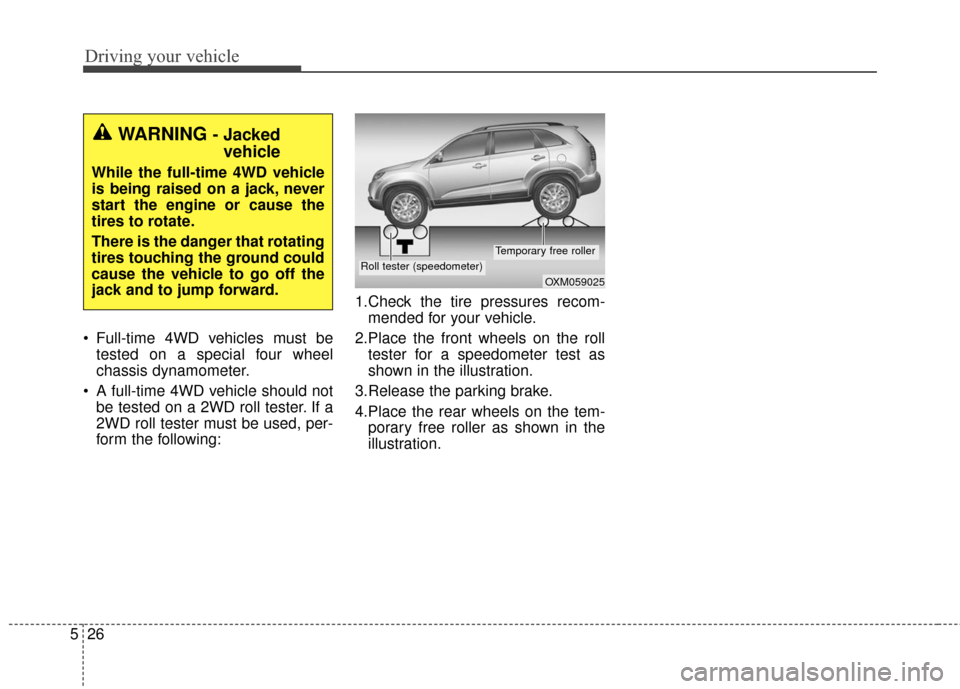
form the following: 1.Check the tire pressures recom-
mended for your vehicle.
2.Place the front wheels on the roll tester for a speedometer test as
shown in the illustration.
3.Release the parking brake.
4.Place the rear wheels on the tem- porary free roller as shown in the
illustration.
WARNING - Jackedvehicle
While the full-time 4WD vehicle
is being raised on a jack, never
start the engine or cause the
tires to rotate.
There is the danger that rotating
tires touching the ground could
cause the vehicle to go off the
jack and to jump forward.
OXM059025
Roll tester (speedometer)
Temporary free roller
Page 355 of 501
Driving your vehicle
30
5
E070202AFD-U1
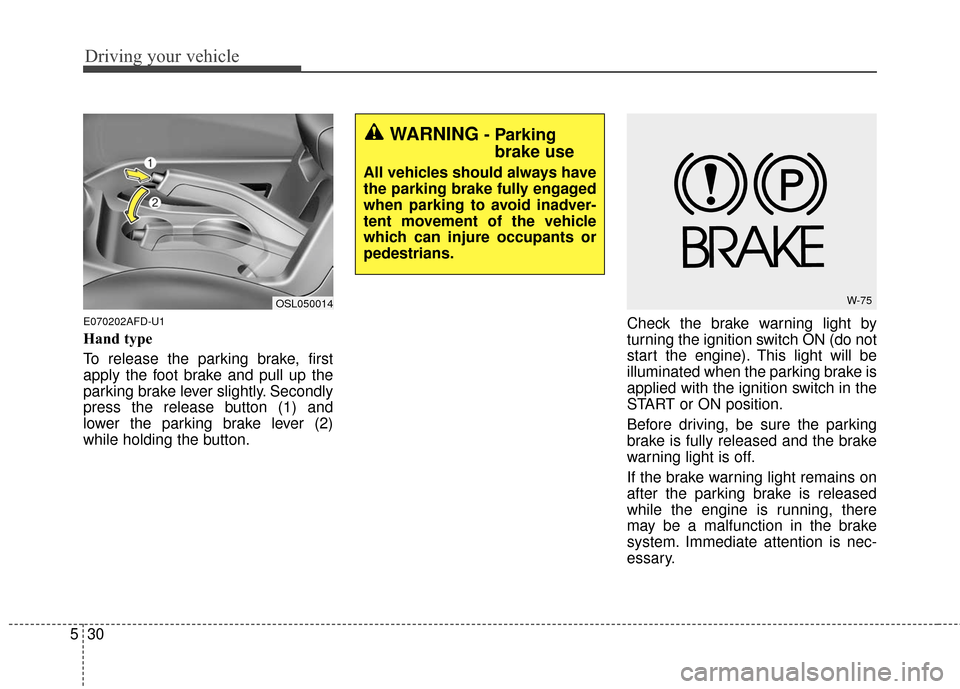
Hand type
To release the parking brake, first
apply the foot brake and pull up the
parking brake lever slightly. Secondly
press the release button (1) and
lower the parking brake lever (2)
while holding the button. Check the brake warning light by
turning the ignition switch ON (do not
start the engine). This light will be
illuminated when the parking brake is
applied with the ignition switch in the
START or ON position.
Before driving, be sure the parking
brake is fully released and the brake
warning light is off.
If the brake warning light remains on
after the parking brake is released
while the engine is running, there
may be a malfunction in the brake
system. Immediate attention is nec-
essary.
OSL050014W-75
WARNING- Parking
brake use
All vehicles should always have
the parking brake fully engaged
when parking to avoid inadver-
tent movement of the vehicle
which can injure occupants or
pedestrians.
Page 358 of 501
533
Driving your vehicle
✽
✽NOTICE
When you jump start your vehicle
because of a drained battery, the
engine may not run as smoothly and
the ABS warning light may turn on
at the same time. This happens
because of low battery voltage. It
does not mean your ABS has mal-
functioned.
• Do not pump your brakes!
• Have the battery recharged before
driving the vehicle.
E070500AHM-EU
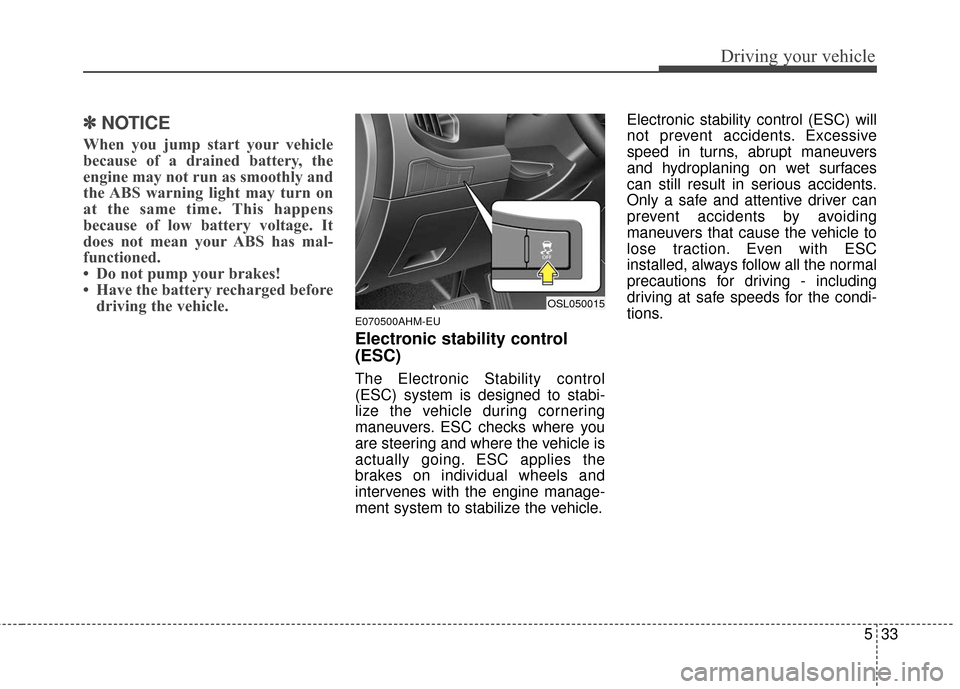
Electronic stability control
(ESC)
The Electronic Stability control
(ESC) system is designed to stabi-
lize the vehicle during cornering
maneuvers. ESC checks where you
are steering and where the vehicle is
actually going. ESC applies the
brakes on individual wheels and
intervenes with the engine manage-
ment system to stabilize the vehicle. Electronic stability control (ESC) will
not prevent accidents. Excessive
speed in turns, abrupt maneuvers
and hydroplaning on wet surfaces
can still result in serious accidents.
Only a safe and attentive driver can
prevent accidents by avoiding
maneuvers that cause the vehicle to
lose traction. Even with ESC
installed, always follow all the normal
precautions for driving - including
driving at safe speeds for the condi-
tions.
OSL050015
Page 359 of 501
Driving your vehicle
34
5
The Electronic Stability Control
(ESC) system is an electronic sys-
tem designed to help the driver main-
tain vehicle control under adverse
conditions. It is not a substitute for
safe driving practices. Factors includ-
ing speed, road conditions and driv-
er steering input can all affect
whether ESC will be effective in pre-
venting a loss of control. It is still your
responsibility to drive and corner at
reasonable speeds and to leave a
sufficient margin of safety.
When you apply your brakes under
conditions which may lock the
wheels, you may hear a “tik-tik’’
sound from the brakes, or feel a cor-
responding sensation in the brake
pedal. This is normal and it means
your ESC is active.✽ ✽
NOTICE
A click sound may be heard in the
engine compartment when the vehi-
cle begins to move after the engine is
started. These conditions are normal
and indicate that the Electronic
Stability Control System is function-
ing properly.
E070501AUN-EU
ESC operation
ESC ON condition
When the ignition is turned ON,
ESC and ESC OFF indicator lights
illuminate for approximately 3 sec-
onds, then ESC is turned on.
Press the ESC OFF button for at least half a second after turning the
ignition ON to turn ESC off. (ESC
OFF indicator will illuminate). To
turn the ESC on, press the ESC
OFF button (ESC OFF indicator
light will go off).
When starting the engine, you may hear a slight ticking sound. This is
the ESC performing an automatic
system self-check and does not
indicate a problem.
Page 365 of 501
Driving your vehicle
40
5
The DBC does not turn ON in the P
(Park) position.
The DBC may not activate if the ESC (or BAS) is activated.
In a very steep hill even though the brake pedal or accelerator pedal is
depressed the DBC may not deac-
tivate.
Always turn OFF the DBC on nor- mal roads. The DBC might activate
from the standby mode when
abrupt corning or driving through
speed bumps.
The rear stop light comes on when the DBC is activated.
✽ ✽ NOTICE
• Noise or vibration may occur from
the brakes when the DBC is acti-
vated.
• DBC may activate and cause the engine to stop in vehicles with
manual transaxle if you drive in
3rd gear (or above) with DBC on.
Do not turn on DBC when driving
in 3rd gear (or above).
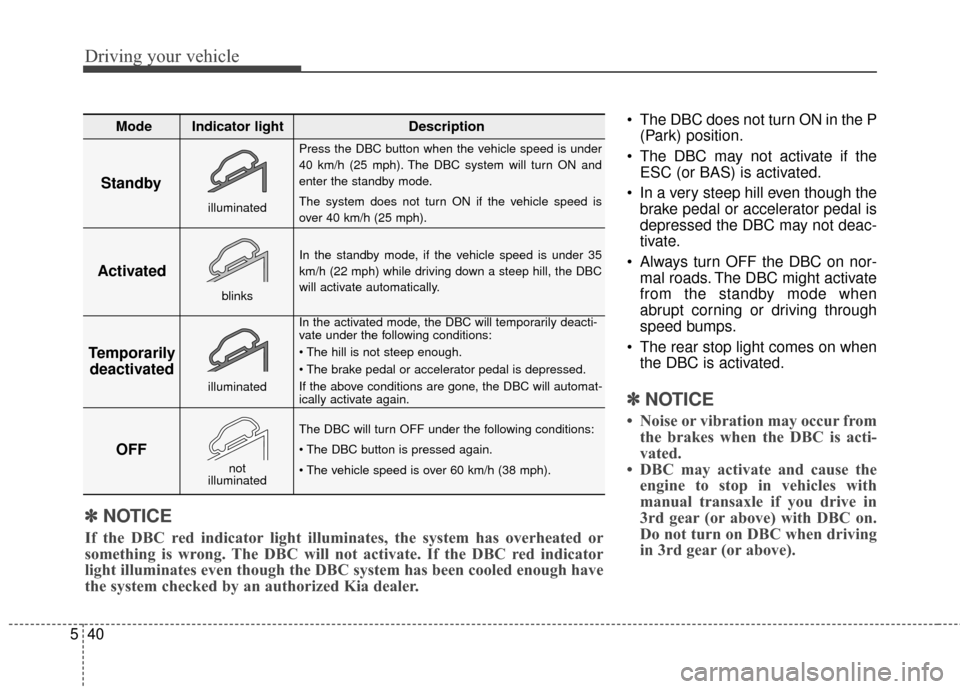
Standby
Press the DBC button when the vehicle speed is under
40 km/h (25 mph). The DBC system will turn ON and
enter the standby mode.
The system does not turn ON if the vehicle speed is
over 40 km/h (25 mph).
In the standby mode, if the vehicle speed is under 35
km/h (22 mph) while driving down a steep hill, the DBC
will activate automatically.
In the activated mode, the DBC will temporarily deacti-
vate under the following conditions:
If the above conditions are gone, the DBC will automat-
ically activate again.
The DBC will turn OFF under the following conditions:
Activated
Temporarily deactivated
OFF
Mode Indicator light Description
blinks
illuminated
not
illuminated
illuminated
✽
✽ NOTICE
If the DBC red indicator light illuminates, the system has overheated or
something is wrong. The DBC will not activate. If the DBC red indicator
light illuminates even though the DBC system has been cooled enough have\
the system checked by an authorized Kia dealer.