eco KIA SPORTAGE 2018 Features and Functions Guide
[x] Cancel search | Manufacturer: KIA, Model Year: 2018, Model line: SPORTAGE, Model: KIA SPORTAGE 2018Pages: 54, PDF Size: 3.81 MB
Page 15 of 54
DRIVER'S PANEL
*IF EQUIPPED 13ALWAYS CHECK THE OWNER’S MANUAL FOR COMPLETE OPER ATING INFORMATION AND SAFET Y WARNINGS .
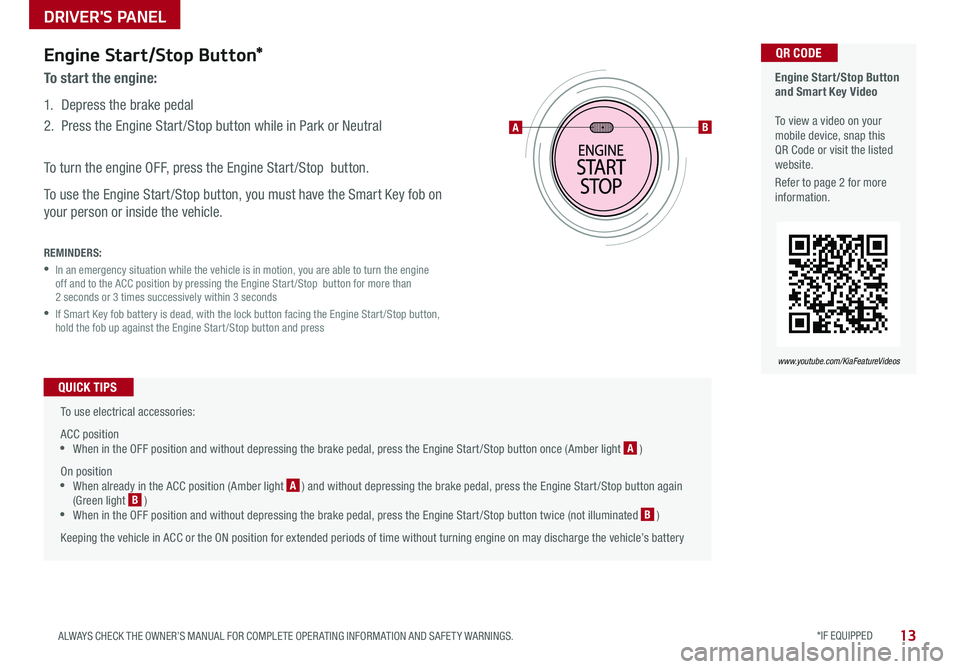
Engine Start/Stop Button*
To start the engine:
1 . Depress the brake pedal
2 .
Press the Engine Start /Stop button while in Park or Neutral
To turn the engine OFF, press the Engine Start /Stop button .
To use the Engine Start /Stop button, you must have the Smart Key fob on
your person or inside the vehicle .
REMINDERS:
•
In an emergency situation while the vehicle is in motion, you are able to turn the engine off and to the ACC position by pressing the Engine Start /Stop button for more than 2 seconds or 3 times successively within 3 seconds
•
If Smart Key fob battery is dead, with the lock button facing the Engine Start /Stop button, hold the fob up against the Engine Start /Stop button and press
To use electrical accessories:
ACC position •When in the OFF position and without depressing the brake pedal, press the Engine Start /Stop button once (Amber light A )
On position •When already in the ACC position (Amber light A ) and without depressing the brake pedal, press the Engine Start /Stop button again (Green light B ) •When in the OFF position and without depressing the brake pedal, press the Engine Start /Stop button twice (not illuminated B )
Keeping the vehicle in ACC or the ON position for extended periods of time without turning engine on may discharge the vehicle’s battery
QUICK TIPS
Engine Start/Stop Button and Smart Key Video To view a video on your mobile device, snap this QR Code or visit the listed website .
Refer to page 2 for more information .
www.youtube.com/KiaFeatureVideos
QR CODE
AB
Page 17 of 54
STEERING WHEEL CONTROLS
*IF EQUIPPED 15ALWAYS CHECK THE OWNER’S MANUAL FOR COMPLETE OPER ATING INFORMATION AND SAFET Y WARNINGS .
Turn Signals & Fog Lights*
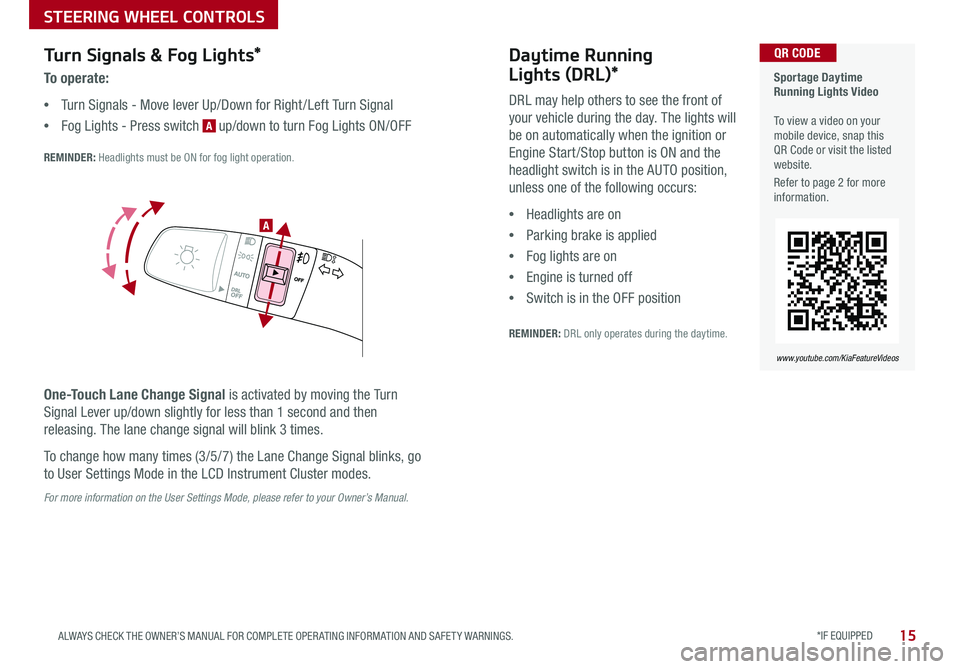
To o p e r a t e :
•Turn Signals - Move lever Up/Down for Right /Left Turn Signal
•Fog Lights - Press switch A up/down to turn Fog Lights ON/OFF
REMINDER: Headlights must be ON for fog light operation .
One-Touch Lane Change Signal is activated by moving the Turn
Signal Lever up/down slightly for less than 1 second and then
releasing . The lane change signal will blink 3 times .
To change how many times (3/5/7) the Lane Change Signal blinks, go
to User Settings Mode in the LCD Instrument Cluster modes .
For more information on the User Settings Mode, please refer to your Owner’s Manual.
Sportage Daytime Running Lights Video To view a video on your mobile device, snap this QR Code or visit the listed website .
Refer to page 2 for more information .
www.youtube.com/KiaFeatureVideos
QR CODE
.
Daytime Running
Lights (DRL)*
DRL may help others to see the front of
your vehicle during the day . The lights will
be on automatically when the ignition or
Engine Start /Stop button is ON and the
headlight switch is in the AUTO position,
unless one of the following occurs:
•Headlights are on
•Parking brake is applied
•Fog lights are on
•Engine is turned off
•Switch is in the OFF position
REMINDER: DRL only operates during the daytime .
A
Page 19 of 54
*IF EQUIPPED 17ALWAYS CHECK THE OWNER’S MANUAL FOR COMPLETE OPER ATING INFORMATION AND SAFET Y WARNINGS .
STEERING WHEEL CONTROLS
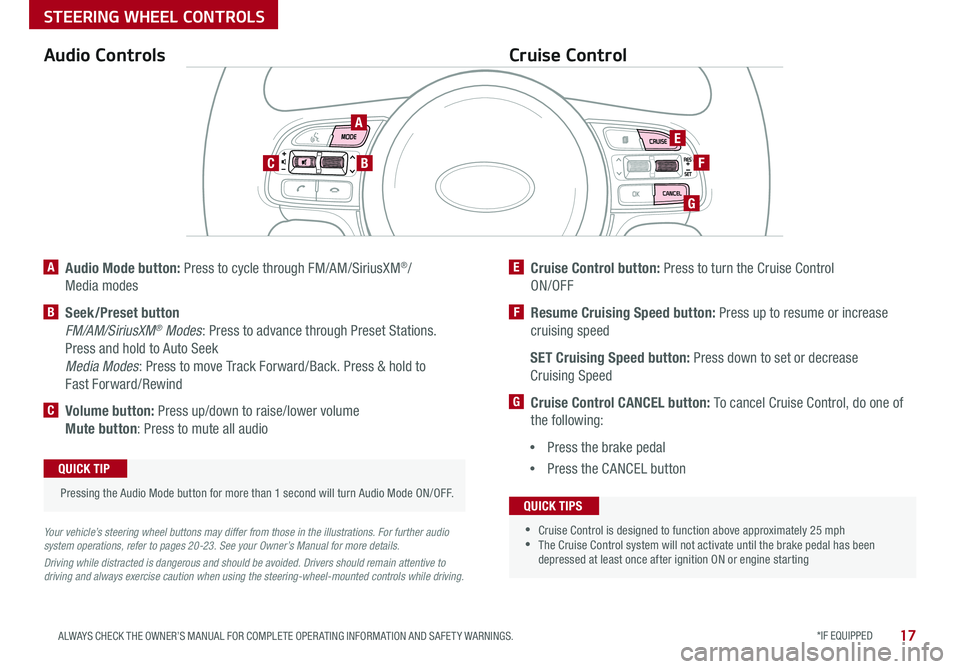
A Audio Mode button: Press to cycle through FM/AM/SiriusXM®/
Media modes
B Seek/Preset button
FM/AM/SiriusXM® Modes: Press to advance through Preset Stations .
Press and hold to Auto Seek
Media Modes: Press to move Track Forward/Back . Press & hold to
Fast Forward/Rewind
C Volume button: Press up/down to raise/lower volume
Mute button: Press to mute all audio
E Cruise Control button: Press to turn the Cruise Control
ON/OFF
F Resume Cruising Speed button: Press up to resume or increase
cruising speed
SET Cruising Speed button: Press down to set or decrease
Cruising Speed
G Cruise Control CANCEL button: To cancel Cruise Control, do one of
the following:
•Press the brake pedal
•Press the CANCEL button
Cruise ControlAudio Controls
Your vehicle’s steering wheel buttons may differ from those in the illustrations. For further audio system operations, refer to pages 20-23. See your Owner’s Manual for more details.
Driving while distracted is dangerous and should be avoided. Drivers should remain attentive to driving and always exercise caution when using the steering-wheel-mounted controls while driving.
Pressing the Audio Mode button for more than 1 second will turn Audio Mode ON/OFF .
QUICK TIP
•
•Cruise Control is designed to function above approximately 25 mph •The Cruise Control system will not activate until the brake pedal has been depressed at least once after ignition ON or engine starting
QUICK TIPS
A
BC
E
F
G
Page 20 of 54
18*IF EQUIPPED SPORTAGE FEATURES & FUNCTIONS GUIDE
STEERING WHEEL CONTROLS
TH E S YSTE M
Bluetooth® Wireless Technology
A
DE
B
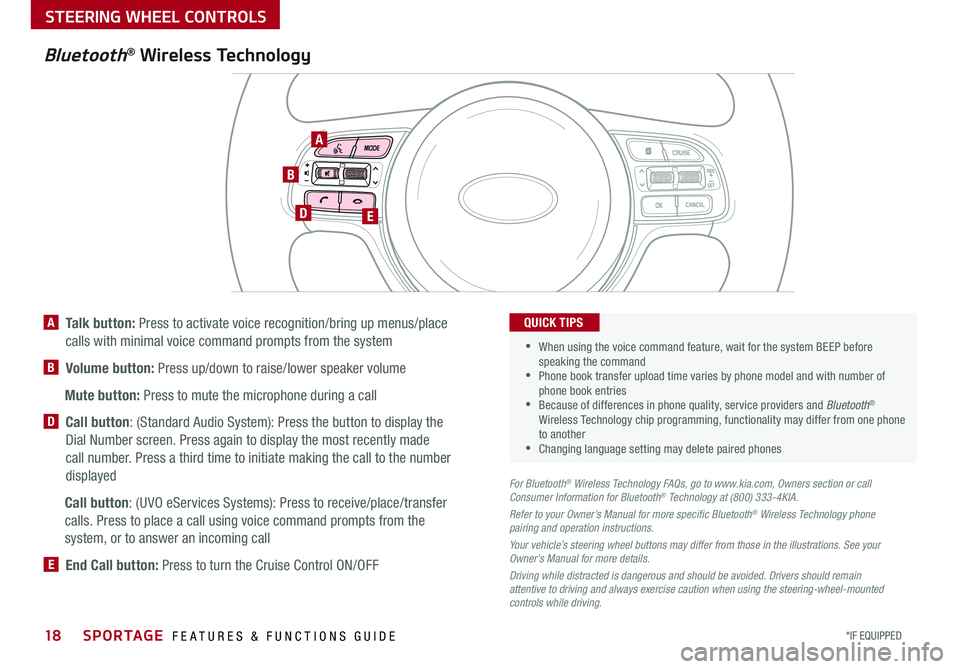
A Talk button: Press to activate voice recognition/bring up menus/place
calls with minimal voice command prompts from the system
B Volume button: Press up/down to raise/lower speaker volume
Mute button: Press to mute the microphone during a call
D Call button: (Standard Audio System): Press the button to display the
Dial Number screen . Press again to display the most recently made
call number . Press a third time to initiate making the call to the number
displayed
Call button: (UVO eServices Systems): Press to receive/place/transfer
calls . Press to place a call using voice command prompts from the
system, or to answer an incoming call
E End Call button: Press to turn the Cruise Control ON/OFF
For Bluetooth® Wireless Technology FAQs, go to www.kia.com, Owners section or call Consumer Information for Bluetooth® Technology at (800) 333-4KIA.
Refer to your Owner’s Manual for more specific Bluetooth® Wireless Technology phone pairing and operation instructions.
Your vehicle’s steering wheel buttons may differ from those in the illustrations. See your Owner’s Manual for more details.
Driving while distracted is dangerous and should be avoided. Drivers should remain attentive to driving and always exercise caution when using the steering-wheel-mounted controls while driving.
•
•
When using the voice command feature, wait for the system BEEP before speaking the command •Phone book transfer upload time varies by phone model and with number of phone book entries •Because of differences in phone quality, service providers and Bluetooth® Wireless Technology chip programming, functionality may differ from one phone to another •Changing language setting may delete paired phones
QUICK TIPS
Page 21 of 54
*IF EQUIPPED 19ALWAYS CHECK THE OWNER’S MANUAL FOR COMPLETE OPER ATING INFORMATION AND SAFET Y WARNINGS .
STEERING WHEEL CONTROLS
Voice Recognition and Phone Contact Tips
To help optimize the Bluetooth® Wireless
Technology Voice Recognition system, below
are some tips and reminders . Improve the
performance by making a few simple changes
to your phone contacts:
•Use full names (first and last names) vs .
short or single-syllable names (“John
Smith” vs . “Dad," “Smith Residence” vs .
“Home”)
•Avoid using special characters and
hyphenated names (@, &, #, /, -, *, +, etc . )
•Avoid using acronyms (“In Case of
Emergency” vs . “ICE”) or words with all
capital letters
•Spell words completely, no abbreviations
(“Doctor Smith” vs . “Dr . Smith”)
The system may have difficulty understanding
some accents or uncommon names . Below are
other tips to optimize using the voice recognition .
Bluetooth® Wireless Technology
Pairing a Phone
For instructions on how to pair a phone, refer to the audio system’s
user’s guide or your vehicle’s Quick Start Guide .
How to Place a Call
When using the voice command feature, wait for the system BEEP
before speaking the command .
There are two options for placing a call using the Steering Wheel
controls:
Standard Audio System*
•Option 1: Press the Receive/Place Call button D (system displays
the call history with the most recent calls)
•Option 2: Press the Talk button A (system will BEEP to indicate it is
ready for call placement) . Then say the command “Call {name}” or
“Dial {number}”
UVO eServices System/UVO eServices with Premium Navigation*
•Option 1: Press the Receive/Place Call button D (displays the call
history with the most recent calls)
•Option 2: Press the Talk button A . Then say the command “Call
{name}” or “Dial {number}”
During the pairing process, be sure to accept the connection requests on the phone for phone book download and to allow acceptance of all future Bluetooth® connection requests .
QUICK TIP
•When placing a call, speak in a natural, moderate tone, with clear pronunciation . The system may have trouble recognizing commands if you speak too soft or too loud •Always wait for the beep before speaking any commands •Close windows and sunroof and turn off A /C . Open windows, sunroof, weather (wind/rain), or an A /C fan operating at higher speeds can interfere with Voice Recognition •Press the talk button and say “Help” to get a list of available commands
QUICK TIPS
Voice Recognition Tips Video To view a video on your mobile device, snap this QR Code or visit the listed website .
Refer to page 2 for more information .
www.youtube.com/KiaFeatureVideos
QR CODE
Page 22 of 54
AUDIO SYSTEMS
Audio System Setup Options
Press the SETUP key, then using the touchscreen, press the menu item to enter (Display, Sound, Clock /
Calendar, Phone, System) . Adjust the available settings for each equipped audio system setup option by
pressing the onscreen buttons/arrows . Audio system setup options may include the following:
To adjust the Sound settings (bass, middle,
treble, fader, balance) – When in the SETUP
menu, select Sound and then Sound Setting .
Adjust the settings by pressing the onscreen
arrows and then Return to exit .
For further audio system operations, refer to pages 21-23.
Your vehicle’s audio system may differ from that in the
illustration. See your Owner’s Manual for more details.
REMINDER: To help minimize driver distraction, some audio system functionalities have been modified while the vehicle is in Drive, Reverse or moved out of Park .
•Display settings - Adjusting the Brightness, Mode Popup, Media Display
•Sound settings - Sound Settings, Speed Dependent Volume Control, Voice Recognition Volume,
Touchscreen Beep
•Clock/Calendar settings - Clock Settings, Calendar Settings, Time Format, Clock Display
•Phone settings - Pair Phone, Paired Phone List, Contacts Download, Outgoing Volume,
Bluetooth® System Off
•System settings - Memory Information, Prompt Feedback, Language
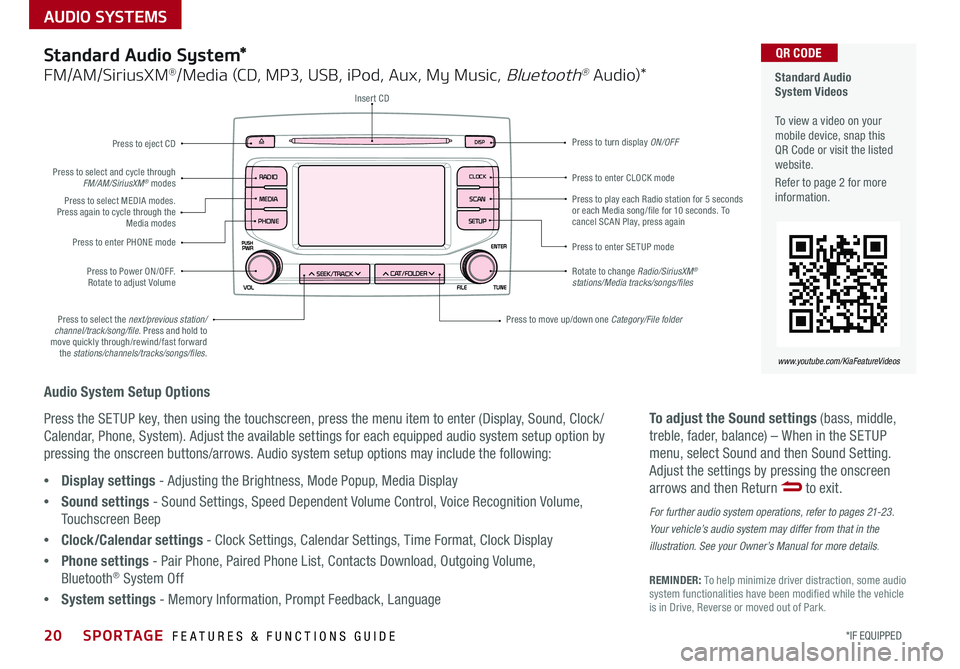
Standard Audio System*
FM/AM/SiriusXM®/Media (CD, MP3, USB, iPod, Aux, My Music, Bluetooth® Au dio)*
Rotate to change Radio/SiriusXM® stations/Media tracks/songs/files
Press to move up/down one Category/File folder
DISP
CAT/FO LDER
SEEK/T RACK
RADIO
M
EDIA
CLO CK
SETU P
SCA
N
PHONE
Press to play each Radio station for 5 seconds or each Media song/file for 10 seconds . To cancel SCAN Play, press again
Press to enter SETUP mode
Press to enter CLOCK mode
Press to turn display ON/OFF
Insert CD
Press to eject CD
Press to select the next/previous station/channel/track/song/file. Press and hold to move quickly through/rewind/fast forward the stations/channels/tracks/songs/files.
Press to select and cycle through FM/AM/SiriusXM® modes
Press to Power ON/OFF . Rotate to adjust Volume
Press to select MEDIA modes . Press again to cycle through the Media modes
Press to enter PHONE mode
Standard Audio System Videos To view a video on your mobile device, snap this QR Code or visit the listed website .
Refer to page 2 for more information .
www.youtube.com/KiaFeatureVideos
QR CODE
20*IF EQUIPPED SPORTAGE FEATURES & FUNCTIONS GUIDE
Page 30 of 54
28*IF EQUIPPED SPORTAGE FEATURES & FUNCTIONS GUIDE
CENTER PANEL
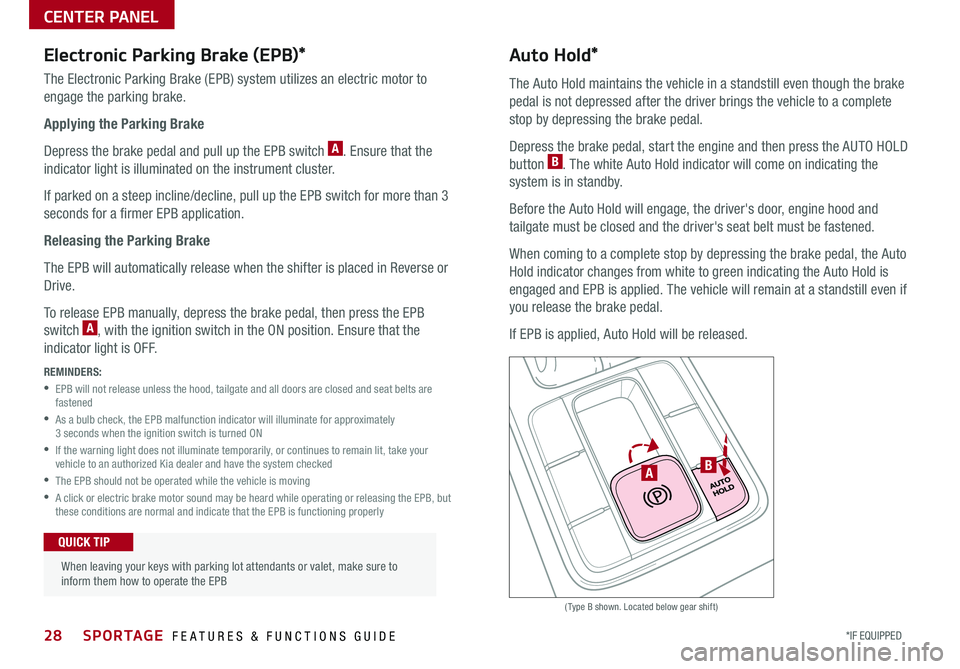
(Type B shown . Located below gear shift)
Electronic Parking Brake (EPB)*
The Electronic Parking Brake (EPB) system utilizes an electric motor to
engage the parking brake .
Applying the Parking Brake
Depress the brake pedal and pull up the EPB switch A . Ensure that the
indicator light is illuminated on the instrument cluster .
If parked on a steep incline/decline, pull up the EPB switch for more than 3
seconds for a firmer EPB application .
Releasing the Parking Brake
The EPB will automatically release when the shifter is placed in Reverse or
Drive .
To release EPB manually, depress the brake pedal, then press the EPB
switch A, with the ignition switch in the ON position . Ensure that the
indicator light is O F F .
REMINDERS:
•
EPB will not release unless the hood, tailgate and all doors are closed and seat belts are fastened
•
As a bulb check, the EPB malfunction indicator will illuminate for approximately 3 seconds when the ignition switch is turned ON
•
If the warning light does not illuminate temporarily, or continues to remain lit, take your vehicle to an authorized Kia dealer and have the system checked
•The EPB should not be operated while the vehicle is moving
•
A click or electric brake motor sound may be heard while operating or releasing the EPB, but these conditions are normal and indicate that the EPB is functioning properly
Auto Hold*
The Auto Hold maintains the vehicle in a standstill even though the brake
pedal is not depressed after the driver brings the vehicle to a complete
stop by depressing the brake pedal .
Depress the brake pedal, start the engine and then press the AUTO HOLD
button B . The white Auto Hold indicator will come on indicating the
system is in standby .
Before the Auto Hold will engage, the driver's door, engine hood and
tailgate must be closed and the driver's seat belt must be fastened .
When coming to a complete stop by depressing the brake pedal, the Auto
Hold indicator changes from white to green indicating the Auto Hold is
engaged and EPB is applied . The vehicle will remain at a standstill even if
you release the brake pedal .
If EPB is applied, Auto Hold will be released .
When leaving your keys with parking lot attendants or valet, make sure to inform them how to operate the EPB
QUICK TIP
BA
Page 32 of 54

30*IF EQUIPPED SPORTAGE FEATURES & FUNCTIONS GUIDE
CENTER PANEL
Parking Assist System*
(Type A shown . Located below gear shift)
REMINDERS:
• If the vehicle is moving at speeds over 3 mph, the system may not activate correctly
• When more than two objects are sensed at the same time, the closest one will be recognized first
The Parking Assist System* is not a substitute for proper and safe backing-up procedures. Always drive safely and use caution when backing up. The Parking Assist System* may not detect every object in front of or behind the vehicle.
The Parking Assist System* is not a safety device . The Parking Assist System* is a supplemental system that assists the driver by chiming if any
object is detected within the sensing area to the front, rear and side of the vehicle when moving forward or backing up .
The system is activated when the ignition is ON and the vehicle is in R (Reverse) . To deactivate the system, press the Parking Assist System*
button A (LED illuminated) .
A
Page 35 of 54

33ALWAYS CHECK THE OWNER’S MANUAL FOR COMPLETE OPER ATING INFORMATION AND SAFET Y WARNINGS .
SEATING
E
E
F
Front Seat Headrest
Adjustment
Unfastening Center Seat Belt
To recline the Rear Seatback:
1 . Pull lever E up to unlock seat
2 . Holding the lever E up, adjust
Seatback to desired position F
3 . Release the lever E and ensure
the Seatback is locked in place
To fold the Rear Seatback:
1 . Pull lever E up to unlock seat
2 . Fold Seatback flat F
Reclining/Folding Rear Seats (Seat type with lever in front)
When adjusting seat forward or backwards, ensure seat clicks or locks into place before driving the vehicle .
QUICK TIP
REMINDER: The lever must return to its original position for the Seatback to lock .
To raise headrest — Pull headrest up to
the desired position .
To lower headrest — Press lock A, then
press the headrest down .
A
1 . If Seat Belt is buckled,
press the release button
on the buckle .
2 . To retract the center
seatbelt webbing G in
2nd and/or 3rd rows,
use the lap belt tongue
plate H to push the
“release button” in the
small slot on the center
belt buckle J .
J
H
GG
H
J
Second and Third Row Center Seatbelt Video To view a video on your mobile device, snap this QR Code or visit the listed website .
Refer to page 2 for more information .
www.youtube.com/KiaFeatureVideos
QR CODE
Page 36 of 54
*IF EQUIPPED SPORTAGE FEATURES & FUNCTIONS GUIDE
OTHER KEY FEATURES
34
HOLD
Engine Start/Stop Button & Smart Key Video To view a video on your mobile device, snap this QR Code or visit the listed website .
Refer to page 2 for more information .
www.youtube.com/KiaFeatureVideos
QR CODE
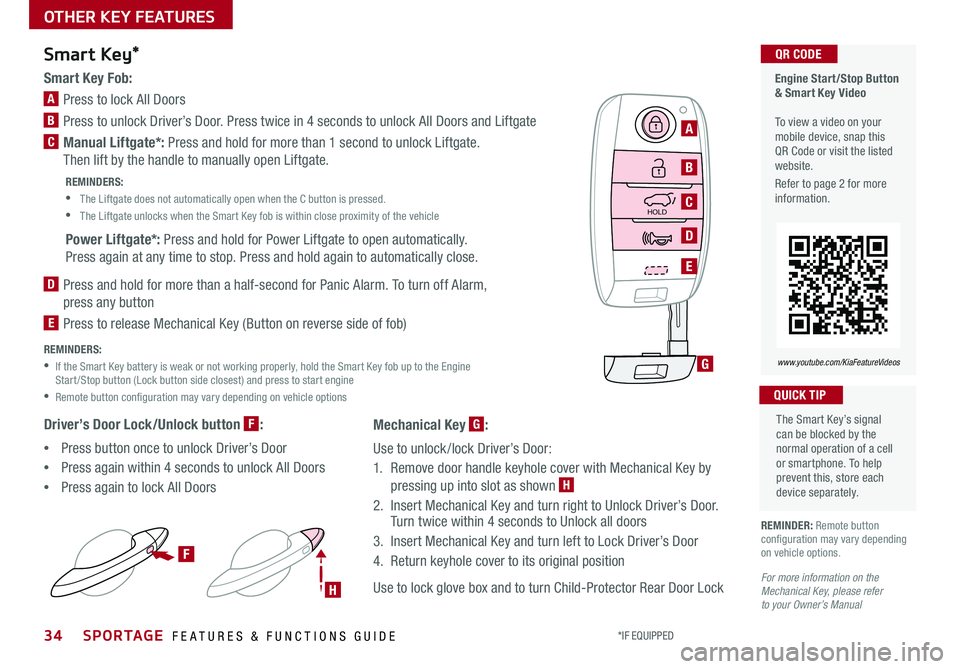
Smart Key Fob:
A Press to lock All Doors
B Press to unlock Driver’s Door . Press twice in 4 seconds to unlock All Doors and Liftgate
C Manual Liftgate*: Press and hold for more than 1 second to unlock Liftgate .
Then lift by the handle to manually open Liftgate .
REMINDERS:
•
The Liftgate does not automatically open when the C button is pressed .
•
The Liftgate unlocks when the Smart Key fob is within close proximity of the vehicle
Power Liftgate*: Press and hold for Power Liftgate to open automatically .
Press again at any time to stop . Press and hold again to automatically close .
D
Press and hold for more than a half-second for Panic Alarm . To turn off Alarm,
press any button
E
Press to release Mechanical Key (Button on reverse side of fob)
REMINDERS:
•
If the Smart Key battery is weak or not working properly, hold the Smart Key fob up to the Engine Start /Stop button (Lock button side closest) and press to start engine
•Remote button configuration may vary depending on vehicle options
Driver’s Door Lock/Unlock button F:
•Press button once to unlock Driver’s Door
•Press again within 4 seconds to unlock All Doors
•Press again to lock All Doors
Smart Key*
REMINDER: Remote button configuration may vary depending on vehicle options .
The Smart Key’s signal can be blocked by the normal operation of a cell or smartphone . To help prevent this, store each device separately .
QUICK TIP
HOLD
F
H
G
A
B
C
D
E
For more information on the Mechanical Key, please refer to your Owner’s Manual
Mechanical Key G:
Use to unlock /lock Driver’s Door:
1 . Remove door handle keyhole cover with Mechanical Key by
pressing up into slot as shown H
2 . Insert Mechanical Key and turn right to Unlock Driver’s Door . Turn twice within 4 seconds to Unlock all doors
3 . Insert Mechanical Key and turn left to Lock Driver’s Door
4 . Return keyhole cover to its original position
Use to lock glove box and to turn Child-Protector Rear Door Lock