plug KIA SPORTAGE 2018 Owners Manual
[x] Cancel search | Manufacturer: KIA, Model Year: 2018, Model line: SPORTAGE, Model: KIA SPORTAGE 2018Pages: 605, PDF Size: 13.79 MB
Page 6 of 605
Introduction
21
HOW TO USE THIS MANUAL
We want to help you get the greatest
possible driving pleasure from your
vehicle. Your Owner’s Manual can
assist you in many ways. We strong-
ly recommend that you read the
entire manual. In order to minimize
the chance of death or injury, you
must read the WARNING and CAU-
TION sections in the manual.
Illustrations complement the words
in this manual to best explain how to
enjoy your vehicle. By reading your
manual, you will learn about fea-
tures, important safety information,
and driving tips under various road
conditions.
The general layout of the manual is
provided in the Table of Contents.
Use the index when looking for a
specific area or subject; it has an
alphabetical listing of all information
in your manual.
Sections: This manual has nine sec-
tions plus an index. Each section
begins with a brief list of contents so
you can tell at a glance if that section
has the information you want.You will find various WARNINGs,
CAUTIONs, and NOTICEs in this
manual. These WARNINGs were pre-
pared to enhance your personal safe-
ty. You should carefully read and follow
ALL procedures and recommenda-
tions provided in these WARNINGs,
CAUTIONs and NOTICEs.
✽ ✽
NOTICE
A NOTICE indicates interesting or
helpful information is being provided.
Your new vehicle is designed to use
only unleaded fuel having a pump
octane number ((R+M)/2) of 87
(Research Octane Number 91) or
higher. (Do not use methanol blend-
ed fuels.)
Your new vehicle is designed to
obtain maximum performance with
UNLEADED FUEL, as well as mini-
mize exhaust emissions and spark
plug fouling.
Never add any fuel system cleaning
agents to the fuel tank other than
what has been specified. (Consult an
authorized Kia dealer for details.)
Tighten the cap until it clicks one
time, otherwise the Check Engine light will illuminate.
WARNING
A WARNING indicates a situa-
tion in which harm, serious bod-
ily injury or death could result if
the warning is ignored.
CAUTION
A CAUTION indicates a situationin which damage to your vehiclecould result if the caution isignored.
FUEL REQUIREMENTS
Page 253 of 605
4167
Features of your vehicle
* The actual sunvisor lamp in the vehi-cle may differ from the illustration.Power outlet
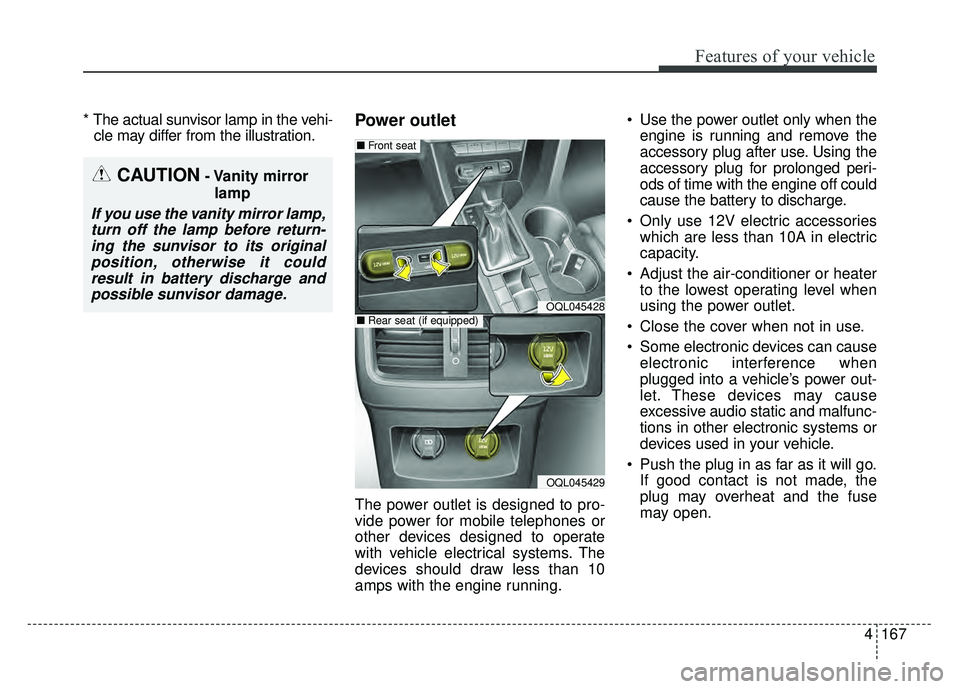
The power outlet is designed to pro-
vide power for mobile telephones or
other devices designed to operate
with vehicle electrical systems. The
devices should draw less than 10
amps with the engine running. Use the power outlet only when the
engine is running and remove the
accessory plug after use. Using the
accessory plug for prolonged peri-
ods of time with the engine off could
cause the battery to discharge.
Only use 12V electric accessories which are less than 10A in electric
capacity.
Adjust the air-conditioner or heater to the lowest operating level when
using the power outlet.
Close the cover when not in use.
Some electronic devices can cause electronic interference when
plugged into a vehicle’s power out-
let. These devices may cause
excessive audio static and malfunc-
tions in other electronic systems or
devices used in your vehicle.
Push the plug in as far as it will go. If good contact is not made, the
plug may overheat and the fuse
may open.
CAUTION- Vanity mirror
lamp
If you use the vanity mirror lamp,turn off the lamp before return-ing the sunvisor to its originalposition, otherwise it couldresult in battery discharge andpossible sunvisor damage.
OQL045428
OQL045429
■ Front seat
■Rear seat (if equipped)
Page 254 of 605
Features of your vehicle
168
4
Plug in battery equipped electronic
devices with reverse current protec-
tion. The current from the battery
may flow into the vehicle’s electri
cal/electronic system and cause
system malfunction.
✽ ✽ NOTICE
Do not use aftermarket chargers to
charge devices. Only use device cer-
tified cables to charge.
USB charger (if equipped)
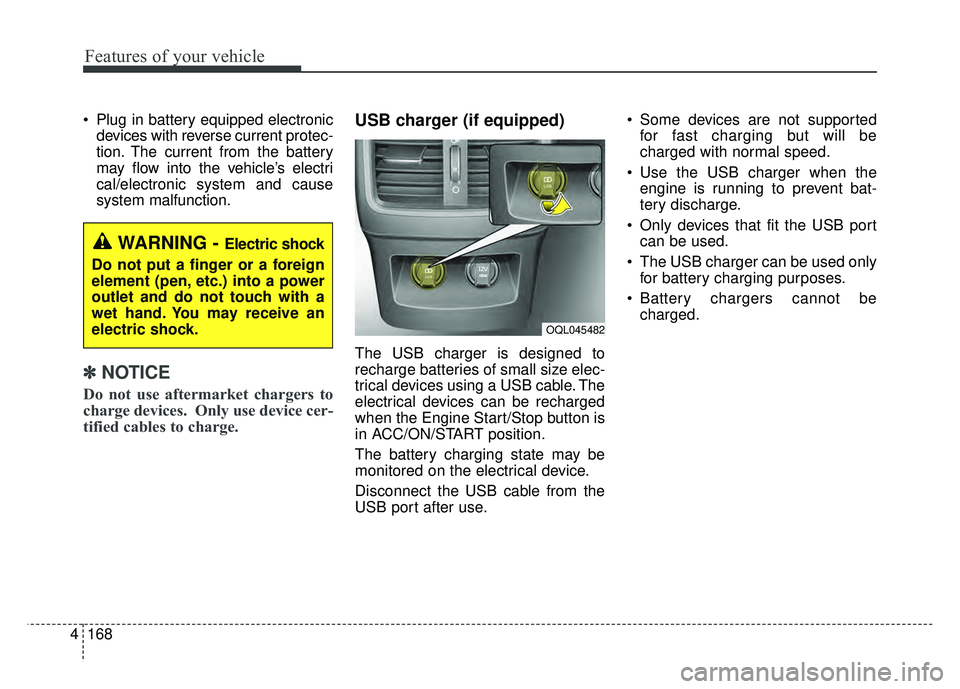
The USB charger is designed to
recharge batteries of small size elec-
trical devices using a USB cable. The
electrical devices can be recharged
when the Engine Start/Stop button is
in ACC/ON/START position.
The battery charging state may be
monitored on the electrical device.
Disconnect the USB cable from the
USB port after use. Some devices are not supported
for fast charging but will be
charged with normal speed.
Use the USB charger when the engine is running to prevent bat-
tery discharge.
Only devices that fit the USB port can be used.
The USB charger can be used only for battery charging purposes.
Battery chargers cannot be charged.
WARNING - Electric shock
Do not put a finger or a foreign
element (pen, etc.) into a power
outlet and do not touch with a
wet hand. You may receive an
electric shock.
OQL045482
Page 266 of 605
Audio system
45
AUX, USB port
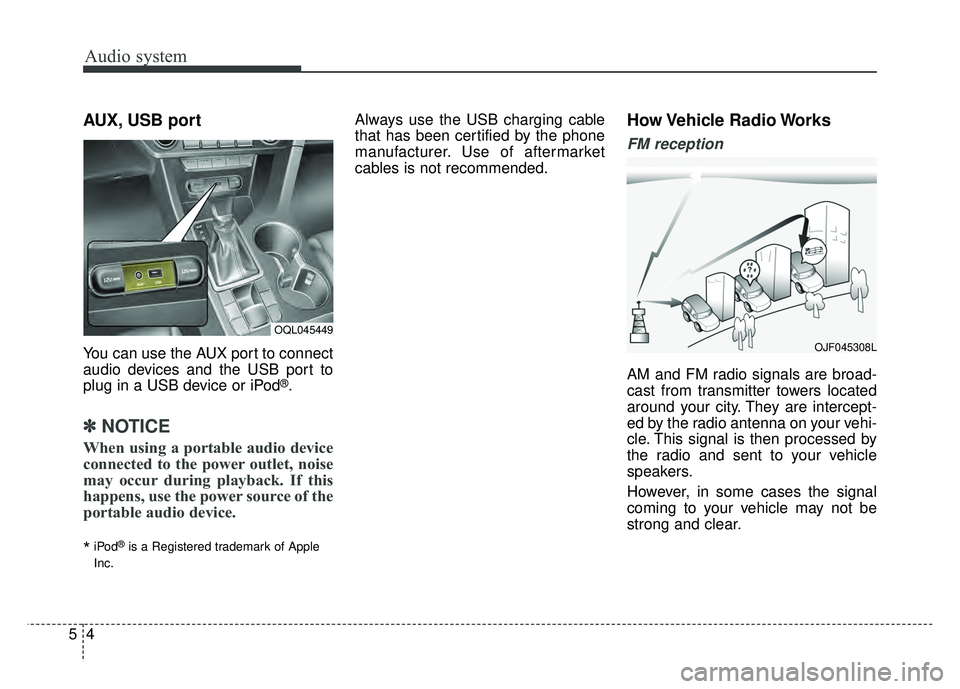
You can use the AUX port to connect
audio devices and the USB port to
plug in a USB device or iPod
®.
✽ ✽NOTICE
When using a portable audio device
connected to the power outlet, noise
may occur during playback. If this
happens, use the power source of the
portable audio device.
*iPod®is a Registered trademark of Apple
Inc.
Always use the USB charging cable
that has been certified by the phone
manufacturer. Use of aftermarket
cables is not recommended.How Vehicle Radio Works
FM reception
AM and FM radio signals are broad-
cast from transmitter towers located
around your city. They are intercept-
ed by the radio antenna on your vehi-
cle. This signal is then processed by
the radio and sent to your vehicle
speakers.
However, in some cases the signal
coming to your vehicle may not be
strong and clear.
OQL045449
OJF045308L
Page 285 of 605
![KIA SPORTAGE 2018 Owners Manual Audio system
523
Seek
Press the [SEEK TRACK]button to
play the previous/next channel.
❈ If the “Category” icon is displayed,
channels are changed within the
current category.
Tu n e
Turn the TUN](/img/2/54576/w960_54576-284.png "KIA SPORTAGE 2018 Owners Manual Audio system
523
Seek
Press the [SEEK TRACK]button to
play the previous/next channel.
❈ If the “Category” icon is displayed,
channels are changed within the
current category.
Tu n e
Turn the TUN")
Audio system
523
Seek
Press the [SEEK TRACK]button to
play the previous/next channel.
❈ If the “Category” icon is displayed,
channels are changed within the
current category.
Tu n e
Turn the TUNE knob to select the
desired channel.
Scan
Press the [SCAN] button to scan all
channels with superior reception for
5 seconds each.
Once scan is complete, the previous-
ly played channel will be restored.
During Scan, pressing the [SCAN]
button again will cancel the scan
operation and restore the previously
played channel.
If the “Category” icon is displayed,
channels are changed within the cur-
rent category. Searching Categories
Select the category by using the
[CAT/FOLDER]
button and press the
TUNE knob to select.
Channels for the selected category
are played.
✽ ✽ Troubleshooting
1. Antenna Error
If this message is displayed, the
antenna or antenna cable is bro-
ken or unplugged. Please consult
with your Kia dealership.
2. No Signal If this message is displayed, it
means that the antenna is covered
and that the SiriusXM Satellite
Radio signal is not available.
Ensure the antenna is uncovered
and has a clear view of the sky.
Selecting Presets/Saving Presets
Press the [Preset] button to display
the broadcast information for the
channel saved to each button.
Press the [1] ~ [6] buttons to play the
desired preset.
While listening to a channel you want
to save as a preset, press and hold
one of the [1] ~ [6] preset buttons to
save the current channel to the
selected preset.
Page 419 of 605
Driving your vehicle
92
6
The use of chains may adversely
affect vehicle handling.
Do not exceed 20 mph (30 km/h) or the chain manufacturer’s recom-
mended speed limit, whichever is
lower.
Drive carefully and avoid bumps, holes, sharp turns, and other road
hazards, which may cause the
vehicle to bounce.
Avoid sharp turns or locked-wheel braking.Use high quality ethylene gly-
col coolant
Your vehicle is delivered with high
quality ethylene glycol coolant in the
cooling system. It is the only type of
coolant that should be used because
it helps prevent corrosion in the cool-
ing system, lubricates the water
pump and prevents freezing. Be sure
to replace or replenish your coolant
in accordance with the maintenance
schedule in chapter 8. Before winter,
have your coolant tested to assure
that its freezing point is sufficient for
the temperatures anticipated during
the winter.
Check battery and cables
Winter puts additional burdens on
the battery system. Visually inspect
the battery and cables as described
in chapter 8. The level of charge in
your battery can be checked by an
authorized Kia dealer or a service
station.
Change to "winter weight" oil
if necessary
In some climates it is recommended
that a lower viscosity "winter weight"
oil be used during cold weather. See
chapter 9 for recommendations. If
you aren't sure what weight oil you
should use, consult an authorized
Kia dealer.
Check spark plugs and ignition
system
Inspect your spark plugs as
described in chapter 8 and replace
them if necessary. Also check all
ignition wiring and components to be
sure they are not cracked, worn or
damaged in any way.CAUTION- Snow chains
Chains that are the wrong size or improperly installed candamage your vehicle's brakelines, suspension, body andwheels.
Stop driving and retighten the chains any time you hear themhitting the vehicle.
Page 438 of 605
What to do in an emergency
47
IF THE ENGINE WILL NOT START
If engine doesn't turn over or
turns over slowly
1. Be sure the shift lever is in N(Neutral) or P (Park) and the
emergency brake is set.
2. Check the battery connections to be sure they are clean and tight.
3. Turn on the interior light. If the light dims or goes out when you oper-
ate the starter, the battery is dis-
charged.
4. Check the starter connections to be sure they are securely tight-
ened.
5. Do not push or pull the vehicle to start it. See instructions for "Jump
starting".
If engine turns over normally
but does not start
1. Check the fuel level.
2. With the ignition switch in theLOCK position, check all connec-
tors at the ignition coils and spark
plugs. Reconnect any that may be
disconnected or loose.
3. Check the fuel line in the engine compartment.
4. If the engine still does not start, call an authorized Kia dealer or
seek other qualified assistance.
WARNING - Push/
pull start
Do not push or pull the vehicle
to start it. Push or pull starting
may cause the catalytic con-
verter to overload and create a
fire hazard.
Page 464 of 605
What to do in an emergency
30
7
Distributing the sealant
11. Immediately drive approximately
4~6 miles (7~10 km or, about 10
min) to evenly distribute the
sealant in the tire.
Do not exceed a speed of 50 mph
(80 km/h). If possible, do not fall
below a speed of 12 mph (20 km/h).
While driving, if you experience any
unusual vibration, ride disturbance or
noise, reduce your speed and drive
with caution until you can safely pull
off of the side of the road.
Call for road side service or towing.
When you use the Tire Mobility Kit,
the tire pressure sensors and wheel
may be stained by sealant.
Therefore, remove the tire pressure
sensors and wheel stained by
sealant and we recommend that
inspect at an authorized Kia dealer.
Checking the tire inflation
pressure
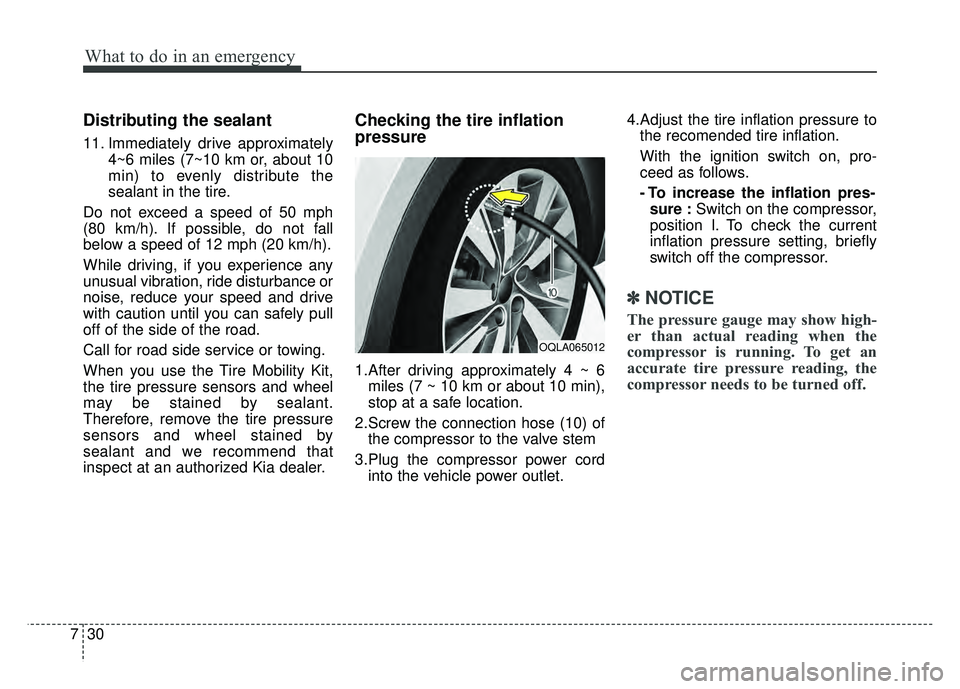
1.After driving approximately 4 ~ 6 miles (7 ~ 10 km or about 10 min),
stop at a safe location.
2.Screw the connection hose (10) of the compressor to the valve stem
3.Plug the compressor power cord into the vehicle power outlet. 4.Adjust the tire inflation pressure to
the recomended tire inflation.
With the ignition switch on, pro-
ceed as follows.
- To increase the inflation pres-sure : Switch on the compressor,
position I. To check the current
inflation pressure setting, briefly
switch off the compressor.
✽ ✽ NOTICE
The pressure gauge may show high-
er than actual reading when the
compressor is running. To get an
accurate tire pressure reading, the
compressor needs to be turned off.
OQLA065012
Page 481 of 605
811
Maintenance
Normal Maintenance Schedule (CONT.)
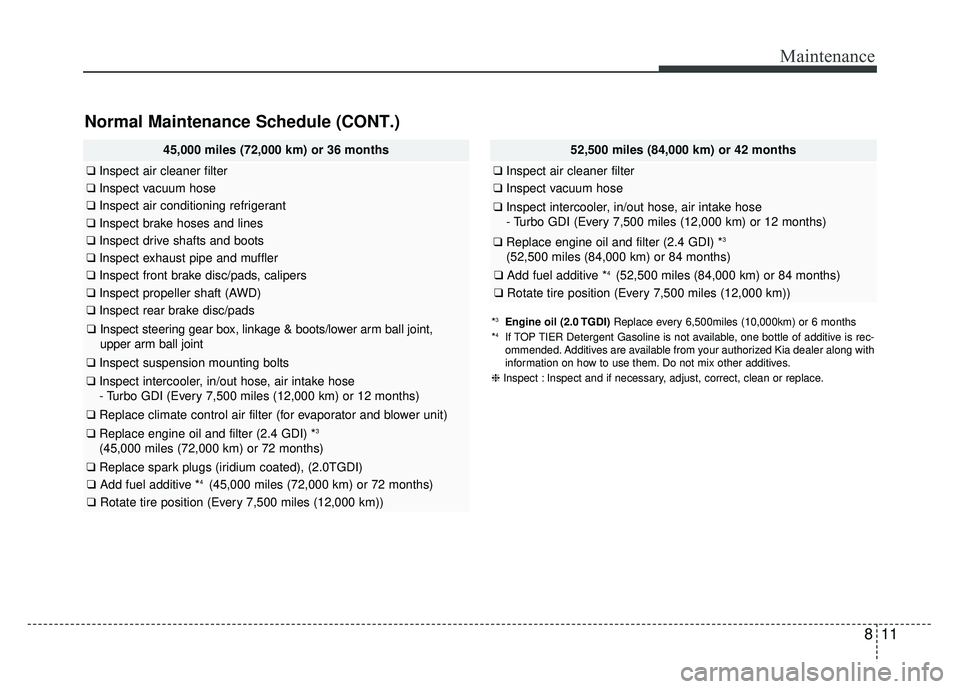
45,000 miles (72,000 km) or 36 months
❑Inspect air cleaner filter
❑Inspect vacuum hose
❑Inspect air conditioning refrigerant
❑Inspect brake hoses and lines
❑Inspect drive shafts and boots
❑Inspect exhaust pipe and muffler
❑Inspect front brake disc/pads, calipers
❑Inspect propeller shaft (AWD)
❑Inspect rear brake disc/pads
❑Inspect steering gear box, linkage & boots/lower arm ball joint,
upper arm ball joint
❑ Inspect suspension mounting bolts
❑Inspect intercooler, in/out hose, air intake hose
- Turbo GDI (Every 7,500 miles (12,000 km) or 12 months)
❑ Replace climate control air filter (for evaporator and blower unit)
❑Replace engine oil and filter (2.4 GDI) *3
(45,000 miles (72,000 km) or 72 months)
❑Replace spark plugs (iridium coated), (2.0TGDI)
❑ Add fuel additive *4 (45,000 miles (72,000 km) or 72 months)
❑Rotate tire position (Every 7,500 miles (12,000 km))
52,500 miles (84,000 km) or 42 months
❑Inspect air cleaner filter
❑Inspect vacuum hose
❑Inspect intercooler, in/out hose, air intake hose
- Turbo GDI (Every 7,500 miles (12,000 km) or 12 months)
❑Replace engine oil and filter (2.4 GDI) *3
(52,500 miles (84,000 km) or 84 months)
❑ Add fuel additive *4 (52,500 miles (84,000 km) or 84 months)
❑Rotate tire position (Every 7,500 miles (12,000 km))
*3Engine oil (2.0 TGDI) Replace every 6,500miles (10,000km) or 6 months
*4If TOP TIER Detergent Gasoline is not available, one bottle of additive is rec-
ommended. Additives are available from your authorized Kia dealer along with
information on how to use them. Do not mix other additives.
❈ Inspect : Inspect and if necessary, adjust, correct, clean or replace.
Page 484 of 605
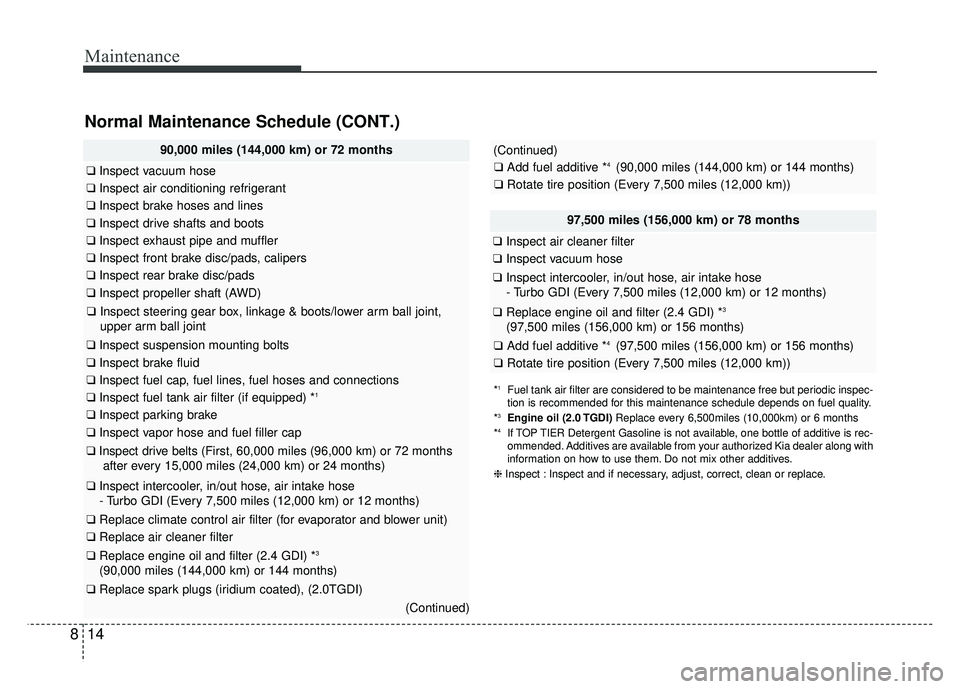
Maintenance
14
8
Normal Maintenance Schedule (CONT.)
97,500 miles (156,000 km) or 78 months
❑ Inspect air cleaner filter
❑Inspect vacuum hose
❑Inspect intercooler, in/out hose, air intake hose
- Turbo GDI (Every 7,500 miles (12,000 km) or 12 months)
❑Replace engine oil and filter (2.4 GDI) *3
(97,500 miles (156,000 km) or 156 months)
❑ Add fuel additive *4 (97,500 miles (156,000 km) or 156 months)
❑Rotate tire position (Every 7,500 miles (12,000 km))
90,000 miles (144,000 km) or 72 months
❑Inspect vacuum hose
❑Inspect air conditioning refrigerant
❑Inspect brake hoses and lines
❑Inspect drive shafts and boots
❑Inspect exhaust pipe and muffler
❑Inspect front brake disc/pads, calipers
❑Inspect rear brake disc/pads
❑Inspect propeller shaft (AWD)
❑Inspect steering gear box, linkage & boots/lower arm ball joint,
upper arm ball joint
❑ Inspect suspension mounting bolts
❑Inspect brake fluid
❑Inspect fuel cap, fuel lines, fuel hoses and connections
❑Inspect fuel tank air filter (if equipped) *1
❑Inspect parking brake
❑Inspect vapor hose and fuel filler cap
❑Inspect drive belts (First, 60,000 miles (96,000 km) or 72 months
after every 15,000 miles (24,000 km) or 24 months)
❑ Inspect intercooler, in/out hose, air intake hose
- Turbo GDI (Every 7,500 miles (12,000 km) or 12 months)
❑ Replace climate control air filter (for evaporator and blower unit)
❑Replace air cleaner filter
❑Replace engine oil and filter (2.4 GDI) *3
(90,000 miles (144,000 km) or 144 months)
❑Replace spark plugs (iridium coated), (2.0TGDI)
(Continued)
*1Fuel tank air filter are considered to be maintenance free but periodic inspec-
tion is recommended for this maintenance schedule depends on fuel quality.
*
3Engine oil (2.0 TGDI) Replace every 6,500miles (10,000km) or 6 months
*4If TOP TIER Detergent Gasoline is not available, one bottle of additive is rec-
ommended. Additives are available from your authorized Kia dealer along with
information on how to use them. Do not mix other additives.
❈ Inspect : Inspect and if necessary, adjust, correct, clean or replace.
(Continued)
❑Add fuel additive *4 (90,000 miles (144,000 km) or 144 months)
❑Rotate tire position (Every 7,500 miles (12,000 km))