instrument cluster KIA SPORTAGE 2019 Features and Functions Guide
[x] Cancel search | Manufacturer: KIA, Model Year: 2019, Model line: SPORTAGE, Model: KIA SPORTAGE 2019Pages: 50, PDF Size: 3.91 MB
Page 14 of 50

DRIVER'S PANEL
12*IF EQUIPPED SPORTAGE FEATURES & FUNCTIONS GUIDE
Auto Door Lock /Unlock will engage when the gear shift is moved in to or out of the
P (Park) position Refer to the User Settings in the LCD Instrument Cluster modes on
how to turn Auto Door Lock /Unlock ON/OFF
Power Folding Outside Mirrors*
D Press the L or R buttons to select the mirror to adjust
E Press button arrows left /right or up/down to adjust mirror position
F Toggle button left /right to unfold/fold the outside rearview mirrors
Toggle button to center to automatically fold/unfold mirrors when:
• Smart Key* lock /unlock buttons are pressed
• Outside door handle button is pressed
• Driver approaches the vehicle with the Smart Key*
REMINDERS:
•
When mirror button F is in the center, press the Lock button on the Smart Key to automatically fold the mirrors
•To lock position of mirrors, toggle switch to the neutral (center) position
Heated Outside Mirrors*
Use mirrors heaters to defrost / defog mirrors Mirror heaters are activated when
Rear Defroster is turned on
A
B
C
E
D
F
•
Press button again to stop Auto Up/Down function
QUICK TIP
Button configuration may vary depending on vehicle model.
Power Windows, Window Lock
& Central Door Lock
A Pull/Press to operate Driver’s Window Auto Up/Down*
B Press to Lock /Unlock All Doors (also unlocks Fuel Door)
C Press to disable Rear Passenger Windows
REMINDER: When pressed C, the rear passengers cannot operate the window controls
Automatic Door Lock/Unlock
Page 16 of 50
STEERING WHEEL CONTROLS
14*IF EQUIPPED SPORTAGE FEATURES & FUNCTIONS GUIDE
Headlights & High Beams
AUTO Light* — When the light switch is in the AUTO Light
position, the tail lights and headlights will turn ON/OFF automatically,
depending on the amount of light outside the vehicle
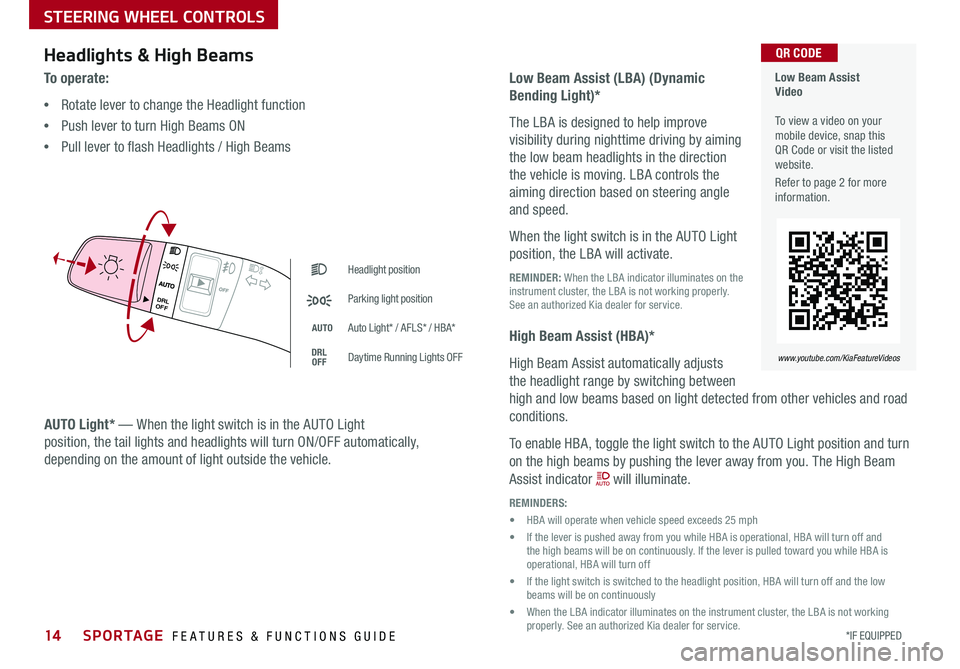
To o p e r a t e :
•Rotate lever to change the Headlight function
•Push lever to turn High Beams ON
•Pull lever to flash Headlights / High Beams
Low Beam Assist (LBA) (Dynamic
Bending Light)*
The LBA is designed to help improve
visibility during nighttime driving by aiming
the low beam headlights in the direction
the vehicle is moving LBA controls the
aiming direction based on steering angle
and speed
When the light switch is in the AUTO Light
position, the LBA will activate
REMINDER: When the LBA indicator illuminates on the instrument cluster, the LBA is not working properly See an authorized Kia dealer for service
High Beam Assist (HBA)*
High Beam Assist automatically adjusts
the headlight range by switching between
high and low beams based on light detected from other vehicles and road
conditions
To enable HBA, toggle the light switch to the AUTO Light position and turn
on the high beams by pushing the lever away from you The High Beam
Assist indicator will illuminate
REMINDERS:
• HBA will operate when vehicle speed exceeds 25 mph
• If the lever is pushed away from you while HBA is operational, HBA will turn off and the high beams will be on continuously If the lever is pulled toward you while HBA is operational, HBA will turn off
• If the light switch is switched to the headlight position, HBA will turn off and the low beams will be on continuously
• When the LBA indicator illuminates on the instrument cluster, the LBA is not working properly See an authorized Kia dealer for service
Headlight position
Parking light position
AUTOAuto Light* / AFLS* / HBA*
DRLOFFDaytime Running Lights OFF
Low Beam Assist Video To view a video on your mobile device, snap this QR Code or visit the listed website
Refer to page 2 for more information
www.youtube.com/KiaFeatureVideos
QR CODE
AUTO
OF F
DRL
OFF
Page 17 of 50
STEERING WHEEL CONTROLS
*IF EQUIPPED 15ALWAYS CHECK THE OWNER’S MANUAL FOR COMPLETE OPER ATING INFORMATION AND SAFET Y WARNINGS
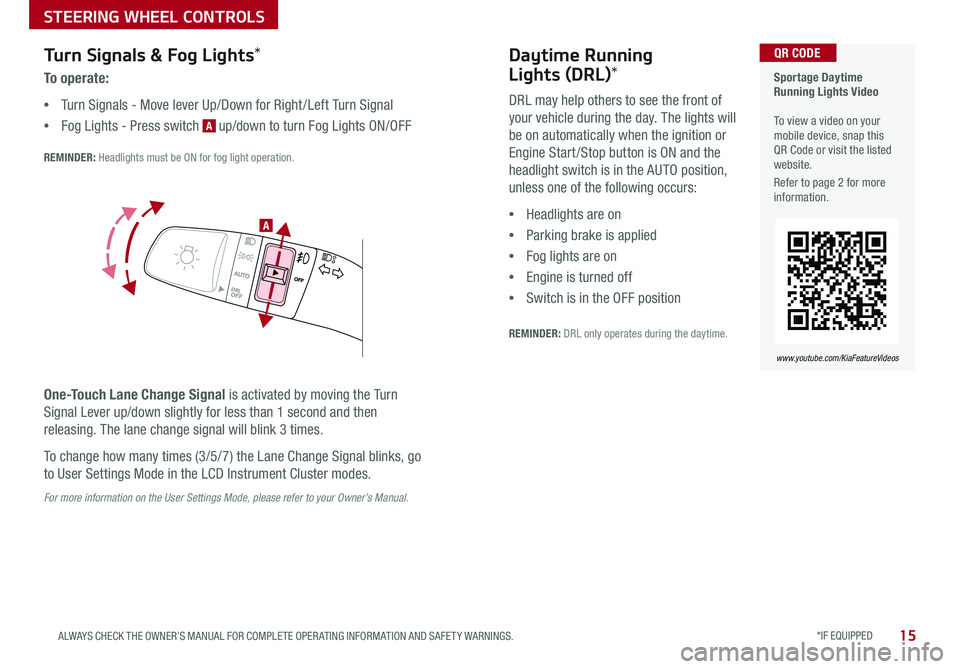
Turn Signals & Fog Lights*
To o p e r a t e :
•Turn Signals - Move lever Up/Down for Right /Left Turn Signal
•Fog Lights - Press switch A up/down to turn Fog Lights ON/OFF
REMINDER: Headlights must be ON for fog light operation
One-Touch Lane Change Signal is activated by moving the Turn
Signal Lever up/down slightly for less than 1 second and then
releasing The lane change signal will blink 3 times
To change how many times (3/5/7) the Lane Change Signal blinks, go
to User Settings Mode in the LCD Instrument Cluster modes
For more information on the User Settings Mode, please refer to your Owner’s Manual.
Sportage Daytime Running Lights Video To view a video on your mobile device, snap this QR Code or visit the listed website
Refer to page 2 for more information
www.youtube.com/KiaFeatureVideos
QR CODE
.
Daytime Running
Lights (DRL)*
DRL may help others to see the front of
your vehicle during the day The lights will
be on automatically when the ignition or
Engine Start /Stop button is ON and the
headlight switch is in the AUTO position,
unless one of the following occurs:
•Headlights are on
•Parking brake is applied
•Fog lights are on
•Engine is turned off
•Switch is in the OFF position
REMINDER: DRL only operates during the daytime
A
Page 30 of 50
28SPORTAGE FEATURES & FUNCTIONS GUIDE
CENTER PANEL
*IF EQUIPPED †LEGAL DISCL AIMERS ON BACK INSIDE COVER
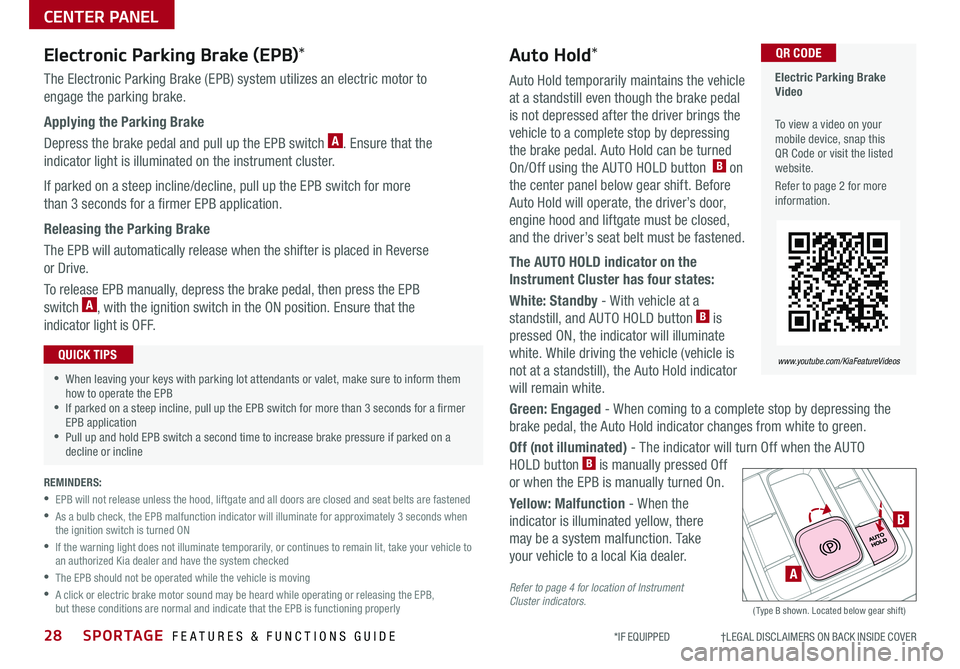
Auto Hold temporarily maintains the vehicle
at a standstill even though the brake pedal
is not depressed after the driver brings the
vehicle to a complete stop by depressing
the brake pedal Auto Hold can be turned
On/Off using the AUTO HOLD button B on
the center panel below gear shift Before
Auto Hold will operate, the driver’s door,
engine hood and liftgate must be closed,
and the driver’s seat belt must be fastened
The AUTO HOLD indicator on the
Instrument Cluster has four states:
White: Standby - With vehicle at a
standstill, and AUTO HOLD button B is
pressed ON, the indicator will illuminate
white While driving the vehicle (vehicle is
not at a standstill), the Auto Hold indicator
will remain white
Green: Engaged - When coming to a complete stop by depressing the
brake pedal, the Auto Hold indicator changes from white to green
Off (not illuminated) - The indicator will turn Off when the AUTO
HOLD button B is manually pressed Off
or when the EPB is manually turned On
Yellow: Malfunction - When the
indicator is illuminated yellow, there
may be a system malfunction Take
your vehicle to a local Kia dealer
Refer to page 4 for location of Instrument Cluster indicators. (Type B shown Located below gear shift)
Electronic Parking Brake (EPB)*
The Electronic Parking Brake (EPB) system utilizes an electric motor to
engage the parking brake
Applying the Parking Brake
Depress the brake pedal and pull up the EPB switch A Ensure that the
indicator light is illuminated on the instrument cluster
If parked on a steep incline/decline, pull up the EPB switch for more
than 3 seconds for a firmer EPB application
Releasing the Parking Brake
The EPB will automatically release when the shifter is placed in Reverse
or Drive
To release EPB manually, depress the brake pedal, then press the EPB
switch A, with the ignition switch in the ON position Ensure that the
indicator light is O F F
•When leaving your keys with parking lot attendants or valet, make sure to inform them how to operate the EPB •If parked on a steep incline, pull up the EPB switch for more than 3 seconds for a firmer EPB application •Pull up and hold EPB switch a second time to increase brake pressure if parked on a decline or incline
QUICK TIPS
A
B
Electric Parking Brake Video
To view a video on your mobile device, snap this QR Code or visit the listed website
Refer to page 2 for more information
www.youtube.com/KiaFeatureVideos
QR CODEAuto Hold*
REMINDERS:
•
EPB will not release unless the hood, liftgate and all doors are closed and seat belts are fastened
•
As a bulb check, the EPB malfunction indicator will illuminate for approximately 3 seconds when the ignition switch is turned ON
•
If the warning light does not illuminate temporarily, or continues to remain lit, take your vehicle to an authorized Kia dealer and have the system checked
•The EPB should not be operated while the vehicle is moving
•
A click or electric brake motor sound may be heard while operating or releasing the EPB, but these conditions are normal and indicate that the EPB is functioning properly
Page 41 of 50

39
OTHER KEY FEATURES
ALWAYS CHECK THE OWNER’S MANUAL FOR COMPLETE OPER ATING INFORMATION AND SAFET Y WARNINGS *IF EQUIPPED †LEGAL DISCL AIMERS ON BACK INSIDE COVER
REMINDERS:
•All doors are closed and locked after about 15 seconds
•The Smart Power Liftgate feature will not operate when:
- The doors are recently closed and locked, and the Smart Key is still detected after 15 seconds near the vehicle or within 60 inches of the door handles- A door is not locked or closed- The Smart Key is in the vehicle
•
Press any button on the Smart Key fob during the Detect and Alert stage to deactivate the Smart Power Liftgate function
Smart Power Liftgate Video
To view a video on your mobile device, snap this QR Code or visit the listed website
Refer to page 2 for more information
www.youtube.com/KiaFeatureVideos
QR CODE
• During the Smart Power Liftgate alert, the Smart Power Liftgate can be deactivated with the Smart Key by pressing any button on the key fob
• The open height can be adjusted For information on how to set open height, see your owner's manual
QUICK TIPS
HOLD
C
Liftgate Release Button
(for manual liftgate)
Smart Power Liftgate*†1 4
Located underneath the rear liftgate hatch With
liftgate unlocked, press the Liftgate Release Button A and pull the liftgate up by the handle to open
• The liftgate must be unlocked before it can be opened by the Liftgate Release Button
• The liftgate unlocks automatically, and can then be opened, when the Smart Key fob* is within close proximity to the vehicle
QUICK TIPS
HOLD
(Liftgate release button)
A
When the Smart Key fob is on your person and you are near
the back of the vehicle, within close proximity, the hazard
lights will blink and a chime will sound for about 3 seconds
as an alert that the Smart Power Liftgate is about to open
Then the alert system will blink and chime two additional
times before opening the Smart Power Liftgate
The Smart Power Liftgate
feature is off by default To
enable the Smart Power
Liftgate, go to User Settings
in the LCD Instrument
Cluster modes