HEAD LIGHT KIA SPORTAGE 2019 Owners Manual
[x] Cancel search | Manufacturer: KIA, Model Year: 2019, Model line: SPORTAGE, Model: KIA SPORTAGE 2019Pages: 607, PDF Size: 16.97 MB
Page 89 of 607

Mirrors . . . . . . . . . . . . . . . . . . . . . . . . . . . . . . . . . . 4-58\
• Inside rearview mirror . . . . . . . . . . . . . . . . . . . . . . . . 4-58
• Outside rearview mirror . . . . . . . . . . . . . . . . . . . . . . 4-65
Instrument cluster . . . . . . . . . . . . . . . . . . . . . . . . . 4-68
• Instrument Cluster Control . . . . . . . . . . . . . . . . . . . . 4-69
• LCD Display Control . . . . . . . . . . . . . . . . . . . . . . . . . 4-69
• Gauges . . . . . . . . . . . . . . . . . . . . . . . . . . . . . . . . . . . . \
. 4-70
• Transaxle Shift Indicator . . . . . . . . . . . . . . . . . . . . . . 4-73
LCD Display . . . . . . . . . . . . . . . . . . . . . . . . . . . . . . 4-74
• LCD Modes . . . . . . . . . . . . . . . . . . . . . . . . . . . . . . . . . 4-74
• Service Mode . . . . . . . . . . . . . . . . . . . . . . . . . . . . . . . . 4-75
• User Settings Mode . . . . . . . . . . . . . . . . . . . . . . . . . . . 4-77
Trip modes (Trip computer) . . . . . . . . . . . . . . . . . 4-83
• Trip Modes . . . . . . . . . . . . . . . . . . . . . . . . . . . . . . . . . . 4-83\
• Fuel Economy . . . . . . . . . . . . . . . . . . . . . . . . . . . . . . . 4-83
• Trip A/B . . . . . . . . . . . . . . . . . . . . . . . . . . . . . . . . . . . . \
4-85
• Digital speedometer . . . . . . . . . . . . . . . . . . . . . . . . . . . 4-86
• One time driving information mode . . . . . . . . . . . . . 4-86
• Turn By Turn Mode . . . . . . . . . . . . . . . . . . . . . . . . . . 4-87
• LDWS Mode . . . . . . . . . . . . . . . . . . . . . . . . . . . . . . . . 4-87
• A/V Mode . . . . . . . . . . . . . . . . . . . . . . . . . . . . . . . . . . . 4-\
87
• Warning Messages . . . . . . . . . . . . . . . . . . . . . . . . . . . . 4-88
Warning and indicator lights . . . . . . . . . . . . . . . . 4-96
• Warning lights . . . . . . . . . . . . . . . . . . . . . . . . . . . . . . . 4-96
• Indicator Lights . . . . . . . . . . . . . . . . . . . . . . . . . . . . . 4-103
Rear parking assist system . . . . . . . . . . . . . . . . . 4-108
• Operation of the rear parking assist system . . . . . . 4-108
• Non-operational conditions of rear parking assist system . . . . . . . . . . . . . . . . . . . 4-109
• Rear parking assist system precautions . . . . . . . . . 4-110
• Self-diagnosis . . . . . . . . . . . . . . . . . . . . . . . . . . . . . . . 4-111
Parking assist system . . . . . . . . . . . . . . . . . . . . . . 4-112
• Operation of the parking assist system . . . . . . . . . . 4-112
• Non-operational conditions of parking assist system. . 4-114
• Self-diagnosis . . . . . . . . . . . . . . . . . . . . . . . . . . . . . . . 4-116
Rearview camera . . . . . . . . . . . . . . . . . . . . . . . . . 4-117
Lighting . . . . . . . . . . . . . . . . . . . . . . . . . . . . . . . . . 4-118
• Battery saver function . . . . . . . . . . . . . . . . . . . . . . . . 4-118
• Daytime running light . . . . . . . . . . . . . . . . . . . . . . . . 4-118
• Lighting control . . . . . . . . . . . . . . . . . . . . . . . . . . . . . 4-118
• High beam operation. . . . . . . . . . . . . . . . . . . . . . . . . 4-120
• High Beam Assist . . . . . . . . . . . . . . . . . . . . . . . . . . . . 4-121
• Turn signals and lane change signals . . . . . . . . . . . 4-123
• Front fog light . . . . . . . . . . . . . . . . . . . . . . . . . . . . . . 4-123
• Check headlight . . . . . . . . . . . . . . . . . . . . . . . . . . . . 4-124
• AFLS (Adaptive Front Lighting System) . . . . . . . . 4-124
Wipers and washers . . . . . . . . . . . . . . . . . . . . . . . 4-125
• Windshield wipers . . . . . . . . . . . . . . . . . . . . . . . . . . 4-125
• Front windshield washers . . . . . . . . . . . . . . . . . . . . . 4-126
• Rear window wiper and washer switch. . . . . . . . . . 4-127
4
Page 90 of 607
Interior lights . . . . . . . . . . . . . . . . . . . . . . . . . . . . 4-129
• Automatic turn off function . . . . . . . . . . . . . . . . . . . 4-129
• Room lamp . . . . . . . . . . . . . . . . . . . . . . . . . . . . . . . . . 4-129
• Map lamp . . . . . . . . . . . . . . . . . . . . . . . . . . . . . . . . . 4-130
• Liftgate room lamp . . . . . . . . . . . . . . . . . . . . . . . . . . 4-131
• Vanity mirror lamp . . . . . . . . . . . . . . . . . . . . . . . . . . 4-131
• Glove box lamp . . . . . . . . . . . . . . . . . . . . . . . . . . . . . 4-131
Welcome system . . . . . . . . . . . . . . . . . . . . . . . . . . 4-132
• Headlight (Headlamp) escort function . . . . . . . . . . 4-132
• Interior light . . . . . . . . . . . . . . . . . . . . . . . . . . . . . . . 4-132
• Pocket lamp . . . . . . . . . . . . . . . . . . . . . . . . . . . . . . . . 4-132
Defroster . . . . . . . . . . . . . . . . . . . . . . . . . . . . . . . . 4-133
• Rear window defroster . . . . . . . . . . . . . . . . . . . . . . . 4-133
Manual climate control system . . . . . . . . . . . . . . 4-134
• Heating and air conditioning . . . . . . . . . . . . . . . . . . 4-135
• System operation . . . . . . . . . . . . . . . . . . . . . . . . . . . . 4-140
• Climate control air filter. . . . . . . . . . . . . . . . . . . . . . 4-142
• Air Conditioning refrigerant label. . . . . . . . . . . . . . 4-142
• Checking the amount of air conditioner refrigerant and compressor lubricant . . . . . . . . . . . . . . . . . . . . . . . 4-143
Automatic climate control system . . . . . . . . . . . 4-144
• Automatic heating and air conditioning . . . . . . . . . 4-145
• Manual heating and air conditioning . . . . . . . . . . . 4-146
• System operation . . . . . . . . . . . . . . . . . . . . . . . . . . . . 4-152
• Climate control air filter. . . . . . . . . . . . . . . . . . . . . . 4-154 • Checking the amount of air conditioner refrigerant and
compressor lubricant . . . . . . . . . . . . . . . . . . . . . . . 4-154
• Air Conditioning refrigerant label. . . . . . . . . . . . . . 4-155
Windshield defrosting and defogging . . . . . . . . . 4-156
• Manual climate control system . . . . . . . . . . . . . . . . 4-156
• Automatic climate control system . . . . . . . . . . . . . . 4-157
• Defogging logic. . . . . . . . . . . . . . . . . . . . . . . . . . . . . . 4-158
Clean air . . . . . . . . . . . . . . . . . . . . . . . . . . . . . . . . 4-160
Storage compartments . . . . . . . . . . . . . . . . . . . . . 4-161
• Center console storage . . . . . . . . . . . . . . . . . . . . . . . 4-161
• Glove box . . . . . . . . . . . . . . . . . . . . . . . . . . . . . . . . . . 4-16\
1
• Sunglass holder . . . . . . . . . . . . . . . . . . . . . . . . . . . . . 4-162
• Luggage box . . . . . . . . . . . . . . . . . . . . . . . . . . . . . . . . 4-162
• Two types of luggage board use . . . . . . . . . . . . . . . . 4-163
Interior features . . . . . . . . . . . . . . . . . . . . . . . . . . 4-164
• Cup holder . . . . . . . . . . . . . . . . . . . . . . . . . . . . . . . . . 4-164
• Bottle holder. . . . . . . . . . . . . . . . . . . . . . . . . . . . . . . . 4-\
164
• Seat warmer . . . . . . . . . . . . . . . . . . . . . . . . . . . . . . . . 4-165
• Air ventilation seat . . . . . . . . . . . . . . . . . . . . . . . . . . 4-166
• Sunvisor . . . . . . . . . . . . . . . . . . . . . . . . . . . . . . . . . . . 4-\
166
• Power outlet . . . . . . . . . . . . . . . . . . . . . . . . . . . . . . . . 4-167
• USB charger . . . . . . . . . . . . . . . . . . . . . . . . . . . . . . . . 4-168
• Wireless smart phone charging system . . . . . . . . . . 4-169
• Clothes hanger . . . . . . . . . . . . . . . . . . . . . . . . . . . . . . 4-172
• Floor mat anchor (s) . . . . . . . . . . . . . . . . . . . . . . . . . 4-172
4
Page 145 of 607
Features of your vehicle
58
4
MIRRORS
Inside rearview mirror
Adjust the rearview mirror so that the
center view through the rear window
is seen. Make this adjustment before
you start driving.
Do not place objects in the rear seat
or cargo area which would interfere
with your vision through the rear win-
dow.
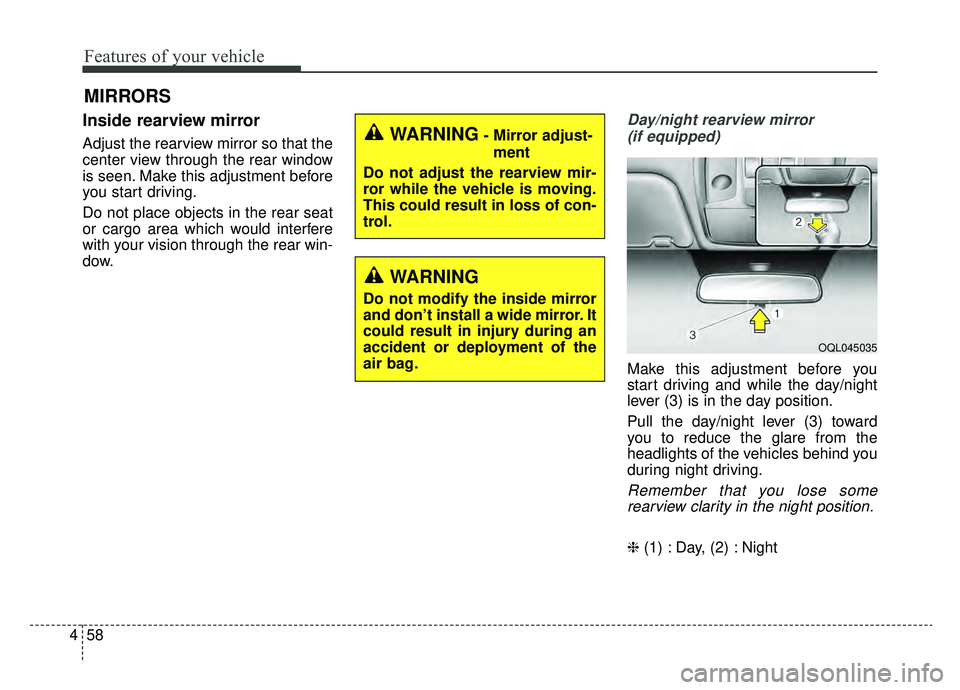
Day/night rearview mirror
(if equipped)
Make this adjustment before you
start driving and while the day/night
lever (3) is in the day position.
Pull the day/night lever (3) toward
you to reduce the glare from the
headlights of the vehicles behind you
during night driving.
Remember that you lose somerearview clarity in the night position.
❈ (1) : Day, (2) : Night
WARNING- Mirror adjust-
ment
Do not adjust the rearview mir-
ror while the vehicle is moving.
This could result in loss of con-
trol.
WARNING
Do not modify the inside mirror
and don’t install a wide mirror. It
could result in injury during an
accident or deployment of the
air bag.
OQL045035
Page 146 of 607
459
Features of your vehicle
Electric chromatic mirror (ECM) (if equipped)
The electric rearview mirror automat-
ically controls the glare from the
headlights of the vehicles behind you
in nighttime or low light driving condi-
tions. The sensor mounted in the mir-
ror senses the light level around the
vehicle and automatically controls
the headlight glare from the vehicles
behind you.
When the engine is running, the
glare is automatically controlled by
the sensor mounted in the rearview
mirror.
Whenever the shift lever is shifted
into reverse (R), the mirror will auto-
matically go to the brightest setting in
order to improve the drivers view
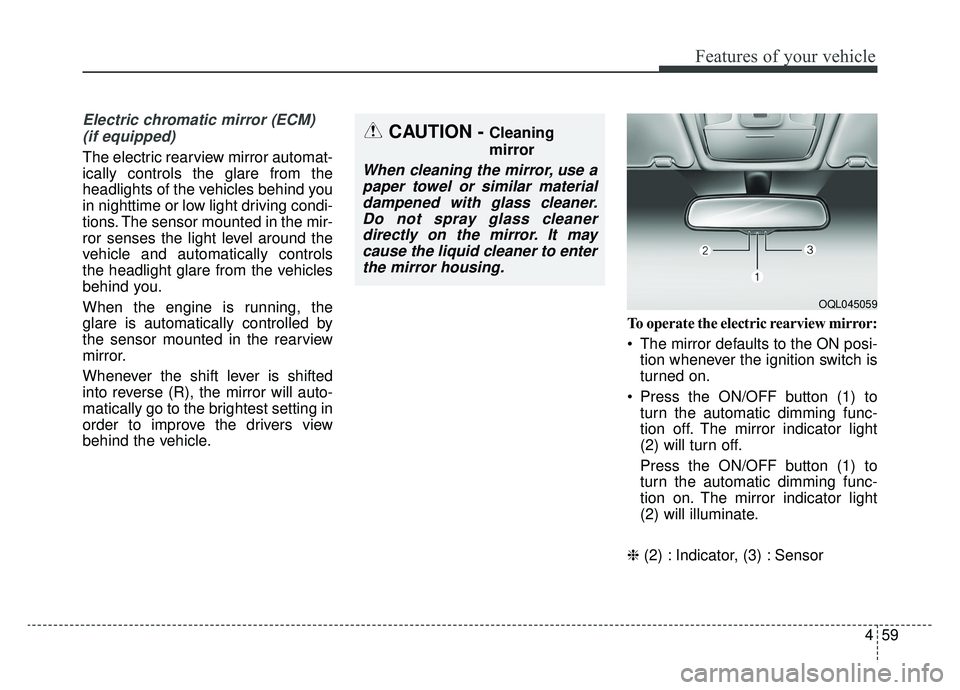
behind the vehicle. To operate the electric rearview mirror:
The mirror defaults to the ON posi-
tion whenever the ignition switch is
turned on.
Press the ON/OFF button (1) to turn the automatic dimming func-
tion off. The mirror indicator light
(2) will turn off.
Press the ON/OFF button (1) to
turn the automatic dimming func-
tion on. The mirror indicator light
(2) will illuminate.
❈ (2) : Indicator, (3) : Sensor
CAUTION - Cleaning
mirror
When cleaning the mirror, use a
paper towel or similar materialdampened with glass cleaner.Do not spray glass cleanerdirectly on the mirror. It maycause the liquid cleaner to enterthe mirror housing.
OQL045059
Page 149 of 607
Features of your vehicle
62
4
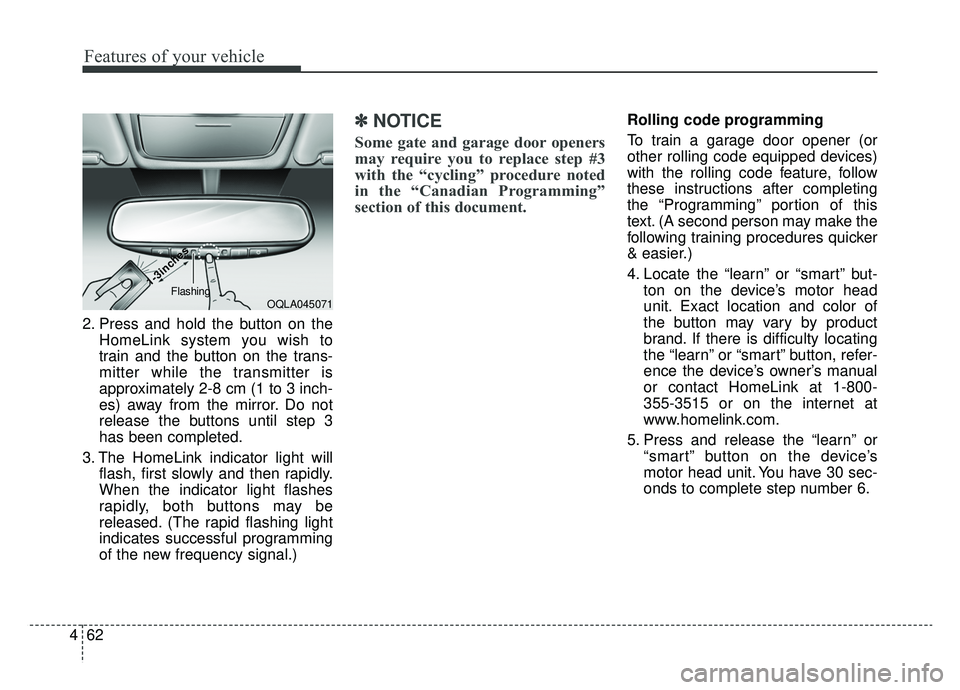
2. Press and hold the button on the
HomeLink system you wish to
train and the button on the trans-
mitter while the transmitter is
approximately 2-8 cm (1 to 3 inch-
es) away from the mirror. Do not
release the buttons until step 3
has been completed.
3. The HomeLink indicator light will flash, first slowly and then rapidly.
When the indicator light flashes
rapidly, both buttons may be
released. (The rapid flashing light
indicates successful programming
of the new frequency signal.)
✽ ✽NOTICE
Some gate and garage door openers
may require you to replace step #3
with the “cycling” procedure noted
in the “Canadian Programming”
section of this document.
Rolling code programming
To train a garage door opener (or
other rolling code equipped devices)
with the rolling code feature, follow
these instructions after completing
the “Programming” portion of this
text. (A second person may make the
following training procedures quicker
& easier.)
4. Locate the “learn” or “smart” but-
ton on the device’s motor head
unit. Exact location and color of
the button may vary by product
brand. If there is difficulty locating
the “learn” or “smart” button, refer-
ence the device’s owner’s manual
or contact HomeLink at 1-800-
355-3515 or on the internet at
www.homelink.com.
5. Press and release the “learn” or “smart” button on the device’s
motor head unit. You have 30 sec-
onds to complete step number 6.
OQLA045071
1-3inc
1-3inc
hes
hesFlashing
Page 167 of 607
Features of your vehicle
80
4
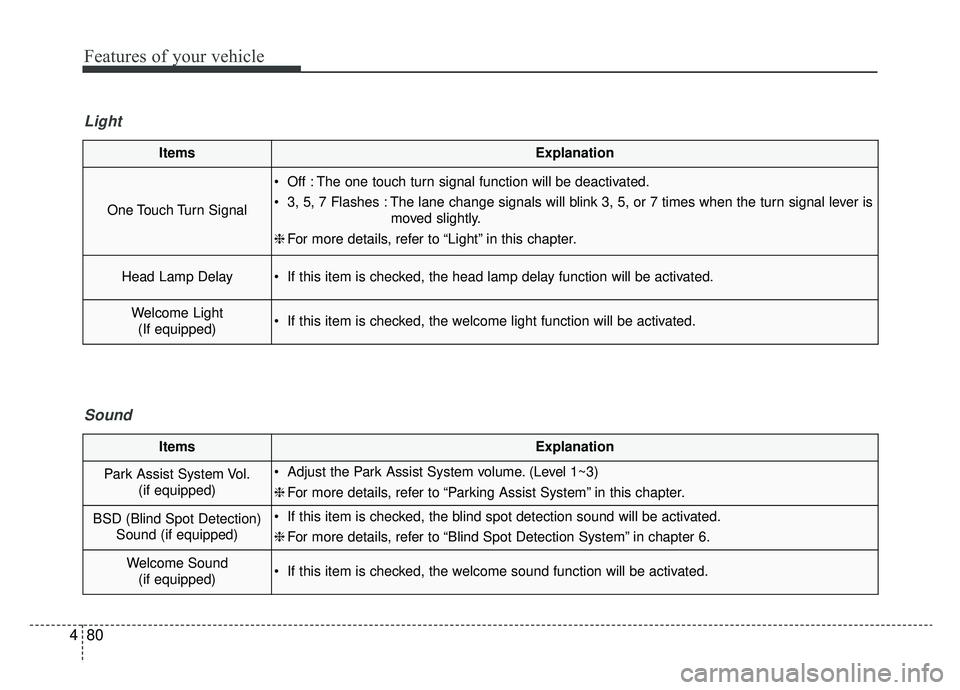
ItemsExplanation
One Touch Turn Signal
Off : The one touch turn signal function will be deactivated.
3, 5, 7 Flashes : The lane change signals will blink 3, 5, or 7 times when the turn signal lever is
moved slightly.
❈ For more details, refer to “Light” in this chapter.
Head Lamp Delay If this item is checked, the head lamp delay function will be activated.
Welcome Light
(If equipped) If this item is checked, the welcome light function will be activated.
Light
ItemsExplanation
Park Assist System Vol. (if equipped) Adjust the Park Assist System volume. (Level 1~3)
❈For more details, refer to “Parking Assist System” in this chapter.
BSD (Blind Spot Detection)
Sound (if equipped) If this item is checked, the blind spot detection sound will be activated.
❈For more details, refer to “Blind Spot Detection System” in chapter 6.
Welcome Sound
(if equipped) If this item is checked, the welcome sound function will be activated.
Sound
Page 181 of 607
Features of your vehicle
94
4
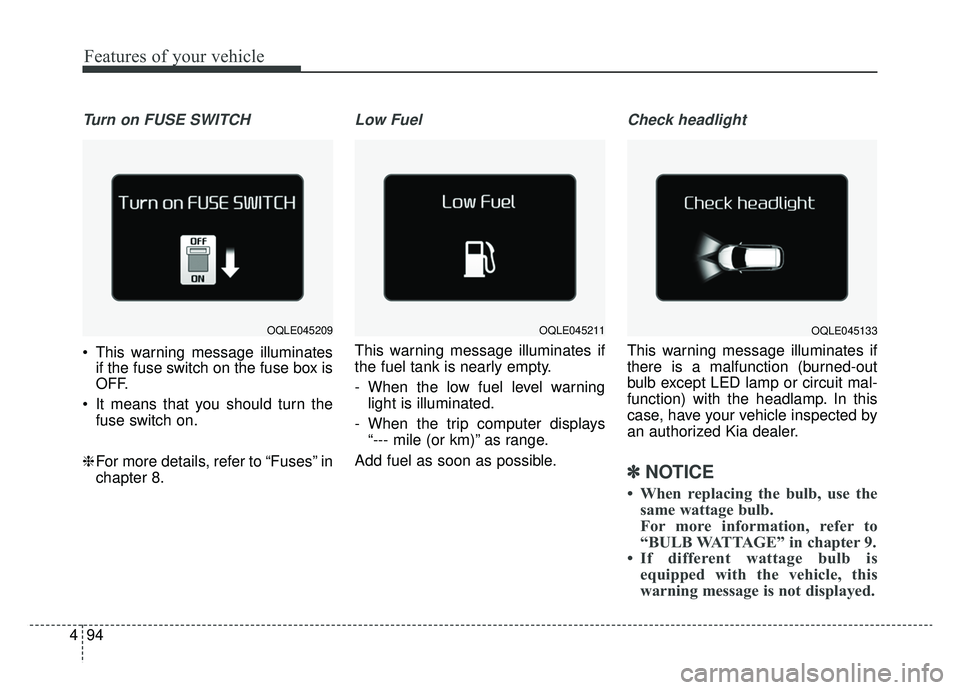
Turn on FUSE SWITCH
This warning message illuminates
if the fuse switch on the fuse box is
OFF.
It means that you should turn the fuse switch on.
❈ For more details, refer to “Fuses” in
chapter 8.
Low Fuel
This warning message illuminates if
the fuel tank is nearly empty.
- When the low fuel level warning
light is illuminated.
- When the trip computer displays “--- mile (or km)” as range.
Add fuel as soon as possible.
Check headlight
This warning message illuminates if
there is a malfunction (burned-out
bulb except LED lamp or circuit mal-
function) with the headlamp. In this
case, have your vehicle inspected by
an authorized Kia dealer.
✽ ✽ NOTICE
• When replacing the bulb, use the
same wattage bulb.
For more information, refer to
“BULB WATTAGE” in chapter 9.
• If different wattage bulb is equipped with the vehicle, this
warning message is not displayed.
OQLE045209OQLE045211OQLE045133
Page 182 of 607
495
Features of your vehicle
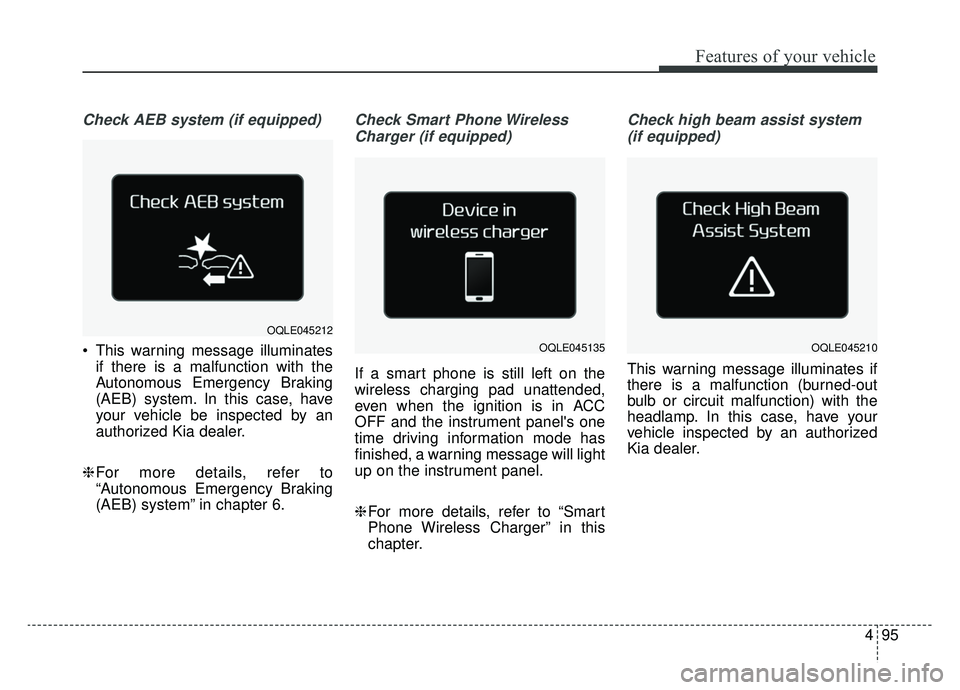
Check AEB system (if equipped)
This warning message illuminatesif there is a malfunction with the
Autonomous Emergency Braking
(AEB) system. In this case, have
your vehicle be inspected by an
authorized Kia dealer.
❈ For more details, refer to
“Autonomous Emergency Braking
(AEB) system” in chapter 6.
Check Smart Phone Wireless
Charger (if equipped)
If a smart phone is still left on the
wireless charging pad unattended,
even when the ignition is in ACC
OFF and the instrument panel's one
time driving information mode has
finished, a warning message will light
up on the instrument panel.
❈ For more details, refer to “Smart
Phone Wireless Charger” in this
chapter.
Check high beam assist system
(if equipped)
This warning message illuminates if
there is a malfunction (burned-out
bulb or circuit malfunction) with the
headlamp. In this case, have your
vehicle inspected by an authorized
Kia dealer.
OQLE045212
OQLE045135OQLE045210
Page 192 of 607
4105
Features of your vehicle
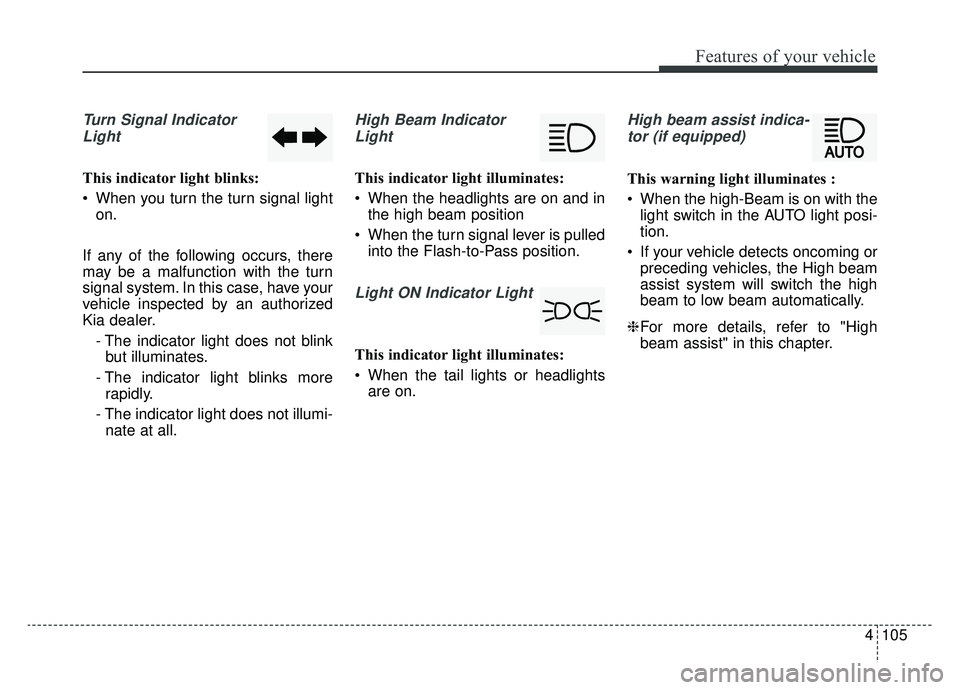
Turn Signal IndicatorLight
This indicator light blinks:
When you turn the turn signal light on.
If any of the following occurs, there
may be a malfunction with the turn
signal system. In this case, have your
vehicle inspected by an authorized
Kia dealer. - The indicator light does not blinkbut illuminates.
- The indicator light blinks more rapidly.
- The indicator light does not illumi- nate at all.
High Beam Indicator
Light
This indicator light illuminates:
When the headlights are on and in the high beam position
When the turn signal lever is pulled into the Flash-to-Pass position.
Light ON Indicator Light
This indicator light illuminates:
When the tail lights or headlightsare on.
High beam assist indica-
tor (if equipped)
This warning light illuminates :
When the high-Beam is on with the light switch in the AUTO light posi-
tion.
If your vehicle detects oncoming or preceding vehicles, the High beam
assist system will switch the high
beam to low beam automatically.
❈ For more details, refer to "High
beam assist" in this chapter.
Page 205 of 607
Features of your vehicle
118
4
Battery saver function
The purpose of this feature is to
prevent the battery from being dis-
charged if the lights are left in the
ON position. The system automati-
cally shuts off the parking lights 30
seconds after the ignition key is
removed and the driver’s door is
opened and closed.
With this feature, the parking lights will turn off automatically if the driver
parks on the side of the road at night
and opens the driver’s side door.
If necessary, to keep the parking
lights on when the ignition key is
removed, perform the following:
1) Open the driver-side door.
2) Turn the parking lights OFF and ON again using the light switch
on the steering column.
Daytime running light
(if equipped)
The Daytime Running Lights (DRL)
can make it easier for others to see the
front of your vehicle during the day.
DRL can be helpful in many different
driving conditions, and it is especially
helpful after dawn and before sunset.
The DRL system turns OFF when:
1. The headlight switch is ON.
2. The engine is OFF.
3. The front fog light is ON.
4. Engaging the Parking Brake
Lighting control
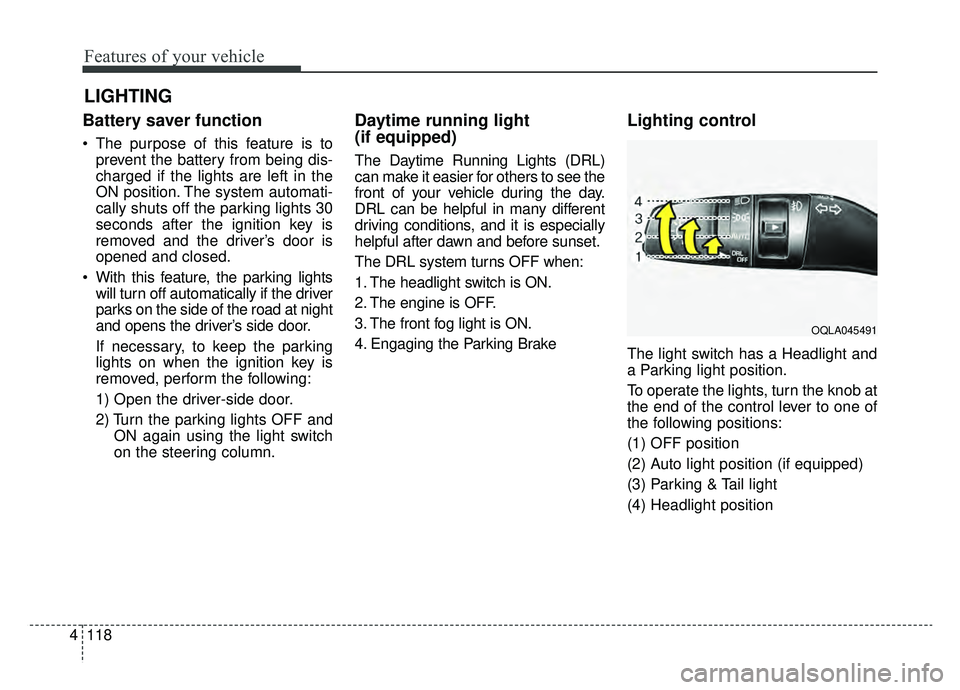
The light switch has a Headlight and
a Parking light position.
To operate the lights, turn the knob at
the end of the control lever to one of
the following positions:
(1) OFF position
(2) Auto light position (if equipped)
(3) Parking & Tail light
(4) Headlight position
LIGHTING
OQLA045491