ESP KIA SPORTAGE 2021 Service Manual
[x] Cancel search | Manufacturer: KIA, Model Year: 2021, Model line: SPORTAGE, Model: KIA SPORTAGE 2021Pages: 631, PDF Size: 10.56 MB
Page 349 of 631
5 63
Driving your vehicle
- For pedestrians, the vehiclespeed is greater than or equal to
5 mph (8 km/h) and less than 40
mph (60 km/h). (Depending on
the condition of pedestrians and
the surrounding environment the
possible maximum operating
speed may be reduced.)
• FCA controls the brakes within cer- tain limit to release shock from the
collision.
FCA controls the maximum brakes
just before the collision.
- If you select “Warning Only”, FCA
activates and produces only warn-
ing alarms in accordance with the
collision risk levels. You should
control the brake directly because
FCA do not control the brake.Brake operation
• In an urgent situation, the brakingsystem enters into the ready status
for prompt reaction to assist the
driver in depressing the brake
pedal.
• FCA provides additional braking power for optimum braking per-
formance, when the driver
depresses the brake pedal.
• The braking control is automatical- ly deactivated, when the driver
sharply depresses the accelerator
pedal, or when the driver abruptly
operates the steering wheel.
• The braking control is automatical- ly canceled, when risk factors dis-
appear.
CAUTION
The driver should always paygreat caution to vehicle opera-tion, even though there is nowarning message or warningalarm.
WARNING
FCA cannot avoid all collisions.
FCA might not completely stop
the vehicle before a collision,
due to ambient, weather and
road conditions. The driver has
the responsibility to drive safely
and control the vehicle.
WARNING
FCA operates in accordance
with certain risk factors, such as
the distance from the
vehicle/passer-by in front, the
speed of the vehicle/passer-by in
front, and the driver's vehicle
operation.
Page 352 of 631
Driving your vehicle
665
✽NOTICE
• FCA is only a supplemental sys-tem for the driver’s convenience.
The driver has the ultimate
responsibility to control and oper-
ate the vehicle safely. Do not solely
depend on FCA. Rather, maintain
a safe braking distance, and, if
necessary, depress the brake pedal
to lower the driving speed.
• In certain instances and under certain driving conditions, FCA
may activate unintentionally. This
initial warning message appears
on the LCD display with a warn-
ing chime.
Also, in certain instances the front
view camera may not detect the
vehicle or pedestrian ahead. FCA
may not activate and the warning
message will not be displayed.
• FCA may unnecessarily produce the warning message and the
warning alarms. Also, due to the
sensing limitation, FCA may not
produce the warning message and
the warning alarm at all.
(Continued)(Continued)
• When there is a malfunction with
FCA, the braking control does not
operate upon detecting a collision
risk even with other braking sys-
tems normally operating.
• FCA operates only for the vehi- cle/pedestrian in front, while driv-
ing forward. It does not operate
for any animals or vehicles in the
opposite direction.
• FCA does not recognize the vehi- cle, which transversally drives
across the crossroad, or the vehi-
cle, which is parked in the trans-
versal direction.
• If the vehicle in front stops sud- denly, you may have less control of
the brake system. Therefore,
always keep safe distance between
your vehicle and the vehicle in
front of you.
• FCA may activate during braking and the vehicle may stop suddenly.
And the load in the vehicle may
endanger passengers. Therefore,
always be mindful of the load vol-
ume in the vehicle. (Continued)(Continued)
• FCA may not activate if the driver
applies the brake pedal to avoid
risk of collision.
• FCA does not operate when the vehicle is in reverse. In these cir-
cumstances, you must maintain a
safe braking distance, and if nec-
essary, depress the brake pedal to
reduce the driving speed in order
to maintain a safe dis tance.
• The regular braking function will operate normally even if There is a
problem with the FCA brake con-
trol system or other functions. In
this case, the braking control will
not operate in an imminent colli-
sion.
• FCA may not activate according to driving condition, traffic on the
road, weather, road condition, etc.
• FCA may not activate in response to all types of vehicles.
Page 357 of 631
5 71
Driving your vehicle
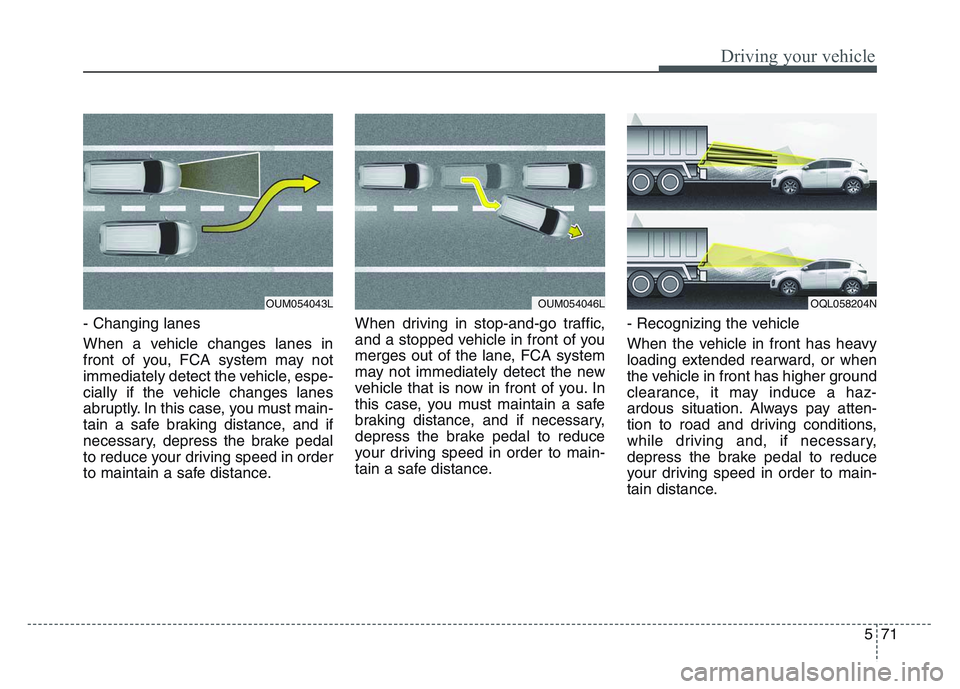
- Changing lanes
When a vehicle changes lanes in
front of you, FCA system may not
immediately detect the vehicle, espe-
cially if the vehicle changes lanes
abruptly. In this case, you must main-
tain a safe braking distance, and if
necessary, depress the brake pedal
to reduce your driving speed in order
to maintain a safe distance.When driving in stop-and-go traffic,
and a stopped vehicle in front of you
merges out of the lane, FCA system
may not immediately detect the new
vehicle that is now in front of you. In
this case, you must maintain a safe
braking distance, and if necessary,
depress the brake pedal to reduce
your driving speed in order to main-
tain a safe distance.
- Recognizing the vehicle
When the vehicle in front has heavy
loading extended rearward, or when
the vehicle in front has higher ground
clearance, it may induce a haz-
ardous situation. Always pay atten-
tion to road and driving conditions,
while driving and, if necessary,
depress the brake pedal to reduce
your driving speed in order to main-
tain distance.
OUM054043LOUM054046LOQL058204N
Page 364 of 631
Driving your vehicle
785
- For pedestrians, the vehiclespeed is greater than or equal to
5 mph (8 km/h) and less than 44
mph (70 km/h). (Depending on
the condition of pedestrians and
bike riders and the surrounding
environment the possible maxi-
mum operating speed may be
reduced.)
• FCA controls the brakes within cer- tain limit to release shock from the
collision.
FCA controls the maximum brakes
just before the collision.
- If you select “Warning Only”,FCA activates and produces only
warning alarms in accordance
with the collision risk levels. You
should control the brake directly
because FCA do not control the
brake.Brake operation
• In an urgent situation, the braking system enters into the ready status
for prompt reaction to assist the
driver in depressing the brake
pedal.
• FCA provides additional braking power for optimum braking per-
formance, when the driver
depresses the brake pedal.
• The braking control is automatical- ly deactivated, when the driver
sharply depresses the accelerator
pedal, or when the driver abruptly
operates the steering wheel.
• The braking control is automatical- ly canceled, when risk factors dis-
appear.CAUTION
• The driver should always pay great caution to vehicle opera-tion, even though there is nowarning message or warningalarm.
• If any other warning sound such as seat belt warningchime is already generated,Forward Collision-AvoidanceAssist warning may notsound.
• Excessive audio volume may disturb the sound of the sys-tem warning alarm.
Page 365 of 631
5 79
Driving your vehicle
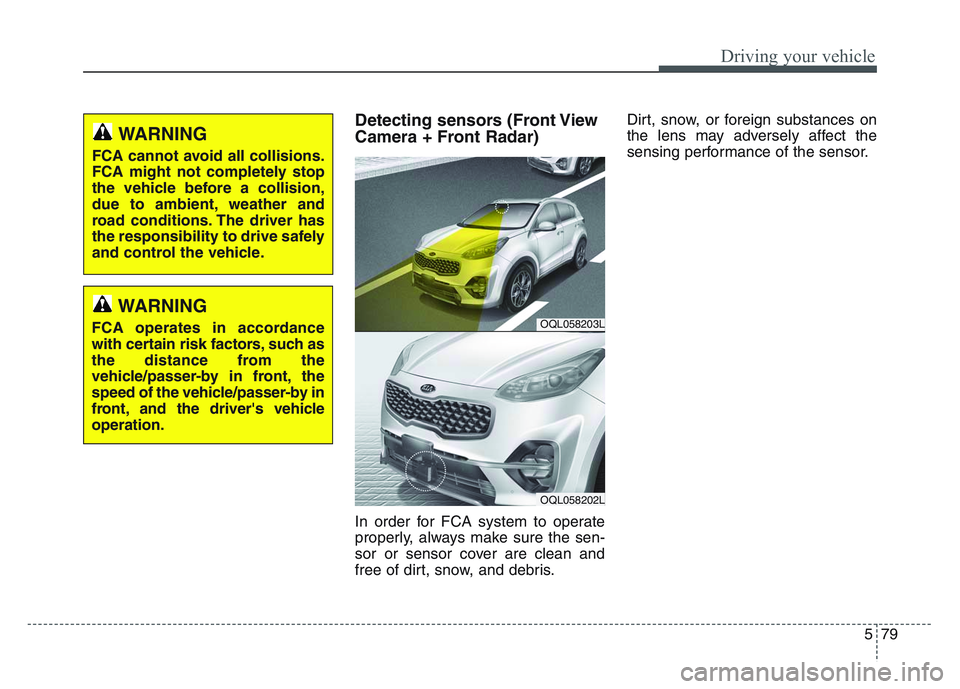
Detecting sensors (Front View
Camera + Front Radar)
In order for FCA system to operate
properly, always make sure the sen-
sor or sensor cover are clean and
free of dirt, snow, and debris.Dirt, snow, or foreign substances on
the lens may adversely affect the
sensing performance of the sensor.
OQL058203L
OQL058202L
WARNING
FCA cannot avoid all collisions.
FCA might not completely stop
the vehicle before a collision,
due to ambient, weather and
road conditions. The driver has
the responsibility to drive safely
and control the vehicle.
WARNING
FCA operates in accordance
with certain risk factors, such as
the distance from the
vehicle/passer-by in front, the
speed of the vehicle/passer-by in
front, and the driver's vehicle
operation.
Page 368 of 631
Driving your vehicle
825
(Continued)
• If the vehicle in front stopssuddenly, you may have less
control of the brake system.
Therefore, always keep safe
distance between your vehicle
and the vehicle in front of you.
• FCA may activate during brak- ing and the vehicle may stop
suddenly. And the load in the
vehicle may endanger passen-
gers. Therefore, always be
mindful of the load volume in
the vehicle.
• FCA may not activate if the driver applies the brake pedal
to avoid risk of collision.
• FCA does not operate when the vehicle is in reverse. In
these circumstances, you
must maintain a safe braking
distance, and if necessary,
depress the brake pedal to
reduce the driving speed in
order to maintain a safe dis
tance.
(Continued)WARNING
• FCA is only a supplementalsystem for the driver’s con-
venience. The driver has the
ultimate responsibility to con-
trol and operate the vehicle
safely. Do not solely depend
on FCA. Rather, maintain a
safe braking distance, and, if
necessary, depress the brake
pedal to lower the driving
speed.
• In certain instances and under certain driving condi-
tions, FCA may activate unin-
tentionally. This initial warning
message appears on the LCD
display with a warning chime.
Also, in certain instances the
front radar sensor or camera
recognition system may not
detect the vehicle or pedestri-
an ahead. FCA may not acti-
vate and the warning mes-
sage will not be displayed.
(Continued)
(Continued)
• FCA may unnecessarily pro-duce the warning message
and the warning alarms. Also,
due to the sensing limitation,
FCA may not produce the
warning message and the
warning alarm at all.
• When there is a malfunction with FCA, the braking control
does not operate upon detect-
ing a collision risk even with
other braking systems nor-
mally operating.
• FCA operates only for the vehicle/pedestrian in front,
while driving forward. It does
not operate for any animals or
vehicles in the opposite direc-
tion.
• FCA does not recognize the vehicle, which transversally
drives across the crossroad,
or the vehicle, which is parked
in the transversal direction.
(Continued)
Page 369 of 631
5 83
Driving your vehicle
Limitation of the system
FCA is an assistant system for a driv-
er in a certain risky driving condition
and it does not take every responsi-
bility for all risks from driving condi-
tion.
FCA monitors the driving situations
through the radar and the camera
sensor. Thus, for a situation out of
the sensing range, FCA may not nor-
mally operate. The driver should pay
great caution in the following situa-
tions. FCA operation may be limited.
Recognizing vehicles
The sensor may be limited when:
• The front view camera or frontradar sensor is blocked with a for-
eign object or debris
• The camera lens is contaminated due to tinted, filmed or coated
windshield, damaged glass, or
stuck of foreign matter (sticker,
bug, etc.) on the glass
• Inclement weather such as heavy rain or snow obscures the field of
view of the radar sensor or camera
• There is interference by electro- magnetic waves
• There is severe irregular reflection from the radar sensor
• The front view camera/front radar sensor recognition is limited
• The vehicle in front is too small to be detected (for example a motor-
cycle etc.)
• The vehicle in front is an oversize vehicle or trailer that is too big to
be detected by the camera recog-
nition system (for example a tractor
trailer, etc.)(Continued)
• The regular braking functionwill operate normally even if
There is a problem with the
FCA brake control system or
other functions. In this case,
the braking control will not
operate in an imminent colli-
sion.
• FCA may not activate accord- ing to driving condition, traffic
on the road, weather, road
condition, etc.
• FCA may not activate in response to all types of vehi-
cles.
Page 373 of 631
5 87
Driving your vehicle
This may result in unnecessary
alarm and braking or no alarm and
braking when necessary.
When the system suddenly recog-
nizes the vehicle or pedestrian in
front while passing over a slope, you
may experience sharp deceleration.
Always keep your eyes forward while
driving upward or downward on a
slope, and, if necessary, depress the
brake pedal to reduce your driving
speed in order to maintain distance.- Changing lanes
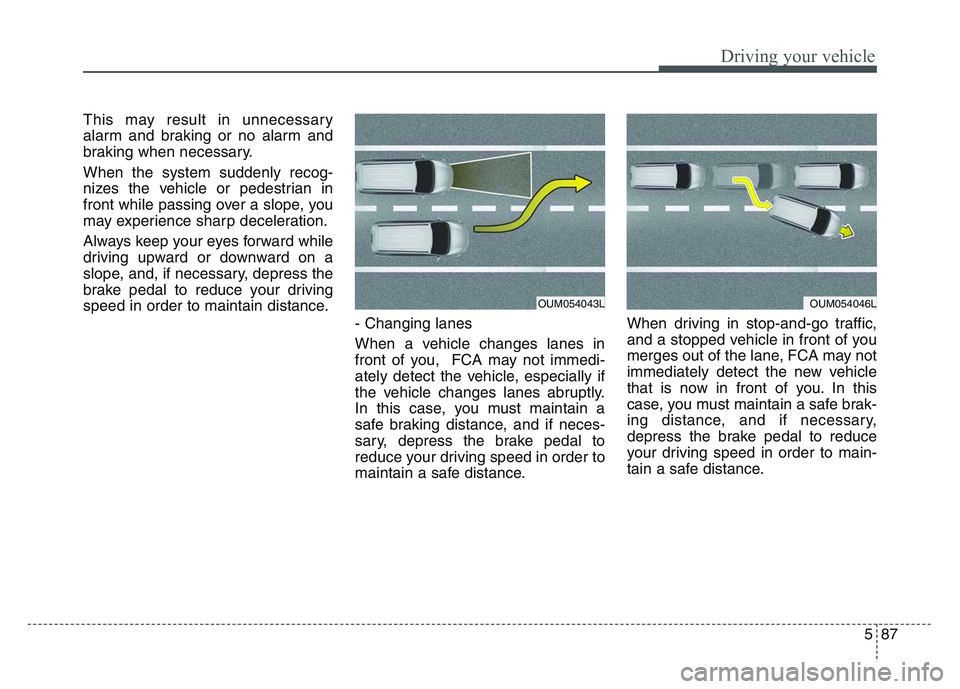
When a vehicle changes lanes in
front of you, FCA may not immedi-
ately detect the vehicle, especially if
the vehicle changes lanes abruptly.
In this case, you must maintain a
safe braking distance, and if neces-
sary, depress the brake pedal to
reduce your driving speed in order to
maintain a safe distance.When driving in stop-and-go traffic,
and a stopped vehicle in front of you
merges out of the lane, FCA may not
immediately detect the new vehicle
that is now in front of you. In this
case, you must maintain a safe brak-
ing distance, and if necessary,
depress the brake pedal to reduce
your driving speed in order to main-
tain a safe distance.
OUM054043LOUM054046L
Page 376 of 631
Driving your vehicle
905
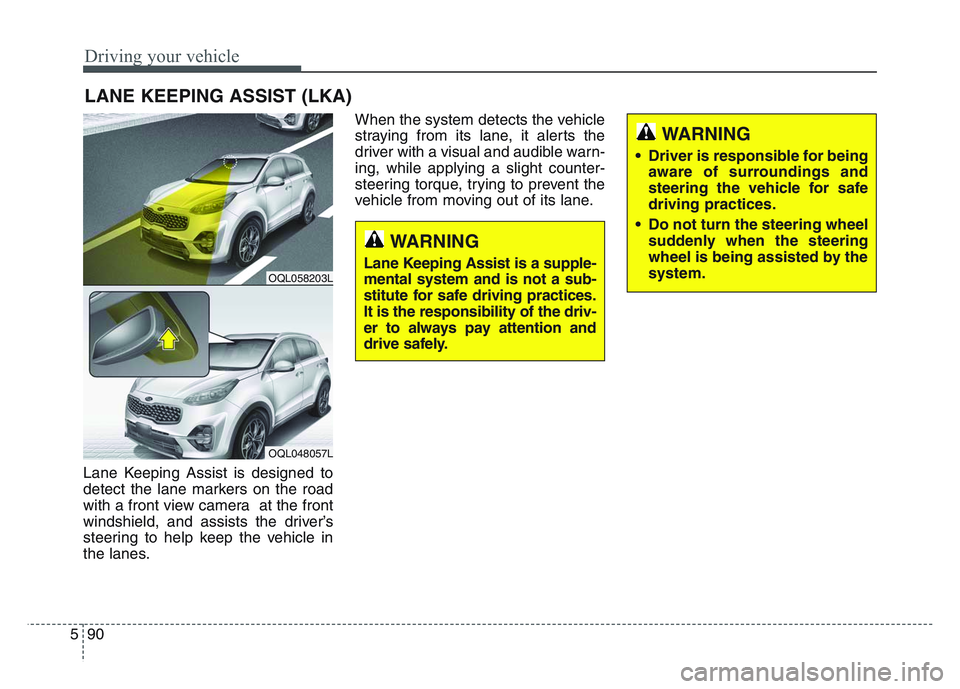
Lane Keeping Assist is designed to
detect the lane markers on the road
with a front view camera at the front
windshield, and assists the driver’s
steering to help keep the vehicle in
the lanes.When the system detects the vehicle
straying from its lane, it alerts the
driver with a visual and audible warn-
ing, while applying a slight counter-
steering torque, trying to prevent the
vehicle from moving out of its lane.
LANE KEEPING ASSIST (LKA)
OQL058203L
OQL048057L
WARNING
• Driver is responsible for being
aware of surroundings and
steering the vehicle for safe
driving practices.
• Do not turn the steering wheel suddenly when the steering
wheel is being assisted by the
system.
WARNING
Lane Keeping Assist is a supple-
mental system and is not a sub-
stitute for safe driving practices.
It is the responsibility of the driv-
er to always pay attention and
drive safely.
Page 381 of 631
5 95
Driving your vehicle
LKA malfunction
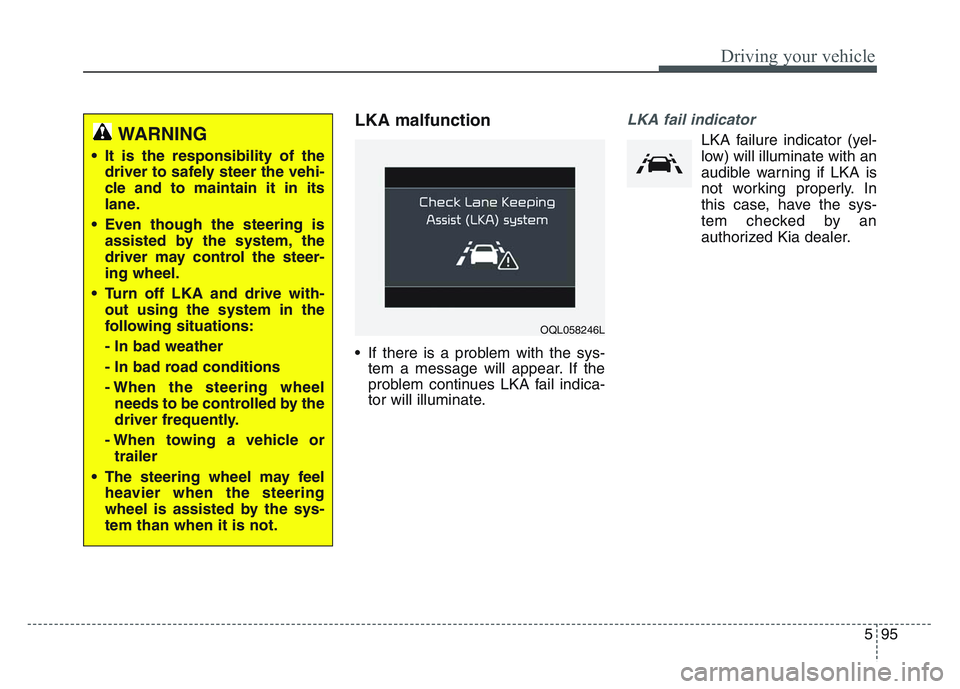
• If there is a problem with the sys-tem a message will appear. If the
problem continues LKA fail indica-
tor will illuminate.
LKA fail indicator
LKA failure indicator (yel-
low) will illuminate with an
audible warning if LKA is
not working properly. In
this case, have the sys-
tem checked by an
authorized Kia dealer.WARNING
• It is the responsibility of the driver to safely steer the vehi-
cle and to maintain it in its
lane.
• Even though the steering is assisted by the system, the
driver may control the steer-
ing wheel.
• Turn off LKA and drive with- out using the system in the
following situations:
- In bad weather
- In bad road conditions
- When the steering wheelneeds to be controlled by the
driver frequently.
- When towing a vehicle or trailer
• The steering wheel may feel heavier when the steering
wheel is assisted by the sys-
tem than when it is not.
OQL058246L