wheel KIA SPORTAGE 2021 Workshop Manual
[x] Cancel search | Manufacturer: KIA, Model Year: 2021, Model line: SPORTAGE, Model: KIA SPORTAGE 2021Pages: 631, PDF Size: 10.56 MB
Page 341 of 631
5 55
Driving your vehicle
• The Vehicle Stability Managementsystem is not a substitute for safe
driving practices but a supplemen-
tary function only. It is the responsi-
bility of the driver to always check
the speed and the distance to the
vehicle ahead. Always hold the
steering wheel firmly while driving.
• Your vehicle is designed to activate according to the driver’s intention,
even with installed VSM. Always fol-
low all the normal precautions for
driving at safe speeds for the condi-
tions – including driving in clement
weather and on a slippery road.Hill-start assist control (HAC)
A vehicle has the tendency to roll
back on a steep hill when it starts to
go after stopping. The Hill-start
Assist Control (HAC) prevents the
vehicle from rolling back by applying
the brakes automatically for about 2
seconds. The brakes are released
when the accelerator pedal is
depressed or after about 2 seconds.
The HAC is activated only for about 2
seconds, so when the vehicle is
starting off always depress the accel-
erator pedal.
Good braking practices
• Check to be sure the parking brakeis not engaged and the parking
brake indicator light is out before
driving away.
• Driving through water may get the brakes wet. They can also get wet
when the vehicle is washed. Wet
brakes can be dangerous! Your
vehicle will not stop as quickly if the
brakes are wet. Wet brakes may
cause the vehicle to pull to one side.
To dry the brakes, apply the brakes
lightly until the braking action
returns to normal, taking care to
keep the vehicle under control at all
times. If the braking action does not
return to normal, stop as soon as it
is safe to do so and call an author-
ized Kia dealer for assistance.
• Don't coast down hills with the vehicle out of gear. This is extreme-
ly hazardous. Keep the vehicle in
gear at all times, use the brakes to
slow down, then shift to a lower
gear so that engine braking will
help you maintain a safe speed.
WARNING- Maintaining
Brake Pressure on Incline
HAC does not replace the need
to apply brakes while stopped on
an incline. While stopped, make
sure you maintain brake pres-
sure sufficient to prevent your
vehicle from rolling backward
and causing an accident. Don’t
release the brake pedal until you
are ready to accelerate forward.WARNING
For maximum protection,
always wear your seat belt. No
system, no matter how
advanced, can compensate for
all driver error and/or driving
conditions. Always drive
responsibly.
Page 342 of 631
Driving your vehicle
565
• Don't "ride" the brake pedal.Resting your foot on the brake
pedal while driving can be danger-
ous because the brakes might
overheat and lose their effective-
ness. It also increases the wear of
the brake components.
• If a tire goes flat while you are driv- ing, apply the brakes gently and
keep the vehicle pointed straight
ahead while you slow down. When
you are moving slowly enough for it
to be safe to do so, pull off the road
and stop in a safe place.
• If your vehicle is equipped with an Automatic Transmission, don't let
your vehicle creep forward. To
avoid creeping forward, keep your
foot firmly on the brake pedal when
the vehicle is stopped.
• Be cautious when parking on a hill. Firmly engage the parking brake
and place the shift lever in P (auto-
matic transmission). If your vehicle
is facing downhill, turn the front
wheels into the curb to help keep
the vehicle from rolling. If your vehicle is facing uphill, turn
the front wheels away from the
curb to help keep the vehicle from
rolling. If there is no curb or if it is
required by other conditions to
keep the vehicle from rolling, block
the wheels.
• Under some conditions your park- ing brake can freeze in the
engaged position. This is most like-
ly to happen when there is an
accumulation of snow or ice
around or near the rear brakes or if
the brakes are wet. If there is a risk
that the parking brake may freeze,
apply it only temporarily while you
put the shift lever in P (automatic
transmission) and block the rear
wheels so the vehicle cannot roll.
Then release the parking brake.
• Do not hold the vehicle on an incline with the accelerator pedal.
This can cause the transmission to
overheat. Always use the brake
pedal or parking brake.
Page 344 of 631
Driving your vehicle
585
When Active ECO is activated:
• The acceleration may slightly bereduced even though you depress
the accelerator fully.
• The air conditioner performance may be limited
• The shift pattern of the automatic transmission may change.
• The engine noise may get louder.
The above situations are normal
conditions when the Active Eco
System is activated to improve fuel
efficiency. Limitation of Active ECO opera-
tion:
If the following conditions occur while
Active ECO is operating, the system
operation is limited even though
there is no change in the ECO indi-
cator.
• When the coolant temperature is
low:
The system will be limited until
engine performance becomes nor-
mal.
• When driving up a hill: The system will be limited to gain
power when driving uphill because
the engine torque is restricted.
• When using manual mode: The system will be limited accord-
ing to the shift location.
• When the accelerator pedal is deeply depressed for a few sec-
onds:
The system will be limited, judging
that the driver wants to speed up.SPORT mode
SPORT mode focuses on
dynamic driving by auto-
matically adjusting the
steering wheel, engine
and transmission system.
• When the DRIVE MODE button is pressed and the SPORT mode is
selected, the SPORT indicator
(yellow) will illuminate.
• When the SPORT mode is activat- ed, and the engine start/stop but-
ton is turned off and on it will
change to NORMAL mode. To turn
on the SPORT mode press DRIVE
MODE button again.
• If the system is activated:
- It maintains the gear and RPM for some time even though the accel-
erator pedal is not depressed.
- Up-shifting is delayed.
✽ NOTICE
In Sport drive mode, the fuel effi-
ciency may decrease.
SPORT
Page 347 of 631
5 61
Driving your vehicle
Prerequisite for activation
FCA gets ready to be activated,
when FCA is selected on the LCD
display, and when the following pre-
requisites are satisfied.
- The ESC (Electronic StabilityControl) is activated.
- Vehicle speed is over 8 km/h (5 mph). (FCA is only activated within
a certain speed range.)
- The system detects a vehicle or pedestrian in front, which may col-
lide with your vehicle. (FCA may
not be activated or may sound a
warning alarm in accordance with
the driving situation or vehicle con-
dition.)
❈ FCA may not operate properly
according to the frontal situation,
the direction and speed of pedes-
trian.
✽
NOTICE
FCA automatically deactivates upon
canceling the ESC (Electronic
Stability Control). When the ESC is
canceled, FCA cannot be activated
on the LCD display. FCA warning
light will illuminate, but it does not
indicate a malfunction of the system.
FCA warning message and
system control
FCA produces warning messages,
warning alarms, alarms in accor-
dance with the collision risk levels,
such as abrupt stopping of the vehi-
cle in front, insufficient braking dis-
tance detection. Also, it controls the
brakes in accordance with the colli-
sion risk levels.
The driver can select the initial warn-
ing activation time in the User
Settings in the LCD display. The
options for the initial Forward
Collision Warning include Early,
Normal or Late initial warning time.
WARNING
• Completely stop the vehicle
on a safe location before
operating the switch on the
steering wheel to activate/
deactivate FCA.
• FCA automatically activates upon placing the Engine
Start/Stop button to the ON
position. The driver can deac-
tivate FCA by canceling the
system setting on the LCD
display. To avoid driver dis-
tractions, do not attempt to
set or cancel FCA while driv-
ing the vehicle.
Page 349 of 631
5 63
Driving your vehicle
- For pedestrians, the vehiclespeed is greater than or equal to
5 mph (8 km/h) and less than 40
mph (60 km/h). (Depending on
the condition of pedestrians and
the surrounding environment the
possible maximum operating
speed may be reduced.)
• FCA controls the brakes within cer- tain limit to release shock from the
collision.
FCA controls the maximum brakes
just before the collision.
- If you select “Warning Only”, FCA
activates and produces only warn-
ing alarms in accordance with the
collision risk levels. You should
control the brake directly because
FCA do not control the brake.Brake operation
• In an urgent situation, the brakingsystem enters into the ready status
for prompt reaction to assist the
driver in depressing the brake
pedal.
• FCA provides additional braking power for optimum braking per-
formance, when the driver
depresses the brake pedal.
• The braking control is automatical- ly deactivated, when the driver
sharply depresses the accelerator
pedal, or when the driver abruptly
operates the steering wheel.
• The braking control is automatical- ly canceled, when risk factors dis-
appear.
CAUTION
The driver should always paygreat caution to vehicle opera-tion, even though there is nowarning message or warningalarm.
WARNING
FCA cannot avoid all collisions.
FCA might not completely stop
the vehicle before a collision,
due to ambient, weather and
road conditions. The driver has
the responsibility to drive safely
and control the vehicle.
WARNING
FCA operates in accordance
with certain risk factors, such as
the distance from the
vehicle/passer-by in front, the
speed of the vehicle/passer-by in
front, and the driver's vehicle
operation.
Page 359 of 631
5 73
Driving your vehicle
✽NOTICE
In some instances, FCA system may
be cancelled when subjected to elec-
tromagnetic interference.WARNING
• Do not use Forward Collision -Avoidance Assist system
when towing a vehicle.
Application of FCA while tow-
ing may adversely affect the
safety of your vehicle or the
towing vehicle.
• Use extreme caution when the vehicle in front of you has
cargo that extends rearward
from the cab, or when the
vehicle in front of you has
higher ground clearance.
• FCA is designed to detect and monitor the vehicle ahead in
the roadway through camera
recognition. It is not designed
to detect bicycles, motorcy-
cles, or smaller
wheeled objects such as lug-
gage bags, shopping carts, or
strollers.
(Continued)
(Continued)
• Never try to test the operationof FCA. Doing so may cause
severe injury or death.
• When windshield glass or front view camera have been
replaced or repaired, we rec-
ommended that you have the
vehicle inspected by an
authorized Kia dealer.
Page 362 of 631
Driving your vehicle
765
Prerequisite for activation
FCA gets ready to be activated,
when FCA is selected on the LCD
display, and when the following pre-
requisites are satisfied.
- The ESC (Electronic StabilityControl) is activated.
- Vehicle speed is over 5 mph (8 km/h). (FCA is only activated with-
in a certain speed range.)
- The system detects a vehicle or a pedestrian in front, which may col-
lide with your vehicle. (FCA may
not be activated or may sound a
warning alarm in accordance with
the driving situation or vehicle con-
dition.)
❈ FCA may not operate properly
according to the frontal situation,
the direction and speed of pedes-
trian.
FCA warning message and
system control
FCA produces warning messages,
warning alarms, and emergency
braking based on the level of risk of
a frontal collision, such as when a
vehicle ahead suddenly brakes.
The driver can select the initial warn-
ing activation time in the User
Settings in the LCD display. The
options for the initial Forward
Collision Warning include Early,
Normal or Late initial warning time.
WARNING
• Completely stop the vehicle in
a safe location before operat-
ing the switch on the steering
wheel to activate/deactivate
FCA.
• FCA automatically activates upon placing the ignition
switch to the ON position. The
driver can deactivate FCA by
canceling the system setting
on the LCD display or
Infotainment System screen.
• FCA automatically deacti- vates upon canceling the
ESC. When the ESC is can-
celed, FCA cannot be activat-
ed on the LCD display or
Infotainment System screen.
FCA warning light will illumi-
nate, which is normal.
Page 364 of 631
Driving your vehicle
785
- For pedestrians, the vehiclespeed is greater than or equal to
5 mph (8 km/h) and less than 44
mph (70 km/h). (Depending on
the condition of pedestrians and
bike riders and the surrounding
environment the possible maxi-
mum operating speed may be
reduced.)
• FCA controls the brakes within cer- tain limit to release shock from the
collision.
FCA controls the maximum brakes
just before the collision.
- If you select “Warning Only”,FCA activates and produces only
warning alarms in accordance
with the collision risk levels. You
should control the brake directly
because FCA do not control the
brake.Brake operation
• In an urgent situation, the braking system enters into the ready status
for prompt reaction to assist the
driver in depressing the brake
pedal.
• FCA provides additional braking power for optimum braking per-
formance, when the driver
depresses the brake pedal.
• The braking control is automatical- ly deactivated, when the driver
sharply depresses the accelerator
pedal, or when the driver abruptly
operates the steering wheel.
• The braking control is automatical- ly canceled, when risk factors dis-
appear.CAUTION
• The driver should always pay great caution to vehicle opera-tion, even though there is nowarning message or warningalarm.
• If any other warning sound such as seat belt warningchime is already generated,Forward Collision-AvoidanceAssist warning may notsound.
• Excessive audio volume may disturb the sound of the sys-tem warning alarm.
Page 375 of 631
5 89
Driving your vehicle
✽NOTICE
In some instances, FCA may be can-
celled when subjected to electro-
magnetic interference.
(Continued)wheeled objects such as lug-
gage bags, shopping carts, or
strollers.
• Never try to test the operation of FCA. Doing so may cause
severe injury or death.
• When front bumper or wind- shield glass is replaced or
repaired, have the vehicle
inspected by an authorized
Kia dealer.WARNING
• Do not use Forward Collision -Avoidance Assist when tow-
ing a vehicle. Application of
FCA while towing may
adversely affect the safety of
your vehicle or the towing
vehicle.
• Use extreme caution when the vehicle in front of you has
cargo that extends rearward
from the cab, or when the
vehicle in front of you has
higher ground clearance.
• FCA is designed to detect and monitor the vehicle ahead in
the roadway through radar
signals and camera recogni-
tion. It is not designed to
detect bicycles, motorcycles,
or smaller
(Continued)
Page 376 of 631
Driving your vehicle
905
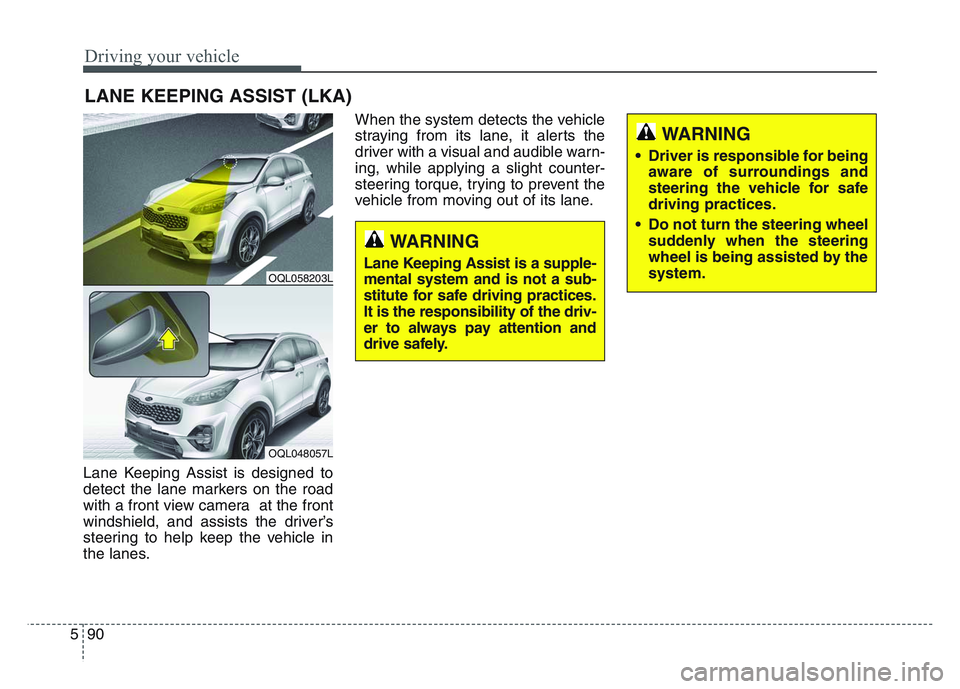
Lane Keeping Assist is designed to
detect the lane markers on the road
with a front view camera at the front
windshield, and assists the driver’s
steering to help keep the vehicle in
the lanes.When the system detects the vehicle
straying from its lane, it alerts the
driver with a visual and audible warn-
ing, while applying a slight counter-
steering torque, trying to prevent the
vehicle from moving out of its lane.
LANE KEEPING ASSIST (LKA)
OQL058203L
OQL048057L
WARNING
• Driver is responsible for being
aware of surroundings and
steering the vehicle for safe
driving practices.
• Do not turn the steering wheel suddenly when the steering
wheel is being assisted by the
system.
WARNING
Lane Keeping Assist is a supple-
mental system and is not a sub-
stitute for safe driving practices.
It is the responsibility of the driv-
er to always pay attention and
drive safely.