tow KIA SPORTAGE 2022 Owner's Manual
[x] Cancel search | Manufacturer: KIA, Model Year: 2022, Model line: SPORTAGE, Model: KIA SPORTAGE 2022Pages: 630, PDF Size: 9.69 MB
Page 236 of 630
4147
Features of your vehicle
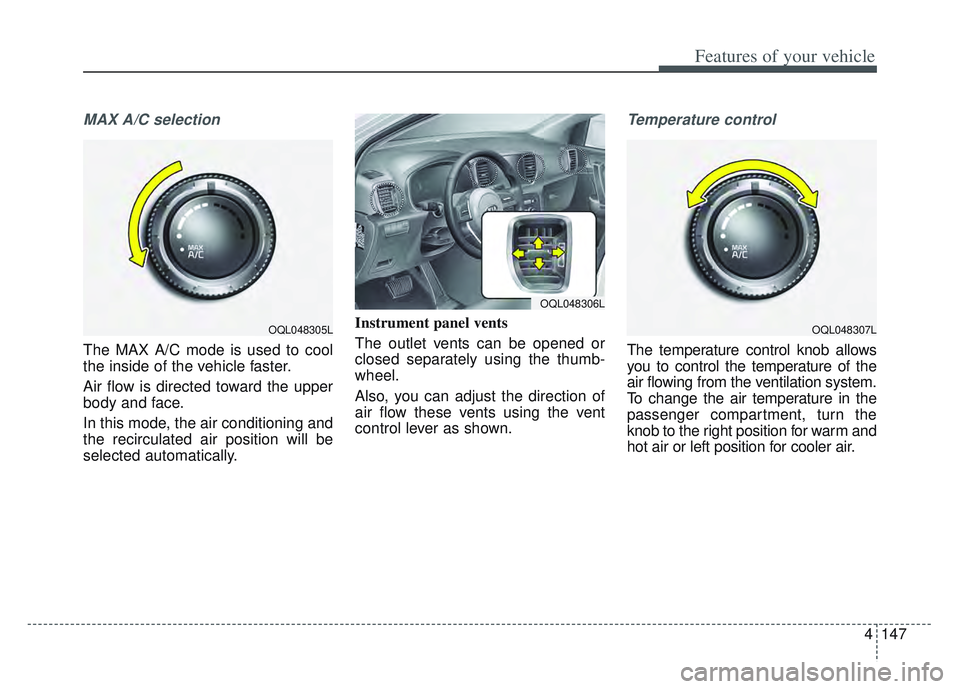
MAX A/C selection
The MAX A/C mode is used to cool
the inside of the vehicle faster.
Air flow is directed toward the upper
body and face.
In this mode, the air conditioning and
the recirculated air position will be
selected automatically.Instrument panel vents
The outlet vents can be opened or
closed separately using the thumb-
wheel.
Also, you can adjust the direction of
air flow these vents using the vent
control lever as shown.
Temperature control
The temperature control knob allows
you to control the temperature of the
air flowing from the ventilation system.
To change the air temperature in the
passenger compartment, turn the
knob to the right position for warm and
hot air or left position for cooler air.
OQL048305LOQL048307L
OQL048306L
Page 247 of 630
Features of your vehicle
158
4
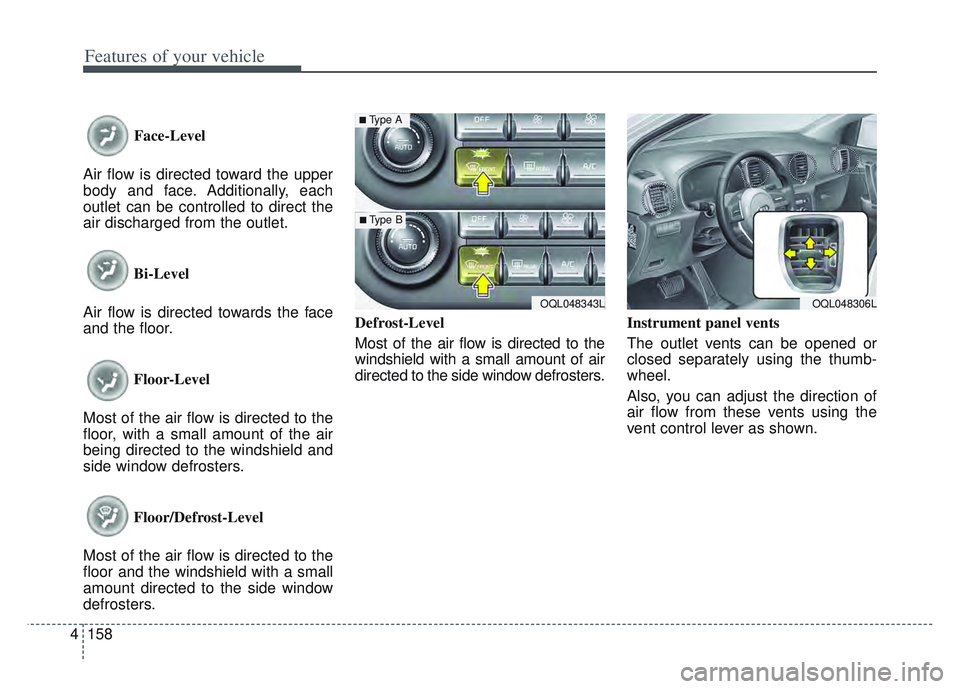
Face-Level
Air flow is directed toward the upper
body and face. Additionally, each
outlet can be controlled to direct the
air discharged from the outlet.
Bi-Level
Air flow is directed towards the face
and the floor.
Floor-Level
Most of the air flow is directed to the
floor, with a small amount of the air
being directed to the windshield and
side window defrosters.
Floor/Defrost-Level
Most of the air flow is directed to the
floor and the windshield with a small
amount directed to the side window
defrosters. Defrost-Level
Most of the air flow is directed to the
windshield with a small amount of air
directed to the side window defrosters.
Instrument panel vents
The outlet vents can be opened or
closed separately using the thumb-
wheel.
Also, you can adjust the direction of
air flow from these vents using the
vent control lever as shown.
OQL048343L
■Type A
■ Type B
OQL048306L
Page 260 of 630
4171
Features of your vehicle
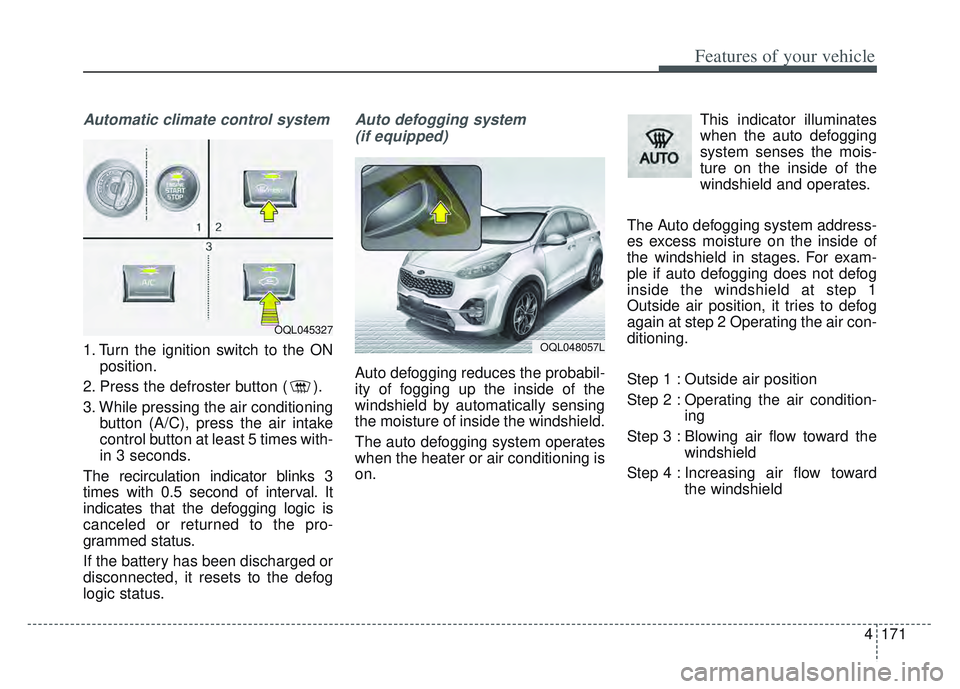
Automatic climate control system
1. Turn the ignition switch to the ONposition.
2. Press the defroster button ( ).
3. While pressing the air conditioning button (A/C), press the air intake
control button at least 5 times with-
in 3 seconds.
The recirculation indicator blinks 3
times with 0.5 second of interval. It
indicates that the defogging logic is
canceled or returned to the pro-
grammed status.
If the battery has been discharged or
disconnected, it resets to the defog
logic status.
Auto defogging system (if equipped)
Auto defogging reduces the probabil-
ity of fogging up the inside of the
windshield by automatically sensing
the moisture of inside the windshield.
The auto defogging system operates
when the heater or air conditioning is
on. This indicator illuminates
when the auto defogging
system senses the mois-
ture on the inside of the
windshield and operates.
The Auto defogging system address-
es excess moisture on the inside of
the windshield in stages. For exam-
ple if auto defogging does not defog
inside the windshield at step 1
Outside air position, it tries to defog
again at step 2 Operating the air con-
ditioning.
Step 1 : Outside air position
Step 2 : Operating the air condition- ing
Step 3 : Blowing air flow toward the windshield
Step 4 : Increasing air flow toward the windshield
OQL045327
OQL048057L
Page 267 of 630
Features of your vehicle
178
4
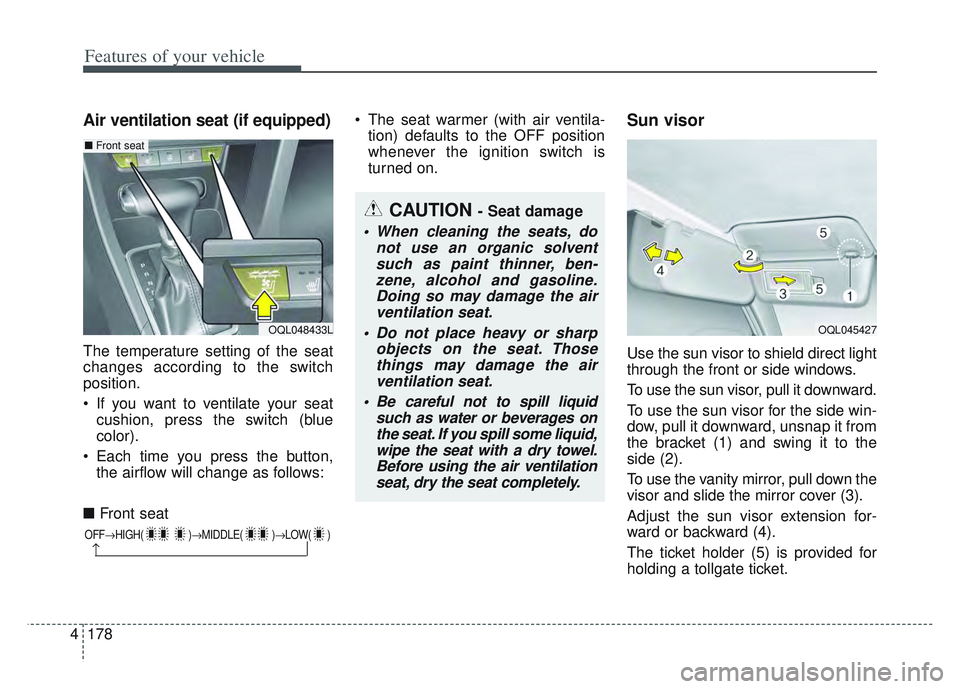
Air ventilation seat (if equipped)
The temperature setting of the seat
changes according to the switch
position.
If you want to ventilate your seat
cushion, press the switch (blue
color).
Each time you press the button, the airflow will change as follows:
■ Front seat The seat warmer (with air ventila-
tion) defaults to the OFF position
whenever the ignition switch is
turned on.
Sun visor
Use the sun visor to shield direct light
through the front or side windows.
To use the sun visor, pull it downward.
To use the sun visor for the side win-
dow, pull it downward, unsnap it from
the bracket (1) and swing it to the
side (2).
To use the vanity mirror, pull down the
visor and slide the mirror cover (3).
Adjust the sun visor extension for-
ward or backward (4).
The ticket holder (5) is provided for
holding a tollgate ticket.
OFF HIGH( ) MIDDLE( )LOW( )
CAUTION - Seat damage
When cleaning the seats, do
not use an organic solventsuch as paint thinner, ben-zene, alcohol and gasoline.Doing so may damage the airventilation seat.
Do not place heavy or sharp objects on the seat. Thosethings may damage the airventilation seat.
Be careful not to spill liquid such as water or beverages onthe seat. If you spill some liquid,wipe the seat with a dry towel.Before using the air ventilationseat, dry the seat completely.
OQL048433L OQL045427
■ Front seat
Page 281 of 630
Features of your vehicle
192
4
USB port
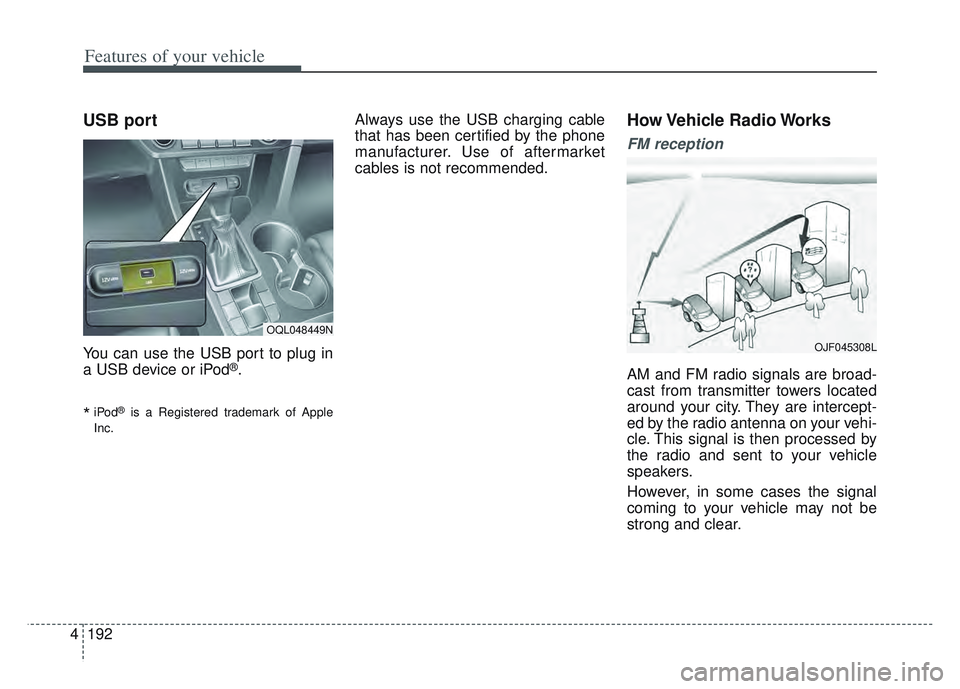
You can use the USB port to plug in
a USB device or iPod®.
*iPod®is a Registered trademark of Apple
Inc.
Always use the USB charging cable
that has been certified by the phone
manufacturer. Use of aftermarket
cables is not recommended.How Vehicle Radio Works
FM reception
AM and FM radio signals are broad-
cast from transmitter towers located
around your city. They are intercept-
ed by the radio antenna on your vehi-
cle. This signal is then processed by
the radio and sent to your vehicle
speakers.
However, in some cases the signal
coming to your vehicle may not be
strong and clear.
OQL048449N
OJF045308L
Page 288 of 630
5
. . . . . . 5-159
. . . . . . . . . . . . . . . . . . . 5-159
. . . . . . . . . . . . 5-159
. . . 5-159
. . . . . . . . . . . . . . . . . . 5-160
Trailer Towing . . . . . . . . . . . . . . . . . . . . . . . . . . . 5-161
. . . . . . . . . . . . . . . . . . . . . . . . . . . . . . . . . . . . \
5-162
. . . . . . . . . . . . . . . . . . . . . . . . . . . . . . . 5-162
. . . . . . . . . . . . . . . . . . . . . . . . . . . . . . 5-162
. . . . . . . . . . . . . . . . . . . . . . . 5-163
. . . . . . . . . . . . . 5-166
. . . . . . . . . . . . . . . 5-167
. . . . . . . . . . . . . 5-169
Vehicle load limit . . . . . . . . . . . . . . . . . . . . . . . . . 5-169
. . . . . . . . . . . . . . . . . . . . . . . . . . . 5-173
Vehicle weight . . . . . . . . . . . . . . . . . . . . . . . . . . . . 5-174
Page 313 of 630
Driving your vehicle
28
5
If you need to drive in the water,
stop your vehicle, set your transfer
to the AWD LOCK mode and drive
at less than 5 mph (8 km/h).✽ ✽ NOTICE
• Do not drive in water if the level is
higher than the bottom of the vehi-
cle.
• Check your brake condition once you are out of mud or water. Press
the brake pedal several times as
you move slowly until you feel nor-
mal braking forces return.
• Shorten your scheduled mainte- nance interval if you drive in off-
road conditions such as sand, mud
or water (see “Maintenance under
severe usage conditions” in section
8). Always wash your vehicle thor-
oughly after off-road use, especially
cleaning the bottom of the vehicle.
• Since the driving torque is always applied to the 4 wheels the per-
formance of the AWD vehicle is
greatly affected by the condition of
the tires. Be sure to equip the vehi-
cle with four tires of the same size
and type.
• A full time all wheel drive vehicle cannot be towed by an ordinary
tow truck. Make sure that the
vehicle is placed on a flat bed
truck for moving.
WARNING - Driving
through water
Drive slowly. If you are driving
too fast in water, the water can
get into the engine compart-
ment and wet the ignition sys-
tem, causing your vehicle to
suddenly stop. If this happens
and your vehicle is in a tilted
position, your vehicle may roll
over.
WARNING - AWD driving
Avoid high cornering speed.
Do not make quick steering wheel movements, such as
sharp lane changes or fast,
sharp turns.
The risk of rollover is greatly increased if you lose control
of your vehicle at high speed.
Loss of control often occurs if two or more wheels drop off
the roadway and the driver
over-steers to re-enter the
roadway. In the event your
vehicle leaves the roadway, do
not steer sharply. Instead,
slow down before pulling
back into the travel lanes.
Page 325 of 630
Driving your vehicle
40
5
Emergency braking
If there is a problem with the brake
pedal while driving, emergency brak-
ing is possible by pulling up and
holding the EPB switch. Braking is
possible only while you are holding
the EPB switch.
✽ ✽
NOTICE
During emergency braking by the
EPB, the parking brake warning
light will illuminate to indicate that
the system is operating.
If you notice a continuous noise or
burning smell when the EPB is used
for emergency braking, have your
vehicle checked by an authorized Kia
dealer.
When the EPB (Electronic
Parking Brake) is not released
If the EPB does not release normal-
ly, take your vehicle to an authorized
Kia dealer by loading the vehicle on
a flatbed tow truck and have the sys-
tem checked.
WARNING
Do not operate the Electronic
Parking Brake while the vehicle
is moving except in an emer-
gency situation. Applying the
Electronic Parking Brake while
the vehicle is moving at normal
speeds can cause a sudden loss
of control of the vehicle. If you
must use the Electronic Parking
Brake to stop the vehicle, use
great caution in applying the
brake.
Page 353 of 630
Driving your vehicle
68
5
The front view camera is damaged.
The brightness outside is too low
such as when the headlamps are
not on at night or the vehicle is
going through a tunnel.
The shadow is on the road by a median strip, trees, etc.
The vehicle drives through a toll- gate.
The windshield glass is fogged up; a clear view of the road is obstruct-
ed.
The rear part of the vehicle in front is not normally visible. (the vehicle
turns in other direction or the vehi-
cle is overturned.)
The adverse road conditions cause excessive vehicle vibrations while
driving
The sensor recognition changes suddenly when passing over a
The vehicle in front
is moving longitudinally to the driv-
ing direction The vehicle in front is stopped lon-
gitudinally
The vehicle in front is driving towards your vehicle or reversing
You are on a roundabout and the vehicle in front circles
It is difficult to secure the field of view of the front view camera such
as backlight, reflected light, and
darkness.
When the front camera is blocked by continuous washer spray and
wiper operation.
The vehicle in front is a special purpose vehicle, a trailer, or a truck
loading with unusual shape of lug-
gage.
The ambient light is too high or low.
The front view camera is contami- nated by front glass tinting, attach-
ing film, water proof coating, dam-
aged, foreign material such as a
sticker, worm, etc. If not using headlamp or using
weak light in the night or in a tun-
nel.
Backlight is shining in the driving direction of the vehicle. (Including
oncoming vehicle headlights.)
When the rear part of the front vehicle is small or low.
When a trailer or other vehicle is towing the front vehicle.
When the ground clearance of the front vehicle is high.
When a front vehicle makes sud- den lane changes unexpectedly.
Page 358 of 630
573
Driving your vehicle
✽ ✽NOTICE
In some instances, FCA system may
be cancelled when subjected to elec-
tromagnetic interference.WARNING
• Do not use Forward Collision -
Avoidance Assist system
when towing a vehicle.
Application of FCA while tow-
ing may adversely affect the
safety of your vehicle or the
towing vehicle.
Use extreme caution when the vehicle in front of you has
cargo that extends rearward
from the cab, or when the
vehicle in front of you has
higher ground clearance.
FCA is designed to detect and monitor the vehicle ahead in
the roadway through camera
recognition. It is not designed
to detect bicycles, motorcy-
cles, or smaller
wheeled objects such as lug-
gage bags, shopping carts, or
strollers.
(Continued)
(Continued)
Never try to test the operationof FCA. Doing so may cause
severe injury or death.
When windshield glass or front view camera have been
replaced or repaired, we rec-
ommended that you have the
vehicle inspected by an
authorized Kia dealer.