sensor KIA SPORTAGE 2022 Service Manual
[x] Cancel search | Manufacturer: KIA, Model Year: 2022, Model line: SPORTAGE, Model: KIA SPORTAGE 2022Pages: 630, PDF Size: 9.69 MB
Page 366 of 630
581
Driving your vehicle
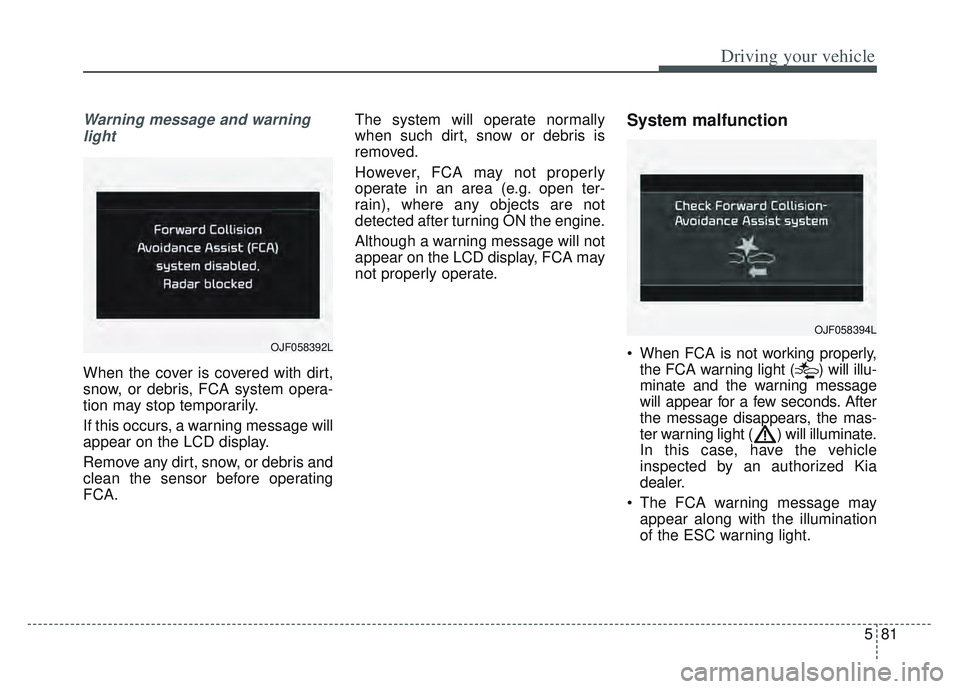
Warning message and warninglight
When the cover is covered with dirt,
snow, or debris, FCA system opera-
tion may stop temporarily.
If this occurs, a warning message will
appear on the LCD display.
Remove any dirt, snow, or debris and
clean the sensor before operating
FCA. The system will operate normally
when such dirt, snow or debris is
removed.
However, FCA may not properly
operate in an area (e.g. open ter-
rain), where any objects are not
detected after turning ON the engine.
Although a warning message will not
appear on the LCD display, FCA may
not properly operate.
System malfunction
When FCA is not working properly,
the FCA warning light ( ) will illu-
minate and the warning message
will appear for a few seconds. After
the message disappears, the mas-
ter warning light ( ) will illuminate.
In this case, have the vehicle
inspected by an authorized Kia
dealer.
The FCA warning message may appear along with the illumination
of the ESC warning light.
OJF058394L
OJF058392L
Page 367 of 630
Driving your vehicle
82
5
(Continued)
If the vehicle in front stops
suddenly, you may have less
control of the brake system.
Therefore, always keep safe
distance between your vehicle
and the vehicle in front of you.
FCA may activate during brak- ing and the vehicle may stop
suddenly. And the load in the
vehicle may endanger passen-
gers. Therefore, always be
mindful of the load volume in
the vehicle.
FCA may not activate if the driver applies the brake pedal
to avoid risk of collision.
FCA does not operate when the vehicle is in reverse. In
these circumstances, you
must maintain a safe braking
distance, and if necessary,
depress the brake pedal to
reduce the driving speed in
order to maintain a safe dis
tance.
(Continued)WARNING
FCA is only a supplementalsystem for the driver’s con-
venience. The driver has the
ultimate responsibility to con-
trol and operate the vehicle
safely. Do not solely depend
on FCA. Rather, maintain a
safe braking distance, and, if
necessary, depress the brake
pedal to lower the driving
speed.
In certain instances and under certain driving condi-
tions, FCA may activate unin-
tentionally. This initial warning
message appears on the LCD
display with a warning chime.
Also, in certain instances the
front radar sensor or camera
recognition system may not
detect the vehicle or pedestri-
an ahead. FCA may not acti-
vate and the warning mes-
sage will not be displayed.
(Continued)
(Continued)
FCA may unnecessarily pro-duce the warning message
and the warning alarms. Also,
due to the sensing limitation,
FCA may not produce the
warning message and the
warning alarm at all.
When there is a malfunction with FCA, the braking control
does not operate upon detect-
ing a collision risk even with
other braking systems nor-
mally operating.
FCA operates only for the vehicle/pedestrian in front,
while driving forward. It does
not operate for any animals or
vehicles in the opposite direc-
tion.
FCA does not recognize the vehicle, which transversally
drives across the crossroad,
or the vehicle, which is parked
in the transversal direction.
(Continued)
Page 368 of 630
583
Driving your vehicle
Limitation of the system
FCA is an assistant system for a driv-
er in a certain risky driving condition
and it does not take every responsi-
bility for all risks from driving condi-
tion.
FCA monitors the driving situations
through the radar and the camera
sensor. Thus, for a situation out of
the sensing range, FCA may not nor-
mally operate. The driver should pay
great caution in the following situa-
tions. FCA operation may be limited.
Recognizing vehicles
The sensor may be limited when:
The front view camera or frontradar sensor is blocked with a for-
eign object or debris
The camera lens is contaminated due to tinted, filmed or coated
windshield, damaged glass, or
stuck of foreign matter (sticker,
bug, etc.) on the glass
Inclement weather such as heavy rain or snow obscures the field of
view of the radar sensor or camera
There is interference by electro- magnetic waves
There is severe irregular reflection from the radar sensor
The front view camera/front radar sensor recognition is limited
The vehicle in front is too small to be detected (for example a motor-
cycle etc.)
The vehicle in front is an oversize vehicle or trailer that is too big to
be detected by the camera recog-
nition system (for example a tractor
trailer, etc.)(Continued)
The regular braking functionwill operate normally even if
There is a problem with the
FCA brake control system or
other functions. In this case,
the braking control will not
operate in an imminent colli-
sion.
FCA may not activate accord- ing to driving condition, traffic
on the road, weather, road
condition, etc.
FCA may not activate in response to all types of vehi-
cles.
Page 369 of 630
Driving your vehicle
84
5
The camera's field of view is not
well illuminated (either too dark or
too much reflection or too much
backlight that obscures the field of
view)
The vehicle in front does not have their rear lights or their rear lights
does not turned ON or their rear
lights are located unusually.
The outside brightness changes suddenly, for example when enter-
ing or exiting a tunnel
When light coming from a street light or an oncoming vehicle is
reflected on a wet road surface
such as a puddle in the road
The field of view in front is obstructed by sun glare
The vehicle in front is driving errat- ically
The vehicle is on unpaved or uneven rough surfaces, or road
with sudden gradient changes.
The vehicle is driven near areas containing metal substances as a
construction zone, railroad, etc. The vehicle drives inside a build-
ing, such as a basement parking
lot
The front view camera does not recognize the entire vehicle in
front.
The front view camera is damaged.
The brightness outside is too low such as when the headlamps are
not on at night or the vehicle is
going through a tunnel.
The shadow is on the road by a median strip, trees, etc.
The vehicle drives through a toll- gate.
The windshield glass is fogged up; a clear view of the road is obstruct-
ed.
The rear part of the vehicle in front is not normally visible. (the vehicle
turns in other direction or the vehi-
cle is overturned.)
The adverse road conditions cause excessive vehicle vibrations while
driving
The sensor recognition changes suddenly when passing over a
speed bump The vehicle in front is moving lon-
gitudinally to the driving direction
The vehicle in front is stopped lon- gitudinally
The vehicle in front is driving towards your vehicle or reversing
You are on a roundabout and the vehicle in front circles
It is difficult to secure the field of view of the front view camera such
as backlight, reflected light, and
darkness.
When the front camera is blocked by continuous washer spray and
wiper operation.
The vehicle in front is a special purpose vehicle, a trailer, or a truck
loading with unusual shape of lug-
gage.
The ambient light is too high or low.
The front view camera is contami- nated by front glass tinting, attach-
ing film, water proof coating, dam-
aged, foreign material such as a
sticker, worm, etc.
When the front view camera (including lens) or front radar is
damaged.
Page 370 of 630
585
Driving your vehicle
If not using headlamp or usingweak light in the night or in a tun-
nel.
Backlight is shining in the driving direction of the vehicle. (Including
oncoming vehicle headlights.)
When the rear part of the front vehicle is small or low.
When a trailer or other vehicle is towing the front vehicle.
When the ground clearance of the front vehicle is high.
When a front vehicle makes sud- den lane changes unexpectedly.
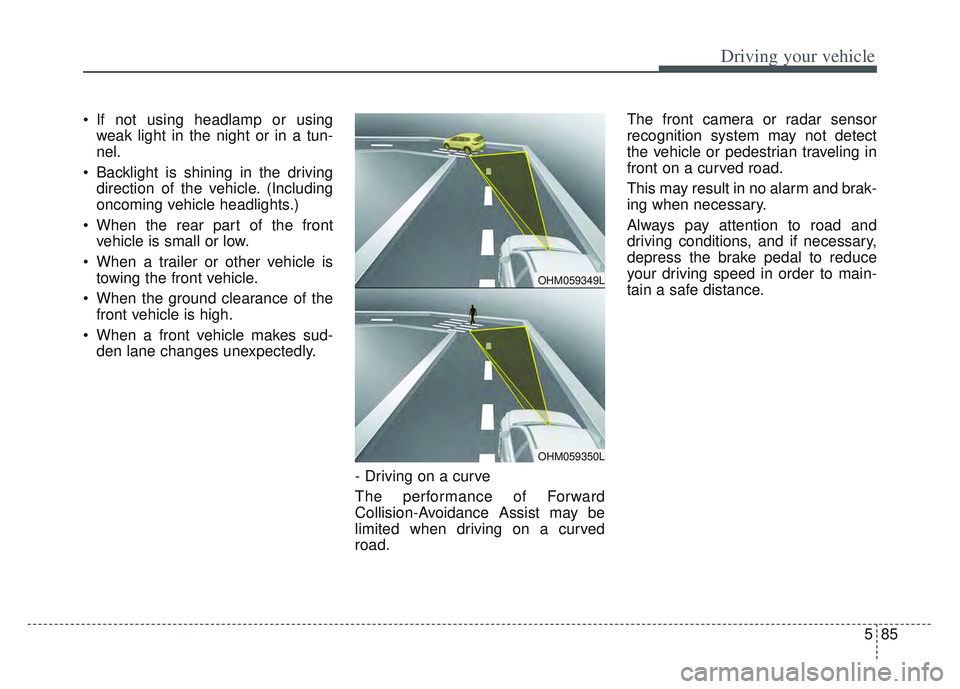
- Driving on a curve
The performance of Forward
Collision-Avoidance Assist may be
limited when driving on a curved
road. The front camera or radar sensor
recognition system may not detect
the vehicle or pedestrian traveling in
front on a curved road.
This may result in no alarm and brak-
ing when necessary.
Always pay attention to road and
driving conditions, and if necessary,
depress the brake pedal to reduce
your driving speed in order to main-
tain a safe distance.
OHM059349L
OHM059350L
Page 371 of 630
Driving your vehicle
86
5
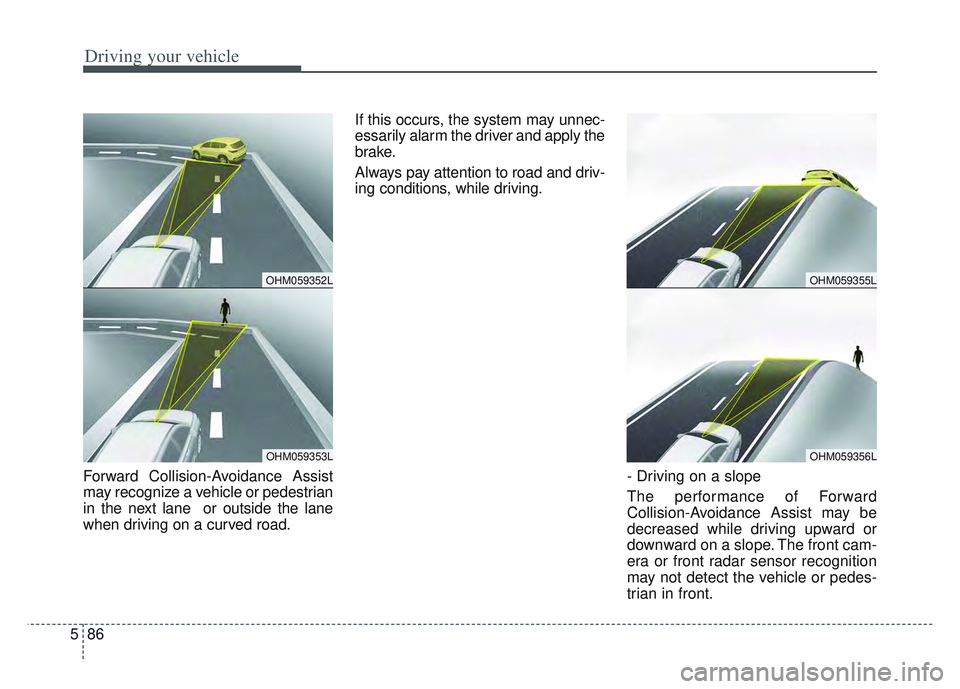
Forward Collision-Avoidance Assist
may recognize a vehicle or pedestrian
in the next lane or outside the lane
when driving on a curved road. If this occurs, the system may unnec-
essarily alarm the driver and apply the
brake.
Always pay attention to road and driv-
ing conditions, while driving.
- Driving on a slope
The performance of Forward
Collision-Avoidance Assist may be
decreased while driving upward or
downward on a slope. The front cam-
era or front radar sensor recognition
may not detect the vehicle or pedes-
trian in front.
OHM059355L
OHM059356L
OHM059352L
OHM059353L
Page 373 of 630
Driving your vehicle
88
5
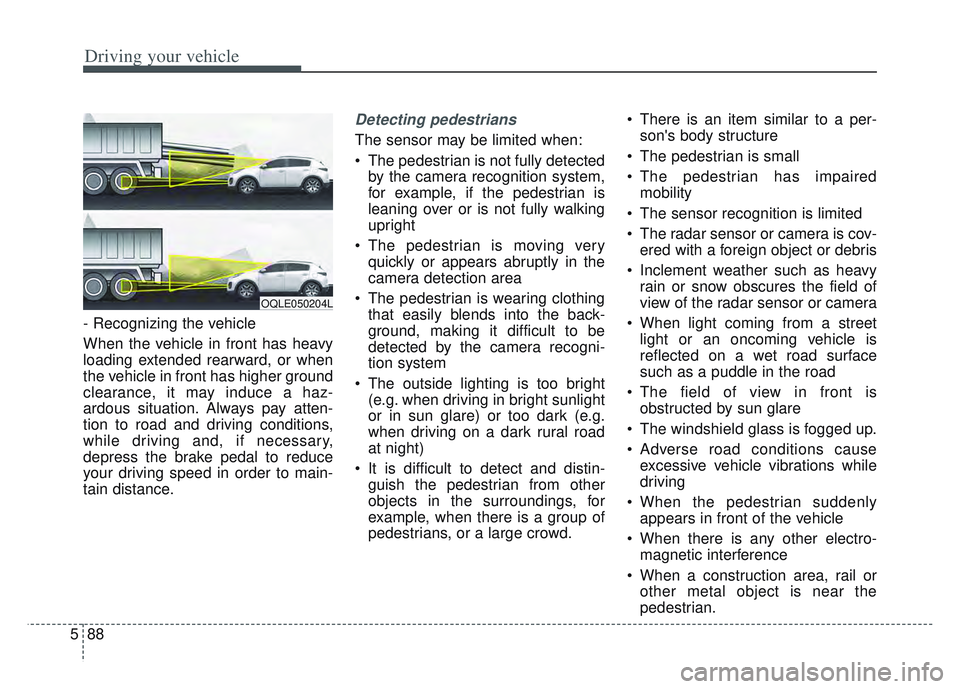
- Recognizing the vehicle
When the vehicle in front has heavy
loading extended rearward, or when
the vehicle in front has higher ground
clearance, it may induce a haz-
ardous situation. Always pay atten-
tion to road and driving conditions,
while driving and, if necessary,
depress the brake pedal to reduce
your driving speed in order to main-
tain distance.
Detecting pedestrians
The sensor may be limited when:
The pedestrian is not fully detected
by the camera recognition system,
for example, if the pedestrian is
leaning over or is not fully walking
upright
The pedestrian is moving very quickly or appears abruptly in the
camera detection area
The pedestrian is wearing clothing that easily blends into the back-
ground, making it difficult to be
detected by the camera recogni-
tion system
The outside lighting is too bright (e.g. when driving in bright sunlight
or in sun glare) or too dark (e.g.
when driving on a dark rural road
at night)
It is difficult to detect and distin- guish the pedestrian from other
objects in the surroundings, for
example, when there is a group of
pedestrians, or a large crowd. There is an item similar to a per-
son's body structure
The pedestrian is small
The pedestrian has impaired mobility
The sensor recognition is limited
The radar sensor or camera is cov- ered with a foreign object or debris
Inclement weather such as heavy rain or snow obscures the field of
view of the radar sensor or camera
When light coming from a street light or an oncoming vehicle is
reflected on a wet road surface
such as a puddle in the road
The field of view in front is obstructed by sun glare
The windshield glass is fogged up.
Adverse road conditions cause excessive vehicle vibrations while
driving
When the pedestrian suddenly appears in front of the vehicle
When there is any other electro- magnetic interference
When a construction area, rail or other metal object is near the
pedestrian.
OQLE050204L
Page 377 of 630
Driving your vehicle
92
5
LKA operation
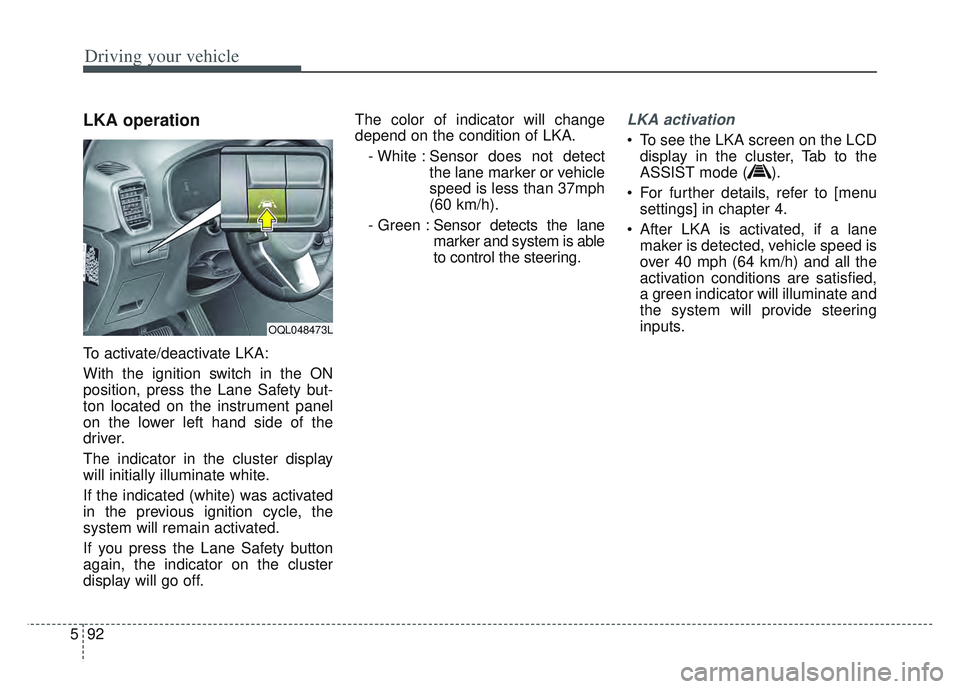
To activate/deactivate LKA:
With the ignition switch in the ON
position, press the Lane Safety but-
ton located on the instrument panel
on the lower left hand side of the
driver.
The indicator in the cluster display
will initially illuminate white.
If the indicated (white) was activated
in the previous ignition cycle, the
system will remain activated.
If you press the Lane Safety button
again, the indicator on the cluster
display will go off. The color of indicator will change
depend on the condition of LKA.
- White : Sensor does not detect the lane marker or vehicle
speed is less than 37mph
(60 km/h).
- Green : Sensor detects the lane
marker and system is able
to control the steering.
LKA activation
To see the LKA screen on the LCD
display in the cluster, Tab to the
ASSIST mode ( ).
For further details, refer to [menu settings] in chapter 4.
After LKA is activated, if a lane maker is detected, vehicle speed is
over 40 mph (64 km/h) and all the
activation conditions are satisfied,
a green indicator will illuminate and
the system will provide steering
inputs.
OQL048473L
Page 383 of 630
Driving your vehicle
98
5
(Continued)
• The lane marker is not visible due
to snow, rain, stain, a puddle or
other factors.
• A shadow is on the lane marker because of a median strip,
guardrail, noise barriers or other
objects.
• When the lane markers are com- plicated or a structure substitutes
for the lines such as a construc-
tion area.
• There are crosswalk signs or other symbols on the road.
• The lane suddenly disappears such as at the intersection.
• The lane marker in a tunnel is cov- ered with dirt or oil and etc.
• The lane is very wide or narrow.
When external conditions inter-
vene
• The brightness outside changes suddenly when entering/exiting a
tunnel or passing under a bridge.
• The headlamps are not on at night or in a tunnel, or light level is low.
• There is a boundary structure in the roadway. (Continued)(Continued)
• The light of reflects from the
water on the road.
• When light shines brightly from behind the vehicle.
• The distance from the vehicle ahead is very short or the vehicle
ahead covers up the lane marker.
• You drive on a steep grade or a sharp curve.
• The vehicle vibrates heavily.
• The temperature near inside mir- ror is very high due to direct sun
light and etc.
When front visibility is poor
• The lens or windshield is covered by foreign materials.
• The sensor cannot detect the lane because of fog, heavy rain or snow.
• The windshield is fogged by humid air in the vehicle.
• Putting something on the crash pad and etc.
WARNING
Lane Keeping Assist is a sys-
tem to help prevent the driver
from leaving the lane. However,
the driver should not solely rely
on the system but always take
the necessary actions for safe
driving practices.
Page 384 of 630

599
Driving your vehicle
System description
BCW uses radar sensors in the rear
bumper to monitor and warn the driv-
er of an approaching vehicle in the
driver's blind spot area.
1) Blind-Spot Area
It warns by detecting the vehicles in
the blind spots.
The blind spot detection range varies
relative to vehicle speed.
Note that if your vehicle is traveling
much faster than the vehicles around
you, the warning will not occur.2) Closing at high speed
BCW feature will alert you when a
vehicle is approaching in an adjacent
lane at a high rate of speed. If the
driver activates the turn signal when
the system detects an oncoming
vehicle, the system sounds an audi-
ble alert.
BLIND-SPOT COLLISION WARNING (BCW) (IF EQUIPPED)
OQLE058284
OQLE058285
WARNING
BCW is a supplemental sys-
tem to assist you. Do not
entirely rely on the system.
Always pay attention, while
driving, for your safety.
Always be aware of road con- ditions while driving and be
alert for unexpected situa-
tions even though BCW is
operating.
BCW is not a substitute for proper and safe driving.
Always drive safely and use
caution when changing lanes
or backing up the vehicle.
BCW may not detect every
object alongside the vehicle.