battery KIA STINGER 2021 User Guide
[x] Cancel search | Manufacturer: KIA, Model Year: 2021, Model line: STINGER, Model: KIA STINGER 2021Pages: 585, PDF Size: 10.87 MB
Page 115 of 585

Features of your vehicle
26 4
Press the power liftgate close but-
ton for approximately one second
when the liftgate is opened.
The liftgate will close and lock
automatically.
Power liftgate Non-Opening or
Closing Conditions :
The power liftgate will not open or
close automatically, when the vehi-
cle is moving more than 2 mph (3
km/h).
The power liftgate can be operated
when the engine is not running.
However, the power liftgate opera-
tion consumes large amounts of
vehicle electric power. To prevent
the battery from draining, do not
operate it excessively (e.g., more
than approximately 10 times
repeatedly).
Do not modify or repair any part of
the power liftgate by yourself. This
must be done by an authorized Kia
dealer.
Before jacking up the vehicle to
change a tire or repair the vehicle,
open the power liftgate. Do not
operate the power liftgate when the
vehicle is raised or this could
cause the power liftgate to operate
improperly. If there are obstacles such as
snow on the power liftgate, it may
not open automatically. After
removing the obstacle, try to open
it again.
OCK047018
Page 116 of 585

427
Features of your vehicle
Automatic stop and Reverse
If, during power opening or closing,
the liftgate is blocked by an object or
part of someone’s body, the power
liftgate will detect the resistance and
it will stop movement or move to the
full open position to allow the object
to be cleared.
However, if an object is thin or soft,
or the liftgate is near the latched
position, the automatic stop and
reversal may not detect the resist-
ance and the closing operation will
continue. If the power liftgate is
forced by a strong impact, the auto-
matic stop and reversal may operate.If the automatic stop and reverse fea-
ture operates more than twice during
one opening or closing operation, the
power liftgate may stop at that posi-
tion.
If this occurs, close the liftgate man-
ually and operate the liftgate auto-
matically again.
How to reset the power liftgate
If the battery has been discharged or
disconnected, or if the related fuse
has been replaced or disconnected,
for the power liftgate to operate nor-
mally, reset the power liftgate as fol-
lows:
1.Push the P(Parking) button.
2. While Pressing the liftgate close
button, press the liftgate handle
switch for more than 3 seconds.
(the chime will sound)
3. Close the liftgate manually.
If the power liftgate does not work
properly after the above procedure,
have the system checked by an
authorized Kia dealer.
OCK047019L
WARNING
To prevent serious injury and
damage take the following pre-
cautions when operating the
power liftgate :
- Keep all faces, hands, arms,
body parts and other objects
away from the path of the
power liftgate.
- Do not intentionally place any
body parts or objects in the
path of the power liftgate to
make sure the automatic stop
and reversal operates.
- Do not allow children to play
with the power liftgate.
Page 139 of 585

Features of your vehicle
50 4
Resetting the sunroof
Whenever the vehicle battery is dis-
connected or discharged, you must
reset your sunroof system as follows:
1.Start the engine.
2.Close the sunshade and sunroof
completely if opened.
3.Release the sunroof control lever.
4.Push the sunroof control lever for-
ward in the direction of close
(about 10 seconds) until the sun-
shade slightly moves. Then,
release the lever.
5.Push the sunroof control lever for-
ward in the direction of close, until
the sunroof operates as follows
again:
Sunshade open →Glass slide
open →Glass slide close →
Sunshade close
Then, release the lever.
When this is complete, the sunroof
system has been reset and one
touch open and close should be
restored.
✽ ✽
NOTICE
If the Resetting the Sunroof proce-
dure is not correctly followed, the
sunroof may not operate properly.
Page 141 of 585
Features of your vehicle
52 4
(Continued)
• When the charging system warning
light comes on due to low voltage
(when the alternator or battery do
not operate normally or malfunc-
tion), the steering wheel may
require increased steering effort.Tilt and telescopic steering
Tilt and telescopic steering allows
you to adjust the steering wheel
before you drive. You can also raise it
to give your legs more room when
you exit and enter the vehicle.
The steering wheel should be posi-
tioned so that it is comfortable for
you to drive, while permitting you to
see the instrument panel warning
lights and gauges.
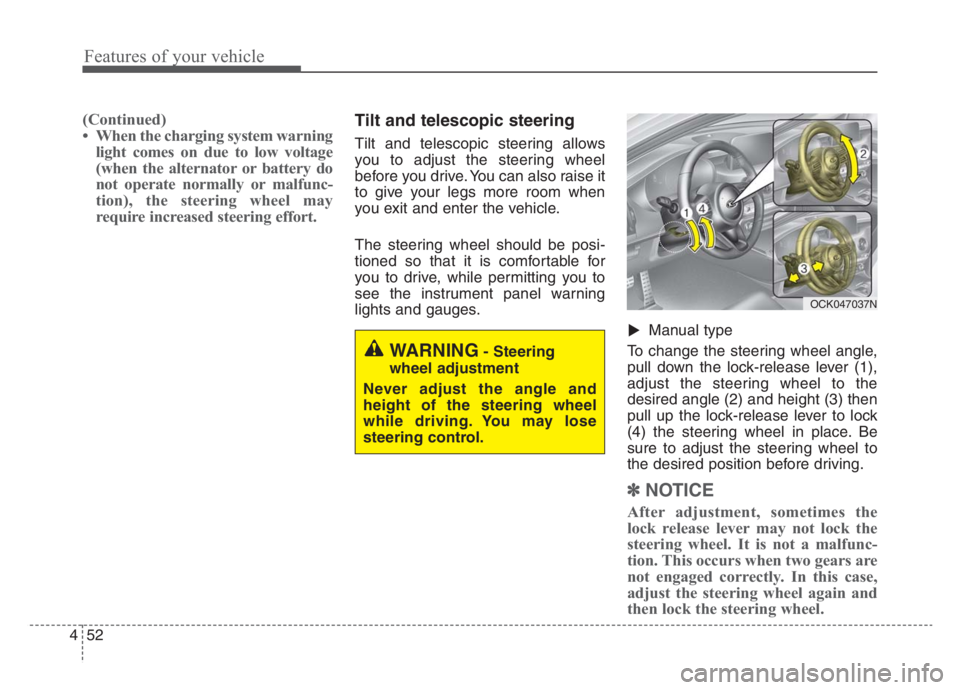
Manual type
To change the steering wheel angle,
pull down the lock-release lever (1),
adjust the steering wheel to the
desired angle (2) and height (3) then
pull up the lock-release lever to lock
(4) the steering wheel in place. Be
sure to adjust the steering wheel to
the desired position before driving.
✽ ✽
NOTICE
After adjustment, sometimes the
lock release lever may not lock the
steering wheel. It is not a malfunc-
tion. This occurs when two gears are
not engaged correctly. In this case,
adjust the steering wheel again and
then lock the steering wheel.
▼
WARNING- Steering
wheel adjustment
Never adjust the angle and
height of the steering wheel
while driving. You may lose
steering control.
OCK047037N
Page 142 of 585
453
Features of your vehicle
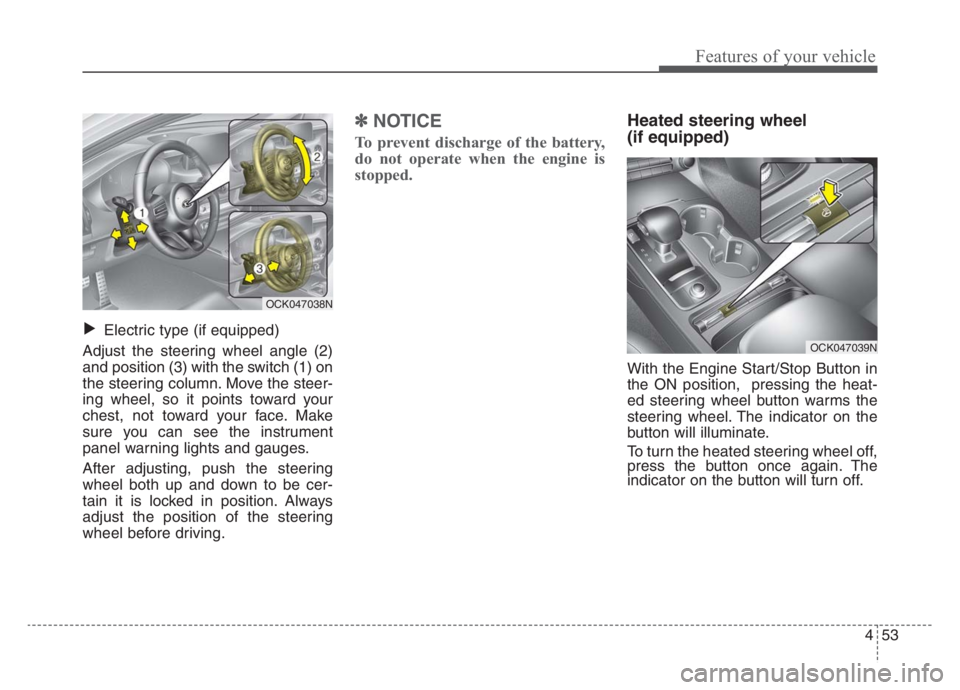
Electric type (if equipped)
Adjust the steering wheel angle (2)
and position (3) with the switch (1) on
the steering column. Move the steer-
ing wheel, so it points toward your
chest, not toward your face. Make
sure you can see the instrument
panel warning lights and gauges.
After adjusting, push the steering
wheel both up and down to be cer-
tain it is locked in position. Always
adjust the position of the steering
wheel before driving.
✽ ✽
NOTICE
To prevent discharge of the battery,
do not operate when the engine is
stopped.
Heated steering wheel
(if equipped)
With the Engine Start/Stop Button in
the ON position, pressing the heat-
ed steering wheel button warms the
steering wheel. The indicator on the
button will illuminate.
To turn the heated steering wheel off,
press the button once again. The
indicator on the button will turn off.
▼
OCK047038N
OCK047039N
Page 155 of 585

Features of your vehicle
66 4
Folding the outside rearview mirror
Electric type
The outside rearview mirror can be
folded or unfolded by pressing the
switch as below.
Left (1): The mirror will unfold.
Right (2): The mirror will fold.Center (AUTO, 3):
The mirror will fold or unfold automat-
ically as follows:
The mirror will fold or unfold when
the door is locked or unlocked by
the smart key.
The mirror will fold or unfold when
the door is locked or unlocked by the
button on the outside door handle.
The mirror will unfold when you
approach the vehicle (all doors
closed and locked) with a smart
key in possession.
OCK047044L
CAUTION -Electric type
outside rearview mirror
The electric type outside rearview
mirror operates even though the
engine start/stop button is in the
OFF position. However, to prevent
unnecessary battery discharge,
do not adjust the mirrors longer
than necessary while the engine
is not running.
Do not fold the electric type out-
side rearview mirror by hand. This
could cause motor failure.
Page 162 of 585

473
Features of your vehicle
Over view
LCD windows show the following
information to drivers.
- Trip information
- LCD modes
- Warning messages
Trip information (Trip computer)
The trip computer is a microcomput-
er-controlled driver information sys-
tem that displays information related
to driving.
✽ ✽
NOTICE
Some driving information stored in
the trip computer (for example
Average Fuel Economy) resets if the
battery is disconnected.
Trip Modes
LCD WINDOWS (IF EQUIPPED)
OCK067036N
OCK067037N
■Type A
■Type B
Accumulated Info
Digital speedometer
Drive Info
TRIP
Drive Mode
Page 169 of 585

Features of your vehicle
80 4
Tire Pressure
This mode displays information relat-
ed to Tire Pressure.
❈ For more details, refer to "Tire
Pressure Monitoring System
(TPMS)" in chapter 6.
Service mode
When Service Required is set, the
remaining distance/time before serv-
ice is required appears on the LCD
screen.
From the point at which the remain-
ing distance to drive amounts to 900
mi. (1,500 km) or the remaining time
amounts to 3 days, the Service
Required message automatically
displays and remains on the LCD
screen for a number of seconds
every time the engine start/stop but-
ton is ON.When Service Required is set, a
Service Required Alarm message
pops up when an aggregated
amount of miles/time driven reaches
a certain point.
With Service Required mode, press
OK button for more than 1 second.
The values will return to initial setting
values.
❈See User Settings
Mode in this chapter for further infor-
mation about Service Required
Setting.
❈Service Required Setting
If the Battery Cable is disconnected,
Fuse Switch is turned OFF, the
Service Required Setting values (an
amount of miles/time driven) may
change. In this situation, re-enter
Service Required settings.
OCK047117N
OCK067025L
Page 171 of 585

Features of your vehicle
82 4
If the estimated distance is below 1
mi. (1 km), the trip computer will
display “---” as distance to empty.
✽ ✽
NOTICE
• If the vehicle is not on level ground
or the battery power has been
interrupted, the distance to empty
function may not operate correct-
ly.
• The distance to empty may differ
from the actual driving distance as
it is an estimate of the available
driving distance.
• The trip computer may not regis-
ter additional fuel if less than 1.6
gallons (6 liters) of fuel are added
to the vehicle.
• The fuel economy and distance to
empty may vary significantly
based on driving conditions, driv-
ing habits, and condition of the
vehicle.
User Settings Mode
Description
On this mode, you can change set-
ting of the doors, lamps, and so on.
Shift to P to edit settings
This warning message appears if
you try to adjust the User Settings
while driving.
For your safety, change the User
Settings after parking the vehicle,
applying the parking brake by press-
ing the parking “P” button.OCK049140L
WARNING
Do not adjust the User Setting
while driving. You may lose your
steering control which could
cause an accident and severe
bodily injury.
OCK047142L
Page 176 of 585
487
Features of your vehicle
Tire Pressure Unit (if equipped)
- Choose the tire pressure unit.
(psi, kPa, bar)
Torque Unit(if equipped)
- Choose the torque unit. (N·m,
lb·ft)
Language
Choose the language
Reset
You can reset the menus in the User
Settings Mode. All menus in the User
Settings Mode are initialized, except
language and service interval.Warning Messages (if equipped)
Shift to P
This warning message illuminates if
you try to turn off the engine without
the transmission in P (Park) posi-
tion.
At this time, the Engine Start/Stop
Button turns to the ACC position (If
you press the Engine Start/Stop
Button once more, it will turn to the
ON position).
Low Key Battery
This warning message illuminates
if the battery of the smart key is
discharged when the Engine
Start/Stop Button changes to the
OFF position.
Press brake pedal to start engine
This warning message illuminates
if the Engine Start/Stop Button
changes to the ACC position twice
by pressing the button repeatedly
without depressing the brake pedal.
It means that you should depress
the brake pedal to start the engine.
Key not in vehicle
This warning message illuminates
if the smart key is not in the vehicle
when you press the Engine
Start/Stop Button.
It means that you should always
have the smart key with you.