audio KIA TELLURIDE 2020 Navigation System Quick Reference Guide
[x] Cancel search | Manufacturer: KIA, Model Year: 2020, Model line: TELLURIDE, Model: KIA TELLURIDE 2020Pages: 219, PDF Size: 9.16 MB
Page 73 of 219
4-7
Listening to music via Bluetooth
To use a Bluetooth device for audio playback, connect a device
that supports Bluetooth communication such as mobile phone
and MP3 player.
For more information about Bluetooth connection:
> see
“ Connecting a Bluetooth device.”
0000
A
The controls or display screens may differ depending on the
connected Bluetooth device, phone model, and music player
application.
0000
A
The streaming may not be supported in some music player
applications.
0000
A
Some functions may not be available depending on the
connected Bluetooth device or phone model.
0000
A
When a media device or mobile phone is connected by both
the Bluetooth and USB cable at the same time, the device
or system may not work properly. To use the Bluetooth
connection, remove all cables from the device.
0000
A
When connecting a USB storage, do not use a separate
extension cable and directly connect to the USB port. When
you connect a USB storage via a USB hub or extension cable,
the device may not be recognized.
0000
A
Push the USB connector all the way into the USB port. When
the connector is not fully inserted, a communication problem
may occur.
0000
A
Noise may occur when removing a USB device from the
system.
0000
A
You can play only the files that have been encoded in the
standard format.
0000
A
The following USB devices may not be recognized or may not
work properly.
-Encrypted MP3 players
-USB devices that are not recognized as removable disks
0000
A
USB devices may not be recognized depending on the device
status.
0000
A
Some USB devices may not be supported due to compatibility
issues.
0000
A
USB device recognition may take longer than usual depending
on the device type, capacity, and file formats on the device.
0000
A
Some devices may not be charged through USB connection. It
depends on the USB specifications.
0000
A
You can hide files only in the USB device formatted in exFAT/
NTFS/FAT16/32. The hidden files can be found in the “Hidden_”
folder.
Page 74 of 219
4-8
k The list of menu items appears.
\225Media Sources: Opens the media selection window.
\225Connections: Can configure the Bluetooth connection
settings.
> See “Connecting a Bluetooth device.”
\225Sound Settings: Can configure system sound settings.
> See “Configuring the sound settings.”
\225User's Manual on Web (QR Code): Displays the QR code
that provides access to the online user manual for the
system.
\225Split Screen: Can turn on or off the split screen mode.
Pause/Resume
You can pause or resume playback of a Bluetooth audio file.
On the Bluetooth audio playback screen, touch
or
.
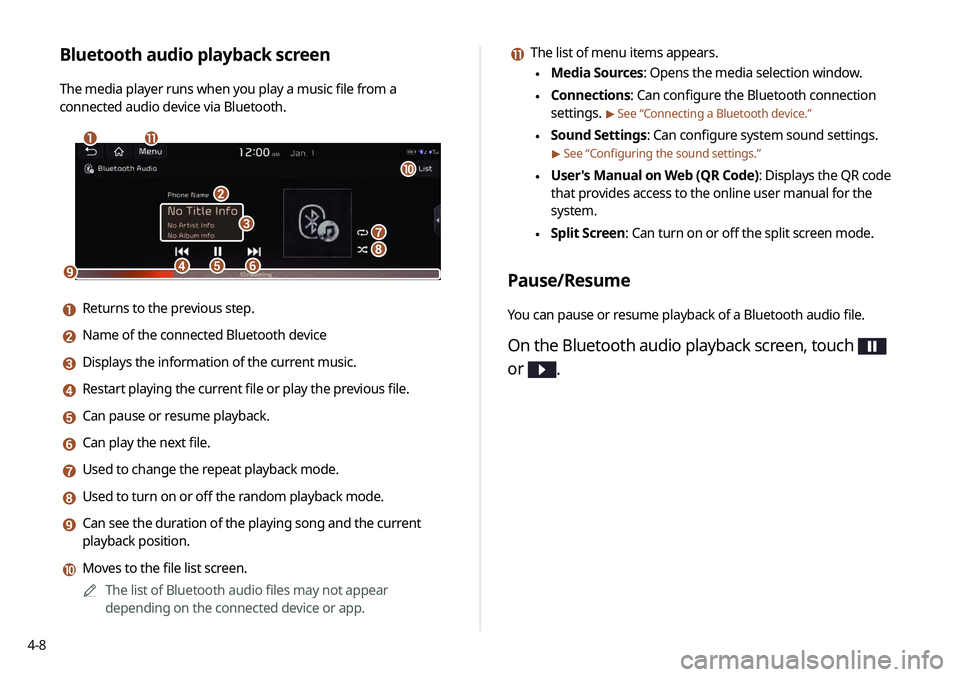
Bluetooth audio playback screen
The media player runs when you play a music file from a
connected audio device via Bluetooth.
\037\036
\035
\034\033\032
\031
\030
\027
\026
\025
a Returns to the previous step.
b Name of the connected Bluetooth device
c Displays the information of the current music.
d Restart playing the current file or play the previous file.
e Can pause or resume playback.
f Can play the next file.
g Used to change the repeat playback mode.
h Used to turn on or off the random playback mode.
i Can see the duration of the playing song and the current
playback position.
j Moves to the file list screen.
0000
A
The list of Bluetooth audio files may not appear
depending on the connected device or app.
Page 75 of 219
4-9
Resuming playback of the previous Bluetooth
audio file
You can play the previous Bluetooth audio file during playback.
Perform any of the following methods:
\225On the Bluetooth audio playback screen, touch twice.
\225On the control panel, press the [
SEEK] button twice.
0000
A
The actions required may differ depending on the connected
device.
0000
A
On the steering wheel, use the [
/] button to run the
function.
0000
A
On the control panel, turn the [TUNE/ FILE] knob to search for
a music file and press the knob within 5 seconds to play it.
0000
A
When there is no operation for 5 seconds, the search stops
and the system displays the information of the playing
content.
Resuming playback of the current Bluetooth
audio file
You can play the current Bluetooth audio file from the beginning.
Perform any of the following methods:
\225On the Bluetooth audio playback screen, touch .
\225On the control panel, press the [
SEEK] button.
0000
A
The actions required may differ depending on the connected
device.
0000
A
On the steering wheel, use the [
/] button to run the
function.
Page 76 of 219
4-10
Turning on/off the random playback
You can turn on or off the random playback mode for Bluetooth
audio.
On the Bluetooth audio playback screen, touch
repeatedly.
Each time the icon is touched, the random playback mode is
turned on and off. When the random playback is active, the files
are played randomly with no sequence.0000
A
This function may not be available depending on the device
or app.
Resuming playback of the next Bluetooth audio
file
You can play the next Bluetooth audio file during playback.
Perform any of the following methods:
\225On the Bluetooth audio playback screen, touch .
\225On the control panel, press the [
TRACK ] button.
0000
A
On the steering wheel, use the [
/] button to run the
function.
0000
A
On the control panel, turn the [TUNE/FILE] knob to search for
a music file and press the knob within 5 seconds to play it.
0000
A
When there is no operation for 5 seconds, the search stops
and the system displays the information of the playing
content.
Changing the repeated playback mode for
Bluetooth audio
You can change the repeated playback mode for Bluetooth audio:
Repeat One and Repeat All.
On the Bluetooth audio playback screen, touch
repeatedly.
Each time the icon is touched, the playback repetition modes are
toggled and the activated mode icon appears on the screen.
0000
A
This function may not be available depending on the device
or app.
Page 110 of 219
6-2
Connecting a Bluetooth device
Bluetooth is a short-range wireless networking technology.
The Bluetooth communication function allows you to exchange
data by connecting a Bluetooth device to another neighboring
Bluetooth device without a cable connection. With this function,
you can use different types of devices more efficiently.
To make a phone call or play audio from a Bluetooth device, check
the following first:
\225For a device that is not registered to the system, > see
“ Registering a device.”
\225 A registered device will automatically connect to the system
when you bring it near the system. If it does not automatically
connects,
> see “Connecting a registered device
”, “Disconnecting a
registered device.”
\335Warning
\225 Driving while distracted can result in a loss of vehicle control
that may lead to an accident, severe bodily injury, or death.
The driver's primary responsibility is the safe and legal
operation of the vehicle, and the use of any vehicle systems,
including the touch screen and steering wheel controls, which
take the driver's eyes, attention, and focus away from the safe
operation of the vehicle, or which are not permissible by law,
should never be used during the operation of the vehicle.
\225 Pull over the vehicle at a safe place before connecting a
Bluetooth device to the system. When a traffic accident occurs
while attempting connection, it may cause severe or fatal
injury.
0000
A
The Bluetooth connection function supports only the hands-
free and audio related functions. Connect your mobile phone,
MP3 player, or device that supports the hands-free or audio
function.
0000
A
For more information on Bluetooth-enabled devices and their
functional compatibility, visit the KIA Motors America website
(https://www.kia.com).
Page 111 of 219
6-3
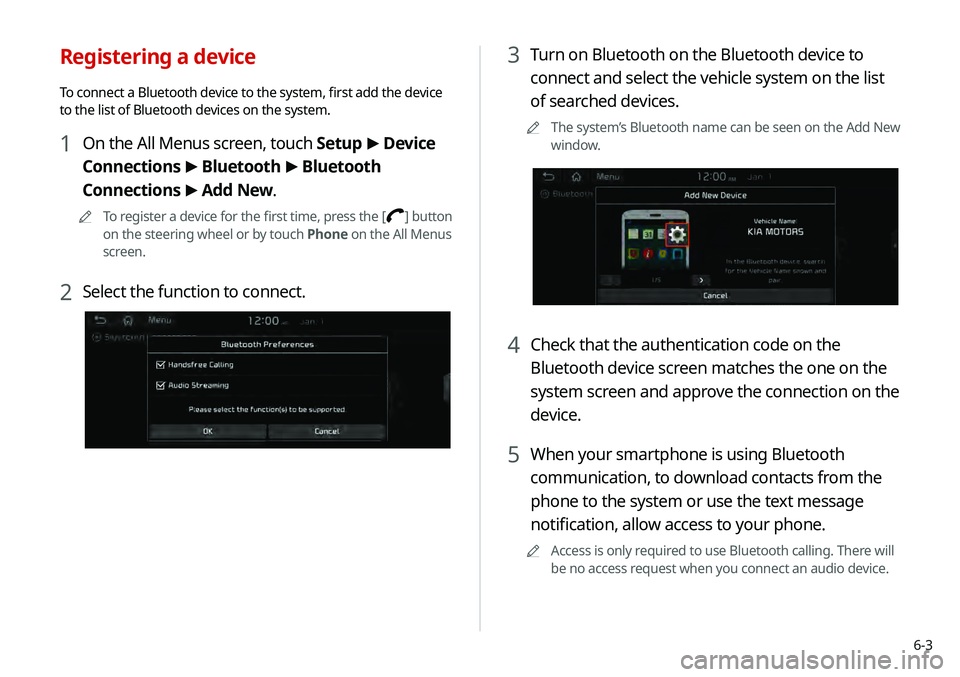
3 Turn on Bluetooth on the Bluetooth device to
connect and select the vehicle system on the list
of searched devices.
0000
A
The system’s Bluetooth name can be seen on the Add New
window.
4 Check that the authentication code on the
Bluetooth device screen matches the one on the
system screen and approve the connection on the
device.
5 When your smartphone is using Bluetooth
communication, to download contacts from the
phone to the system or use the text message
notification, allow access to your phone.
0000
A
Access is only required to use Bluetooth calling. There will
be no access request when you connect an audio device.
Registering a device
To connect a Bluetooth device to the system, first add the device
to the list of Bluetooth devices on the system.
1 On the All Menus screen, touch Setup >
Device
Connections >
Bluetooth >
Bluetooth
Connections >
Add New.
0000
A
To register a device for the first time, press the [] button
on the steering wheel or by touch Phone on the All Menus
screen.
2 Select the function to connect.
Page 112 of 219
6-4
Connecting a registered device
To use a Bluetooth device, first connect a registered Bluetooth
device to the system.0000
A
You can add one Bluetooth hands-free kit or up to two
Bluetooth audio devices.
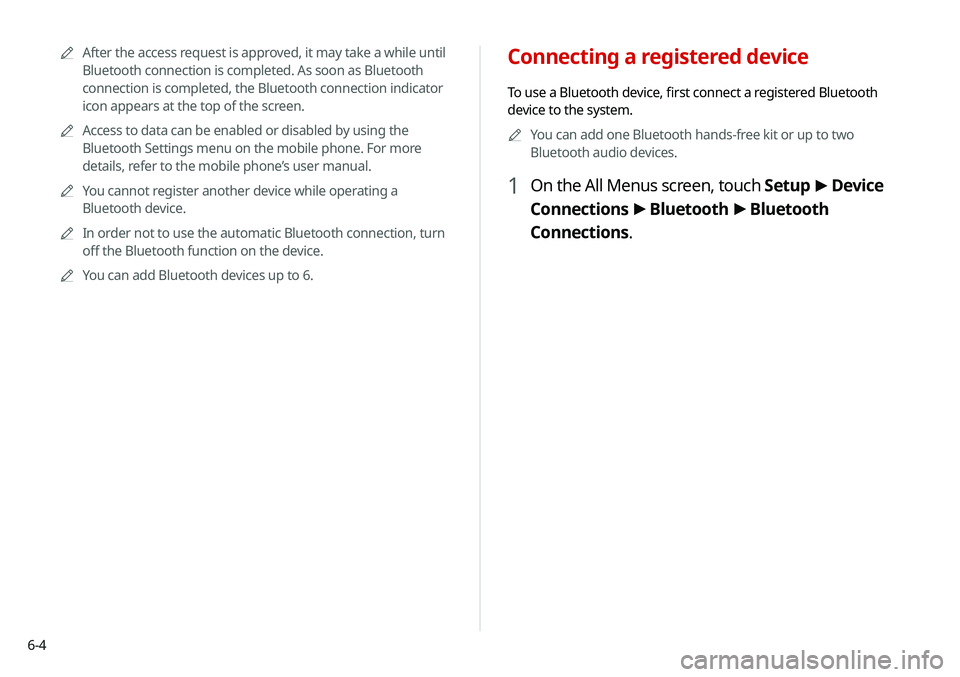
1 On the All Menus screen, touch Setup >
Device
Connections >
Bluetooth >
Bluetooth
Connections.
0000
A
After the access request is approved, it may take a while until
Bluetooth connection is completed. As soon as Bluetooth
connection is completed, the Bluetooth connection indicator
icon appears at the top of the screen.
0000
A
Access to data can be enabled or disabled by using the
Bluetooth Settings menu on the mobile phone. For more
details, refer to the mobile phone’s user manual.
0000
A
You cannot register another device while operating a
Bluetooth device.
0000
A
In order not to use the automatic Bluetooth connection, turn
off the Bluetooth function on the device.
0000
A
You can add Bluetooth devices up to 6.
Page 113 of 219
6-5
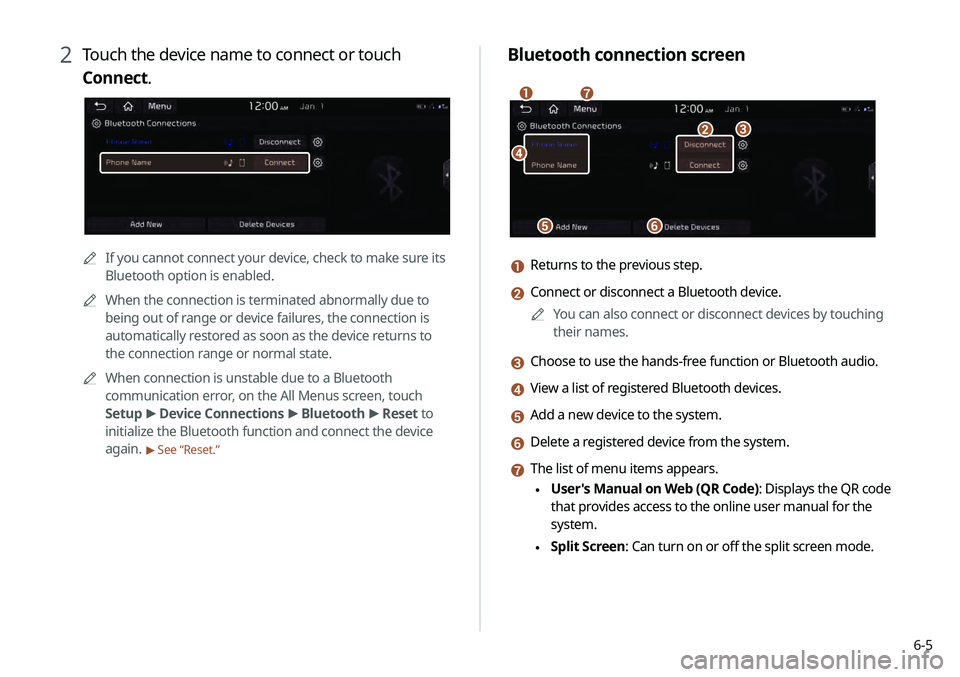
Bluetooth connection screen
\037
\036\035
\034\033
\032\031
a Returns to the previous step.
b Connect or disconnect a Bluetooth device.0000
A
You can also connect or disconnect devices by touching
their names.
c Choose to use the hands-free function or Bluetooth audio.
d View a list of registered Bluetooth devices.
e Add a new device to the system.
f Delete a registered device from the system.
g The list of menu items appears.
\225User's Manual on Web (QR Code): Displays the QR code
that provides access to the online user manual for the
system.
\225Split Screen: Can turn on or off the split screen mode.
2 Touch the device name to connect or touch
Connect.
0000A
If you cannot connect your device, check to make sure its
Bluetooth option is enabled.
0000
A
When the connection is terminated abnormally due to
being out of range or device failures, the connection is
automatically restored as soon as the device returns to
the connection range or normal state.
0000
A
When connection is unstable due to a Bluetooth
communication error, on the All Menus screen, touch
Setup >
Device Connections >
Bluetooth >
Reset to
initialize the Bluetooth function and connect the device
again.
> See “Reset.”
Page 149 of 219
7-21
Playing a voice memo
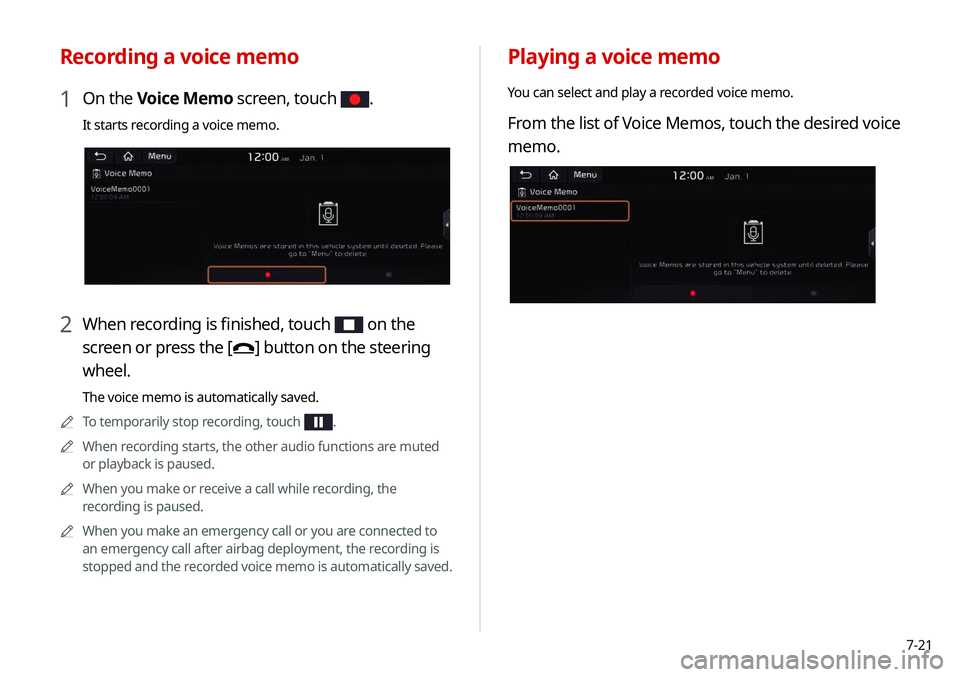
You can select and play a recorded voice memo.
From the list of Voice Memos, touch the desired voice
memo.
Recording a voice memo
1 On the Voice Memo screen, touch .
It starts recording a voice memo.
2 When recording is finished, touch on the
screen or press the [
] button on the steering
wheel.
The voice memo is automatically saved.
0000
A
To temporarily stop recording, touch
.
0000
A
When recording starts, the other audio functions are muted
or playback is paused.
0000
A
When you make or receive a call while recording, the
recording is paused.
0000
A
When you make an emergency call or you are connected to
an emergency call after airbag deployment, the recording is
stopped and the recorded voice memo is automatically saved.
Page 165 of 219
9-5
0000
A
For more information on how to use the Bluetooth functions:
> see “Connecting a Bluetooth device.”
0000
A
Some setting options appear when a smartphone is
connected to the system.
0000
A
To edit or delete a message, pull over the vehicle at a
safe place and access the messaging function on your
smartphone. You cannot edit or delete a message from the
system.
0000
A
When an iPhone is connected to the system, there are some
restrictions when receiving messages as follows:
-Only the sender name appears when the sender
information is saved.
-Only the phone number appears when the sender
information is not saved.
-You cannot use the auto-reply message function.
-When the incoming message notification or lock-screen
view option is off, messages cannot be received.
0000
A
The message reader function may not be supported
depending on the system language.
Bluetooth Connections
You can register or delete a Bluetooth device from the system
and connect or disconnect a registered device.
0000
A
You can add one Bluetooth hands-free kit or up to two
Bluetooth audio devices.
Bluetooth Voice Prompts
Set whether to hear voice prompts for events related to Bluetooth
connections.
Message Settings
\225Message Notification: Sets to receive message notifications.
\225Predefined Messages: Can edit message templates for
replies.
0000
A
This option may not be available in some phone models.
Bluetooth System Info
You can see and edit the Bluetooth information of the system.
Reset
You can delete all registered Bluetooth devices and initialize
Bluetooth settings. All data for Bluetooth devices are also deleted.