navigation system KIA TELLURIDE 2020 Navigation System Quick Reference Guide
[x] Cancel search | Manufacturer: KIA, Model Year: 2020, Model line: TELLURIDE, Model: KIA TELLURIDE 2020Pages: 219, PDF Size: 9.16 MB
Page 78 of 219
5-2
Navigation functions
Navigation Menu overview
You can use the navigation system conveniently through various
functions on the Navigation Menu screen.
\037\036
\035
\034
\033
\032\031\030\027
\026\025\024\023\022
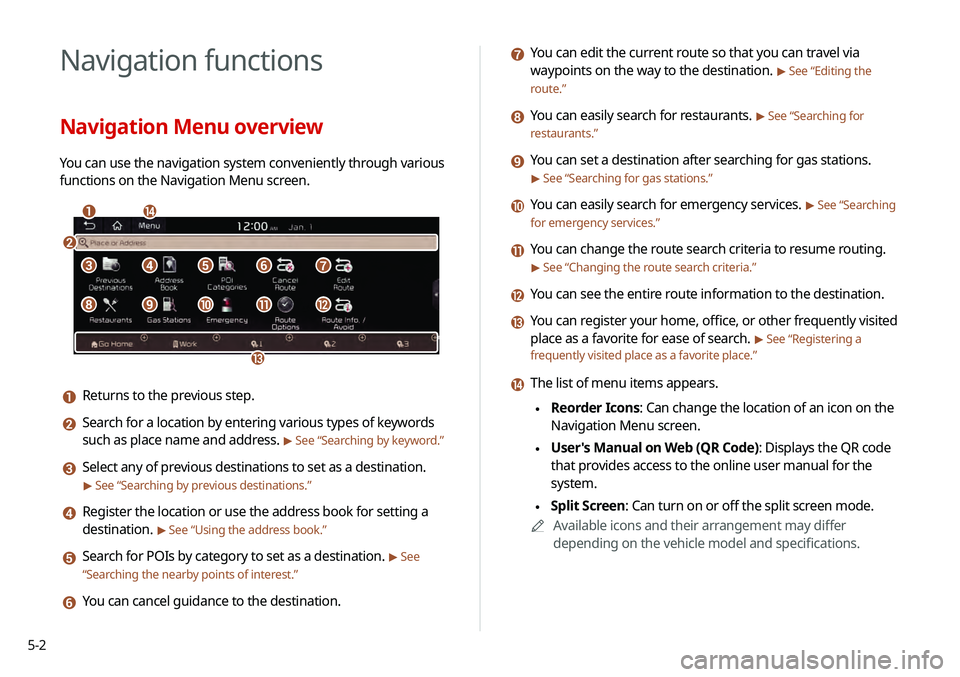
a Returns to the previous step.
b Search for a location by entering various types of keywords
such as place name and address.
> See “Searching by keyword.”
c Select any of previous destinations to set as a destination.
> See “Searching by previous destinations.”
d Register the location or use the address book for setting a
destination.
> See “Using the address book.”
e Search for POIs by category to set as a destination. > See
“ Searching the nearby points of interest .”
f You can cancel guidance to the destination.
g You can edit the current route so that you can travel via
waypoints on the way to the destination.
> See “Editing the
route.”
h You can easily search for restaurants. > See “Searching for
restaurants.”
i You can set a destination after searching for gas stations.
> See “Searching for gas stations.”
j You can easily search for emergency services. > See “Searching
for emergency services.”
k You can change the route search criteria to resume routing.
> See “Changing the route search criteria.”
l You can see the entire route information to the destination.
m You can register your home, office, or other frequently visited
place as a favorite for ease of search.
> See “Registering a
frequently visited place as a favorite place .”
n The list of menu items appears.
\225Reorder Icons: Can change the location of an icon on the
Navigation Menu screen.
\225User's Manual on Web (QR Code): Displays the QR code
that provides access to the online user manual for the
system.
\225Split Screen: Can turn on or off the split screen mode.
0000
A
Available icons and their arrangement may differ
depending on the vehicle model and specifications.
Page 82 of 219
5-6
Map screen
The map screen provides various functions and information, as
follows:
\037
\036\035
\034
\033
\032
\031
\030
\027
\026
\025\024\023
\022
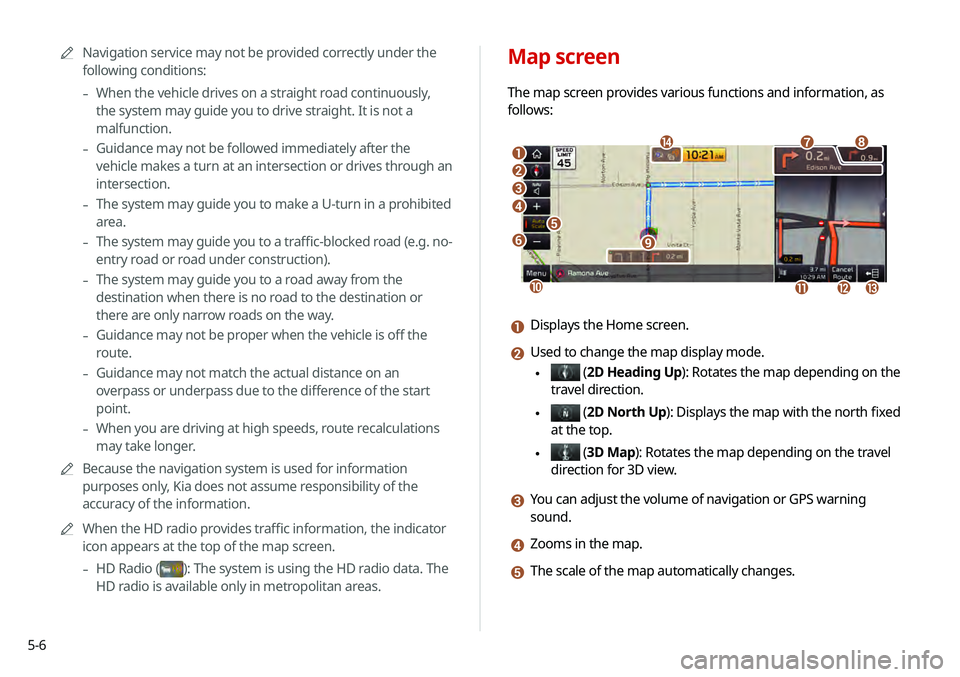
a Displays the Home screen.
b Used to change the map display mode.
\225 (2D Heading Up): Rotates the map depending on the
travel direction.
\225 (2D North Up ): Displays the map with the north fixed
at the top.
\225 ( 3D Map): Rotates the map depending on the travel
direction for 3D view.
c You can adjust the volume of navigation or GPS warning
sound.
d Zooms in the map.
e The scale of the map automatically changes.
0000
A
Navigation service may not be provided correctly under the
following conditions:
-When the vehicle drives on a straight road continuously,
the system may guide you to drive straight. It is not a
malfunction.
-Guidance may not be followed immediately after the
vehicle makes a turn at an intersection or drives through an
intersection.
-The system may guide you to make a U-turn in a prohibited
area.
-The system may guide you to a traffic-blocked road (e.g. no-
entry road or road under construction).
-The system may guide you to a road away from the
destination when there is no road to the destination or
there are only narrow roads on the way.
-Guidance may not be proper when the vehicle is off the
route.
-Guidance may not match the actual distance on an
overpass or underpass due to the difference of the start
point.
-When you are driving at high speeds, route recalculations
may take longer.
0000
A
Because the navigation system is used for information
purposes only, Kia does not assume responsibility of the
accuracy of the information.
0000
A
When the HD radio provides traffic information, the indicator
icon appears at the top of the map screen.
-HD Radio ()
: The system is using the HD radio data. The
HD radio is available only in metropolitan areas.
Page 98 of 219
5-22
Registering a frequently visited place as
a destination
When your home, office, or other frequently visited places are
registered as special destinations, you can easily set any of them
as a destination.
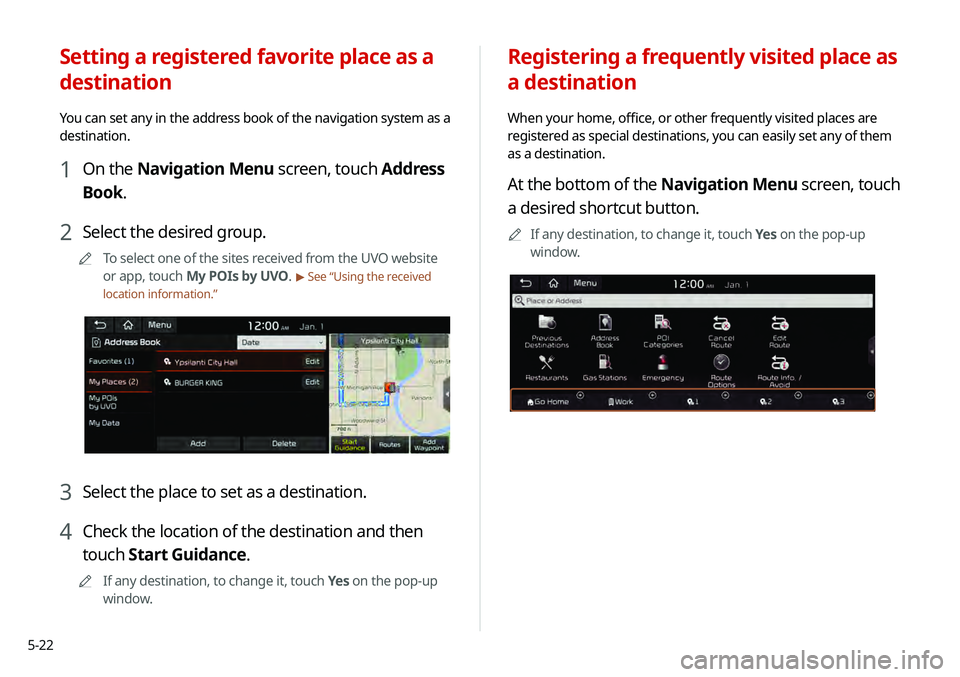
At the bottom of the Navigation Menu screen, touch
a desired shortcut button.
0000
A
If any destination, to change it, touch Yes on the pop-up
window.
Setting a registered favorite place as a
destination
You can set any in the address book of the navigation system as a
destination.
1 On the Navigation Menu screen, touch Address
Book.
2 Select the desired group.
0000
A
To select one of the sites received from the UVO website
or app, touch My POIs by UVO.
> See “Using the received
location information.”
3 Select the place to set as a destination.
4 Check the location of the destination and then
touch Start Guidance.
0000
A
If any destination, to change it, touch Yes on the pop-up
window.
Page 100 of 219
5-24
Searching for gas stations
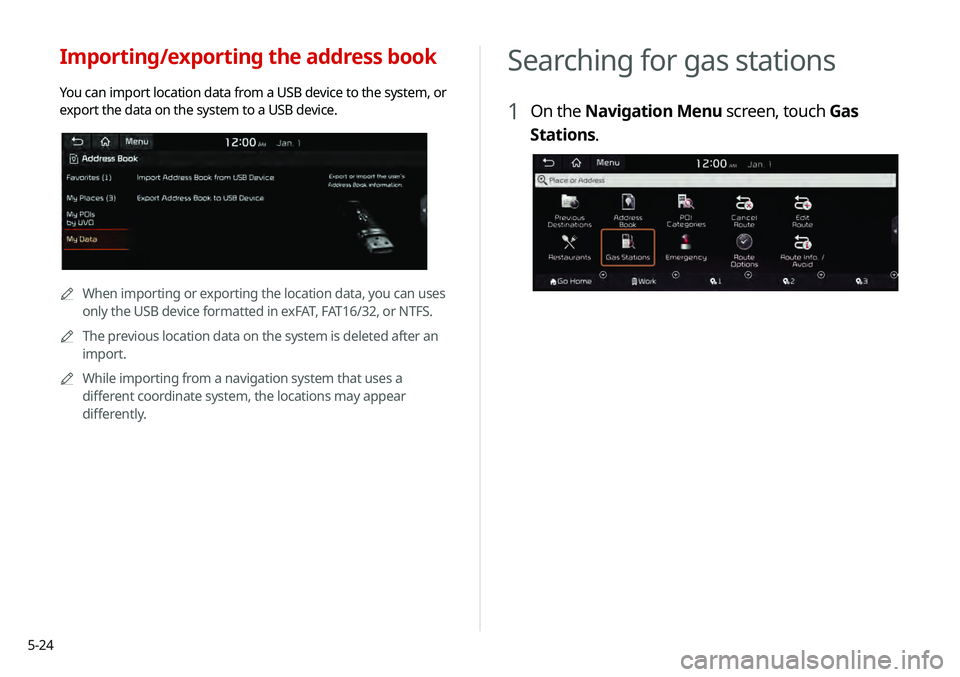
1 On the Navigation Menu screen, touch Gas
Stations.
Importing/exporting the address book
You can import location data from a USB device to the system, or
export the data on the system to a USB device.
0000
A
When importing or exporting the location data, you can uses
only the USB device formatted in exFAT, FAT16/32, or NTFS.
0000
A
The previous location data on the system is deleted after an
import.
0000
A
While importing from a navigation system that uses a
different coordinate system, the locations may appear
differently.
Page 101 of 219
5-25
END USER LICENSE
AGREEMENT
PLEASE READ THIS END USER LICENSE AGREEMENT ("EULA")
CAREFULLY BEFORE USING THE NAVIGATION SYSTEM.
This is a license agreement between you and Hyundai MnSoft,
INC. including its affiliates ("COMPANY") regarding a copy of the
COMPANY navigable map database together with associated
software, media and explanatory printed documentation
published by COMPANY (jointly the "Product"). The Product is
provided for your personal, internal use only and not for resale.
It is protected by copyright and is subject to the following terms
which are agreed to by you, on the one hand, and COMPANY
and its licensors (and their licensors and suppliers) (collectively,
"Licensors") on the other hand.
By using the Product, you accept and agree to all terms and
conditions in this End User License Agreement ("EULA"). IF
YOU DO NOT AGREE TO THE TERMS OF THIS EULA, YOU MUST
PROMPTLY EXIT THE PRODUCT OPERATION PROGRAM AND DO
NOT USE OR ACCESS TO THE PRODUCT. YOU AGREE THAT YOUR
RIGHTS UNDER THIS EULA MAY BE TERMINATED AUTOMATICALLY
WITHOUT NOTICE IF YOU FAIL TO COMPLY WITH ANY TERM(S) OF
THIS EULA.
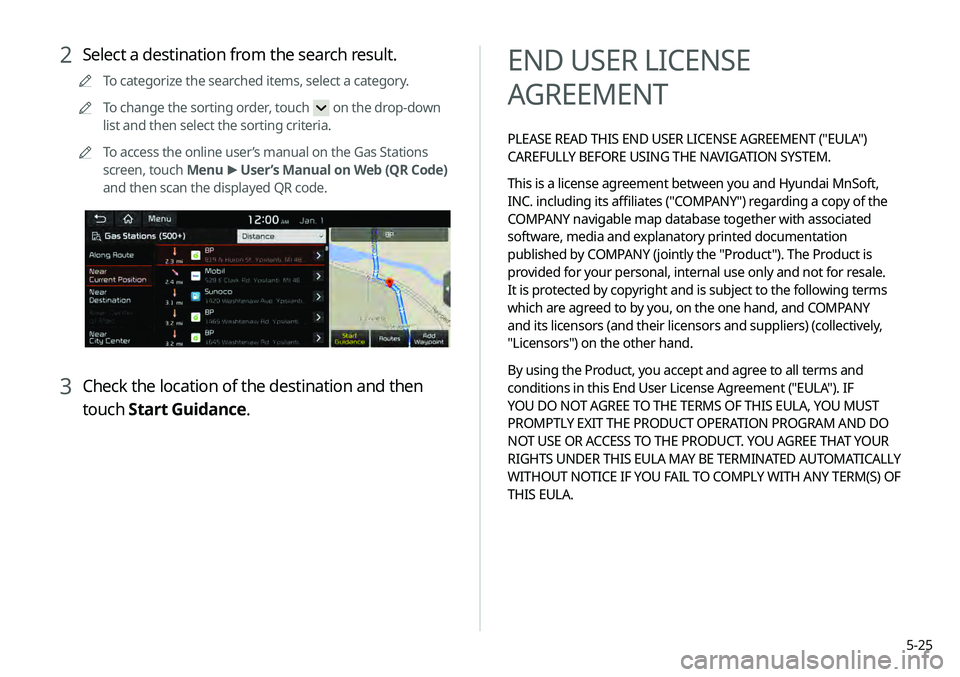
2 Select a destination from the search result.
0000
A
To categorize the searched items, select a category.
0000
A
To change the sorting order, touch
on the drop-down
list and then select the sorting criteria.
0000
A
To access the online user’s manual on the Gas Stations
screen, touch Menu >
User’s Manual on Web (QR Code)
and then scan the displayed QR code.
3 Check the location of the destination and then
touch Start Guidance.
Page 102 of 219
5-26COPYING OR USE OF THE PRODUCT EXCEPT AS PERMITTED
BY THIS EULA IS UNAUTHORIZED AND IS COPYRIGHT
INFRINGEMENT UNDER THE LAWS OF YOUR COUNTRY. IF
YOU COPY OR USE THE PRODUCT WITHOUT COMPANY'S
PERMISSION, EXCEPT AS PERMITTED BY THIS EULA, YOU ARE
VIOLATING THE LAW AND LIABLE TO COMPANY AND ITS
LICENSORS FOR DAMAGES, AND YOU MAY BE SUBJECT TO
CRIMINAL PENALTIES.
THE PRODUCT MAY INCLUDE ENFORCEMENT TECHNOLOGY
DESIGNED TO PREVENT (i) UNAUTHORIZED COPYING OF THE
PRODUCT ONTO PHYSICAL STORAGE MEDIA OR VIA TRANSFER
OVER THE INTERNET OR OTHER ELECTRONIC COMMUNICATION
MEANS AND/OR (ii) ILLEGAL USAGE OF THE PRODUCT OTHER
THAN BY A SPECIFICALLY AHTORIZED DEVICE. YOU AGREE THAT
COMPANY MAY USE THESE MEASURES TO PROTECT COMPANY
AND THE LICENSORS AGAINST COPYRIGHT INFRINGEMENT.
Uploads. The Product may provide functionality through which
you are able to upload certain information about your use of the
Product (collectively, "Uploads") to COMPANY's servers or receive
other services from COMPANY (collectively, the "Services"). If
you use such functionality, you authorize COMPANY to retain
your Uploads on its servers. COMPANY will have no obligation
to provide any Services, may change the form and nature of
any Services at any time with or without notice to you, will have
no liability whatsoever to you for any failure of the Product or
Services to transmit your Uploads to or from COMPANY's servers,
may cease providing any Services at any time with or without
notice to you, and will have no obligation to retain your Uploads (or
any other materials you may provide to COMPANY) on its servers
or return your Uploads (or any other materials you may provide
to COMPANY) to you before deleting them from its servers.
Terms and Conditions
Personal Use Only. You agree to use this Product together
with COMPANY's authorized application for the solely personal,
non-commercial purposes for which you were licensed, and
not for service bureau, time-sharing or other similar purposes.
Accordingly, but subject to the restrictions set forth in the
following paragraphs, you agree not to otherwise reproduce,
copy, modify, decompile, disassemble, create any derivative
works of, or reverse engineer any portion of this Data, and may
not transfer or distribute it in any form, for any purpose, except
to the extent permitted by mandatory laws. You may not assign
this EULA or any of the rights or licenses granted under this EULA,
except when installed in the system for which it was created.
Restrictions. Except where you have been specifically licensed
to do so by COMPANY, and without limiting the preceding
paragraph, you may not use the Product (i) with any products,
systems, or applications installed or otherwise connected to or
in communication with vehicles, capable of vehicle navigation,
positioning, dispatch, real time route guidance, fleet management
or similar applications; or (ii) with or in communication with any
positioning devices or any mobile or wireless-connected electronic
or computer devices, including without limitation cellular phones,
palmtop and handheld computers, pagers, and personal digital
assistants or PDAs.
Page 130 of 219

7-2
Voice recognition
With the voice recognition function, you can access various
functions of the infotainment system without manipulating the
screen or buttons. This function prevents driver distraction and
dangerous situations.
Use voice commands to access various functions easily.0000
A
The system can recognize the specified voice commands.
> See “ Available voice commands” or the voice recognition help.
0000
A
Note the following for accurate delivery of command when
saying it.
-Pronounce a command accurately and naturally like a
conversation.
-Keep the correct posture and say commands toward the
direction of the microphone.
0000
A
Voice recognition is automatically ended when:
-You make or receive a call.
-A media source is connected or disconnected.
-The front or rear cameras operate (if equipped).
-The
[RADIO] or [MEDIA] button is pressed to perform
another function.
- Rerouting or other unexpected action is made due to
deviation from the route during guidance. 0000
A
Voice recognition may not work properly when:
-The sunroof or windows are open so the wind is strong.
-The fan speed of the air conditioner or heater is high (level
3 or below is recommended).
-The vehicle is passing through a tunnel.
-The vehicle is driving on an unpaved road and its noise and
vibration are loud.
-Noise is loud due to a heavy rain or storm.
Using the voice recognition
1 On the steering wheel, press the [] button.
Voice recognition starts along with voice guidance.
0000
A
To skip the voice guidance, press the [
] button on the
steering wheel.
2 When a beep sound is heard, say a command to
perform (e.g. navigation, music, call).
> See “ Available
voice commands” or the voice recognition help.
The recognized command appears in text at the top of the
screen and the corresponding function is performed. 0000
A
When an additional command is required to perform, the
commands that can be followed in the next step appear
on the screen. Say a command or touch a command.
0000
A
When there are several similar commands, say a
command number to perform.
Page 135 of 219
7-7
Navigation commands
CommandFunction
Find
name or address.
For example, say "Find Kia dealerships"
or "Find Kia dealerships in Seattle."
Find Address in
address in a designated state. Say an
address in order of the house number,
street, and city.
Find
category of POIs nearby.
> See “POI
names.”
Frequently Visited
Points You can select a location from the list of
your frequently visited points. Say the
number of the location you want.
Address Book Access the address book screen.
CommandFunction
Send Message
to
contact more directly.
This command is available only if UVO is
activated.
Change Bluetooth
Device You can search for and connect another
Bluetooth device.
0000
A
To use call commands, your mobile phone must be connected
to the system via Bluetooth and your contacts must be
downloaded.
> See “Connecting a Bluetooth device.”
Page 159 of 219
8-9
Configuring the UVO settings
You can subscribe to the UVO service or see the modem
information.0000
A
For more information:
> see “Configuring the UVO settings.”
Using Voice Local Search
With UVO, you can search for locations from the online map
database by using voice commands.
If you did not update the map or system or you cannot find your
destination in the navigation, you can use the latest information
from the online server to search for locations and receive
guidance.
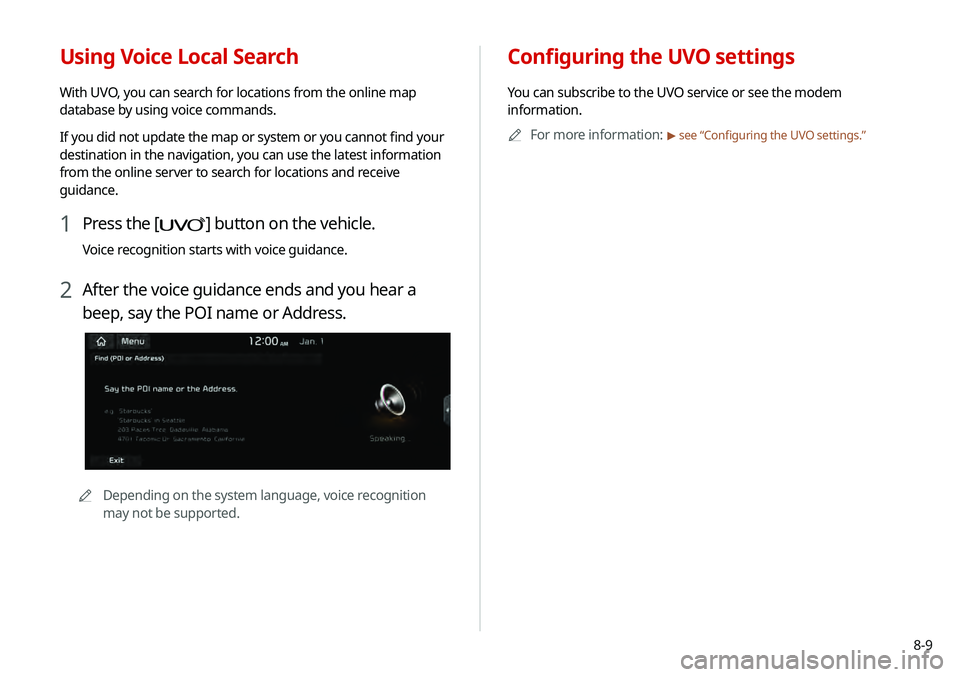
1 Press the [] button on the vehicle.
Voice recognition starts with voice guidance.
2 After the voice guidance ends and you hear a
beep, say the POI name or Address.
0000
A
Depending on the system language, voice recognition
may not be supported.
Page 161 of 219
Settings
Configuring the vehicle settings
Configuring the device connection settings Configuring the advanced system settings Configuring the sound settings
Configuring the voice recognition settings Configuring the navigation settingsConfiguring the UVO settings
Configuring the general system settings Configuring the display settings
Updating the system software and map
09