navigation system KIA TELLURIDE 2020 Navigation System Quick Reference Guide
[x] Cancel search | Manufacturer: KIA, Model Year: 2020, Model line: TELLURIDE, Model: KIA TELLURIDE 2020Pages: 219, PDF Size: 9.16 MB
Page 166 of 219

9-6
Android Auto
You can activate the Android Auto function to pair your Android
smartphone with the system.
Apple CarPlay
You can activate the Apple CarPlay function to pair your iPhone
with the system.
Configuring the advanced
system settings
You can configure the settings for notification and button actions.
1 On the All Menus screen, touch Setup >
Advanced.
The advanced settings screen appears.
2 Configure the settings required:
Return to Map: Set Time
You can set the system to automatically display the map screen
after a specified period of time when switched to the Radio/Media
mode screen while using the navigation.
0000
A
This function works while driving once a destination has been
set.
Page 169 of 219
9-9
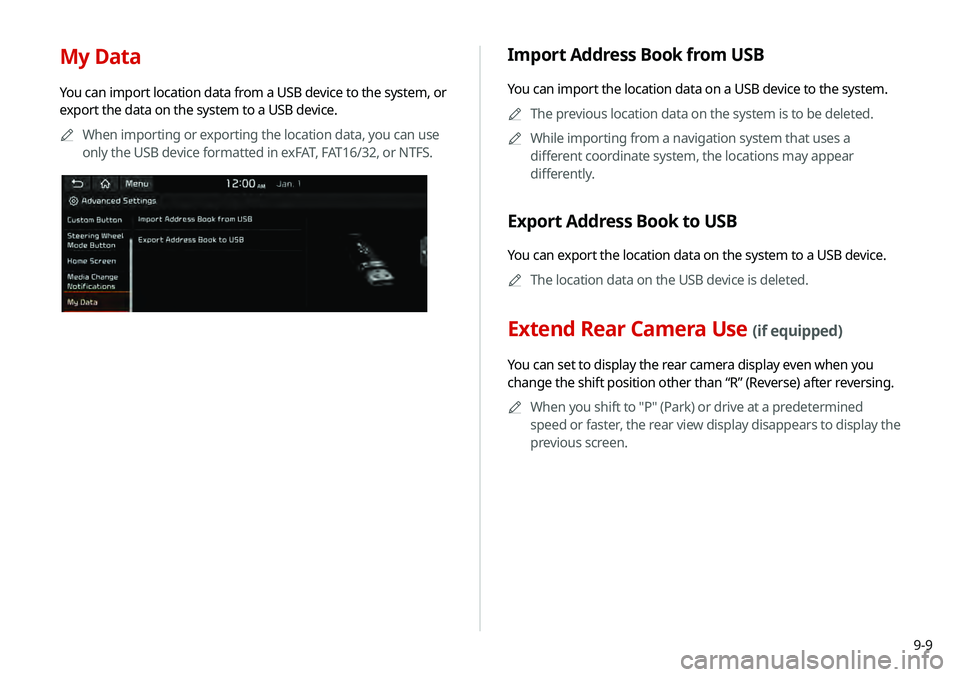
My Data
You can import location data from a USB device to the system, or
export the data on the system to a USB device.0000
A
When importing or exporting the location data, you can use
only the USB device formatted in exFAT, FAT16/32, or NTFS.
Import Address Book from USB
You can import the location data on a USB device to the system.
0000
A
The previous location data on the system is to be deleted.
0000
A
While importing from a navigation system that uses a
different coordinate system, the locations may appear
differently.
Export Address Book to USB
You can export the location data on the system to a USB device.
0000
A
The location data on the USB device is deleted.
Extend Rear Camera Use (if equipped)
You can set to display the rear camera display even when you
change the shift position other than “R” (Reverse) after reversing.
0000
A
When you shift to "P" (Park) or drive at a predetermined
speed or faster, the rear view display disappears to display the
previous screen.
Page 172 of 219
9-12
Navigation Guidance
You can set to enable the navigation sound to be heard first when
using both the navigation system and Radio/Media system.
Proximity Warning
When warning sound is generated while parking, the audio
volume is decreased to make the sound audible.
Navigation Guidance During Calls
Even during a call, the navigation sound is heard.
Start-up Volume Limit
You can set to automatically decrease the audio volume to an
adequate level when turning on the vehicle.
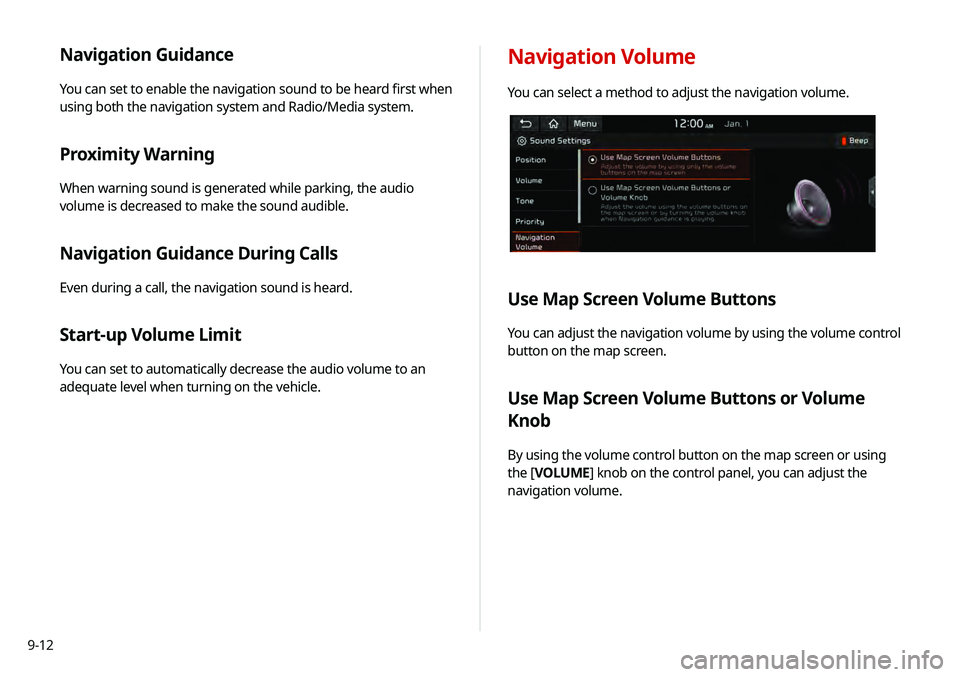
Navigation Volume
You can select a method to adjust the navigation volume.
Use Map Screen Volume Buttons
You can adjust the navigation volume by using the volume control
button on the map screen.
Use Map Screen Volume Buttons or Volume
Knob
By using the volume control button on the map screen or using
the [VOLUME] knob on the control panel, you can adjust the
navigation volume.
Page 176 of 219
9-16
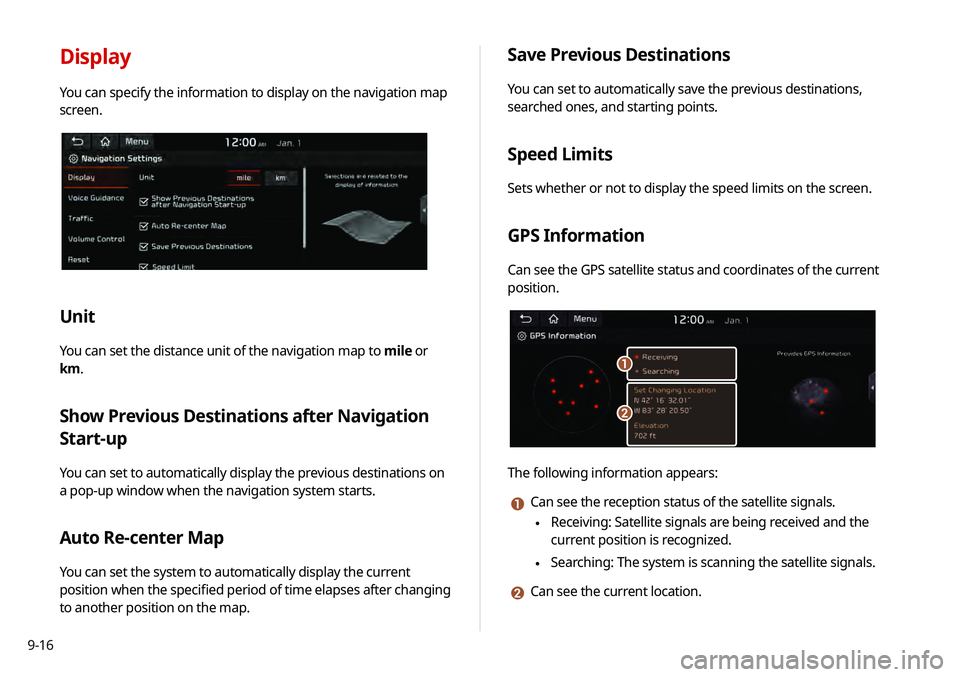
Display
You can specify the information to display on the navigation map
screen.
Unit
You can set the distance unit of the navigation map to mile or
km.
Show Previous Destinations after Navigation
Start-up
You can set to automatically display the previous destinations on
a pop-up window when the navigation system starts.
Auto Re-center Map
You can set the system to automatically display the current
position when the specified period of time elapses after changing
to another position on the map.
Save Previous Destinations
You can set to automatically save the previous destinations,
searched ones, and starting points.
Speed Limits
Sets whether or not to display the speed limits on the screen.
GPS Information
Can see the GPS satellite status and coordinates of the current
position.
\037
\036
The following information appears:
a Can see the reception status of the satellite signals.
\225 Receiving: Satellite signals are being received and the
current position is recognized.
\225Searching: The system is scanning the satellite signals.
b Can see the current location.
Page 177 of 219
9-17
Voice Guidance
You can configure the navigation guidance settings.
Number of Guidance Prompts
You can set to hear the navigation voice guidance as Fewer or
More.
Navigation Guidance Priority
You can set to hear the navigation voice guidance in advance.
When the setting is checked, the volume decreases automatically
while in guidance.
Navigation During Calls
Sets whether or not to provide guidance during a call. When
checked, you can hear the guidance during a call.
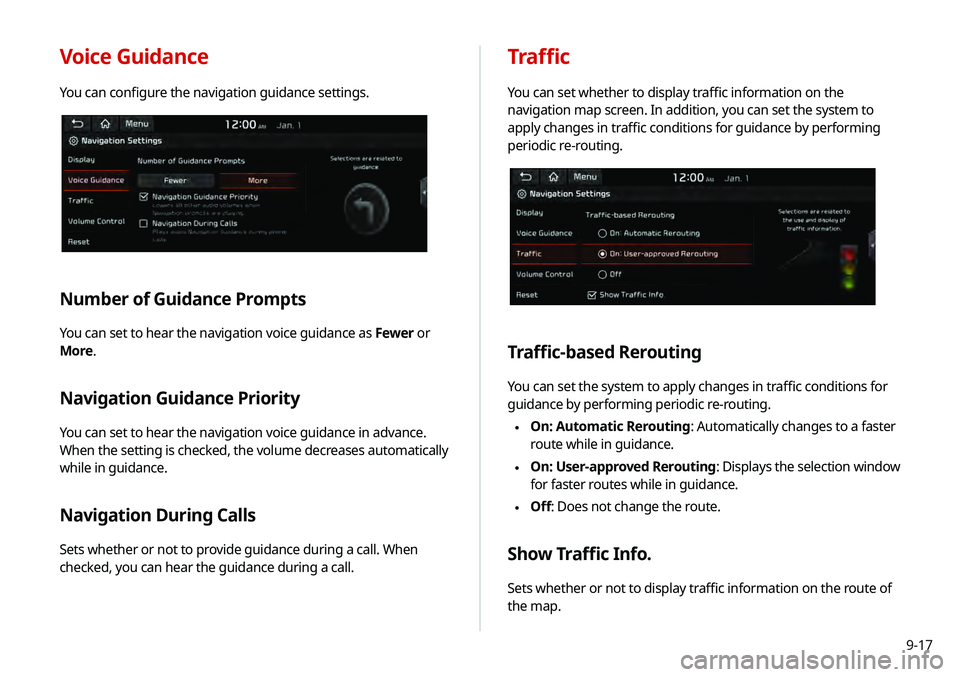
Traffic
You can set whether to display traffic information on the
navigation map screen. In addition, you can set the system to
apply changes in traffic conditions for guidance by performing
periodic re-routing.
Traffic-based Rerouting
You can set the system to apply changes in traffic conditions for
guidance by performing periodic re-routing.
\225 On: Automatic Rerouting: Automatically changes to a faster
route while in guidance.
\225On: User-approved Rerouting
: Displays the selection window
for faster routes while in guidance.
\225 Off: Does not change the route.
Show Traffic Info.
Sets whether or not to display traffic information on the route of
the map.
Page 178 of 219
9-18
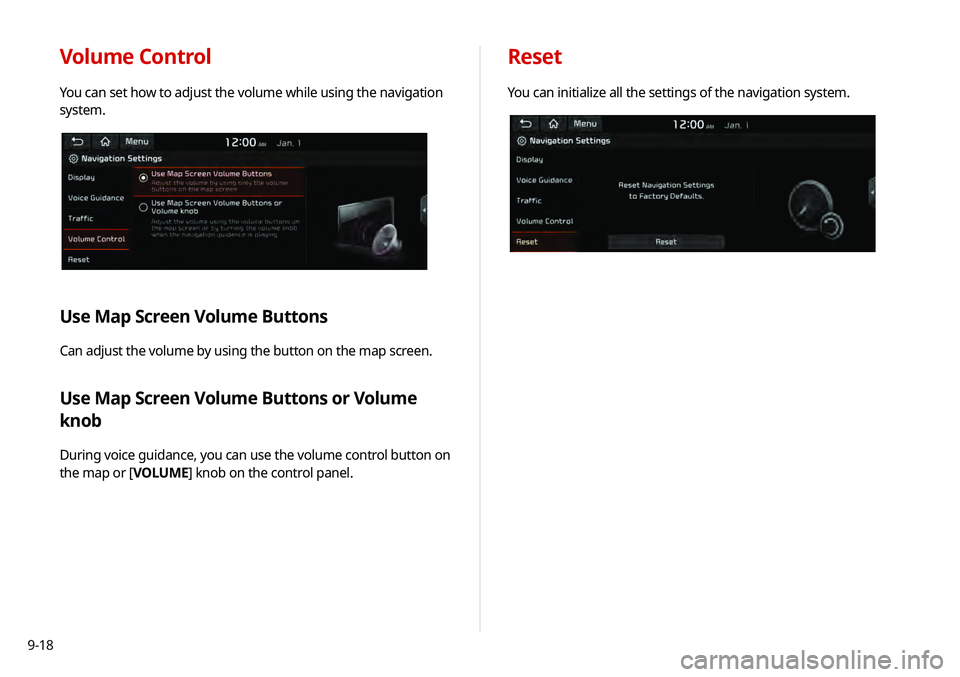
Volume Control
You can set how to adjust the volume while using the navigation
system.
Use Map Screen Volume Buttons
Can adjust the volume by using the button on the map screen.
Use Map Screen Volume Buttons or Volume
knob
During voice guidance, you can use the volume control button on
the map or [VOLUME] knob on the control panel.
Reset
You can initialize all the settings of the navigation system.
Page 184 of 219
9-24
Configuring the display
settings
You can change the system display settings such as display
brightness.
1 On the All Menus screen, touch Setup >
Display.
The display settings screen appears.
2 Configure the settings required:
Storage
You can check the storage space of the system memory where
voice memos can be saved.
User's Manual on Web (QR Code)
You can access the online user’s manual of the system by
scanning the QR code with your smartphone.
Reset
You can initialize all system settings including general settings
and navigation settings.
\334Caution
When initialize is performed, all user data in the system including
the location data is deleted.
Page 186 of 219

9-26
Updating the system software
and map
You can update the navigation map and infotainment system.
Please visit your local dealership to update your system.0000
A
Any changes made after the update file is created are not
reflected in the map. As a result, certain roads, buildings, and
speed limits on the map may not be up to date.
0000
A
Depending on the total data amount, an update may take
several minutes.
0000
A
Do not turn off the system or remove the storage device while
the update is in progress. When power supply is cut off or the
storage device is removed from the system, it may damage
the data or cause a system malfunction.
Night
You can set the display brightness when Night is selected under
Mode. Uncheck Link to Cluster Illustration Control and then
set to the desired brightness.
Reset
You can initialize all display settings such as brightness.
Page 194 of 219
10-8
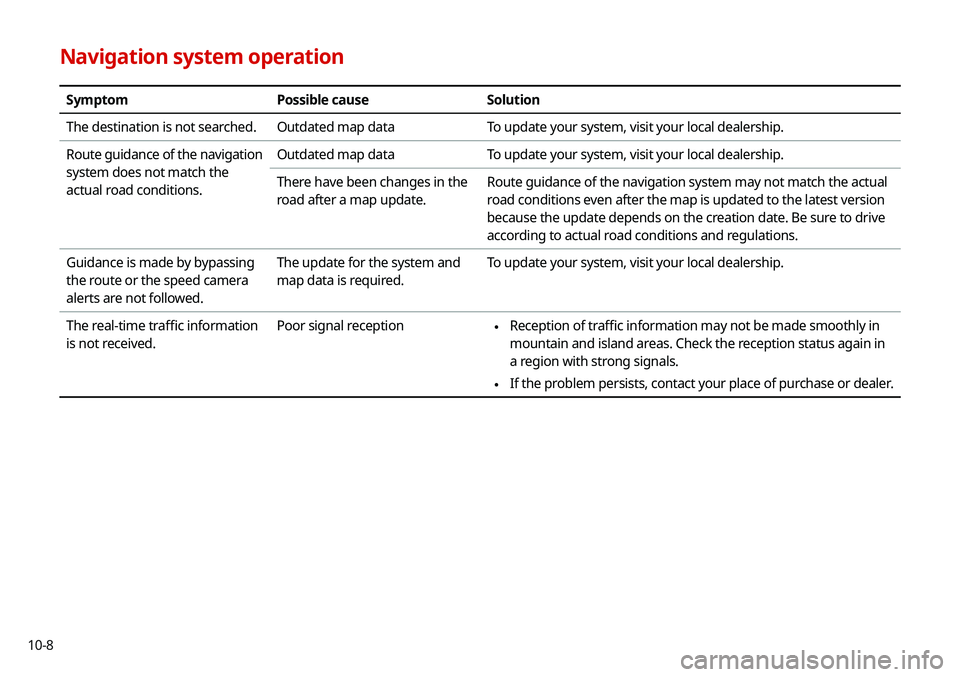
Navigation system operation
SymptomPossible causeSolution
The destination is not searched. Outdated map dataTo update your system, visit your local dealership.
Route guidance of the navigation
system does not match the
actual road conditions. Outdated map data
To update your system, visit your local dealership.
There have been changes in the
road after a map update. Route guidance of the navigation system may not match the actual
road conditions even after the map is updated to the latest version
because the update depends on the creation date. Be sure to drive
according to actual road conditions and regulations.
Guidance is made by bypassing
the route or the speed camera
alerts are not followed. The update for the system and
map data is required.
To update your system, visit your local dealership.
The real-time traffic information
is not received. Poor signal reception
\225
Reception of traffic information may not be made smoothly in
mountain and island areas. Check the reception status again in
a region with strong signals.
\225If the problem persists, contact your place of purchase or dealer.
Page 195 of 219
10-9
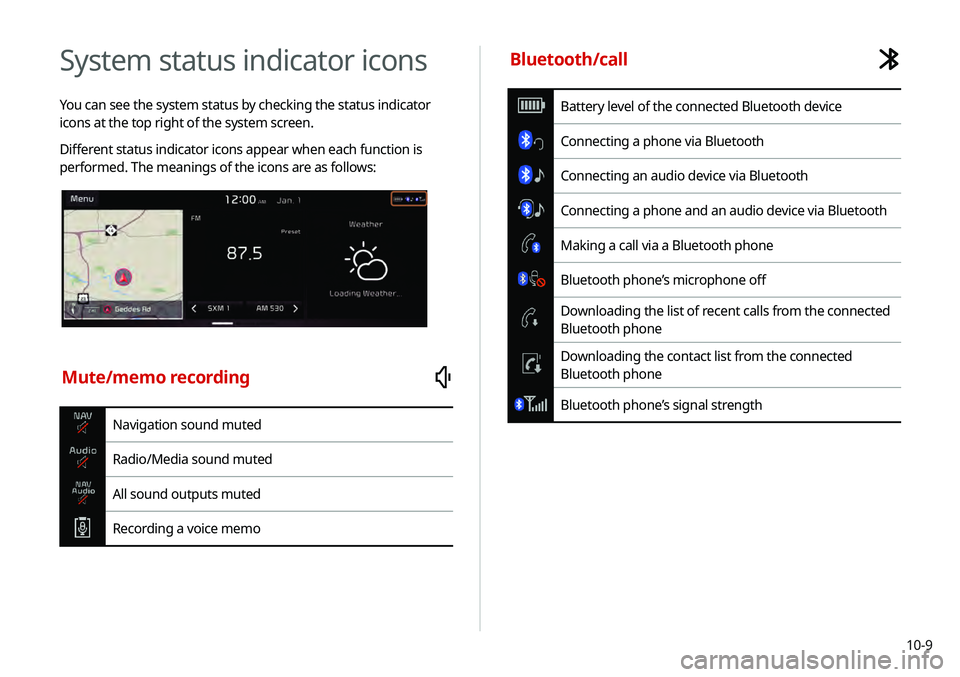
System status indicator icons
You can see the system status by checking the status indicator
icons at the top right of the system screen.
Different status indicator icons appear when each function is
performed. The meanings of the icons are as follows:
Mute/memo recording
Navigation sound muted
Radio/Media sound muted
All sound outputs muted
Recording a voice memo
Bluetooth/call
Battery level of the connected Bluetooth device
Connecting a phone via Bluetooth
Connecting an audio device via Bluetooth
Connecting a phone and an audio device via Bluetooth
Making a call via a Bluetooth phone
Bluetooth phone’s microphone off
Downloading the list of recent calls from the connected
Bluetooth phone
Downloading the contact list from the connected
Bluetooth phone
Bluetooth phone’s signal strength