apple KIA TELLURIDE 2020 Navigation System Quick Reference Guide
[x] Cancel search | Manufacturer: KIA, Model Year: 2020, Model line: TELLURIDE, Model: KIA TELLURIDE 2020Pages: 219, PDF Size: 9.16 MB
Page 16 of 219

6
Contents
01 System overview
Component names and functions 1-2
Control panel 1-2
Steering wheel remote control 1-3
Turning the system on or off 1-4
Turning on the system 1-4
Turning off the system 1-5
Using the touch screen 1-6
“Touch” gesture 1-7
“Touch and hold” gesture 1-7
“Slide” gesture 1-8
“Drag” gesture 1-8
“Swipe” gesture 1-9
“Spread/pinch” gesture 1-9
Home screen 1-10
Setting the Home screen type 1-10
One Page Home screen 1-11
Multi-page Home screen 1-13
All Menus screen 1-15
Viewing the list of all menus on One Page Home Screen 1-15
Seeing all menus on the Multi-page Home screen 1-15
Using the Favorites 1-16
Adding a favorite menu 1-16
Arranging the items in Favorites 1-16
Deleting items in Favorites 1-16
Split screen 1-17
Opening the split screen 1-17
Editing the split screen 1-17
Closing the split screen 1-17
02 Useful functions
Using the phone projection function 2-2
Paring to an Android smartphone via Android Auto 2-2
Paring to an iPhone via Apple CarPlay 2-4
Using the driving assist display 2-6
Using the rear-view display 2-6
Surround View Monitor 2-8
Using the rear-seat climate control system 2-10
Using the Driver Talk mode in the rear seat 2-11
Using the Quiet mode in the rear seat 2-12
Page 19 of 219
9
Configuring the device connection settings 9-4
Bluetooth 9-4
Android Auto 9-6
Apple CarPlay 9-6
Configuring the advanced system settings 9-6
Return to Map: Set Time 9-6
TUNE Knob Function 9-7
Custom Button 9-7
Steering Wheel Mode Button 9-7
Home Screen 9-8
Media Change Notifications 9-8
My Data 9-9
Extend Rear Camera Use 9-9
Configuring the sound settings 9-10
Position 9-10
Volume 9-11
Tone 9-11
Priority 9-11
Navigation Volume 9-12
Advanced 9-13
Reset 9-14
Turning on/off the screen touch sound 9-14
Configuring the voice recognition settings 9-14
Use Network 9-15
Guidance 9-15
08 UVO
UVO service 8-2
Service restrictions 8-2
Subscribing to the service 8-3
Running the UVO 8-4
Viewing driving information 8-5
Contacting for roadside assistance 8-6
Diagnosing the vehicle 8-6
Using the received location information 8-7
Contacting the UVO Center 8-8
Using Voice Local Search 8-9
Configuring the UVO settings 8-9
09 Settings
Configuring the vehicle settings 9-2
Drive Mode 9-2
Climate 9-3
Lights 9-3
Seat/Steering Wheel 9-4
Page 41 of 219
2-3
0000
A
You cannot change the Android Auto settings when
connected via a USB cable.
0000
A
The icons on the screen are subject to change according to
the policy of Google Corporation.
0000
A
Applications or functions used through Android Auto
are subject to change according to the policy of Google
Corporation. For supportable functions, visit the Android
website at https://www.android.com/auto.
0000
A
To use the functions on your smartphone with the minimized
system settings, update the smartphone OS to the latest
version.
0000
A
The recognition time may differ depending on the device
type, firmware, and OS version.
0000
A
Charges may apply for any mobile data used while Android
Auto is running.
0000
A
Some functions may not work properly depending on the
network signal strength.
0000
A
Avoid interacting with the smartphone while using Android
Auto.
0000
A
You cannot use the following functions when Android Auto is
in use.
-USB mode
-Browse function using the [TUNE/
FILE] knob
-Apple CarPlay
4 When the smartphone is locked, unlock it first and
then consent to the use of Android Auto.
After the smartphone is recognized, the All Menus screen
displays the Android Auto menu.
Using the Android Auto
1 On the All Menus screen, touch Android Auto.
2 Perform the desired function.
\225 To run the functions for phone, music, or navigation on
the smartphone, touch the corresponding app icon.
\225To use the Google voice recognition, press and hold the
[
] button on the steering wheel.
0000
A
By pressing the [ MODE] button on the steering wheel, you
can run the media application on your smartphone as well as
the Radio/Media mode of the system.
0000
A
On the All Menus screen, touch Setup >
Advanced >
Steering Wheel Mode Button and then press the [ MODE]
button to set the functions to run.
> See “Steering Wheel Mode
Button.”
0000
A
By pressing the [] button on the steering wheel, you can
make a call via Bluetooth connection.
Page 42 of 219
2-4
3 Connect an iPhone to the USB port on the vehicle
by using the provided USB cable.
0000
A
When connection is made for the first time, the system
screen displays a notification window. Check the details
and then touch OK.
0000
A
To end the Apple CarPlay and disconnect from the iPhone,
remove the USB cable from the system.
\334Caution
Do not repeatedly connect and remove the USB connector
within a short time. It may cause device errors or system
failures.
4 When the iPhone is locked, unlock it first and then
consent to the use of Apple CarPlay.
After the iPhone is recognized, the All Menus screen displays
the Apple CarPlay menu.
Paring to an iPhone via Apple CarPlay
After you connect an iPhone to the vehicle with Apple CarPlay,
you can run and control applications on the phone through the
system screen.
1 To use Apple CarPlay, first check the following:
\225For iPhone models that support Apple CarPlay, visit the
Apple website at https://www.apple.com/ios/carplay
.
\225Make sure that the Apple CarPlay is activated in the iPhone
settings. When Apple CarPlay is not available, update to
the latest version of iOS.
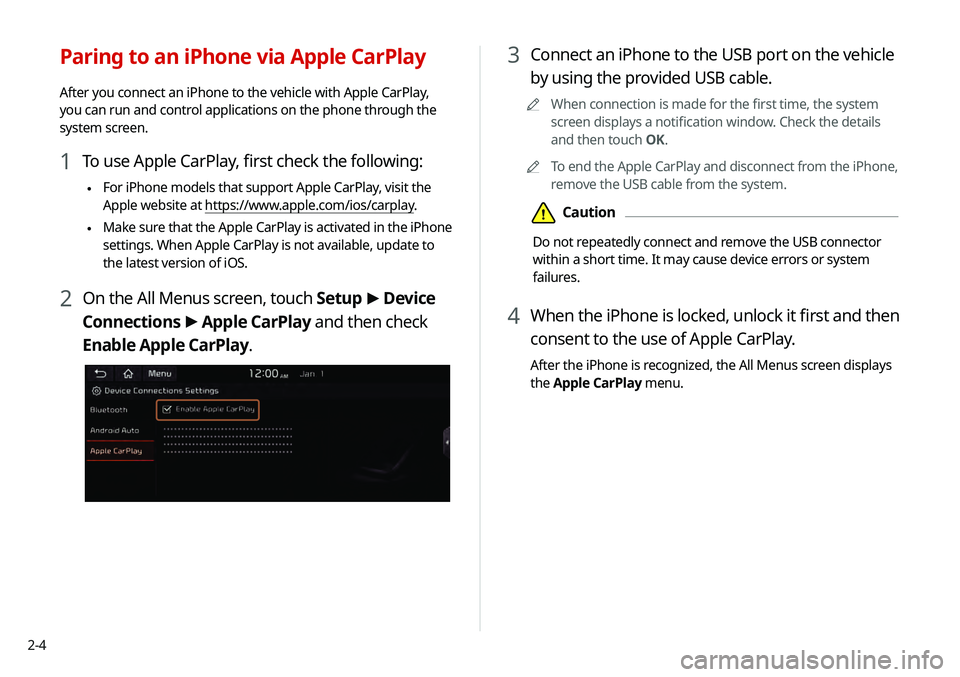
2 On the All Menus screen, touch Setup
>
Device
Connections >
Apple CarPlay and then check
Enable Apple CarPlay.
Page 43 of 219
2-5
0000
A
To use the functions on your smartphone with the minimized
system settings, update the smartphone OS to the latest
version.
0000
A
The recognition time may differ depending on the device
type, firmware, and OS version.
0000
A
Charges may apply for any mobile data used while Apple
CarPlay is running.
0000
A
Some functions may not work properly depending on the
network signal strength.
0000
A
Avoid interacting with the smartphone while using Apple
CarPlay.
0000
A
You cannot use the following functions when Apple CarPlay is
in use.
-Bluetooth
-USB mode
-Browse function using the [TUNE/
FILE] knob
-Android Auto
Using the Apple CarPlay
1 On the All Menus screen, touch Apple CarPlay.
2 Perform the desired function.
\225 To run any of functions (phone, messaging, navigation,
etc.) on your iPhone, touch the corresponding function
icon.
\225To run the Siri voice recognition, press and hold the
[]
button on the steering wheel.
0000
A
To display the system Home screen, touch
.
0000
A
By pressing the [ MODE] button on the steering wheel, you
can run the media application on your smartphone as well as
the Radio/Media mode of the system.
0000
A
On the All Menus screen, touch Setup >
Advanced >
Steering Wheel Mode Button and then press the [ MODE]
button to set the functions to run.
> See “Steering Wheel Mode
Button.”
0000
A
When you receive a call, press the [] button on the steering
wheel to answer it.
0000
A
You cannot change the Apple CarPlay settings when
connected via a USB cable.
0000
A
Applications or functions used through Apple CarPlay
are subject to change according to the policy of Apple
Corporation. For supportable functions, visit the Apple
Corporation website at http://www.apple.com/ios/carplay .
Page 139 of 219
7-11
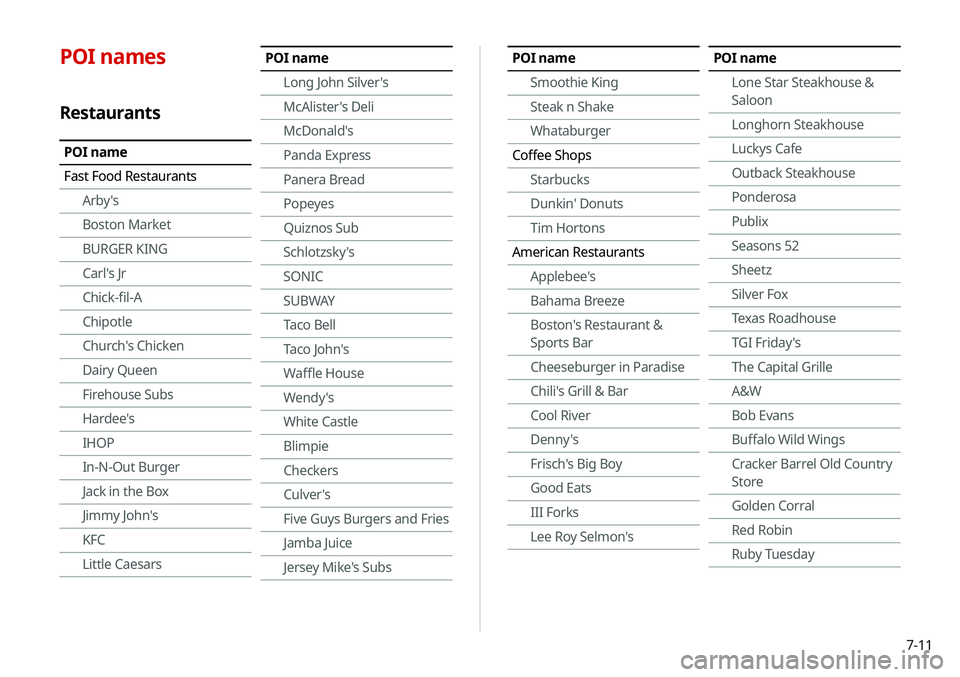
POI names
Restaurants
POI name
Fast Food RestaurantsArby's
Boston Market
BURGER KING
Carl's Jr
Chick-fil-A
Chipotle
Church's Chicken
Dairy Queen
Firehouse Subs
Hardee's
IHOP
In-N-Out Burger
Jack in the Box
Jimmy John's
KFC
Little Caesars
POI name
Long John Silver's
McAlister's Deli
McDonald's
Panda Express
Panera Bread
Popeyes
Quiznos Sub
Schlotzsky's
SONIC
SUBWAY
Taco Bell
Taco John's
Waffle House
Wendy's
White Castle
Blimpie
Checkers
Culver's
Five Guys Burgers and Fries
Jamba Juice
Jersey Mike's SubsPOI nameSmoothie King
Steak n Shake
Whataburger
Coffee Shops Starbucks
Dunkin' Donuts
Tim Hortons
American Restaurants Applebee's
Bahama Breeze
Boston's Restaurant &
Sports Bar
Cheeseburger in Paradise
Chili's Grill & Bar
Cool River
Denny's
Frisch's Big Boy
Good Eats
III Forks
Lee Roy Selmon'sPOI name
Lone Star Steakhouse &
Saloon
Longhorn Steakhouse
Luckys Cafe
Outback Steakhouse
Ponderosa
Publix
Seasons 52
Sheetz
Silver Fox
Texas Roadhouse
TGI Friday's
The Capital Grille
A&W
Bob Evans
Buffalo Wild Wings
Cracker Barrel Old Country
Store
Golden Corral
Red Robin
Ruby Tuesday
Page 147 of 219
![KIA TELLURIDE 2020 Navigation System Quick Reference Guide 7-19
4 Say a command.
0000
A
You can perform the functions related to Bluetooth calls
on the system and other functions on your Apple device.
0000
A
Press the [
] button to restart Siri.
5 To end Sir](/img/2/54882/w960_54882-146.png "KIA TELLURIDE 2020 Navigation System Quick Reference Guide 7-19
4 Say a command.
0000
A
You can perform the functions related to Bluetooth calls
on the system and other functions on your Apple device.
0000
A
Press the [
] button to restart Siri.
5 To end Sir")
7-19
4 Say a command.
0000
A
You can perform the functions related to Bluetooth calls
on the system and other functions on your Apple device.
0000
A
Press the [
] button to restart Siri.
5 To end Siri, press and hold the [] button on the
steering wheel.
Siri Eyes Free is enabled only while driving. When you shift to “P”
(Park) or apply the parking brake, you can disable this function.
0000
A
Apple devices may have different functions enabled and
may vary in the way how they respond to Siri commands,
depending on the device type and iOS version.
Using the Siri Eyes Free
When you connect an Apple device that is compatible with Siri
to your system via Bluetooth, you can use the Siri Eyes Free.
This allows you to perform the functions on your system and
Apple device with voice commands so that you can devote your
attention to driving.
First, make sure that your Apple device supports Siri and that you
have activated Siri.
1 Connect your Apple device to your system via
Bluetooth.
2 On the steering wheel, press and hold the []
button.
3 On the Siri screen, touch Speak.
Page 166 of 219

9-6
Android Auto
You can activate the Android Auto function to pair your Android
smartphone with the system.
Apple CarPlay
You can activate the Apple CarPlay function to pair your iPhone
with the system.
Configuring the advanced
system settings
You can configure the settings for notification and button actions.
1 On the All Menus screen, touch Setup >
Advanced.
The advanced settings screen appears.
2 Configure the settings required:
Return to Map: Set Time
You can set the system to automatically display the map screen
after a specified period of time when switched to the Radio/Media
mode screen while using the navigation.
0000
A
This function works while driving once a destination has been
set.
Page 192 of 219
10-6
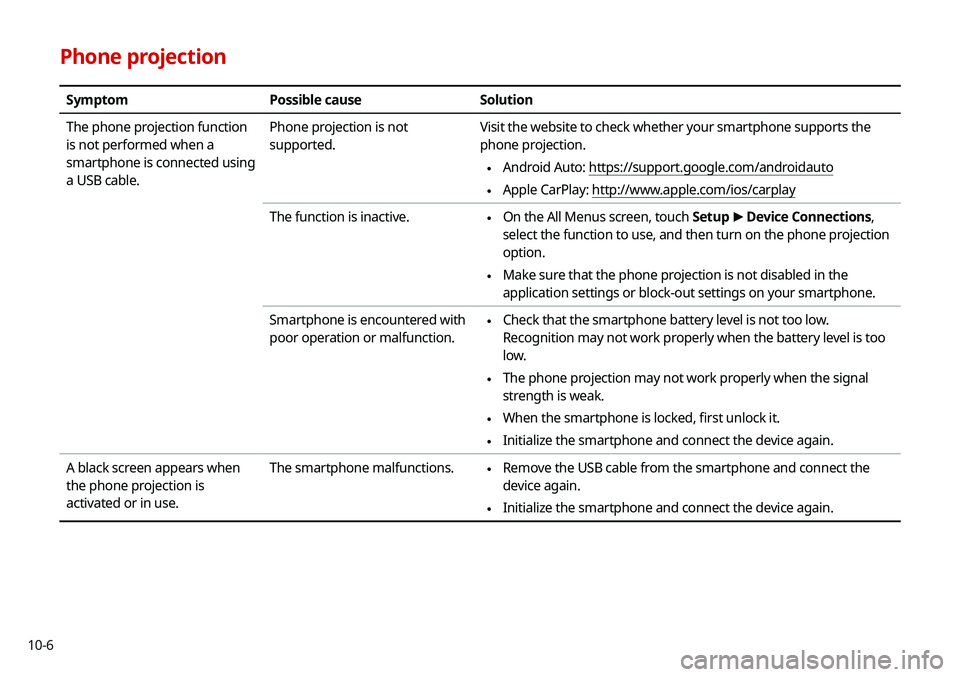
Phone projection
SymptomPossible cause Solution
The phone projection function
is not performed when a
smartphone is connected using
a USB cable. Phone projection is not
supported.
Visit the website to check whether your smartphone supports the
phone projection.
\225
Android Auto: https://support.google.com/androidauto
\225Apple CarPlay: http://www.apple.com/ios/carplay
The function is inactive.
\225 On the All Menus screen, touch Setup
>
Device Connections,
select the function to use, and then turn on the phone projection
option.
\225 Make sure that the phone projection is not disabled in the
application settings or block-out settings on your smartphone.
Smartphone is encountered with
poor operation or malfunction.
\225 Check that the smartphone battery level is not too low.
Recognition may not work properly when the battery level is too
low.
\225The phone projection may not work properly when the signal
strength is weak.
\225When the smartphone is locked, first unlock it.
\225Initialize the smartphone and connect the device again.
A black screen appears when
the phone projection is
activated or in use. The smartphone malfunctions.
\225
Remove the USB cable from the smartphone and connect the
device again.
\225Initialize the smartphone and connect the device again.
Page 206 of 219

10-20
Index
A
Advanced system settings 9-6
Android devicesAndroid Auto 2-2
Apple devices Apple CarPlay 2-4
B
Battery warning 1-6
BluetoothBluetooth phone
Answering a call 6-14
Call 6-6
Contacts list 6-10
Dial pad 6-12
Favorites settings 6-8
Options during a call 6-15
Recent calls list 6-7
Switching to another call 6-16
Text message 6-16
Specifications 10-16 Bluetooth connection
Adding a device 6-3
Deleting a device 6-6
Device connection 6-4
Disconnecting a device 6-6
C
Component Names and FunctionsControl panel
Custom button 1-2
MAP button 1-2
MEDIA button 1-2
NAV button 1-2
POWER button/VOLUME knob 1-2
RADIO button 1-2
SEEK/TRACK button 1-2
SETUP button 1-2
System Reset button 1-3
TUNE knob/FILE knob/
ENTER button 1-3
Steering wheel remote control
Call button 1-4
End Call button 1-4
MODE button 1-3
Move button 1-4
Voice Recognition button 1-3
Volume lever/Mute button 1-3
Contacts list 6-10
Control panel 1-2
D
Date and time settings 9-21
Deleting a location 5-23
Destination search 5-3
Driving assist display 2-6
E
Editing a location 5-23
Editing a route 5-16