key KIA TELLURIDE 2021 Features and Functions Guide
[x] Cancel search | Manufacturer: KIA, Model Year: 2021, Model line: TELLURIDE, Model: KIA TELLURIDE 2021Pages: 70, PDF Size: 8.41 MB
Page 48 of 70
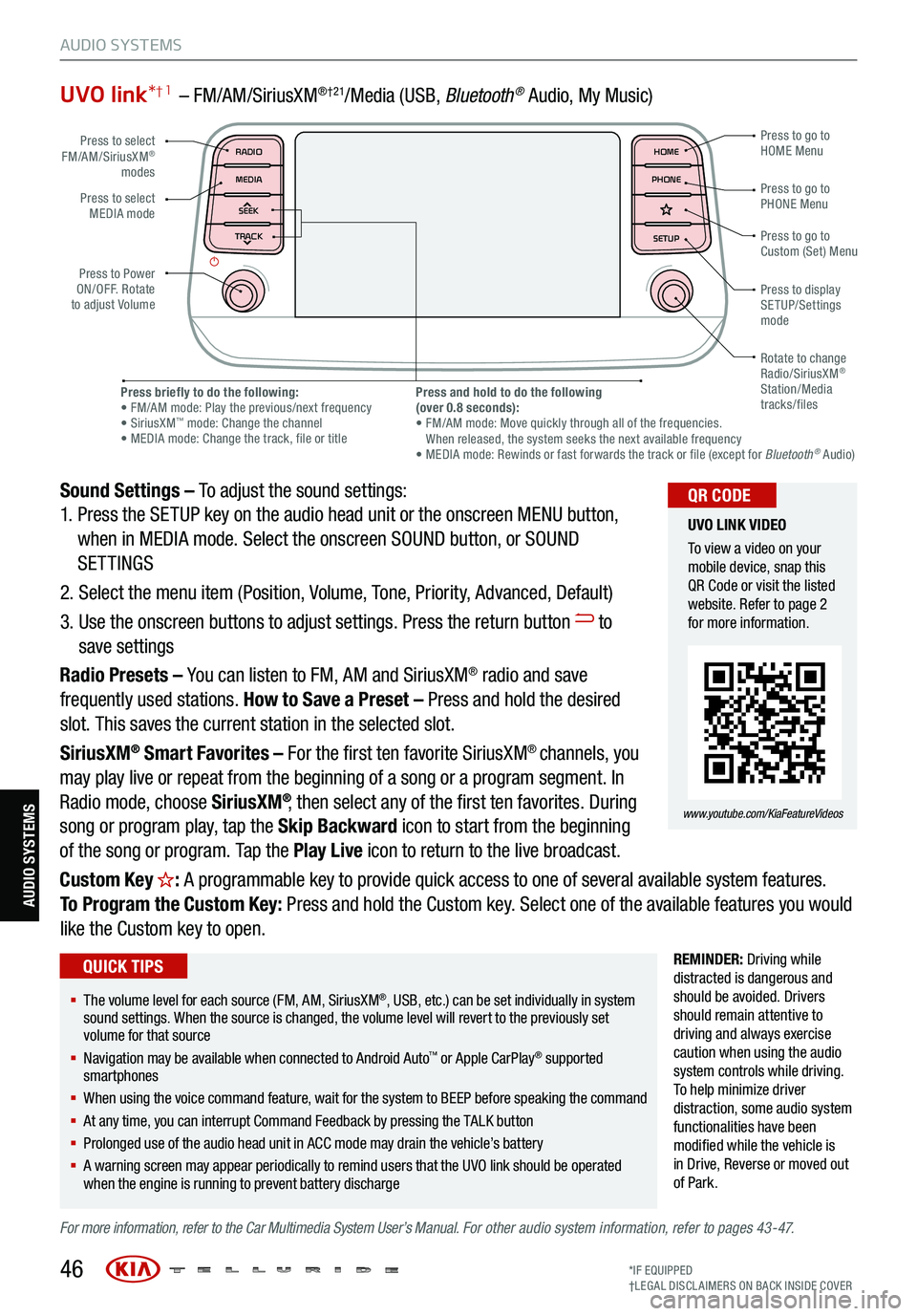
UVO link*† 1 – FM/AM/SiriusXM®†21/Media (USB, Bluetoot h® Audio, My Music)
Sound Settings – To adjust the sound settings:
1. Press the SETUP key on the audio head unit or the onscreen MENU button,
when in MEDIA mode. Select the onscreen SOUND button, or SOUND
SETTINGS
2. Select the menu item (Position, Volume, Tone, Priority, Advanced, Default)
3. Use the onscreen buttons to adjust settings. Press the return button
to
save settings
Radio Presets – You can listen to FM, AM and SiriusXM
® radio and save
frequently used stations. How to Save a Preset – Press and hold the desired
slot. This saves the current station in the selected slot.
SiriusXM
® Smart Favorites – For the first ten favorite SiriusXM® channels, you
may play live or repeat from the beginning of a song or a program segment. In
Radio mode, choose SiriusXM
®, then select any of the first ten favorites. During
song or program play, tap the Skip Backward icon to start from the beginning
of the song or program. Tap the Play Live icon to return to the live broadcast.
Custom Key
H: A programmable key to provide quick access to one of several available system features.
To Program the Custom Key: Press and hold the Custom key. Select one of the available features you would
like the Custom key to open.
REMINDER: Driving while
distracted is dangerous and
should be avoided. Drivers
should remain attentive to
driving and always exercise
caution when using the audio
system controls while driving.
T o help minimize driver
distraction, some audio system
functionalities have been
modified while the vehicle is
in Drive , Reverse or moved out
of Park.
For more information, refer to the Car Multimedia System User’s Manual. For other audio system information, refer to pages 43-47.
46
Press to select
FM/AM/SiriusXM®
modes
Press to Power
ON/OFF. Rotate
to adjust Volume Press to go to
Custom (Set) Menu
Press to go to
PHONE Menu
Press to go to
HOME Menu
Press briefly to do the following:
• FM/AM mode: Play the previous/next frequency
• SiriusXM
™ mode: Change the channel
• MEDIA mode: Change the track, file or title Press and hold to do the following
(over 0.8 seconds):
• FM/AM mode: Move quickly through all of the frequencies.
When released, the system seeks the next available frequency
• MEDIA mode: Rewinds or fast forwards the track or file (except for Bluetooth
® Audio)
Press to display
SETUP/Settings
mode
Press to select
MEDIA mode
Rotate to change
Radio/SiriusXM
®
Station/Media
tracks/files
MAP RADIO
N AV MEDIASEEK<
Page 49 of 70
47
AUDIO SYSTEMS
AUDIO SYSTEMS
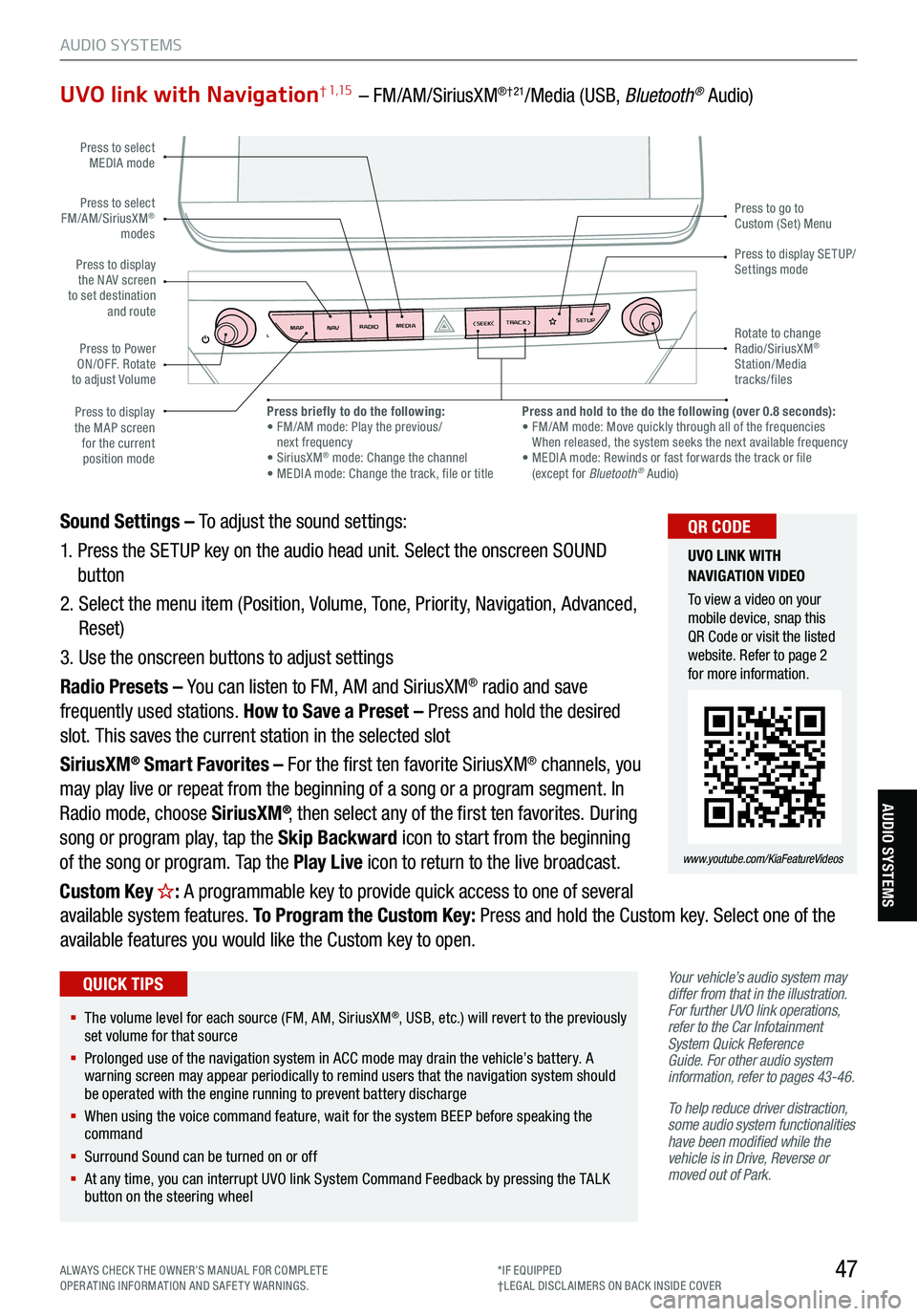
UVO link with Navigation† 1,15 – FM/AM/SiriusXM®†21/Media (USB, Bluetooth® Audio)
Your vehicle’s audio system may
differ from that in the illustration.
For further UVO link operations,
refer to the Car Infotainment
System Quick Reference
Guide. For other audio system
information, refer to pages 43-46 .
To help reduce driver distraction,
some audio system functionalities
have been modified while the
vehicle is in Drive, Reverse or
moved out of Park.
Sound Settings – To adjust the sound settings:
1. Press the SETUP key on the audio head unit. Select the onscreen SOUND
button
2. Select the menu item (Position, Volume, Tone, Priority, Navigation, Advanced,
Reset)
3. Use the onscreen buttons to adjust settings
Radio Presets – You can listen to FM, AM and SiriusXM
® radio and save
frequently used stations. How to Save a Preset – Press and hold the desired
slot. This saves the current station in the selected slot
SiriusXM
® Smart Favorites – For the first ten favorite SiriusXM® channels, you
may play live or repeat from the beginning of a song or a program segment. In
Radio mode, choose SiriusXM
®, then select any of the first ten favorites. During
song or program play, tap the Skip Backward icon to start from the beginning
of the song or program. Tap the Play Live icon to return to the live broadcast.
Custom Key
H: A programmable key to provide quick access to one of several
available system features. To Program the Custom Key: Press and hold the Custom key. Select one of the
available features you would like the Custom key to open.
MAP RADIO
N AV MEDIASEEK<
Page 53 of 70
51
S E AT I N G
SE ATING
CRUISE
CANCEL
RES
OK SET
This system is not a substitute
for one’s attention and may
not detect all movement within
the vehicle. Always check the
vehicle’s interior before exiting.
Images are for illustrative
purposes only and may not
reflect actual feature or
operation.
See section 4 in the Owner’s
Manual for more information.
Rear Occupant Alert (ROA) with Ultrasonic Sensors *†6
The Rear Occupant Alert (ROA) with Ultrasonic Sensors can help alert the
driver when rear passenger(s) are left in the rear seats using the ultrasonic
sensors and door monitoring. The system is designed to provide three
separate alerts:
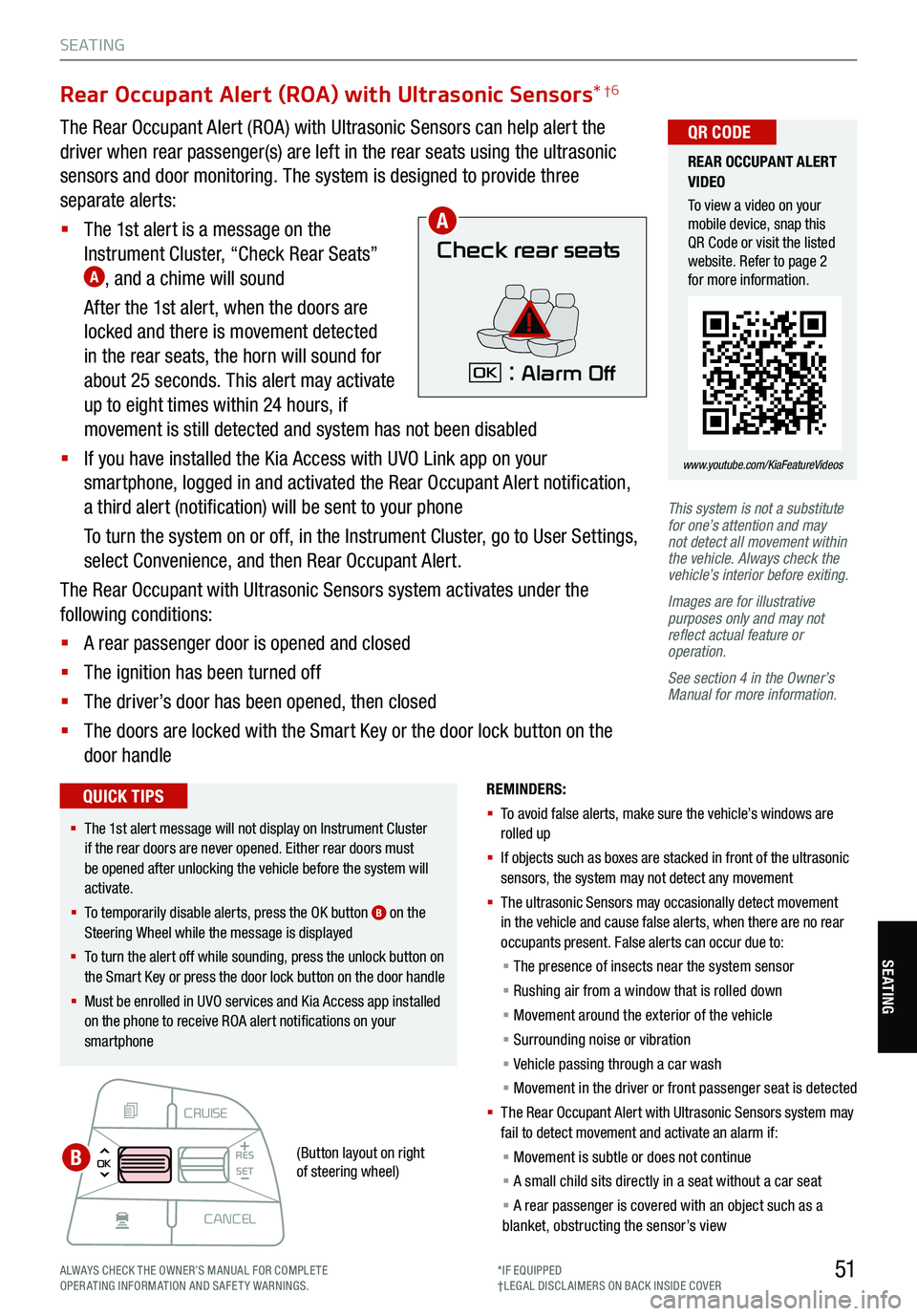
§ The 1st alert is a message on the
Instrument Cluster, “Check Rear Seats”
A, and a chime will sound
After the 1st alert, when the doors are
locked and there is movement detected
in the rear seats, the horn will sound for
about 25 seconds. This alert may activate
up to eight times within 24 hours, if
movement is still detected and system has not been disabled
§ If you have installed the Kia Access with UVO Link app on your
smartphone, logged in and activated the Rear Occupant Alert notification,
a third alert (notification) will be sent to your phone
To turn the system on or off, in the Instrument Cluster, go to User Settings,
select Convenience, and then Rear Occupant Alert.
The Rear Occupant with Ultrasonic Sensors system activates under the
following conditions:
§ A rear passenger door is opened and closed
§ The ignition has been turned off
§ The driver’s door has been opened, then closed
§ The doors are locked with the Smart Key or the door lock button on the
door handle
Check rear seats
: Alarm OffOK
A
B
REMINDERS:
§ To avoid false alerts, make sure the vehicle’s windows are
rolled up
§ If objects such as boxes are stacked in front of the ultrasonic
sensors, the system may not detect any movement
§ The ultrasonic Sensors may occasionally detect movement
in the vehicle and cause false alerts, when there are no rear
occupants present. False alerts can occur due to:
§ The presence of insects near the system sensor
§ Rushing air from a window that is rolled down
§ Movement around the exterior of the vehicle
§ Surrounding noise or vibration
§ Vehicle passing through a car wash
§ Movement in the driver or front passenger seat is detected
§ Th e Rear Occupant Alert with Ultrasonic Sensors system may
fail to detect movement and activate an alarm if:
§ Movement is subtle or does not continue
§ A small child sits directly in a seat without a car seat
§ A rear passenger is covered with an object such as a
blanket, obstructing the sensor’s view
REAR OCCUPANT ALERT
VIDEO
To view a video on your
mobile device, snap this
QR Code or visit the listed
website. Refer to page 2
for more information.
www.youtube.com/KiaFeatureVideos
QR CODE
§ The 1st alert message will not display on Instrument Cluster
if the rear doors are never opened. Either rear doors must
be opened after unlocking the vehicle before the system will
activate.
§ To temporarily disable alerts, press the OK button
B on the
Steering Wheel while the message is displayed
§ To turn the alert off while sounding, press the unlock button on
the Smart Key or press the door lock button on the door handle
§ Must be enrolled in UVO services and Kia Access app installed
on the phone to receive ROA alert notifications on your
smartphone
QUICK TIPS
(Button layout on right
of steering wheel)
ALWAYS CHECK THE OWNER’S MANUAL FOR COMPLE TE
OPERATING INFORMATION AND SAFETY WARNINGS. *IF EQUIPPED
†LEG AL DISCL AIMERS ON BACK INSIDE COVER
Page 56 of 70
54
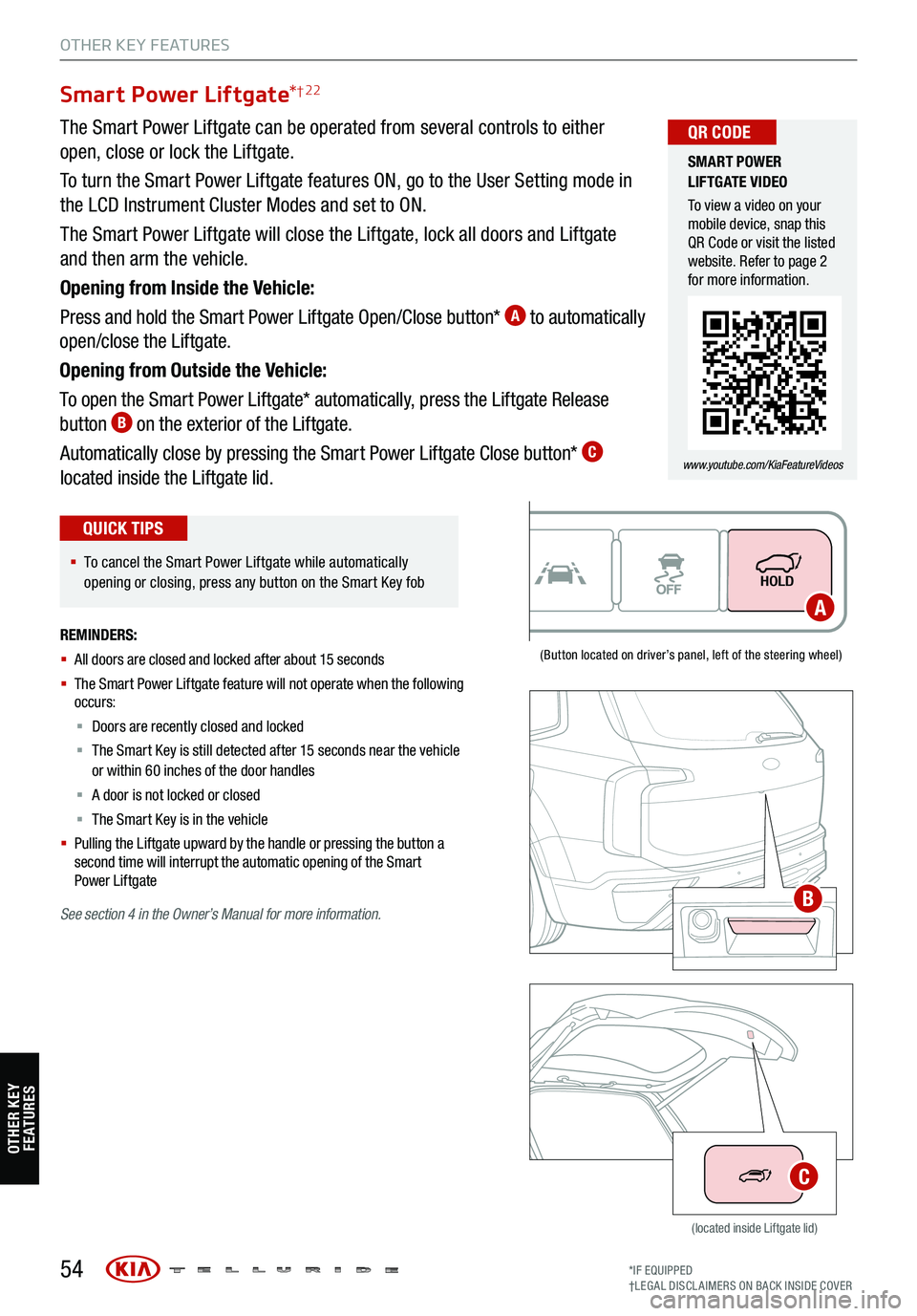
Smart Power Liftgate*† 22
(Button located on driver’s panel, left of the steering wheel)
(located inside Liftgate lid)
The Smart Power Liftgate can be operated from several controls to either
open, close or lock the Liftgate.
To turn the Smart Power Liftgate features ON, go to the User Setting mode in
the LCD Instrument Cluster Modes and set to ON.
The Smart Power Liftgate will close the Liftgate, lock all doors and Liftgate
and then arm the vehicle.
Opening from Inside the Vehicle:
Press and hold the Smart Power Liftgate Open/Close button*
A to automatically
open/close the Liftgate.
Opening from Outside the Vehicle:
To open the Smart Power Liftgate* automatically, press the Liftgate Release
button
B on the exterior of the Liftgate.
Automatically close by pressing the Smart Power Liftgate Close button*
C
located inside the Liftgate lid.
SMART POWER
LIFTGATE VIDEO
To view a video on your
mobile device, snap this
QR Code or visit the listed
website. Refer to page 2
for more information.
www.youtube.com/KiaFeatureVideos
QR CODE
§ To cancel the Smart Power Liftgate while automatically
opening or closing, press any button on the Smart Key fob
QUICK TIPS
REMINDERS:
§ All doors are closed and locked after about 15 seconds
§ The Smart Power Liftgate feature will not operate when the following
occurs:
§ Doors are recently closed and locked
§ The Smart Key is still detected after 15 seconds near the vehicle
or within 60 inches of the door handles
§ A door is not locked or closed
§ The Smart Key is in the vehicle
§
Pulling the Liftgate upward by the handle or pressing the button a
second time will interrupt the automatic opening of the Smart
Power Liftgate
See section 4 in the Owner’s Manual for more information.
OTHER KEY FEATURES
A
B
C
OTHER KEY
FE AT URE S
*IF EQUIPPED
†LEG AL DISCL AIMERS ON BACK INSIDE COVER
Page 57 of 70

Opening with no-touch activation:
When the Smart Key fob is on your person and you are near the back of the
vehicle, within close proximity, the hazard lights will blink and a chime will sound
for about 3 seconds as an alert that the Smart Power Liftgate* is about to open.
Then the alert system will blink and chime two additional times before opening
the Smart Power Liftgate*.
The Smart Power Liftgate* feature is OFF by default. To enable the Smart Power
Liftgate*, go to User Settings in the LCD Instrument Cluster modes.
Smart Key:
To open the Smart Power Liftgate*, press and hold the Smart Key Liftgate
button
E until the Liftgate begins opening. Press again and hold to close.
Power Liftgate Height Adjustment:
For your convenience, the liftgate opening height is adjustable. To program the
opening height, perform the following:
1. Open liftgate and manually position the liftgate to your preferred opening height
2. Depress and hold the close button on the liftgate for 3 seconds or more
3. Once the system sounds the alert that the programming
is complete, manually close the liftgate
Power Liftgate Opening/Closing Speed Setting:
Go to the User Settings
in the Instrument Cluster. Select Door, then Power
Liftgate Speed, and select Fast or Normal.
55
Smart Power Liftgate * (Continued)
REMINDERS:
§ Smart Power Liftgate may be damaged if attempting to open or close manually
§ When not in use, keep the Liftgate Lid Control button in the OFF position
§ If going through a car wash, remind the attendant to keep the vehicle in Neutral (N) and keep the engine running. Also, disable the Smart
Power Liftgate lid control using the button inside the glove compartment, turn off the auto rain-sensing wipers and fold in the mirrors
§ Ensure all obstacles are out of the way of the liftgate lid when operating the Smart Power Liftgate
§ The default liftgate opening/closing speed is set to fast
§ The liftgate opening/closing speed setting cannot be changed when the Power Liftgate function is turned off or if the liftgate is not
completely closed
HOLDHOLD
KIA KEY FOB
VIDEO
To view a video on your
mobile device, snap this
QR Code or visit the listed
website. Refer to page 2
for more information.
www.youtube.com/KiaFeatureVideos
QR CODE
§ The liftgate must be unlocked before it can be opened by the liftgate Release button
§ The liftgate unlocks automatically and then can be opened manually when the Smart Key is
within close proximity to the vehicle
QUICK TIPS
OTHER KEY FEATURES
E
OTHER KEY FE AT URE SSee section 4 in the Owner’s Manual for more information.
ALWAYS CHECK THE OWNER’S MANUAL FOR COMPLE TE
OPERATING INFORMATION AND SAFETY WARNINGS. *IF EQUIPPED
†LEG AL DISCL AIMERS ON BACK INSIDE COVER
Page 58 of 70
56
REMINDERS:
§ The liftgate unlocks when the Smart Key is
within close proximity of the vehicle
§ Remote button configuration may vary
depending on vehicle options
See section 4 in the Owner’s Manual for more
information.
These illustrations are for demonstration
purposes only.
Unock
Lock
Smart Key
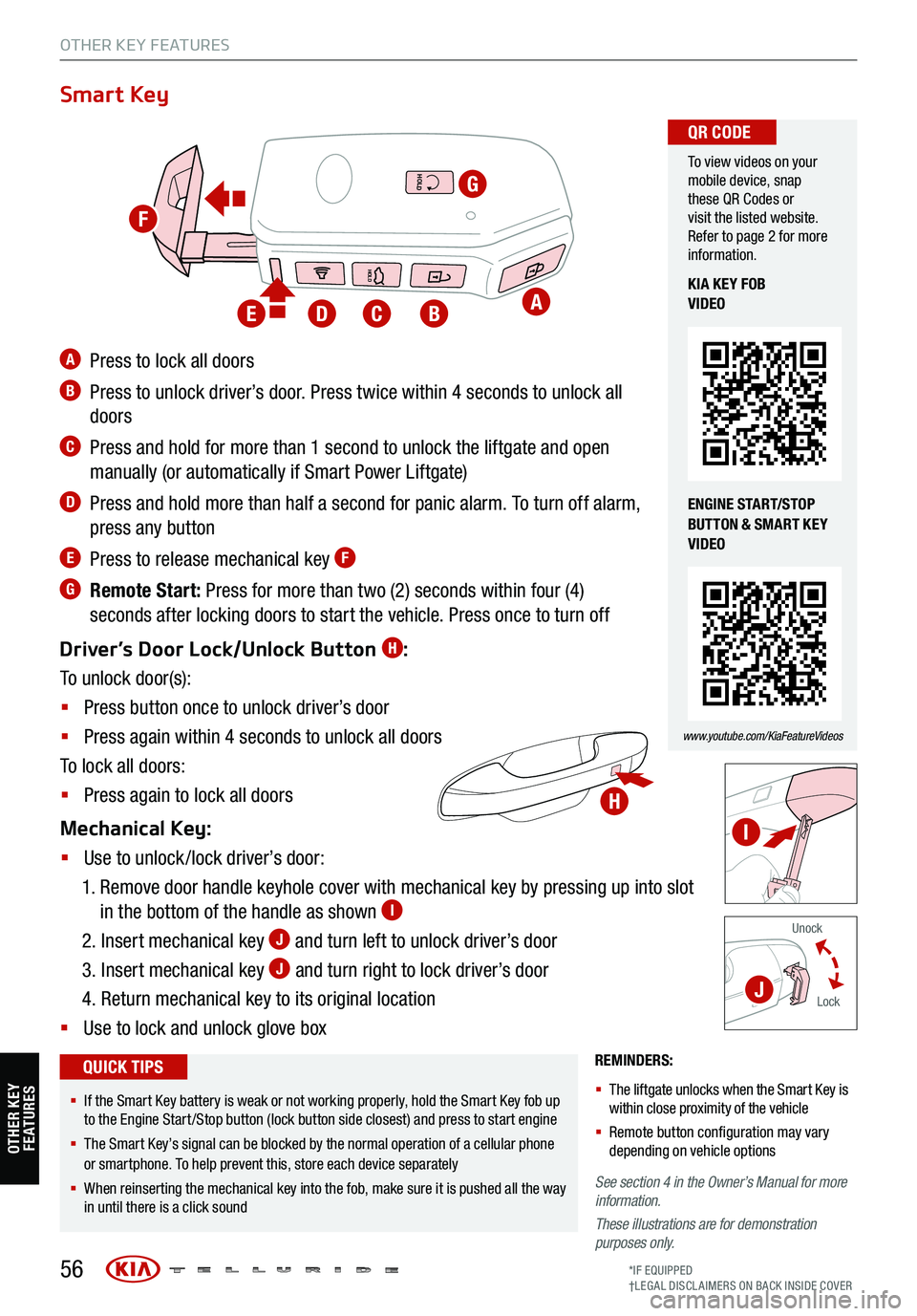
A Press to lock all doors
B Press to unlock driver’s door. Press twice within 4 seconds to unlock all
doors
C Press and hold for more than 1 second to unlock the liftgate and open
manually (or automatically if Smart Power Liftgate)
D Press and hold more than half a second for panic alarm. To turn off alarm,
press any button
E Press to release mechanical key F
G Remote Start: Press for more than two (2) seconds within four (4)
seconds after locking doors to start the vehicle. Press once to turn off
Driver’s Door Lock/Unlock Button
H:
To unlock door(s):
§ Press button once to unlock driver’s door
§ Press again within 4 seconds to unlock all doors
To lock all doors:
§ Press again to lock all doors
Mechanical Key:
§ Use to unlock /lock driver’s door:
1. Remove door handle keyhole cover with mechanical key by pressing up into slot
in the bottom of the handle as shown
I
2. Insert mechanical key J and turn left to unlock driver’s door
3. Insert mechanical key
J and turn right to lock driver’s door
4. Return mechanical key to its original location
§ Use to lock and unlock glove box
To view videos on your
mobile device, snap
these QR Codes or
visit the listed website.
Refer to page 2 for more
information.
www.youtube.com/KiaFeatureVideos
QR CODE
KIA KEY FOB
VIDEO
ENGINE START/STOP
BUTTON & SMART KEY
VIDEO
§ If the Smart Key battery is weak or not working properly, hold the Smart Key fob up
to the Engine Start /Stop button (lock button side closest) and press to start engine
§ The Smart Key’s signal can be blocked by the normal operation of a cellular phone
or smartphone. To help prevent this, store each device separately
§ When reinserting the mechanical key into the fob, make sure it is pushed all the way
in until there is a click sound
QUICK TIPS
HOLD
HOLD
HOLD
OTHER KEY FEATURES
A
G
BCDE
H
I
J
F
OTHER KEY FE AT URE S
*IF EQUIPPED
†LEG AL DISCL AIMERS ON BACK INSIDE COVER
Page 59 of 70
57
Map/Room Lamps
Automatic Turn Off Function
The interior lights automatically turn off approximately 20 seconds after the Engine Start /Stop button is
turned OFF.
Map/Room Lamp Operation
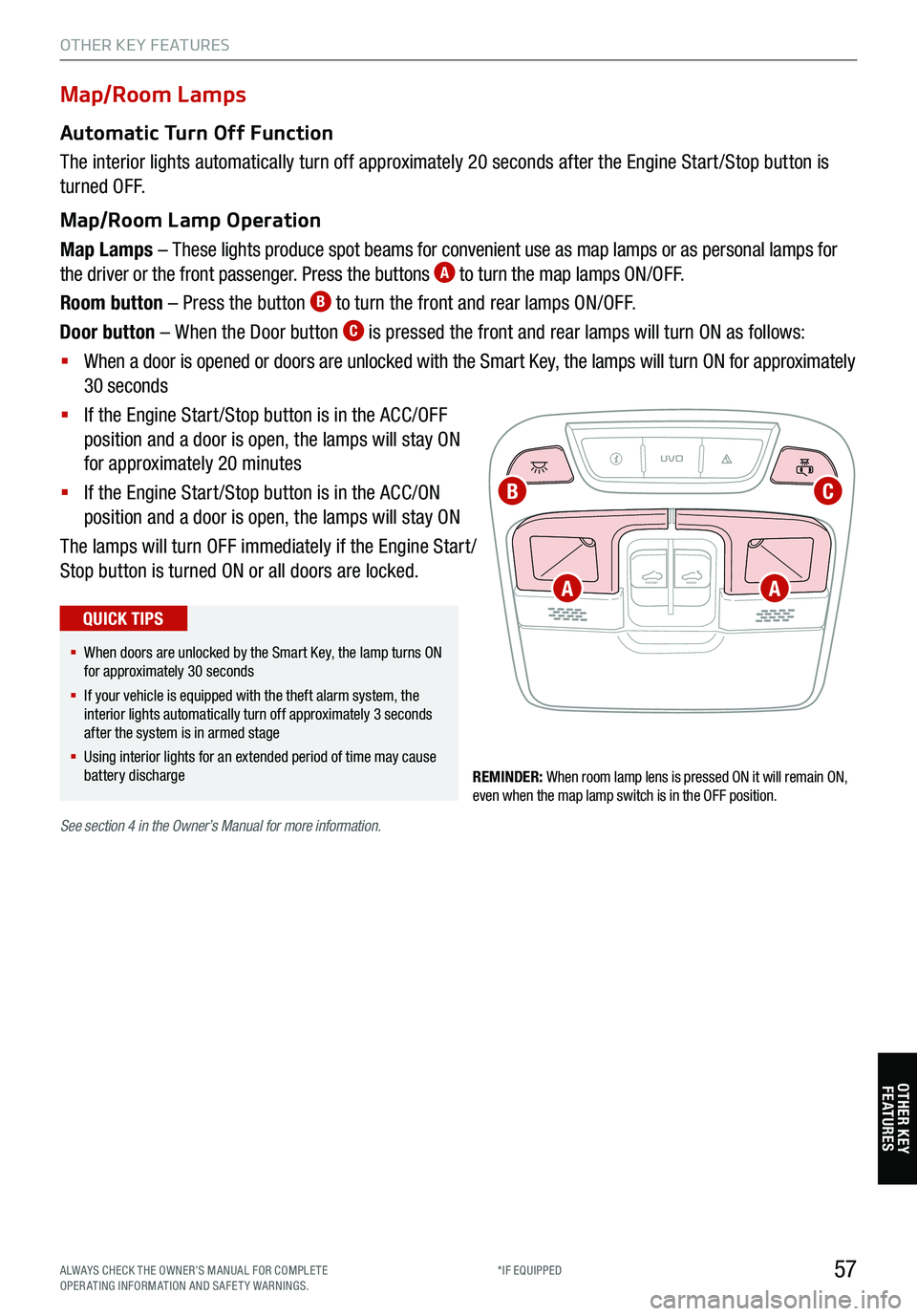
Map Lamps – These lights produce spot beams for convenient use as map lamps or as personal lamps for
the driver or the front passenger. Press the buttons
A to turn the map lamps ON/OFF.
Room button – Press the button
B to turn the front and rear lamps ON/OFF.
Door button – When the Door button
C is pressed the front and rear lamps will turn ON as follows:
§ When a door is opened or doors are unlocked with the Smart Key, the lamps will turn ON for approximately
30 seconds
§ If the Engine Start /Stop button is in the ACC/OFF
position and a door is open, the lamps will stay ON
for approximately 20 minutes
§ If the Engine Start /Stop button is in the ACC/ON
position and a door is open, the lamps will stay ON
The lamps will turn OFF immediately if the Engine Start /
Stop button is turned ON or all doors are locked.
REMINDER: When room lamp lens is pressed ON it will remain ON,
even when the map lamp switch is in the OFF position.
UVO
FRONT REAR
ONOFFDOOR
See
section 4 in the Owner’s Manual for more information.
§ When doors are unlocked by the Smart Key, the lamp turns ON
for approximately 30 seconds
§ If your vehicle is equipped with the theft alarm system, the
interior lights automatically turn off approximately 3 seconds
after the system is in armed stage
§ Using interior lights for an extended period of time may cause
battery discharge
QUICK TIPS
OTHER KEY FEATURES
A
CB
A
OTHER KEY FE AT URE S
ALWAYS CHECK THE OWNER’S MANUAL FOR COMPLE TE
OPERATING INFORMATION AND SAFETY WARNINGS. *IF EQUIPPED
Page 60 of 70

REMINDERS:
§
Sunshade must remain OPEN while the sunroof is open and
vehicle is moving
§
If the ignition is turned off with the Sunroof not fully closed, the
Instrument Cluster LCD will display a warning message and a
chime will sound for a few seconds
§
Do not adjust the sunroof or sunshade while driving. This could
result in loss of control of the vehicle
UVO
FRONT REAR
ONOFFDOOR
58
Sunroof Operation
*
The sunroof and sunshade operation is controlled by a multidirectional switch/
lever for the front and rear sunroofs. The ignition needs to be in the ON
position to operate the sunroof/sunshade.
Slide the front sunshade and sunroof
A:
Auto Open – Slide lever backward to the farthest position and release.
Auto Close – Slide the lever forward to the farthest position and release
(manually close the Sunshade).
Tilt the sunroof
(front only)
A:
Raise – Press lever upward
Lower – Push lever forward
Slide the rear
sunshade
B:
Auto Open – Slide the lever
backward
Auto Close – Slide the lever
forward
SUNROOF OPERATION
VIDEO
To view a video on your
mobile device, snap this
QR Code or visit the listed
website. Refer to page 2
for more information.
www.youtube.com/KiaFeatureVideos
QR CODE
§ To stop the sunroof/sunshade at any position, press or pull the
sunroof control lever in any direction
QUICK TIP
OTHER KEY FEATURES
AB
OTHER KEY FE AT URE S
See section 4 in the Owner’s Manual for more information.
*IF EQUIPPED
Page 61 of 70
REMINDERS:
§ The Rear View Monitor is not a substitute for proper and safe backing-up procedures
§ The Rear View Monitor may not display every object behind the vehicle
§ Always drive carefully and use caution when backing up
See section 4 in the Owner’s Manual for more information. Images are for illustrative purposes only and may not reflect actual feature or
operation.
59
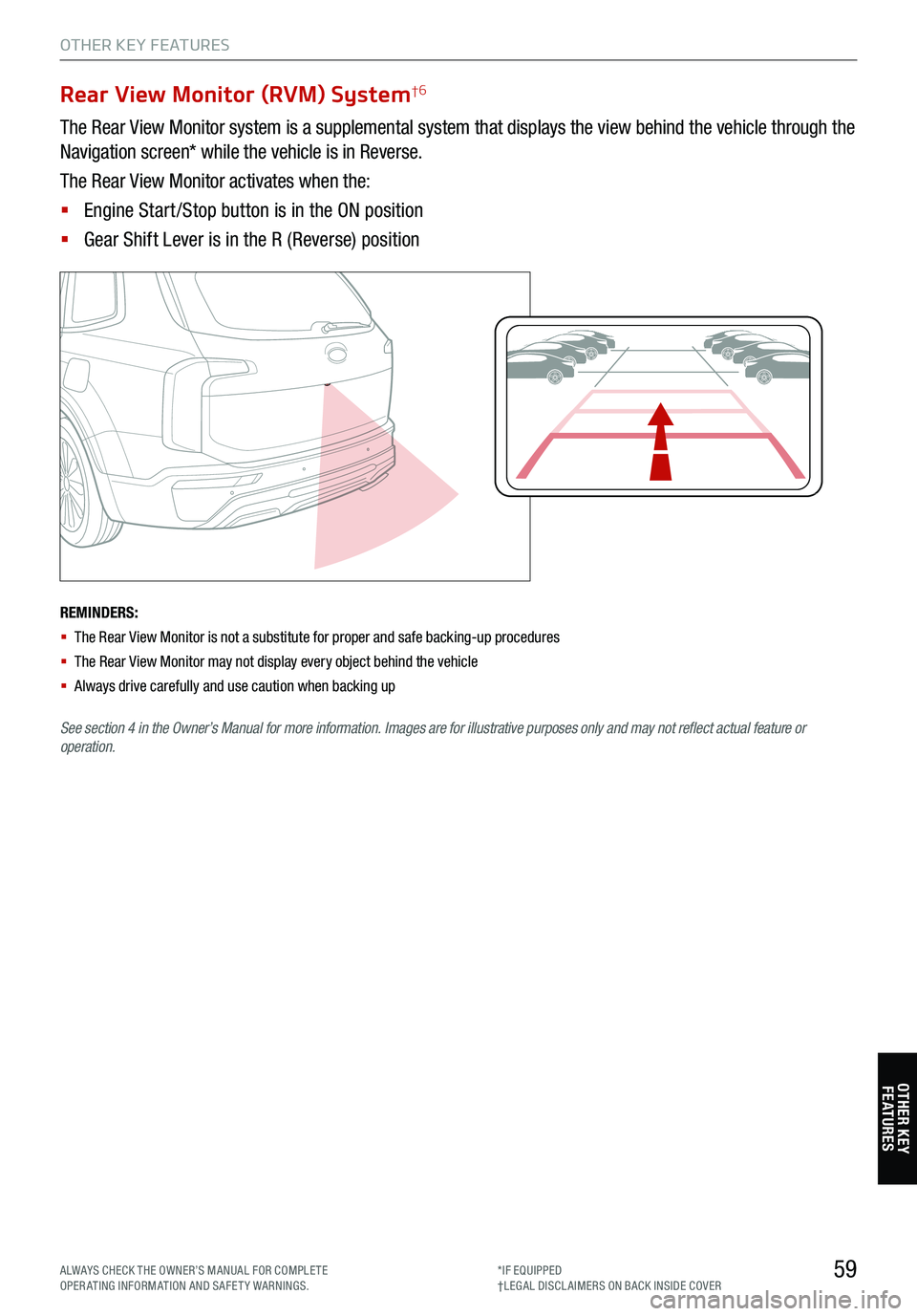
Rear View Monitor (RVM) System†6
The Rear View Monitor system is a supplemental system that displays the view behind the vehicle through the
Navigation screen* while the vehicle is in Reverse.
The Rear View Monitor activates when the:
§ Engine Start /Stop button is in the ON position
§ Gear Shift Lever is in the R (Reverse) position
P
R
N
DSHIFTL OCK
RELEASE
OTHER KEY FEATURES
OTHER KEY FE AT URE S
ALWAYS CHECK THE OWNER’S MANUAL FOR COMPLE TE
OPERATING INFORMATION AND SAFETY WARNINGS. *IF EQUIPPED
†LEG AL DISCL AIMERS ON BACK INSIDE COVER
Page 62 of 70

60
Auto-Dimming Rearview Mirror
Designed to help reduce glare from a vehicle’s headlights located in the rear
and also to connect up to three electronic transmitters in one location.
REMINDER: Mirror indicator light will illuminate when automatic dimming is ON.
HomeLink® Setup - How to Sync Transmitter
If programming for the first time, begin with Step 1 (repeating this step will delete all information).
To program non-rolling and rolling code garage door openers and other devices:
1. Press and hold the left
A and center D buttons simultaneously until the indicator light C begins to
flash (to reprogram buttons, skip this step)
2. Press and hold the desired button
A, B or D and hold the button on the transmitter while it is
approximately 1 to 3 inches away from the mirror. The HomeLink® Indicator light C will flash rapidly
once the frequency signal has been successfully programmed
To finish programming rolling code garage door openers, complete these steps:
3. Locate the “learn” or “smart” button on the garage door’s motor head unit. Press and release the button
and complete Step 4 within 30 seconds
4. Firmly press and release the programmed HomeLink
® button up to three times
Operating HomeLink
®:
Press one of the programmed HomeLink
® buttons.
Erasing programmed buttons:
Press and hold the left
A and center D buttons simultaneously for approximately 20 seconds, and then
release both buttons within 30 seconds.
HomeLink® with Auto-Dimming Rearview Mirror† 13
A HomeLink® button B HomeLink® button C Indicator lightD HomeLink® button
E Glare detection sensorF Automatic dimming ONG Automatic dimming OFF
See section 4 in the Owner’s Manual for more
information.
If your garage door opener was manufactured
in 2011 or later, and you’re unable to program
your vehicle’s HomeLink
® system, you may
need to purchase a HomeLink Repeater Kit. For
more information, go to www.HomeLink.com or
call (800) 355-3515.
HOMELINK REARVIEW
MIRROR SETUP VIDEO
To view a video on your
mobile device, snap this
QR Code or visit the listed
website. Refer to page 2
for more information.
www.youtube.com/KiaFeatureVideos
QR CODE
§ You can reprogram a single HomeLink® button by repeating Step 2
§ Erasing programmed buttons will delete all trained transmitters
QUICK TIPS
OTHER KEY FEATURES
ABCDEFG
OTHER KEY
FE AT URE S
*IF EQUIPPED
†LEG AL DISCL AIMERS ON BACK INSIDE COVER